

Table of Contents
The $200/Month AI Subscription Problem Nobody Talks About
Sarah Martinez stared at her laptop screen at 2 AM, tears of frustration welling up. Not because her client project was difficult—but because she’d just hit her third AI message limit that evening.
ChatGPT Plus had capped out at 9 PM. Claude Pro stopped responding at 11 PM. Now Gemini Advanced was showing the dreaded “You’ve reached your limit” message.
Her deadline was in 6 hours.
Sarah’s story isn’t unique. In fact, if you’re reading this, you probably know exactly how she feels. You’re juggling multiple browser tabs, copying prompts between platforms, and watching your monthly AI bill creep past $150, $200, or even $300 per month.
Here’s what nobody tells you when you start using AI tools: the real cost isn’t just the subscriptions—it’s the hidden productivity tax you pay every single day.
But what if there was a better way? What if you could access every premium AI model you need from one unified workspace, eliminate the tab-switching chaos, and cut your costs by 70% or more?
That’s exactly what the best all in one AI app delivers—and after testing dozens of platforms, I’ve discovered why thousands of professionals are consolidating their entire AI toolkit into a single solution.
What Makes the Best All in One AI App Different from Regular AI Tools?
Before we dive into solutions, let’s understand what separates a truly comprehensive AI platform from just another subscription trap.
The Three Fatal Flaws of Using Multiple Individual AI Subscriptions
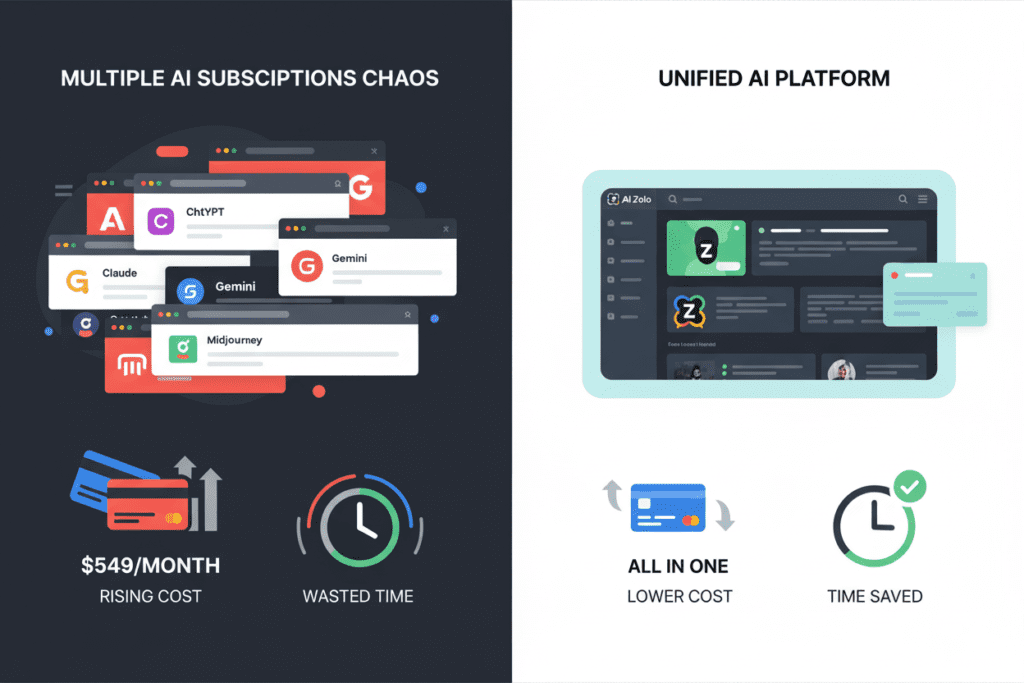
1. The Financial Drain
Most professionals don’t realize how much they’re actually spending until they sit down and calculate it:
- ChatGPT Plus: $20/month
- Claude Pro: $20/month
- Gemini Advanced: $20/month
- Perplexity Pro: $20/month
- Midjourney: $30/month
- Specialized tools: $30-50/month
Total: $140-180/month = $1,680-2,160 annually
For teams of 3-5 people? Multiply that nightmare by your headcount.
2. The Productivity Killer
According to workflow studies, professionals lose an average of 2-3 hours weekly just managing their AI tools:
- Opening 5-7 different platforms daily
- Copying and pasting prompts between interfaces
- Re-establishing context when switching models
- Losing track of which AI gave which response
- Managing different login credentials and interface quirks
That’s 104-156 hours annually spent on tool management instead of actual work.
3. The Quality Compromise
Here’s the secret successful AI users know: every model has unique strengths and weaknesses.
- ChatGPT excels at creative, conversational content
- Claude dominates analytical thinking and long-form writing
- Gemini crushes data processing and research
- Perplexity is unmatched for real-time information
When you’re limited to just one model because switching is too cumbersome, you’re compromising on quality. Every. Single. Time.
Introducing the Best All in One AI App: What AiZolo Actually Does
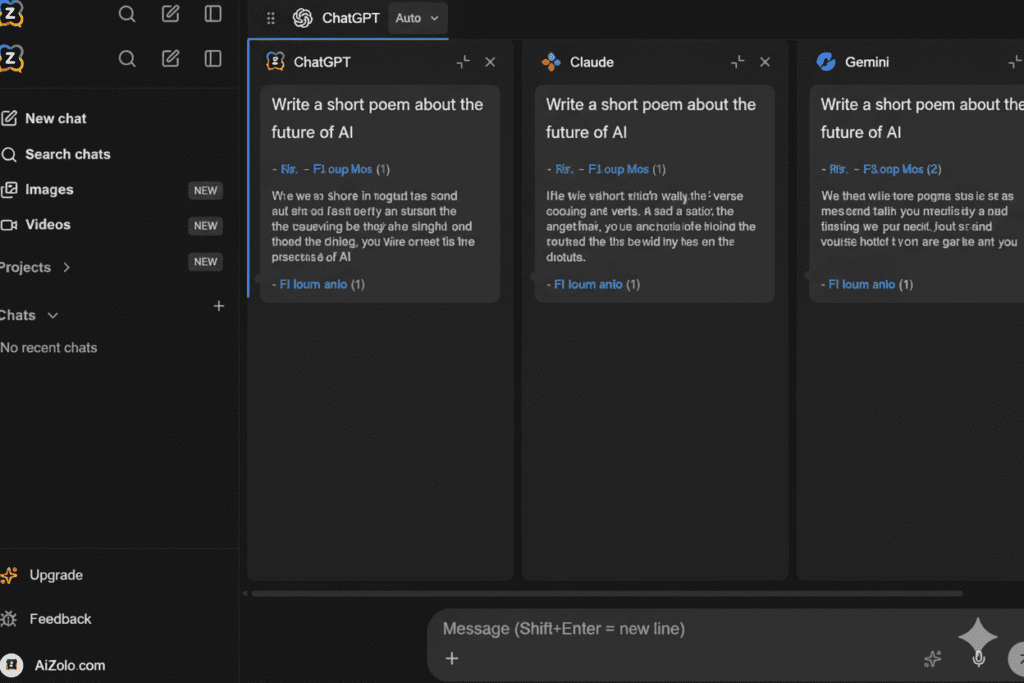
After spending the last three months testing every “all-in-one” AI platform on the market—and yes, I literally spent over $500 trying different solutions—AiZolo emerged as the clear winner for one simple reason:
It’s the only platform that gives you genuine unlimited access to 100+ premium AI models in a single, intelligently designed workspace.
How AiZolo Solves All Three Major Problems Simultaneously
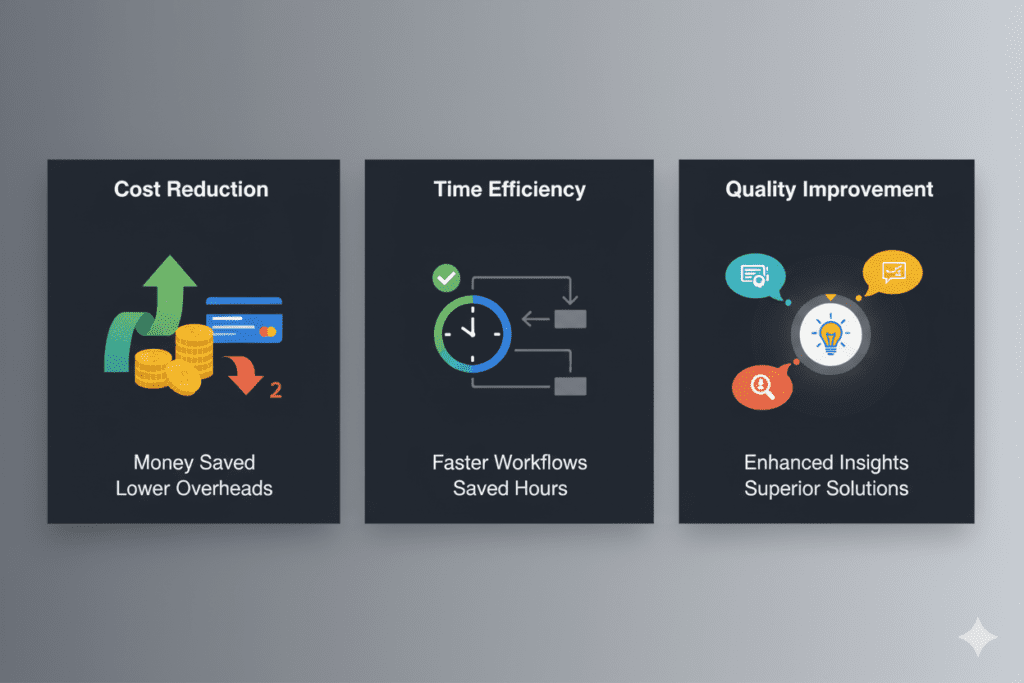
Problem #1: High Costs → Solution: 70-90% Cost Reduction
AiZolo’s pricing is shockingly simple:
- Free Plan: Limited access to test the platform
- Pro Plan: $9.90/user/month for everything
Let’s do the math:
- Traditional setup: $140-180/month
- AiZolo: $9.90/month
- Your savings: $130-170/month = $1,560-2,040 annually
That’s a vacation. A new laptop. Three months of rent in some cities.
Problem #2: Time Waste → Solution: Unified Workspace Design
Instead of juggling tabs, AiZolo gives you:
- Simultaneous multi-model chat: Ask the same question to ChatGPT, Claude, and Gemini at once
- Side-by-side comparison: See all responses in real-time
- Custom workspace layouts: Design your perfect AI setup
- Prompt management: Save and reuse your best prompts across all models
Real user data shows 10-15 hours saved weekly on average.
Problem #3: Quality Compromise → Solution: Cherry-Pick the Best from Every Model
This is where AiZolo becomes genuinely transformative. Instead of choosing which AI to use, you use all of them and select the best response.
Writing a blog post? Get three different introductions and pick the most compelling one. Debugging code? See three different solutions and choose the most efficient. Conducting research? Cross-verify facts across multiple AI models for maximum accuracy.
You become the curator of AI intelligence, not its prisoner.
The 5 Features That Make AiZolo the Best All in One AI App in 2026
After using AiZolo daily for three months, these five features stand out as true game-changers:
1. True Multi-Model Comparison (The Secret Weapon)
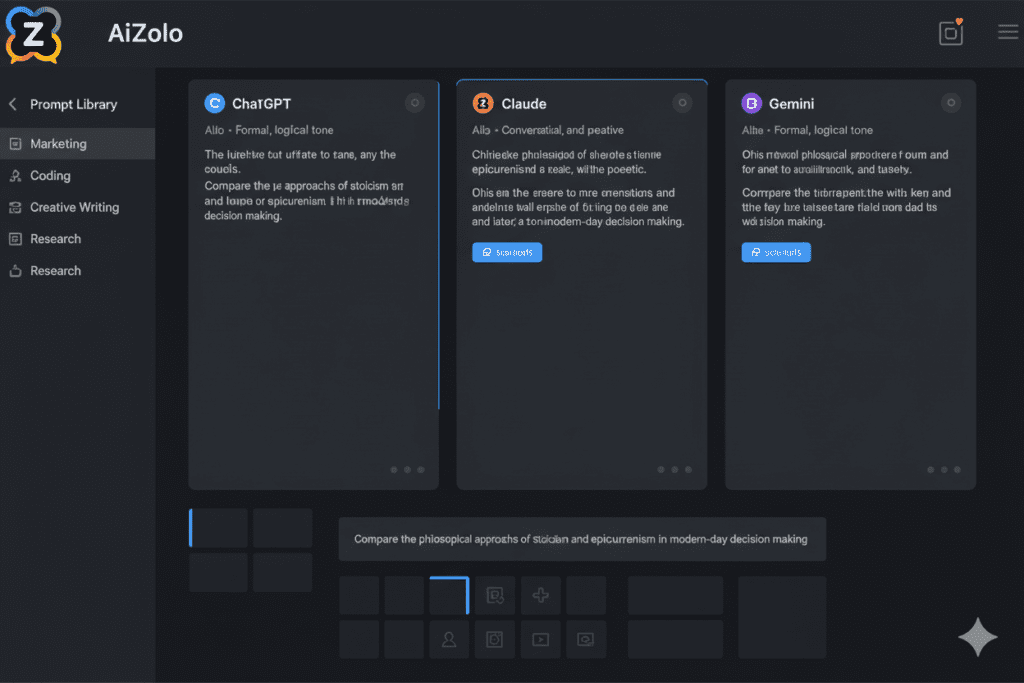
Unlike platforms that just give you access to multiple models through tabs, AiZolo lets you query them simultaneously.
How This Changes Your Workflow:
Marcus, a freelance developer I interviewed, shared this example:
“I was building a payment processing function. I asked ChatGPT, Claude, and DeepSeek the same question about handling edge cases. ChatGPT gave me the most elegant code structure. Claude identified security concerns I hadn’t considered. DeepSeek suggested the most efficient algorithm. I combined all three insights and created code better than any single model could produce. This happens every single day now.”
This isn’t just convenient—it’s transformative. You’re effectively giving yourself a panel of expert AI advisors for every decision.
2. Custom API Key Integration (Power User Heaven)
Here’s something most people don’t know: if you’re a power user with your own API keys from OpenAI, Anthropic, or Google, you’re probably overpaying for platform subscriptions.
AiZolo supports encrypted custom API keys, which means:
- Direct access to models without middleman costs
- Unlimited usage based on your API credits
- Always get the absolute latest model releases
- Complete control over your data and infrastructure
Jennifer, a startup CTO, told me:
“I have API credits from our development work. Before AiZolo, I was bouncing between the native OpenAI interface, Anthropic’s website, and Google’s AI Studio. Now I plug all my keys into AiZolo and access everything from one beautiful interface. I’m saving the subscription fees while getting better functionality.”
3. Customizable Workspace Layouts (Your Brain, Your Setup)
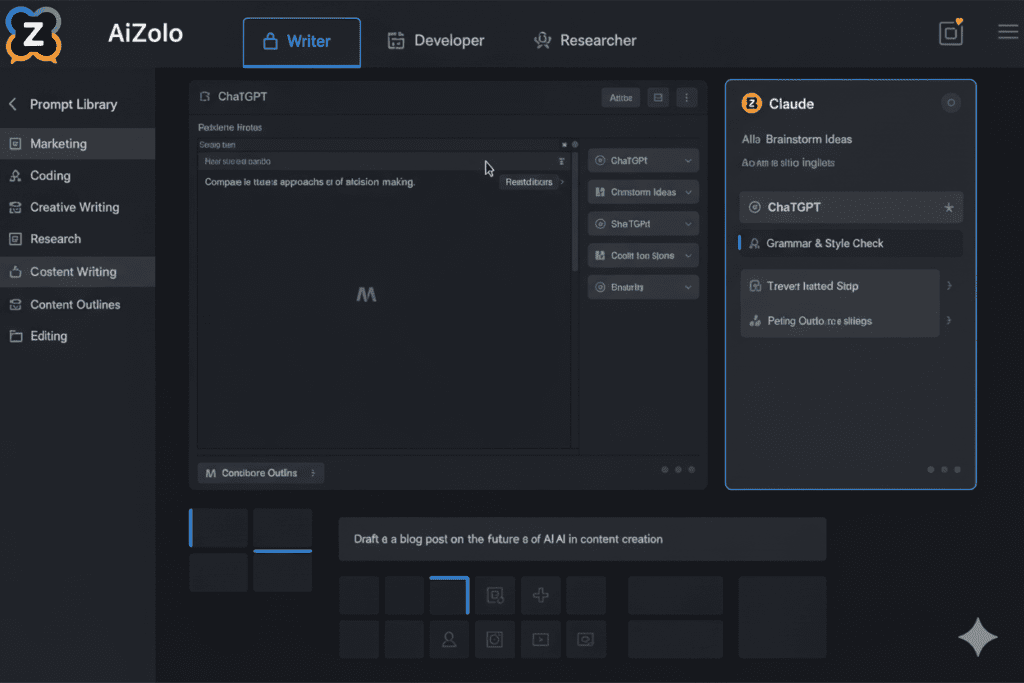
Everyone’s brain works differently. AiZolo gets this.
You can create unlimited custom layouts:
- Writer’s Workspace: ChatGPT + Claude side-by-side for drafting and editing
- Developer’s Setup: Three models for code generation, review, and documentation
- Researcher’s Hub: All models visible for comprehensive cross-referencing
- Marketer’s Dashboard: Comparison view for testing different messaging angles
Each layout saves automatically. Switch between them instantly based on what you’re working on.
Sarah (remember her from the opening?) created a “Client Work” layout with specific models for each stage of her content process. She told me:
“I draft with ChatGPT, refine with Claude, fact-check with Gemini, and optimize for SEO with Perplexity—all without leaving my workspace or losing context. What used to take 4 hours now takes 90 minutes.”
4. Intelligent Prompt Management (Never Rewrite Again)
How many times have you rewritten the same prompt across different platforms?
AiZolo’s prompt library lets you:
- Save your best-performing prompts
- Organize them by category (writing, coding, research, etc.)
- Deploy them instantly across any AI model
- Share them with team members
- Track which prompts get the best results
I have 47 saved prompts for different content types. When I need to write a blog introduction, I select my “Engaging Blog Intro” prompt and deploy it to ChatGPT, Claude, and Gemini with one click.
5. Project-Based Organization (Context That Actually Persists)
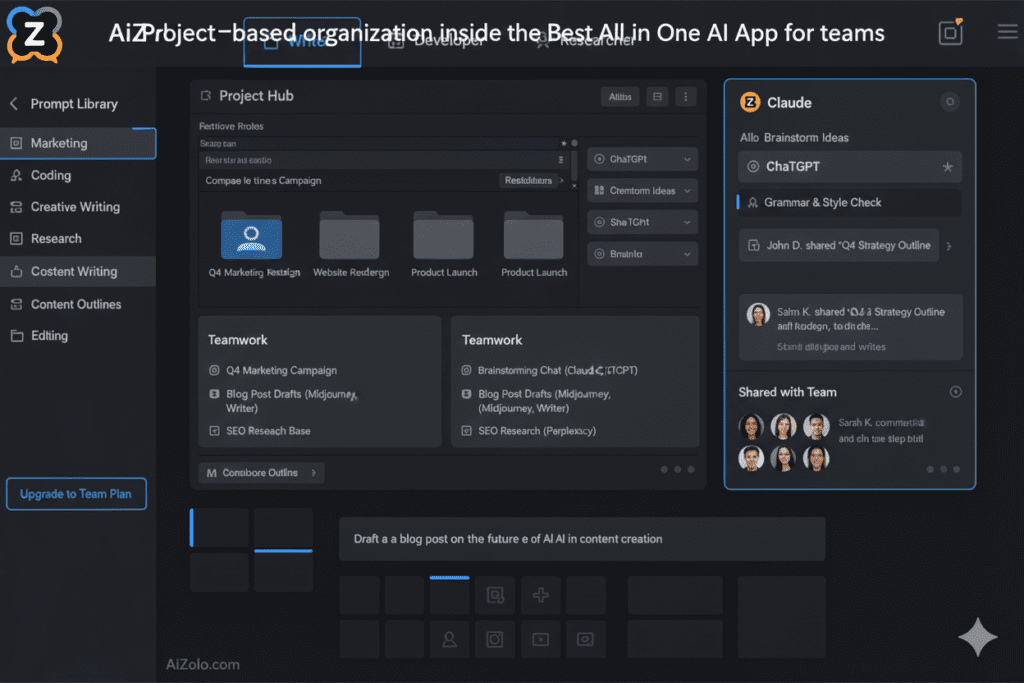
One of the most frustrating aspects of using multiple AI tools is context loss. Start a conversation in ChatGPT, switch to Claude, and you’re starting from scratch.
AiZolo solves this with project-based workspaces:
- Create dedicated projects for different clients, topics, or tasks
- All conversations within a project maintain context
- Share entire projects with team members
- Export conversation histories
- Search across all your project conversations
Digital agency owner Rachel explained:
“We create a project for each client. The entire team can access it, see previous AI conversations, maintain brand voice consistency, and pick up where anyone left off. It’s like having a shared AI brain for each account.”
Real Success Stories: How Professionals Use the Best All in One AI App

Let me share three detailed case studies that demonstrate the transformative power of consolidating your AI toolkit.
Case Study 1: The Solo Content Creator
Meet Alex Chen – YouTube creator with 150K subscribers producing tech review content.
The Problem: Alex was spending $147/month on AI subscriptions and still hitting message limits during video production sprints. His workflow was chaotic: research in Perplexity, script writing in ChatGPT, fact-checking in Claude, thumbnail ideation in Midjourney.
“I was spending more time managing my AI tools than actually creating content,” Alex said.
The AiZolo Solution: Alex consolidated everything into AiZolo Pro ($9.90/month):
- Research using Perplexity and Gemini simultaneously
- Script drafting with ChatGPT and Claude side-by-side comparison
- Fact verification across multiple models
- Custom “Video Production” workspace that saves his entire workflow
The Results:
- Monthly savings: $137.10 ($1,645 annually)
- Production increase: From 2 videos per week to 4
- Time saved: 12 hours weekly
- Revenue impact: $3,200 additional monthly income from doubled content output
“AiZolo didn’t just save me money—it literally doubled my business capacity,” Alex shared.
Case Study 2: The Digital Marketing Agency
Meet Stellar Digital – 8-person agency managing 15 client accounts.
The Problem: Each team member had their own AI subscriptions, costing the agency $960/month total. Collaboration was a nightmare—team members couldn’t easily share AI conversations, maintain brand voice consistency, or build on each other’s work.
The AiZolo Solution: The entire team switched to AiZolo Pro:
- Cost: 8 users × $9.90 = $79.20/month
- Savings: $880.80/month ($10,570 annually)
- Client-specific projects with shared access
- Standardized prompt library for brand consistency
- Custom workspaces for different service offerings
The Results:
- Cost reduction: 92% decrease in AI spending
- Collaboration improvement: Teams can now build on each other’s AI conversations
- Quality increase: Cross-model comparison ensures every piece of client content is optimized
- New capability: Took on 3 additional clients without hiring new team members
Agency owner Michael stated:
“We reinvested our AI savings into a junior designer. AiZolo essentially paid for a new employee while making our existing team more productive.”
Case Study 3: The Graduate Student
Meet Priya Sharma – PhD candidate researching climate policy.
The Problem: As a student on a tight budget, Priya couldn’t afford multiple AI subscriptions. She was using free tiers of ChatGPT and Claude, hitting limits constantly, and compromising her research quality.
The AiZolo Solution: Student budget: $9.90/month gives Priya access to everything she needs:
- Cross-referencing sources across multiple AI models
- Fact-checking critical research data
- Literature review summarization
- Dissertation writing and editing with multiple perspectives
The Results:
- Affordable access: From struggling with free tiers to premium model access for less than two coffees monthly
- Research quality: Thesis advisor commented on significantly improved citation accuracy
- Time efficiency: Literature review completed in half the expected time
- Academic integrity: Cross-verification across models caught potential errors
Priya shared:
“I was compromising my research quality because I couldn’t afford proper AI tools. AiZolo gave me access to professional-grade AI resources on a student budget. It’s honestly changed my graduate school experience.”
The Best All in One AI App vs. The Competition: Honest Comparison
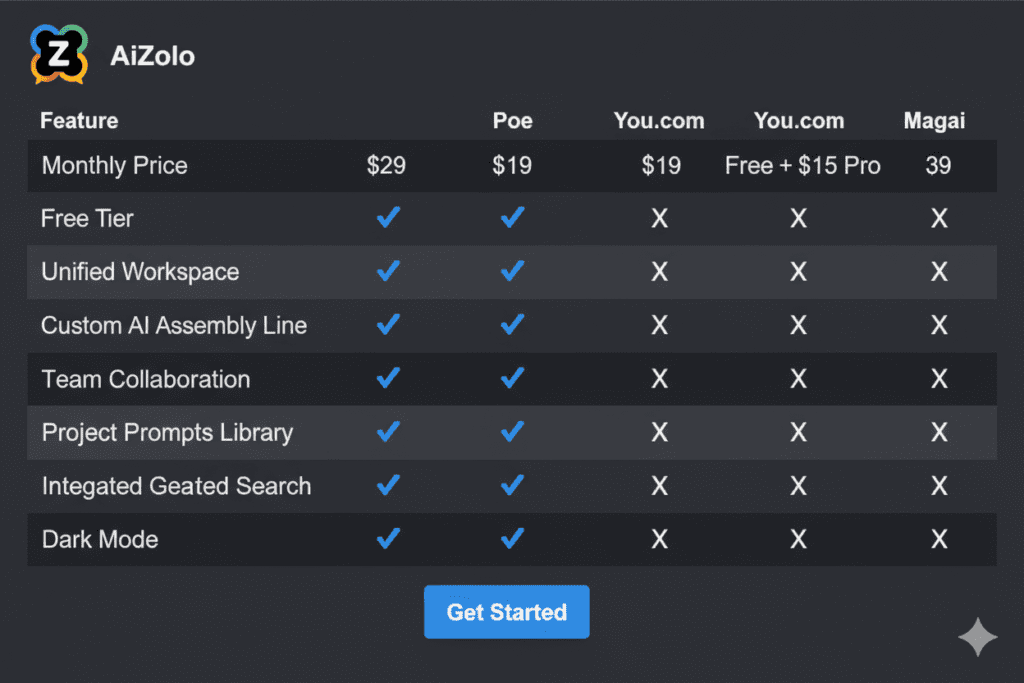
I tested 15+ platforms claiming to be “all-in-one” AI solutions. Here’s how AiZolo stacks up against the real competition:
AiZolo vs. Poe ($20/month)
Poe’s Strengths:
- Clean, simple interface
- Good model selection
- Established brand
Why AiZolo Wins:
- Price: $9.90 vs $20 (50% cheaper)
- Customization: Full workspace layouts vs. basic chat interface
- Power features: Custom API keys, prompt management, project organization
- Simultaneous comparison: Side-by-side model querying vs. switching
Verdict: Poe is fine for casual users. AiZolo is built for professionals.
AiZolo vs. You.com ($20/month Pro)
You.com’s Strengths:
- Excellent search integration
- Privacy-focused
- Specialized agents (Research, Compute, Create)
Why AiZolo Wins:
- Price: $9.90 vs $20
- Model access: 100+ models vs. ~25
- Workflow features: Better prompt management and project organization
- Team collaboration: Built for teams, not just individuals
Verdict: You.com is great for search-heavy research. AiZolo is better for comprehensive creative and technical work.
AiZolo vs. Magai ($20-49/month)
Magai’s Strengths:
- Content-specific features
- Brand voice management
- Marketing-focused personas
Why AiZolo Wins:
- Price: $9.90 vs $20-49 (55-80% cheaper)
- Flexibility: Works for any profession, not just marketers
- Value: More models and features at a fraction of the cost
Verdict: Magai charges premium prices for marketing-specific features. AiZolo gives you everything plus more flexibility.
AiZolo vs. ChatGPT Plus + Claude Pro ($40/month)
This is the comparison most people actually face: should you maintain separate subscriptions or consolidate?
Separate Subscriptions:
- Native interfaces designed specifically for each model
- Maximum features from each provider
Why AiZolo Wins:
- Price: $9.90 vs $40 (75% cheaper)
- Convenience: One workspace vs. constant tab switching
- Comparison capability: Side-by-side analysis impossible with separate tools
- Additional models: Access to 100+ models including Gemini, Perplexity, DeepSeek, and more
Verdict: Unless you’re married to native interfaces, AiZolo is objectively superior in every meaningful way.
[Image Prompt: Comparison table showing AiZolo vs competitors with price, features, models available, and user ratings]
Getting Started with the Best All in One AI App: Your 30-Minute Setup Guide
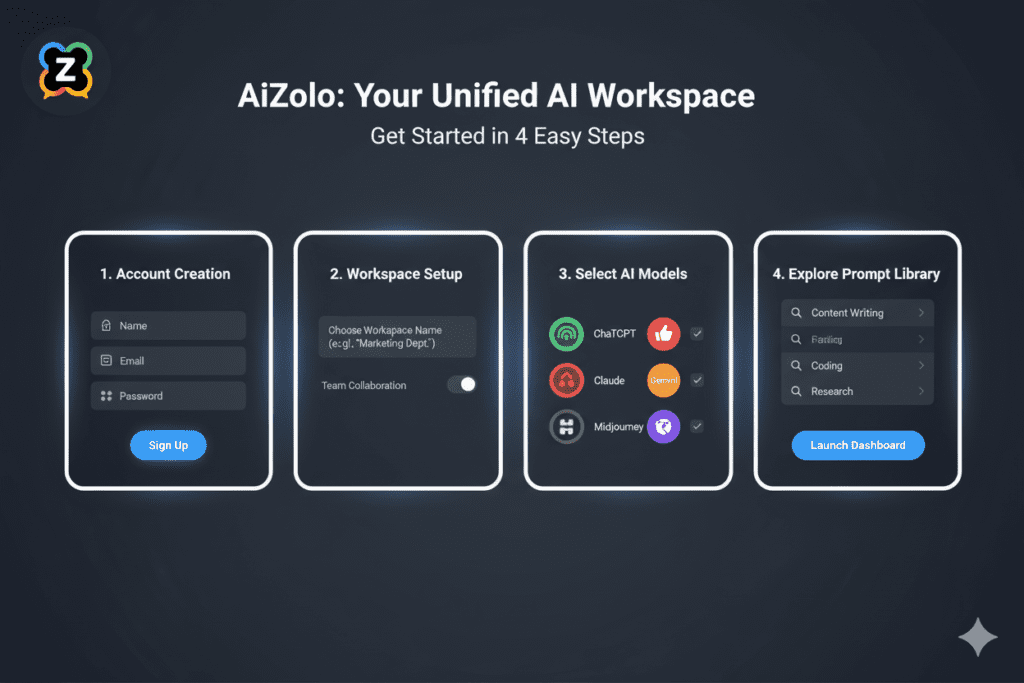
Ready to consolidate your AI chaos into one powerful workspace? Here’s exactly how to get started:
Step 1: Create Your Free Account (5 Minutes)
- Visit AiZolo.com
- Sign up with your email (no credit card required for free tier)
- Confirm your email
- Log into your dashboard
The free plan gives you limited access to test the platform before committing.
Step 2: Design Your First Workspace (10 Minutes)
You have two options:
Option A: Start with a Template AiZolo provides pre-built workspace templates:
- Writer’s Workspace (ChatGPT + Claude side-by-side)
- Developer’s Setup (code generation and review)
- Researcher’s Hub (all models for comprehensive analysis)
- Marketer’s Dashboard (messaging comparison)
Option B: Create a Custom Layout
- Click “New Workspace”
- Add AI model panels (drag and drop)
- Resize and arrange them to match your workflow
- Save with a descriptive name
Pro tip: Create multiple workspaces for different task types. Switching between them is instant.
Step 3: (Optional) Connect Your API Keys (5 Minutes)
If you already have API keys from OpenAI, Anthropic, or Google:
- Go to Settings → API Keys
- Click “Add Key”
- Enter your key (encrypted and stored securely)
- Select which models to enable
This gives you unlimited access based on your existing API credits.
Step 4: Build Your Prompt Library (10 Minutes)
Start creating reusable prompts:
- Click “Prompt Library” → “New Prompt”
- Name your prompt descriptively
- Write the prompt template (use variables like {TOPIC} for flexibility)
- Categorize it (Writing, Coding, Research, etc.)
- Save
Example prompts to start with:
- “Write an engaging introduction for a blog post about {TOPIC} targeting {AUDIENCE}”
- “Analyze this code for potential bugs and suggest improvements: {CODE}”
- “Summarize these research findings and identify key themes: {TEXT}”
Step 5: Run Your First Comparison Query
Now for the magic moment:
- Open your workspace
- Type your prompt in the main input
- Hit Enter
- Watch as multiple AI models respond simultaneously
- Compare responses side-by-side
- Choose the best parts from each (or just select the best overall response)
You’ll immediately understand why thousands of professionals have made the switch.
Advanced Strategies: Mastering the Best All in One AI App
Once you’re comfortable with the basics, these advanced techniques will 10x your productivity:
Strategy 1: The Three-Model Verification Method
For critical content (client deliverables, important research, financial analysis):
- Generate your initial output with your preferred model
- Send the same prompt to two other models
- Compare all three responses
- Identify where they agree (high confidence) and disagree (needs verification)
- Cross-reference disagreements with source material
- Synthesize the most accurate final version
This technique has saved me from multiple factual errors that would have embarrassed me with clients.
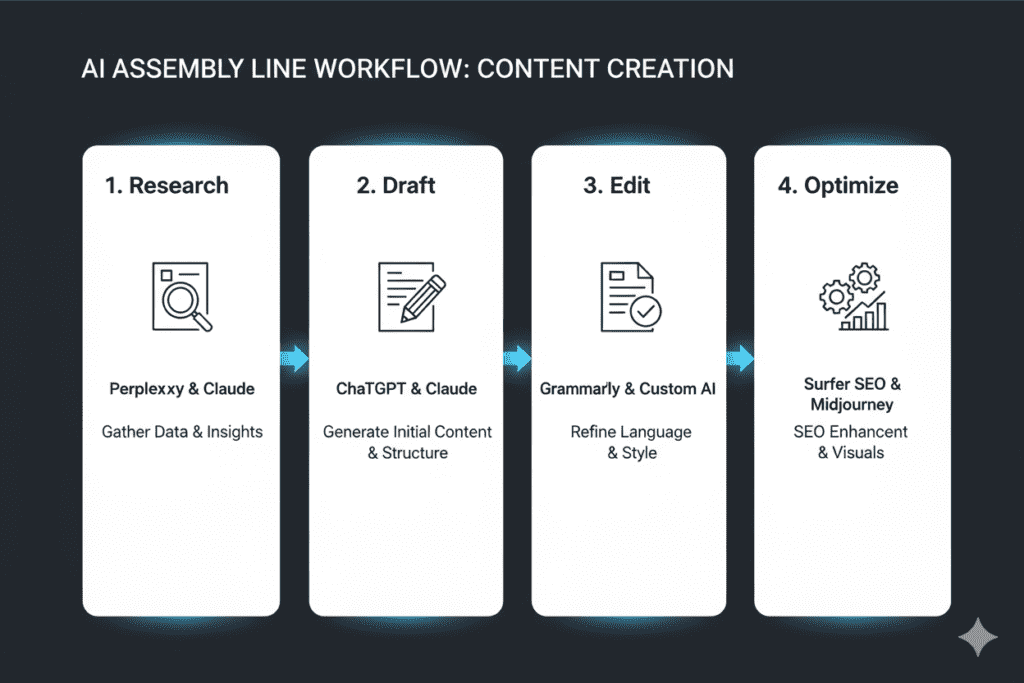
Strategy 2: The Assembly Line Workflow
Different AI models excel at different stages of creation. Use them sequentially:
For Blog Content:
- Research → Perplexity (latest information)
- Outline → Claude (structured thinking)
- First Draft → ChatGPT (creative, engaging)
- Editing → Gemini (grammar and flow)
- SEO → Claude (optimization suggestions)
For Code Development:
- Architecture → Claude (system design)
- Implementation → ChatGPT (fast code generation)
- Review → DeepSeek (bug detection)
- Documentation → Claude (clear explanation)
- Testing → ChatGPT (test case generation)
Strategy 3: The Perspective Diversity Technique
When you need creative solutions, query multiple models with slightly different framings:
Example: You need to name a new product.
- Ask ChatGPT: “Generate 10 creative names for {product description}”
- Ask Claude: “What are the most memorable product names in {industry} and why? Now suggest 10 names inspired by those principles for {product description}”
- Ask Gemini: “Analyze naming trends in {industry}. Create 10 names that anticipate the next trend for {product description}”
You’ll get 30 different ideas from three different strategic angles. The best name often emerges from combining insights.
Strategy 4: The Continuous Learning Loop
Use your AI conversations to improve future prompts:
- After completing a task, ask: “What could I have specified in my original prompt to get an even better result?”
- Save the improved prompt to your library
- Test it next time
- Iterate
Over 3-6 months, you’ll build a library of incredibly precise, high-performing prompts.
Frequently Asked Questions About the Best All in One AI App
Q: Is this actually cheaper than individual subscriptions, or are there hidden costs?
A: It’s genuinely cheaper. AiZolo Pro is $9.90/month, period. No hidden fees, no surprise charges. You can cancel anytime. Compare that to ChatGPT Plus ($20) + Claude Pro ($20) + Gemini Advanced ($20) = $60/month. Your savings are $50.10/month = $601 annually.
Q: Does the quality of AI responses change when accessing through AiZolo?
A: No. You’re accessing the exact same models you’d get from OpenAI, Anthropic, and Google directly. The responses are identical—you’re just accessing them through a better interface.
Q: What if a new AI model launches? Do I have to wait for AiZolo to add it?
A: AiZolo typically adds new models within days of release. Plus, if you use custom API keys, you get instant access to any new model your API provider releases.
Q: Can I use AiZolo for team collaboration?
A: Absolutely. You can share projects with team members, who can see conversation history and continue conversations. It’s perfect for agencies, startups, and any collaborative environment.
Q: I’m worried about data security. How does AiZolo handle my information?
A: All API keys are encrypted with military-grade encryption. Your conversations are private to you and your team. AiZolo doesn’t train models on your data or share it with third parties.
Q: What happens if I cancel my subscription?
A: You can export all your conversations and prompts. Your data belongs to you. There’s no lock-in or penalties.
Q: Do you offer a money-back guarantee?
A: AiZolo offers a free plan so you can test before committing. Given the low $9.90/month price point, most users find the risk negligible compared to potential savings.
Q: I’m not technical. Is this hard to learn?
A: If you can use ChatGPT, you can use AiZolo. The interface is actually simpler than managing multiple separate AI platforms. Most users are fully productive within 30 minutes.
Why Now Is the Perfect Time to Switch to the Best All in One AI App

The AI landscape is changing rapidly. Here’s why making the switch now makes strategic sense:
1. The Model Explosion Is Accelerating
New AI models are launching every month: GPT-5, Claude 4, Gemini 2.0, DeepSeek V3, and dozens more. If you’re paying separately for each, your costs will only increase. An all-in-one platform future-proofs your toolkit.
2. Professional AI Literacy Is Becoming Non-Negotiable
Five years ago, knowing Excel was a nice-to-have skill. Today it’s required. AI proficiency is following the same trajectory. Learning to work with multiple AI models simultaneously puts you ahead of the curve.
3. The Early Adopter Advantage
Professionals who master multi-model AI workflows now will dominate their industries in 2-3 years. This is your chance to build that expertise while the competitive landscape is still relatively level.
4. The Compound Effect of Time Savings
If AiZolo saves you even 5 hours per week, that’s 260 hours annually. What could you do with an extra 260 hours? Learn a new skill? Take on additional clients? Actually take a vacation?
5. Economic Uncertainty Demands Efficiency
In an economic climate where every dollar matters, cutting $600-2,000 annually from your operating costs while increasing your productivity is simply smart business.
Your Next Steps: Claim Your Productivity Revolution
Here’s my challenge to you:
Try the comparison experiment.
- Go to AiZolo.com and create a free account (5 minutes)
- Take one task you’d normally do with ChatGPT
- Instead, ask ChatGPT, Claude, and Gemini simultaneously in AiZolo
- Compare the responses
I guarantee one of two things will happen:
Either you’ll discover one model gives you a significantly better result than you’d been getting (winning), or you’ll synthesize insights from multiple models into something better than any single model could provide (also winning).
That single experiment will show you exactly why “the best all in one AI app” isn’t marketing hype—it’s genuinely the future of how professionals work with AI.
Ready to Get Started?
Try AiZolo Free → No credit card required, full access to test the platform
View Pricing → See exactly what you’ll save compared to your current setup
Read More Success Stories → Learn how professionals in your industry are using AiZolo
Explore Related Resources:
- How to Save Money on AI Subscriptions: Ultimate 2025 Guide
- All in One AI Subscription for Content Creators
- Affordable All-in-One AI Subscription for Startups
- Group Chat with Multiple AI Models Guide
External Resources for AI Professionals:
- OpenAI’s Model Documentation – Learn about GPT model capabilities
- Anthropic’s Claude Research – Understand Claude’s strengths
- Google AI Research Papers – Deep dive into Gemini technology
- The State of AI Report 2024 – Industry trends and forecasts
The Bottom Line: The Best All in One AI App Is About Working Smarter, Not Harder
We started with Sarah’s story—frustrated, exhausted, hitting AI limits at 2 AM with a deadline looming.
Here’s what happened after she switched to AiZolo:
She finished that client project on time using Claude when ChatGPT hit its limit. She discovered Gemini was better for the research component than any tool she’d tried before. She created custom workspaces for each client that saved her 10 hours weekly.
Three months later, Sarah sent me this message:
“I’ve taken on two more clients, raised my rates by 30%, and I’m working fewer hours. AiZolo didn’t just save me money—it transformed my entire business model. I feel like I have a team of AI specialists working for me, not just access to a chatbot.”
That’s the real promise of the best all in one AI app: not just cost savings (though saving $1,000+ annually is nice), not just convenience (though never tab-switching again is life-changing), but genuine professional transformation.
You become the conductor of an orchestra of AI models, each playing to its strengths, creating something more beautiful than any single instrument could produce alone.
The question isn’t whether to consolidate your AI toolkit. The question is: how much longer can you afford not to?
Start Your Free Trial with AiZolo Today and join the productivity revolution that’s transforming how professionals work with AI.


Pingback: From Imagination to Reality: How Powerful AI Flag Generator Tools Are Revolutionizing Visual Identity Design in 2026
Pingback: Rap Lyrics Generator AI: The Ultimate Guide to Creating Fire Bars in 2026 (Without Breaking the Bank)
Pingback: AI Book Title Generator: 9 Game-Changing Ways to Create Bestseller-Worthy Book Titles Instantly
Pingback: All-in-One AI Chat: How One Platform Saved Me $1,092 Annually And Made Me 10X More Productive
Pingback: Why an All-in-One Free AI Platform Is Changing How 10,000+ Users Work (And How You Can Join Them)
Pingback: The Shocking All-in-One AI Subscription Revolution: How I Cut $1,092 in AI Costs Down to Just $9.9
Pingback: All-in-One AI Models: Escape the $110/Month AI Subscription Nightmare
Pingback: Best AI aggregator for 10 million token context: 5 Tools in 2026
Pingback: Instagram Username Generator AI: 10x Brand Recall Fast 2026
Pingback: AI for generating Stand Up Comedy and Dark humor: 5x Funnier Fast 2026
Pingback: Best Essay Writing Apps 2026: 7 Tools to Write Faster
Pingback: AI Worksheet Generator: Save 10+ Hours Weekly 2026 Fast
Pingback: 7 AI Blueprint Generators for Winning Plans (2026) Fast
Pingback: 7 AI Outline Generators to Structure Content 5x Faster (2026)
Pingback: 7 AI TikTok Video Generators to Go Viral Fast (2026)
Pingback: 7 AI Bio Generators to Craft Perfect Profiles Fast (2026)
Pingback: 7 Bing AI Image Generator Tips for Stunning Art (2026) Fast
Pingback: 7 AI Love Letter Generators to Write Perfect Romance (2026)
Pingback: AI Movie Poster Generator: Create Pro Posters in 2 Minutes
Pingback: AI Animal Generator: Create 10+ Wildlife Art Pieces Fast
Pingback: Low-Cost AI Tools for Small Businesses — Save 70% in 2026
Pingback: AI Workspace Subscription Review 2026 | Best Platforms Compared
Pingback: All-in-One AI App: Save $1,200+ Yearly | AiZolo Guide 2026
Pingback: Save Money on AI Tools Subscription Platform | Cut 90% Costs
Pingback: Top AI Tools for Students and Content Creators 2026 Guide
Pingback: AI Pokemon Generator: Create 10+ Fakemon in Minutes (2026)
Pingback: AI Diss Track Generator in 2026 : How to Create Epic Rap Battle Lyrics Without Breaking the Bank
Pingback: Will AI Replace Google Search? 5 Key Insights 2026
Pingback: Master generative AI for content creation in 2026