

Introduction
You probably have six AI tabs open right now. One for writing, one for research, one for images, one for notes—and you’re still not sure which one actually does the job well. Aizolo simplifies that experience by bringing multiple AI capabilities together in one place.
That’s the real problem with top AI tools for students in 2026: there are too many, they overlap, and most “best AI tools” lists are just recycled marketing copy.
The cost isn’t only money. It’s the hours lost re-explaining context to five different chatbots, the shaky facts you have to double-check anyway, and the subscription fatigue that creeps in around the third $20/month plan.
This guide is different. Every tool below was chosen because it solves a specific, recurring problem — writing, research, note-taking, design, video, or studying — not because it has a flashy landing page.
You’ll get a plain-English breakdown of what each tool is actually good at, what it costs as of mid-2026, where it falls short, and a decision framework so you can build a lean stack instead of a cluttered one.
Table of Contents
What Are AI Tools?
AI tools are software applications that use machine learning models — usually large language models (LLMs) or diffusion models — to help you write, research, design, edit, or study faster.
Quick definition: An AI tool takes a prompt or piece of content as input and returns a generated, summarized, or transformed output, using patterns learned from large training datasets rather than fixed rules.
Most tools in this category fall into a few buckets:
- Conversational assistants (ChatGPT, Claude, Gemini) — general-purpose reasoning and writing
- Answer engines (Perplexity) — cited, research-first search
- Workspace AI (Notion AI, NotebookLM) — AI embedded inside your notes or documents
- Creative generators (Midjourney, Ideogram, Runway) — images and video from text prompts
- Productivity add-ons (Grammarly, Otter, Fireflies) — AI layered on top of an existing task like writing or meetings
Did You Know? The shift in 2025–2026 has been away from single-purpose chatbots and toward “agentic” tools that can take multi-step actions on your behalf — booking research, drafting, and formatting in one pass — rather than answering one prompt at a time.
Why Students and Content Creators Need AI Tools in 2026
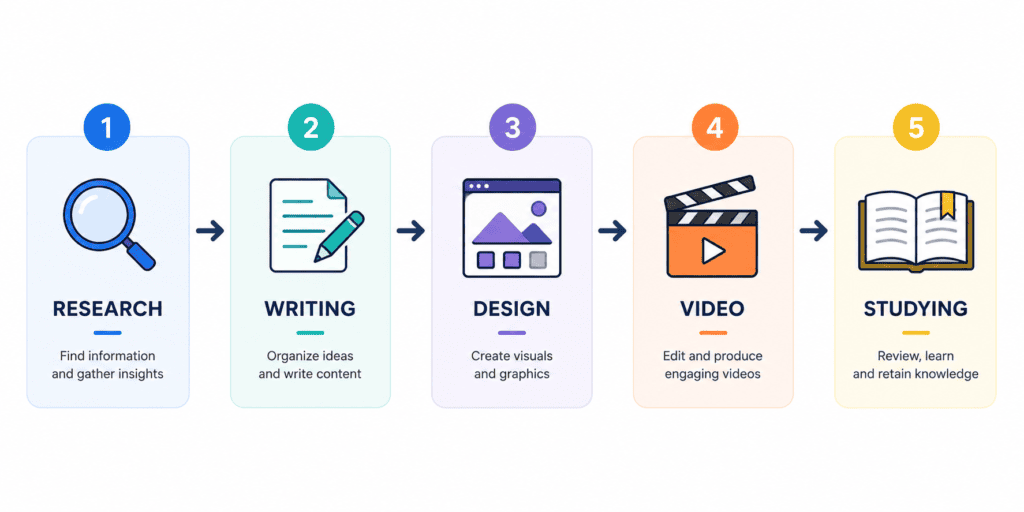
Students and creators share a common constraint: too much output expected in too little time. AI tools address that in a few concrete ways.
Saving time. Summarizing a 40-page PDF or turning bullet points into a first draft used to take an hour. AI tools like NotebookLM or Claude do it in minutes, leaving more time for revision and thinking.
Better research. Tools like Perplexity and Google’s NotebookLM cite sources directly, which matters for academic integrity and for fact-checking a blog post before you publish it.
Faster writing. AI tools for note taking students handle first drafts, tone adjustments, and grammar checks, though the final judgment call should always stay human.
Design without a design degree. Canva AI and Gamma let non-designers produce clean presentations, thumbnails, and social graphics without touching a vector tool.
Video editing at speed. CapCut AI and Descript turn hours of raw footage into a shareable clip through text-based editing rather than frame-by-frame cutting.
Studying smarter. AI study tools convert lecture recordings, textbook chapters, and class notes into flashcards, summaries, and practice questions.
Brainstorming. A blank page is the biggest blocker for both an essay and a YouTube script. Conversational AI is genuinely useful for breaking that block, even if the final content still needs a human voice.
Automation. Workflow tools chain several of the above together — record a meeting, get a transcript, get a summary, get a follow-up email — without manual copy-pasting.
Pro Tip: Don’t pick tools task-by-task. Map your weekly workflow first (research → draft → design → publish), then pick one tool per stage. That’s how you avoid paying for four subscriptions that do the same thing.
Top AI Tools for Students and Content Creators
Below are 20 tools, grouped loosely by what they’re best at. Pricing reflects publicly listed rates as of July 2026; AI subscription pricing changes often, so check each provider’s own pricing page before you buy.
ChatGPT
The most versatile general assistant for outlining essays, coding help, and brainstorming — free tier is genuinely usable for coursework. Full ChatGPT review →
Claude
The strongest pick for long PDFs, thesis chapters, and literature reviews thanks to its large context window and less “AI-sounding” prose. Full Claude review →
Gemini
Best if your coursework already lives in Google Docs/Drive — no exporting or copy-pasting between apps. Full Gemini review →
Perplexity
A cited, source-linked research engine — the safer choice over a general chatbot when a claim needs to be traceable for a paper. Full Perplexity review →
Notion AI
Useful if your notes and group-project docs already live in Notion; skip it if you don’t already use the platform. Full Notion AI review →
Canva AI
The fastest way to build a clean presentation, thumbnail, or social graphic without design skills. Full Canva review →
Grammarly
The final-pass editing layer for essays and emails — catches tone and grammar issues before submission. Full Grammarly review →
Midjourney
The go-to for custom, non-stock header images or book-cover art when aesthetic quality matters more than speed. Full Midjourney review →
Descript
Turns podcast or video editing into editing a text transcript — the fastest way to clean up a recorded presentation or interview. Full Descript review →
Jasper
Built for teams maintaining brand voice at scale — overkill pricing for a solo student, more relevant if you’re freelancing for a client. Full Jasper review →
Writesonic
SEO-focused article generation — worth a look if you’re running a side blog or freelance content gig alongside school. Full Writesonic review →
Aizolo
A multi-model workspace giving metered access to ChatGPT, Claude, Gemini, and Grok under one subscription instead of stacking separate logins. Full Aizolo review →
Gamma
Overview: An AI presentation and document generator that turns a topic or outline into a formatted deck, webpage, or one-pager in minutes.
Best For: Fast presentations for class projects, pitch decks, and internal reports.
Key Features: Prompt-to-deck generation, auto-layout, theme customization, and export to PDF or PPTX.
Pros: Dramatically faster than building slides manually; good default design sense for non-designers.
Cons: Complex data-heavy decks (like financial models) still need manual cleanup; free tier is credit-limited.
Pricing: Free tier available with limited AI credits; paid plans typically start around $8–20/month depending on usage tier — confirm current pricing on Gamma’s site, as it updates frequently.
Ideal Users: Students presenting group projects; solo founders building an investor deck quickly.
Real Use Case: A student pastes a research outline into Gamma and gets a presentable, on-theme slide deck in under ten minutes.
NotebookLM (Google)
Overview: A research and study assistant that only answers based on documents you upload, reducing hallucination risk compared to open-ended chatbots.
Best For: Studying from lecture notes, generating audio overviews of readings, and building source-grounded study guides.
Key Features: Source-grounded Q&A, auto-generated study guides and flashcards, and an “audio overview” feature that turns documents into a podcast-style discussion.
Pros: Answers are tied directly to your uploaded sources, which is ideal for exam prep and academic integrity; free to use with a Google account.
Cons: Limited to what you upload — it won’t reach outside your source material, which is a feature for accuracy but a limit for open research.
Pricing: Free for individual use with generous limits; Plus tier available through Google AI Pro subscriptions for higher usage caps.
Ideal Users: Students converting a semester’s readings into a structured study companion; teachers building source-based quizzes.
Real Use Case: A pre-med student uploads all of their biology lecture slides and generates an audio summary to review while commuting.
Otter.ai
Overview: An AI meeting and lecture transcription tool that captures audio, generates searchable notes, and summarizes key action items.
Best For: Recording and transcribing lectures, interviews, and team meetings in real time.
Key Features: Live transcription, speaker identification, automated summaries, and integrations with Zoom, Google Meet, and Microsoft Teams.
Pros: Accurate transcription even with multiple speakers; searchable transcript makes reviewing a two-hour lecture far faster.
Cons: Free tier has monthly minute limits; accuracy can dip with heavy accents or poor audio quality.
Pricing: Free tier with limited monthly transcription minutes; paid plans scale by usage, typically starting around $10–17/month per user.
Ideal Users: Students who can’t type fast enough to keep up with lectures; journalists transcribing interviews.
Real Use Case: A journalism student records a professor’s guest lecture, then searches the transcript later for one specific quote.
Fireflies.ai
Overview: Similar to Otter but built more around business meetings, with stronger CRM and project-management integrations.
Best For: Content teams and small businesses running recurring meetings that need automated notes and follow-ups.
Key Features: Meeting transcription, AI-generated summaries, action-item extraction, and integrations with Slack, HubSpot, and Notion.
Pros: Strong integration ecosystem for teams already using CRM or project tools; automatic follow-up email drafts save real time.
Cons: Less optimized for pure academic lecture capture compared to Otter; overkill for a solo student.
Pricing: Free tier available; paid plans typically start around $10/user/month, scaling with team size and features.
Ideal Users: Content agencies and freelance teams running client calls that need documented follow-ups.
Real Use Case: A small content agency uses Fireflies to auto-generate a recap email after every client strategy call.
ElevenLabs
Overview: A leading AI voice generation platform, used for realistic text-to-speech, voice cloning, and dubbing.
Best For: Podcast production, video voiceovers, and multilingual dubbing for content creators.
Key Features: Natural-sounding voice synthesis across many languages, custom voice cloning, and a dubbing studio for translating video into other languages while preserving tone.
Pros: Voice quality is close to indistinguishable from a human narrator; strong for creators publishing across multiple language markets.
Cons: Cloning a real voice raises consent and ethical questions creators must handle responsibly; higher-tier plans needed for commercial usage rights.
Pricing: Free tier with limited monthly characters; paid plans generally start around $5–22/month, scaling with usage and voice cloning needs.
Ideal Users: Podcasters without professional recording setups; YouTubers localizing content for global audiences.
Real Use Case: A solo creator dubs an English tutorial video into three languages using ElevenLabs instead of hiring separate voice actors.
Ideogram
Overview: An AI image generator that stands out for accurately rendering text inside images — a common weak point for other generators.
Best For: Posters, logos, memes, and any visual that needs legible text baked into the design.
Key Features: Reliable in-image text rendering, style presets, and a “Magic Fill” tool for editing specific regions of an image.
Pros: Handles text-in-image far better than most competitors; generous free tier for casual use.
Cons: Overall artistic polish can trail Midjourney for pure illustration work; smaller community and preset library.
Pricing: Free tier available; paid plans typically start around $8–20/month for higher generation limits and commercial licensing.
Ideal Users: Students designing event posters or club flyers; creators making quote graphics for social media.
Real Use Case: A student club generates an event poster with the date, time, and location rendered accurately directly in the image.
Runway
Overview: A professional-grade AI video generation and editing platform, used for text-to-video, video-to-video style transfer, and green-screen-free background removal.
Best For: Short-form video experimentation, motion graphics, and creative video effects without a full production crew.
Key Features: Gen-series text-to-video models, motion brush for animating specific parts of a frame, and AI-powered background removal.
Pros: Genuinely useful for concept videos and creative experimentation; frequent model upgrades keep quality improving.
Cons: Rendering credits get expensive quickly for heavy use; output length and consistency still lag behind traditional filmed video for longer projects.
Pricing: Free tier with limited credits; paid plans typically start around $12/month, scaling with generation volume.
Ideal Users: Filmmaking students experimenting with AI-generated b-roll; creators producing short concept trailers.
Real Use Case: A film student prototypes a music video concept in Runway before committing to a full physical shoot.
CapCut AI
Overview: A widely used mobile-and-desktop video editor with AI features aimed squarely at short-form content for TikTok, Reels, and YouTube Shorts.
Best For: Fast-turnaround short-form video editing, captions, and trend-based templates.
Key Features: Auto-captioning, AI background removal, template-based editing, and text-to-speech voiceovers.
Pros: Free and low-cost tier covers most casual creator needs; extremely fast for short-form content specifically.
Cons: Less suited to long-form or highly custom editing compared to Descript or professional editing suites.
Pricing: Free tier is generous for casual use; Pro plans typically run around $8–10/month for expanded export and AI feature limits.
Ideal Users: TikTok and Reels creators, and students producing quick video assignments on a phone.
Real Use Case: A creator auto-generates burned-in captions for a Reel directly on their phone, cutting editing time from an hour to minutes.
Quick Summary: No single tool wins at everything. The strongest stacks usually combine one general-purpose assistant (ChatGPT, Claude, or Gemini), one research tool (Perplexity or NotebookLM), and one or two task-specific tools (Canva, Descript, Grammarly) rather than trying to force one app to do it all.
Comparison Table
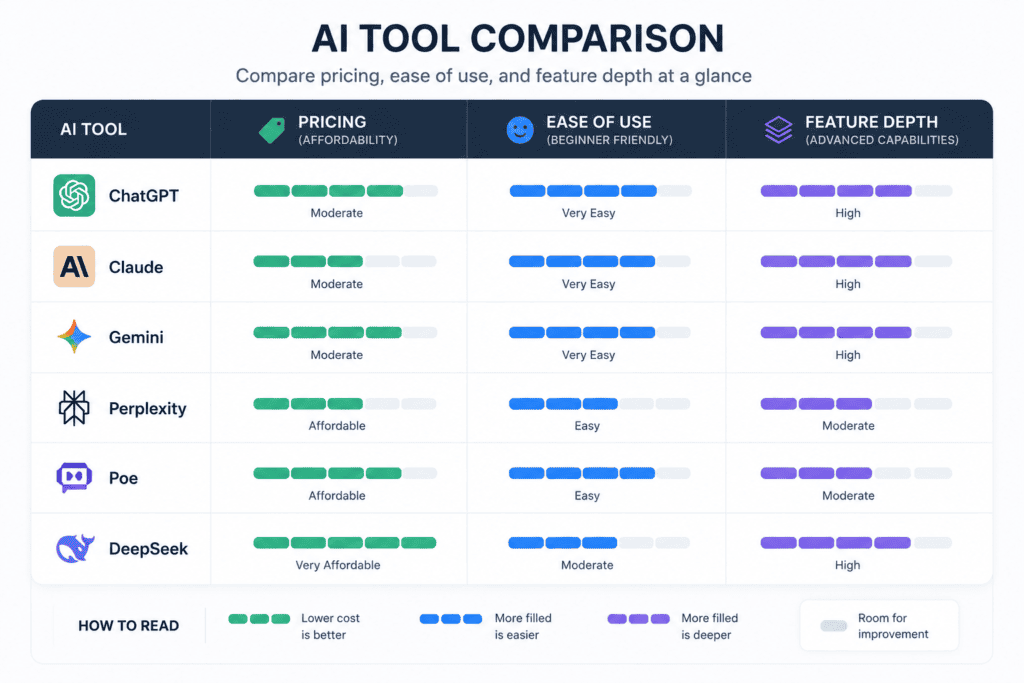
| Tool | Best For | Pricing (from) | Free Plan | Strength | Weakness | Overall Rating | Full Review |
|---|---|---|---|---|---|---|---|
| ChatGPT | General writing & research | $8/mo (Go) | Yes | Versatility, ecosystem | Confusing tier structure | 4.6/5 | → Full review |
| Claude | Long documents, coding | $20/mo | Yes | Long-context accuracy | Fewer multimedia tools | 4.6/5 | → Full review |
| Gemini | Google Workspace users | $19.99/mo | Yes | 1M-token context, integration | Compute-based limits | 4.5/5 | → Full review |
| Perplexity | Cited research | $20/mo | Yes | Source citations | Weaker for creative writing | 4.5/5 | → Full review |
| Notion AI | Workspace notes & docs | $20/user/mo | Trial only | No app-switching | Full AI needs Business plan | 4.2/5 | → Full review |
| Canva AI | Design & presentations | $13/mo | Yes | Speed, templates | Credit-hungry AI features | 4.5/5 | → Full review |
| Grammarly | Grammar & tone editing | Free / $12/mo | Yes | Cross-platform, privacy | Prompt caps on Pro | 4.4/5 | → Full review |
| Gamma | Instant presentations | Free / ~$10/mo | Yes | Fast deck generation | Weak for data-heavy decks | 4.3/5 | — |
| NotebookLM | Source-grounded studying | Free | Yes | Accuracy, no hallucination drift | Limited to uploaded sources | 4.6/5 | — |
| Otter.ai | Lecture/meeting transcription | Free / ~$10/mo | Yes | Searchable transcripts | Accent/audio sensitivity | 4.3/5 | — |
| Fireflies.ai | Meeting notes & CRM sync | Free / ~$10/mo | Yes | Integrations | Overkill for solo students | 4.1/5 | — |
| ElevenLabs | AI voice & dubbing | Free / ~$5/mo | Yes | Voice realism | Ethical/consent considerations | 4.4/5 | — |
| Midjourney | Aesthetic image generation | ~$10/mo | No | Visual quality | No free tier, learning curve | 4.5/5 | → Full review |
| Ideogram | Text-in-image generation | Free / ~$8/mo | Yes | Legible in-image text | Less polished than Midjourney | 4.2/5 | — |
| Runway | AI video generation | Free / ~$12/mo | Yes | Creative video experiments | Credits get costly | 4.2/5 | — |
| CapCut AI | Short-form video editing | Free / ~$8/mo | Yes | Speed, mobile-friendly | Limited for long-form editing | 4.4/5 | — |
| Descript | Text-based video/podcast editing | Free / ~$12/mo | Yes | Transcript-based editing | Learning curve | 4.5/5 | → Full review |
| Jasper | Brand-voice marketing content | ~$39/mo | Trial only | Team consistency | Expensive for individuals | 4.1/5 | → Full review |
| Writesonic | SEO article generation | Free trial / ~$15/mo | Yes | SEO scoring | Needs human editing pass | 4.0/5 | → Full review |
| Aizolo | Focused student/creator workflow | See site | Varies | Purpose-built workflow | Narrower feature set by design | 4.3/5 | → Full review |
Ratings reflect a general assessment of feature depth, value, and ease of use for students and creators; always verify current pricing directly with each provider.
Best AI Tool by Category
- Best for Studying & Exam Prep: NotebookLM — source-grounded answers and audio overviews built directly from your own lecture notes and readings
- Best for Lecture & Meeting Notes: Otter.ai — searchable, speaker-tagged transcripts you can scan instead of re-listening to a two-hour recording
- Best for Citations & Research Papers: Perplexity — every claim links back to a traceable source, which matters for academic integrity
- Best for Group Project Coordination: Notion AI — turns scattered meeting notes into a structured, shared action-item tracker
- Best for Tight Budgets: NotebookLM and Grammarly’s free tier — genuinely useful at $0, no trial period to worry about running out
- Best for Multilingual Study Material: ElevenLabs — dub or narrate study content in another language without hiring a voice actor
For general writing, image, video, and presentation picks that apply beyond the classroom, see our full use-case breakdown on the pillar guide.
How to Choose the Right AI Tool
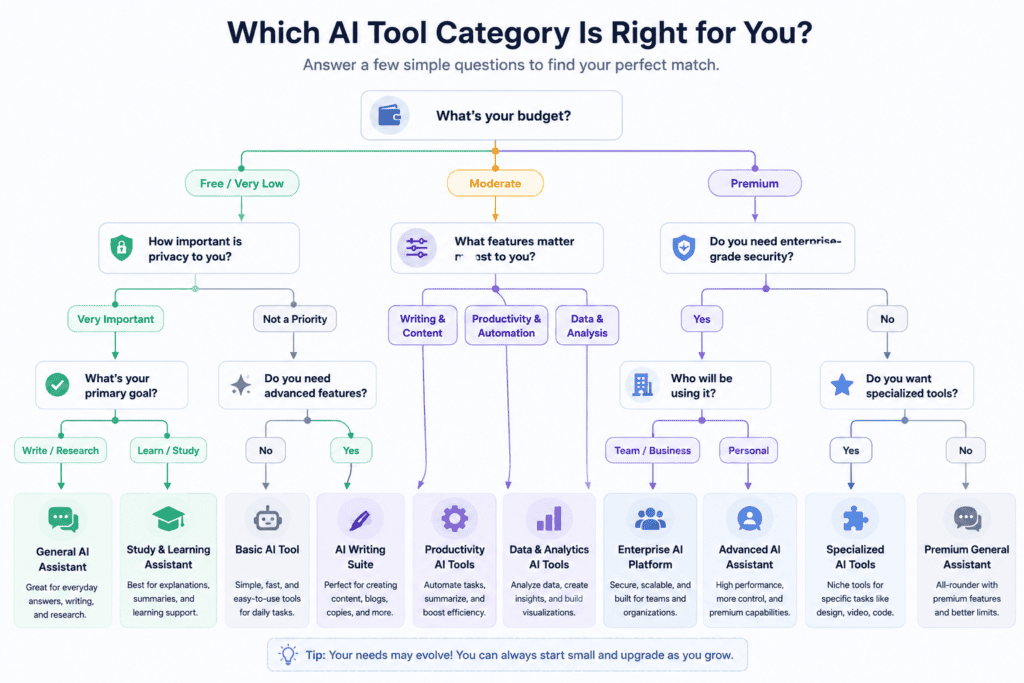
Use this decision framework instead of picking based on hype:
Budget. Map your realistic monthly spend before browsing. Two well-chosen $20/month tools beat five overlapping free trials that quietly convert to paid.
Privacy. Check whether the tool trains its models on your input by default, especially for unpublished drafts, research, or client work.
Features. List your top three recurring tasks first, then match tools to tasks — not the other way around.
Learning Curve. A powerful tool you never open is worse than a simple one you use daily. Descript’s transcript editing, for example, takes practice before it pays off.
Integrations. If your life already runs through Google Workspace or Notion, favor tools that plug into that ecosystem instead of forcing new habits.
Accuracy. For research and academic work, prioritize tools with citations (Perplexity, NotebookLM) over tools that generate confident-sounding but unsourced claims.
Support. Free tiers rarely include support. If a tool is central to your workflow, check whether paid support even exists before committing.
Warning: Don’t build your entire workflow around a single tool’s free tier. Free limits change often, and losing access mid-semester or mid-project is a real risk.
Common Mistakes to Avoid
Choosing the wrong tool for the task. Using a general chatbot for citation-heavy research instead of a source-grounded tool like Perplexity or NotebookLM invites errors.
Blind trust in AI output. Treat every AI-generated fact, statistic, or quote as unverified until you’ve checked it against a primary source.
Ignoring hallucinations. All current LLMs can generate confident, plausible-sounding, and incorrect information — especially with dates, statistics, and citations.
Skipping fact-checking. This matters even more for academic work, where a fabricated citation can trigger an academic integrity investigation.
Submitting AI-generated content as entirely original. Many schools and platforms now use AI-detection tools; check your institution’s specific policy before submitting AI-assisted work.
Over-automation. Automating every step of your workflow can strip out the human judgment and personal voice that make content genuinely good — and genuinely yours.
Future Trends in AI Tools
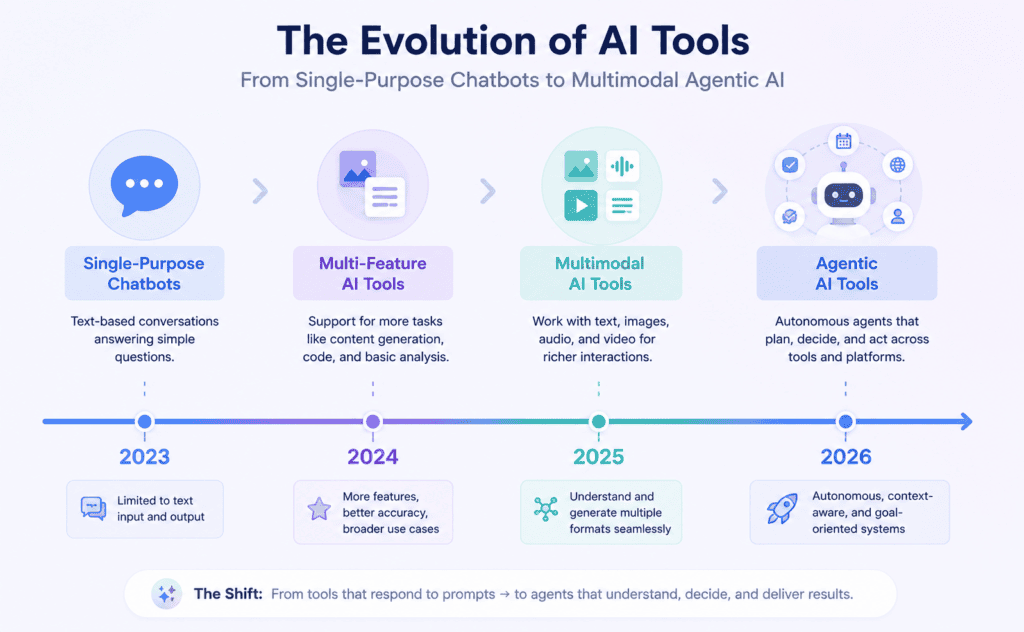
Agentic AI. Tools are moving from single-turn answers toward multi-step agents that can research, draft, and format with minimal supervision.
Multimodal AI. Text, image, audio, and video are converging into single interfaces — Gemini and GPT-5.6 already handle mixed inputs in one conversation.
Personal AI tutors. Expect deeper personalization in study tools, adapting explanations to a student’s specific gaps rather than generic summaries.
AI collaboration. Features like Perplexity’s Model Council, which compares answers from multiple frontier models, hint at multi-model collaboration becoming standard.
Workflow automation. More tools are chaining tasks together automatically — recording, transcribing, summarizing, and drafting a follow-up in one pass.
Voice AI. As voice synthesis quality improves, expect more audio-first study and content tools, following the pattern set by NotebookLM’s audio overviews.
Frequently Asked Questions
What are the best free AI tools for students? NotebookLM, Grammarly’s free tier, and the free versions of ChatGPT, Claude, and Gemini all offer genuinely useful functionality without a subscription.
Is ChatGPT or Claude better for students? ChatGPT offers broader features and a bigger ecosystem; Claude tends to produce more accurate, less “AI-sounding” long-form writing. Many students use both.
Can teachers detect AI-generated essays? AI-detection tools exist but are not fully reliable, producing both false positives and false negatives. Always follow your institution’s specific AI policy rather than assuming detection risk alone.
What’s the best AI tool for research papers? Perplexity and NotebookLM are strongest here because they provide traceable citations rather than unsourced claims.
Are AI image generators free to use? For coursework and student projects specifically, Ideogram’s free tier covers most poster and flyer needs; Midjourney is paid-only and better suited to creators who need higher-end illustration quality than a class assignment usually requires.
What AI tools do YouTubers actually use? Commonly: CapCut AI or Descript for editing, Canva for thumbnails, and ChatGPT or Claude for scripting and titles.
Is Grammarly considered “AI-generated content”? No — grammar and tone correction is generally treated differently from full AI-generated drafting, but check your specific school or publication’s policy.
What’s the difference between Perplexity and ChatGPT? Perplexity is built around cited, source-linked answers; ChatGPT is a general-purpose assistant that can write, code, and generate images without citing sources by default.
Do AI note-taking tools record without consent? Tools like Otter and Fireflies require explicit recording permission in many jurisdictions — always get verbal or written consent before recording a meeting or lecture.
What AI tool is best for a tight student budget? NotebookLM and Grammarly’s free tier deliver strong value at $0; Perplexity and Claude’s free tiers are also solid starting points.
How much should I expect to spend on an AI tool stack? A reasonable stack for most students or solo creators runs $20–40/month total for one primary assistant plus one specialized tool, before factoring in any free tiers already covering part of the workload.
For a broader cost breakdown across marketing, SEO, and design tools beyond a student budget, see our full pricing comparison in the content creation guide.
Can I use multiple AI tools together? Yes — most creators combine a research tool, a writing assistant, and a design or editing tool rather than relying on a single app for everything.
Are AI tools allowed for coursework? Policies vary widely by school and even by individual professor. Always check your specific syllabus or academic integrity policy before using AI on graded work.
What AI tool is best for podcast editing? Descript, thanks to its transcript-based editing and filler-word removal, is widely used by podcasters for exactly this reason.
Is it worth paying for Aizolo alongside other AI tools? It depends on your workflow — if you’re already juggling separate research, writing, and organization apps, a workflow-focused tool like Aizolo can reduce the app-switching overhead; compare it directly against your current stack before adding another subscription.
Conclusion
There’s no single “best” AI tool — there’s a best tool for each stage of your workflow.
For most students and content creators, a lean stack beats a crowded one: one general-purpose assistant (ChatGPT, Claude, or Gemini), one citation-backed research tool (Perplexity or NotebookLM), and one or two task-specific tools for design, video, or editing.
Start with what’s free. NotebookLM and Grammarly cost nothing and already solve real problems. Add paid tools only once a specific, recurring bottleneck justifies the cost.
If your workflow keeps breaking down at the handoff between research, writing, and organizing — the exact gap that leads to five open tabs and lost context — a more integrated, workflow-first tool like Aizolo is worth a look alongside whichever assistant you already use.
Author Bio
Author: Jeevesh Tripathi Email: jeevesh@aizolo.com
Jeevesh Tripathi writes about AI tools, SEO, and content strategy, with a focus on helping students and creators build practical, low-clutter tech stacks. His work centers on testing tools directly against real workflows rather than relying on vendor marketing claims, and on tracking how fast-moving AI product pricing and features change over time.

