
Table of Contents
Introduction
It’s 11 p.m., the essay is due at 9 a.m., and the cursor is blinking on an empty page. That exact moment is why essay writing apps have gone from a niche curiosity to something nearly every student has open in another browser tab.
These tools promise to brainstorm ideas, fix grammar, tighten arguments, and format citations in seconds. Some genuinely deliver on that. Others oversell what AI can safely do for academic work.
The AI writing landscape has also gotten more complicated. There’s a real difference between an AI writing assistant that polishes your own words and an AI essay writer that generates entire paragraphs from a prompt — and that difference matters enormously for academic integrity.
This guide breaks down the leading essay writing apps of 2026, how we evaluated them, where each one genuinely helps, and where responsible use ends and academic misconduct begins. No app here is going to write your essay for you and get away scot-free — and none of them should.
What Are Essay Writing Apps?
Essay writing apps are software tools — usually browser extensions, web apps, or desktop add-ins — that use AI, natural language processing, or rules-based grammar engines to help with academic writing.
They span a spectrum. On one end are proofreading software tools that only catch grammar and style issues. On the other are full AI essay writer platforms that can draft entire sections of text from a short prompt.
How They Work
Most modern tools run on large language models (LLMs) similar to the ones behind ChatGPT. Others, like Grammarly’s core engine or QuillBot’s grammar checker, still rely partly on rules-based natural language processing layered with AI suggestions.
They typically plug into your existing workflow — a Google Docs add-on, a Microsoft Word ribbon, a Chrome extension, or a standalone web editor — so you don’t have to leave your document to get suggestions.
Benefits
Used well, these tools save real time on the mechanical parts of writing: fixing comma splices, restructuring an awkward sentence, formatting a citation, or catching an accidental duplicate paragraph.
They can also lower the barrier for non-native English speakers, students with learning differences, and anyone who freezes up at a blank page, by offering a starting point to react to and revise.
Limitations
AI models can produce confident-sounding text that is factually wrong, a problem researchers call “hallucination.” No essay writing app should be trusted to generate citations or facts without independent verification.
They also can’t understand your professor’s specific rubric, your argument’s original contribution, or your personal voice — all things that ultimately determine whether an essay is actually good.
Who Should Use Them
Students revising their own drafts, researchers polishing manuscript language, ESL writers refining phrasing, and professionals writing reports all get genuine value from these tools when used as an editing layer, not a replacement for original thought.
How We Evaluated These Essay Writing Apps
We didn’t just skim marketing pages. Each tool was assessed against the same criteria so the comparisons below are apples-to-apples.
- Writing quality: Does the output (or the suggestions) actually improve clarity and correctness?
- Research assistance: Can it help locate or organize sources, not just generate text?
- Citation support: Does it generate properly formatted APA, MLA, or Chicago citations?
- Grammar accuracy: How reliable is the grammar and style engine on real academic sentences?
- Underlying AI model: Which model powers the tool, and how current is it?
- Pricing: What’s the real cost, including annual vs. monthly traps?
- Privacy: Does the vendor train on your documents? Is your data encrypted and controllable?
- Ease of use: How steep is the learning curve for a first-time student user?
- Academic integrity fit: Is the tool built for editing your own words, or generating new ones wholesale?
- Plagiarism support: Does it include an actual plagiarism checker, and how does it compare to Turnitin?
- Export options: Word, Google Docs, PDF — where does the output actually go?
- Collaboration: Can teams or study groups use it together?
Expert Tip: When comparing essay writing apps, always test the free tier on a real paragraph of your own writing before paying. Marketing demos are cherry-picked; your own messy first draft is a much better stress test.
Quick Comparison Table
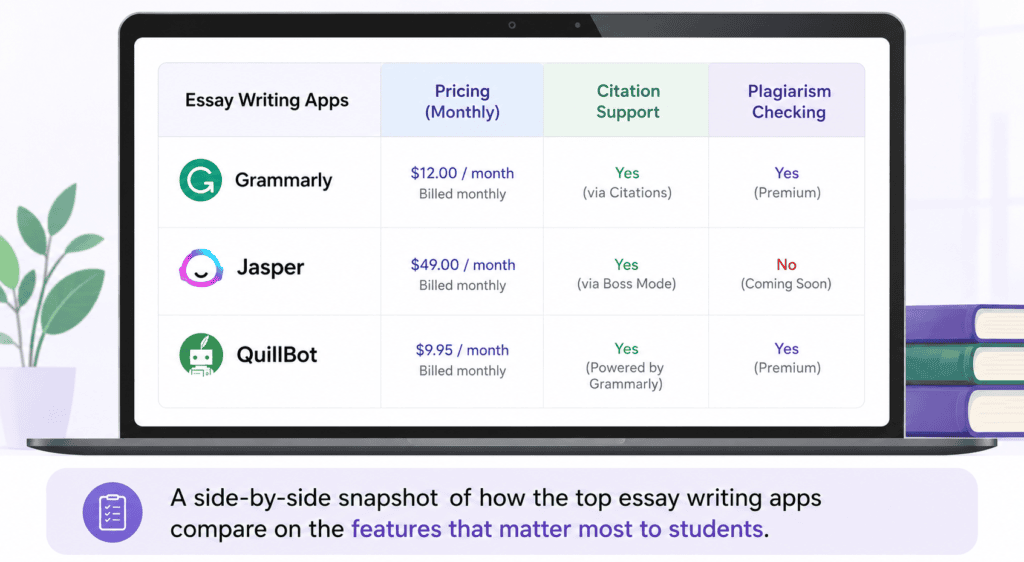
| Tool | Best For | Free Plan | Starting Price | Citation Support | Plagiarism Checker | Grammar Engine | AI Model | Rating |
|---|---|---|---|---|---|---|---|---|
| ChatGPT | Brainstorming & drafting help | Yes | $20/mo (Plus) | Manual only | No | Basic | GPT-5.5 | 4.5/5 |
| Grammarly | Grammar & clarity editing | Yes | $12/mo (Pro, annual) | No | Yes (Pro) | Advanced | Proprietary + AI | 4.5/5 |
| Jasper | Long-form structured drafts | No (7-day trial) | $59/mo (Pro, annual) | No | Add-on only | Basic | Multi-model | 4/5 |
| QuillBot | Paraphrasing & rewriting | Yes | $8.33/mo (Premium, annual) | Yes | Yes (Premium) | Advanced | Proprietary + AI | 4.3/5 |
| Paperpal | Academic/research manuscripts | Yes (limited) | $25/mo (Prime) | Yes (10,000+ styles) | Yes | Advanced (academic) | Proprietary | 4.4/5 |
| Writesonic | Marketing-adjacent long content | Yes (limited) | ~$79/mo (Basic, annual) | No | No | Basic | Multi-model | 3.8/5 |
| Notion AI | Notes-to-draft workflow | Limited trial | $20/mo (Business) | No | No | Basic | Multi-model | 4/5 |
| Google Gemini | Research + drafting in one app | Yes | $19.99/mo (Google AI Pro) | Manual only | No | Basic | Gemini 3.1 Pro | 4.3/5 |
| Microsoft Copilot | Drafting inside Word | Yes (basic) | Bundled, ~$19.99/mo | Manual only | No | Basic (Editor separate) | GPT-5.5 | 4.2/5 |
| Studybay | Human-written custom essays | No | Varies by bid | Yes (by writer) | Varies | N/A (human) | N/A | 3.5/5 |
Pricing verified against vendor pages and independent pricing trackers as of July 2026; always confirm current rates on the official site before subscribing, since AI tool pricing changes frequently.
Detailed Reviews
ChatGPT
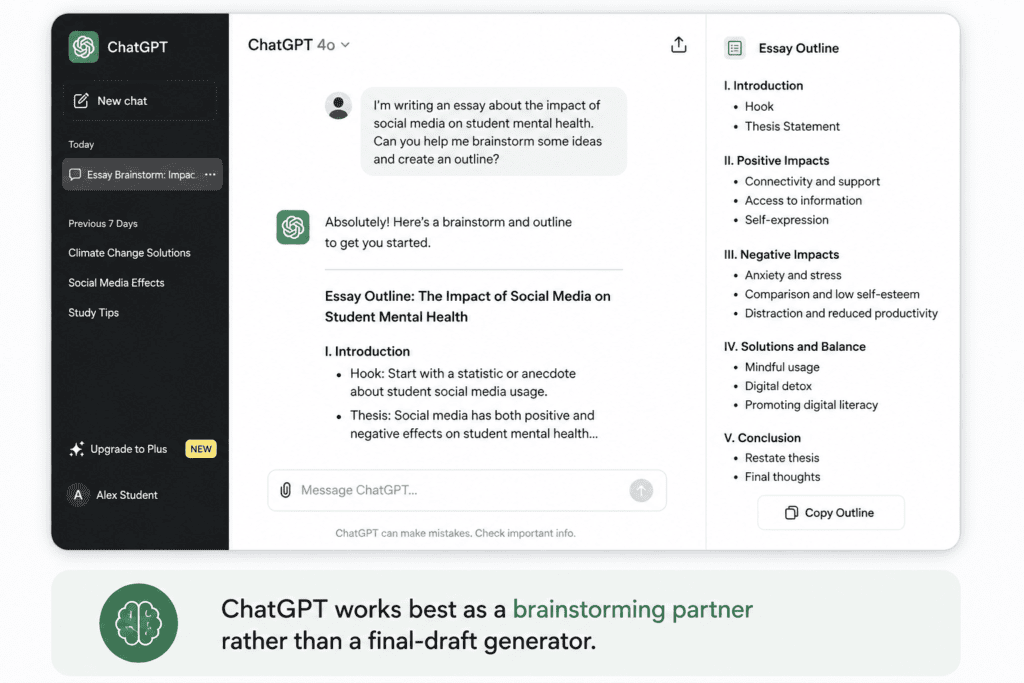
Overview: ChatGPT, built by OpenAI, is the most widely used general-purpose AI writing platform. Students use it for brainstorming, outlining, explaining concepts, and drafting text to revise in their own words.
Best For: Idea generation, outlining, explaining difficult concepts, and rewriting your own drafts for clarity.
Key Features: Conversational drafting, GPT-5.5 reasoning on paid tiers, custom instructions, file uploads for analyzing your own notes, and voice input.
Pros: Extremely flexible, fast, good at explaining why a suggestion works, useful across every subject.
Cons: No built-in citation generator, no plagiarism checker, and it can fabricate sources or facts if you don’t verify them.
Pricing: Free tier available with usage limits; ChatGPT Plus runs $20/month; ChatGPT Pro is $200/month for heavy users.
Limitations: It doesn’t know your course rubric or your professor’s expectations, and its “facts” always need independent verification.
Who Should Use It: Students who want a brainstorming partner and are disciplined about writing the final draft in their own words.
Expert Verdict: The most versatile tool on this list, but also the one that requires the most self-discipline to use ethically.
Warning: Submitting AI-generated text as your own original work violates most universities’ academic integrity policies, even if the text is technically “unique.” Use ChatGPT to think alongside, not to write for you.
Grammarly
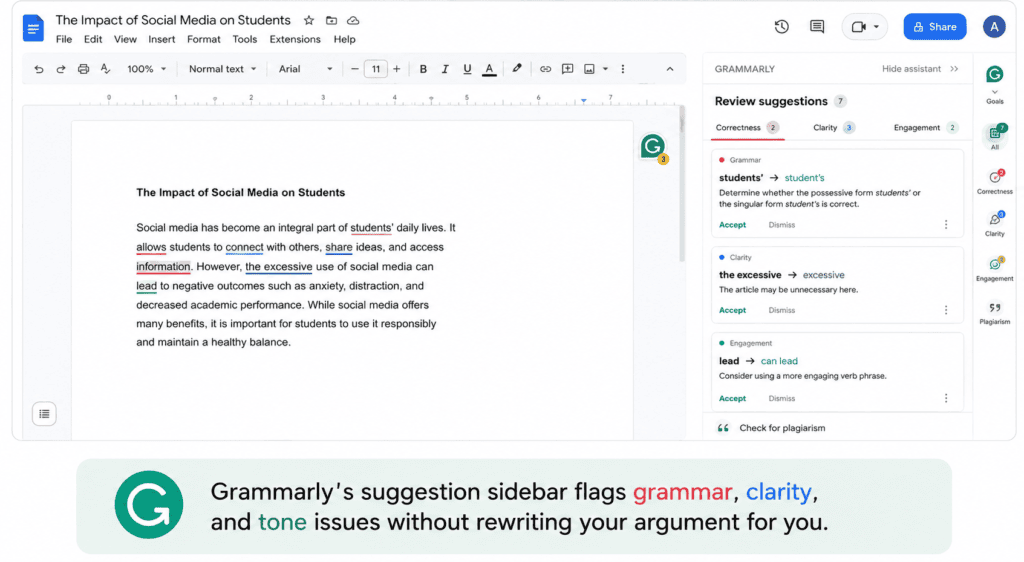
Overview: Grammarly is the category leader in grammar and clarity checking, now bundled into a single “Pro” plan that folds in what used to be Premium and Business features.
Best For: Catching grammar, punctuation, and clarity issues in a draft you’ve already written.
Key Features: Real-time grammar and spelling checks, tone detection, full-sentence rewrites, an integrated plagiarism checker, and an AI-generated-text detector on Pro.
Pros: Works almost everywhere you type, genuinely strong grammar engine, generous free tier for basic use.
Cons: Heavier editing features are locked behind Pro, and some users report confusing billing around trials and auto-renewal.
Pricing: Free plan available; Grammarly Pro costs $12 per month on annual billing, or $30 per month on monthly billing, and includes 2,000 AI prompts per member. Enterprise pricing is custom.
Limitations: Not built for generating new essay content — it’s an editing layer for text you’ve already written.
Who Should Use It: Anyone who wants a dependable second pair of eyes on grammar, tone, and clarity before submitting.
Expert Verdict: The safest, most academic-integrity-friendly tool on this list, because it edits your writing instead of replacing it.
Jasper
Overview: Jasper is a premium AI content platform built primarily for marketing teams, but its long-form drafting tools are sometimes used for essay-length writing tasks.
Best For: Teams and power users who need structured, on-brand long-form content — less suited to individual academic essays.
Key Features: Canvas editor, brand voice training, multi-model access, and templates for long-form drafts.
Pros: Strong at producing structured long-form drafts quickly, good collaboration tools for teams.
Cons: No permanent free plan, expensive relative to student budgets, and not designed with academic citation needs in mind.
Pricing: The Pro plan costs $69 per seat per month billed monthly, dropping to $59 per seat per month on annual billing; Business pricing is custom.
Limitations: Plagiarism checking requires a separate paid add-on, and it has no academic citation formatting.
Who Should Use It: Content teams and marketers more than individual students — it’s overkill and overpriced for a single essay.
Expert Verdict: A capable tool, but priced and designed for business content production, not classroom writing.
QuillBot
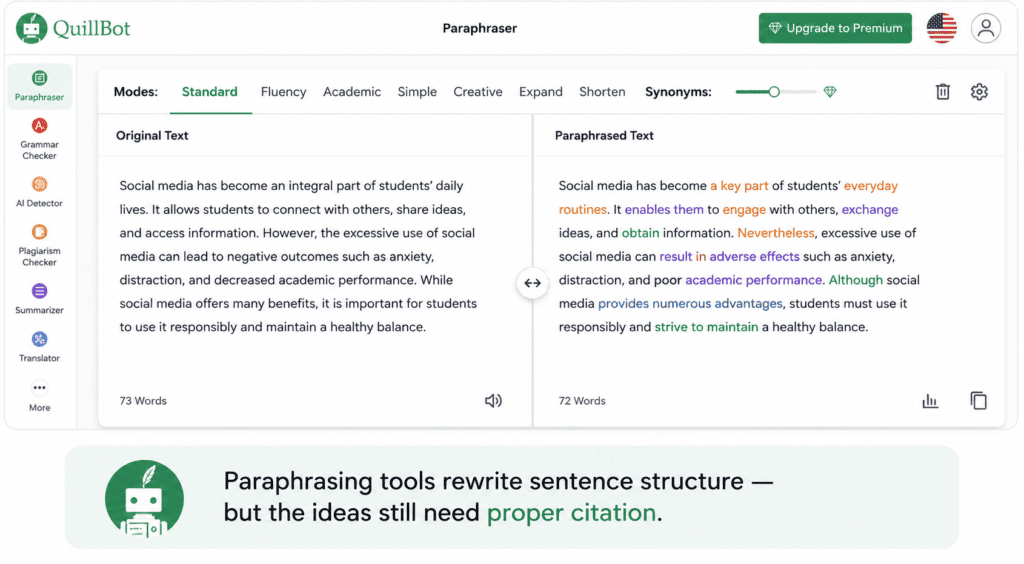
Overview: QuillBot built its reputation on paraphrasing, and has since expanded into grammar checking, summarizing, and citation generation.
Best For: Rewriting your own sentences for clarity or tone, and quickly summarizing long readings.
Key Features: Multiple paraphrasing modes, a grammar checker, a summarizer, a citation generator, and an AI content detector.
Pros: Genuinely useful free tier, affordable premium pricing, strong for rewriting rather than generating from scratch.
Cons: Heavy paraphrasing can sometimes drift from the original meaning or introduce unnatural phrasing.
Pricing: Free plan available; Premium runs $8.33 per month billed annually, with a Teams plan starting at $7.50 per user per month.
Limitations: Paraphrasing tools sit close to the line of academic dishonesty if used to disguise someone else’s work as original — use with caution and always cite the source material.
Who Should Use It: Students who need help rephrasing their own clunky sentences or condensing long research articles.
Expert Verdict: Excellent value for rewriting and summarizing, but should never be used to launder another author’s work.
Important: Paraphrasing a source closely, even through an AI tool, without citation is still plagiarism under most academic integrity policies. Paraphrasing does not remove the need to cite.
Paperpal
Overview: Paperpal, built by Cactus Communications (the company behind Editage), is purpose-built for academic and scientific manuscript writing rather than general essays.
Best For: Graduate students, researchers, and academics preparing manuscripts, theses, or journal submissions.
Key Features: Academic-tone language suggestions, a citation generator supporting thousands of citation styles, a plagiarism checker, and pre-submission journal readiness checks.
Pros: Trained specifically on scholarly writing patterns, strong citation and reference tooling, integrates with Word, Google Docs, and Overleaf.
Cons: Overkill for a short undergraduate essay, and its strengths are wasted outside research-heavy writing.
Pricing: Paperpal Prime is $25 per month, $55 per quarter, or $139 per year, with a limited free tier available.
Limitations: It’s not a general-purpose writing assistant — casual essay writers or bloggers will find it narrow and academically formal.
Who Should Use It: Graduate students and researchers writing for journal submission or thesis committees.
Expert Verdict: The most specialized, credible option here for genuinely academic (not just classroom) writing.
Writesonic
Overview: Writesonic has shifted significantly from a general AI writer toward an “AI search visibility” platform aimed at marketers tracking brand mentions in AI search results.
Best For: Marketing content and SEO articles rather than academic essays — its current product direction has moved away from student use cases.
Key Features: Long-form AI Article Writer, SEO scoring, and newer Generative Engine Optimization (GEO) tracking tools.
Pros: Fast drafting for long-form content, multiple underlying AI models to choose from.
Cons: Pricing has risen substantially as the product repositioned toward business marketing teams, and it lacks academic citation tools entirely.
Pricing: Paid plans now start around $79 per month on annual billing for real GEO tracking features, a steep jump from its earlier consumer-friendly pricing.
Limitations: No plagiarism checker, no citation formatting, and a product roadmap that’s moving further from academic use every quarter.
Who Should Use It: Content marketers, not students — there are better, cheaper, more academically appropriate options on this list.
Expert Verdict: Worth mentioning for completeness, but no longer a strong fit for essay writing specifically.
Notion AI
Overview: Notion AI lives inside the popular Notion workspace app, useful for students who already organize notes, reading lists, and outlines there.
Best For: Turning organized notes and outlines into a first draft without switching apps.
Key Features: AI-assisted drafting, summarizing, translation, and (on higher tiers) autonomous AI agents that can pull information across your workspace.
Pros: Seamless if you already live in Notion for class notes and project planning.
Cons: Full AI access now requires the pricier Business tier, and it has no citation or plagiarism tooling.
Pricing: Notion AI in 2026 is bundled into the Business plan at $20 per user per month billed annually; the free and Plus tiers only offer a limited AI trial.
Limitations: Not purpose-built for essays — it’s a productivity workspace with AI layered on top, not a dedicated writing tool.
Who Should Use It: Students who already organize their research and notes in Notion and want to draft in the same place.
Expert Verdict: A convenient bonus feature for existing Notion users, not a reason to adopt Notion on its own.
Google Gemini
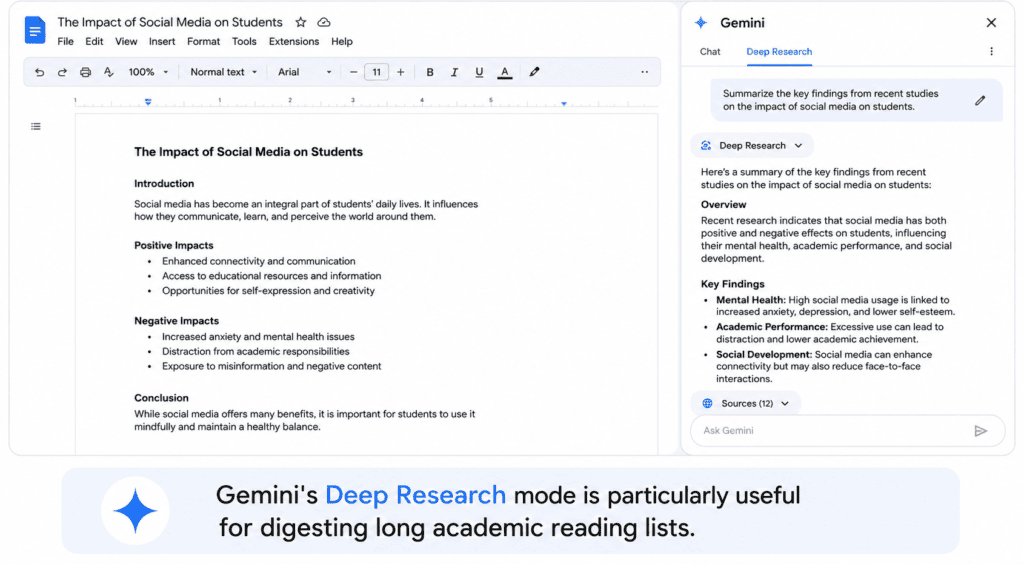
Overview: Google’s flagship AI assistant, integrated with Google Docs, Gmail, and the broader Google Workspace ecosystem.
Best For: Students who already work inside Google Docs and want AI research and drafting help without leaving the ecosystem.
Key Features: Deep Research mode, a very large context window for analyzing long readings, and direct integration with Docs and Drive.
Pros: Strong for digesting long source material, generous free tier, tight Google Docs integration.
Cons: No dedicated academic citation generator, and like other general models it can generate inaccurate information if unchecked.
Pricing: Free tier available; Google AI Pro costs $19.99 per month in the US and includes access to Gemini 3 Pro and Deep Research capabilities.
Limitations: Best treated as a research and drafting aid, with all facts and sources independently verified before use.
Who Should Use It: Google Workspace-native students who want research summarization alongside drafting help.
Expert Verdict: A strong all-rounder, particularly for digesting long reading lists into workable notes.
Microsoft Copilot
Overview: Microsoft Copilot is woven directly into Word, Outlook, and the rest of Microsoft 365, making it a natural fit for students who already write in Word.
Best For: Drafting and revising directly inside Word without switching to a separate app.
Key Features: In-document drafting suggestions, tone rewriting, and access to the same GPT-5.5 model family that powers ChatGPT.
Pros: No app-switching required if you already use Microsoft 365, and it’s bundled with a full Office suite and cloud storage.
Cons: The standalone Copilot Pro plan has been folded into broader Microsoft 365 subscriptions, and grammar-specific checking still runs through the separate Microsoft Editor tool.
Pricing: Copilot access now comes bundled with Microsoft 365 Personal or Premium plans, generally in the $10–$20 per month range depending on region and plan.
Limitations: No academic citation generator and no plagiarism checker built in.
Who Should Use It: Students already paying for Microsoft 365 who want AI drafting help without adding another subscription.
Expert Verdict: Good value if you’re already inside the Microsoft ecosystem; not a reason to switch on its own.
Studybay
Overview: Studybay is different from every other tool on this list — it’s a marketplace connecting students with freelance human writers and tutors, not an AI writing app.
Best For: Students who want human tutoring help, proofreading, or example essays written by a freelancer, rather than AI-generated text.
Key Features: Bidding marketplace for writers, direct messaging with the assigned writer, and revision requests.
Pros: Human writers can offer subject-specific expertise that generic AI models sometimes lack.
Cons: Quality varies significantly by writer, and having someone else write your essay for submission is academic misconduct at virtually every institution.
Pricing: Varies by assignment complexity, deadline, and writer bid — there is no fixed subscription price.
Limitations: This is fundamentally a ghostwriting marketplace, not a writing-skill tool, and using it to submit work as your own carries serious academic integrity risk.
Who Should Use It: We’d recommend extreme caution here. If used at all, it should be limited to tutoring-style help or example papers to learn from — never for direct submission.
Expert Verdict: Included for completeness since it’s frequently searched alongside essay writing apps, but it sits in a fundamentally different — and riskier — category than the AI tools above.
Warning: Contract cheating services, where someone else writes your assignment for submission, violate academic integrity policies at nearly every school and can result in failing grades, suspension, or expulsion.
Best Essay Writing Apps by Use Case
| Use Case | Best Pick | Why |
|---|---|---|
| Best for college essays | Grammarly | Reliable grammar and clarity editing without generating new content |
| Best for research papers | Paperpal | Purpose-built citation and academic-tone tools |
| Best free option | QuillBot | Genuinely useful free tier across multiple tools |
| Best premium option | Paperpal | Deepest academic-specific feature set for the price |
| Best for citations | Paperpal | Supports 10,000+ citation styles from real research databases |
| Best for grammar | Grammarly | Most mature, widely tested grammar engine available |
| Best for rewriting | QuillBot | Multiple paraphrasing modes built for sentence-level revision |
| Best for plagiarism support | Grammarly | Integrated plagiarism checker alongside grammar suggestions |
| Best for AI-assisted research | Google Gemini | Deep Research mode for digesting long source lists |
| Best for beginners | ChatGPT | Conversational interface with no learning curve |
Common Mistakes Students Make
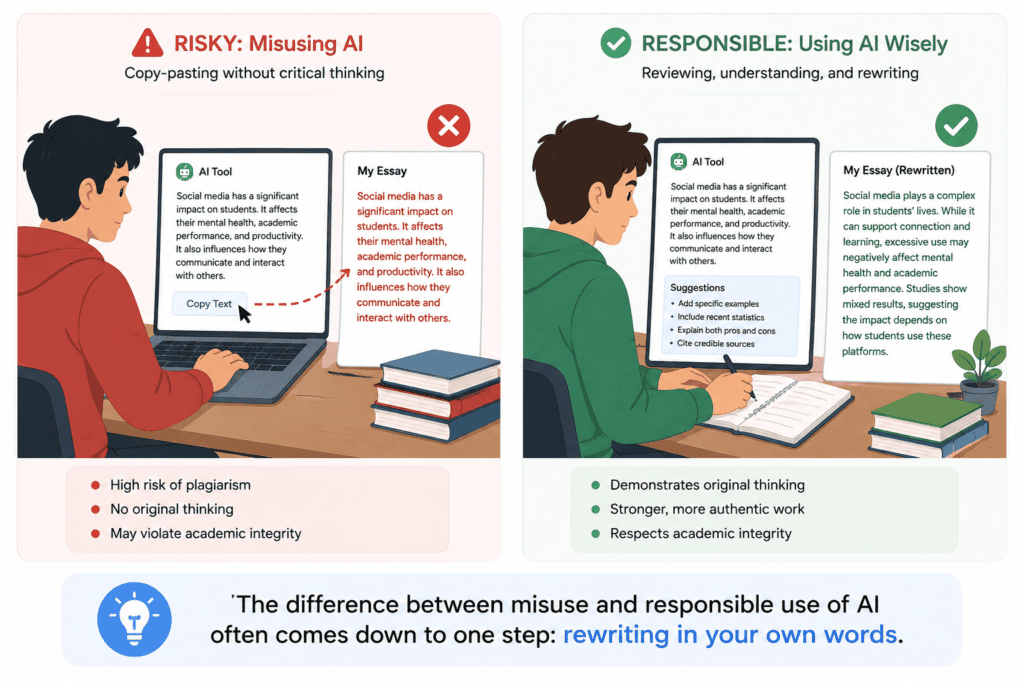
Copy-pasting AI output directly. Submitting unedited AI text as your own work is easy for instructors to spot and easy for AI detectors to flag, and it skips the actual learning the assignment is meant to build.
Ignoring citations. AI tools frequently can’t verify whether a source actually exists or says what the tool claims — always confirm citations independently before submitting.
Not verifying facts. Treat every factual claim from an AI tool as a draft claim to check, not a confirmed one.
Academic misconduct. Many universities now explicitly define unauthorized AI-generated submissions as a violation, so it’s worth reading your specific institution’s AI policy before using any tool.
Overusing AI. Leaning on AI for every sentence prevents the skill-building that writing assignments are designed to develop — a real cost even when it doesn’t count as misconduct.
Depending only on AI. The strongest essays still come from a student’s own argument and analysis, with AI tools used to sharpen — not replace — that thinking.
Tips for Using Essay Writing Apps Responsibly
Use AI tools to react to and revise your own draft, not to generate your first draft from scratch.
Always run any AI-suggested fact or citation through a second, independent source before it goes in your paper.
Check your school’s specific AI and academic integrity policy — these vary widely between institutions and even between individual instructors.
Keep a version history of your drafts, so you can show your own writing process if ever asked.
Treat paraphrasing tools as sentence-level polish, never as a way to disguise someone else’s original ideas as your own.
Disclose AI tool use if your instructor requires it, even for editing-only tools like grammar checkers.
Did You Know? Many universities now include an “AI use disclosure” section in essay submission portals, asking students to note which tools, if any, assisted with a given assignment.
Frequently Asked Questions
Are essay writing apps allowed in college? It depends entirely on your institution and, often, your individual instructor. Editing-focused tools like grammar checkers are usually fine; tools that generate submitted text often are not. Always check your syllabus or academic integrity policy.
Can professors detect AI-generated essays? AI detection tools exist and are used by many schools, but they aren’t perfectly reliable and can produce false positives. The safer approach is writing your own draft and using AI only to edit it.
What is the best free essay writing app? QuillBot and Grammarly both offer genuinely useful free tiers for grammar checking, paraphrasing, and basic editing without a subscription.
Do essay writing apps check for plagiarism? Some do. Grammarly Pro, QuillBot Premium, and Paperpal all include integrated plagiarism checkers, though none matches the institutional database access that tools like Turnitin have.
Can AI essay writers generate accurate citations? Not reliably from memory. General AI models like ChatGPT and Gemini can format a citation correctly if you give them the source details, but they should never be trusted to invent or verify a citation on their own.
Is QuillBot considered cheating? Using QuillBot to reword your own writing for clarity is generally acceptable; using it to disguise someone else’s source material as original, without citation, is not.
Which essay writing app is best for research papers? Paperpal is the most purpose-built option for research and thesis writing, thanks to its academic tone tuning and extensive citation style support.
How much do essay writing apps cost? Pricing ranges from free (Grammarly, QuillBot free tiers) to around $12–$25/month for individual premium plans (Grammarly, Paperpal), up to $59–$69/month for business-oriented tools like Jasper.
Can I use ChatGPT to write my essay? You can use it to brainstorm, outline, and get feedback, but submitting ChatGPT-generated text as your own original work violates most academic integrity policies.
What’s the difference between an AI writing assistant and an AI essay generator? An AI writing assistant (like Grammarly) edits and improves text you’ve already written. An AI essay generator (like unedited ChatGPT output) creates new text from a prompt — a much higher academic-integrity risk when submitted directly.
Are AI essay writing apps safe for my data and privacy? Reputable tools like Grammarly and Paperpal publish clear data policies and generally don’t train models on your private documents by default, but always review a tool’s specific privacy policy before uploading sensitive academic work.
Do essay writing apps work with Google Docs and Microsoft Word? Most major tools, including Grammarly, QuillBot, and Paperpal, offer dedicated add-ins or extensions for both Google Docs and Microsoft Word.
Is Grammarly worth paying for as a student? If you write frequently and want plagiarism checking plus advanced clarity suggestions, the Pro plan can be worthwhile; the free tier already covers basic grammar and spelling needs well.
Can essay writing apps help with citations in APA or MLA format? Yes — QuillBot’s citation generator and Paperpal both support APA, MLA, Chicago, and thousands of other citation styles.
What should I do if I’m unsure whether using an AI tool counts as cheating? Ask your instructor directly before submitting. Academic integrity policies vary widely, and a quick clarifying question is far better than risking a misconduct case.
Final Verdict
There’s no single “best” essay writing app — there’s a best app for your specific task. For grammar and clarity editing on your own drafts, Grammarly remains the most dependable choice.
For research-heavy academic writing with real citation needs, Paperpal is the most specialized and credible option available.
For brainstorming, outlining, and working through ideas conversationally, ChatGPT and Google Gemini are both strong, flexible starting points.
Avoid treating any of these tools — or a marketplace like Studybay — as a shortcut to submitting work that isn’t genuinely yours. The tools that add the most long-term value are the ones that make your own writing better, not the ones that replace it.
Whichever tool you choose, the responsible pattern is the same: draft in your own words, use AI to sharpen and check that draft, verify every fact and citation independently, and follow your institution’s specific AI policy.
Ready to try one? Start with a free tier — Grammarly or QuillBot are both zero-risk ways to see how AI-assisted editing fits your own writing process before you spend a dollar.
External Linking Recommendations
| External Source | Suggested Anchor Text | Reason | Suggested Placement |
|---|---|---|---|
| https://developers.google.com/search/docs/appearance/core-updates | Google’s Core Updates documentation | Establishes authority on how Google evaluates helpful content | Introduction or methodology section |
| https://developers.google.com/search/docs/essentials/spam-policies | Google’s spam policies | Supports the article’s commitment to genuine, non-spammy content | How We Evaluated section |
| https://openai.com/chatgpt | OpenAI’s official ChatGPT page | Primary source for ChatGPT features and pricing | ChatGPT review |
| https://www.anthropic.com | Anthropic’s official site | Reference for AI safety and model context | General AI landscape mentions |
| https://gemini.google.com | Google Gemini’s official page | Primary source for Gemini features and pricing | Google Gemini review |
| https://www.microsoft.com/microsoft-365/microsoft-copilot | Microsoft Copilot’s official page | Primary source for Copilot integration details | Microsoft Copilot review |
| https://www.grammarly.com/plans | Grammarly’s official pricing page | Primary source for current Grammarly pricing | Grammarly review |
| https://apastyle.apa.org | APA Style’s official guidelines | Authoritative citation formatting reference | Citation-related FAQ answers |
| https://style.mla.org | MLA Style Center | Authoritative citation formatting reference | Citation-related FAQ answers |
| https://owl.purdue.edu | Purdue OWL writing resources | Trusted academic writing and citation resource | Tips for Responsible Use section |
| https://www.jasper.ai/pricing | Jasper’s official pricing page | Primary source for current Jasper pricing | Jasper review |
| https://quillbot.com/upgrade | QuillBot’s official pricing page | Primary source for current QuillBot pricing | QuillBot review |
| https://paperpal.com/pricing | Paperpal’s official pricing page | Primary source for current Paperpal pricing | Paperpal review |
| https://www.turnitin.com | Turnitin’s official site | Reference point for institutional-grade plagiarism detection | Plagiarism support discussion |
Author
Author: Jeevesh Tripathi Email: jeevesh@aizolo.com
Jeevesh Tripathi is an SEO strategist and technology researcher who specializes in AI productivity tools, software comparisons, and educational technology. His work focuses on evaluating AI writing platforms against real evaluation criteria — writing quality, data privacy, and academic integrity — rather than affiliate incentives.
He has spent years researching how students and professionals adopt AI tools responsibly, with a particular focus on the intersection of AI writing assistance and academic policy. This article was researched using official vendor pricing pages, independent pricing trackers, and Google’s own Search Central documentation to ensure accuracy and helpfulness.
