

Running a business alone — or with a tiny team — means every hour gets fought over. Email, scheduling, invoicing, content, customer questions, and the actual work of building your product all compete for the same 10 hours a day.
That’s not a discipline problem. It’s a bandwidth problem. With Aizolo, a solo founder can automate routine tasks instead of running the org chart of a 15-person company by themselves.
AI productivity tools for entrepreneurs exist to close that gap. Not by promising a magic 4-hour workweek, but by quietly absorbing the repetitive 70% of the job — drafting, summarizing, scheduling, routing, tagging — so the founder’s attention goes to the 30% that actually needs a human: judgment calls, relationships, and decisions with real consequences.
This guide is built around that distinction. It covers what these tools actually do, which ones are worth paying for, what they cost in 2026, where they fall short, and how to build a stack that fits a real business rather than a hypothetical one.
It’s written for three kinds of readers: the founder who hasn’t touched AI tools yet, the one juggling three subscriptions and wondering if it’s too many, and the operator trying to decide what to standardize on before a team is hired to inherit the mess.
Nothing here is a paid placement. Where a tool has a real weakness — hidden costs, a steep learning curve, a feature that’s not what the marketing implies — that gets said plainly.
Table of Contents
What Are AI Productivity Tools for Entrepreneurs?
AI productivity tools for entrepreneurs are software applications that use machine learning and generative AI to automate repetitive business tasks — drafting, scheduling, research, bookkeeping, and customer support — so a founder or small team can focus on higher-value decisions. They range from single-purpose assistants (a meeting note-taker) to multi-step autonomous agents that execute entire workflows.
Three capabilities separate them from ordinary software:
- Generation — writing, summarizing, or coding from a plain-language instruction.
- Judgment-lite automation — routing an email, prioritizing a task, or flagging a risk based on context rather than a rigid rule.
- Orchestration — chaining several of the above into a workflow that runs without a human clicking “go” at every step.
That third capability is the newest and the most consequential. A basic Zap or macro follows fixed if-this-then-that logic. An AI agent, by contrast, can read an email, decide whether it’s urgent, draft a reply in your voice, and only pause for your approval before sending — which is a meaningfully different kind of automation.
Why This Matters Now: The Data Behind the Shift
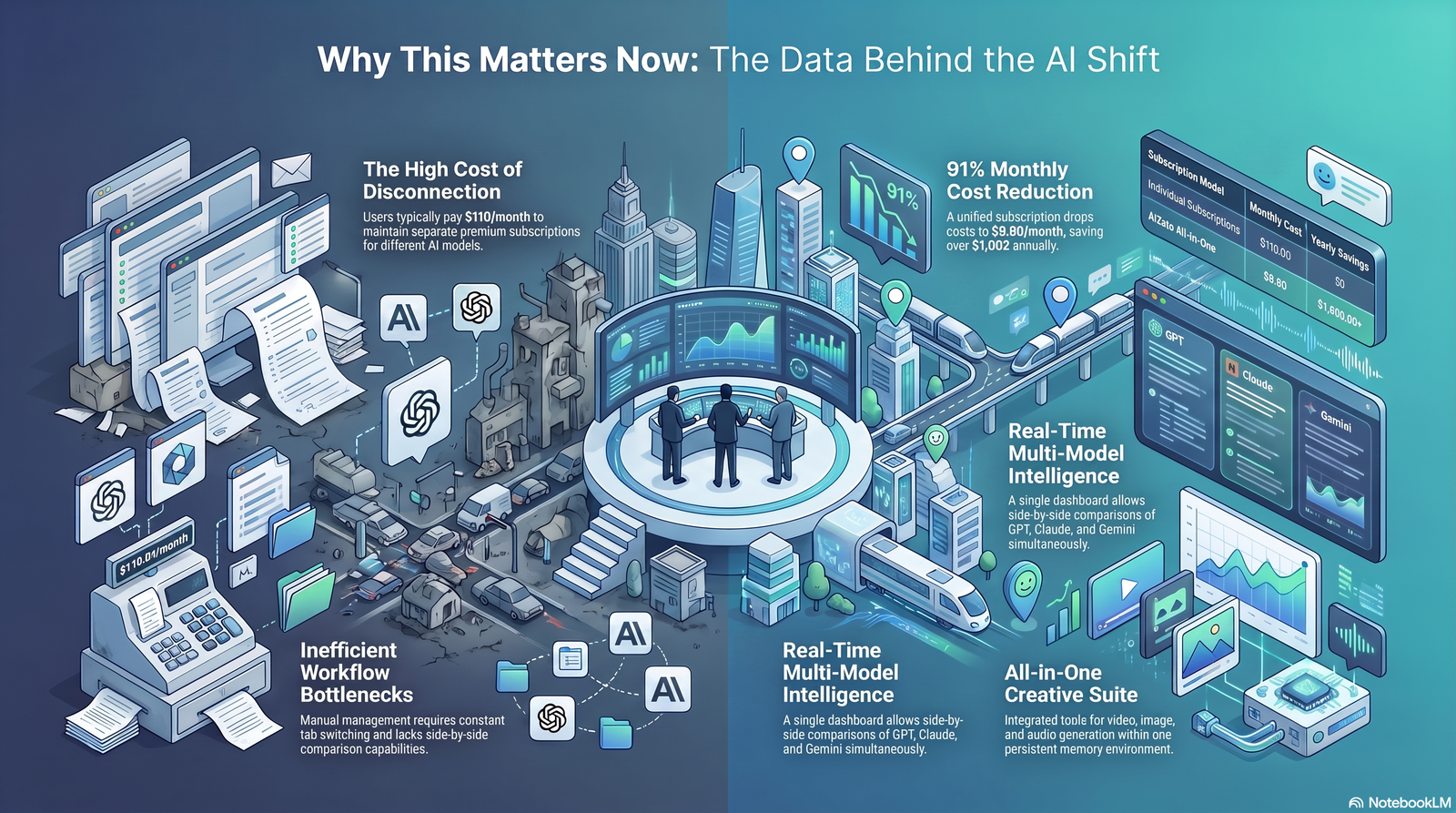
The scale of adoption is no longer in question. Microsoft’s 2026 Work Trend Index, based on trillions of anonymized Microsoft 365 signals and a survey of 20,000 knowledge workers across ten countries, found that 58% of AI users are producing work they couldn’t have produced a year earlier — a figure that rises to 80% among the heaviest users, whom Microsoft calls “Frontier Professionals.” Two-thirds of respondents said AI frees up time for higher-value work.
McKinsey’s 2025 State of AI research tells a more sobering companion story: 88% of organizations now use AI in at least one business function, yet fewer than 40% have scaled beyond a pilot, and MIT’s Project NANDA found that 95% of generative AI pilots fail to show a measurable financial return. The gap isn’t access to tools. It’s whether the workflow around the tool actually changes.
That gap matters more for entrepreneurs than for large enterprises, in one important way: a solo founder doesn’t need six months of change management to redesign a workflow.
They can just do it. The Microsoft research itself notes that organizational and cultural factors — not individual skill — explain most of the difference between AI’s “frontier” users and everyone else. A one-person business sidesteps that entire bottleneck.
That said, the research also carries a warning worth taking seriously. A widely cited 2023 study of Boston Consulting Group consultants found that on tasks outside AI’s actual capability, people using AI performed measurably worse than those without it — not because the tool was bad, but because confidence in AI output didn’t track its accuracy on unfamiliar tasks.
The lesson for a founder: AI tools compress busywork reliably, but judgment calls on unfamiliar territory still deserve a skeptical, well-informed human.
How to Evaluate an AI Tool Before You Pay For It
Most “best AI tools” lists rank by feature count. That’s the wrong metric for a founder with limited time and a limited budget. Four questions matter more:
- Does it save at least 30 minutes a week, reliably? Below that threshold, the habit change rarely pays for itself.
- Is the output closer to “ready to send” or “needs a rewrite”? If you spend more time correcting AI output than writing from scratch, it’s a net loss, not a gain.
- How long until it pays back the time you spend learning it? A 10-minute setup with immediate value beats a powerful tool with a two-week learning curve, especially for a solo operator.
- Does it fit your existing stack, or does it ask you to rebuild everything around it? Integration depth is often the real differentiator between similar-looking tools.
Building an AI Productivity Stack, By Function
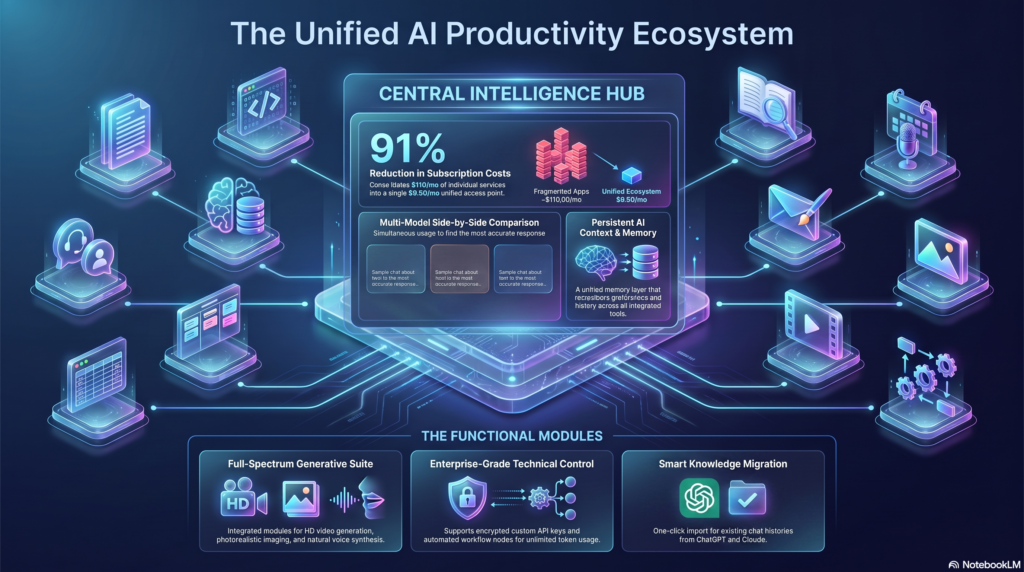
Almost no founder needs 20 AI tools. Most build a workable stack from five or six, each covering a distinct job. Here’s the landscape, organized by the actual bottleneck each category solves.
Scheduling and Calendar Management
Scheduling is one of the most measurably solved problems in the AI productivity space. Tools like Motion and Reclaim.ai auto-block your calendar around deadlines and priorities rather than just logging meetings, and Clockwise-style tools focus on protecting deep-work blocks by rearranging meetings automatically.
Email and Inbox Management
Inbox triage is where “AI employee” tools like Lindy distinguish themselves from a simple filter: they read context, gauge urgency, and draft a reply that sounds like you, rather than just sorting messages into folders.
Meeting Assistants
Meeting note-takers such as Fireflies and Otter.ai transcribe calls, generate summaries and action items, and — increasingly — analyze talk-time and sentiment, which is useful well beyond sales coaching.
Knowledge Management
Notion AI turns scattered docs, meeting notes, and Slack threads into a searchable, structured knowledge base, and its newer “Agent” features can execute multi-step tasks like building a tracker directly from a meeting summary.
Project and Task Management
ClickUp Brain, Asana’s AI features, and similar tools now handle status summarization, task prioritization, and realistic timeline estimation on top of standard project boards.
Writing and Content
General-purpose assistants (ChatGPT, Claude) handle first drafts, editing, and brainstorming, while specialized tools like Grammarly Business enforce tone and brand voice at scale, and Jasper or Copy.ai focus specifically on high-volume marketing copy.
Research
Perplexity and similar tools return cited, sourced answers rather than a single ungrounded response, which matters enormously for anything you plan to act on or repeat to a customer.
Coding and No-Code Building
Tools like Claude, GitHub Copilot, and app builders such as Lovable let non-developers turn a plain-language description into a working prototype, and give technical founders a serious head start on boilerplate.
Marketing, Design, and Video
Canva’s Magic Studio, Midjourney, and Synthesia cover image generation, brand-consistent design, and AI-avatar video production without a production budget.
Sales and CRM
AI layers inside HubSpot and Salesforce now recommend next actions on a deal, not just log activity, shortening the gap between “data entered” and “decision made.”
Customer Support
AI support agents — including Lindy’s support workflows and dedicated helpdesk AI — resolve routine tickets from a knowledge base and escalate only the genuinely complex cases to a human.
Accounting and Finance
AI-assisted bookkeeping (QuickBooks AI and similar) automates categorization and flags anomalies, though it should not replace an accountant’s judgment on anything tax- or compliance-related.
Operations, Agents, and Automation
Zapier and Make remain the backbone for connecting apps with deterministic “if X, then Y” logic, while agent platforms like Lindy add judgment on top for tasks that need context, not just triggers.
Tool Reviews: The Tools Worth Your Time
Below are deeper reviews of the tools that show up most consistently across founder workflows. Pricing changes often in this market — treat these as directional and verify current pricing before you buy.
ChatGPT
Overview: OpenAI’s general-purpose assistant remains the default starting point for most founders because it does a competent job across writing, research, coding, and light data analysis from a single interface.
Best For: Brainstorming, first drafts, coding help, and acting as a sounding board for strategy.
Key Features: Custom GPTs for repeatable tasks, a built-in code interpreter, web browsing, and voice mode.
Pros: Broad capability, huge ecosystem of guides and integrations, low learning curve.
Cons: Generalist by design — narrower tools often out-perform it on specialized tasks like brand-voice writing or meeting transcription.
Pricing: Free tier available; Plus around $20/month; Team plans priced per seat.
Integrations: Broad third-party plugin and API ecosystem; connects to many tools via Zapier.
Limitations: Like all LLMs, it can produce confident but incorrect answers — verify anything factual before it reaches a customer or a filing.
Real Business Use Case: A founder builds a custom GPT trained on past successful proposals to draft new client pitches in a fraction of the time.
Expert Opinion: Strong as a generalist anchor tool, but pairing it with one or two specialized tools (a meeting assistant, a scheduling tool) typically produces better results than trying to make it do everything.
Claude
Overview: Anthropic’s assistant is generally regarded as the stronger choice for long documents, nuanced writing, and careful reasoning, with a very large context window that lets founders upload entire contracts or codebases at once.
Best For: Document analysis, long-form writing, and technical work that benefits from careful, structured reasoning.
Key Features: Large context window, strong code generation and review, Projects for organizing ongoing work, artifact creation for documents and code.
Pros: Handles long, complex inputs well; tends to flag structural issues in code or reasoning proactively rather than only when asked.
Cons: Smaller plugin ecosystem than ChatGPT’s, and some workflow-automation features are newer and still maturing.
Pricing: Free tier available; paid individual and team tiers priced per seat, roughly comparable to other frontier assistants.
Integrations: Growing set of connectors for docs, code hosts, and business tools; API access for custom builds.
Limitations: Best suited to reasoning and writing tasks rather than end-to-end workflow automation on its own.
Real Business Use Case: A founder uploads a full commercial lease and asks for a plain-language summary of the obligations and renewal terms before a lawyer review.
Expert Opinion: A strong pick for founders whose bottleneck is thinking-through-writing rather than high-volume repetitive tasks.
Notion AI
Overview: Notion combines a flexible workspace (docs, wikis, project databases) with an AI layer that can summarize, draft, and — on the Business plan — execute multi-step tasks across connected data.
Best For: Teams that already use Notion as a shared knowledge base and want AI query and drafting layered on top.
Key Features: Notion Agent for multi-step tasks, AI meeting notes, workspace-wide Q&A across connected apps like Google Drive and Slack, and newer custom-agent workflows.
Pros: Turns messy notes into structured documentation; genuinely useful workspace search across scattered sources.
Cons: Full AI functionality is now bundled only into the Business tier, a meaningful price jump from the entry-level plan; heavy Custom Agent use adds a metered credit cost on top.
Pricing: Free tier is generous for individuals; Plus around $10/user/month; Business (required for full AI) around $20/user/month; custom agent credits billed separately.
Integrations: Google Drive, Slack, and a growing connector library for workspace-wide search.
Limitations: Not a dedicated scheduling or task-automation tool — it complements those rather than replacing them.
Real Business Use Case: A two-person agency turns a client kickoff call transcript into a structured SOP and project tracker automatically.
Expert Opinion: Worth it primarily for teams that will actually live inside Notion daily; solo founders with lighter documentation needs may not need the Business tier.
ClickUp (with ClickUp Brain)
Overview: ClickUp positions itself as an “everything app” — tasks, docs, goals, and whiteboards — with an AI layer, ClickUp Brain, bolted on as a paid add-on.
Best For: Small teams and agencies that want one tool to replace several project-management apps.
Key Features: AI-assisted status summaries and task prioritization, workspace-wide AI search, automation builder.
Pros: Very competitive base pricing for a full project-management suite; generous free tier for very small teams.
Cons: The AI add-on is billed per seat regardless of who actually uses it, which inflates cost for larger teams with light AI usage; the breadth of features brings a real learning curve.
Pricing: Free tier available; paid plans typically range from roughly $7–$12/user/month, with the AI add-on layered on top at an additional per-seat cost.
Integrations: 1,000+ native integrations including Slack, Google Workspace, GitHub, and Zapier.
Limitations: The sheer number of features can slow onboarding for very small teams that only need basic task tracking.
Real Business Use Case: A ten-person agency consolidates four separate tools (task tracker, docs, time tracking, and whiteboard) into one ClickUp workspace.
Expert Opinion: Strong value for teams past the solo-founder stage; overkill for someone who just needs a simple task list.
Lindy
Overview: Lindy is a no-code platform for building “AI employees” — agents that read emails, research leads, schedule meetings, and update a CRM using natural-language instructions rather than rigid rules.
Best For: Founders who want an assistant that can exercise judgment (prioritizing, drafting in your voice) rather than just moving data between apps.
Key Features: Drag-and-drop agent builder, 100+ prebuilt templates, per-agent memory across runs, a voice agent for phone-based support and sales.
Pros: Genuinely usable without a developer; strong at nuanced tasks like inbox triage and meeting-follow-up drafting; broad app integration library.
Cons: Usage-based credit pricing can be unpredictable — voice calls and premium integrations consume credits faster than expected, and several users report burning through a plan’s allowance well before month’s end.
Pricing: Plans generally start in the roughly $20–$50/month range depending on tier, with usage credits, and voice minutes billed separately at an additional per-minute rate.
Integrations: Connects to 4,000+ apps including Gmail, Slack, HubSpot, and Salesforce.
Limitations: For simple, deterministic “if this happens, do that” automations, a cheaper tool like Zapier or Make is usually a better fit — Lindy earns its price when the task genuinely requires judgment.
Real Business Use Case: A founder automates lead research and qualification so that only genuinely warm prospects reach their inbox for a personal follow-up.
Expert Opinion: One of the stronger “AI agent” platforms for non-developers in 2026, but model the credit math against your actual task volume before committing to a plan.
Zapier
Overview: Zapier remains the connective tissue of most small-business tech stacks, linking thousands of apps through automated workflows, now layered with AI features for building automations in plain English.
Best For: Connecting the tools you already use without writing code.
Key Features: AI Copilot for building automations conversationally, Zapier MCP for orchestrating AI models across tools, Tables and Interfaces bundled into standard plans.
Pros: Unmatched integration breadth; low learning curve for simple automations; reliable for deterministic, repeatable tasks.
Cons: Costs scale with the number and complexity of automation runs, and heavy users can hit plan limits faster than expected.
Pricing: Free tier for a small number of Zaps; paid plans typically start in the $20–$30/month range and scale with usage.
Integrations: Thousands of apps across nearly every business category.
Limitations: Best for rule-based automation rather than tasks that require contextual judgment — that’s where an agent platform like Lindy complements it.
Real Business Use Case: New leads from a website form are automatically summarized, enriched, and posted to a Slack channel with no manual data entry.
Expert Opinion: Nearly every stack benefits from at least a light Zapier setup, even one paired with more sophisticated agent tools.
Motion
Overview: Motion is a calendar-first productivity tool that auto-schedules your day around deadlines and priorities rather than requiring manual time-blocking.
Best For: Founders who lose hours daily to reactive calendar management.
Key Features: Automatic task scheduling, meeting booking, and project timeline management in one calendar view.
Pros: Meaningfully reduces manual scheduling decisions once it’s set up correctly.
Cons: Pricing sits on the higher end for a single-function tool, and some workflows now include AI credits that deplete with heavy use, adding an unpredictable cost layer.
Pricing: Typically in the high-teens to high-$20s per seat per month, billed annually.
Integrations: Google Calendar and major calendar platforms.
Limitations: Works best as your primary scheduling system — partial adoption alongside another calendar tool undercuts its value.
Real Business Use Case: A solo consultant lets Motion auto-block deep-work time around client calls instead of manually defending focus time on their calendar.
Expert Opinion: Worth testing via the free trial before committing, since the value depends heavily on whether you’re willing to make it your single source of truth for time.
Fireflies / Otter.ai (Meeting Assistants)
Overview: Both tools join your calls as a silent participant, producing transcripts, summaries, and action items automatically.
Best For: Founders and sales teams who take back-to-back calls and can’t afford to also take notes.
Key Features: Automated summaries, searchable transcripts, CRM integrations, and — for Fireflies — conversational intelligence like talk-time tracking.
Pros: Consistently one of the highest-ROI categories in this space; near-immediate time savings with minimal setup.
Cons: Summary quality can vary on calls with heavy cross-talk or poor audio.
Pricing: Free tiers available; paid plans generally in the $10–$20/user/month range.
Integrations: Zoom, Google Meet, Microsoft Teams, and major CRMs.
Limitations: Not a substitute for actually reviewing action items — treat the summary as a first draft, not a final record.
Real Business Use Case: A founder running back-to-back investor calls gets a clean recap and follow-up email drafted automatically after each one.
Expert Opinion: Among the easiest wins in this entire guide — low cost, low learning curve, immediate value.
Comparison Tables
Free vs. Paid: What You Actually Get
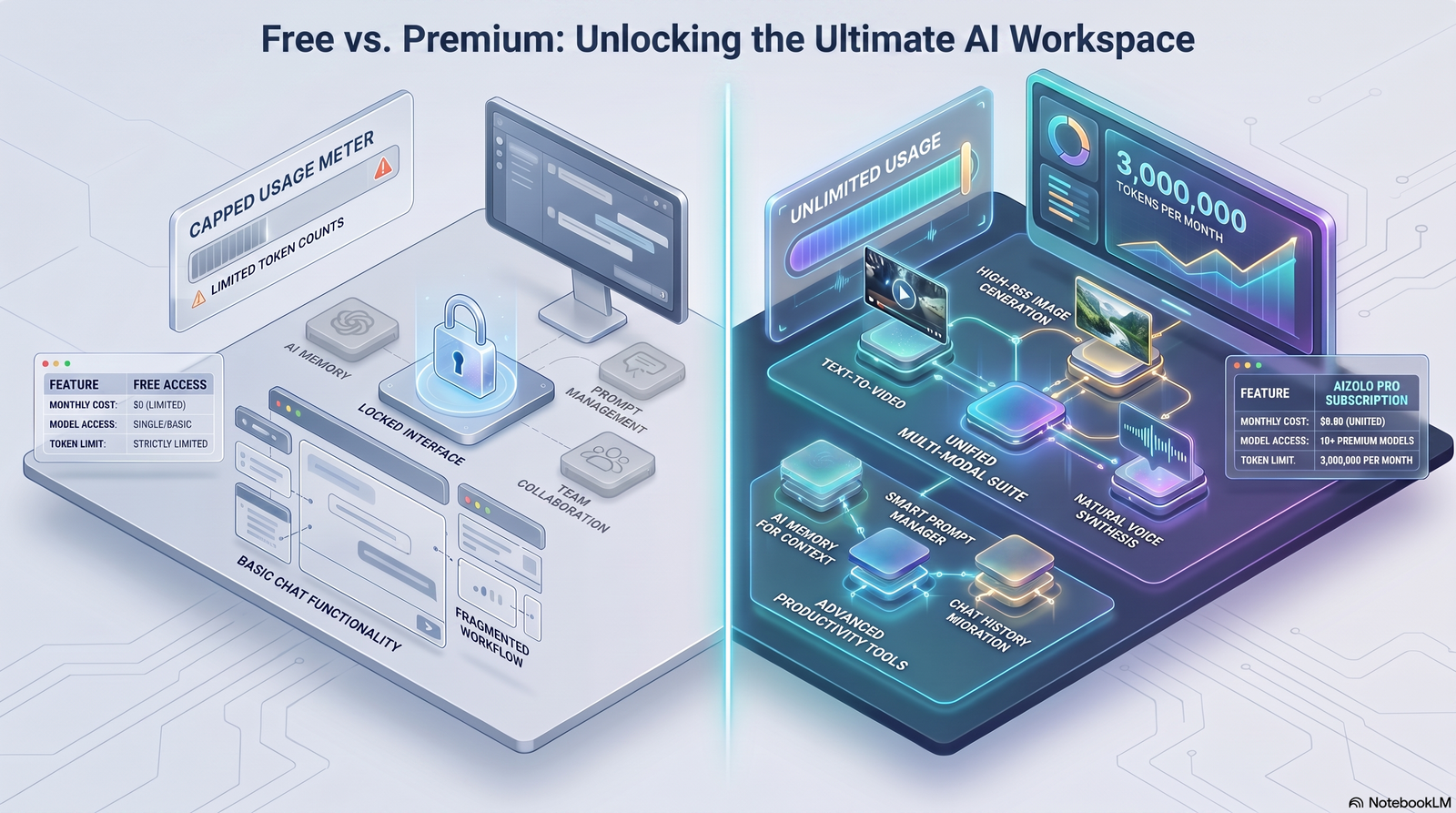
| Tool | Free Tier Reality | Paid Tier Unlocks |
|---|---|---|
| ChatGPT | Full core chat, limited access to newest models | Faster access, higher limits, custom GPTs, Team workspace |
| Claude | Daily message limits | Higher usage limits, Projects, larger file uploads |
| Notion AI | Workspace usable; AI trial only | Full AI Agent, meeting notes, workspace-wide search (Business tier) |
| ClickUp | Usable for very small teams; storage capped | Unlimited storage/automation; AI add-on billed separately |
| Zapier | A handful of basic Zaps | Multi-step Zaps, higher run volume, Copilot |
| Lindy | 7-day trial only, no permanent free tier | Ongoing agent automation with monthly credits |
Learning Curve vs. Time-to-Value
| Tool | Learning Curve | Time to First Value |
|---|---|---|
| ChatGPT / Claude | Low | Minutes |
| Fireflies / Otter | Low | First meeting |
| Zapier (simple Zaps) | Low–Medium | Under an hour |
| Notion AI | Medium | A few days, longer if migrating existing docs |
| ClickUp | Medium–High | One to two weeks for full setup |
| Lindy (agent building) | Medium | A few hours per agent |
| Motion | Medium | One to two weeks of calendar adjustment |
Best For: Quick Matching Table
| If your bottleneck is… | Start here |
|---|---|
| Scheduling and calendar chaos | Motion or Reclaim.ai |
| Drowning inbox | Lindy |
| Meeting notes eating your day | Fireflies or Otter.ai |
| Scattered docs and no single source of truth | Notion AI |
| Project visibility across a small team | ClickUp |
| Connecting existing apps without code | Zapier |
| Drafting and thinking through writing | Claude |
| General brainstorming and quick answers | ChatGPT |
| Cited, trustworthy research | Perplexity |
A Day in the Life: Using AI as a Solo Founder
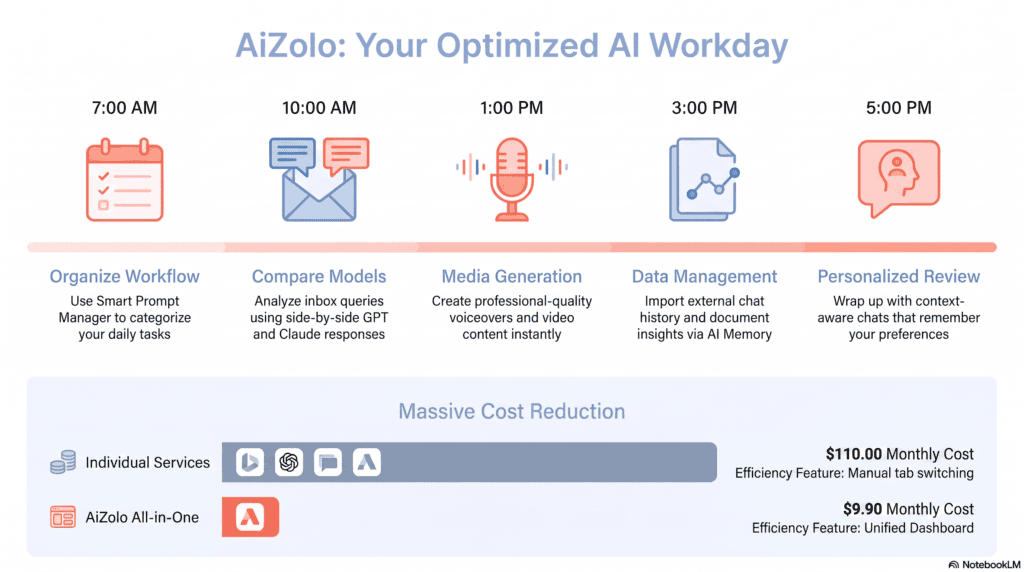
- 7:30 a.m. — Motion has already rearranged the calendar overnight around a deadline moved up by a client.
- 8:00 a.m. — Lindy has triaged overnight email, drafted replies to three routine requests, and flagged one that needs a personal response.
- 9:00 a.m. — A client call runs through Fireflies; a summary and action items land in Slack within minutes of hanging up.
- 11:00 a.m. — Claude helps draft a proposal, referencing an uploaded contract template and a past successful pitch.
- 1:00 p.m. — Zapier moves a new lead from a website form into the CRM and posts a summary to Slack automatically.
- 3:00 p.m. — ClickUp’s AI layer summarizes project status for a quick client update instead of manually pulling data from three boards.
- 5:00 p.m. — Notion AI turns the day’s scattered notes into a clean, searchable record for next week.
None of this replaces the founder’s judgment on the proposal terms, the client relationship, or the deal itself. It just clears the runway to make those calls with a clear head.
A Weekly AI Automation Checklist
- Review what each agent or automation actually did this week — not just whether it ran, but whether the output was good.
- Check credit or usage consumption on metered tools before you’re surprised by a bill.
- Clear or review AI “memory” on agent tools if a relationship or project context has changed.
- Spot-check at least one AI-drafted customer-facing message for tone and accuracy.
- Note one task that’s still fully manual and worth automating next.
Common Implementation Mistakes
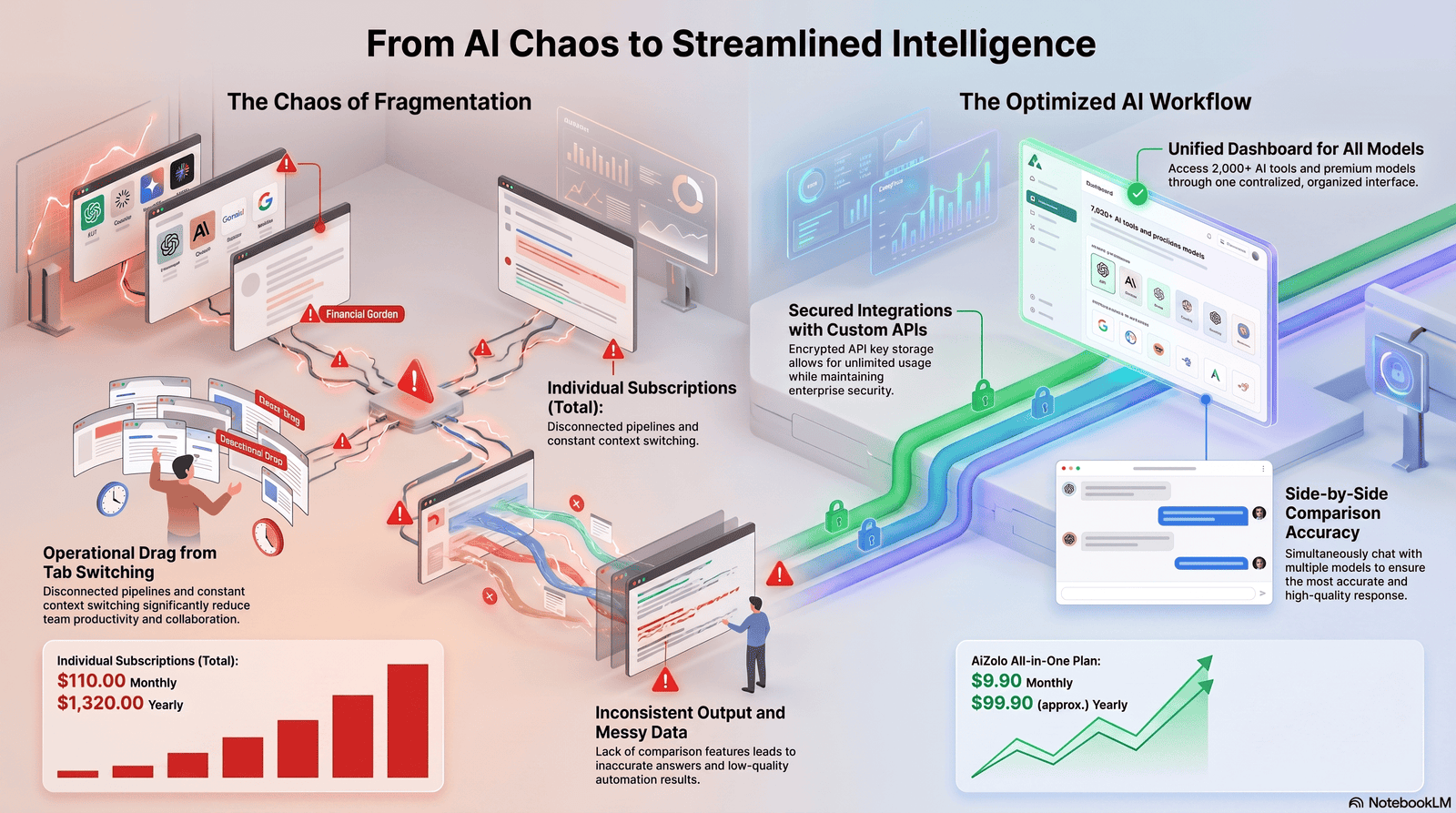
- Chasing every new tool. Stack sprawl is a bigger risk than under-adoption; most founders do better with three to five tools used well than fifteen used shallowly.
- Vague prompts. “Write an email” produces generic output; “write a 150-word cold email to SaaS CTOs, lead with the pain point” produces something usable.
- Treating AI output as final. Especially for anything financial, legal, or customer-facing — AI models can produce confident, plausible, and wrong answers.
- Ignoring the credit math. Usage-based pricing on agent platforms can turn a “$50/month” tool into a much larger bill once real volume hits.
- Skipping the habit change. Buying a scheduling tool and still manually managing your calendar in parallel defeats the purpose.
Hidden Costs to Watch For
- Per-seat AI add-ons that bill every team member, not just the people actually using AI features.
- Metered credits for premium actions (voice minutes, advanced model swaps, custom agent runs) that aren’t obvious from the headline price.
- Onboarding and migration time, especially for tools like ClickUp with a genuine learning curve.
- Integration limits on lower-tier plans that push you toward an upgrade sooner than expected.
- Overlap — paying for AI features in two tools that do the same job because nobody audited the stack.
Privacy, Security, and Data Risk
This is the section most “best tools” lists skim past, and it deserves real attention. Gartner research finds that data privacy and security now rank as the top AI-related risk cited by enterprises, and a meaningful share of organizations report having already experienced an AI-related security incident, including sensitive data leaking through prompts submitted to an LLM.
For an entrepreneur, the practical implications are:
- Read what the vendor does with your inputs. Some tools explicitly contractually prohibit using your data to train their models; others don’t say so clearly. That distinction matters if you’re pasting client contracts or financial data into a chat window.
- Separate what you’ll put in a general assistant from what needs a business-tier plan. Enterprise and business tiers of most major tools carry stronger data-handling commitments than free consumer tiers.
- Check compliance certifications if you handle regulated data. HIPAA, SOC 2, and GDPR support vary significantly by tool and, often, by plan tier — a free or entry plan may not carry the same guarantees as an enterprise agreement.
- Watch for “shadow AI.” As soon as you have even one employee, people will quietly adopt AI tools you haven’t vetted. An explicit, simple policy on what’s approved for company or client data heads off a real risk.
- Treat AI drafts of anything sensitive as a draft, not a final, sent-as-is communication, until you’ve built real trust in a specific tool for a specific task type.
Future Trends Worth Watching
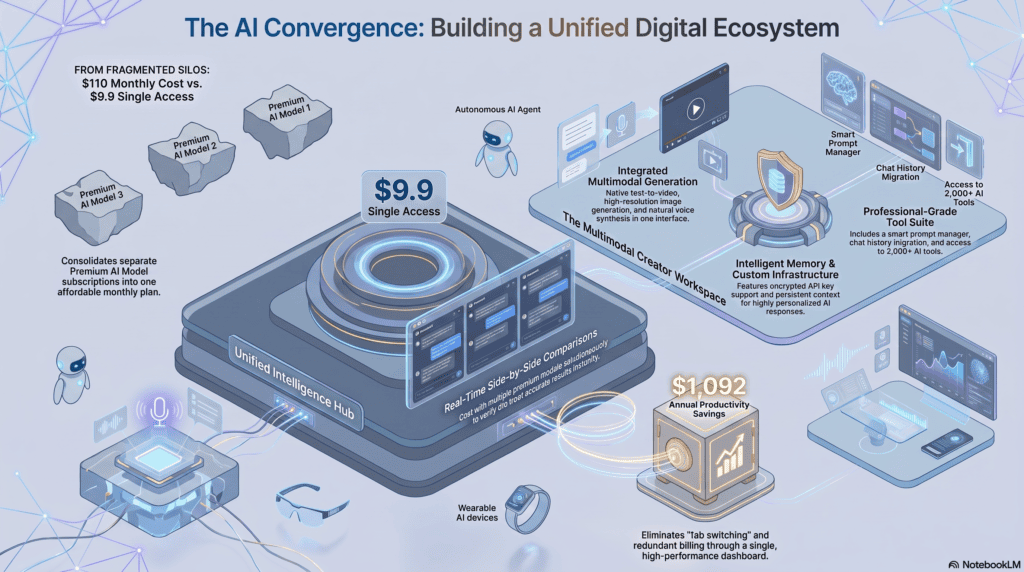
- Agents doing more of the execution, humans doing more of the directing. That’s the throughline of Microsoft’s 2026 research: as AI takes on more rote execution, the differentiator becomes how well a founder directs, reviews, and decides — not how fast they can type.
- Consolidation over proliferation. Expect existing tools (Notion, ClickUp, Zapier) to keep absorbing agent-like features rather than founders needing an ever-growing pile of single-purpose apps.
- Usage-based pricing becoming the norm for agentic features, which shifts budgeting from a flat subscription mindset to something closer to a utility bill — worth planning for.
- Governance catching up to adoption. Expect more built-in approval steps, audit logs, and “human-in-the-loop” defaults as vendors respond to the security concerns above.
Best Practices for Getting Real Value
- Start with one painful, repeatable workflow rather than trying to automate everything at once.
- Write down what “good output” looks like for a task before you hand it to AI — it makes evaluating results much faster.
- Give tools context about your business once (brand voice, standard terms, common questions) rather than re-explaining it every session.
- Review outputs on a schedule, not just when something goes wrong.
- Revisit your stack every quarter — pricing, features, and your own needs all shift fast in this market.
A Tool Selection Checklist
- Does it solve a specific, named bottleneck rather than a vague “be more productive” goal?
- Can you test it free or on a short trial before committing?
- Is pricing predictable, or does it depend on usage you can’t easily forecast?
- Does it integrate with what you already use?
- Does the vendor state clearly what happens to your data?
- Would you still want this tool if it took a week to set up properly?
Measuring ROI
Time saved is the simplest metric, but it’s incomplete on its own. A more complete view tracks:
- Hours reclaimed per week, measured honestly (not just “it feels faster”).
- Editing time on AI output — if you’re rewriting most of it, the real time savings are smaller than they look.
- Error or correction rate on anything customer-facing that AI touched.
- Cost per outcome, not just cost per seat — a $50/month tool that closes one extra deal a quarter pays for itself many times over; a $20/month tool nobody opens after week one is a loss regardless of the sticker price.
McKinsey’s research offers a useful benchmark for calibrating expectations: even among organizations already using AI, only a minority report a measurable bottom-line impact, and the ones that do typically pair the tool with a genuine change in how the work gets done — not just a new subscription layered onto an old process.
A 30-60-90 Day Implementation Roadmap
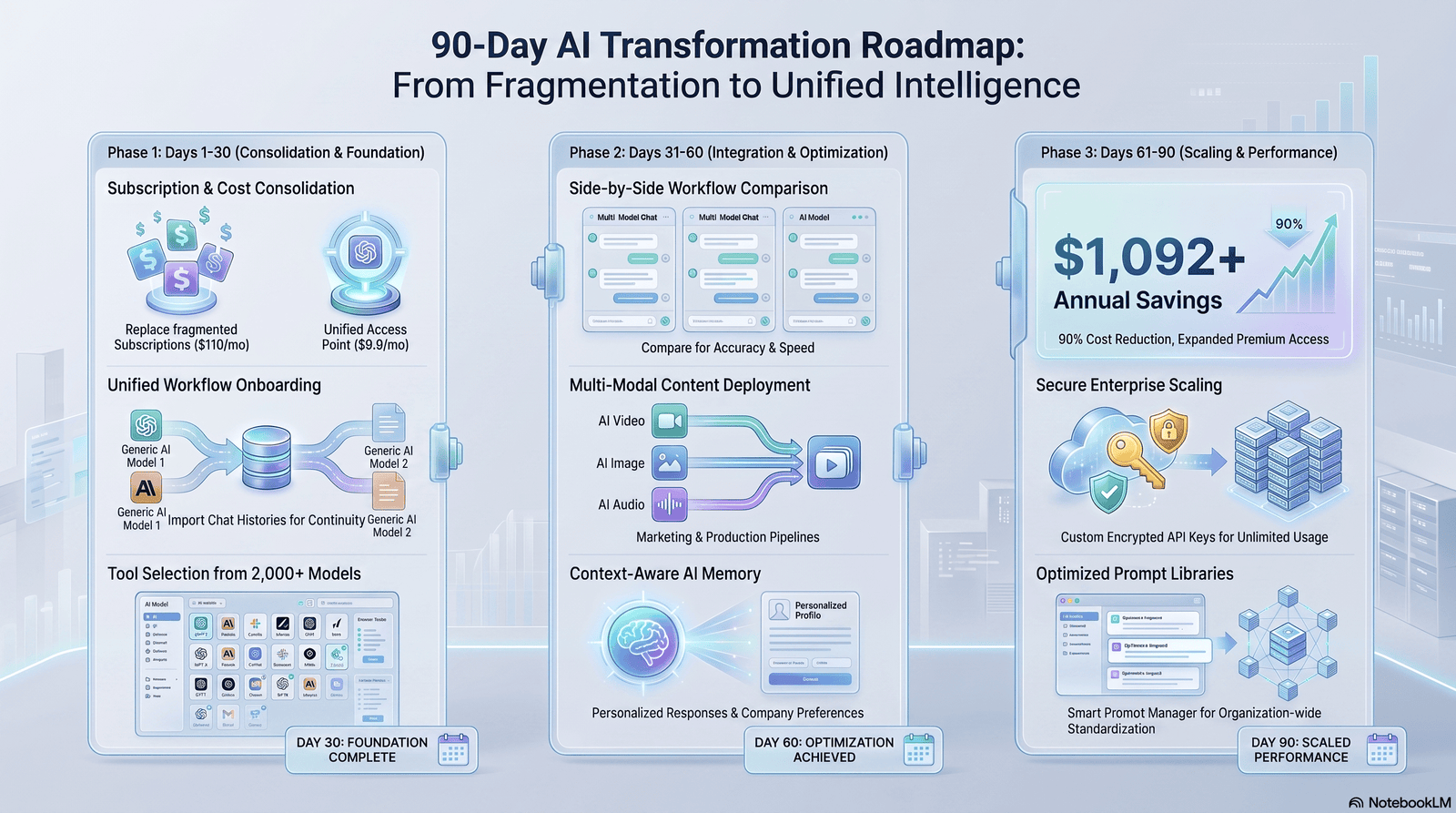
Days 1–30: Pick one bottleneck, one tool. Audit where your time actually goes for a few days. Choose the single most painful, most repeatable task — scheduling, inbox, or meeting notes are usually the highest-leverage starting points — and commit to one tool for it.
Days 31–60: Add a second layer, measure honestly. Once the first tool is a genuine habit, add a second (commonly a knowledge base or project tool). Track real time saved, not assumed time saved.
Days 61–90: Automate the connections between tools. This is where Zapier or a light agent workflow typically comes in — linking the tools you’ve already validated so information moves between them without manual re-entry.
People Also Ask
What are AI productivity tools? Software that uses AI to automate repetitive business tasks like writing, scheduling, research, and customer support, freeing up time for higher-value work. They range from single-purpose assistants to multi-step autonomous agents.
Which AI tool is best for entrepreneurs? There’s no single best tool — most founders combine a general assistant (ChatGPT or Claude) with one or two specialized tools for their biggest bottleneck, such as scheduling, meetings, or inbox management.
Can AI improve productivity? Yes, for well-matched tasks. Independent research shows measurable gains, particularly for less experienced workers and routine tasks, though gains are uneven and depend heavily on how the workflow is redesigned around the tool.
Are AI productivity tools worth paying for? Usually, if the tool saves at least 30 minutes a week reliably and the output needs minimal editing. Below that bar, the cost and habit-change effort rarely pay off.
Which free AI productivity tools are best? ChatGPT’s free tier, Notion’s free workspace, Zapier’s limited free automations, and Google Gemini’s free tier cover a meaningful share of basic needs before any paid upgrade is necessary.
How do startups use AI? Most commonly for drafting communications, scheduling, meeting notes, customer support triage, and connecting existing apps through automation — rarely for fully autonomous, unsupervised decision-making.
Can AI automate business workflows? Yes, particularly repetitive, well-defined workflows like lead routing, data entry, and follow-up sequences. Tasks requiring nuanced judgment still benefit from human review.
How secure are AI productivity tools? It varies significantly by vendor and plan tier. Enterprise plans typically carry stronger data-handling guarantees than free tiers; always check what a vendor does with your inputs before sharing sensitive business or client data.
FAQs
Do I need to know how to code to use these tools? No. Nearly every tool covered here, including agent builders like Lindy, is designed around plain-language instructions and visual, no-code interfaces.
How many AI tools should a solo founder use? Most founders get the most value from three to five well-chosen tools rather than a large, overlapping stack. Start with one bottleneck and expand deliberately.
Will AI tools replace the need to hire? Not entirely. They typically delay or reduce the need for certain administrative hires, but judgment-heavy roles — sales closing, strategic decisions, client relationships — still benefit from a human.
What’s the difference between automation tools like Zapier and agent tools like Lindy? Zapier follows fixed rules (“if this happens, do that”). Agent tools apply judgment — reading context and deciding what to do, not just executing a fixed trigger.
Is ChatGPT or Claude better for a small business? Both are strong generalists. ChatGPT tends to have a broader plugin ecosystem; Claude tends to perform better on long documents and careful, structured reasoning. Many founders use both for different tasks.
How much should I budget monthly for an AI productivity stack? A lean, effective solo-founder stack often runs somewhere between $50 and $200 a month once you combine a general assistant, a scheduling or meeting tool, and light automation — though usage-based agent tools can push that higher depending on volume.
Can AI tools handle customer support entirely on their own? They can resolve a meaningful share of routine, knowledge-base-answerable tickets, but complex or emotionally sensitive cases should still escalate to a human.
What happens to the data I put into these tools? It depends entirely on the vendor and plan. Read the specific data-handling terms before submitting sensitive client or financial information, and prefer business-tier plans with explicit no-training-on-your-data commitments for anything sensitive.
Are free AI tools good enough to start with? Often, yes, for a first month of testing. Most founders hit real limits (usage caps, missing features) within a few weeks and can decide whether a paid upgrade is justified based on actual, observed use.
How often should I re-evaluate my AI tool stack? Roughly quarterly. Pricing, features, and your own business needs all shift quickly enough in this market that a tool that made sense six months ago may not be the best fit today.
Do AI productivity tools work for non-technical founders? Yes — that’s largely the point of the current generation of tools. The learning curve is closer to “using a new app” than “writing software.”
What’s the biggest mistake founders make with these tools? Buying more tools than they can actually operationalize, and skipping the workflow change that makes the tool worth paying for in the first place.
Conclusion
The honest version of this guide is shorter than the marketing version most tools would prefer: AI productivity tools genuinely save entrepreneurs meaningful time, but only on tasks that are repetitive, well-defined, and honestly assessed — not on every task, and not automatically.
Start with the single bottleneck costing you the most hours each week. Pick one tool. Give it a real trial, measure the actual time saved, and only then add the next layer. A lean stack, used well, consistently beats a sprawling one used carelessly — and the data on pilot failure rates backs that up directly.
AUTHOR BIO
Author: Jeevesh Tripathi Title: AI Researcher & Content Specialist Email: jeevesh@aizolo.com
Bio: Jeevesh Tripathi researches artificial intelligence, SaaS software, automation, and emerging technology trends. His articles combine in-depth research, practical experience, and SEO best practices to help businesses and professionals make informed technology decisions.

