
Creating a clear AI blueprint can save hours of planning, research, and trial and error. An AI blueprint generator helps turn a goal or idea into a structured, actionable plan in seconds. But choosing the right AI model can make a difference in the quality of those plans. With AiZolo, you can work with multiple leading AI models from one workspace, making it easier to compare different approaches and choose the response that fits your project best. Whether you’re planning a business, content strategy, product, or personal project, combining AI-generated planning with multiple model perspectives can help you move from idea to execution faster.

Table of Contents
Introduction
Planning used to mean whiteboards, sticky notes, and days of back-and-forth meetings. That’s changing fast.
An AI blueprint generator can now turn a short text prompt into a structured plan, layout, or workflow in minutes. It’s one of the most practical applications of generative AI to hit mainstream business use in 2026.
The shift isn’t hype. Search interest in AI planning tools has grown steadily since 2023, and enterprise adoption of AI-assisted design and workflow tools has followed the same curve as generative AI itself.
Businesses are adopting these tools for a simple reason: the cost of planning mistakes is high, and AI catches gaps humans miss under deadline pressure.
Architects use them to test floor plans. Startups use them to map business models. Developers use them to sketch software architecture before writing a line of code.
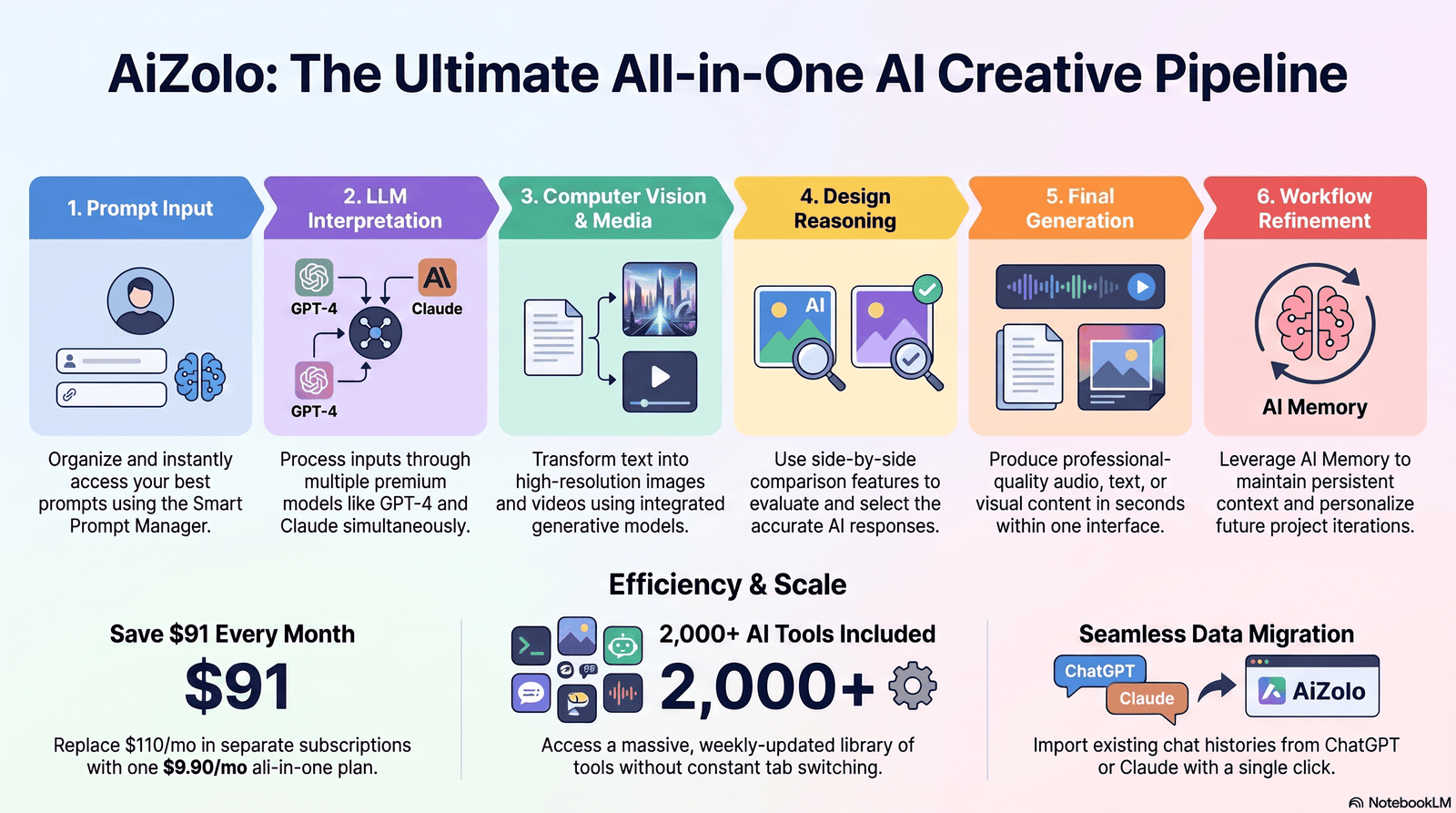
In this guide, you’ll learn what an AI blueprint generator actually is, how it works under the hood, and which tools are worth your time in 2026. You’ll also get real prompt examples, a step-by-step tutorial, pricing breakdowns, and honest limitations — not marketing fluff.
What Is an AI Blueprint Generator?
An AI blueprint generator is a software tool that uses artificial intelligence — typically large language models (LLMs), computer vision, or generative design algorithms — to automatically create structured plans, layouts, or diagrams from a prompt, dataset, or set of requirements.
In short: it converts an idea, described in plain language, into a usable blueprint — whether that’s a business plan, a floor plan, a software architecture diagram, or a marketing workflow.
Unlike traditional blueprint software, which requires manual input at every step, an AI blueprint generator interprets intent and fills in structural details on its own.
A Quick History
Blueprint creation has always followed the tools available at the time.
- 1950s–1990s: Hand-drafted blueprints and technical drawings.
- 1990s–2010s: CAD software (AutoCAD, SolidWorks) digitized the process but still required manual drafting skill.
- 2015–2022: Rule-based automation and template generators reduced repetitive work.
- 2023–present: Generative AI models introduced natural-language-to-blueprint capability, letting non-experts generate usable first drafts instantly.
How It Differs From Traditional Blueprint Software
Traditional blueprint software is a canvas. You draw, place, and connect everything yourself.
An AI blueprint generator is closer to a collaborator. You describe the goal, and it proposes a structure, which you then refine.
The AI models involved usually include large language models for reasoning and text-based structure, computer vision models for image or floor-plan interpretation, and generative design algorithms for spatial or engineering layouts.
Why the Term Is Suddenly Everywhere
Search interest around “AI blueprint” phrases has climbed alongside broader generative AI adoption.
Part of this is genuine utility. Part of it is vendors renaming existing features to ride the trend.
That’s why it helps to understand the underlying mechanics rather than just the marketing label — so you can tell a genuinely useful tool from a repackaged template generator.
Core Components Behind the Scenes
Most credible AI blueprint generators combine three technical layers.
Natural language understanding interprets what you’re asking for, including implied requirements you didn’t spell out.
Domain knowledge encoding applies rules specific to the blueprint type — building codes for architecture, design patterns for software, marketing frameworks for campaigns.
Output formatting logic converts the AI’s internal reasoning into a usable format: a diagram, a document, a spreadsheet, or a visual layout.
Understanding these layers helps explain why some tools excel at business blueprints but struggle with architecture, and vice versa — the domain knowledge layer is rarely equally strong across every use case.
How an AI Blueprint Generator Works
Most modern tools follow a similar pipeline, whether they’re generating a business plan or a building layout.
1. Prompt Input
You describe your goal in natural language: “Create a workflow blueprint for onboarding new SaaS customers.”
2. LLM Interpretation
The underlying language model parses your intent, identifies missing requirements, and structures the response into logical components.
3. Computer Vision (When Applicable)
For architecture, engineering, or floor-plan generators, computer vision models interpret existing images, sketches, or spatial constraints.
4. Design Reasoning
The system applies domain logic — building codes, software design patterns, or business frameworks — to keep the output realistic and usable.
5. Workflow or Layout Generation
The AI assembles the blueprint: a diagram, document, floor plan, or workflow chart, depending on the tool.
6. Iterative Refinement
You review the draft and ask the AI to adjust specific sections. This back-and-forth is where most of the real value happens.
Step-by-step summary:
- Enter a natural language prompt describing your goal
- AI interprets intent and identifies requirements
- Relevant models (LLM, vision, generative design) process the input
- Initial blueprint draft is generated
- You review and request changes
- AI refines the output iteratively
- Final blueprint is exported or integrated into other tools
Why Prompt Quality Determines Output Quality
The single biggest factor in blueprint quality isn’t the tool — it’s the prompt.
A vague prompt forces the AI to guess at constraints, which is where most disappointing results come from.
A detailed prompt that includes goal, audience, constraints, and format typically produces a usable first draft with far less back-and-forth.
The Role of Iteration
Few AI blueprints are perfect on the first try, and that’s expected, not a flaw.
Treat the first output as a rough skeleton. The real value shows up in the second and third rounds of targeted refinement.
Experienced users typically spend more time refining specific sections than generating the initial draft — that’s where domain expertise and AI speed combine most effectively.
Types of AI Blueprint Generators
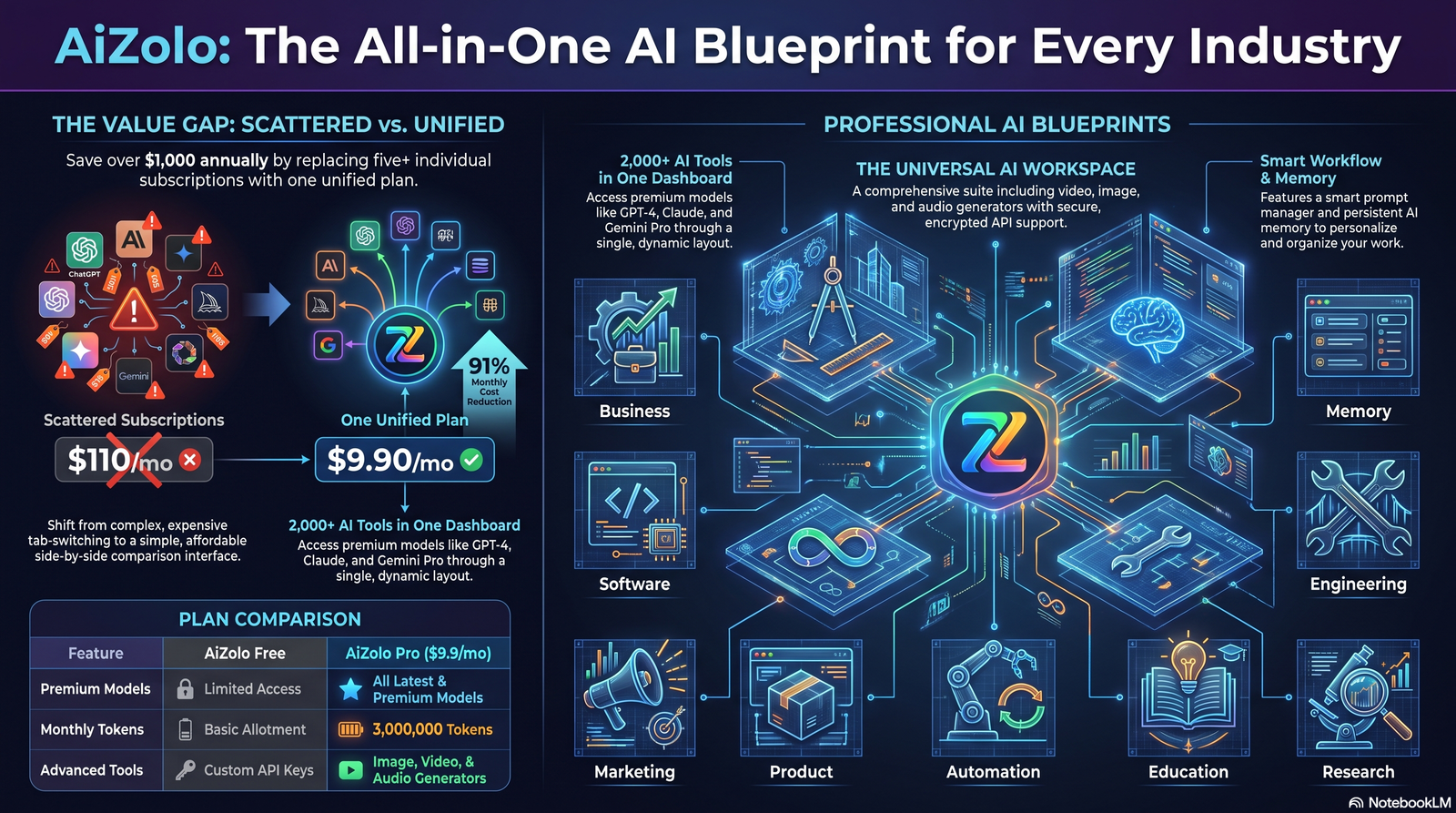
Not all blueprint generators solve the same problem. Here’s how the main categories differ.
Business Blueprint — Maps business models, revenue streams, and operational structure. Useful for founders validating an idea quickly.
Architecture Blueprint — Generates building layouts, floor plans, and spatial designs based on square footage, code requirements, and use case.
Software Blueprint — Produces system architecture diagrams, database schemas, and API structures from a product description.
Workflow Blueprint — Automates process mapping for operations, customer journeys, or internal approvals.
Engineering Blueprint — Supports mechanical, electrical, or product engineering diagrams with technical constraints built in.
Marketing Blueprint — Builds campaign structures, content calendars, and funnel maps from a stated goal and audience.
Product Blueprint — Outlines feature sets, user flows, and roadmaps for new product development.
Automation Blueprint — Designs multi-step automation sequences connecting tools, triggers, and actions.
Education Blueprint — Creates lesson plans, curriculum maps, and learning paths tailored to specific outcomes.
Research Blueprint — Structures research methodology, literature review scope, and data collection plans.
Benefits of Using an AI Blueprint Generator
Speed — What took days of meetings can now produce a working draft in minutes.
Automation — Repetitive structural work (formatting, sectioning, labeling) happens automatically.
Collaboration — Teams can iterate on a shared draft instead of starting from a blank page separately.
Brainstorming — AI often proposes structural options a human planner wouldn’t think to include.
Documentation — Blueprints double as living documentation that’s easy to update.
Cost savings — Less time spent on manual drafting means lower project overhead, especially for early-stage work.
Consistency — AI applies the same structural logic every time, reducing formatting drift across teams.
Scalability — Generating ten blueprints takes barely more effort than generating one.
Why These Benefits Compound Over Time
Individually, each benefit saves modest time. Together, they change how teams approach early-stage planning entirely.
A team that once budgeted a week for a first-draft business plan can now compress that into a single working session, leaving more time for the parts that actually require human judgment — negotiation, strategy, and final decision-making.
This is where AI blueprint generators earn their place in a workflow: not by replacing expertise, but by removing the slow, repetitive parts that precede it.
Limitations You Should Know
Honesty matters more than hype here, so let’s be direct.
Hallucinations — AI models can invent requirements, codes, or specifications that sound plausible but are inaccurate. Always verify technical details against authoritative sources.
Technical limitations — Complex engineering or structural blueprints still require licensed professional review; AI output is a draft, not a certified plan.
Security — Blueprints often contain sensitive business or infrastructure data. Check how each tool stores and processes your inputs.
Privacy — Avoid pasting confidential financial or personal data into consumer-facing AI tools without confirming their data policies.
Human review — Every AI-generated blueprint needs expert review before implementation, especially in regulated industries.
Compliance — Building codes, industry regulations, and legal requirements vary by region; AI tools don’t always account for local rules automatically.
Treat AI Output as a Draft, Not a Deliverable
None of these limitations mean AI blueprint generators aren’t worth using. They mean the output needs the same scrutiny you’d give any junior team member’s first draft.
The tools are excellent at compressing the time it takes to get from a blank page to a structured starting point. They are not a substitute for licensed professional sign-off where that’s legally required — architecture, engineering, and financial planning being the clearest examples.
Best AI Blueprint Generator Tools Compared
There’s no single “best” tool — it depends on whether you need text-based planning, visual design, or technical diagrams.
| Tool | Best For | Key Features | Pricing (2026) | Limitations |
|---|---|---|---|---|
| ChatGPT | General business & workflow blueprints | Strong reasoning, plugins, custom GPTs | Free tier; Plus ~$20/mo | No native visual layout tools |
| Claude | Long-form structured planning & document blueprints | Long context, strong writing/reasoning, Artifacts for structured output | Free tier; Pro from ~$20/mo | Limited native image generation |
| Gemini | Google Workspace-integrated planning | Deep integration with Docs, Sheets, Slides | Free tier; paid via Google One AI plans | Best results require Workspace ecosystem |
| Aizolo | Accessing multiple AI models for blueprint drafting from one interface | Multi-model access in one subscription | Subscription-based | Not a native diagram/CAD tool |
| Mistral | Developer-focused workflow and software blueprints | Open-weight models, fast inference | Free/open models; paid API tiers | Smaller ecosystem of integrations |
| Perplexity | Research-backed blueprint drafting | Cited sources, real-time search | Free tier; Pro ~$20/mo | Less suited to visual/spatial output |
| Microsoft Copilot | Enterprise workflow blueprints inside Office | Deep Office/Teams integration | Included with Copilot licensing | Best value tied to Microsoft 365 plans |
| Notion AI | Documentation-style project blueprints | Native database and page structuring | Add-on to Notion plans | Not built for spatial/architecture use |
| Figma AI | UI/UX and product blueprint generation | Visual design generation inside Figma | Included in select Figma plans | Design-focused, not for business planning |
| Autodesk AI | Architecture & engineering blueprints | Generative design, CAD integration | Enterprise/subscription pricing | Steeper learning curve for beginners |
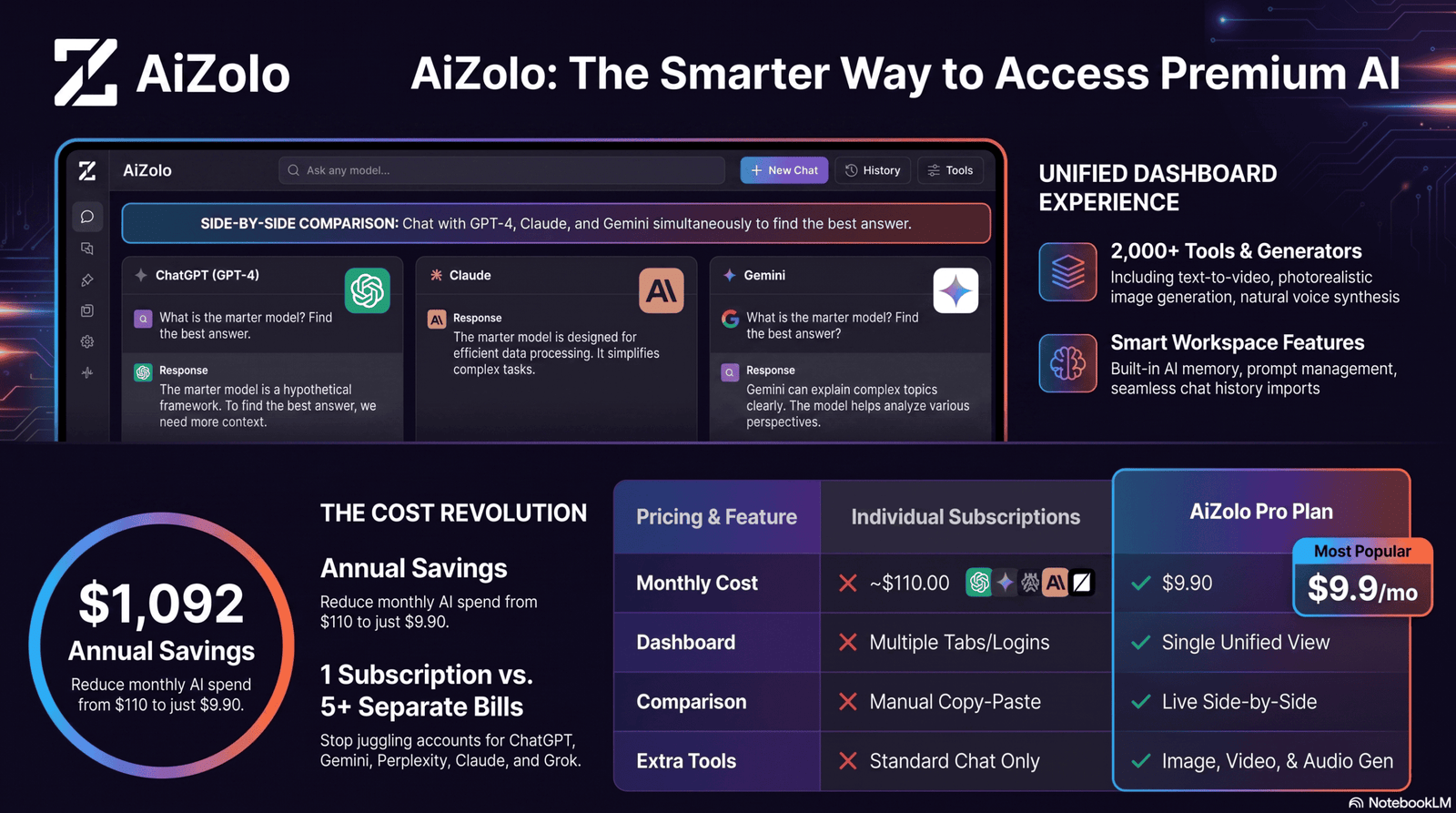
Pricing changes frequently — always confirm current rates directly on each provider’s website before purchasing.
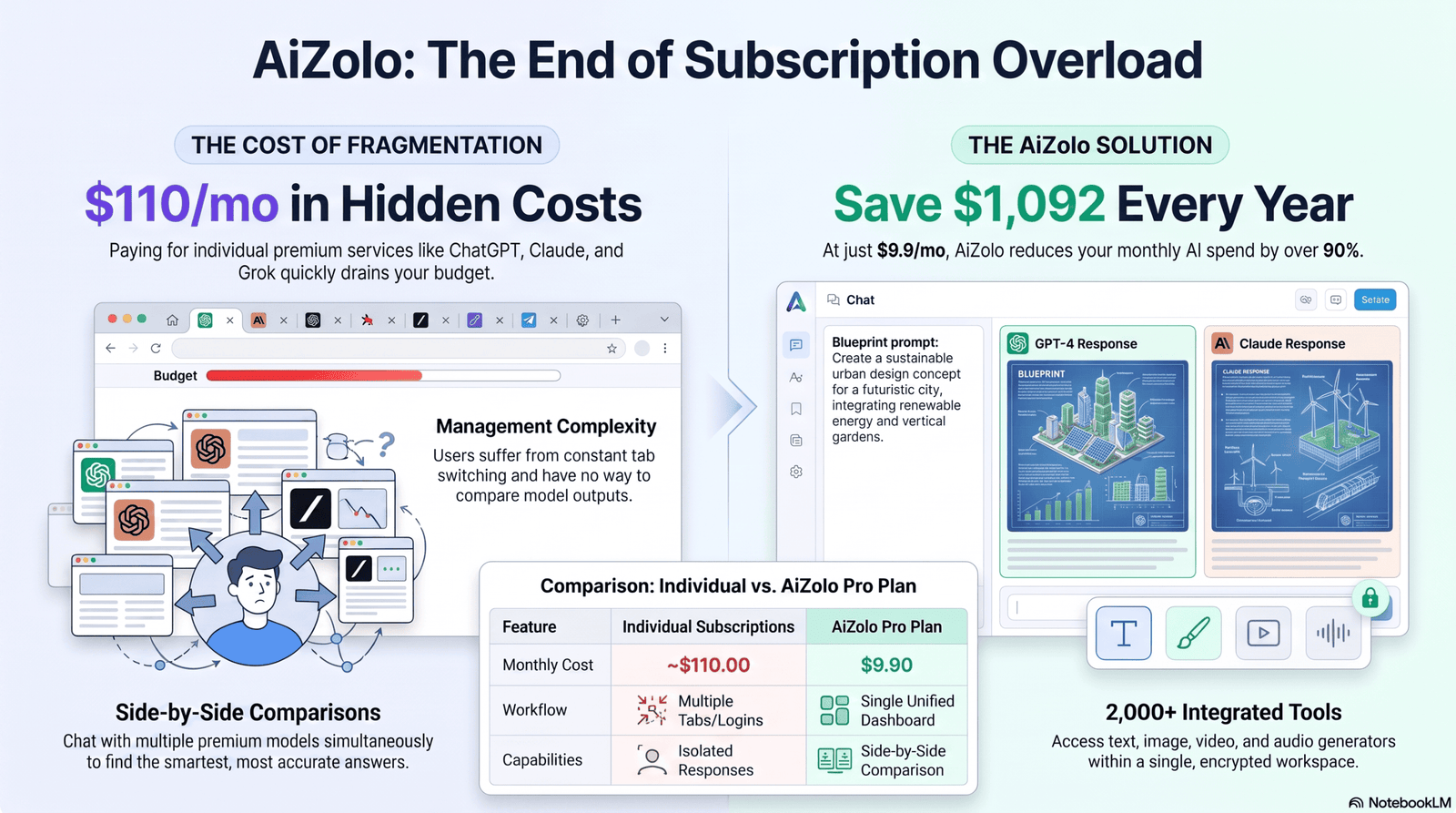
If your workflow involves comparing outputs from multiple models before settling on a final blueprint, using a platform built around <strong>accessing multiple AI models in one subscription</strong> can save both time and separate subscription costs.
Real Use Cases Across Industries
The value of an AI blueprint generator looks different depending on who’s using it and what “done” means for their project.
Below are the patterns that show up most consistently across industries in 2026.
Businesses use AI blueprint generators to map new department structures and operational workflows before rolling them out.
Startups validate business models fast, turning a pitch idea into a structured plan for investors within a single session.
Architects use them to explore multiple floor plan variations for a site before committing to detailed CAD work.
Engineers draft early-stage technical diagrams to test feasibility before formal engineering review.
Students use blueprint generators to structure research proposals, essays, and study plans.
Content creators build content calendars and campaign blueprints in a fraction of the usual planning time.
Marketing teams map full-funnel campaigns, from audience segmentation to channel sequencing.
Software developers sketch system architecture and database schemas before writing production code.
Manufacturing teams use engineering blueprint generators to prototype process layouts and equipment placement.
Healthcare organizations map patient workflow and facility layouts to reduce bottlenecks.
Education institutions design curriculum blueprints aligned to specific learning outcomes.
Construction firms use architecture blueprint tools to test design options before final permitting.
Step-by-Step Tutorial
Here’s a practical walkthrough for creating your first AI blueprint, regardless of which tool you use.
Step 1: Define your objective clearly. Write one sentence describing exactly what you want the blueprint to accomplish.
Step 2: Gather constraints. List budget, timeline, technical requirements, or spatial dimensions before prompting.
Step 3: Write a detailed prompt. Include the objective, constraints, format, and audience. (Screenshot recommendation: capture the prompt input screen with a filled-out example prompt visible.)
Step 4: Review the first draft. Read the entire output before making changes — don’t edit line by line yet. (Screenshot recommendation: capture the generated blueprint output in full view.)
Step 5: Request targeted refinements. Ask for changes to specific sections rather than regenerating the whole blueprint.
Step 6: Verify technical claims. Cross-check any codes, statistics, or specifications against authoritative sources.
Step 7: Export or integrate. Move the finalized blueprint into your project management, CAD, or documentation tool.
Step 8: Get human sign-off. Have a qualified reviewer approve the blueprint before implementation.
A Realistic Timeline
For a business or workflow blueprint, expect roughly 15–30 minutes from first prompt to a solid working draft, plus additional time for review depending on complexity.
Architecture, engineering, and other regulated blueprints take longer, since professional verification is a required step, not an optional one.
20 Best Prompt Examples
- “Create a business blueprint for a subscription-based meal-kit startup targeting busy professionals.”
- “Generate a workflow blueprint for a customer support escalation process with three tiers.”
- “Design a software architecture blueprint for a multi-tenant SaaS analytics platform.”
- “Draft a floor plan blueprint for a 1,200 sq ft open-plan office with 20 desks and two meeting rooms.”
- “Build a marketing campaign blueprint for a product launch targeting Gen Z consumers.”
- “Create an automation blueprint connecting a CRM, email tool, and calendar for lead follow-up.”
- “Generate a product roadmap blueprint for a mobile app’s first two release cycles.”
- “Draft an engineering blueprint for a modular shelving system with adjustable height.”
- “Create an education blueprint for a 6-week beginner Python course.”
- “Design a research blueprint for studying remote work productivity across three company sizes.”
- “Generate a business blueprint comparing three pricing models for a B2B SaaS product.”
- “Create a workflow blueprint for onboarding new employees in a 50-person company.”
- “Draft a software blueprint for a REST API supporting user authentication and payments.”
- “Design an architecture blueprint for a two-bedroom accessible home under 1,000 sq ft.”
- “Build a marketing blueprint for a content calendar covering one quarter across three channels.”
- “Generate an automation blueprint for syncing inventory data between two e-commerce platforms.”
- “Create a product blueprint outlining MVP features for a habit-tracking app.”
- “Draft an engineering blueprint for a solar panel mounting bracket for residential rooftops.”
- “Design an education blueprint for onboarding new teachers to a digital classroom platform.”
- “Generate a research blueprint for testing user experience across three checkout flow designs.”
Common Mistakes to Avoid
Vague prompts. “Make me a business plan” gives the AI too little to work with. Be specific about audience, goal, and constraints.
Missing requirements. Skipping budget, timeline, or technical limits leads to unrealistic blueprints.
Over-automation. Letting AI make final decisions without human review, especially on compliance-sensitive projects.
Security issues. Pasting confidential data into public AI tools without checking their privacy policy first.
Accepting the first draft. Treating the initial output as final instead of iterating toward accuracy.
AI Blueprint Generator vs Traditional Planning
| Factor | AI Blueprint Generator | Traditional Planning |
|---|---|---|
| Speed | Minutes to first draft | Days to weeks |
| Cost | Lower for early-stage drafts | Higher due to manual labor hours |
| Consistency | High, repeatable structure | Varies by planner |
| Customization depth | Good, improves with iteration | Very high, fully manual control |
| Compliance accuracy | Requires human verification | Handled directly by experts |
| Best for | Early drafts, brainstorming, speed | Final, certified, regulated deliverables |
AI Blueprint Generator vs AI Workflow Generator
These terms overlap but aren’t identical.
An AI blueprint generator produces the overall structural plan — the “what” and “how it fits together.”
An AI workflow generator focuses specifically on process sequencing — the “what happens in what order.”
In practice, a blueprint often contains one or more workflows inside it. Think of the blueprint as the blueprint for a house, and the workflow as the plumbing diagram within it.
AI Blueprint Generator vs CAD Software
| Factor | AI Blueprint Generator | CAD Software |
|---|---|---|
| Input method | Natural language prompts | Manual drafting/technical input |
| Learning curve | Low to moderate | High, requires training |
| Precision | Good for early drafts | Engineering-grade precision |
| Certification-ready output | No, needs professional finishing | Yes, industry standard |
| Speed to first draft | Very fast | Slower, more deliberate |
| Best use | Concept exploration | Final technical documentation |
AI blueprint generators and CAD software increasingly work together — many teams use AI for concept drafts, then finalize in CAD tools like Autodesk’s platforms.
Pricing Guide
Free tools: ChatGPT (free tier), Gemini (free tier), Mistral open models, and Claude’s free tier all support basic blueprint drafting at no cost.
Paid tools: Most premium plans, including ChatGPT Plus, Claude Pro, and Perplexity Pro, sit in the $20/month range as of 2026.
Enterprise pricing: Tools like Autodesk AI, Microsoft Copilot, and Figma AI enterprise tiers are typically quoted per seat and vary based on organization size and usage volume.
If you regularly compare drafts across multiple models, it may be more cost-effective to use a <strong>single subscription for all AI models</strong> rather than paying for several separate tools. Always confirm current pricing directly with each provider, since rates change frequently.
Future Trends
Agentic AI — Blueprint generators will increasingly act autonomously, executing parts of the plan rather than just describing it.
Multimodal AI — Combining text, image, and voice input will make blueprint creation more natural and less prompt-dependent.
Reasoning models — Deeper step-by-step reasoning will improve accuracy on complex, multi-constraint blueprints.
Generative design — Engineering and architecture tools will propose optimized structural variations automatically.
3D blueprint generation — Full 3D models, not just 2D layouts, will become standard output for architecture and product design tools.
Robotics integration — Blueprints will increasingly feed directly into robotic manufacturing and construction systems.
Frequently Asked Questions
What is an AI blueprint generator? It’s a tool that uses AI to turn a text prompt or dataset into a structured plan, layout, or diagram automatically.
Is an AI blueprint generator free? Many tools offer free tiers with basic functionality; advanced features usually require a paid plan.
Can AI blueprint generators replace architects or engineers? No. They speed up early drafting but still require professional review for certified, compliant final plans.
Which AI is best for business blueprints? ChatGPT and Claude are both strong choices for text-based business and workflow blueprints.
Which AI is best for architecture blueprints? Autodesk AI is purpose-built for architecture and engineering, with generative design and CAD integration.
Are AI-generated blueprints accurate? They’re a strong starting point but can contain errors or hallucinated details that need human verification.
Do AI blueprint generators work for software architecture? Yes — tools like ChatGPT, Claude, and Mistral are commonly used to draft system architecture and database schemas.
Is my data safe when using an AI blueprint generator? It depends on the tool’s privacy policy. Avoid entering sensitive data unless you’ve confirmed how it’s stored and used.
How much do AI blueprint generators cost? Free tiers exist, but most paid plans range from around $20/month for individuals to custom enterprise pricing.
Can I use AI blueprint generators for marketing plans? Yes, they’re commonly used to build campaign structures, content calendars, and funnel maps.
What’s the difference between a blueprint and a workflow? A blueprint is the overall structural plan; a workflow describes the sequence of steps within part of that plan.
Do I need technical skills to use these tools? No. Most tools are designed for natural language input, though technical knowledge helps you evaluate the output.
Can AI blueprint generators create 3D designs? Some, like Autodesk AI, support 3D generative design; most text-based AI tools are limited to 2D or structural text output.
How do I write a good blueprint prompt? Include your objective, constraints, format, and audience — vague prompts produce vague results.
Are AI blueprints legally compliant automatically? No. Compliance with building codes and regulations must always be verified by a licensed professional.
Can small businesses benefit from AI blueprint generators? Yes — they’re especially useful for startups needing fast, low-cost planning drafts.
What industries use AI blueprint generators most? Architecture, software development, marketing, education, manufacturing, and healthcare are leading adopters.
Will AI blueprint generators improve in the future? Yes — trends point toward more agentic, multimodal, and 3D-capable tools over the next few years.
Final Verdict
An AI blueprint generator won’t replace expert judgment, but it will save you real time getting from idea to structured plan.
Start with a clear objective and constraints, choose a tool that fits your specific blueprint type, and always have a qualified human review the final output.
For most people, the smartest approach is testing a few tools side by side before committing to one subscription. Platforms that let you access <strong>multiple AI models in one subscription</strong> make that comparison process far simpler and more affordable.
Featured Snippet Opportunities
- 40–60 word definition included in the “What Is an AI Blueprint Generator?” section
- Numbered step-by-step process in “How an AI Blueprint Generator Works” and the tutorial section
- Comparison tables for tools, traditional planning, workflow generators, and CAD software
- Bullet-point benefits and limitations lists
- FAQ section formatted for direct answer extraction
Additional recommended media: a short demo video showing a full prompt-to-blueprint workflow, and an animated GIF of the iterative refinement step in the tutorial section.
Note: distribute these across the article body as shown; do not repeat the same slug more than once per section.
Call to Action
Testing several AI tools before committing to one is the smartest way to find the right fit for your blueprint needs. If you’d rather not juggle separate subscriptions, Aizolo lets you work with multiple AI models from a single interface, so you can compare outputs and pick what works best for your project.
About the Author
Jeevesh Tripathi AI Researcher & Technical Content Writer 📧 jeevesh@aizolo.com
Jeevesh Tripathi is an AI researcher and technical content writer specializing in generative AI, AI-powered planning tools, and practical technology education. With hands-on experience testing and comparing leading AI platforms, he focuses on translating complex AI concepts into clear, actionable guidance for businesses and individual users alike. His work emphasizes accuracy, transparency about tool limitations, and alignment with current search quality and EEAT standards. Jeevesh regularly evaluates emerging AI tools across planning, design, and automation categories to help readers make informed, practical decisions rather than relying on marketing claims.
