
Quick summary: Most guides list AI apps and call it a strategy. This one is different — it walks through how to actually connect AI workflow tools for content creators into a repeatable pipeline: brief, draft, fact-check, edit, repurpose, publish. You’ll see which model fits which stage, how to set up projects so you’re not re-explaining tone every session, and where a unified workspace like AiZolo removes the tab-switching that quietly eats your week.
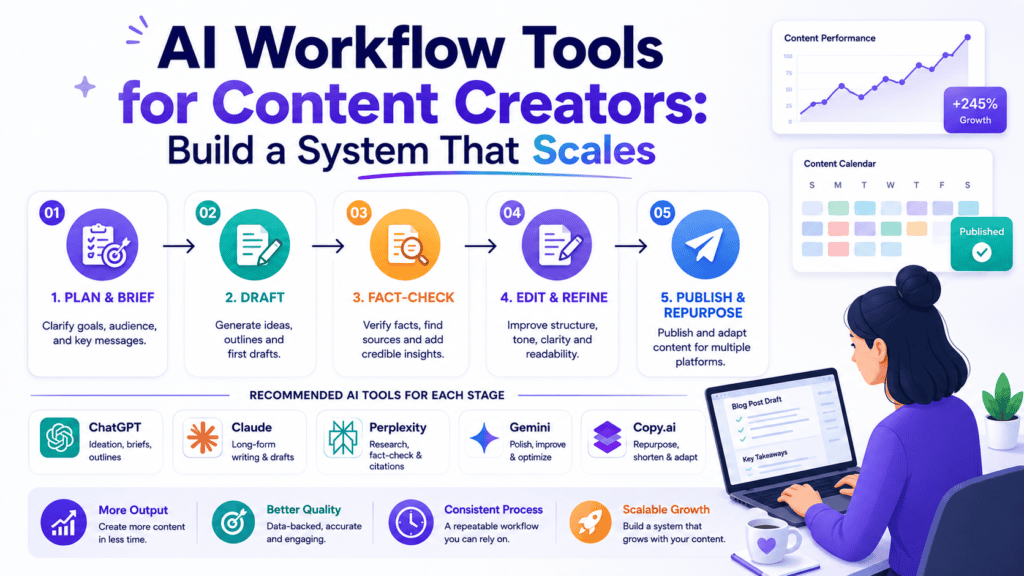
Table of Contents
The Problem Isn’t the Tools. It’s the Gaps Between Them
Most creators already have access to good AI tools. ChatGPT, Claude, Gemini — all capable, all a click away.
The problem shows up in the gaps: copying a draft from one tab, pasting it into another, losing the brief’s context somewhere in between.
That’s not a tools problem. That’s a workflow problem — and it’s the one thing most “best AI tools” lists never actually solve.
Fixing it doesn’t mean adding another subscription. It means choosing AI workflow tools for content creators that connect to each other, and setting them up so context survives every handoff.
This guide walks through exactly that: which model fits which stage, how to structure projects so tone never gets lost, and where a unified workspace removes the switching cost entirely.
What “AI Workflow Tools” Actually Means
A workflow tool isn’t just an app you open. It’s a piece that connects to the next step without losing context.
For content creators, the right AI workflow tools mean the brief you write on Monday should still be readable — and usable — by whichever model drafts the piece on Tuesday.
LSI terms worth knowing here: content creation pipeline, multi-model workflow, AI content automation, brief-to-publish process, prompt library, project-based AI workspace, content operations.
Most AI workflow tools for content creators fail at exactly this connection point — not at the writing itself.
Why Fragmented Workflows Cost More Than Time
A missed connection between stages doesn’t just cost minutes. It costs consistency.
When your brief lives in one tab and your draft in another, small details drift — a tone note gets forgotten, a statistic goes unverified, a deadline slips because you’re rebuilding context instead of writing.
Multiply that across every piece you publish in a month, and the real cost of disconnected AI workflow tools for content creators becomes obvious: not the subscription price, but the compounding friction.
How to Tell If Your Current Workflow Is Actually Broken
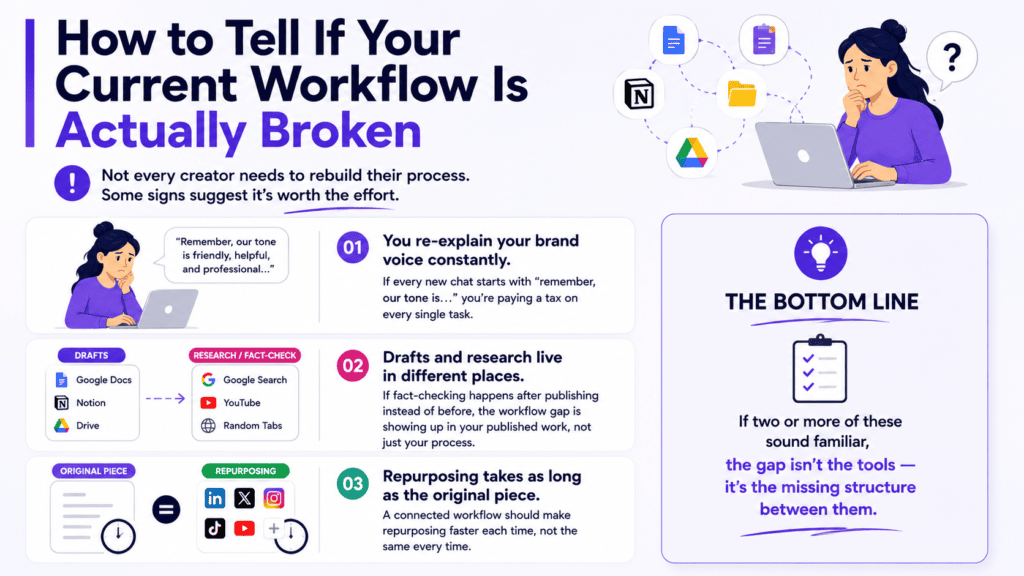
Not every creator needs to rebuild their process. Some signs suggest it’s worth the effort.
You re-explain your brand voice constantly. If every new chat starts with “remember, our tone is…” you’re paying a tax on every single task.
Drafts and research live in different places. If fact-checking happens after publishing instead of before, the workflow gap is showing up in your published work, not just your process.
Repurposing takes as long as the original piece. A connected workflow should make repurposing faster each time, not the same every time.
If two or more of these sound familiar, the gap isn’t the tools — it’s the missing structure between them.
Choosing Your First AI Workflow Tool
You don’t need every model on day one. Start with whichever two cover the stage you repeat most often.
If you publish blog content weekly, start with a drafting model and a fact-checking model — that pairing alone removes the biggest workflow gap for written content.
If your work leans visual, pair a drafting model with an image generation tool inside the same project, so captions and visuals stay aligned to one brief.
The mistake to avoid is picking tools by reputation alone. Pick them by which stage of your actual workflow is currently weakest.
Scaling the Workflow as Your Content Volume Grows
A workflow built for three posts a week doesn’t automatically hold up at fifteen.
As volume grows, the prompt library becomes more valuable than any single model choice — it’s what keeps quality consistent when you can’t personally review every draft as closely.
Teams scaling content output should standardize project templates before adding more contributors, not after. Retrofitting structure onto existing chaos takes longer than building it in from the start.
For teams evaluating whether to consolidate multiple individual subscriptions as they scale, our comparison of AI subscription costs breaks down the math at different team sizes.
Why a Unified Workspace Fits This Workflow Naturally
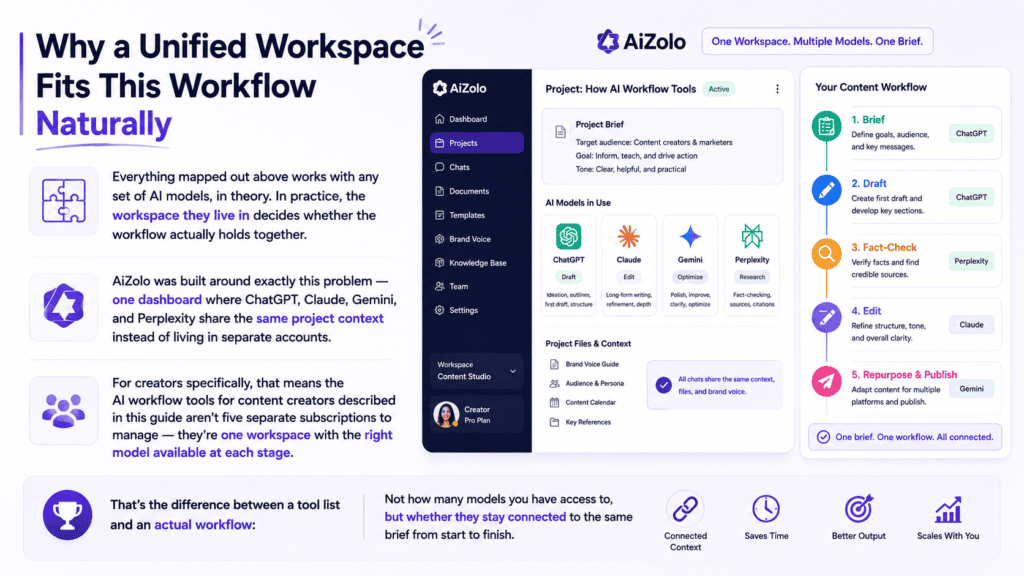
Everything mapped out above works with any set of AI models, in theory. In practice, the workspace they live in decides whether the workflow actually holds together.
AiZolo was built around exactly this problem — one dashboard where ChatGPT, Claude, Gemini, and Perplexity share the same project context instead of living in separate accounts.
For creators specifically, that means the AI workflow tools for content creators described in this guide aren’t five separate subscriptions to manage — they’re one workspace with the right model available at each stage.
That’s the difference between a tool list and an actual workflow: not how many models you have access to, but whether they stay connected to the same brief from start to finish.
Why Tool Lists Don’t Solve This
Search “AI tools for content creators” and you’ll find dozens of roundups: Jasper for writing, Midjourney for images, Canva for design.
Each recommendation is fine in isolation. None of them tell you how the tools talk to each other.
That’s the actual gap. A list of ten tools with no connective workflow is just ten more tabs to manage.
If you want the tool-by-tool roundup instead, we’ve published a full breakdown of individual AI tools for content creation — this piece focuses on the system that connects them, not the apps themselves.
Mapping AI Models to Each Stage of Your Workflow
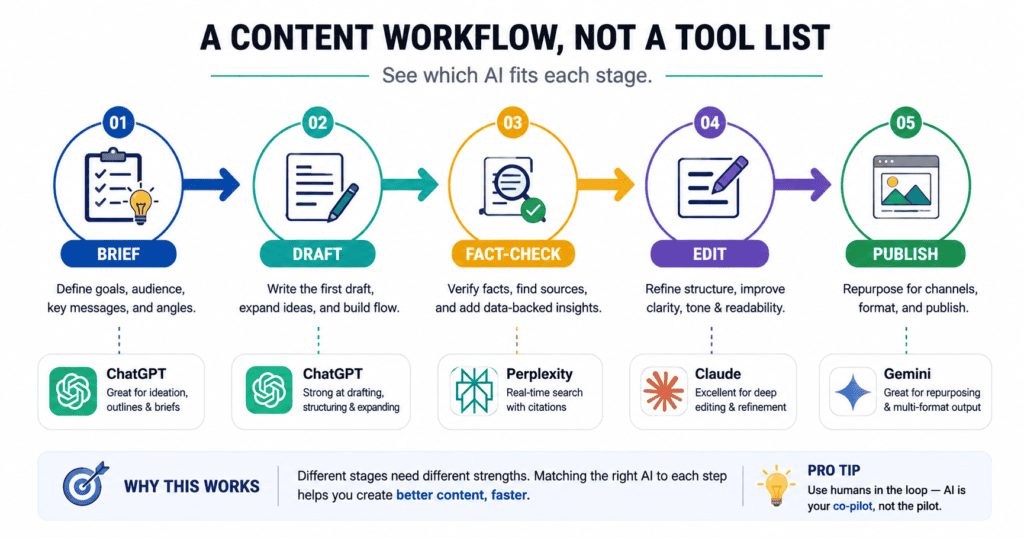
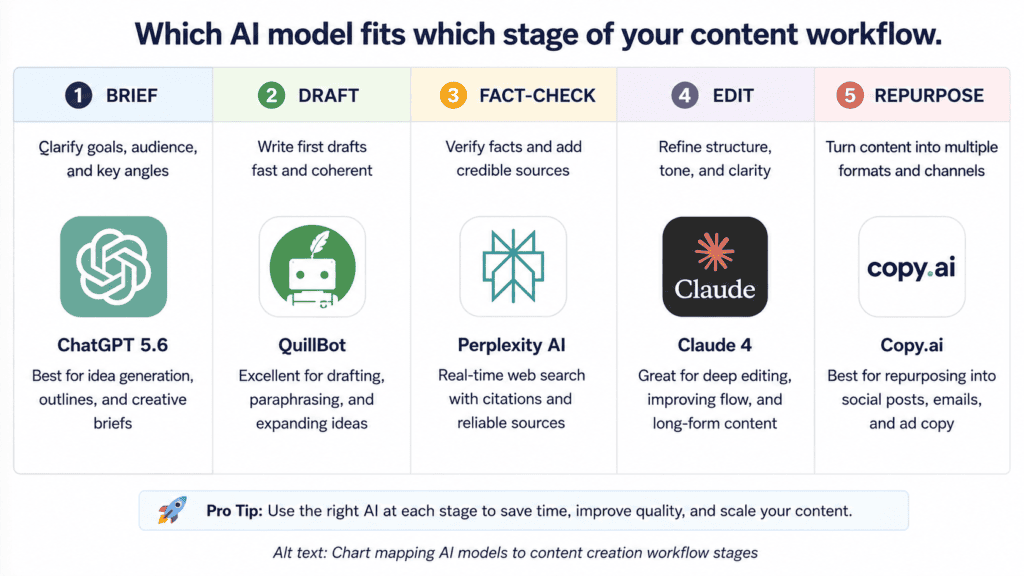
A real content workflow has five recognizable stages. Each one benefits from a different kind of AI thinking.
Stage 1: Brief and Ideation
This is where tone, audience, and goal get defined — before a single word of the actual piece exists.
ChatGPT tends to generate a wider spread of angles here, useful when you’re not sure which direction to take yet.
Stage 2: Drafting
Once the angle is set, drafting benefits from a model that holds structure over a long piece.
Claude is consistently strong for long-form drafts that need to stay coherent across several thousand words.
Stage 3: Fact-Checking and Research
Nothing kills a piece’s credibility faster than an unverified claim.
Perplexity, with its cited sources, is built specifically for this stage — verify before you publish, not after.
Stage 4: Editing and Tone Pass
This is where a second model reading the same draft catches what the first one missed.
Running your draft through a different model than the one that wrote it is one of the simplest workflow upgrades available.
Stage 5: Repurposing and Publishing
Turning one long piece into five short ones is a distinct skill — compressing without losing the core idea.
Any capable model handles this, but doing it in the same workspace as the original draft saves you from re-pasting context a third time.
Stage Order Isn’t Fixed
This five-stage map is a starting structure, not a rulebook. Some creators fact-check before drafting; others draft first and verify only the claims that made the final cut.
What matters is that every stage stays connected to the brief that started it — the order is negotiable, the continuity isn’t.
Why This Needs to Live in One Workspace
Here’s the part most workflow advice misses: the mapping above only works if switching between stages doesn’t cost you anything.
If moving from Stage 2 to Stage 3 means opening a new tab, logging into a different account, and re-explaining your brief, you’ve rebuilt the exact fragmentation this workflow was supposed to remove.
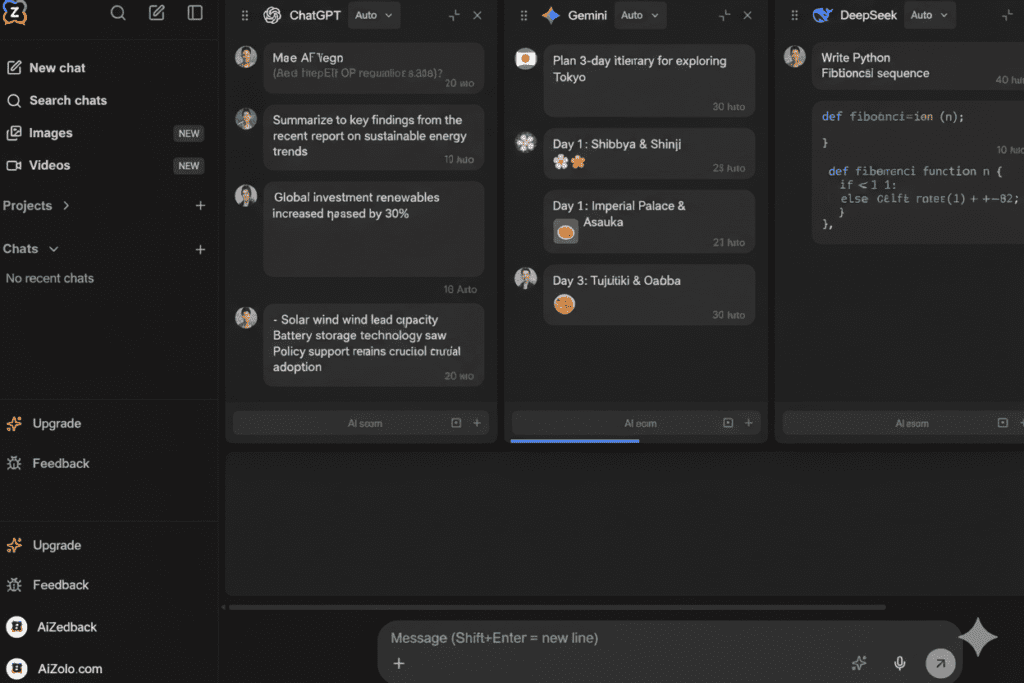
This is where a unified workspace changes the math. AiZolo brings ChatGPT, Claude, Gemini, and Perplexity into one dashboard, so the brief you wrote for Stage 1 is still sitting right there when you reach Stage 5.
Research on workplace interruptions backs this up — a well-known University of California, Irvine study cited by Asana found it can take over 20 minutes to fully refocus after switching context, a cost that compounds every time you move between disconnected tools.
For a five-stage content workflow, that’s potentially an hour of lost focus per piece, just from tab-switching alone.
Setting Up Your Workflow: Projects, Not Just Chats
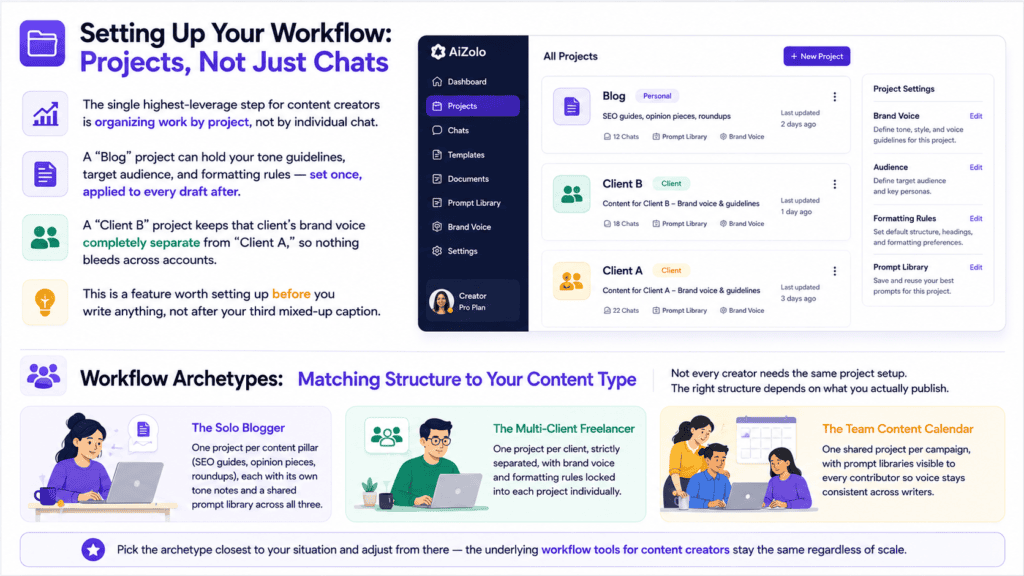
The single highest-leverage step for content creators is organizing work by project, not by individual chat.
A “Blog” project can hold your tone guidelines, target audience, and formatting rules — set once, applied to every draft after.
A “Client B” project keeps that client’s brand voice completely separate from “Client A,” so nothing bleeds across accounts.
This is a feature worth setting up before you write anything, not after your third mixed-up caption.
Workflow Archetypes: Matching Structure to Your Content Type
Not every creator needs the same project setup. The right structure depends on what you actually publish.
The Solo Blogger: One project per content pillar (SEO guides, opinion pieces, roundups), each with its own tone notes and a shared prompt library across all three.
The Multi-Client Freelancer: One project per client, strictly separated, with brand voice and formatting rules locked into each project individually.
The Team Content Calendar: One shared project per campaign, with prompt libraries visible to every contributor so voice stays consistent across writers.
Pick the archetype closest to your situation and adjust from there — the underlying workflow tools for content creators stay the same regardless of scale.
Building a Prompt Library as Part of Your Workflow
Every recurring task — a weekly newsletter intro, a standard product description format — deserves a saved prompt, not a rewritten one.
A prompt library turns your best previous work into a repeatable starting point instead of a blank page every time.
Over weeks, this compounds: your fifth newsletter takes a fraction of the time your first one did, because the structure is already solved.
AiZolo’s prompt manager keeps this library attached to your workspace, so it travels with your projects instead of living in a separate notes app.
A Realistic Example: Turning One Brief Into a Week of Content
Here’s what a connected workflow looks like end to end, using a single Monday brief.
Monday morning: Draft a blog post outline using ChatGPT for angle generation, then hand it to Claude for the full first draft — same project, same context.
Monday afternoon: Run the draft through Perplexity to verify any statistics or claims before they go anywhere near “publish.”
Tuesday: Repurpose the finished post into three social captions and a short newsletter blurb, using the same brief the blog post came from.
Wednesday: Review engagement on the earliest repurposed piece, and feed what worked back into next week’s brief.
None of this requires new tools. It requires the tools you already use to stay connected across the week.
Free vs Paid: Where to Start Building This Workflow
You don’t need a paid plan to test whether this workflow structure fits how you work.
Most platforms, including AiZolo, offer a free tier generous enough to run one full brief-to-publish cycle before you decide anything.
If you want to compare free-tier limits across platforms first, see our breakdown of free all-in-one AI plans.
Once your workflow is running daily and you’re hitting free-tier limits, our full paid platform comparison breaks down pricing tiers across every major option.
Common Workflow Mistakes Creators Make
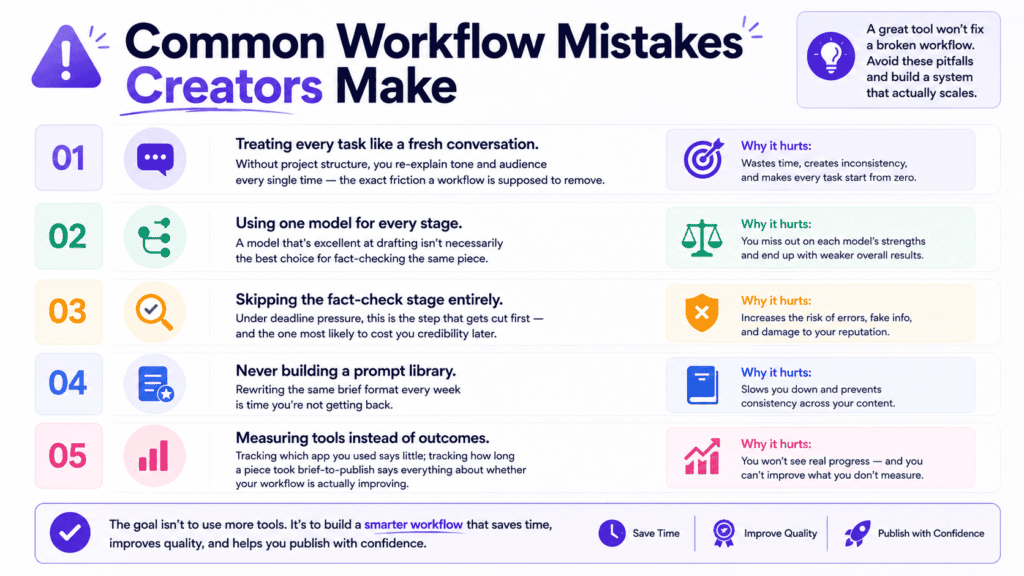
Treating every task like a fresh conversation. Without project structure, you re-explain tone and audience every single time — the exact friction a workflow is supposed to remove.
Using one model for every stage. A model that’s excellent at drafting isn’t necessarily the best choice for fact-checking the same piece.
Skipping the fact-check stage entirely. Under deadline pressure, this is the step that gets cut first — and the one most likely to cost you credibility later.
Never building a prompt library. Rewriting the same brief format every week is time you’re not getting back.
Measuring tools instead of outcomes. Tracking which app you used says little; tracking how long a piece took brief-to-publish says everything about whether your workflow is actually improving.
Measuring Whether Your Workflow Is Working
A workflow change is only worth keeping if it shows up in your numbers, not just your gut feeling.
Track two things for two weeks: total time from brief to published piece, and how many times you had to re-explain context mid-task.
If brief-to-publish time drops and re-explanations approach zero, the structure is working — keep it and refine the prompt library further.
If neither number moves, the bottleneck isn’t the AI workflow tools themselves — it’s likely the project setup, not the models you chose.
How to Set Up This Workflow in the Next 15 Minutes
Getting started doesn’t require a full afternoon. Here’s the fastest path.
- Create one project for your most frequent content type — blog, newsletter, or social captions.
- Write your tone and audience guidelines once, and save them to that project.
- Run your next brief through the five-stage map above, using a different model for drafting versus fact-checking.
- Save the prompts that worked so next week’s version starts faster than this week’s did.
That’s the whole system. The tools were never the hard part — the connective structure was.
How This Compares to Other Multi-Model Approaches
If you’re evaluating routing-layer tools like OpenRouter or self-hosted options for a workflow like this, we’ve compared the tradeoffs in detail in our multi-AI platform review and our guide to accessing all AI models in one place.
For creators specifically weighing AiZolo against other content-focused platforms, our multi-LLM tool comparison for content creation covers that ground directly.
Frequently Asked Questions
Do I need a paid plan to build this workflow?
No. A free tier is enough to test the full five-stage structure on one or two pieces before deciding whether to upgrade. See the free-plan comparison linked above for current limits.
What if I only write one type of content, like blog posts?
The workflow still applies — you’ll just use fewer projects. The value comes from separating brief, draft, and fact-check stages, not from managing multiple content types.
Can a team share the same AI workflow setup?
Yes, provided the platform supports shared projects. This keeps brand voice and formatting consistent across everyone contributing to the same content calendar.
How is this different from just using ChatGPT for everything?
Using one model for every stage works, but you lose the strengths each model brings to different tasks — drafting depth versus fact-checking accuracy, for example. A connected multi-model workflow keeps those strengths without adding friction.
How long does it take to see results from a new workflow?
Most creators notice a difference within the first week — usually in how fast repurposing gets, since that stage benefits most from a saved prompt library and consistent project context.
What if my team already uses different AI tools individually?
Standardizing on one shared workspace doesn’t mean forcing everyone onto the same model. It means giving the team a shared project structure so brand voice and formatting stay consistent, even if individual contributors prefer different models for drafting.
Is this workflow approach only useful for written content?
No. The same five-stage structure applies to video scripts, podcast outlines, and design briefs — the stages just get relabeled. What matters is that each stage stays connected to the original brief, regardless of content format.
The System Is the Upgrade, Not the Subscription
Content creators don’t need more AI tools. Most already have access to more than enough.
What’s missing is the structure connecting brief to draft to publish, without losing context at every handoff — the real function of good AI workflow tools for content creators.
Build that structure once — with projects, a prompt library, and models matched to the right stage — and the workflow keeps paying off on every piece after the first.
Start building your workflow with AiZolo’s free plan — no credit card required, and your existing brief format works from day one.
About the Author
Jeevesh Tripathi is a researcher and writer focused on AI-assisted content workflows, subscription economics, and productivity systems for creators and small teams. He has spent the past year testing multi-model workflows across more than twenty platforms, focused on where real time gets lost between tools rather than which single app performs best in isolation.
For corrections, questions, or workflow examples to feature, reach out at jeevesh@aizolo.com.
This article is reviewed periodically as platform features and model capabilities change. Last verified: August 2026.


Pingback: Album Cover Generator AI in 2026 : Powerful Ways It Transforms Struggling Artists Into Design Legends
Pingback: Stunning Ways an AI Pet Portrait Generator Transforms Ordinary Photos into Timeless Masterpieces in 2026
Pingback: AI Selfie Generator: 5x Stunning Digital Portraits Fast 2026
Pingback: 7 AI Manga Generators to Create Stunning Art Fast (2026)
Pingback: drag and drop AI workspace customization features - Complete Guide 2026
Pingback: Powerful Blog Content Ideas for AI Workspace Users | Expert Guide 2026
Pingback: Microsoft Bing AI Image Generator: 5 Pro Tips for 2026
Pingback: AI Reply Generator: How to Craft Perfect Responses in Seconds (And Save 15+ Hours Weekly)
Pingback: AI Dialogue Generator in 2026 : How One Platform Transformed My Writing From Robotic to Remarkable
Pingback: AI Review Generator: How Smart Businesses Create Authentic Reviews in 2026 Without Breaking the Bank