
Table of Contents
Introduction
Replying to messages eats up more of the workday than most people realize. Between email, LinkedIn, live chat, and support tickets, a single professional can spend two to three hours a day just typing responses. Aizolo helps automate and streamline replies, saving valuable time every day.
An AI reply generator changes that math. It reads the incoming message, understands the context, and drafts a reply you can send as-is or tweak in seconds.
This guide covers everything: how these tools actually work, the best options on the market, honest pros and cons, and the mistakes that trip up new users. By the end, you’ll know exactly which type of AI reply generator fits your workflow.
What Is an AI Reply Generator?
An AI reply generator is software that uses a large language model (LLM) to read an incoming message — an email, chat, comment, or DM — and produce a relevant, human-sounding response.
Unlike a canned template, it adapts to the actual content of the message. It picks up on tone, intent, and key details, then writes a reply that fits the specific conversation instead of a generic one-size-fits-all script.
Most tools sit inside the app you already use: your inbox, your CRM, your help desk, or a browser extension for LinkedIn and social platforms.
Did You Know? The underlying technology is the same family of models that power tools like ChatGPT and Claude — general-purpose LLMs fine-tuned or prompted specifically for reply generation.
How AI Reply Generators Work
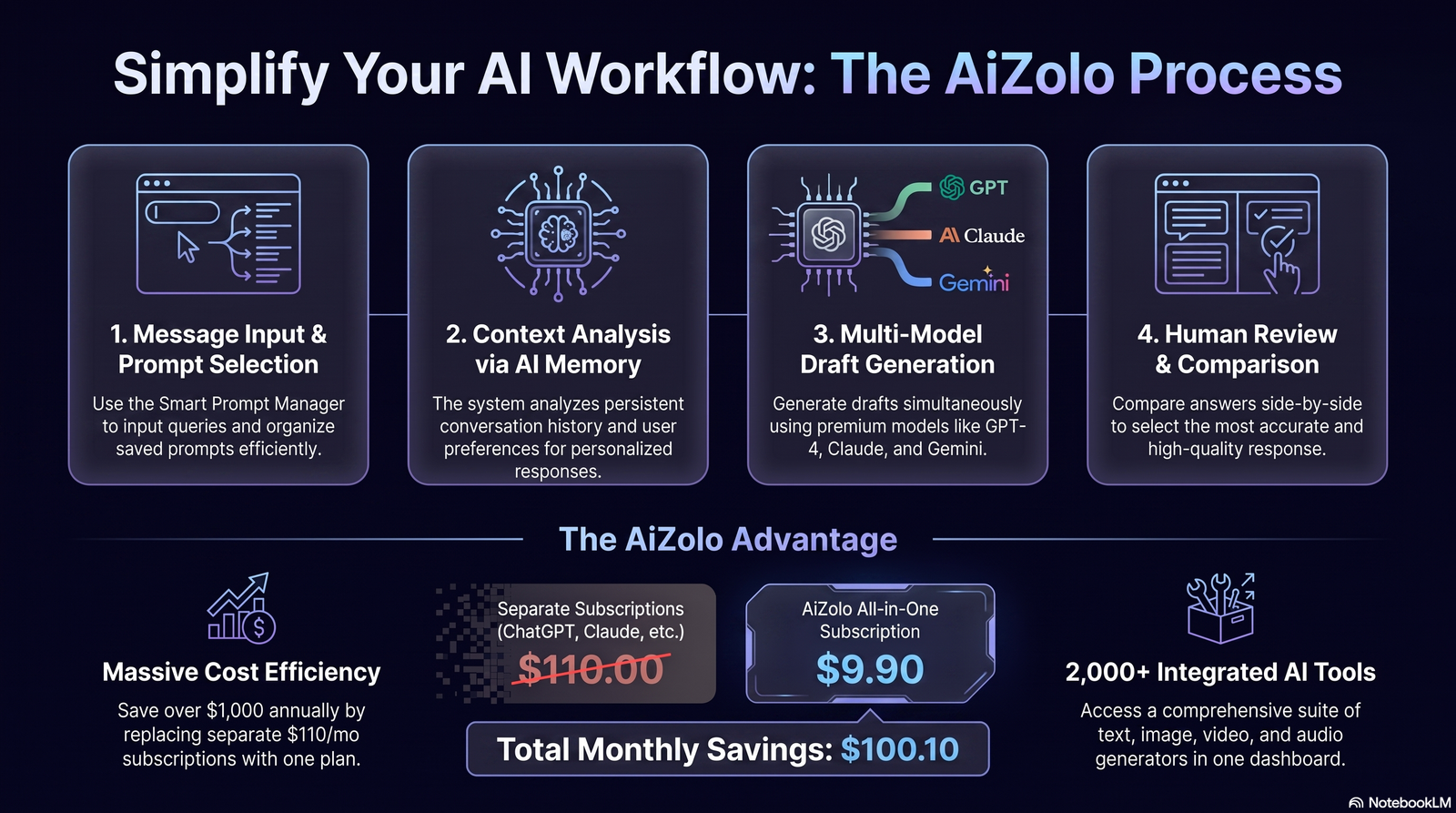
At a high level, every AI reply generator follows a similar pipeline:
- Input capture — the tool reads the incoming message, and often the surrounding thread for context.
- Context analysis — the model identifies intent (a complaint, a question, a sales inquiry), tone, and any specific facts mentioned.
- Draft generation — the LLM produces one or more reply options based on your instructions, brand voice, or past replies.
- Refinement — you edit, regenerate, or adjust tone (formal, friendly, brief) before sending.
More advanced tools also connect to your CRM or knowledge base, so replies can reference order numbers, account details, or product documentation automatically.
Pro Tip: The quality of the output depends heavily on the context the tool is given. Tools that read the full thread and pull in CRM data consistently produce better first drafts than those working from the message alone.
Key Features to Look For
Not every AI reply generator is built the same way. These are the features that separate genuinely useful tools from novelty add-ons:
- Context awareness — reads the full thread, not just the latest message
- Tone control — lets you set formal, casual, empathetic, or brand-specific voice
- Multi-channel support — email, chat, social DMs, and messaging apps
- CRM/help desk integration — pulls customer data into the draft
- Multiple draft options — gives you 2–3 variations to choose from
- Editable output — never forces a one-click send
- Language support — drafts and translates across languages
- Learning from feedback — improves based on your edits over time
Key Takeaway: If a tool only offers one rigid reply per message with no tone or context controls, it’s closer to a template generator than a true AI reply generator.
Benefits of Using an AI Reply Generator
Time savings. Drafting a thoughtful reply from scratch takes minutes; an AI-assisted first draft takes seconds to review and send.
Consistency. Teams maintain a unified voice across support, sales, and account management, even with many people replying.
Reduced response time. Faster replies improve customer satisfaction scores and sales conversion, especially in channels where speed matters (live chat, DMs).
Lower cognitive load. Repetitive, similar-sounding messages (refund requests, pricing questions) no longer require starting from a blank page each time.
Language flexibility. Reps can confidently reply in languages they don’t speak fluently, with the AI handling grammar and phrasing.
That said, these benefits depend on proper setup and human review — a point we’ll come back to in the best practices and limitations sections.
Real Business Use Cases by Channel
Customer Support
Support teams use AI reply generators to draft responses to common tickets — refund requests, shipping questions, troubleshooting — pulling in order data automatically so agents just review and send.
Email Replies
Busy professionals use them to clear inbox backlogs, drafting replies to meeting requests, follow-ups, and routine correspondence in bulk.
Sales Outreach
Sales reps generate personalized follow-ups and objection-handling replies based on a prospect’s previous messages, keeping outreach relevant instead of generic.
Recruiters and salespeople use browser-based AI reply tools to respond to InMail and connection messages quickly, maintaining a professional tone at scale.
Businesses running customer service or sales over WhatsApp use AI drafting to keep response times low without sacrificing a personal tone.
Facebook Messenger
E-commerce brands use AI replies to handle product questions and order status inquiries coming through Messenger.
Instagram DMs
Creators and small brands use AI reply tools to manage high DM volume from followers without spending hours a day on messaging.
Slack
Internal teams use AI drafting for quick, polished responses in busy channels, especially for cross-team requests.
Microsoft Teams
Similar to Slack, teams use AI-assisted replies to handle high message volume during collaborative projects.
CRM Communication
Account managers use AI reply generators embedded in CRMs like HubSpot or Salesforce to draft client updates that reference deal stage and history automatically.
Best AI Reply Generator Tools
The market has matured quickly. Here’s how leading tools compare as of 2026 — evaluate based on your primary channel and team size.
| Tool | Best For | Free Plan | AI Model | Integrations | Pros | Cons |
|---|---|---|---|---|---|---|
| Reply.io | Sales outreach sequences | Trial only | Multiple LLMs | CRM, email | Strong sequencing, sales-focused | Less suited to support |
| Tomba AI | Email response drafting | Limited free tier | GPT-based | Gmail, Outlook | Simple setup, fast drafts | Narrower feature set |
| Scrile AI | Live chat & messaging | Limited free tier | Proprietary + LLM | Chat widgets | Good for real-time chat | Less depth for email |
| Front | Team inbox + support | No | Multiple LLMs | Help desk, CRM | Strong team collaboration | Pricier for small teams |
| Intercom Fin | Customer support automation | No | Proprietary LLM | Help desk suite | Deep support automation | Support-only focus |
Quick Summary: Sales teams should lean toward outreach-focused tools; support teams benefit more from help-desk-native options; solo professionals often do fine with a lightweight email-focused tool.
How to Choose the Best AI Reply Generator
Checklist
- Does it support your primary channel (email, chat, social)?
- Can it connect to your CRM or help desk?
- Does it offer tone and length controls?
- Is there a free trial to test real conversations?
- Does it show a clear data privacy policy?
- Can multiple team members use it with shared brand voice settings?
Decision Framework
Start with your highest-volume channel. A tool that’s excellent at email but weak at chat won’t help if most of your replies happen in live chat. Match the tool to where the bottleneck actually is.
Mistakes to Avoid
- Choosing a tool based on price alone, ignoring integration gaps
- Skipping the trial period and committing to an annual plan immediately
- Assuming every AI draft is ready to send without review
AI Reply Generator vs. Traditional Templates
| Factor | AI Reply Generator | Traditional Templates |
|---|---|---|
| Personalization | High — adapts to each message | Low — static text |
| Setup time | Minutes | Minutes, but needs constant updates |
| Scalability | Scales with volume automatically | Requires manual template library growth |
| Tone flexibility | Adjustable per message | Fixed per template |
| Risk of sounding robotic | Low, if reviewed | High, if overused |
| Maintenance | Learns and adapts over time | Manual updates required |
Templates still have a place for extremely high-volume, low-variation replies (like “we’ve received your request”). AI reply generators shine where messages vary in content and tone.
AI Reply Generator vs. AI Email Assistant
These terms are often used interchangeably, but there’s a meaningful difference.
An AI reply generator focuses narrowly on drafting responses to inbound messages across one or more channels.
An AI email assistant is broader — it may also handle scheduling, summarizing threads, prioritizing your inbox, and drafting new outbound emails, not just replies.
Advantages of a dedicated reply generator: simpler setup, often cheaper, works well across multiple channels beyond just email.
Disadvantages: lacks the broader inbox-management features (prioritization, scheduling) that a full email assistant provides.
If email is your only channel and you want full inbox management, an AI email assistant may serve you better. If you need consistent replies across email, chat, and social, a dedicated reply generator is usually the stronger fit.
Best Practices
- Always review before sending, especially for sensitive or high-stakes conversations.
- Feed the tool real context — the more thread history and CRM data it has, the better the draft.
- Set a clear brand voice once, rather than adjusting tone manually every time.
- Use multiple draft options when available instead of accepting the first output.
- Audit outputs periodically to catch tone drift or factual errors before they reach customers.
Common Mistakes to Avoid
Sending drafts unreviewed. Even strong models occasionally produce an inaccurate or oddly-toned reply — a human check prevents embarrassing mistakes.
Ignoring tone settings. A default “neutral” tone can feel cold in customer-facing replies; adjusting it takes seconds and makes a real difference.
Using it for everything. Highly sensitive conversations (complaints escalations, legal matters) still benefit from a fully human-written reply.
Not training the tool on your voice. Skipping the brand-voice setup step leads to generic-sounding replies that don’t match your company’s tone.
Security & Privacy Considerations
Because reply generators often process customer data — names, order details, account information — security matters as much as speed.
Look for tools that offer encryption in transit and at rest, clear data retention policies, and compliance certifications like SOC 2. If you operate in the EU or handle EU customer data, confirm GDPR compliance specifically, including where data is processed and stored.
Enterprise teams should also check whether the vendor uses customer data to train underlying models by default — many reputable providers now offer opt-outs or zero-retention modes.
Human review remains an important safeguard — not just for tone, but to catch cases where a draft might inadvertently reference the wrong customer’s data.
NIST AI Risk Management Framework and OWASP LLM Security Top 10
The Future of AI Replies
Several trends are shaping where AI reply generators go next:
- AI agents that don’t just draft replies but can take follow-up actions (scheduling, updating a CRM record) autonomously
- Multimodal AI that can read and reply to messages containing images or attachments, not just text
- Contextual memory that remembers a customer’s full history across conversations, not just the current thread
- Multilingual replies that go beyond translation to match cultural tone and phrasing norms
- Voice replies for messaging platforms that support voice notes
- Deeper CRM integration, where replies are generated with full pipeline and account context built in
These developments point toward reply generators becoming less of a standalone tool and more of an embedded layer across every communication channel a business uses.
FAQs
1. What is an AI reply generator used for? It’s used to draft responses to emails, chats, or messages automatically, saving time on repetitive or high-volume communication while still sounding personal.
2. Are AI-generated replies safe to send without editing? Not always. Most experts recommend a quick human review, especially for sensitive topics, to catch tone issues or inaccurate details before sending.
3. Can AI reply generators work across multiple channels? Many do — supporting email, live chat, LinkedIn, WhatsApp, and more — though feature depth varies by tool, so check channel support before choosing one.
4. Do AI reply generators learn my writing style? Some tools improve over time based on your edits and can be trained on your brand voice guidelines; others generate generic replies regardless of history.
5. Is an AI reply generator the same as a chatbot? No. A chatbot typically responds automatically in real time within a conversation, while a reply generator drafts a suggestion for a human to review and send.
6. How much does an AI reply generator cost? Pricing varies widely, from free tiers with limited replies to enterprise plans costing hundreds per month, depending on volume and integrations needed.
7. Can small businesses benefit from AI reply generators? Yes — they’re especially useful for small teams managing high message volume without dedicated support staff.
8. Do AI reply generators support languages other than English? Most modern tools support multiple languages, though quality can vary, so it’s worth testing your specific language pair during a trial.
9. What’s the difference between an AI reply generator and an AI email assistant? A reply generator focuses on drafting responses; an email assistant often adds broader features like scheduling and inbox prioritization.
10. Can AI reply generators integrate with a CRM? Many top tools integrate with CRMs like HubSpot or Salesforce, pulling account data into drafts for more personalized responses.
11. Are there privacy risks with AI reply generators? Yes, since they process message content and sometimes customer data — checking a vendor’s security certifications and data policies is essential.
12. What industries use AI reply generators most? E-commerce, SaaS, recruiting, and customer support-heavy industries see the highest adoption due to high message volume.
13. Can I customize the tone of AI-generated replies? Most reputable tools let you choose or set a tone — formal, friendly, concise — either per message or as a default brand setting.
14. Do AI reply generators replace human customer support? No — they assist human agents by handling first drafts, but human judgment is still essential for complex or sensitive interactions.
15. How do I choose the right AI reply generator for my team? Match the tool to your highest-volume channel, confirm it integrates with your existing tools, and test it during a trial before committing.
Conclusion
An AI reply generator isn’t about replacing the human side of communication — it’s about removing the blank-page problem so people can respond faster without losing their voice.
The right tool depends entirely on where your messages come from and how your team already works. Test a couple of options against your real inbox or chat volume before committing, and keep a human in the loop for anything sensitive.
Ready to speed up your replies? Explore the tools compared above, start with a free trial, and choose the one that fits your workflow — not just the one with the most features.
Author Bio
Jeevesh Tripathi AI Researcher & Content Strategist, Aizolo Email: jeevesh@aizolo.com
Jeevesh Tripathi is an AI researcher and content strategist at Aizolo, specializing in AI productivity tools, SEO research, and practical technology education. With hands-on experience testing and evaluating AI writing and communication tools, he focuses on translating complex AI capabilities into clear, actionable guidance for marketers, founders, and support teams. His work emphasizes accuracy, transparency, and real-world usability over hype, aligning with a commitment to helpful, trustworthy content.

If some one desires expert view concerning blogging afterward i advise him/her to pay a visit this weblog, Keep up the good work.
I feel this is one of the such a lot important information for me. And i’m satisfied reading your article. But should observation on some normal issues, The site style is perfect, the articles is actually nice :
What’s up, after reading this awesome post i am too happy to share my familiarity here with colleagues.
sure
I am curious to find out what blog platform you happen to be utilizing? I’m experiencing some minor security issues with my latest blog and I would like to find something more safeguarded. Do you have any suggestions?
you can use this https://feather.so/?via=bkabhi
Useful info. Fortunate me I found your site unintentionally, and I’m stunned why this twist of fate didn’t came about in advance! I bookmarked it.
Magnificent site. A lot of useful info here. I’m sending it to several friends ans also sharing in delicious. And naturally, thanks for your effort!
I just like the helpful info you provide for your articles. I will bookmark your weblog and test once more here regularly. I’m relatively sure I will learn many new stuff right right here! Best of luck for the next!
Good article. It is rather unfortunate that over the last years, the travel industry has had to take on terrorism, SARS, tsunamis, bird flu, swine flu, plus the first ever entire global economic depression. Through everthing the industry has really proven to be effective, resilient plus dynamic, obtaining new methods to deal with trouble. There are always fresh challenges and opportunities to which the field must once again adapt and answer.
I’m curious to find out what blog system you’re working with? I’m having some small security problems with my latest blog and I’d like to find something more risk-free. Do you have any recommendations?
You can definitely see your enthusiasm in the work you write. The world hopes for more passionate writers like you who aren’t afraid to say how they believe. Always follow your heart.
This had so much energy — I absolutely loved it!
Very nice post. I simply stumbled upon your weblog
and wanted to mеntiⲟn that I’ve really loved surfing aгound your blog posts.
In any case I will be subscribing to your feed and I hope
you write aցain soon!