

The Day Claude Said “No More” Right When You Needed It Most
Picture this: You’re deep in a research session. You’ve been back and forth with Claude AI for an hour — debugging code, brainstorming content, analyzing a competitor’s strategy. Things are finally clicking. You type your next message, hit send, and then… the dreaded notification appears.
“You’ve reached your usage limit. Please wait before continuing.”
Sound familiar?
If you’ve ever been blocked mid-workflow by Claude AI’s message cap, you know exactly how disruptive that moment feels. You’re not alone.
Thousands of developers, students, marketers, and founders hit this wall every single day. And the frustrating part? The question everyone keeps Googling — how to get unlimited messages on Claude AI — doesn’t have a simple one-sentence answer.
The truth is more nuanced, more practical, and honestly more interesting than most guides let on. If you’re wondering how to get unlimited messages on Claude AI, the answer isn’t as straightforward as many articles suggest. That’s what this post is here to change.
By the time you finish reading, you’ll know exactly why Claude’s limits exist, how to stretch them intelligently, what the best upgrade paths look like, and how platforms like Aizolo make the whole “Claude message limit” problem feel almost irrelevant — for a fraction of the cost.
Let’s get into it.
Table of Contents
Why Does Claude AI Have Message Limits in the First Place?
Before learning how to get unlimited messages on Claude AI, it helps to understand why those limits exist. This isn’t a corporate money grab — it’s a computational reality.
Claude AI doesn’t count messages. It counts tokens. Every time you send a message, Claude doesn’t just read that message in isolation. It re-reads your entire conversation history from the very beginning. So your 30th message in a thread doesn’t cost the same as your first — it costs roughly 30x more in compute resources.
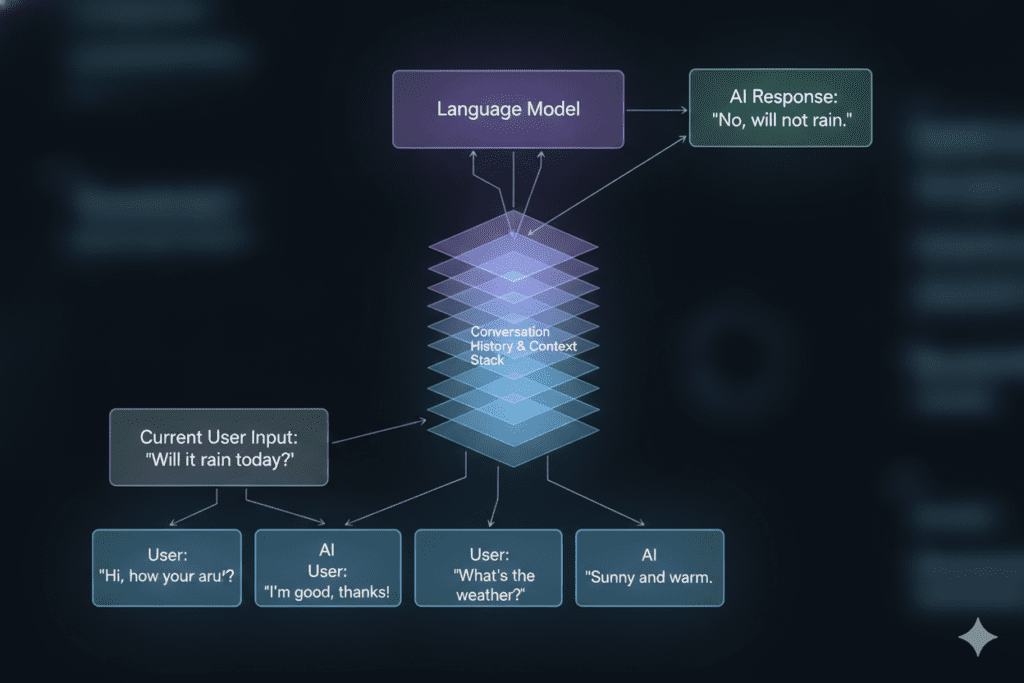
This is why your limits can feel inconsistent. Some days you fly through 80 messages without hitting a cap. Other days you slam into the wall after 15. The difference usually comes down to:
- Conversation length — longer threads consume exponentially more tokens per message
- File attachments — uploading PDFs or documents adds significant token costs
- Model selection — Claude Opus uses far more compute than Claude Haiku
- Feature usage — web search, Projects, and code execution all add to your quota
- Server demand — Anthropic dynamically adjusts limits based on system load
Understanding this token-first reality is the foundation of every practical strategy for how to get unlimited messages on Claude AI.
The Real State of Claude AI Message Limits in 2026
Here’s a quick breakdown of where things stand today:
Claude Free Plan:
- Roughly 15–40 messages per session depending on message length
- Daily reset cycle
- Long conversations or file uploads drop this to 20–30 messages
Claude Pro ($20/month):
- 5-hour reset cycle
- Approximately 45 messages per 5-hour window for short conversations
- Roughly 200+ messages per day under ideal conditions
Claude Max ($100–$200/month):
- 5× to 20× the Pro capacity
- Designed for heavy developers, AI researchers, and enterprise workflows
- Near-unlimited for most professional use cases
The painful reality? Even Claude Pro users — paying $20 a month — frequently hit limits mid-project. And the “solution” of upgrading to Claude Max at $100–$200 per month is simply out of budget for most founders, students, and freelancers.
This is where the conversation about how to get unlimited messages on Claude AI gets really interesting.
7 Smart Strategies to Maximize Claude AI Messages (Without Spending More)
Before we talk about smarter subscription solutions, let’s cover the practical optimization layer. These strategies work whether you’re on the free plan, Pro, or any tier.
1. Start Fresh Conversations Regularly
This is the single most impactful habit change when thinking about how to get unlimited messages on Claude AI. Because Claude re-reads your entire conversation history on every turn, long threads are token sinks.
One of the most effective strategies for how to get unlimited messages on Claude AI is to start a new conversation every 10–15 messages. When you switch topics, open a fresh chat instead of continuing a long thread. Before doing so, ask Claude to summarize everything discussed, copy that summary, and paste it into the new conversation as context. This approach helps maintain continuity while reducing the compounding token costs that contribute to usage limits.
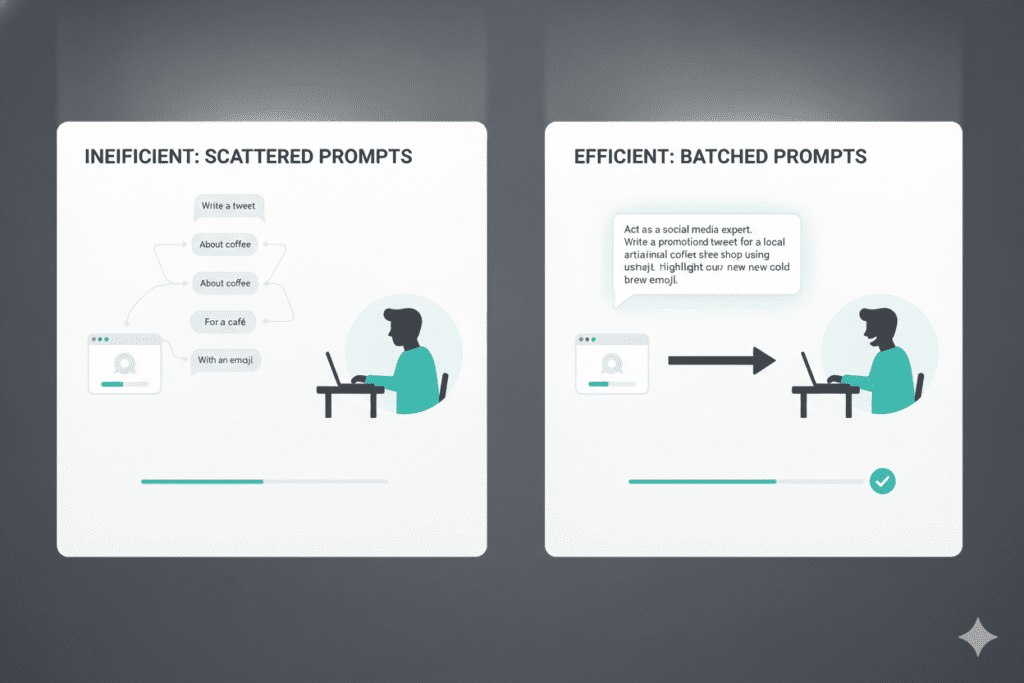
2. Batch Your Questions Into One Message
Instead of sending three separate messages like “Summarize this,” then “List the key points,” then “Write a headline,” combine them into a single prompt: “Summarize this, list the key points as bullets, and suggest a headline.”
One message. Three outputs. One context load. Batching questions is one of the most underused strategies for anyone researching how to get unlimited messages on Claude AI.
3. Edit, Don’t Reply
When Claude misses the mark on a response, most users send a follow-up message saying “that’s not quite right, can you try again?” That follow-up adds another layer to your conversation history.
If you’re looking for how to get unlimited messages on Claude AI, don’t immediately send a follow-up prompt when you receive a poor response. Instead, click the edit icon on your original message, refine your prompt, and regenerate. Claude treats it as if the bad response never happened, helping you avoid unnecessary token usage and get more value from your available message allowance.
4. Use Claude Projects for Recurring Files
If you’re uploading the same document in multiple conversations, you’re burning tokens unnecessarily. Claude Projects allow you to upload files once, where they’re cached and referenced efficiently across conversations. This is a game-changer for researchers, legal professionals, and anyone doing repetitive document analysis.
5. Match the Model to the Task
Using Claude Opus for a simple email draft is like hiring a senior architect to install a light bulb. Claude Haiku is fast, light, and more than capable for quick tasks. Sonnet handles most professional workflows. Save Opus for genuinely complex reasoning.
Starting with the lighter model and escalating only when needed can effectively multiply your available quota.
6. Keep Project Instructions Lean
If you’re exploring how to get unlimited messages on Claude AI, be careful with how you use Claude Projects. Resist the urge to dump your entire knowledge base into the project instructions.
Every message in that project processes those instructions, which can increase token consumption. Instead, keep project context focused on information you’ll actually use in 70% or more of conversations to maximize efficiency and extend your available usage.
7. Avoid Re-uploading Files
Claude retains file context within a conversation. If you uploaded a 50-page PDF earlier in the thread, you don’t need to re-upload it. Reference it directly. Uploading it again burns the same token cost as the first time.
These seven strategies can meaningfully extend your effective Claude usage — but they’re still working within a fundamentally limited system. If you want to know how to get unlimited messages on Claude AI at a structural level, you need to look at smarter subscription options.
The Upgrade Path Problem: Why Claude Max Isn’t the Only Answer
Anthropic offers Claude Max at $100 or $200 per month, giving you 5× or 20× the Pro capacity. For heavy enterprise users or AI engineering teams, that investment makes sense.
But for most people searching how to get unlimited messages on Claude AI — founders testing product ideas, marketers scaling content, developers building side projects, students doing research — paying $100–$200 per month for a single AI tool is simply not viable.
And here’s what makes the situation even more frustrating: Claude isn’t the only AI tool you need. The modern workflow involves multiple models for different tasks:
- ChatGPT for certain reasoning and plugin tasks
- Gemini for Google ecosystem integration
- Grok for real-time web awareness
- Perplexity for research and citation
Most people end up juggling 3–5 different subscriptions, paying $20+ for each, switching between browser tabs, losing context, and spending $80–$110 per month across disconnected platforms.
This is the problem that Aizolo was built to solve.
How Aizolo Solves the “Unlimited Messages on Claude AI” Problem Differently
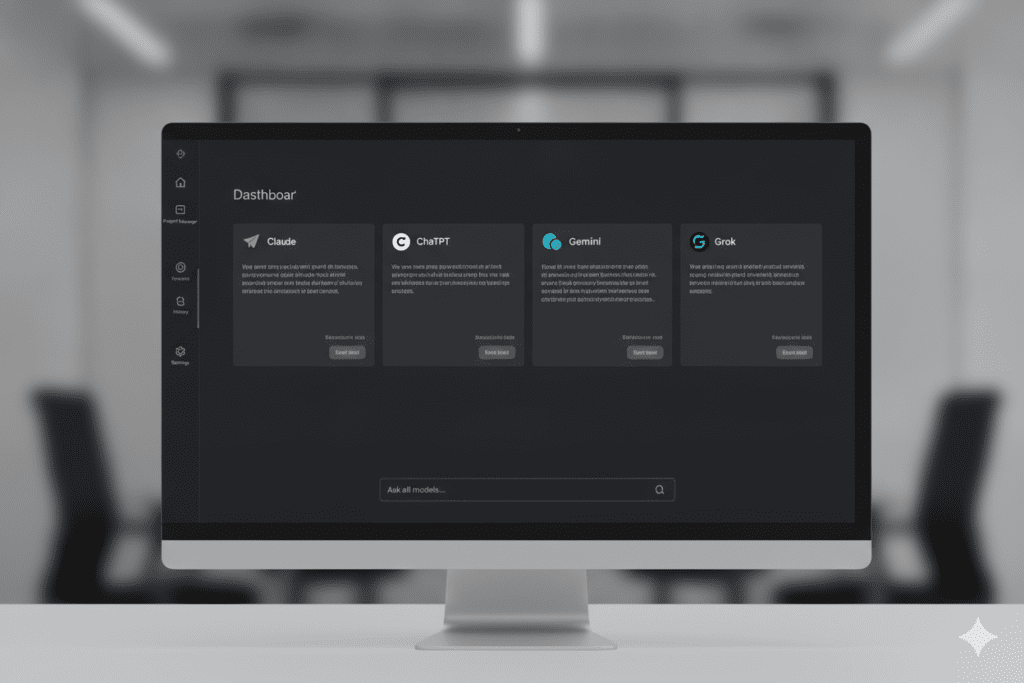
Aizolo is an all-in-one AI subscription platform that gives you access to Claude, ChatGPT, Gemini, Grok, Perplexity, and dozens of other premium AI models from a single dashboard — for just $9.90 per month.
But here’s the feature that directly answers how to get unlimited messages on Claude AI: Custom API Key Support.
Aizolo allows you to bring your own API keys from Anthropic (or any other AI provider), connect them securely (encrypted), and use Claude through Aizolo’s unified interface with your own usage quota — not Aizolo’s shared pool.
API access to Claude is governed by Anthropic’s API rate limits, which are significantly more generous than the chat interface limits and scale with your usage.
This means:
- You’re not competing with other users for a shared message pool
- Your API key gives you direct access to Claude’s compute
- You combine this with Aizolo’s comparison, memory, and workflow features
- Everything stays in one workspace
For developers, this is essentially the answer to how to get unlimited messages on Claude AI — use the API, routed through a professional interface that makes it feel like a premium product.
What Aizolo Includes at $9.90/Month
Beyond Claude access, an Aizolo Pro subscription gives you:
- All premium AI models — Claude, ChatGPT, Gemini, Grok, Perplexity, and more
- Side-by-side AI comparison — run the same prompt across multiple models simultaneously
- 3,000,000 tokens per month on Aizolo’s shared pool
- AI image generation — text to visuals using multiple models
- AI video generation — from prompt to video
- AI audio tools — voiceovers, sound effects, music generation
- Smart Prompt Manager — save, organize, and reuse your best prompts
- AI Memory — persistent context that remembers your preferences across sessions
- Chat with PDFs and documents — upload once, analyze deeply
- Import chats from Claude or ChatGPT — migrate your existing history seamlessly
Compare that to paying $20/month just for Claude Pro, and suddenly $9.90 for all of the above looks extraordinary.
Explore more insights on Aizolo at aizolo.com.
Real-World Use Cases: Who Benefits Most From These Strategies

For Developers Building Products
A developer working on an AI-powered SaaS product needs Claude for code generation, debugging, architecture planning, and documentation — often in long, context-heavy sessions. Hitting the usage limit mid-debug is a workflow killer.
The solution: Use Aizolo with a custom Anthropic API key. This routes your Claude usage through the API’s more generous rate limits, keeps your code context organized in Projects, and lets you switch to Gemini or ChatGPT for comparison testing — all without leaving the dashboard.
Learn from real-world experience at Aizolo.
For Marketers Scaling Content
A content marketer producing 20+ pieces per week needs to draft, edit, research, and repurpose constantly. The free Claude tier is gone within an hour. Pro limits get stretched by afternoon.
By using Aizolo’s multi-model workspace, marketers can draft with Claude, fact-check with Perplexity, generate visuals with the image generator, and batch-create across models — all from one subscription. No more tab-switching. No more mid-campaign crashes.
For Students and Researchers
A graduate student analyzing research papers, summarizing academic sources, and drafting thesis sections needs deep document analysis — exactly the kind of work that devours Claude’s token budget fastest.
Aizolo’s document chat feature, combined with the Claude API key option, means students can upload a 200-page dissertation and work through it without hitting a wall. The AI Memory feature remembers their research context across sessions. The Prompt Manager saves their most effective academic prompts for reuse.
For Freelancers and Solopreneurs
A freelance copywriter or consultant running their own business can’t justify $100+ per month on AI tools. But they also can’t afford to lose three hours of momentum because Claude said “usage limit reached.”
The affordable AI subscription plans at Aizolo — starting at $9.90/month — give freelancers the best value AI subscription in 2026. They get Claude, ChatGPT, Gemini, and more, plus the ability to bring their own API key for truly extended sessions.
For Founders and SaaS Builders
A solo founder building an MVP uses AI as their entire product team — for research, writing, coding, and strategy. They need Claude for nuanced reasoning, ChatGPT for speed, and Perplexity for real-time market data. Paying separately for each would cost $80–$110 per month.
Aizolo collapses that entire stack into one cheapest AI tools subscription that doesn’t compromise on quality. The side-by-side comparison feature lets founders instantly validate which AI model gives the sharpest insight for each task.
Start building smarter with Aizolo.
Aizolo vs. Paying Separately: The Math Is Brutal

Let’s put numbers to this:
| Subscription | Monthly Cost |
|---|---|
| ChatGPT Plus | $20 |
| Claude Pro | $20 |
| Google Gemini Pro | $20 |
| Grok Premium | $30 |
| Perplexity Pro | $20 |
| Total | $110/month |
Versus Aizolo Pro at $9.90/month — with all of the above included plus image generation, video generation, audio tools, prompt management, AI memory, and document analysis.
That’s over $1,200 in savings per year for essentially the same access — often better, because Aizolo’s comparison feature helps you get higher-quality outputs by pitting models against each other.
For anyone serious about how to get unlimited messages on Claude AI while keeping costs sane, the best AI subscription for price in 2026 isn’t a Claude Max upgrade. It’s a smarter platform.
Read more expert guides on Aizolo’s blog at aizolo.com/blog.
The API Key Strategy: The Closest Thing to Truly Unlimited Messages

For those who want to dig deeper into how to get unlimited messages on Claude AI at a near-unlimited scale, the API key strategy deserves its own explanation.
When you access Claude through claude.ai, you’re sharing compute resources with millions of other users. Anthropic limits this to ensure fair distribution.
But when you access Claude through its API (either directly or via a platform like Aizolo), you’re operating under a different rate limit structure — one that’s tied to your account tier and actual API usage, not a shared pool.
Anthropic’s API offers:
- Tier 1 users: 50 requests per minute on Claude Sonnet
- Rate limits that scale as your usage history grows
- No daily message caps tied to the claude.ai interface
By connecting your Anthropic API key to Aizolo, you get:
- Claude’s full capability through the API
- Aizolo’s polished chat interface, memory, and comparison features
- Your usage limits governed by your API tier — not by shared platform constraints
- Encrypted key storage, so your credentials are never exposed
This is the most practical answer for power users asking how to get unlimited messages on Claude AI in a professional workflow. It’s not a hack or a workaround — it’s exactly how Anthropic intends API keys to be used.
Common Mistakes That Make Your Claude Limits Worse
Before we close, here are the habits that silently drain your quota — and that most guides on how to get unlimited messages on Claude AI never mention:
Mistake 1: Sending follow-up corrections instead of editing prompts. Every “actually, please change that to…” adds another layer to conversation history. Edit the original instead.
Mistake 2: Re-uploading files across conversations. Upload once in a Project. Reference it indefinitely without burning tokens.
Mistake 3: Using Opus for everything. Haiku handles 80% of tasks faster and lighter. Reserve Opus for genuinely complex problems.
Mistake 4: Keeping Projects bloated with context. Only add context you’ll use in 70%+ of conversations. Lean Projects mean faster, cheaper sessions.
Mistake 5: Staying in one long thread all day. Fresh conversations are dramatically cheaper. Summarize and restart regularly.
Avoiding these five mistakes alone can double your effective Claude usage without touching your subscription plan.
Conclusion: How to Get Unlimited Messages on Claude AI in 2026
Let’s bring it all together.
The reality of how to get unlimited messages on Claude AI in 2026 isn’t one magic button. It’s a combination of smarter habits, the right subscription strategy, and the right platform.
If you’re on the free plan, the seven optimization strategies in this guide can dramatically extend your sessions. If you’re on Claude Pro and still hitting walls, Aizolo’s all-in-one workspace at $9.90/month is a far better investment than jumping to $100/month Claude Max.
And if you’re a power user who genuinely needs near-unlimited access, connecting your own Anthropic API key to Aizolo gives you API-level capacity with a premium interface.
The core insight: the message limit problem is really a subscription strategy problem. Most people are paying too much for too little, or optimizing too late in their workflow. Both issues are solvable.
Aizolo was built for exactly this moment — when AI users realize they’re spending more time managing tools than actually using them. One dashboard, all premium models, a fraction of the price, and the option to bring your own API key for genuinely unlimited sessions.
That’s not a workaround. That’s just a smarter way to work.
Follow Aizolo for practical tech and startup insights at aizolo.com.
