
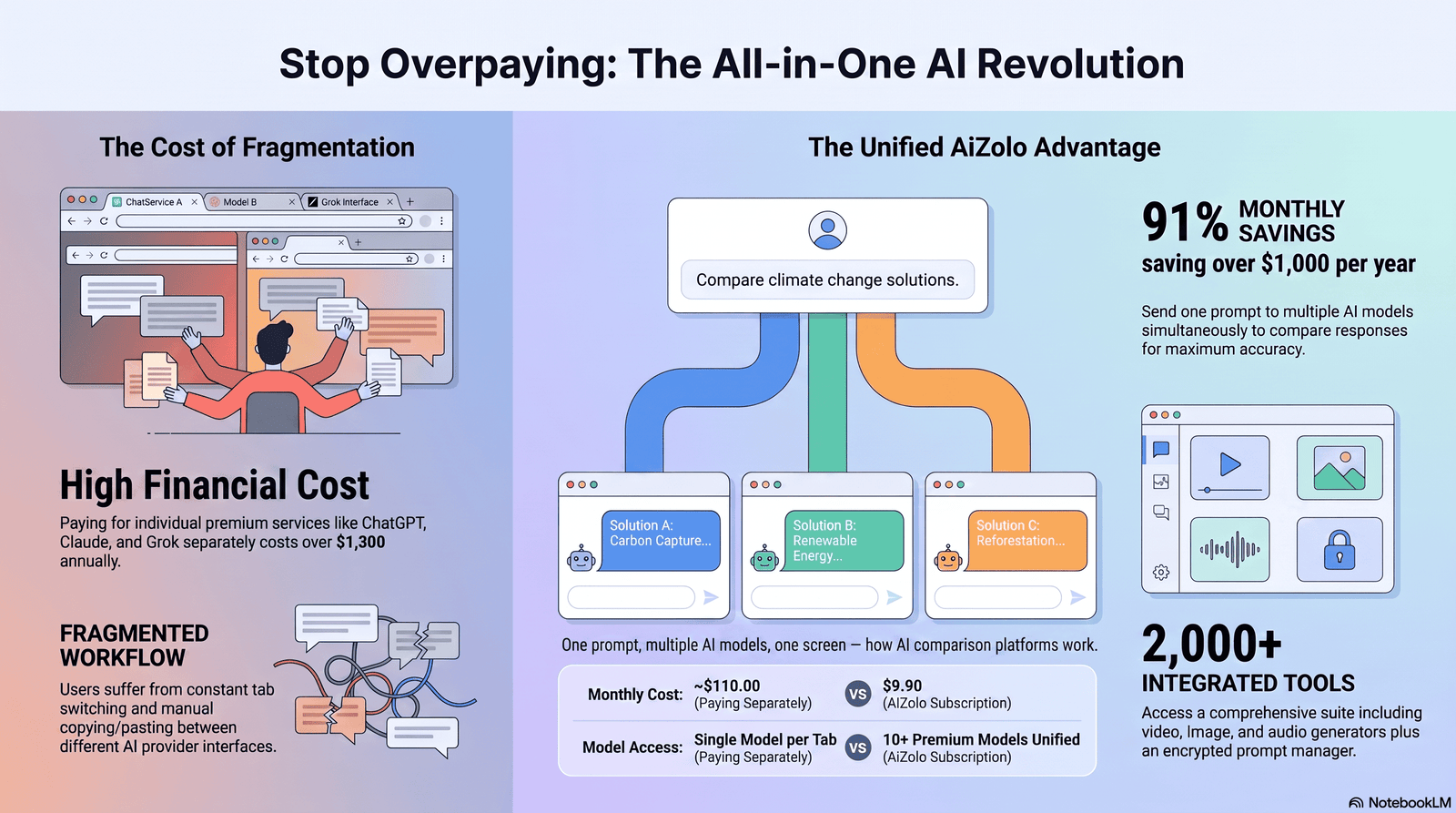
I got tired of doing this manually.
Open ChatGPT. Paste a prompt. Open Aizolo to compare ChatGPT, Claude, and Gemini in one place—instead of opening new tabs. No need to paste the same prompt three times or scroll between browser tabs trying to remember which model said what.
If you’ve ever done that, you already understand why platforms to ask the same question to multiple AI models exist.
These tools send one prompt to several AI models at once — GPT, Claude, Gemini, Grok, DeepSeek, and others — and show you every answer side by side. No tab-switching. No copy-paste. No forgetting which chatbot gave you the better draft.
In this guide, I tested the leading multi-model platforms, compared their pricing and model libraries, and broke down exactly who should use which one. I’ll also cover the mistakes people make when comparing AI outputs, and how to read disagreement between models instead of just picking whichever answer sounds most confident.
This isn’t a sponsored roundup. Where a platform has real weaknesses — usage caps, clunky UI, missing models — I’ll say so.
Quick answer: if you want the broadest model access for the lowest price, an aggregator like Krater.ai or Aymo AI covers most people. If you’re a developer who wants full control and doesn’t mind managing API keys, TypingMind or OpenRouter is the better fit. If you just want a free browser extension for quick comparisons, ChatHub is worth trying first.
Now let’s get into the details.
Table of Contents
What Are Platforms to Ask Same Question to Multiple AI Models and How Do They Work?

A multi-AI comparison platform, often called an AI aggregator or AI model aggregator, is a single workspace that connects to several AI providers — OpenAI, Anthropic, Google, xAI, Meta, DeepSeek, and others — through one login.
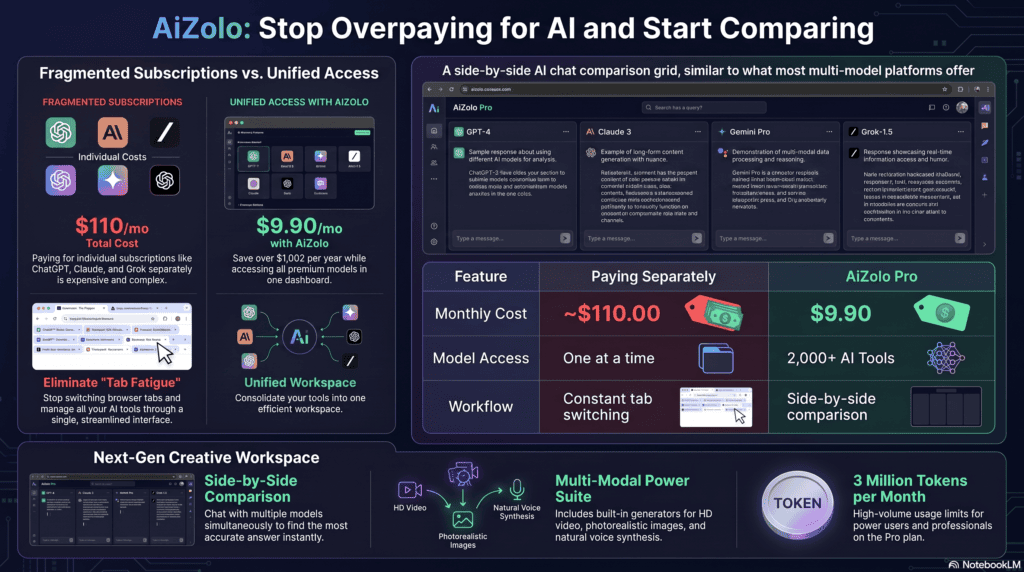
Instead of paying for ChatGPT Plus, Claude Pro, and Gemini Advanced separately, you subscribe to one multi AI workspace and get access to most of them from a single chat window.
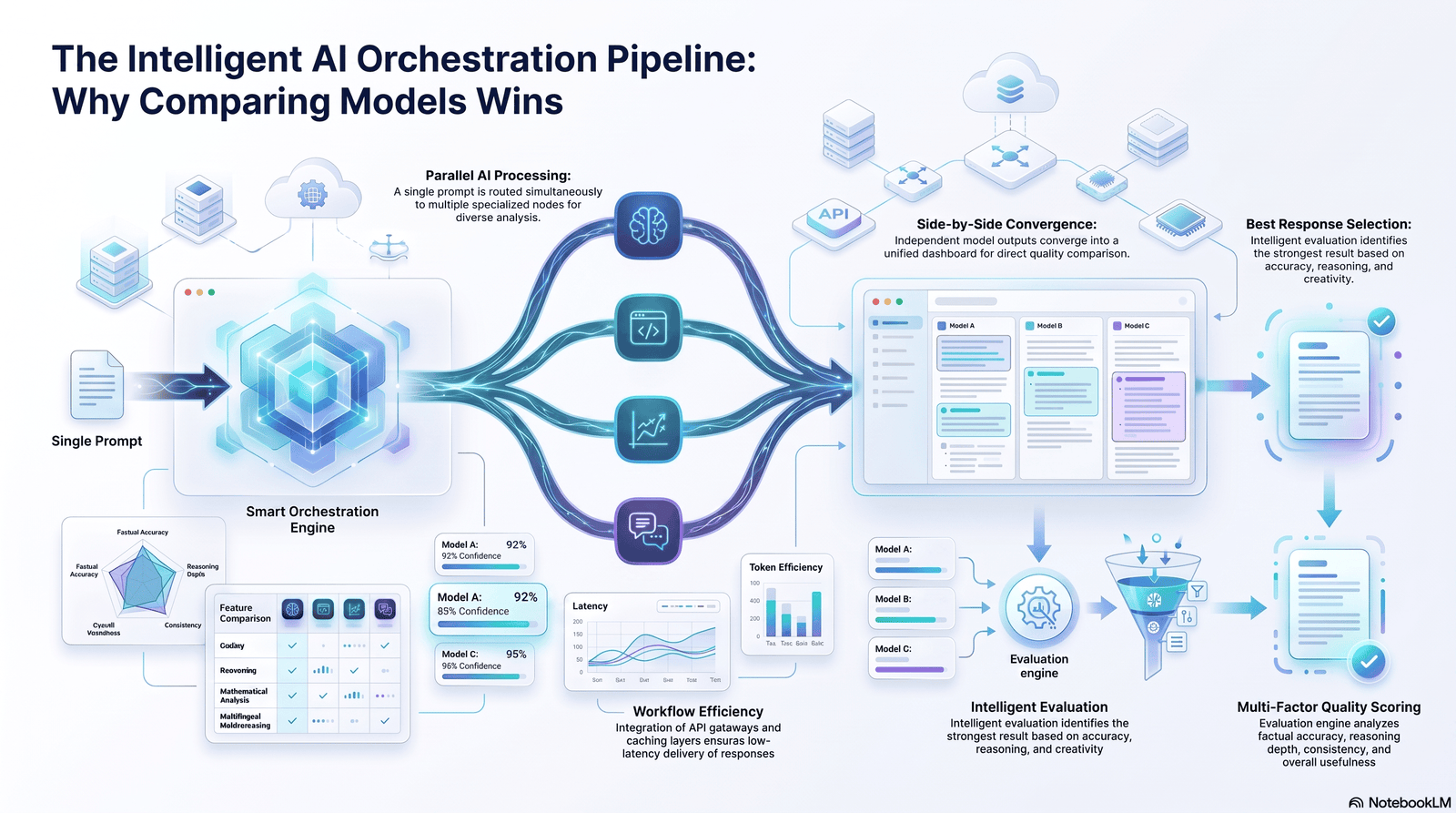
The core function is simple: you type a prompt once, the platform sends it to two or more models at the same time, and you see every response next to each other. This is sometimes called an AI chat comparison or AI prompt comparison feature.
Some platforms go a step further and let you pick a model per task instead of comparing all of them every time. That’s less about comparison and more about AI model switching — using GPT-5 for one message and Claude for the next inside the same conversation thread.
Both approaches fall under the same umbrella: giving you multiple AI models in one platform so you’re not stuck with whatever a single vendor decided to ship this quarter.
Why This Category Exists Now
No single AI model wins at everything. That’s not a marketing line — it’s something you notice within a week of using more than one model seriously.
Claude tends to handle long documents and careful reasoning well. GPT models are often strong generalists with wide plugin and tool support.
Gemini has an edge on tasks tied to real-time search and Google’s ecosystem. Grok leans into current events and a different tone. DeepSeek and other open models are cheap and fast for high-volume tasks.
Once you’ve used more than one model for real work, going back to a single chatbot feels limiting. That gap is what an AI comparison platform is built to close.
How These Platforms Work
Under the hood, most platforms follow a similar pattern.
1. You connect or the platform provides API access. Some tools, like TypingMind and OpenRouter, require you to bring your own API keys from OpenAI, Anthropic, and Google. Others, like Krater.ai, Poe, and ChatHub, bundle model access into a single subscription so you never touch an API key.
2. You type one prompt. The interface usually shows a grid, split-screen, or tabbed layout where you pick which models should answer.
3. The platform routes your prompt to each selected model. This happens through each provider’s API in parallel, not sequentially, so you’re not waiting for one model to finish before the next starts.
4. Responses stream back side by side. Most platforms show real-time streaming so you can watch each model “think” and respond at its own pace.
5. You compare, save, or merge the outputs. Some tools, like Vear, add a “combiner” model that reads all the individual answers and produces one merged response. Others leave the comparison entirely up to you.
This routing layer is sometimes called an AI routing platform or AI orchestration platform, especially when it includes logic for automatically picking the best model for a given task type rather than just running all of them at once.
Why Compare Multiple AI Models Instead of Using One
I’ll be direct about this: for most everyday questions, one good model is fine. You don’t need three AIs to tell you how to boil an egg.
Comparison earns its keep when the cost of a wrong or shallow answer is high. A few real situations where it matters:
- Coding. One model might miss an edge case another catches. Running the same bug report through two models is often faster than debugging blind.
- Research and fact-heavy writing. Models hallucinate differently. When two independent models agree on a fact, that’s a weak but useful signal. When they disagree, that’s your cue to verify manually.
- Client or professional deliverables. A single AI draft can carry a single model’s blind spots into a report your boss or client reads. Cross-checking catches some of that.
- High-stakes decisions. Legal language, financial estimates, and technical specs benefit from a second opinion, the same way you’d want a second doctor’s read on an ambiguous scan.
This is the real value of a cross-model AI testing workflow — not that more models are always better, but that disagreement between models is informative in a way a single confident-sounding answer never is.
Benefits and Drawbacks
No tool in this category is perfect. Here’s the honest tradeoff.
Benefits
- Lower total cost. ChatGPT Plus and Claude Pro alone run about $40/month combined. Most aggregators bundle both, plus several more models, for less than that.
- Faster comparison. No copy-pasting the same prompt into three tabs.
- Better model selection. You learn which model actually performs best for your specific work, instead of guessing.
- Fewer blind spots. Cross-checking catches errors a single model would let slide.
- Centralized history. One searchable archive instead of scattered chat logs across five apps.
Drawbacks
- Usage caps. “Unlimited” plans often hide fair-use credit limits. Read the fine print before assuming a plan has no ceiling.
- Slight latency. Running multiple models in parallel can feel a touch slower than a single fast model, especially on lower-tier plans.
- Data routing concerns. Your prompt now passes through a third-party layer before reaching the model provider. For sensitive data, that’s a real consideration, not a footnote.
- Feature lag. Aggregators sometimes add new frontier models a few days or weeks after they launch, since they need to integrate each provider’s API.
- Overkill for simple tasks. Comparing four models to answer “what’s the capital of Peru” wastes time and, on metered plans, credits.
Best Platforms to Ask the Same Question to Multiple AI Models
I tested each of these directly — sending the same prompts (a coding bug, a research summary, and a marketing brief) across all of them to see how the comparison experience actually holds up, not just what the pricing page claims.
1. Krater.ai
Krater is built around a dedicated /compare command that sends one prompt to multiple models and lines up the answers side by side. It supports 350+ models, including GPT, Claude, Gemini, Llama, DeepSeek, Mistral, and image and video models like Flux and Kling.
Pros
- Very wide model library, including image and video generation
- Purpose-built comparison mode, not a bolted-on feature
- Team workspaces and cloud storage included on higher tiers
Cons
- More features than a casual user needs
- Credit-based system takes a session to understand
2. Poe (by Quora)
Poe was one of the earliest mainstream multi-model chat products. It supports GPT, Claude, Gemini, Llama, and thousands of community-built bots, with fast switching between models in a clean interface.
Pros
- Simple, fast, well-designed interface
- Huge community bot ecosystem
- Good for casually exploring model differences
Cons
- No dedicated side-by-side compare grid in the core experience
- Community bots vary wildly in quality
3. TypingMind
TypingMind is a bring-your-own-API-key tool. You connect your own OpenAI, Anthropic, and Google accounts, and pay providers directly for usage. TypingMind itself is a one-time purchase rather than a subscription.
Pros
- One-time cost, no recurring aggregator fee
- Full control over which models and providers you use
- Strong for developers who already have API access
Cons
- Requires managing API keys and billing across providers
- Not beginner-friendly
- API costs are separate and usage-based, so total cost can vary
4. ChatHub
ChatHub is a browser extension and web app built specifically around comparing chatbot answers. It supports up to six models at once in a configurable grid and is one of the more affordable dedicated comparison tools.
Pros
- Purpose-built for side-by-side comparison
- Works as a lightweight browser extension
- Competitive pricing versus subscription-only rivals
Cons
- Query caps on the entry-tier plan
- Mobile experience is less polished than desktop
5. OpenRouter
OpenRouter is a developer-first unified API that routes requests to hundreds of models from OpenAI, Anthropic, Meta, Google, and others through one endpoint. It also has a basic chat interface for manual testing.
Pros
- Massive model catalog
- Transparent, usage-based pricing
- Ideal for building your own comparison tools or apps
Cons
- Chat interface is secondary to the API — not built for casual comparison
- Requires some technical comfort
6. Aymo AI
Aymo AI (formerly Geeky.chat) positions itself as a team-first aggregator with 30+ models, shared workspaces, and role-based access for collaborative comparison work.
Pros
- Strong team and collaboration features
- Competitive entry pricing
- BYOK (bring your own key) support for cost control
Cons
- Smaller model catalog than Krater or OpenRouter
- Some integrations are still rolling out
7. Merlin AI
Merlin is a Chrome extension that layers multiple models into your existing browsing and workflow, rather than being a standalone workspace.
Pros
- Convenient sidebar access from any webpage
- Bundles several premium models under one subscription
- Good for people who want AI without leaving their browser tab
Cons
- “Unlimited” plans run on fair-use credit systems, not truly unlimited usage
- Less suited to deep side-by-side comparison than dedicated tools
- Refund and billing support has been a recurring user complaint
Comparison Table
| Platform | Best For | Models Supported | Compare Mode | Starting Price |
|---|---|---|---|---|
| Krater.ai | All-around, teams | 350+ (text, image, video) | Yes (/compare) | ~$20/mo |
| Poe | Casual comparison | GPT, Claude, Gemini, Llama + community bots | Limited | ~$20/mo |
| TypingMind | Developers, BYOK | Any model via API key | Manual | $39 one-time + API costs |
| ChatHub | Dedicated side-by-side comparison | GPT, Claude, Gemini, Llama, Grok, DeepSeek, 20+ | Yes (grid, up to 6) | ~$14.99/mo |
| OpenRouter | Developers, app builders | 300+ via unified API | Via API only | Pay-as-you-go |
| Aymo AI | Team collaboration | 30+ | Yes | ~$4/mo |
| Merlin AI | Browser-based convenience | 20+ | Limited | ~$15–19/mo |
Pricing and model counts change frequently as providers release new models and platforms adjust tiers. Always confirm current pricing on the vendor’s site before purchasing.
Pricing Breakdown
Multi-model platforms use three general pricing structures.
Flat monthly subscription. You pay one price and get a set number of credits or messages across all supported models. Krater, Poe, ChatHub, and Merlin fall here. Watch for “unlimited” language — it usually means a high but real cap, not infinite usage.
One-time purchase plus your own API costs. TypingMind charges once for the software, then you pay OpenAI, Anthropic, and Google directly based on token usage. This can be cheaper for light users and more expensive for heavy ones, since API pricing is metered.
Usage-based, pay-as-you-go. OpenRouter charges per token, with no subscription fee. This suits developers building their own tools more than someone who just wants a chat interface.
As a rule of thumb: if you already pay for two or more individual AI subscriptions (say, ChatGPT Plus and Claude Pro, at roughly $20 each), a bundled aggregator at $15–20/month usually saves money while adding more models on top.
Supported AI Models
Most reputable platforms in this space cover the major frontier model families:
- OpenAI — GPT-series models
- Anthropic — Claude Sonnet, Opus, and Haiku models
- Google — Gemini Pro and Flash models
- xAI — Grok models
- DeepSeek — cost-efficient reasoning models
- Meta — Llama open-weight models
- Mistral — open and commercial models
Coverage varies by platform. Aggregators like Krater.ai and OpenRouter lean toward breadth (hundreds of models, including niche and open-source options). Single-purpose comparison tools like ChatHub focus on a tighter list of major, well-known models. Neither approach is wrong — it depends whether you want maximum choice or a faster, simpler comparison view.
Response Quality, Speed, and Reliability
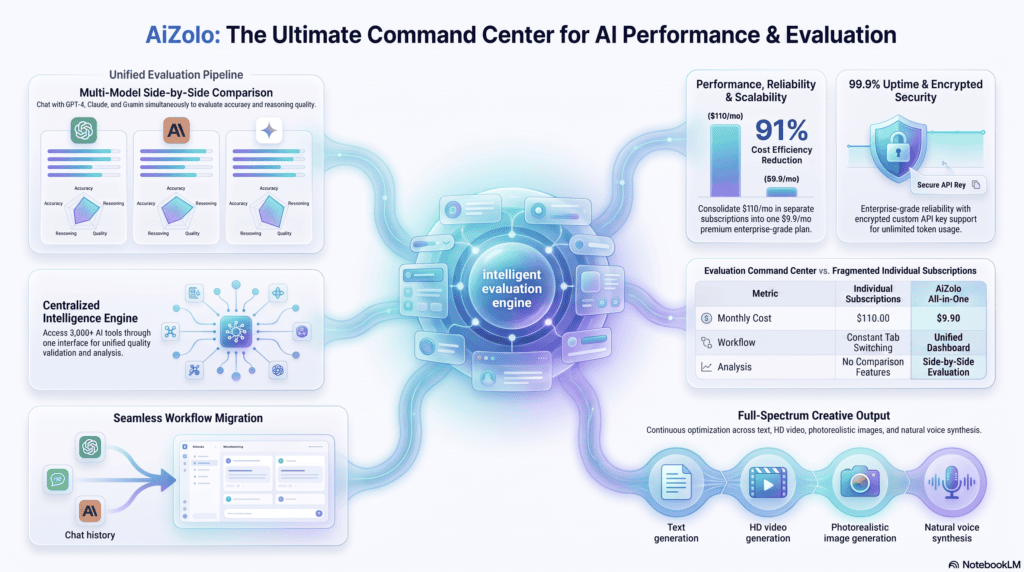
A common misconception is that the aggregator changes model quality. It doesn’t. When you ask GPT-5 a question through Krater or through ChatGPT directly, you’re getting the same underlying model — the aggregator is a routing and display layer, not a different brain.
What the aggregator does affect:
- Speed. Parallel requests to multiple providers can introduce small delays versus a single native app, especially under load.
- Formatting fidelity. Some platforms strip or alter formatting (tables, code blocks) when displaying multiple responses side by side. Test this with your typical prompt types before committing.
- Feature parity. Native apps often get provider-specific features (like ChatGPT’s Canvas or Claude’s Artifacts) before or instead of aggregators, since those features depend on custom UI the aggregator would need to rebuild separately.
In my testing, response quality itself was identical to using each provider’s own app. The differences that mattered were in the interface, not the intelligence.
A Real Test: Same Bug, Three Models
To see how this plays out in practice, I ran a real debugging prompt — a Python function throwing an intermittent KeyError — through three models on the same platform at the same time.
One model spotted the missing key check immediately and suggested a .get() fallback. A second model rewrote the entire function unnecessarily, missing the actual bug. The third correctly identified the root cause but suggested a fix that would have introduced a new edge case.
None of the three answers was complete on its own. Reading all three together, though, took less time than debugging manually would have, and the disagreement itself pointed straight at the part of the code that actually needed a closer look.
That’s the pattern I’d encourage you to expect. Multi-model comparison rarely hands you one obviously correct answer. It narrows down where to focus your own judgment — which, for anything that matters, is still required.
Security and Privacy Considerations
This is the part most competing guides skip, and it matters.
When you use a multi-model platform, your prompt typically passes through the aggregator’s servers before reaching OpenAI, Anthropic, or Google. That means:
- Read the data retention policy. Some platforms store your prompts for product improvement unless you opt out. Others don’t retain content at all. This varies by vendor, so check the specific platform’s privacy policy rather than assuming.
- BYOK reduces exposure. Bring-your-own-key platforms like TypingMind route your prompt more directly to the provider, cutting out one layer of storage.
- Avoid pasting sensitive data into any third-party layer — client contracts, health information, unreleased financial data — unless the platform explicitly states enterprise-grade data handling and you’ve verified it.
- Check for SOC 2 or equivalent certification if you’re evaluating a platform for business use. Vendors serious about enterprise customers will publish this.
None of this means multi-model platforms are unsafe. It means you should treat them the way you’d treat any third-party SaaS tool handling business data: verify before you trust.
Team Collaboration and Enterprise Use
For teams, the value shifts from “compare answers” to “standardize how the team uses AI.”
Look for:
- Shared workspaces where team members see the same chat history and prompt library
- Role-based access controls to manage who can use which models or spend limits
- Centralized billing instead of five people expensing five separate AI subscriptions
- Audit logs for compliance-sensitive industries
Platforms like Aymo AI and Krater.ai’s team tiers, and enterprise-focused tools like TeamAI, are built around this. If you’re rolling AI out across a department, this collaboration layer often matters more than raw model count.
API Integrations and Developer Access
If you’re building a product rather than just chatting, the calculus changes. OpenRouter and TypingMind are the strongest fits here, since both are designed around direct API access rather than a polished consumer chat UI.
A typical developer workflow looks like this: send a request to a unified endpoint, specify which model to use (or run several in parallel for A/B testing), and handle the responses programmatically. This is useful for testing which model performs best for a specific feature — say, comparing GPT and Claude for summarization quality — before locking in a production model.
For non-developers, this layer is mostly invisible. Consumer-facing aggregators handle the API complexity for you.
Who Should Use These Platforms
Students — use a free-tier tool like ChatHub or Poe to cross-check homework help and catch factual errors before submitting work.
Developers — OpenRouter or TypingMind, for direct API access and the flexibility to swap models per project.
Marketers — an aggregator with strong writing models (Krater.ai, Merlin) to draft and compare copy variations quickly.
Content creators — platforms with both text and image/video model support, like Krater.ai or Mammouth AI, to keep the whole content pipeline in one place.
Researchers — comparison-first tools like ChatHub, where disagreement between models is the actual point of the workflow.
Small businesses — a bundled subscription (Krater.ai, Aymo AI) that replaces multiple individual AI subscriptions at a lower combined cost.
Enterprises and teams — platforms with admin controls, audit logs, and centralized billing, like TeamAI or the enterprise tiers of Krater.ai and Aymo AI.
Common Mistakes to Avoid
Assuming more models means better answers. Running the same weak prompt through five models just gives you five mediocre answers. Improve the prompt first.
Ignoring usage caps. “Unlimited” plans often have invisible fair-use ceilings. Confirm the actual limit before relying on a plan for high-volume work.
Treating agreement as proof. When two models give the same wrong answer — because they were trained on similar data — that’s not verification. It’s a shared blind spot.
Skipping the privacy policy. Especially for business use, know where your prompts go and how long they’re stored.
Comparing models on tasks where it doesn’t matter. Save comparison for higher-stakes work. For quick, low-risk questions, one good model is enough.
Best Practices for Comparing AI Responses
- Use the same prompt, word for word, across models. Small wording changes make the comparison meaningless.
- Compare on tasks with a right answer when possible. Coding and factual questions make disagreement easy to evaluate. Creative writing is more subjective.
- Pay attention to why models disagree, not just that they disagree. A model that flags uncertainty is often more trustworthy than one that answers confidently and wrong.
- Keep a running note of which model wins for which task type. Over a few weeks, a clear pattern usually emerges — this is more useful than reading someone else’s benchmark.
- Don’t skip the manual verification step for anything that matters. Multi-model comparison narrows down risk. It doesn’t eliminate it.
Buying Guide: How to Choose the Right Platform
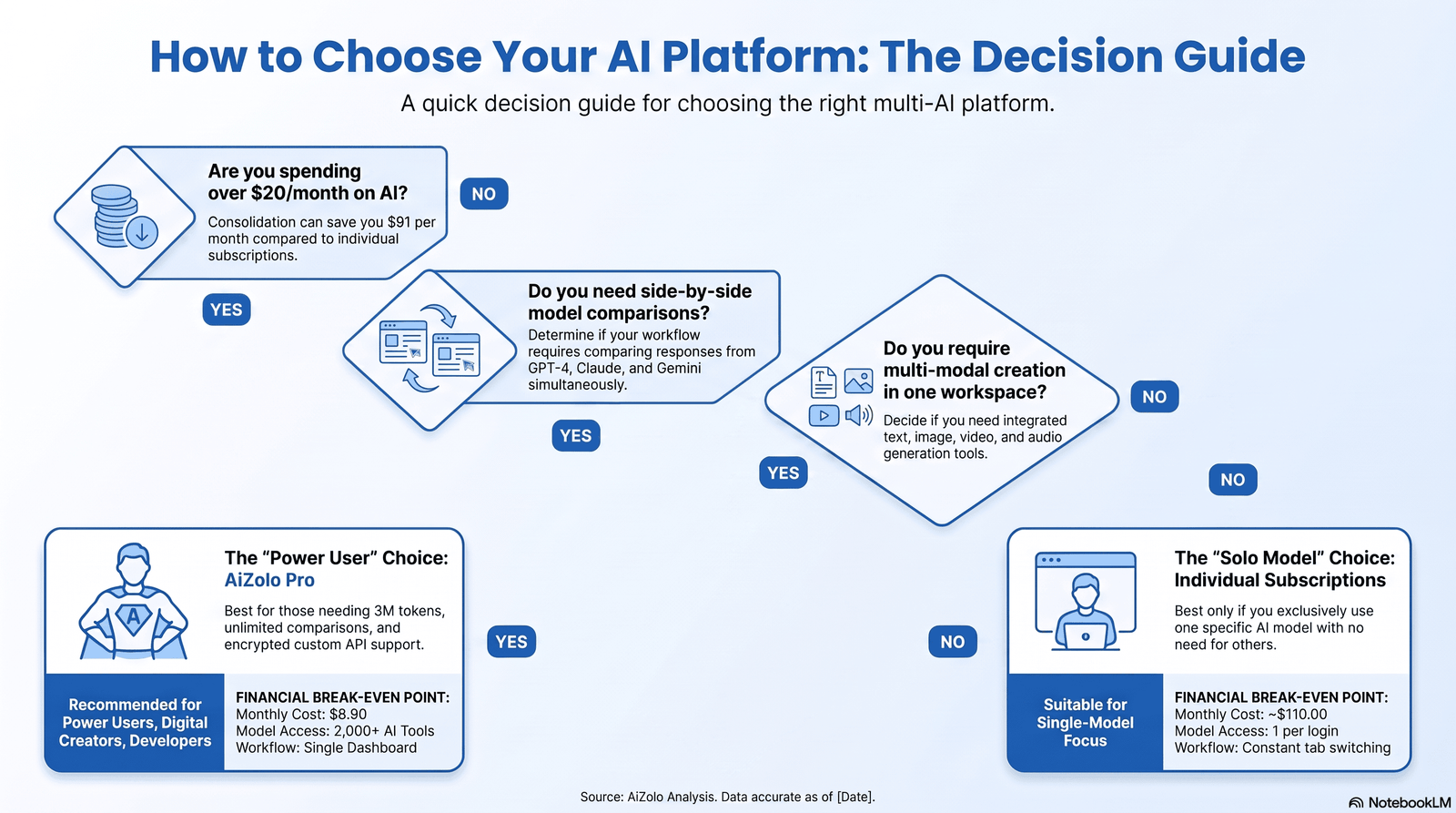
Ask yourself these four questions before subscribing:
1. Do I want a dedicated comparison mode, or just model-switching? If side-by-side comparison is the core need, prioritize ChatHub or Krater.ai’s /compare. If you just want flexibility to pick a model per task, Poe or Aymo AI work fine.
2. Am I comfortable managing API keys? If yes, TypingMind or OpenRouter give you more control at a lower long-term cost for light usage. If no, stick with a bundled subscription platform.
3. Do I need image or video generation alongside text models? If yes, narrow to platforms like Krater.ai or Mammouth AI that support multi-modal generation, not just chat.
4. Is this for a team? If yes, prioritize admin controls, shared workspaces, and centralized billing over raw model count.
There’s rarely a single “best” platform — there’s a best platform for your specific mix of budget, technical comfort, and use case.
A fifth question worth asking: how often do you expect to actually use the comparison feature versus just switching between models? If you’ll compare responses daily — for research, editing, or QA work — pay for a platform with a fast, dedicated compare view. If you mostly want the flexibility to pick whichever model suits a task, a simpler model-switcher without a heavy comparison UI will feel less cluttered day to day. Buying more comparison power than you’ll use is a common way people overpay in this category.
Future Trends in Multi-Model AI
A few directions worth watching as this category matures:
- Automatic model routing. Instead of manually picking models to compare, platforms are increasingly routing prompts to whichever model is statistically best suited for that task type, only falling back to full comparison when confidence is low.
- Merged or synthesized responses. Tools that use one model to read and combine outputs from several others are becoming more common, reducing the manual work of comparing raw text.
- Tighter enterprise controls. As businesses adopt these platforms at scale, expect more emphasis on audit trails, data residency options, and compliance certifications.
- Pricing consolidation. As model costs shift, expect more platforms to move toward credit-based systems rather than flat “unlimited” plans, since true unlimited usage is expensive to sustain.
This space changes quickly — model lineups and pricing tiers shift every few months, so treat any specific price or model list (including the ones in this article) as a snapshot rather than a permanent fact.
FAQs
1. What is the best platform to ask the same question to multiple AI models? It depends on your priorities. Krater.ai offers the broadest model library with a dedicated compare mode. ChatHub is a strong, affordable option built specifically for side-by-side comparison. TypingMind suits developers who want full control via their own API keys.
2. Is it free to use multiple AI models on one platform? Some platforms offer free tiers with limited queries, such as Poe and ChatHub’s free plan. Fully free, uncapped access across multiple frontier models is rare, since the underlying API costs money regardless of which platform you use.
3. Can I ask GPT and Claude the same question at the same time? Yes. Platforms like ChatHub and Krater.ai let you select multiple models and send one prompt to all of them simultaneously, with responses streaming in side by side.
4. Are multi-AI platforms safe to use with sensitive information? It depends on the platform’s data handling policy. Bring-your-own-key tools like TypingMind reduce the number of parties that see your data. For business use, verify a platform’s privacy policy and any compliance certifications before sharing sensitive information.
5. Do these platforms cost more than subscribing to each AI separately? Usually less. Two individual subscriptions, like ChatGPT Plus and Claude Pro, often cost around $40/month combined. Many aggregators bundle both plus additional models for less than that.
6. Do I need technical skills to use an AI aggregator? No, for most platforms. Tools like Krater.ai, Poe, and Merlin are designed for non-technical users. TypingMind and OpenRouter require more comfort with API keys and technical setup.
7. Which platform has the most AI models available? As of this writing, Krater.ai (350+) and OpenRouter (300+) offer the widest model selection. Coverage changes as new models launch, so check each platform’s current model list before deciding.
8. Can I compare AI image or video generation models too, not just chat? Yes, on platforms built for multi-modal generation, such as Krater.ai and Mammouth AI. Chat-only comparison tools like ChatHub focus primarily on text models.
9. What’s the difference between an AI aggregator and switching models manually? An aggregator handles billing, API connections, and side-by-side display for you. Switching manually means separately subscribing to and logging into each AI provider, then copying prompts between tabs yourself.
10. How do I know which AI model is actually best for my work? Run your typical prompts through two or three models over a couple of weeks and track which one performs best for your specific task types — writing, coding, research, and so on. General benchmarks are a starting point, not a substitute for testing on your own work.
11. Do multi-model platforms slow down responses compared to using one AI app directly? Sometimes slightly, since the platform is managing parallel connections to multiple providers. In practice, the difference is usually a second or two, not something that disrupts most workflows.
Conclusion
Comparing AI models used to mean juggling browser tabs and losing track of which chatbot said what. Platforms built to ask the same question to multiple AI models fix that — and for anyone doing serious research, coding, or content work, that fix pays for itself fast.
There’s no single winner for everyone. If you want breadth and a dedicated compare mode, start with Krater.ai. If you want a lightweight, affordable comparison tool, try ChatHub. If you’re a developer who wants full control, TypingMind or OpenRouter will serve you better than any bundled subscription.
Whichever you pick, remember the real value isn’t in the number of models you can run at once — it’s in what disagreement between them teaches you about where to dig deeper.
Next step: pick one platform from this list that matches your budget and technical comfort, run your next three real prompts through it, and see which model actually wins for your work. That’s a better test than any ranking, including this one.
External Linking Table
| Anchor Text | Recommended URL | Reason for Linking | Suggested Placement |
|---|---|---|---|
| OpenAI’s API documentation | https://platform.openai.com/docs | Authoritative source on GPT model capabilities and API usage | “API Integrations” section |
| Anthropic’s model documentation | https://docs.anthropic.com | Authoritative source on Claude model family and capabilities | “Supported AI Models” section |
| Google AI’s Gemini documentation | https://ai.google.dev | Authoritative source on Gemini model specifications | “Supported AI Models” section |
| Google Search Central’s Helpful Content guidance | https://developers.google.com/search/docs/fundamentals/creating-helpful-content | Supports EEAT and content quality claims made in this article | Author bio / conclusion area |
| Stanford HAI’s AI Index Report | https://aiindex.stanford.edu | Authoritative, research-backed data on AI model trends | “Future Trends” section |
| MIT Technology Review’s AI coverage | https://www.technologyreview.com/topic/artificial-intelligence | Independent journalism on AI industry developments | “Future Trends” section |
| NVIDIA’s developer blog on LLM inference | https://developer.nvidia.com/blog | Technical background on how model inference and routing work | “How These Platforms Work” section |
| GitHub’s OpenRouter repository or docs | https://openrouter.ai/docs | Primary source for OpenRouter’s technical capabilities | “API Integrations” section |
Author Bio
Jeevesh Tripathi Email: jeevesh@aizolo.com
Jeevesh Tripathi writes about AI tools, large language models, and productivity software, with a focus on helping readers cut through marketing claims and understand how these tools actually perform in daily use. His work is grounded in hands-on testing rather than secondhand summaries — he runs the same prompts across competing platforms before writing about them, and flags limitations and pricing caveats that vendors tend to leave out of their own marketing pages. He follows model releases and platform updates closely, since this category changes fast, and updates his coverage when pricing, features, or model lineups shift materially.

Pingback: Chat GPT Claude Gemini All in One: 7 Powerful Benefits
Pingback: Replace 10 Paid AI Tools with AI Zolo & Save $2,400+
Pingback: AI Subscription: 50+ Apps to Save $1,000+ Every Year, Smarter
Pingback: 7 Tools to Improve AI Prompts for 3x Better Results 2026
1