
New to comparing AI subscriptions? Here’s the short version. Every major AI company — OpenAI, Anthropic, Google, xAI, Perplexity — sells its own chatbot on its own $20-ish/month plan. None of those plans include access to the others. So “the cheapest AI subscription” isn’t really a single-tool question; it’s a question of how many of those tools you actually need, and whether you’re paying for each one separately or accessing them all through one bundled platform like AiZolo. The rest of this guide breaks down both approaches by price, by use case, and by what “cheap” actually means once hidden costs are factored in.
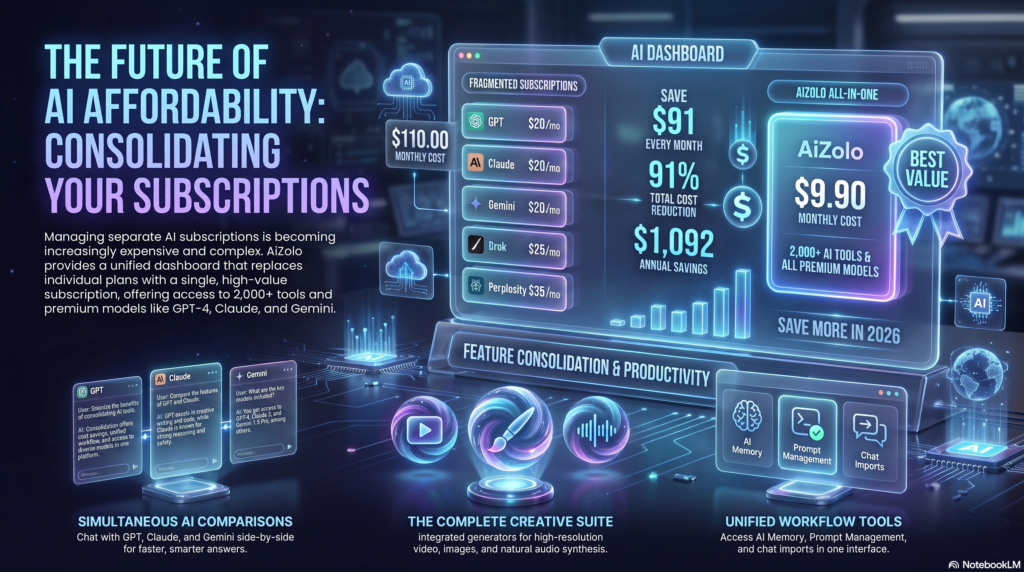
If you’ve opened your bank statement recently and found ChatGPT Plus, Claude Pro, and Gemini Advanced all sitting there on the same page, you’re not imagining things. A lot of people who started with one $20/month AI subscription in 2024 now find themselves paying for three or four, because each model is genuinely better at different things — and none of them do everything well.
Stack up ChatGPT Plus, Claude Pro, Google AI Pro, and Perplexity Pro and you’re already at roughly $80/month, or $960 a year, before you’ve added a coding tool, an image generator, or a writing assistant. That’s more than a lot of people pay for streaming, music, and cloud storage combined.
This guide breaks down the actual, current cost of every major AI subscription, points out where the cheap options fall short, and shows you a few genuinely low-cost paths — including budget individual tiers, student discounts, and all-in-one plans that bundle multiple models under one subscription.
Here’s what you’ll walk away with:
- A current, verified price table for every major AI subscription
- The real difference between “cheap” and “good value”
- Which plan fits students, freelancers, developers, and small teams
- The hidden costs — rate limits, missing features, no API — that cheap plans don’t advertise
- A clear-eyed look at all-in-one subscriptions as an alternative to stacking multiple tools
Table of Contents
What Is an AI Subscription?
An AI subscription is a recurring monthly or annual payment that gives you expanded access to a chatbot or AI platform beyond its free tier — typically a smarter model, higher usage limits, fewer ads, and extra features like file uploads, image generation, or deep research tools. It’s different from API pricing, which charges per token and is aimed at developers building applications, not people chatting in an app.
Most consumer AI subscriptions today sit in a narrow band: free, roughly $8–$10 for a budget tier, roughly $20 for the main paid tier, and $100–$250 for power-user tiers with much higher usage caps.
If this is your first paid plan and terms like tokens, credits, and freemium caps are still fuzzy, our AI tool subscription guide for beginners breaks down each pricing structure before you commit to one.
Why AI Subscription Costs Matter
A single $20/month subscription doesn’t feel like much. The problem is what happens once you add a second, third, or fourth one, because each AI model has a genuine edge somewhere:
- Claude tends to be preferred for long-form writing, careful reasoning, and coding
- ChatGPT has the broadest feature set — voice, image and video generation, custom GPTs
- Gemini integrates deeply with Gmail, Docs, and Drive and offers the largest context windows
- Perplexity is built around cited, real-time web research
Once you’re paying for two or three of these because no single one covers everything you need, the “cheap” $20/month subscription quietly becomes an $80–$110/month AI budget line. That’s the exact problem this guide is built to help you solve.
Pricing Comparison: Every Major AI Plan
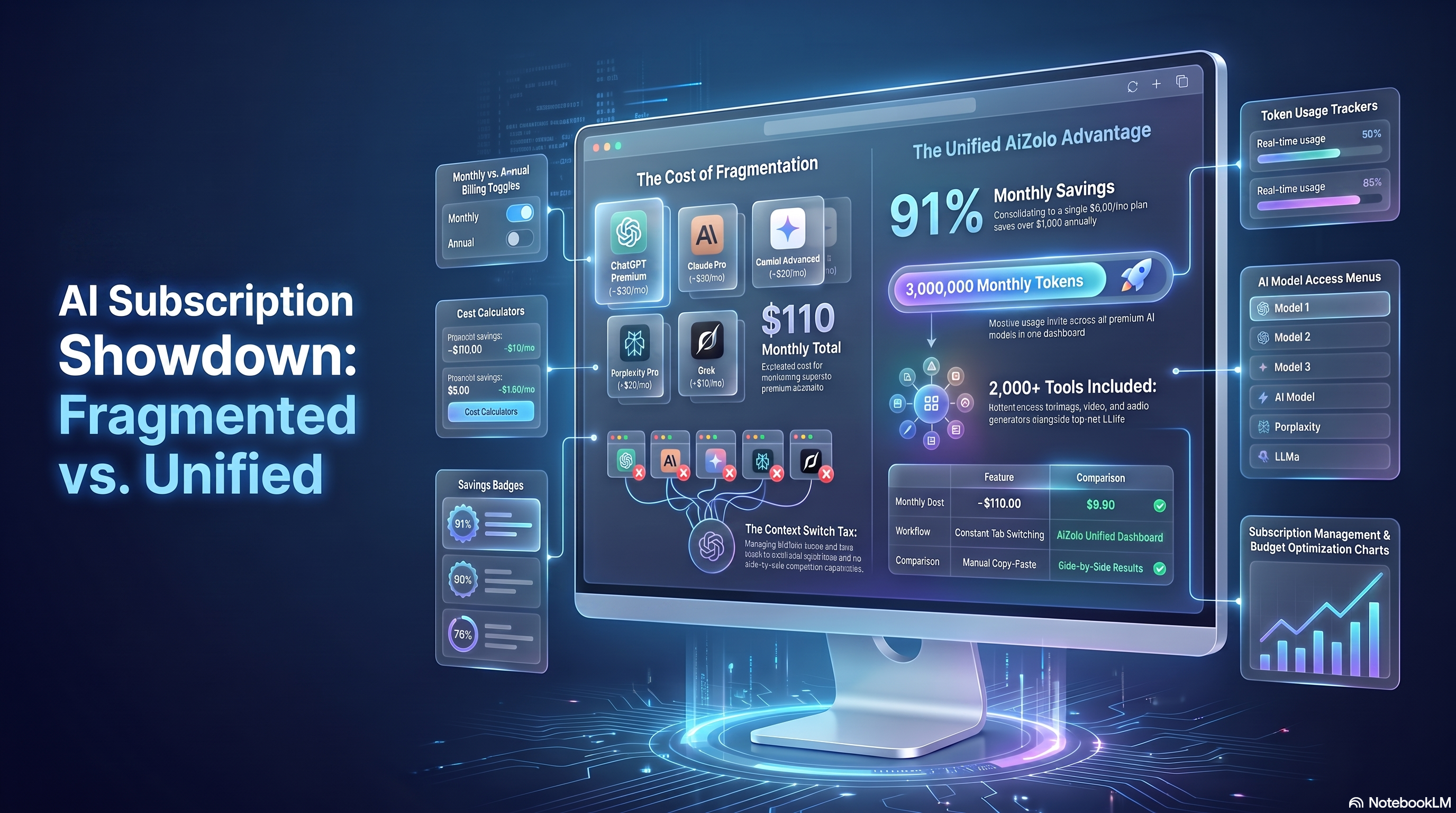
Prices below are current as of mid-2026, verified against each provider’s official pricing page. Subscription pricing changes often, so treat this as a snapshot and double-check before you buy.
| Platform | Monthly Cost | Models Included | Comparison Feature | Own API Keys | What You Don’t Get |
|---|---|---|---|---|---|
| ChatGPT Plus | $20/mo | GPT-4o only | ❌ | ❌ | Claude’s long-form reasoning, Gemini’s Workspace integration |
| Claude Pro | $20/mo | Claude only | ❌ | ❌ | Image generation, multi-model comparison |
| Gemini Advanced | $19.99/mo | Gemini only | ❌ | ❌ | Claude’s writing nuance, GPT’s tool ecosystem |
| Perplexity Pro | $20/mo | Perplexity (research) | ❌ | ❌ | General creative/coding capability |
| Grok SuperGrok | $30/mo | Grok only | ❌ | ❌ | Everything outside the X ecosystem |
| Buying all 5 separately | $109.99/mo | 5 | ❌ | ❌ | A unified workspace |
| AiZolo Pro | $9.90/mo | 5+ | ✅ | ✅ | — |
(Annual AiZolo plan: $99.90/year → $8.33/mo effective, 17% savings.)
A few things jump out immediately: Google AI Pro is technically the cheapest of the “big three” flagship subscriptions by a few cents, ChatGPT Go is the cheapest way into a real GPT model, and the all-in-one category (Poe, Aizolo, and similar tools) exists specifically to undercut the cost of stacking single-model subscriptions.
How AiZolo Compares to Other Multi-Model Platforms
The table above compares AiZolo against first-party subscriptions, which is only half the picture. AiZolo isn’t the only platform bundling several models under one bill, and if you’re considering this category at all, these are the alternatives worth knowing about.
| Platform | Billed monthly | Billed annually | Models included | Image generation | Simultaneous comparison | Own API keys |
|---|---|---|---|---|---|---|
| AiZolo Pro | $9.90 | $8.33 ($99.90/yr) | GPT, Claude, Gemini, Grok, Perplexity Sonar Pro | Yes — plus video and audio | Yes | Yes |
| T3 Chat Pro | $8 | — | GPT, Claude, Gemini, DeepSeek and others | ~100 generations/mo | Switch models mid-thread, not side by side | No |
| ChatHub Pro | $19 | $14.99 | GPT, Claude, Gemini and others | 300 generations/mo | Yes — up to 6 at once | Not required |
| ChatHub Unlimited | $39 | $24.99 | Same, without query caps | 1,000 generations/mo | Yes — up to 6 at once | Not required |
| Magai Solo | ~$20 [VERIFY] | — | GPT, Claude, Gemini, DeepSeek, Llama, plus image tools | Yes | Yes | No |
| Perplexity Pro | $20 | — | Routed multi-model, research-focused | No | No | No |
Verified against each provider’s official pricing page as of August 2026. Aggregator pricing changes frequently — confirm before you buy.
T3 Chat ($8/month) is the cheapest genuine multi-model option, and for a lot of people it’s enough. It’s fast, it’s cheap, and it covers the major models. What you don’t get is a workspace: no persistent memory across sessions, no project organisation, and no true side-by-side view — you switch models within a thread rather than querying several at once.
ChatHub ($19/month, or $14.99 on annual billing) is the closest direct competitor on the comparison feature specifically, and arguably does it best — six models at once is more than most platforms offer. The catch is price. At $19 billed monthly it costs roughly double AiZolo, and the widely-quoted $14.99 figure requires committing to a year upfront.
Magai (~$20/month) is built for content teams rather than price-sensitive individuals. Personas, folders and brand organisation are genuinely good if that’s your workflow. Usage is metered by output cost rather than a flat allowance, which can be either generous or restrictive depending on which models you lean on.
Perplexity Pro ($20/month) isn’t really in this category. It routes queries across models but doesn’t let you compare them, and it isn’t a general workspace. For citation-backed research it’s the best tool here; for anything else it isn’t competing.
Where AiZolo sits: it’s the cheapest option that combines multi-model access, simultaneous comparison, creative generation and bring-your-own-key support in one plan. T3 Chat undercuts it by $1.90 but drops the workspace features; ChatHub matches the comparison feature but costs roughly twice as much month-to-month.
The honest limitation: AiZolo runs on a shared 3,000,000-token monthly allowance across every model, rather than each provider’s own per-model limits. If you spend eight hours a day inside one model, that pooled allowance will constrain you sooner than a dedicated subscription would. It’s a platform built for people who spread usage across models, not for people who live in one.
The Cheapest AI Subscription Options
If your only goal is the lowest monthly bill, here’s the honest ranking, from cheapest to most expensive:
- ChatGPT Go — $8/month. The lowest price for genuine GPT access, though it’s ad-supported in the US and doesn’t include GPT-5.5, Deep Research, or Codex.
- Google AI Plus — $7.99/month. Slightly cheaper than Go, and ad-free, but with narrower model access than Google AI Pro.
- Aizolo Pro — $9.90/month ($8.33/month billed annually). Cheaper than a single flagship subscription, and it’s a multi-model plan rather than a single-model one — the trade-off is a shared monthly token allowance instead of each provider’s native unlimited-feeling chat window.
- Perplexity Education Pro — $10/month for verified students, with the same feature set as the full $20 Pro plan.
- Poe (entry tier) — from around $5/month, though usage is metered in points rather than messages, so heavy users burn through the allowance quickly.
If you only need one capable model and are willing to live with a message cap, ChatGPT Go or Google AI Plus are the cheapest legitimate entry points. If you regularly want more than one model, an all-in-one plan like Aizolo or Poe usually beats paying for two flagship subscriptions separately.
Best Value vs. Cheapest — They’re Not the Same
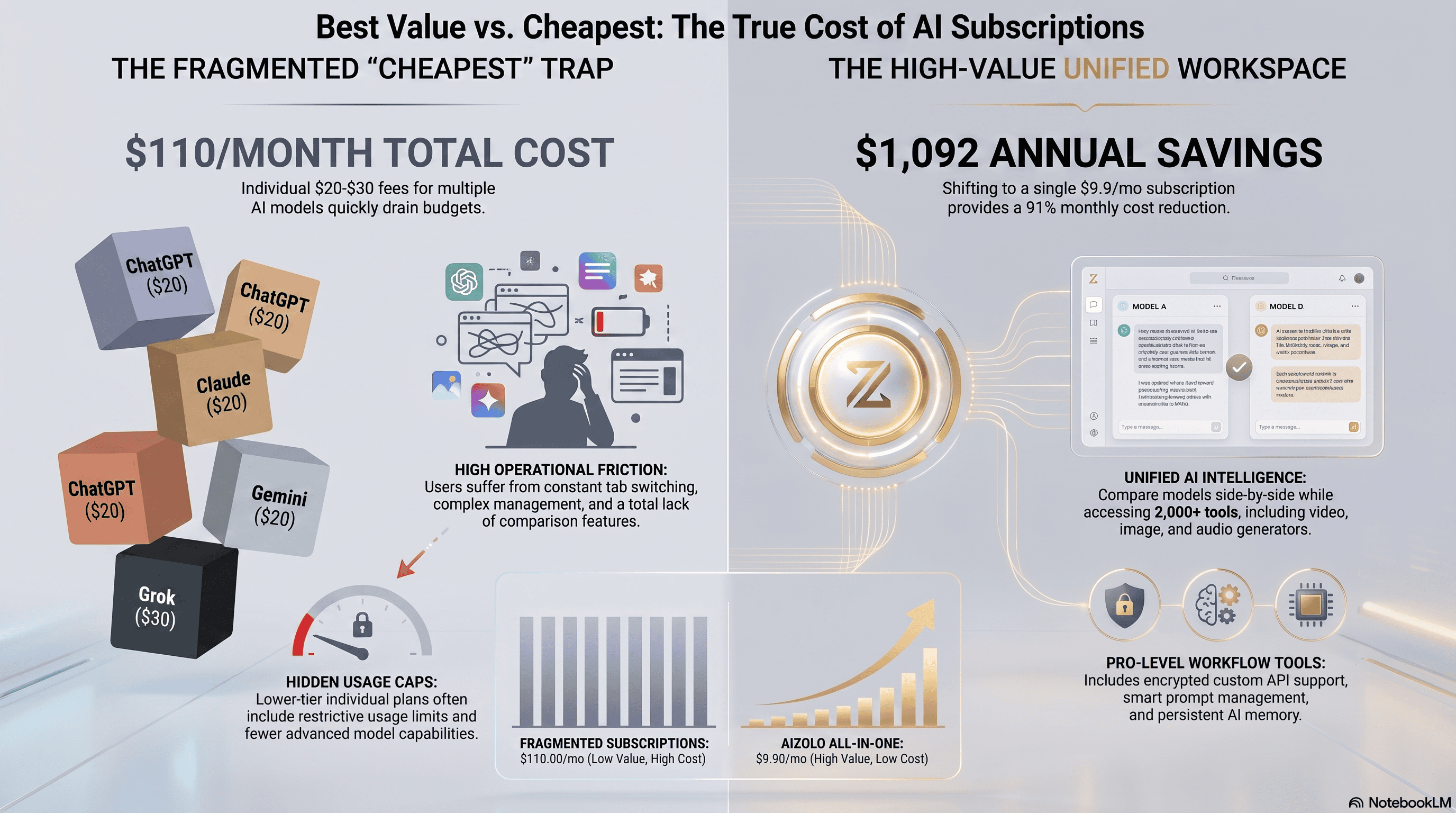
Cheapest and best value aren’t the same question. A $8/month plan that doesn’t include the model you actually need isn’t a deal — it’s a plan you’ll outgrow in a week.
Value is a ratio: what you get, divided by what you pay. On that basis:
- Claude Pro at $20/month offers strong value for coding and writing-heavy work, largely because Claude Code is bundled in rather than sold separately.
- ChatGPT Plus at $20/month offers the broadest single-subscription feature set — voice, image, video generation, and agent tools — which makes it good value if you use several of those features.
- Perplexity Pro at $20/month is strong value specifically for research, because it includes multiple underlying models plus real-time citations in one interface.
- Aizolo at $9.90/month offers a different kind of value: instead of paying full price for the single best model, you get partial access to several, which suits people who don’t yet know which model fits their workflow, or who genuinely need to compare outputs.
The right call depends on whether you have one dominant use case (pick the specialist) or a mix of tasks that benefit from different models (an all-in-one plan or Perplexity’s model-switching starts to make more financial sense).
That same ratio can be applied one level up, to the providers themselves rather than their plans — see which AI companies offer the best value for money for how each company’s pricing lines up against what it actually delivers.
What Most “Cheap AI” Guides Get Wrong
Most advice on cutting AI costs falls into three recommendations, and all three trade away more than they save.
“Just pick one model and commit.” This is the most common suggestion and the least useful, because it treats the models as interchangeable when the entire reason people end up with multiple subscriptions is that they aren’t. Committing to one model means accepting that you’ll get a worse answer whenever your task falls outside its strengths. That’s a real cost — it just doesn’t appear on a statement.
“Live on the free tiers.” Free tiers have genuinely improved, and for light use they’re often enough. But rate limits don’t reset when it’s convenient. They reset a few hours after you hit them, which in practice means mid-afternoon on the day you’re up against a deadline. A free tier that fails at the exact moment you need it isn’t saving you anything.
“Rotate subscriptions month to month.” Subscribe to Claude in January, ChatGPT in February, cancel and re-subscribe as your needs change. It works arithmetically and falls apart practically: you lose conversation history, saved prompts and accumulated context each time, and you spend real time managing billing cycles for a saving of maybe $20.
What these have in common is that they treat the monthly total as the only number that matters. The more useful question isn’t “which single AI is cheapest?” but “what’s the lowest total cost of getting the right model for each task?” Those have different answers, and only the second one accounts for the work you’re actually trying to do.
Why Paying for Multiple AI Tools Gets Expensive Fast
Here’s what subscription stacking actually looks like for a few common personas:
A freelance writer using Claude Pro for drafting ($20) and ChatGPT Plus for research and brainstorming ($20) is at $40/month, or $480/year, before any writing-specific tools.
A developer running Claude Pro for Claude Code ($20), ChatGPT Plus for general debugging help ($20), and Perplexity Pro to check documentation and recent releases ($20) is at $60/month, or $720/year.
A marketing agency with five people each running a Plus-tier subscription hits $100/month per tool, per person — multiply that by however many tools the team standardizes on, and a small agency can easily clear $500–$1,000/month in AI subscriptions alone.
A student juggling ChatGPT for coursework and Perplexity for citations is already at $40/month on top of tuition costs, unless they use student discounts (more on that below).
A startup founder validating an idea might reasonably want ChatGPT for drafting a pitch deck, Claude for technical documentation, and Gemini for anything inside Google Workspace — three subscriptions, roughly $60/month, before the business has any revenue.
Stacking doesn’t stop at chatbots either. Once Grammarly, Jasper, Canva, and Otter are in the mix, the arithmetic changes again — we’ve mapped the full AI subscription savings compared to individual SaaS tools, including the categories where one AI plan genuinely can’t replace a specialist tool.
None of these people are being wasteful. Each tool is arguably the right choice for its specific task. The expense comes from the fact that no single $20 plan currently covers “the best model for every kind of work.”
Beyond the chatbots: the wider tool stack
The $80–$110 figure only counts chatbot subscriptions. For anyone doing creative or marketing work, that’s the floor rather than the ceiling, because the specialist tools sit on top of it:
Tool Typical monthly cost ChatGPT Plus $20 Claude Pro $20 Midjourney $30 Jasper $49 Copy.ai $49 Canva Pro $13 Grammarly Premium $12 Notion AI $10 Total $203/month — $2,436/year Not everyone runs a stack this large, and most people who do aren’t using any single tool to its full extent. That’s the real inefficiency: paying eight full subscription prices to use a fraction of each. Before you compare plans, it’s worth listing everything you currently pay for and marking which ones you opened in the last month. The answer is usually uncomfortable.
The cost that doesn’t appear on any invoice. Task-switching carries a measurable productivity penalty — the time spent reorienting after moving between contexts is well documented in psychological research on attention. Every tab switch, re-pasted prompt and re-explained project background is a small tax. Multiply it across several tools and dozens of sessions a week and the friction becomes a bigger line item than the subscriptions, even though nothing bills you for it.
All-in-One AI Subscriptions: A Different Approach
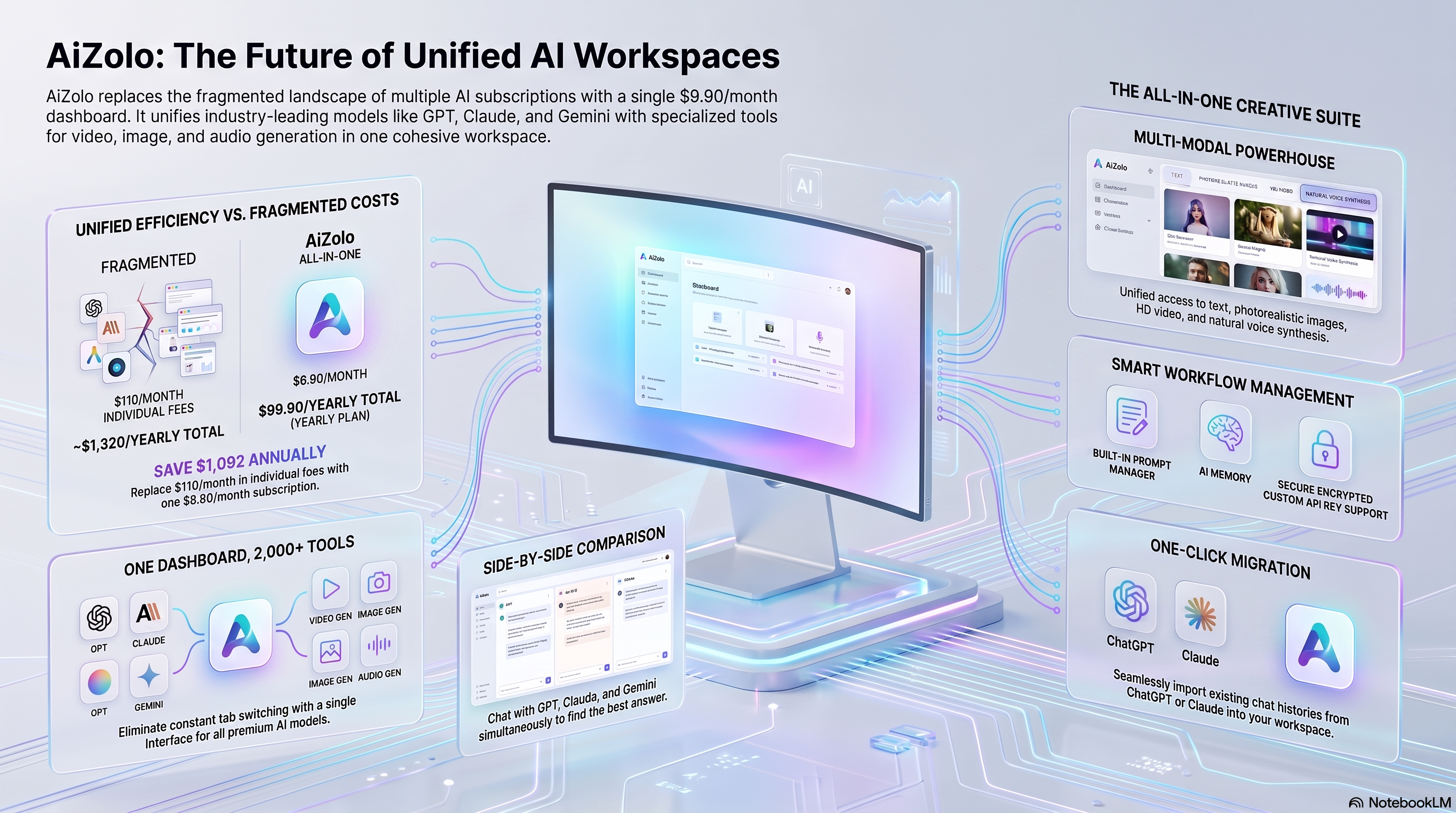
Instead of paying $20 each to OpenAI, Anthropic, Google, and Perplexity, a growing category of subscriptions bundles access to several models under one bill.
The pitch is straightforward: one login, one price, and the ability to compare GPT, Claude, and Gemini answers to the same prompt side by side instead of manually copy-pasting between browser tabs.
Aizolo is one option in this category, priced at $9.90/month ($99.90/year), bundling access to GPT-4o/5, Claude, Gemini, Grok, and Perplexity’s Sonar Pro through a single dashboard, along with a side-by-side comparison view and support for bringing your own API keys if you want to extend beyond the included token allowance.
Other tools in the same space, like Poe, ChatHub, and Magai, take a similar approach at varying price points, generally between $5 and $30/month.
The trade-off to understand before switching: an all-in-one plan typically works on a shared monthly token or point allowance across every model, rather than each provider’s own “unlimited-feeling” usage cap. For someone comparing two or three models occasionally, that’s a real cost saving.
For someone doing sustained, all-day work in a single model — say, a developer living inside Claude Code for eight hours a day — a dedicated subscription to that one provider will usually still make more sense, because you’re not splitting a shared allowance across models you’re not using.
The honest way to decide: if you use one model heavily and rarely touch the others, pay that provider directly.
If you regularly want to compare outputs, or use different models for different tasks in the same day, an all-in-one plan is very likely to beat the cost of stacking individual subscriptions.
A fair question at this point: if these are the same models, how can a bundled plan cost less than a single provider’s subscription — and is the quality actually the same?
The quality is the same, and the reason is structural rather than promotional. Aggregators buy model access at API rates and pool usage across their entire user base. Some users query heavily, most query lightly, and the average lands well below what any individual provider prices a flat-rate subscription to cover. That spread is the margin that funds the lower price. You’re accessing the same Claude, the same GPT, the same Gemini — what changes is the commercial structure delivering them, not the model underneath.
The trade-off is the flip side of the same mechanism. Because the allowance is pooled, it’s finite in a way a native subscription’s “unlimited-feeling” cap isn’t. Aggregators are cheap precisely because most users don’t max out their share. If you’re the person who would, the economics stop working in your favour and a direct subscription is the better buy.
Common Concerns About All-in-One AI Platforms
Four objections come up consistently, and three of them have straightforward answers.
“Won’t the model quality be worse than going direct?” No. Aggregators call the same underlying models through official APIs — GPT accessed through a third-party interface is the same GPT. Where output can differ is in configuration: system prompts, temperature settings and context window handling vary between platforms and will change the character of responses. Worth testing on your own work, but it isn’t a question of getting a downgraded model.
“Is my data safe with a third party?” This is the objection with the most substance, and it deserves a real answer rather than reassurance. You’re adding a company to the chain of custody between you and the model provider, which is a genuine change to your risk profile.
What to actually check: whether conversations are encrypted at rest, whether they’re retained and for how long, whether anything is used for training, and what happens to your data if you cancel. Any platform that can’t answer those plainly in its privacy policy isn’t one to trust with client work. The counter-argument — that one vendor relationship is easier to audit than five — is reasonable, but it only holds if you audit the one.
“What if the platform shuts down or goes offline?” A legitimate risk with any smaller company, and more relevant here than with the incumbents. Bring-your-own-key support is the meaningful mitigation: if you’re running your own API keys through the interface, an outage costs you a front-end, not your access. Beyond that, export your conversation history periodically. Any platform that makes exporting difficult is telling you something.
“Can a bundle really replace all my subscriptions?” For most people, most of the time — but not universally, and anyone claiming otherwise is selling. If you use one model intensively for several hours a day, a dedicated subscription to that provider will serve you better and probably cost less per unit of use. The realistic outcome for many people isn’t zero direct subscriptions; it’s one specialist subscription plus a bundle covering everything else, instead of four or five separate plans.
Cheapest AI Subscription by User Type
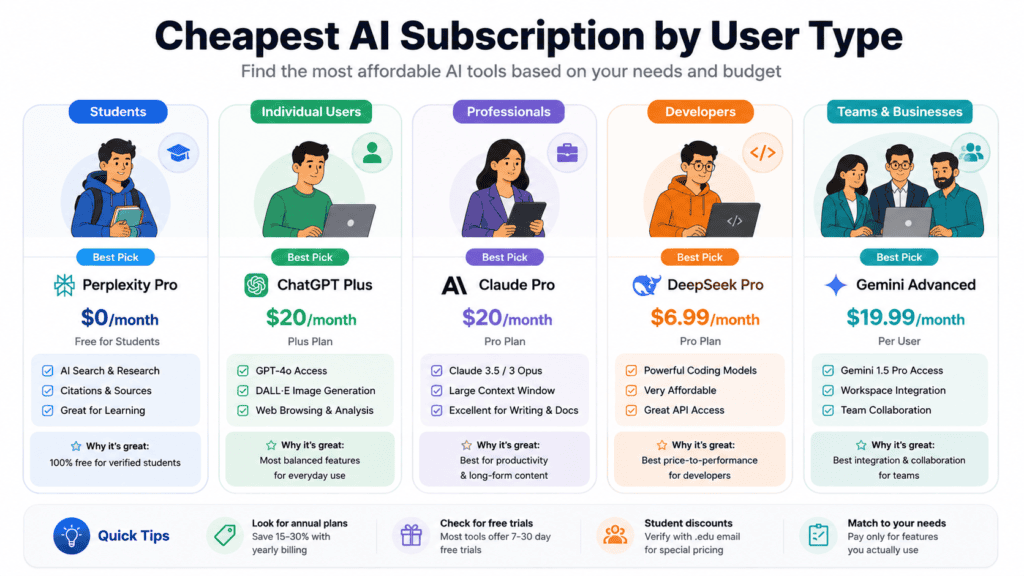
Students. Perplexity’s Education Pro ($10/month via SheerID verification) and various education-specific ChatGPT and Claude programs are worth checking first — schools sometimes have institutional access at no cost to the student. If neither applies, ChatGPT Go ($8) or an all-in-one plan under $10/month covers most coursework needs without a $20 commitment.
Freelancers. Value usually beats cheapest here, since your subscription is a business tool. Claude Pro ($20) for writing/editing work, or an all-in-one plan if you regularly switch between client-facing writing and research tasks.
Developers. Claude Pro ($20, includes Claude Code) is the strongest single subscription for coding work. Budget-conscious developers sometimes pair a $20 subscription with pay-as-you-go API access for overflow, since API pricing with batch discounts can undercut a second full subscription for occasional heavy-usage days.
Researchers. Perplexity Pro ($20) remains purpose-built for citation-backed research and real-time information — the category it was designed for.
Content creators. ChatGPT Plus ($20) covers the widest range of creative output — text, image, and voice — in one subscription.
If most of your billable work is drafting and editing, compare purpose-built options in our roundup of the best affordable AI writing software before defaulting to a general chatbot plan.
Small businesses. Microsoft Copilot Pro, bundled into Microsoft 365 Personal or Family (roughly $19.99–$99.99/year for the Family plan shared across up to six people), is hard to beat if your team already lives in Word, Excel, and Outlook, since the AI features come bundled with productivity software you’re already paying for.
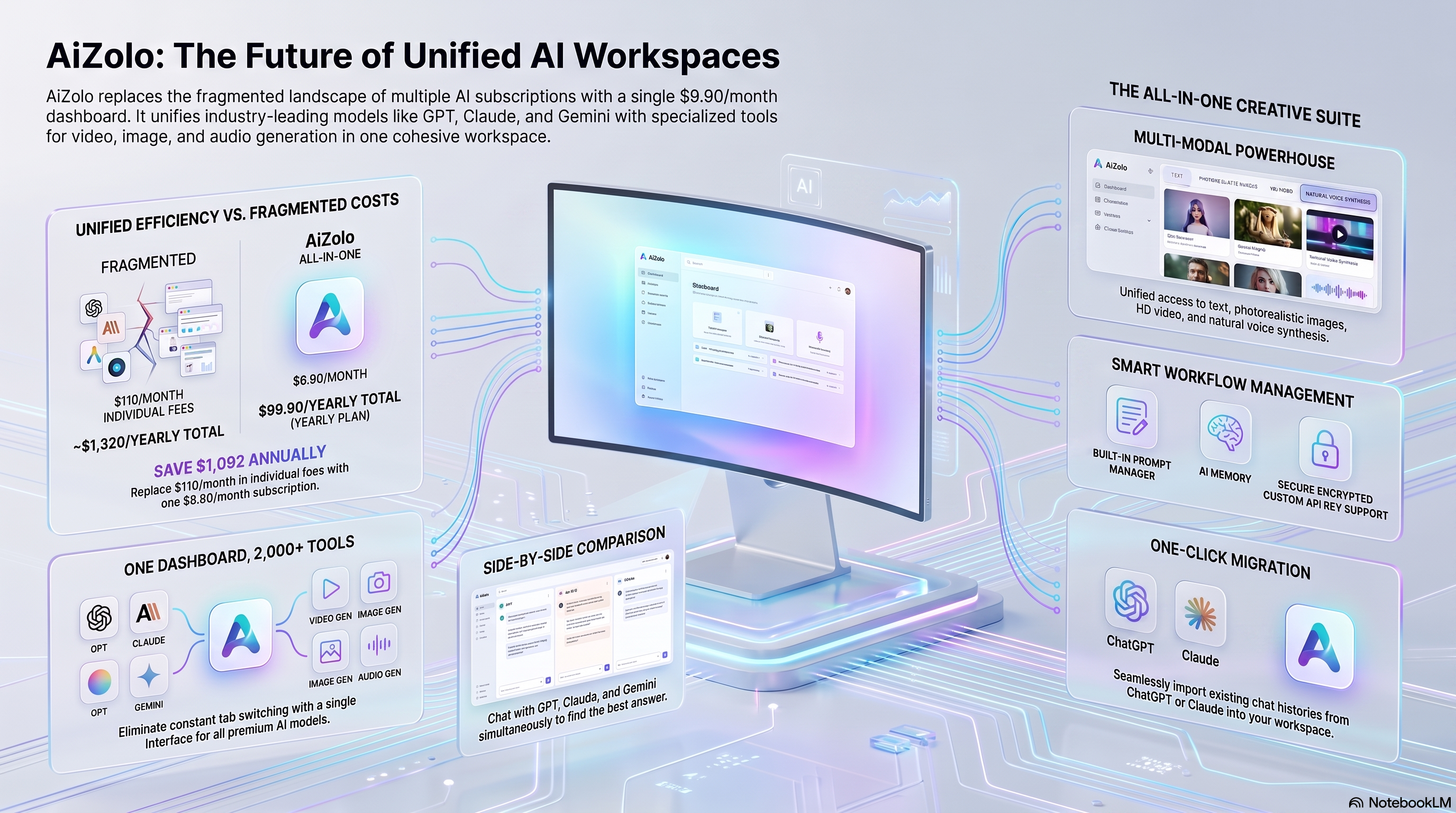
For Creators Specifically: If your work spans writing, image concepts, and short-form video — social captions, YouTube thumbnails, TikTok scripts — a single-model subscription forces you into separate tools for each modality. AiZolo’s Pro plan bundles text, image, audio, and video generation under one $9.90/month price, which is typically $40–80/month cheaper than stitching together a chatbot subscription, an image generator, and a video tool separately.
If you’d rather start from what you can spend than from what you do, this is roughly what each budget band buys in 2026:
| Monthly budget | What’s realistically available |
|---|---|
| Under $10 | One budget single-model tier (ChatGPT Go, Google AI Plus), or an entry multi-model plan. Real usage caps at this level |
| $10–$20 | One flagship subscription, or a multi-model plan with creative tools included. The best value band for most individuals |
| $20–$40 | A flagship plan plus a specialist tool, or a bundle with room to spare. Sensible for anyone earning from their AI output |
| $40+ | Genuinely worth auditing. Above this, you’re usually either a legitimate power user on a $100+ usage tier, or paying for overlap you could consolidate |
The band worth pausing on is the last one. If you’re above $40/month across several tools, the question isn’t which cheap plan to add — it’s which of your current subscriptions you’ve stopped using.
Cheapest AI Chatbot Subscription in 2026
If you’re comparing consumer AI chatbots against business AI chatbots (for customer support or automation), the pricing landscapes are completely different — and conflating them is where most “cheapest AI chatbot” searches go wrong.
Consumer AI chatbots (personal/professional use):
- ChatGPT Plus — $20/month (GPT-4o only)
- Claude Pro — $20/month (Claude only)
- Gemini Advanced — $19.99/month
- Grok — $30/month via X Premium+
- Perplexity Pro — $20/month
Business AI chatbots (customer support/automation):
- ManyChat — from $15/month, largely rule-based rather than true AI
- Tidio — $24/month entry, but the actual AI layer (Lyro) costs an additional $39/month
- Intercom — $39/month per seat, plus $0.99 per AI resolution — costs scale fast with volume
- Zendesk AI — $1.50–$2.00 per AI resolution, which compounds quickly at scale
- Chatbase — $40/month entry for functional AI chat
The trap in both categories is the same: advertised entry prices rarely include the actual AI capability. Per-resolution billing, per-seat pricing, and “AI add-on” upsells are how low headline prices turn into high real costs.
For personal/professional chatbot use, the pricing table above already shows the cheapest way to cover all five major models without per-resolution billing or seat multipliers.
(Business chatbot platforms serve a fundamentally different purpose — customer support automation — and aren’t a direct substitute for personal/professional AI subscriptions. Keep this distinction explicit so the page doesn’t imply Intercom and ChatGPT Plus are interchangeable.)
Most Cost-Effective AI Subscription
“Cheapest” and “most cost-effective” aren’t the same question. The cheapest AI subscription in isolation is a free tier — but free tiers cap out fast on tokens and features. Cost-effectiveness measures value delivered per dollar spent, which is where bundled access changes the math:
| Metric | Buying 5 Individually | AiZolo Pro |
|---|---|---|
| Monthly cost | $109.99 | $9.90 |
| Models accessed | 5 (separately) | 5+ (same interface) |
| Side-by-side comparison | Not possible | Included |
| Creative suite (image/video/audio) | Extra $15–50/mo each | Included |
| Annual cost | $1,319.88 | $118.80 (or $99.90 on yearly billing) |
The gap isn’t just the sticker price — it’s that a $20/month single-model plan still requires additional subscriptions to cover the tasks that model isn’t best at. A cost-effectiveness comparison has to include that stacking, not just each platform’s standalone price. (See the pricing table above for the full breakdown.)
Most Affordable AI Subscription Plans in 2026
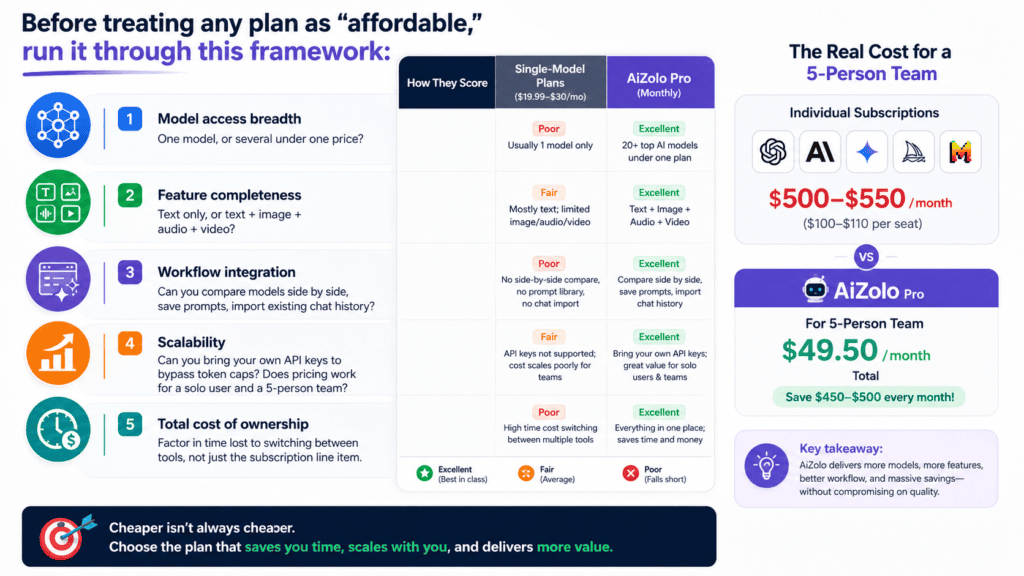
Before treating any plan as “affordable,” run it through this framework:
- Model access breadth — one model, or several under one price?
- Feature completeness — text only, or text + image + audio + video?
- Workflow integration — can you compare models side by side, save prompts, import existing chat history?
- Scalability — can you bring your own API keys to bypass token caps? Does pricing work for a solo user and a 5-person team?
- Total cost of ownership — factor in time lost to switching between tools, not just the subscription line item.
Scored against that framework, single-model plans ($19.99–$30/month) score well on price but poorly on breadth and integration — see the comparison table above for how AiZolo scores across all five criteria.
For a 5-person team specifically: individual subscriptions run roughly $500–550/month ($100–110/seat). The same team on AiZolo Pro runs $49.50/month.
Cheapest Paid AI Subscription in 2026
This section exists to answer one specific question: among paid (non-free) options, what’s actually cheapest — and is switching worth it for you?
Stick with a single-platform paid plan if:
- You use AI for one narrow task (only coding, or only image generation)
- You have a strong workflow preference for one model and rarely need alternatives
- You’re still evaluating whether you need AI tools regularly at all
A bundled plan is worth it if:
- You already pay for two or more AI tools separately
- You regularly compare outputs across models
- You work across content types — text, image, audio, video
- You’re budget-constrained but can’t sacrifice capability (students, freelancers, early-stage founders)
The math on doing nothing: three separate $20/month subscriptions cost $720/year — versus $118.80/year on AiZolo Pro (or $99.90 annual). That $600+/year gap is the real cost of not consolidating.
An all-in-one plan is a poor fit if:
- You use a single model intensively for hours a day — a pooled allowance will constrain you before a native subscription would
- Your work depends on one provider’s proprietary features (Claude Code, Deep Research, Sora) rather than the base model
- You need enterprise controls: SSO, admin provisioning, compliance certifications, or a data processing agreement
- You’re a casual user whose needs a free tier already covers
There’s no version of this comparison where one plan wins for everyone, and a guide that concludes otherwise isn’t worth much. If you’re in the list above, the cheapest option for you is the one this page spends most of its time arguing against.
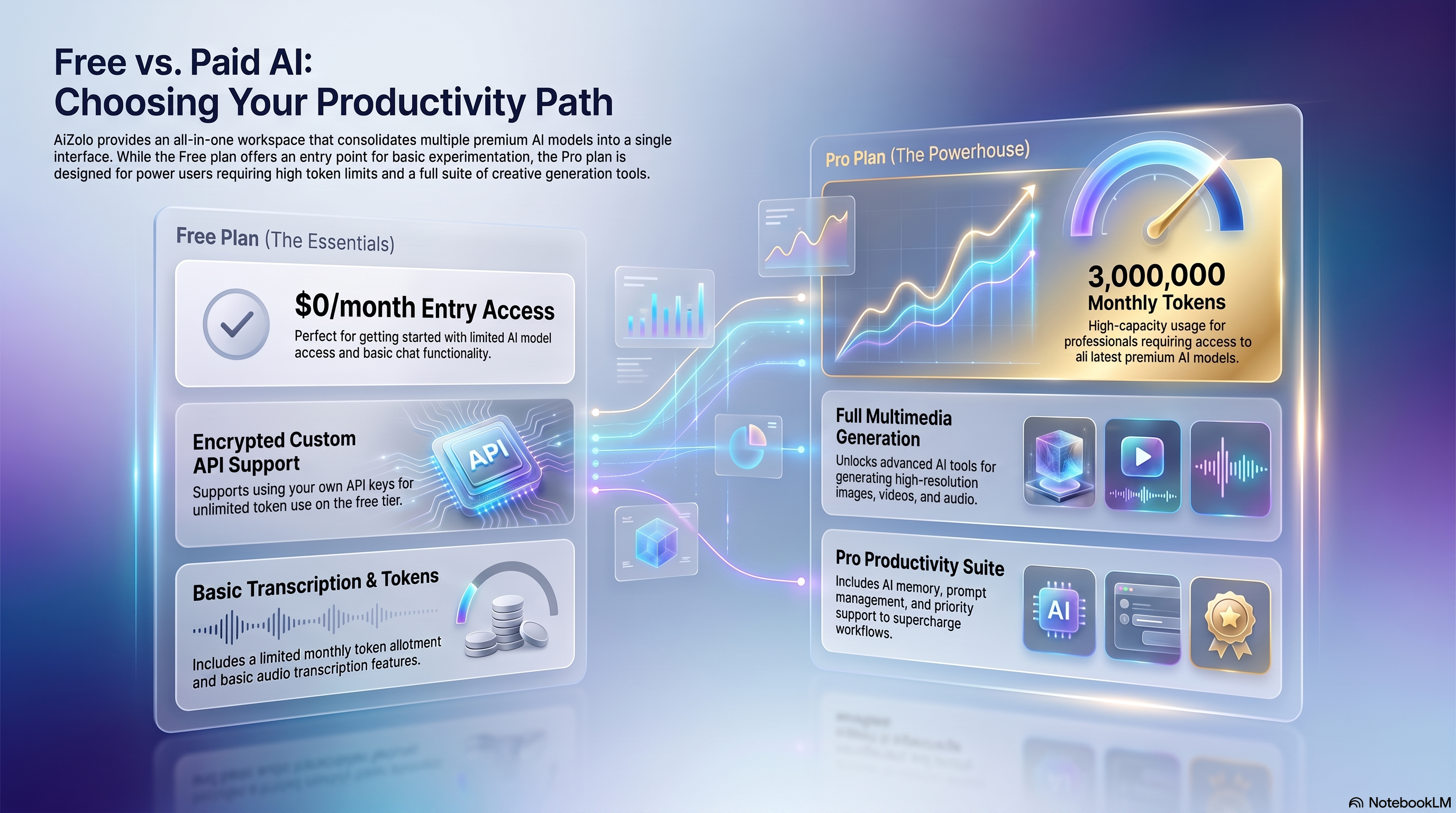
Free vs. Paid AI Plans
| Free Tier | Paid Tier (~$20/mo) | |
|---|---|---|
| Model access | Older or “lite” models | Flagship models (GPT-5.5, Claude Opus, Gemini 3.1 Pro) |
| Usage limits | Tight — often 10–15 messages per few hours | Substantially higher, though still capped |
| Ads | Increasingly common on free tiers in 2026 | Ad-free |
| File uploads | Limited or unavailable | Included |
| Advanced features | Rarely included (Deep Research, Agent Mode, Claude Code) | Included, with their own sub-limits |
| Good for | Occasional questions, testing a platform | Daily or professional use |
Free tiers in 2026 are genuinely useful for light, occasional use, but nearly every major provider has tightened free-tier limits and, in some cases, added advertising, which makes the jump to a paid tier feel more necessary than it did a year or two ago.
Hidden Costs of Cheap AI Plans
The advertised price is rarely the full story. Before committing to a “cheap” plan, check for:
- Usage and rate limits. Budget tiers like ChatGPT Go often cap you well below what a Plus subscriber gets, and limits can reset on rolling windows that are easy to hit during a busy day.
- Older or “lite” models. Some budget tiers default to a lighter model and only give occasional access to the flagship one.
- No API access. A chat subscription doesn’t include API credits — that’s a separate, metered product on every platform.
Those figures are only the subscription line. Once you count overlapping features you’re paying for twice, the context you re-paste every time you switch tools, and usage-based overages on credit-billed plans, the hidden cost of multiple AI subscriptions typically runs well above the monthly total.
None of this makes budget tiers a bad choice — it just means the $8 plan and the $20 plan usually aren’t interchangeable for anything beyond casual chat.
What to Check Before You Buy
Run any plan you’re considering through these before entering card details.
On what’s actually included
- Which specific models does this tier include — not the brand, the model. “GPT access” and “GPT-5.5 access” are different products
- Is it one model or several? A cheap plan covering a single model doesn’t solve a multi-subscription problem
- Are image, video and audio generation included, or billed as add-ons?
- Can you compare models simultaneously, or only switch between them? These are different features and often confused
On limits
- What is the real usage cap, in messages, tokens or credits — and does it reset daily, monthly, or on a rolling window?
- Is there throttling at peak hours on lower tiers?
- What happens when you hit the cap: hard stop, downgrade to a lighter model, or paid top-up?
- Do unused credits roll over, or expire monthly?
On cost
- Is the advertised price the monthly rate, or the annual rate divided by twelve? This is the single most common way comparison tables mislead
- Is there an annual discount, and does it lock you in?
- Do you qualify for student, nonprofit or education pricing? It’s often 50% off
- For teams: is it per seat, and does the price still work at your headcount?
On flexibility and exit
- Can you bring your own API keys to bypass the platform allowance?
- Is there a genuine free tier you can test without a card?
- Can you export your conversation history if you leave?
- Does the provider’s terms of service permit your intended use? Account sharing breaches most of them
One question that matters more than the rest: would a single all-in-one plan cost less than the two or three separate subscriptions you’re currently weighing up? If you only need one model, the answer is no and you should buy it directly. Working out which situation you’re in is most of the decision.
Getting the Most From a Cheap AI Subscription
Choosing the plan is the easy part. Most people underuse whatever they buy, which is its own form of overpaying.
Build a prompt library in the first week. Whatever you find yourself typing repeatedly — a tone brief, a formatting spec, a project background — save it once. Most platforms now include some form of prompt storage, and it’s consistently the most underused feature on any plan. The time saved compounds; the effort is a single afternoon.
Reserve model comparison for work that matters. Running every query through several models wastes your allowance and your attention. Save it for the outputs with consequences: client deliverables, anything published under your name, code touching production, decisions you’d struggle to reverse. For everything else, one model is fine.
Match models to tasks deliberately rather than by habit. Most people default to whichever tool they opened first. A rough starting split: research and anything needing citations to Perplexity, long-form writing and code to Claude, broad multimodal and creative work to ChatGPT, anything inside Google Workspace to Gemini. Treat it as a starting point and adjust — the point is having a rule at all.
Move your history when you switch. If you’re consolidating, import existing conversations rather than abandoning them. Months of accumulated context has real value, and starting from scratch is the main reason people quietly drift back to their old tools within a few weeks.
Test on the free tier before paying. Spend a week running your actual work — not sample prompts — through the free plan. The friction you’ll notice in week one is the friction you’ll still be dealing with in month six.
Re-audit every quarter. Subscriptions accumulate silently. Twice a year, list what you’re paying for and when you last opened each one. This is the single highest-return habit on this page, and it costs ten minutes.
Where to Buy AI Subscriptions Safely
Worth stating plainly because the market around cheap AI access has attracted the predictable problems.
Buy from the provider directly. OpenAI for ChatGPT, Anthropic for Claude, Google for Gemini, xAI for Grok, or the platform’s own site for a multi-model plan. There is no legitimate reseller channel offering the same product cheaper.
Treat these as red flags:
- “Lifetime access” to a subscription service. The provider bills monthly for compute; nobody can resell that as a one-off and stay solvent. These accounts get revoked, usually within weeks
- Shared or pooled accounts sold per-seat by a third party. This breaches every major provider’s terms and gets the account terminated — normally the buyer’s access, not the seller’s
- Steep regional discounts accessed via VPN. Providers actively detect this, and the consequence is losing the account and its history
- Anyone asking for your existing account credentials to “upgrade” them
On student pricing: verified education discounts are real and often 50% off, but they run through the provider’s own verification (SheerID or equivalent) — never a third party selling verified student accounts. Check whether your institution has an agreement first; some provide access at no cost.
The pattern behind all of these: a subscription is a billing relationship, not a licence key. Anything sold as though it were transferable isn’t.
Common Mistakes
- Subscribing to the cheapest tier without checking which model it actually includes. “GPT access” and “GPT-5.5 access” are not the same thing.
- Stacking subscriptions out of habit rather than need. It’s worth auditing what you actually use each tool for every few months.
- Ignoring annual billing discounts. Claude Pro’s annual option, for example, brings the effective monthly price down by about 15%.
- Assuming a VPN unlocks cheaper regional pricing. Most providers’ terms of service prohibit this, and it can put your account at risk.
- Overlooking student and education pricing, which is often 50% off the standard rate and easy to verify with a school email.
Where AI Pricing Is Headed
A few patterns are worth watching through the rest of 2026:
- Budget tiers are becoming standard, not optional. OpenAI’s Go plan, Google’s AI Plus tier, and similar budget options from other providers suggest the market is settling into a three-tier structure — free (often ad-supported), budget (~$8–10), and flagship (~$20) — rather than a simple free/paid split.
- Flagship pricing has held remarkably steady. ChatGPT Plus and Claude Pro have both stayed near $20/month for an extended period even as the underlying models have improved substantially, though OpenAI’s leadership has publicly floated the idea of future increases.
- Usage-based tiers above $20 are multiplying. The $100 and $200 “power user” tiers (ChatGPT Pro, Claude Max, Google AI Ultra) are now common, aimed squarely at people who exceed standard limits rather than casual users.
- All-in-one and aggregator subscriptions are gaining traction as more people run multiple models regularly, since the economics increasingly favor a single bundled subscription over stacking several $20 plans.
For Readers in India: Getting Better Value on AI Subscriptions
Most AI pricing is quoted in US dollars, which means the sticker price isn’t what leaves your account. A few things worth checking before you subscribe.
Work out the real INR cost. A $20/month subscription becomes noticeably more once GST on imported digital services and your bank’s charges are applied. On an international credit card you’re typically looking at a foreign transaction markup of around 3–3.5%, plus GST on that markup. [VERIFY current rates] Add it up before deciding a plan is affordable — the gap between the advertised price and the debited amount is usually 20% or more.
Prefer providers with local billing. Some services bill Indian customers in rupees through a local entity, which removes the forex markup entirely and gives you a GST invoice you can actually claim if you’re freelancing or running a business. That last point matters more than the forex saving for anyone filing business expenses.
Check payment method support before you commit. UPI and RuPay coverage varies considerably between providers, and RuPay cards are frequently declined on international checkouts. Where a service supports UPI or an Indian card directly, it’s usually both cheaper and less likely to fail at renewal. Failed auto-renewals on international cards are a common and avoidable annoyance — the RBI’s recurring-payment mandate rules mean international subscriptions sometimes need re-authorising.
Compare annual billing more seriously than a US reader would. When each transaction carries a forex markup, paying once a year rather than twelve times saves the markup eleven additional times over. On a $99.90 annual plan versus twelve monthly charges, that difference is real money on top of the headline discount.
Where this leaves the maths. At the time of writing, AiZolo Pro at $9.90/month works out substantially cheaper than a single flagship subscription even after conversion costs, and the annual plan at $99.90 reduces the forex exposure further. But the general principle holds regardless of which platform you choose: always compare the final rupee amount after tax and card charges, not the dollar figure on the pricing page.
Final Recommendation
There’s no single “cheapest AI subscription” that’s right for everyone, because the right answer depends on how many models you actually need and how heavily you use them.
- If you use one model, heavily, pay that provider directly — Claude Pro or ChatGPT Plus at $20/month remains solid value for daily professional use.
- If your budget is tight and your usage is light, ChatGPT Go or Google AI Plus at under $10/month is a reasonable entry point.
- If you regularly want more than one model — to compare answers, or because different tasks favor different AIs — an all-in-one subscription like Aizolo (from $9.90/month) is very likely to cost less than stacking two or three flagship plans, with the trade-off of a shared usage allowance rather than each provider’s native limits.
- If you’re a student, check education pricing before anything else — it’s often 50% off and easy to verify.
Whichever direction you go, the fastest way to overpay for AI in 2026 isn’t picking the “wrong” subscription — it’s paying for three subscriptions when your actual usage pattern only needed one, or paying full flagship price for casual, occasional use that a budget tier would have covered just as well.
FAQs
What is the cheapest AI subscription available right now? Among single-model subscriptions, ChatGPT Go and Google AI Plus are the cheapest at roughly $8/month, though both come with meaningfully lower usage limits and fewer features than the ~$20 flagship tiers. Among multi-model options, all-in-one plans like Aizolo start at $9.90/month and include access to several providers’ models rather than just one.
Is ChatGPT Plus worth paying for in 2026? For most people who use ChatGPT daily for work, yes. At $20/month it includes the flagship GPT-5.5 model, Deep Research, Sora, and Codex, and the price hasn’t increased since the plan launched even as the feature set has grown substantially. Occasional or light users may find the free tier, or ChatGPT Go, sufficient instead.
Claude vs. ChatGPT pricing — which is cheaper? They’re priced identically at $20/month for the standard tier, though Claude Pro offers an annual discount bringing it to roughly $17/month, while ChatGPT Plus currently has no annual billing option. Feature sets differ more than price: Claude leans toward writing and coding strength, while ChatGPT offers a broader multimedia feature set.
How much is Gemini pricing in 2026? Google AI Pro (formerly Gemini Advanced) costs $19.99/month, with a cheaper Google AI Plus tier at $7.99/month and a higher-usage Google AI Ultra tier starting at $99.99/month. All Google AI subscriptions include Google One cloud storage alongside model access.
Which AI subscription gives access to multiple models? Perplexity Pro lets you switch between several underlying models within its research-focused interface for $20/month. Dedicated multi-model platforms like Poe (from roughly $5–$20/month) and Aizolo ($9.90/month) go further, bundling GPT, Claude, Gemini, and other models under a single subscription and billing relationship.
What’s the best AI subscription for students? Perplexity’s Education Pro plan ($10/month via SheerID verification) offers the same feature set as its standard Pro plan at half price. It’s also worth checking whether your school has an institutional agreement with OpenAI, Anthropic, or Google that provides free or discounted access directly.
Is it cheaper to pay for one AI subscription or several? It depends entirely on your usage pattern. If you rely on one model for nearly everything, a single $20/month subscription is cheaper and simpler than any bundle. If you regularly use two or more models, an all-in-one subscription typically costs less than stacking individual plans — the break-even point is usually around two flagship subscriptions.
Do AI subscriptions offer student discounts? Some do. Perplexity offers a verified student rate. OpenAI and Anthropic don’t currently publish a standing consumer student discount for ChatGPT Plus or Claude Pro, though both occasionally run promotional offers, and institutional/education-specific plans exist separately from the standard consumer tiers.
What’s the difference between a cheap AI subscription and a good-value one? Cheap refers only to price. Good value accounts for what you actually get for that price relative to how you’ll use it — a $20/month plan that fully covers your workflow is better value than an $8/month plan you outgrow within days.
Are there hidden costs with budget AI plans? Yes — commonly usage caps, ads (increasingly common on free and budget tiers in 2026), older default models, and the absence of features like Deep Research, coding agents, or integrations that are reserved for higher tiers.
Is Microsoft Copilot Pro a cheap AI subscription? On its own, Copilot Pro is priced similarly to other flagship tiers. But because it’s bundled into Microsoft 365 Personal or Family, and the Family plan can be shared across up to six people, the effective per-person cost can be one of the lowest on this list if you already need Office apps and cloud storage.
Will AI subscription prices go up in 2026? Flagship pricing (around $20/month) has been unusually stable across providers, but usage-based power tiers above $100/month have multiplied, and at least one major provider has publicly discussed the possibility of future price increases on its standard tier. Locking in an annual plan where available is a reasonable hedge.
What’s the cheapest AI subscription that includes image generation? AiZolo Pro at $9.90/month includes image, video, and audio generation alongside text — most single-model subscriptions charge extra or don’t offer this at all.
What’s the cheapest AI subscription if I want to use my own API keys? AiZolo’s free plan supports encrypted custom API key storage, so if you already have API credits with a provider, your effective cost for the unified interface is $0.
If you want a deeper look at how these platforms stack up feature-for-feature, see our guides on top AI models and all-in-one AI platforms.
Author Bio
Jeevesh Tripathi — AI Researcher & Content Strategist at Aizolo
Jeevesh Tripathi researches AI models, AI subscriptions, productivity tools, and emerging artificial intelligence trends. His work focuses on helping businesses, developers, creators, and everyday users choose the right AI solutions through in-depth comparisons, hands-on testing, and data-driven analysis.
Contact: jeevesh@aizolo.com

Sau khi cài đặt thành công, người chơi có thể Đăng nhập Go88 vào
ứng dụng và bắt đầu trải nghiệm các sản phẩm game của Go88.
1