
If you’ve spent any time on Perchance making AI art, you’ve probably noticed a “video generator” link somewhere on the site and wondered if it’s the real deal. So, does Perchance AI have a video generator? Yes and no—Perchance hosts several community-built tools labeled “video generator,” but none of them come from Perchance itself, and none work as reliably as dedicated platforms like Runway or Kling.
At Aizolo, we tested these tools and reviewed official information to understand how they actually work. This guide breaks down what’s happening behind the scenes, what features are genuinely available, where the current limitations lie, and which dedicated AI video generators are better choices if you need reliable, high-quality video creation.

Table of Contents
Does Perchance AI Have a Video Generator? Short Answer
Technically yes — there are pages on Perchance labeled “AI Video Generator.” Practically, no reliable native video generator exists at the platform level. The tools you’ll find are community-made, they sit on top of external AI backends, and they fail often enough that most experienced users don’t rely on them for anything beyond casual experimentation.
Does Perchance AI Have a Video Generator? Long Answer
1. The pages are real, but they’re not Perchance’s. Search “Perchance AI video generator” and you’ll land on pages like “Pretty AI Video Generator” or “HyperReal AI Video Generator.” These are built by individual creators using Perchance’s scripting engine, not shipped by a Perchance product team. Some route prompts through third-party video backends behind the scenes.
2. Perchance doesn’t operate its own video model. As of mid-2026, Perchance does not run a proprietary video generation model the way Runway or Kling do. What you’re using is closer to a free wrapper around someone else’s infrastructure, maintained by volunteers with no guaranteed uptime.
3. Reliability depends entirely on which page you land on. When the backend behind a given generator is available, you can get a usable clip. When it isn’t, you get a spinning loader, a “demo mode” popup, or nothing at all. There’s no consistency across pages because they’re independently built.
Callout: If a Perchance video page produces a slideshow of still images instead of real motion, that’s not a bug on your end — it’s a known limitation of how these community tools are built.
What Perchance Actually Supports
Perchance’s real strength is text and image generation, not video. Here’s the honest breakdown of what works well.
Image generation — mature, fast, no account or watermark required
Character generation — consistent portraits for writers and game designers
Story and prompt generation — Perchance’s original use case
Video remains the weak link, and that’s unlikely to change soon — see our note on whether Perchance is building a real video model in the full review.
The most reliable Perchance-to-video workflow
Most experienced users don’t try to get finished video directly from Perchance. Instead:
- Generate a still image on Perchance (this part works well).
- Download it.
- Animate it in a dedicated image-to-video tool.
For the step-by-step version of this, including the specific failure modes (slideshow effects, demo-mode blocks) and which free tools actually deliver, see our full image-to-video guide.
Limitations of This Workflow
- No native handoff between Perchance and video tools — everything is manual.
- You lose any character or scene consistency Perchance built up across images.
- Free image-to-video tiers elsewhere often add watermarks or resolution caps.
Official Evidence and Community Feedback
Digging into this properly means checking three things: what the pages themselves say, what shows up in official documentation, and what real users report.
Documentation: Perchance’s own site documents how to build generators using its scripting syntax, but it doesn’t publish a dedicated, official video generation product page the way it does for its image tools.
Screenshots and pages: Pages such as “Fast Free AI Animation Generator” and “HyperReal AI Video Generator” exist live on perchance.org, confirming that video-labeled tools are real and accessible — but their framing as community generators, not first-party products, is consistent across the platform.
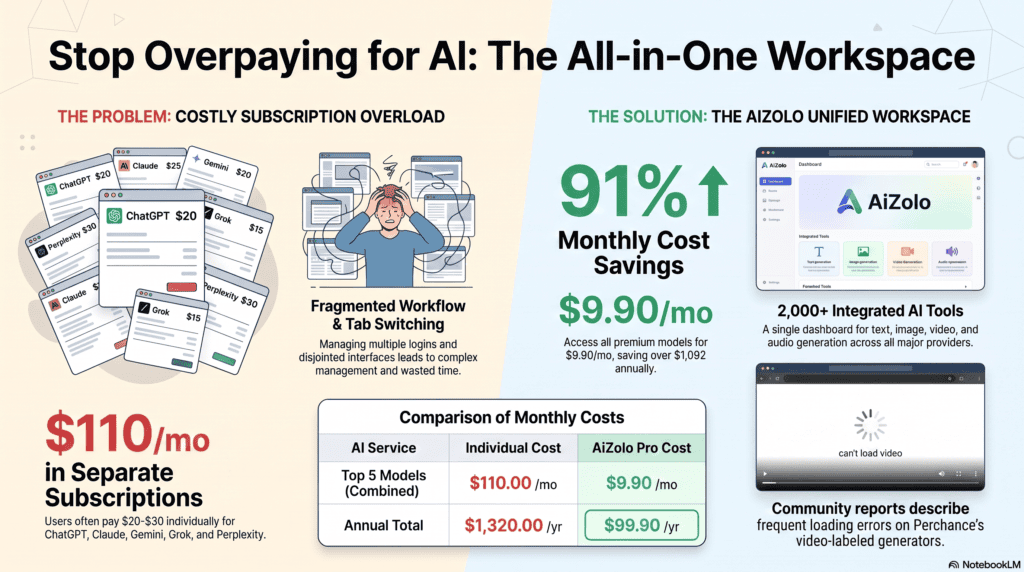
Community feedback: On the r/perchance subreddit, the same question comes up repeatedly, and the consensus among regular users is that native video generation on Perchance does not work reliably. Independent testers report queue delays during peak hours, occasional error screens, and output that sometimes resembles a slideshow rather than smooth motion.
One independent reviewer who spent a week testing the tools at production volume described genuine praise for the no-login, no-credit-meter access, while also flagging inconsistent output tied to the availability of the backend model behind each generator.
Can You Convert Perchance Images Into Videos?
Not directly on Perchance itself — there’s no built-in, reliable image-to-video pipeline native to the platform. What you can do is export a Perchance-generated image and feed it into an external image-to-video AI tool.
This two-step approach is currently the most dependable way to turn Perchance output into an actual moving clip. It takes a few extra minutes, but it sidesteps the reliability issues found in Perchance’s own video-labeled generators entirely.
Expert tip: Keep your original prompt text saved when you export a Perchance image. Reusing that same description in your image-to-video tool’s prompt field helps preserve the mood and style you were going for.
Best AI Video Generator Alternatives
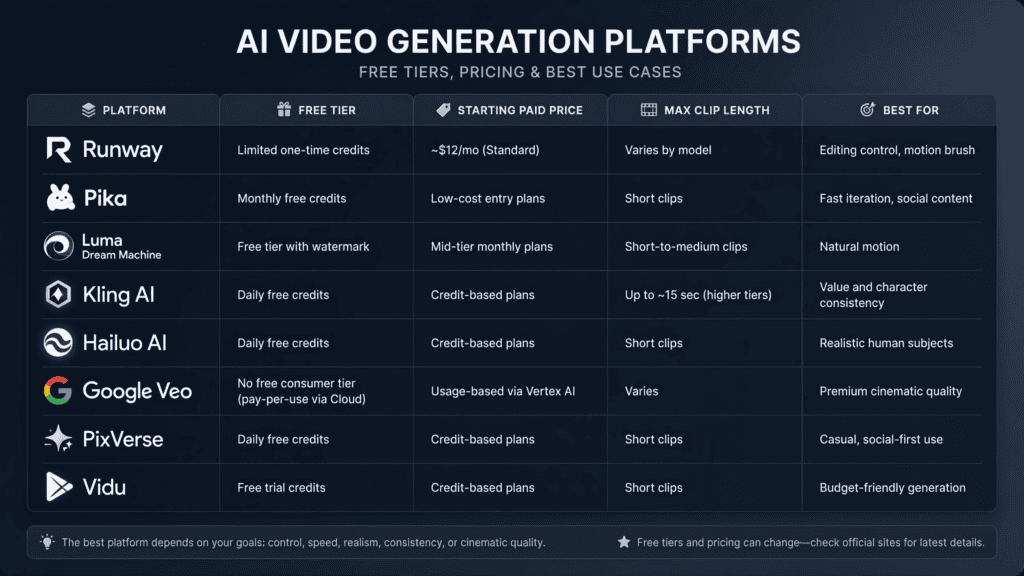
If you need dependable AI video generation rather than an experimental community tool, here’s how the major players compare as of mid-2026.
| Platform | Free Tier | Starting Paid Price | Max Clip Length | Best For |
|---|---|---|---|---|
| Runway | Limited one-time credits | ~$12/mo (Standard) | Varies by model | Editing control, motion brush |
| Pika | Monthly free credits | Low-cost entry plans | Short clips | Fast iteration, social content |
| Luma Dream Machine | Free tier with watermark | Mid-tier monthly plans | Short-to-medium clips | Natural motion |
| Kling AI | Daily free credits | Credit-based plans | Up to ~15 sec (higher tiers) | Value and character consistency |
| Hailuo AI | Daily free credits | Credit-based plans | Short clips | Realistic human subjects |
| Google Veo | No free consumer tier (pay-per-use via Cloud) | Usage-based via Vertex AI | Varies | Premium cinematic quality |
| PixVerse | Daily free credits | Credit-based plans | Short clips | Casual, social-first use |
| Vidu | Free trial credits | Credit-based plans | Short clips | Budget-friendly generation |
Runway
Pros: Strong editing toolkit, motion brush, video-to-video features.
Cons: Pricier per clip than budget-focused competitors.
Video quality: High, with production-oriented controls.
Best use case: Creators who need to edit and refine, not just generate.
Pika
Pros: Low-friction free tier, fast generation.
Cons: Latest model versions often require a paid plan.
Video quality: Solid for social-first content.
Best use case: Quick social media clips and idea testing.
Luma Dream Machine
Pros: Natural-looking motion.
Cons: Free tier is watermarked and limited.
Video quality: Strong for cinematic camera movement.
Best use case: Pre-visualization and short cinematic tests.
Kling AI
Pros: Long clip lengths at higher tiers, character consistency.
Cons: Credit-based pricing can be confusing.
Video quality: Competitive with premium tools at a lower cost.
Best use case: Narrative content needing continuity across shots.
Hailuo AI
Pros: Generous signup bonus credits, strong with human subjects.
Cons: Clip length capped on lower tiers.
Video quality: Particularly good for faces and expressions.
Best use case: Portrait-style and people-focused clips.
Google Veo
Pros: Premium output quality, native audio in newer versions.
Cons: No simple free consumer tier; billed through Google Cloud.
Video quality: Among the highest available.
Best use case: Brand-safe, high-end production work.
PixVerse
Pros: Clean output even on the free tier, daily credits.
Cons: Shorter clip lengths on free plan.
Video quality: Good for casual and social use.
Best use case: Everyday social content without watermarks.
Vidu
Pros: Budget-friendly credit plans.
Cons: Less brand recognition, smaller community.
Video quality: Decent for the price point.
Best use case: Cost-conscious creators testing multiple ideas.
Warning box: Pricing, free-tier limits, and clip lengths across every platform above change frequently. Always confirm current numbers on each provider’s official pricing page before budgeting a project.
Is Perchance Planning Video Generation?
As of July 2026, no official Perchance announcement, blog post, or documentation page was found confirming a dedicated, first-party video generation model in development. The video-labeled generators currently live on the platform are community projects, not confirmed products on an official roadmap.
If that changes, it would likely show up first as a new generator category on Perchance’s own site rather than a traditional press announcement, given how the platform typically ships features.
Pros and Cons of Perchance for Video
Pros:
- No account or sign-up required to try most generators
- No credit system or subscription gate
- Useful for quick, casual experimentation
- Genuinely free image generation to pair with other video tools
Cons:
- No reliable native video generator
- Inconsistent uptime tied to third-party backends
- No timeline control, frame editing, or audio support
- Low, uncontrollable output resolution on most video-labeled generators
- No official support channel for video-specific issues
Who Should Use Perchance? Who Should Avoid It?
Perchance is a good fit if you:
- Want free, fast AI images with zero setup
- Are curious about experimental AI video and don’t mind failures
- Need writing or character prompts, not finished video
You should avoid Perchance’s video tools if you:
- Need consistent, deadline-driven video output
- Require specific resolution, aspect ratio, or export settings
- Are producing content for paying clients or commercial campaigns
Real-World Use Cases
- Hobbyist worldbuilding: Writers use Perchance to generate character portraits and backstories, then animate select images elsewhere for a trailer-style teaser.
- Social media testing: Casual creators try Perchance’s video generators first because there’s no sign-up friction, then switch to Pika or Kling once they need something publishable.
- Prompt drafting: Some creators use Perchance’s prompt generators purely to brainstorm ideas before running them through a paid video model.

Frequently Asked Questions
Why does the video generator page not load or finish? Usually backend load on the third-party service the generator routes through, not your prompt. See our timing breakdown for realistic wait times.
Can Perchance turn my photo into a video? Not through a reliable built-in pipeline. See the image-to-video guide for the workflow that actually works.
Is Perchance video generation better or worse than Runway or Kling? Worse for actual video output — better only on cost and zero-friction access. Full comparison in our complete Perchance video generator review.
Does Perchance AI have a video generator? Perchance hosts community-built generators labeled as video tools, but it doesn’t have an official, first-party video generation model. Results are inconsistent because these tools depend on external AI backends the platform doesn’t fully control.
Is Perchance AI video generation free? Yes, most Perchance generators, including the video-labeled ones, don’t require an account or credits. The platform runs on donations rather than subscription tiers, though output reliability isn’t guaranteed.
Is Perchance AI safe to use? Perchance doesn’t require an account to use most generators, and it states that it doesn’t store interaction data for anonymous users. As with any AI platform, avoid entering sensitive personal information into prompts.
What is the best free alternative to Perchance for video? Kling AI and Pika both offer daily or monthly free credits with more consistent output than Perchance’s video generators, though both eventually push toward paid tiers for higher resolution or longer clips.
Does Perchance have watermarks on generated content? Most Perchance image generators produce watermark-free output. Video-labeled generators vary by which backend they use, so watermark behavior isn’t fully consistent across all of them.
How long are Perchance-generated videos? Clip length varies by generator and isn’t standardized, since each video tool on Perchance is built independently by different community creators.
Can I use Perchance AI video generator for commercial projects? Because output quality and uptime aren’t guaranteed, and licensing terms aren’t clearly published for the underlying video backends, Perchance’s video tools aren’t a dependable choice for commercial work.
Is there an official Perchance app for video generation? No. As of July 2026, Perchance operates as a browser-based platform, and no dedicated video generation app has been confirmed.
Does Perchance AI have an image-to-video generator? Some community generators attempt this, but reliability is inconsistent. A more dependable path is exporting images from Perchance and using them in a dedicated image-to-video AI generator.
Final Verdict
So, does Perchance AI have a video generator? Yes, in the sense that video-labeled tools exist on the platform — but no, not in the sense of a dependable, first-party AI video maker you can count on for real projects. Perchance remains excellent for free image and text generation. For actual video, pairing a Perchance-generated image with a dedicated tool like Runway, Pika, or Kling is still the more realistic path in 2026.
Author Bio
Name: Jeevesh Tripathi Email: jeevesh@aizolo.com
Bio: Jeevesh is an AI researcher and SEO content specialist at Aizolo, where he analyzes emerging AI tools, large language models, and productivity software. He focuses on creating evidence-based, user-first content that aligns with Google’s EEAT principles and the latest Search quality guidelines.
