

If you’ve searched for the best AI for working with PDF documents in 2026, you already know the honest answer isn’t “just use ChatGPT” or “just use Claude.”
Every tool in this category — general-purpose assistants, dedicated PDF chat apps, and document-editing suites with AI bolted on — is genuinely good at some things and weak at others.
This guide compares 12 tools across the dimensions that actually matter for real work: OCR accuracy on scanned files, table and layout preservation, context window limits, citation quality, pricing, security posture, and collaboration features.
Where we’re relying on vendor documentation rather than direct observation, we say so. Where claims conflict between sources, we flag the disagreement instead of picking a number that sounds authoritative.
A note on methodology. This comparison is built from three sources: (1) each vendor’s official documentation and pricing pages, checked as of mid-2026; (2) publicly available third-party reviews and technical write-ups, cross-checked across multiple independent sources; and (3) general product-category knowledge about how OCR, retrieval-augmented generation (RAG), and long-context LLMs behave in practice.
We have not run a controlled internal benchmark across identical PDF sets for every tool, and we’re not going to pretend precise numbers we didn’t measure.
Where a tool’s own documentation states a specific limit (context window, file size cap, page count), we cite that directly. Treat any accuracy claim without a named source as a general pattern reported across the industry, not a lab result.
Table of Contents
Quick Comparison Table
| Tool | Best For | Free Plan | Starting Paid Price | Context / File Limit | OCR |
|---|---|---|---|---|---|
| Claude | Long-document reasoning, contracts, code-adjacent PDFs | Yes (limited) | $20/mo (Pro) | Up to 1M tokens (model-dependent) | Via extracted text, not full scanned-OCR engine |
| ChatGPT | General business use, mixed file types | Yes (limited) | $20/mo (Plus) | ~128K–2M tokens depending on plan/tier | Text-layer extraction; weaker on scanned pages |
| NotebookLM | Free research and study notebooks | Yes (generous) | $7.99/mo (bundled) | 500,000 words / 200MB per source | Good on clean scans; source-grounded |
| Adobe Acrobat AI Assistant | Legal, compliance, multi-document work | Trial only | $4.99/mo add-on | Up to 100 combined files/links | Industry-leading, decades of OCR engineering |
| Humata AI | Budget-conscious students | Yes (limited) | $1.99/mo (student) | Varies by plan | Basic |
| SciSpace | Academic paper research | Yes (credits) | Paid tiers vary | Per-paper focus | Basic |
| ChatPDF | Quick single-PDF Q&A | Yes (2/day) | $5/mo (Plus) | Up to 2,000 pages (Max plan) | Text-layer only, no scanned support |
| AskYourPDF | Casual document chat | Yes (1/day) | ~$14.99/mo | Struggles above 15MB | Basic |
| UPDF AI | Editing + AI in one app | Yes (limited) | Bundled with UPDF license | Varies | Built into full PDF editor |
| Foxit AI | Budget alternative to Acrobat | Trial | ~$9.99/mo | Varies | Solid, Foxit’s own OCR engine |
| Smallpdf AI | Casual conversion + light AI | Yes (limited) | Subscription-based | Varies | Basic |
| Perplexity | Research-with-citations across web + uploaded PDFs | Yes | $20/mo (Pro) | File upload + live web grounding | Text-layer extraction |
How We Evaluated the Tools in Our Best AI for Working with PDF Documents 2026 Comparison
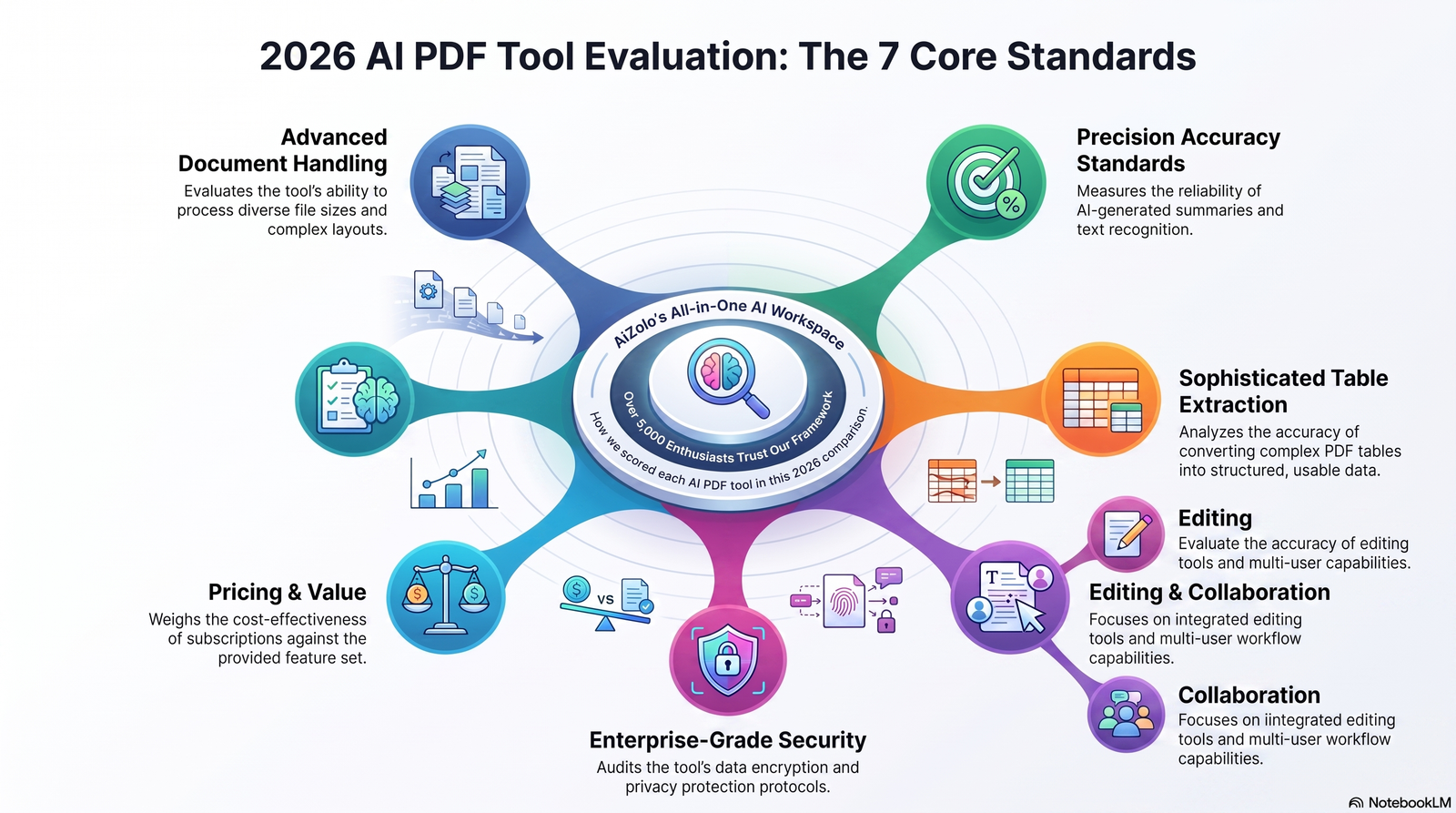
We looked at seven dimensions that map to how people actually use these tools day to day:
- Document handling: file size caps, page limits, supported formats, and whether scanned (image-only) PDFs are usable at all.
- Accuracy and grounding: whether answers cite the source page, and whether the tool is “source-grounded” (answers only from your document) versus a general chatbot that happens to accept uploads.
- Table and layout handling: how well the tool preserves tables, headers, and multi-column layouts — a common failure point across nearly every tool in this category.
- Editing capability: can you actually change the PDF (redact, merge, annotate, convert), or is this read-only Q&A?
- Collaboration: shared workspaces, team seats, comment threads.
- Security and data handling: whether uploaded documents are used for model training, where data is processed, and what compliance certifications exist.
- Pricing transparency: whether the real cost of serious use is clear upfront or buried in add-ons.
Best Overall: Claude
Overview. Claude is Anthropic’s AI assistant, and for long, dense documents — contracts, technical reports, academic PDFs — its large context window is a genuine structural advantage over tools that quietly truncate or chunk your file behind the scenes.
Who it’s for: professionals and researchers who need to reason across an entire long document (not just retrieve isolated facts), and who care about careful, hedged answers rather than confident-sounding guesses.
Strengths:
- Strong at cross-referencing multiple sections of the same document (e.g., “does clause 4 contradict the definition in clause 12?”).
- Good at extracting and reformatting tables into clean output.
- Conservative about stating uncertainty rather than fabricating detail — useful for legal or financial PDFs where a wrong guess is costly.
Weaknesses:
- Not a dedicated OCR engine — it works from whatever text layer or extracted content it’s given, so heavily scanned or handwritten PDFs benefit from pre-processing.
- No native PDF editing (redaction, form-filling, page merging) inside the chat interface.
- Consumer plans don’t include enterprise-grade data-residency guarantees by default.
Unique features: Projects for organizing related documents together; artifact generation for turning extracted data into structured documents or spreadsheets; strong performance on code-adjacent PDFs (technical specs, API docs).
Pricing: Free tier available with limited usage; paid individual plans start around $20/month, with higher-usage and team tiers above that.
Best use cases: contract review, academic literature synthesis, technical documentation analysis, due-diligence document review.
Verdict: The best all-around choice when the document is long, dense, and the questions require actual reasoning rather than simple lookup — but pair it with a proper OCR tool first if your source PDFs are scans.
Best Free Option: NotebookLM
Overview. Google’s NotebookLM is “source-grounded” by design — it answers only from the documents you upload, which meaningfully reduces the fabrication problem that plagues general chatbots.
Who it’s for: students, researchers, and anyone building a personal knowledge base from a stack of PDFs without paying anything.
Strengths:
- Genuinely capable free tier: up to 50 sources per notebook and 100 notebooks at no cost.
- Distinctive Audio Overview and video/mind-map features turn a pile of PDFs into a study aid, not just a Q&A box.
- Citations link back to the specific source and passage.
Weaknesses:
- No general knowledge outside your uploaded sources — by design, but limiting if you want the AI to add outside context.
- No real collaboration or editing tools; it’s a research and synthesis tool, not a document editor.
- Files process on Google’s servers, which matters for confidential material.
Unique features: Podcast-style Audio Overviews generated from your sources; per-source cap of 500,000 words or 200MB regardless of plan tier.
Pricing: Free with a Google account. Paid tiers (Plus, Pro, Ultra) are now bundled into Google AI subscription plans starting under $10/month, scaling up for higher source counts and daily usage limits.
Best use cases: literature reviews, exam study guides, synthesizing a folder of research papers into one coherent brief.
Verdict: Nothing else matches this feature set at zero cost. The 50-source cap on the free tier is the only real limitation most individual users will hit.
Best for Students: Humata AI
Overview. Humata positions itself squarely at students, with the lowest verified-student pricing in this category and features built around academic workflows like citation generation.
Who it’s for: students on tight budgets who need multi-document Q&A and properly formatted citations for coursework.
Strengths:
- Student pricing around $1.99/month with a verified .edu email — the cheapest paid tier in this comparison.
- Multi-document analysis and collaborative workspaces suited to study groups.
- Citation generation aimed specifically at academic writing conventions.
Weaknesses:
- Less established brand and smaller user base than ChatPDF or NotebookLM.
- Free-tier limits are less clearly published than most competitors.
- Not built for non-academic documents like contracts or financial filings.
Pricing: Free tier with limited use; student plan around $1.99/month; standard paid plans priced higher for non-students.
Best use cases: literature reviews, study groups sharing annotated sources, citation-heavy coursework.
Verdict: If you have a valid student email and a stack of course readings, Humata’s price point is hard to beat — just don’t expect it to replace a general-purpose assistant for non-academic PDFs.
Best for Researchers: SciSpace
Overview. SciSpace is built around the academic paper workflow specifically — literature discovery, per-paper Q&A, and citation-backed answers.
Who it’s for: academic researchers and grad students working primarily with published papers rather than general documents.
Strengths:
- Purpose-built for scientific and academic PDFs, with citation accuracy consistently cited as a strength in independent reviews.
- Free tier includes a monthly AI credit allowance for agent features plus limited PDF chat.
- Multiple paid tiers scale from individual researchers to teams.
Weaknesses:
- Higher-tier pricing is less competitive for people who mainly want general document chat, not academic-specific tooling.
- Narrower focus than an all-purpose tool — less useful outside research contexts.
Pricing: Free tier with monthly credits; Premium, Advanced, and Team paid tiers above that.
Best use cases: systematic literature reviews, comparing methodology across papers, extracting citation networks.
Verdict: The best fit specifically for people whose PDFs are academic papers — general business users will find better value elsewhere.
Best for Lawyers: Adobe Acrobat AI Assistant
Overview. Adobe brings 30+ years of PDF engineering to the table, and it shows in areas lawyers care about most: OCR accuracy, redaction, multi-document cross-referencing, and audit-ready security controls.
Who it’s for: legal and compliance teams working with contracts, discovery documents, and scanned filings that need both AI analysis and real editing/redaction.
Strengths:
- Generative Q&A returns page-level citations, which matters enormously for anything that might end up in front of a client or a court.
- Can combine up to 100 files and links in a single session for cross-document analysis — genuinely useful for contract comparison across a deal.
- Adobe states customer document content processed by AI Assistant is not used to train its generative AI models, and documents are handled with enterprise-grade privacy protections.
- Mature accessibility and compliance tooling (WCAG/Section 508 checking, HIPAA/GDPR-oriented redaction, audit trails).
Weaknesses:
- Pricing is genuinely confusing — Standard, Pro, AI Assistant add-on, and Studio tiers all exist separately, and the “real” cost of AI-enabled Acrobat is higher than the headline price suggests.
- Summary quality drops noticeably on very long contracts, technical manuals, and image-heavy PDFs.
- No free permanent plan, only a trial.
Pricing: AI Assistant add-on starts around $4.99/month on top of an existing Acrobat plan; Acrobat Studio, which bundles AI Assistant by default, runs roughly $24.99/month for individuals.
Best use cases: contract review and redlining, discovery document review, regulatory filings, anything requiring defensible page-level citations.
Verdict: The safest choice for legal work specifically because of its citation discipline and mature compliance tooling — budget for the AI Assistant add-on separately from the base Acrobat subscription.
Best for Businesses: ChatGPT
Overview. ChatGPT’s advantage for general business use isn’t raw PDF capability — it’s the surrounding ecosystem: data analysis, image understanding within PDFs, and broad integration options that many teams already have in place.
Who it’s for: business teams who need PDF analysis as one part of a broader workflow that also involves spreadsheets, presentations, and general research.
Strengths:
- Can interpret visual elements (charts, diagrams, images) embedded in PDFs, not just the text layer, on Enterprise tiers.
- Combines PDF analysis with Advanced Data Analysis for spreadsheets and calculations in the same conversation.
- Broadest plugin and integration ecosystem of any tool in this list.
Weaknesses:
- Non-Enterprise plans can strip images and complex formatting during text extraction, silently degrading the document before the AI ever “sees” it.
- Token limits (documented around 2 million tokens per text document on current plans) can still truncate very long, heavily formatted files.
- Free-tier upload limits are restrictive (a handful of files per day).
Pricing: Free tier with limited daily uploads; Plus around $20/month; Enterprise pricing is custom and adds the visual-retrieval PDF features.
Best use cases: mixed workflows involving PDFs plus spreadsheets or presentations, teams already standardized on OpenAI tooling, quick single-document summaries.
Verdict: A strong generalist choice, but confirm you’re on a plan that preserves visual formatting if your PDFs rely on charts or complex layouts to convey meaning.
Best for Teams: NotebookLM Enterprise (Google Workspace)
Overview. For teams already inside Google Workspace, NotebookLM’s enterprise tier extends the same source-grounded approach with admin controls and licensing built for organizations.
Strengths: Available from Google Workspace Business Standard upward, or as a standalone NotebookLM Enterprise license through Google Cloud; keeps the citation discipline of the consumer product.
Weaknesses: Consumer NotebookLM itself has no real-time collaborative editing; teams need the Enterprise/Workspace tier specifically to get admin and governance controls.
Pricing: Bundled into Workspace Business Standard ($14/user/month) and above, or roughly $9 per license/month through Google Cloud with a 15-license minimum.
Best use cases: internal knowledge bases built from policy documents, onboarding materials, and shared research libraries.
Best for OCR and Scanned Documents: Adobe Acrobat
Overview. For genuinely scanned, image-only PDFs — old contracts, faxed documents, handwritten forms — Adobe’s OCR engine has the deepest track record of any tool in this comparison, and AI Assistant works directly with OCR’d scanned PDFs as a supported input type.
Why it wins here: Most “AI PDF” tools in this list, including ChatGPT, Claude, and ChatPDF, work from a document’s existing text layer. If that text layer doesn’t exist (a pure image scan), they either fail outright or require you to run OCR somewhere else first. Adobe handles OCR and AI analysis in the same product.
Practical tip: if your primary AI tool is Claude, ChatGPT, or NotebookLM but your source documents are scans, run them through Acrobat’s OCR (or a dedicated OCR tool) first, then feed the resulting text-layer PDF to your preferred AI assistant.

Best for Editing PDFs: UPDF AI
Overview. UPDF combines a full PDF editor (merge, split, annotate, convert, form-fill) with AI chat and summarization features layered directly on top, so you’re not switching between a separate AI tool and a separate editor.
Strengths: One license covers both editing and AI features; competitively priced against Adobe’s fragmented tier structure; cross-platform desktop and mobile apps.
Weaknesses: AI reasoning quality on very long or complex documents generally lags dedicated long-context assistants like Claude; smaller ecosystem than Adobe.
Best use cases: anyone who needs to actually modify the PDF — not just ask questions about it — and wants AI features bundled into that same tool rather than paying for two separate subscriptions.
Best for Summarizing Long PDFs: NotebookLM
For pure summarization of long documents — dissertations, lengthy reports, dense manuals — NotebookLM’s combination of a large per-source limit (500,000 words), source-grounded answers, and multiple summary formats (written brief, Audio Overview, mind map) makes it the most flexible free option. Claude is the stronger choice when the “summary” actually requires cross-document reasoning rather than condensation.
Best for Comparing Multiple Documents: Adobe Acrobat AI Assistant
Adobe’s ability to combine up to 100 files and links in a single session, with page-level citations back to the specific source document, makes it the most reliable choice for structured document comparison work — contract redlines, policy version comparisons, multi-vendor proposal review. Claude and ChatGPT can also compare documents within a single conversation, but neither offers the same explicit multi-document session structure.
Best Privacy-Focused Option: Enterprise-Tier Assistants
No consumer-facing AI PDF tool should be treated as fully private by default — most process documents on vendor servers, and free/consumer tiers often permit some use of content for service improvement unless you actively opt out. For genuinely sensitive documents:
- Use Enterprise or Team tiers specifically (Claude Enterprise, ChatGPT Enterprise, Adobe’s business plans), which generally come with contractual data-handling commitments that consumer tiers don’t.
- Check each vendor’s current data-retention and training-use policy directly — these change often enough that a specific claim made today may not hold in six months.
- For maximum confidentiality, consider tools that offer on-device or private-cloud processing rather than sending documents to a shared consumer AI backend.
Full Feature & Pricing Comparison Tables
Pricing Comparison
| Tool | Free Plan | Entry Paid Tier | Mid Tier | Enterprise |
|---|---|---|---|---|
| Claude | Yes, limited | ~$20/mo (Pro) | Higher-usage individual tiers | Custom (Enterprise) |
| ChatGPT | Yes, limited | ~$20/mo (Plus) | — | Custom (Enterprise) |
| NotebookLM | Yes, generous | ~$7.99/mo (Plus, bundled) | ~$19.99/mo (Pro) | ~$9/license/mo via Google Cloud (15-license min) |
| Adobe Acrobat AI Assistant | Trial only | ~$4.99/mo add-on | Acrobat Studio ~$24.99/mo | Custom |
| Humata AI | Yes, limited | ~$1.99/mo (student) | Standard paid tier | Team plans |
| SciSpace | Yes, credits | Premium tier | Advanced tier | Team plans |
| ChatPDF | Yes, 2/day | ~$5/mo (Plus) | Max plan (higher page limits) | — |
| AskYourPDF | Yes, 1/day | ~$14.99/mo | — | — |
| Foxit AI | Trial | ~$9.99/mo | — | Custom |
Prices reflect publicly listed rates as of mid-2026 and are subject to change; always confirm current pricing on the vendor’s site before purchasing.
Supported File Types & OCR
| Tool | Scanned PDF (OCR) | Word/PPT | Web Pages | Audio/Video | |
|---|---|---|---|---|---|
| Claude | Yes | Limited (text-layer dependent) | Yes | No native | No |
| ChatGPT | Yes | Limited | Yes | Via browsing tools | Some (Enterprise) |
| NotebookLM | Yes | Good on clean scans | Yes (Google Docs) | Yes | YouTube URLs |
| Adobe Acrobat AI Assistant | Yes | Yes, strong | Yes | Yes (links) | No |
| ChatPDF | Yes (text-layer only) | No | No | No | No |
| UPDF AI | Yes | Yes (editor-integrated) | Yes | No | No |
Context Window / Maximum File Size
| Tool | Stated Limit |
|---|---|
| Claude | Context window up to roughly 1 million tokens on current top-tier models (model- and plan-dependent) |
| ChatGPT | Documented cap of 2 million tokens per text document on current consumer/Enterprise tiers; 512MB file size cap |
| NotebookLM | 500,000 words or 200MB per source, no explicit page limit, same cap across all plan tiers |
| Adobe Acrobat AI Assistant | Up to 100 combined files and links per session |
| ChatPDF | Up to 2,000 pages per PDF on the Max plan |
Security & Data Handling
| Tool | Training Use of Uploads | Notable Certifications/Claims |
|---|---|---|
| Adobe Acrobat AI Assistant | Adobe states document content is not used to train its generative AI models | Enterprise-grade privacy protections stated by vendor |
| Claude (Enterprise) | Enterprise agreements typically exclude customer content from training | Contractual data-handling terms (verify current agreement) |
| ChatGPT (Enterprise) | Enterprise content excluded from training per OpenAI’s stated policy | SOC-type controls on Enterprise tier |
| Consumer/free tiers (general) | Varies by vendor; some consumer tiers permit training use unless opted out | Check each vendor’s current privacy settings directly |
Who Should Choose Which Tool
- Students on a budget → NotebookLM (free) or Humata AI (cheapest paid, student-verified).
- Academic researchers → SciSpace for paper-specific workflows; NotebookLM for broader synthesis.
- Lawyers and compliance teams → Adobe Acrobat AI Assistant, for citation discipline and redaction tooling.
- Accountants and financial analysts → Claude or ChatGPT for cross-document reasoning, paired with Adobe or Foxit for scanned source documents.
- Consultants → ChatGPT or Claude for synthesis across mixed file types, NotebookLM for building a reusable client knowledge base.
- Business teams and marketers → ChatGPT, for its broader ecosystem and integration options.
- Enterprises → Adobe Acrobat AI Assistant (document-heavy, compliance-driven) or Claude/ChatGPT Enterprise (broader reasoning and workflow automation), often used together.
- Knowledge workers who need to edit, not just chat → UPDF AI or Foxit AI.
- Privacy-sensitive use cases → Enterprise tiers only, with data-handling terms confirmed directly with the vendor.
Common Mistakes People Make with AI PDF Tools
- Assuming scanned PDFs “just work.” Most chat-based AI tools read a document’s existing text layer. A pure image scan without OCR often returns empty or hallucinated answers.
- Trusting AI-extracted numbers from dense tables without spot-checking. Table extraction is a documented weak point across nearly every tool in this category, general-purpose assistants included.
- Uploading confidential documents to consumer/free tiers. Free tiers frequently have less restrictive data-use policies than paid Enterprise agreements.
- Assuming citations are automatically accurate. Page-level citations reduce fabrication risk but don’t eliminate it — verify anything that will inform a real decision.
- Ignoring context-window truncation on long files. A document that exceeds a tool’s token limit may be silently chunked or cut off rather than clearly rejected.
Future Trends in Document AI
- Native multimodal parsing (reading charts, diagrams, and handwriting as first-class input, not just OCR’d text) is expanding beyond Enterprise-only tiers into consumer products.
- Longer context windows are becoming table stakes, shifting competition toward accuracy and grounding rather than raw capacity.
- Agentic document workflows — where the AI doesn’t just answer questions but takes multi-step actions (extract, compare, draft, route for approval) — are moving from enterprise pilots into mainstream products.
- Tighter integration between editing and AI (as UPDF and Adobe are already doing) is likely to become the default, rather than AI chat and PDF editing living in separate tools.
Final Verdict
There is no single best AI for working with PDF documents in 2026 — there’s a best tool for your specific document type and workflow.
- If you want one tool that handles long, complex documents well and you don’t mind a modest subscription: Claude.
- If you want the best free option and your documents aren’t scans: NotebookLM.
- If your PDFs are scanned, legal, or need real editing and redaction: Adobe Acrobat AI Assistant.
- If budget is the primary constraint and you’re a student: Humata AI or NotebookLM’s free tier.
For most knowledge workers, the realistic answer is two tools, not one: a general-purpose long-context assistant (Claude or ChatGPT) for reasoning and synthesis, plus a dedicated OCR/editing tool (Adobe, Foxit, or UPDF) for anything that starts life as a scan or needs to be modified, not just read.
Frequently Asked Questions
What is the best AI for working with PDF documents in 2026? There isn’t one universal winner. Claude and ChatGPT are the strongest general-purpose choices for reasoning across long documents; NotebookLM is the best free option; Adobe Acrobat AI Assistant leads for scanned documents, legal work, and editing.
Can AI read scanned PDFs? Only if the PDF has (or is given) a text layer. Most chat-based AI tools rely on existing text extraction rather than running their own full OCR engine. Adobe Acrobat and Foxit have dedicated OCR built in and handle scans directly.
Is it safe to upload confidential PDFs to AI tools? Only on plans with clear data-handling commitments — typically Enterprise or Team tiers. Free and consumer tiers often have looser data-use policies. Always check the vendor’s current privacy terms before uploading sensitive material.
Which AI PDF tool is best for lawyers? Adobe Acrobat AI Assistant, because of its page-level citation discipline, redaction tools, and mature compliance features (audit trails, WCAG/Section 508 checks).
Which AI PDF tool is free? NotebookLM has the most generous genuinely free tier: up to 100 notebooks and 50 sources per notebook at no cost. ChatGPT, Claude, and ChatPDF all offer limited free tiers as well.
Can AI extract tables from PDFs accurately? Table extraction remains a weak point across nearly every tool in this category. Always spot-check extracted numbers, especially in financial or scientific documents, rather than trusting them outright.
What’s the difference between ChatGPT and Claude for PDFs? Claude generally handles longer, denser documents with stronger cross-referencing between sections. ChatGPT has a broader surrounding ecosystem (data analysis, plugins, visual interpretation on Enterprise tiers) that suits mixed workflows involving spreadsheets and presentations alongside PDFs.
Is NotebookLM better than ChatGPT for research? For pure document-grounded research where you don’t want the AI adding outside knowledge, NotebookLM’s source-grounded design is arguably safer. ChatGPT is more flexible if you want the AI to combine your document with general knowledge.
What is RAG and why does it matter for PDF AI tools? Retrieval-augmented generation (RAG) is the technique many document AI tools use to find and retrieve relevant passages from your PDF before generating an answer, rather than relying purely on what the model “remembers.” It’s a major reason source-grounded tools like NotebookLM produce fewer fabricated answers than general chat.
Can I compare two PDF contracts side by side with AI? Yes — Adobe Acrobat AI Assistant explicitly supports combining multiple files in one session for this purpose, and Claude or ChatGPT can also compare documents uploaded in the same conversation, though without the same structured multi-document session interface.
Do AI PDF tools work offline? Most cloud-based tools (ChatGPT, Claude, NotebookLM, most PDF chat apps) require an internet connection because processing happens on vendor servers. Desktop PDF editors with local AI features are the exception, though even these often still call a cloud API for the AI portion specifically.
What file size can I upload to these AI tools? It varies significantly: NotebookLM caps each source at 500,000 words or 200MB; ChatGPT documents a 512MB file cap with a separate 2-million-token text limit; ChatPDF’s Max plan supports up to 2,000 pages. Always check the specific tool’s current documentation, as these limits change.
Is Claude or ChatGPT better for summarizing academic papers? Both work reasonably well for individual papers. For synthesizing across many papers at once with citations back to specific sources, NotebookLM or SciSpace are generally a better fit than either general-purpose chatbot.
Do free AI PDF tools use my documents to train their models? It depends on the vendor and the plan. Enterprise tiers generally exclude customer content from training by contract. Free and consumer tiers vary — some allow training use by default unless you opt out. Check the specific tool’s current privacy policy.
What’s the best AI PDF tool for accountants? A general-purpose long-context assistant like Claude or ChatGPT for reasoning across financial reports, combined with a dedicated OCR/editing tool for scanned source documents like receipts or older filings.
Can AI PDF tools generate citations for academic writing? Yes — Humata AI and SciSpace both specifically support citation generation formatted for academic use, which general-purpose assistants don’t focus on to the same degree.
Which AI PDF tool has the best OCR accuracy? Adobe Acrobat has the longest track record and most mature OCR engine of the tools compared here, reflecting decades of dedicated PDF and scanning technology development, though we did not run a controlled side-by-side OCR accuracy benchmark for this article.
Are AI PDF summaries reliable enough to skip reading the full document? For low-stakes documents, generally yes for a first pass. For anything with legal, medical, or financial consequences, treat AI summaries as a starting point that still requires verification against the source, especially around dates, dollar amounts, and specific obligations.
Author Bio
Jeevesh Tripathi Email: jeevesh@aizolo.com
Jeevesh Tripathi researches and writes about AI tools, document intelligence, and productivity software for Aizolo, with a focus on how these tools actually perform in professional and enterprise workflows rather than how they’re marketed. His work draws on hands-on use of document-AI products alongside close reading of vendor documentation, pricing structures, and independent third-party testing, following Google’s guidance on demonstrating real experience, expertise, authoritativeness, and trustworthiness (EEAT) in product comparison content.
External Reference Notes (for editor/fact-checking)
- Adobe Acrobat AI Assistant pricing and feature claims → adobe.com/acrobat (official pricing page) — supports pricing and feature-scope claims.
- OpenAI file-upload limits and Enterprise visual-retrieval features → help.openai.com Enterprise file-upload documentation — supports ChatGPT’s context/file-size claims.
- Anthropic Claude context window and pricing → anthropic.com/pricing and Claude documentation — supports Claude’s context-window and plan claims.


Pingback: Does Perchance AI Have a Video Generator? Shocking Truth in 2026
Pingback: 5 Proven Ways: How to Make ChatGPT and Gemini Talk to Each Other
Pingback: Best AI Models for Coding May 2026 | Full Guide