Every developer building with LLMs hits the same wall eventually.
You start with one provider’s SDK. Then you need a second model for a task the first one handles poorly. Now you’re managing two API keys, two billing dashboards, and two sets of rate limits — and that’s before you add a third provider for fallback.
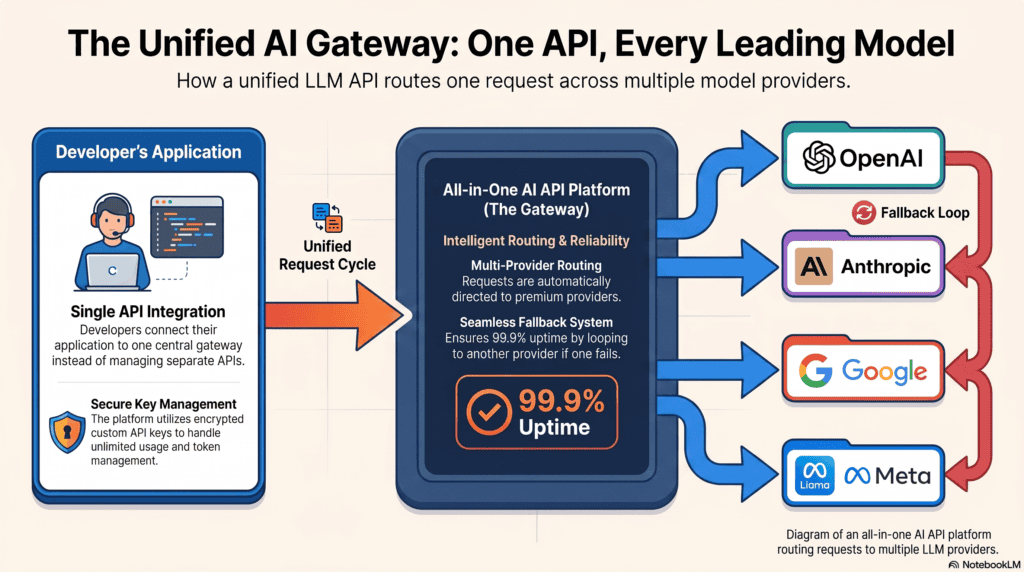
This is the exact problem an all in one AI API platform is built to solve. Instead of hardcoding calls to OpenAI, Anthropic, and Google separately, you integrate once and route to whichever model fits the job.
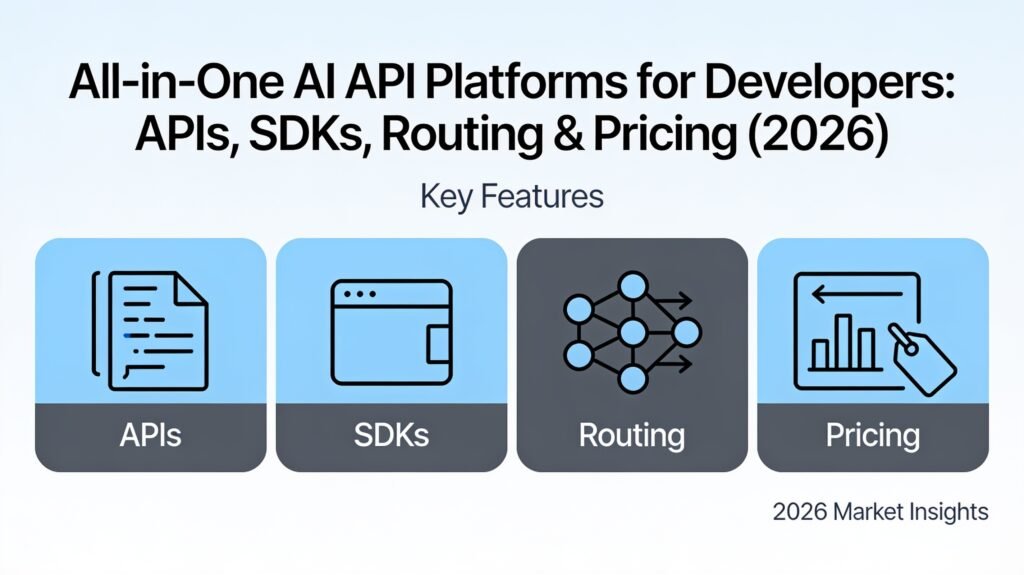
This guide is written for developers, not general AI shoppers. We’ll cover API structure, SDK support, authentication, BYOK (bring-your-own-key), model routing, failover, rate limits, and real pricing per 1M tokens — with code you can actually run.
If you’re comparing consumer-facing multi-model apps instead of raw APIs, our top all-in-one AI platforms comparison covers that side of the market in more depth.
Table of Contents
What Is an All-in-One AI API Platform, Technically?
An all in one AI API platform is a single API layer that sits in front of multiple LLM providers. You send one request, and the platform routes it to GPT, Claude, Gemini, Llama, or another model.
Technically, most modern platforms expose an OpenAI-compatible schema. That means your existing chat.completions code often works with a one-line base URL change.
This is different from a consumer chat app. A unified LLM API is meant to be called from your code — a backend service, a script, a CI pipeline — not clicked through in a browser.
The value isn’t just convenience. It’s abstraction: your application code stays stable even as the underlying model landscape shifts every few months.
Why Developers Are Consolidating Around Unified LLM APIs
Four problems keep coming up in developer forums and GitHub issues about multi-model apps.
Provider outages break production. If your app only calls OpenAI’s API directly and OpenAI has an incident, your app goes down with it. A model routing API with automatic failover keeps requests flowing to a backup provider.
Cost optimization requires flexibility. Different models have wildly different per-token costs. Routing simple tasks to cheaper models and complex reasoning to premium ones can cut spend significantly without touching your application logic.
Model quality shifts fast. The best coding model six months ago may not be the best one today. An all-in-one AI API platform lets you swap the underlying model via config, not a rewrite.
Multi-provider billing is tedious. Reconciling usage across five dashboards, five invoices, and five rate-limit policies is real operational overhead for a small team.
Core Building Blocks of a Developer-First AI API Platform
Before comparing platforms, it helps to know what you’re actually evaluating. A serious AI API platform for developers should offer four things at minimum.
1. Authentication and API Key Management
You need either a single platform API key, support for your own provider keys (BYOK), or both. Look for encrypted key storage and per-key usage scoping.
2. Model Routing and Failover
The platform should let you specify a primary model with fallback options, so a single provider outage doesn’t take down your integration.
3. Rate Limits That Match Your Traffic
Understand whether limits are enforced per platform account, per underlying provider key, or both — this changes how you architect retries.
4. SDK and Language Coverage
Official SDKs reduce boilerplate. At minimum, expect REST/cURL support; ideally Python and Node.js SDKs, with community libraries for Go, Ruby, and Java.
Code in Action: One Endpoint, Multiple Models
Here’s what an OpenAI-compatible unified LLM API call typically looks like — the same pattern works across most all-in-one AI API platforms, including AiZolo.
cURL:
curl https://api.aizolo.com/v1/chat/completions \
  -H "Authorization: Bearer $AIZOLO_API_KEY" \
  -H "Content-Type: application/json" \
  -d '{
    "model": "claude-sonnet-5",
    "messages": [{"role": "user", "content": "Summarize this changelog."}],
    "fallback_models": ["gpt-5.6", "gemini-3.6-pro"]
  }'
Node.js (OpenAI SDK, repointed):
import OpenAI from "openai";

const client = new OpenAI({
  apiKey: process.env.AIZOLO_API_KEY,
  baseURL: "https://api.aizolo.com/v1",
});

const response = await client.chat.completions.create({
  model: "gpt-5.6",
  messages: [{ role: "user", content: "Draft a commit message for this diff." }],
});

console.log(response.choices[0].message.content);
Python:
from openai import OpenAI

client = OpenAI(
    api_key="YOUR_AIZOLO_API_KEY",
    base_url="https://api.aizolo.com/v1"
)

response = client.chat.completions.create(
    model="gemini-3.6-pro",
    messages=[{"role": "user", "content": "Explain this stack trace."}]
)

print(response.choices[0].message.content)
Because the schema mirrors OpenAI’s format, migrating an existing integration is usually a base-URL and API-key swap — not a rewrite. That portability is the practical core of what an AI API platform is supposed to deliver.
Pricing Per 1M Tokens: What Developers Actually Pay
Token pricing is the number that actually matters once you’re past prototyping. Here’s a representative snapshot — always confirm current rates directly with each provider before budgeting, since pricing changes frequently.
| Model Class | Typical Input ($/1M tokens) | Typical Output ($/1M tokens) |
|---|---|---|
| Frontier reasoning (GPT-5.x, Claude 5 tier) | $2.50 – $3.50 | $10 – $15 |
| Mid-tier multimodal (Gemini 3.x Pro tier) | $1.00 – $1.50 | $4 – $6 |
| Open-weight models (Llama, Mistral) | $0.05 – $0.25 | $0.10 – $0.40 |
Pay-per-use aggregators like OpenRouter bill close to these underlying provider rates, plus a small routing margin. That’s the tradeoff of a pure model routing API: transparent per-token costs, but no bundled flat rate.
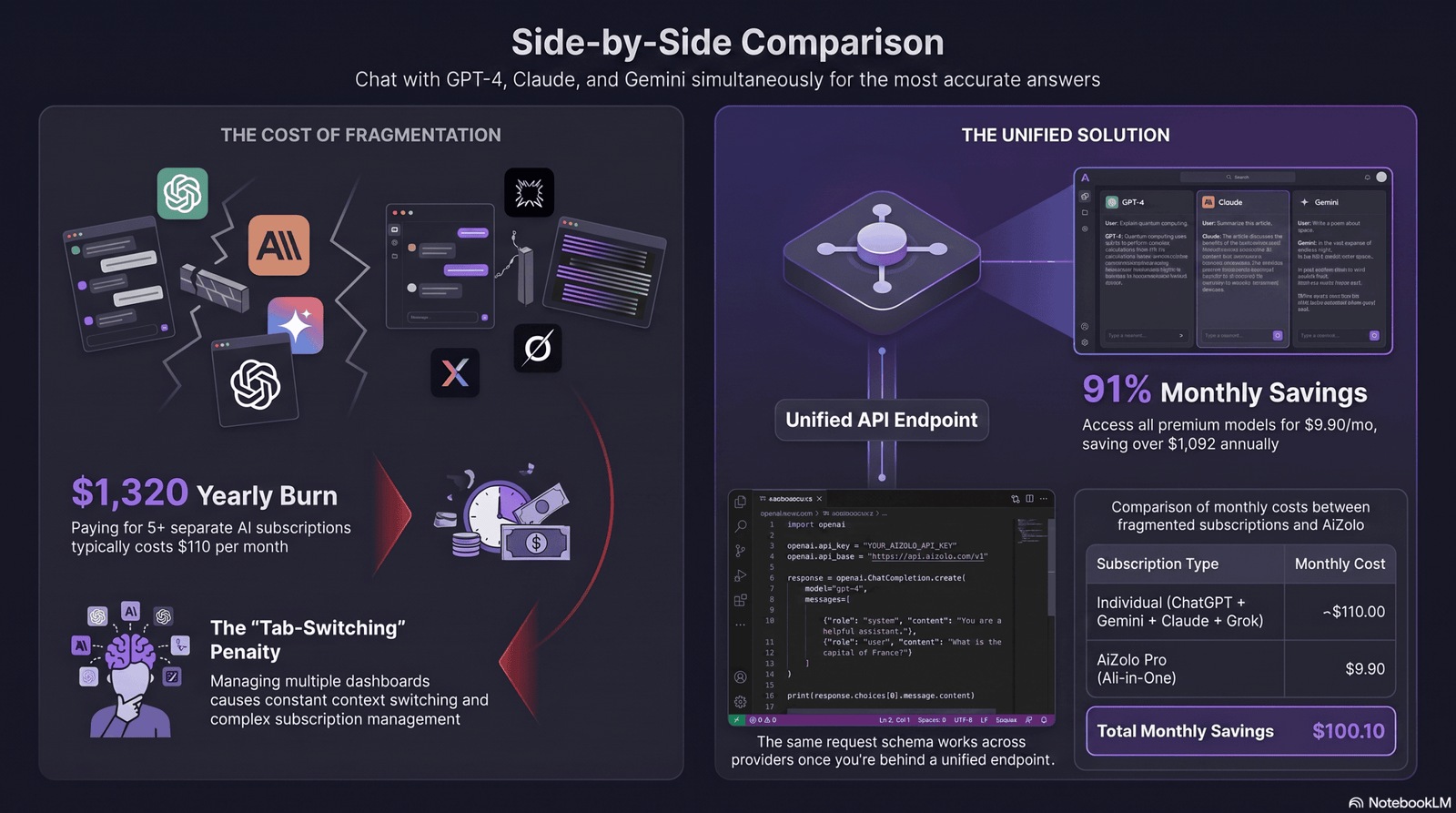
AiZolo’s Pro plan takes a different approach: $9.90/month includes 3,000,000 tokens across all supported models, which works out to roughly $3.30 per 1M tokens blended — before you even add your own API keys for unlimited BYOK usage on top.
For teams with unpredictable, bursty usage, flat-rate token pools are easier to forecast than pure pay-as-you-go billing. For teams with steady, high-volume production traffic, direct pay-per-token pricing can work out cheaper at scale.
SDK and Language Support Compared
| Platform | REST/cURL | Python SDK | Node.js SDK | OpenAI-Compatible | Other Languages |
|---|---|---|---|---|---|
| AiZolo API | ✅ | ✅ | ✅ | ✅ | Go, Ruby via community wrappers |
| OpenRouter | ✅ | ✅ (via OpenAI SDK) | ✅ (via OpenAI SDK) | ✅ | Broad community support |
| TypingMind (API mode) | ✅ | Limited | Limited | Partial | — |
| Abacus AI | ✅ | ✅ | ✅ | Partial | Java, enterprise SDKs |
OpenAI-compatible schemas matter more than the raw SDK count. If a platform speaks that format, it’s usually a drop-in swap for any tool already built against OpenAI’s API — including LangChain, LlamaIndex, and most agent frameworks.
Model Routing and Failover, Explained
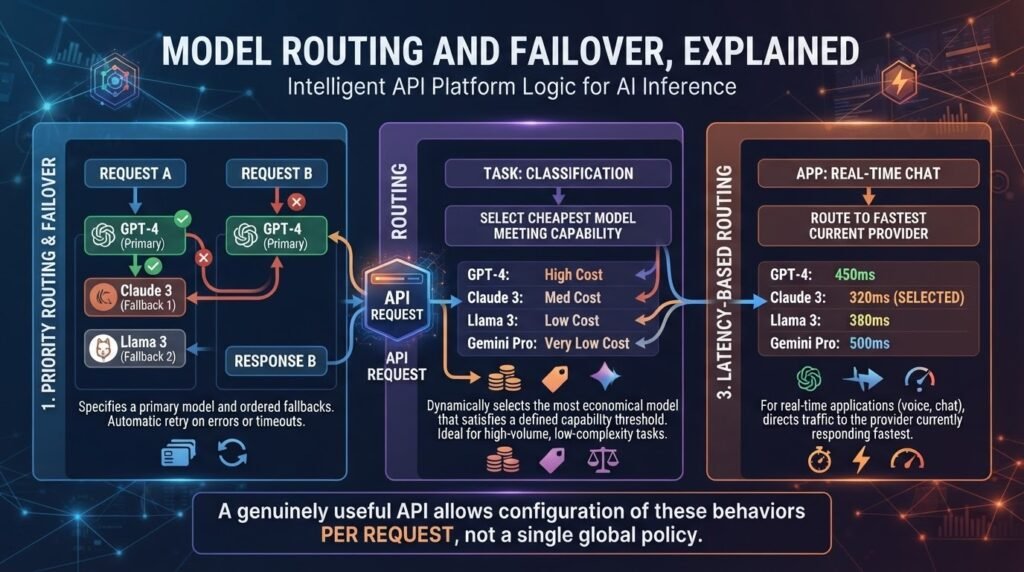
Routing logic is where all-in-one AI API platforms actually differentiate from one another. Three patterns show up most often.
Priority routing. You specify a primary model and one or more fallbacks. If the primary errors or times out, the platform automatically retries against the next model in the list.
Cost-based routing. The platform picks the cheapest available model that meets a capability threshold you define, useful for high-volume, low-complexity tasks like classification or tagging.
Latency-based routing. For real-time applications, the platform routes to whichever provider is currently responding fastest, which matters more for voice and chat UIs than batch jobs.
A genuinely useful model routing API should let you configure which of these behaviors applies per request, not force one global policy on your whole integration.
Rate Limits: How Platforms Actually Enforce Them
Rate limits get confusing fast because they can apply at two different layers.
Platform-level limits cap how many requests or tokens your account can send through the aggregator itself, regardless of which model you’re calling.
Provider-level limits are set by the underlying model provider (OpenAI, Anthropic, Google) and apply even when you’re using your own BYOK keys.
Free tiers typically cap requests in the tens-per-minute range. Paid plans scale into the hundreds or low thousands per minute, with enterprise tiers offering custom or dedicated throughput.
If you bring your own API keys, platform-level limits usually loosen significantly, since you’re billed and rate-limited by the provider directly rather than through the aggregator’s shared pool.
BYOK vs. Platform-Managed Keys
BYOK — bring your own key — means you connect your own OpenAI, Anthropic, or Google credentials instead of relying on the platform’s shared pool.
Choose platform-managed keys if you want the fastest possible setup and don’t need usage isolated by provider account.
Choose BYOK if you need provider-level billing transparency, want to avoid any per-token markup, or need usage tied to your own compliance and data-processing agreements.
AiZolo, OpenRouter, and TypingMind all support BYOK to varying degrees; encrypted key storage should be table stakes on any platform you evaluate. Our dedicated breakdown of custom API key support goes deeper into how encrypted BYOK actually works under the hood.
All-in-One AI API Platforms Compared
| Platform | Pricing Model | BYOK Support | Model Routing | Best For |
|---|---|---|---|---|
| AiZolo API | $9.90/mo flat (3M tokens) + BYOK | ✅ Encrypted | ✅ Priority + cost-based | Small teams wanting predictable cost + flexibility |
| OpenRouter | Pure pay-per-token | ✅ Required for some models | ✅ Priority + latency | Developers wanting the broadest raw model catalog |
| TypingMind | One-time license fee | ✅ Required | Limited | Solo developers avoiding subscriptions |
| Abacus AI | Custom / tiered | Partial | ✅ Agent-level routing | Teams building RAG pipelines and agents |
No single platform wins on every axis. If your priority is the widest model catalog with transparent per-token billing, OpenRouter is the established reference point. If you want a flat, predictable monthly cost with routing and comparison built in, AiZolo’s API tier is designed for that gap.
Worth noting: this comparison focuses specifically on API-first platforms developers call from code. If you’re weighing consumer-facing, chat-first tools instead, that’s a separate buying decision covered in our multi-model platform comparison.
How to Choose the Right Platform for Your Stack
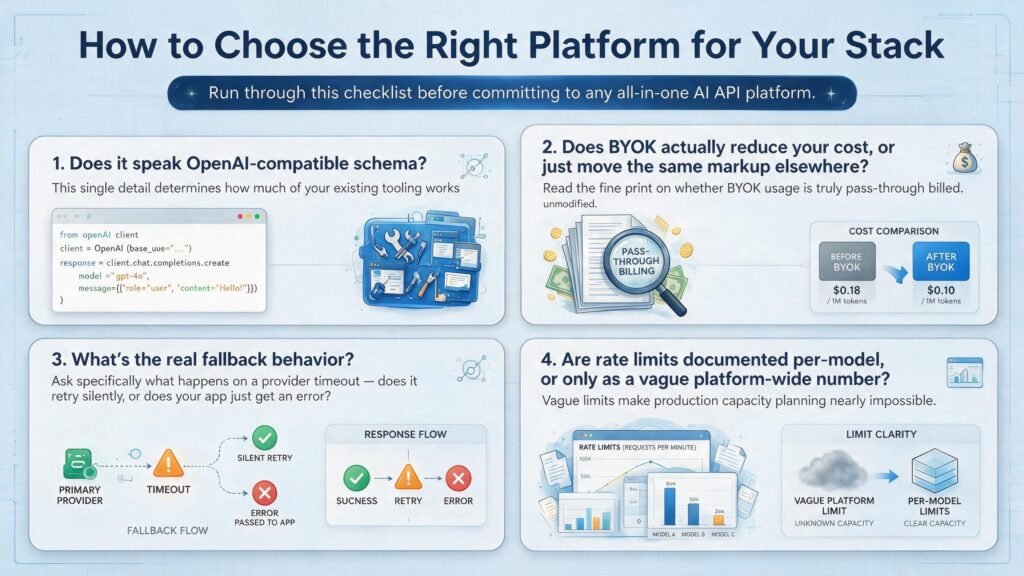
Run through this checklist before committing to any all-in-one AI API platform.
Does it speak OpenAI-compatible schema? This single detail determines how much of your existing tooling works unmodified.
Does BYOK actually reduce your cost, or just move the same markup elsewhere? Read the fine print on whether BYOK usage is truly pass-through billed.
What’s the real fallback behavior? Ask specifically what happens on a provider timeout — does it retry silently, or does your app just get an error?
Are rate limits documented per-model, or only as a vague platform-wide number? Vague limits make production capacity planning nearly impossible.
Getting Started With AiZolo’s API
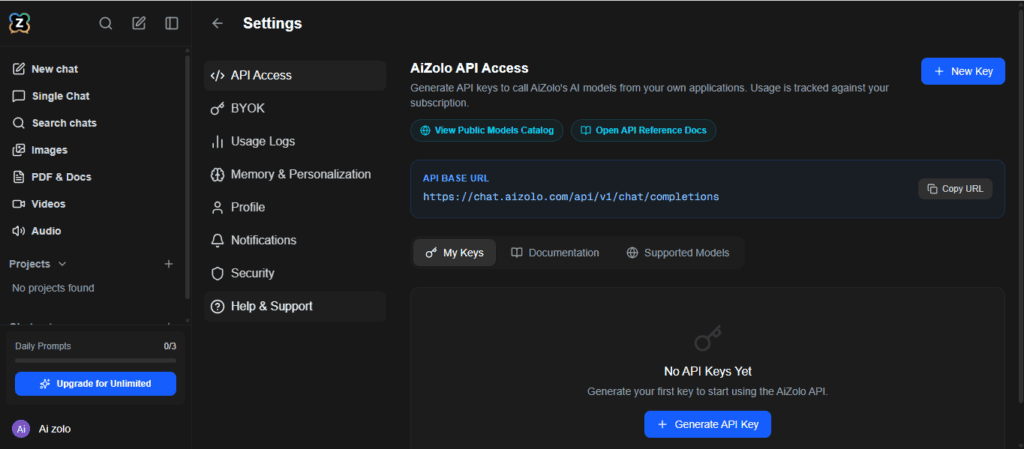
Getting a working integration against AiZolo’s all in one AI API platform takes about five minutes if you already have an existing OpenAI-style client.
Step 1: Create a free account at chat.aizolo.com and generate an API key from the dashboard.
Step 2: Point your existing OpenAI SDK client at https://api.aizolo.com/v1 and swap in your AiZolo key — most integrations need no other code changes.
Step 3: Optionally add your own OpenAI, Anthropic, or Google keys under BYOK settings for unlimited, provider-billed usage.
Step 4: Configure fallback_models on your critical-path requests so a single provider incident doesn’t take your integration down.
Step 5: Upgrade to Pro ($9.90/month) for full model access, higher rate limits, and 3,000,000 pooled tokens once you’re past prototyping.
Common Integration Mistakes to Avoid
Hardcoding a single model name everywhere. This defeats the entire point of a unified LLM API — always route through a config variable, not a literal string scattered across your codebase.
Skipping fallback configuration. Teams often add multi-model support but never actually test what happens when the primary model fails.
Ignoring per-provider rate limits when using BYOK. Your own OpenAI key still has OpenAI’s limits, even behind an aggregator.
Not budgeting output tokens separately. Output tokens are almost always priced higher than input tokens — a detail that’s easy to miss until the first invoice.
What “All-in-One” Actually Means for an API (Not Just a Chat App)
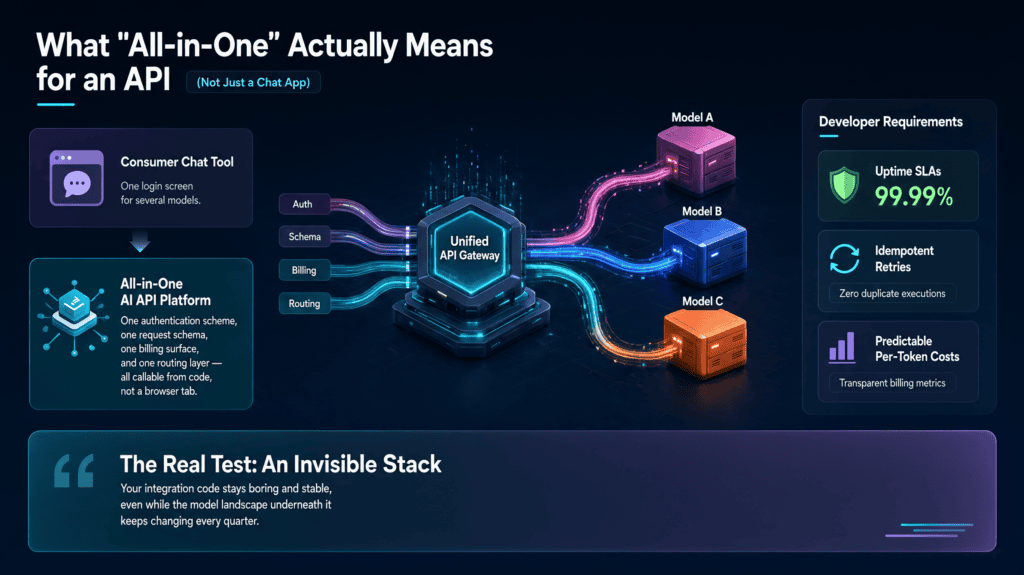
It’s worth being precise here, because the term gets used loosely. For a consumer chat tool, “all-in-one” usually just means one login screen for several models.
For an all in one AI API platform, it means something stricter: one authentication scheme, one request schema, one billing surface, and one routing layer — all callable from code, not a browser tab.
That distinction matters because developer requirements are different from chat-user requirements. You care about uptime SLAs, idempotent retries, and predictable per-token costs far more than you care about UI polish.
A genuine AI API platform built for this audience should feel invisible in your stack — you shouldn’t be able to tell, from your application code, which underlying model actually answered a given request.
That’s the real test of whether a unified LLM API is doing its job: your integration code stays boring and stable, even while the model landscape underneath it keeps changing every quarter.
Frequently Asked Questions
Q: What’s the difference between an all-in-one AI API platform and an AI aggregator? A: In practice, the terms overlap. “Aggregator” usually emphasizes raw model access and pay-per-token billing (like OpenRouter), while an all-in-one AI API platform often bundles routing, BYOK, and a flat pricing tier on top (like AiZolo).
Q: Does using a unified LLM API add latency compared to calling providers directly? A: There’s a small additional network hop, typically single-digit milliseconds for a well-built platform. For most applications this is negligible compared to model inference time itself.
Q: Can I use my own API keys and still get flat-rate pricing? A: Yes, on platforms like AiZolo — BYOK usage is billed directly by the provider, while the platform’s flat fee covers routing, comparison tools, and any pooled token allowance you use without your own keys.
Q: How do rate limits work across multiple models on the same platform? A: Most platforms track limits both globally on your account and, where relevant, per underlying provider — check documentation for whether limits are shared or independent per model.
Q: Is an all-in-one AI API platform suitable for production traffic, or just prototyping? A: Both, provided the platform documents SLAs, failover behavior, and rate limits clearly. Many teams prototype on a shared pool, then move to BYOK or dedicated throughput once traffic scales.
Q: What happens if a model I’m using gets deprecated by its provider? A: A good model routing API abstracts this — you update your fallback configuration rather than rewriting integration code, which is one of the main arguments for using one in the first place.
This is a sensitive area for teams making budget decisions — if you’re evaluating providers for a production deployment, treat every number above as a starting point for your own testing, not a guarantee.
Final Thoughts
For developers, the appeal of an all in one AI API platform isn’t novelty — it’s operational resilience. One integration, multiple providers, and a routing layer that keeps working when any single model has a bad day.
That’s the core promise of any credible AI API platform in 2026: less time spent gluing together provider SDKs, more time spent shipping the feature the model was supposed to power in the first place.
Whether you land on a pure pay-per-token aggregator like OpenRouter or a flat-rate workspace like AiZolo depends on your traffic pattern and how much billing predictability you need.
Start with AiZolo’s free API tier, point your existing SDK at it, and see how much of your integration stays unchanged. Try AiZolo’s API free — no credit card required.
About the Author
Jeevesh Tripathi is an AI infrastructure researcher covering LLM API design, model routing, and developer tooling for the AiZolo blog. His work focuses on hands-on testing of API platforms — pricing, SDK behavior, and failover reliability — rather than vendor marketing claims.
For questions, corrections, or platform updates to report, contact: jeevesh@aizolo.com
Reviewed for technical accuracy as of August 2026. API pricing and rate limits are checked periodically; providers update these frequently, so confirm current numbers directly with each provider before budgeting a production deployment.