
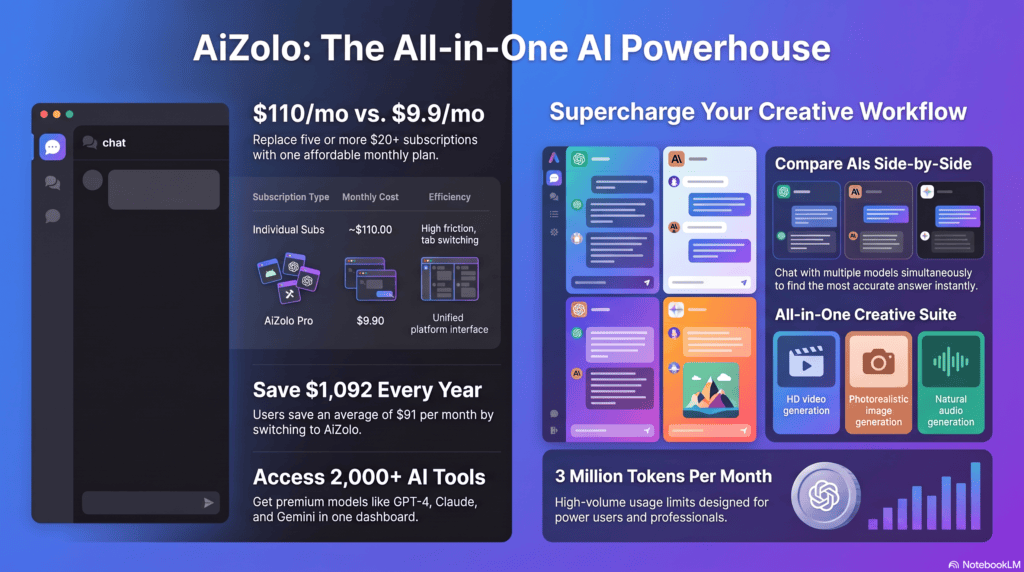
If you’ve ever paid for ChatGPT Plus, Claude Pro, and Gemini Advanced at the same time, you already know the problem. Three logins, three bills, and three tabs open just to ask one question three different ways.
That’s the exact pain point both TypingMind and AiZolo are built around. Both promise one dashboard for multiple AI models. Both target people juggling too many subscriptions. But they solve the problem in very different ways — and that difference matters more than either homepage lets on.
This guide breaks down how TypingMind and AiZolo actually compare: pricing model, supported AI models, features, and who each one is really built for.
Table of Contents
What is TypingMind?
TypingMind is a chat interface layer that sits on top of AI providers’ own APIs. Instead of building its own AI models, it gives you a polished, feature-rich front end and lets you plug in your own API keys from OpenAI, Anthropic, Google, and others.
It focuses on enhancing the AI chat experience by giving users more freedom to interact with different LLMs, organize their AI workspace, fine-tune assistant outputs, and upload training data to chat about its content. TypingMind also offers a custom-built version for teams and businesses, letting them run a chat UI under their own domain with full control through an Admin Panel.
Who actually uses it: TypingMind is popular with founders, executives, and managers who need a flexible AI workspace for decision-making, content creation, and research, as well as creative professionals brainstorming and drafting, and instructors and operations leaders handling analysis and explanations.Small businesses make up the large majority of its reported user base, with enterprise use a smaller slice.
Purchase model: TypingMind is structured around one-time licenses rather than a recurring subscription for the core product — you pay once for the app, then bring your own API keys and pay each provider (OpenAI, Anthropic, Google) directly for usage. A shared license covering up to 10 users across 50 devices is listed at $395.
Integrations: TypingMind integrates with ElevenLabs for custom voice features and supports additional third-party connections through its integration catalog, with the current set centered on voice and AI-workflow use cases.
TypingMind Pros
- Bring-your-own-API-key model means you’re paying providers at cost, not marked-up rates.
- One-time license option instead of a forced monthly subscription for the core app.
- Frequent model catalog updates — its June 2026 changelog added new models and refreshed pricing, PDF support, and prompt-caching metadata for existing ones.
- Deep customization: folders, prompt library, chat search, admin panel for teams.
TypingMind Cons
- You manage two bills — the license and your API usage — which surprises new users expecting a flat “all models included” price.
- Setup takes more effort since you need to generate and enter API keys from each provider separately, each with its own dashboard and billing.
- New consumer features (like OpenAI’s Canvas or Advanced Voice) tend to reach ChatGPT first, and TypingMind can only replicate what the underlying API exposes.
- No native mobile app — it’s web and desktop only, with mobile access via a PWA.
💡 Expert Tip: If your monthly API usage across providers is already low, TypingMind’s one-time license plus pay-as-you-go API can end up cheaper long-term than a bundled subscription. One independent review estimated the lifetime license is good value for a disciplined user whose API bill stays below roughly $12 a month in the first year.
What is AiZolo?
AiZolo takes the opposite approach: instead of bring-your-own-API-key, it bundles access to multiple frontier models behind one flat subscription.
AiZolo.com provides access to multiple AI models through a single interface, designed for individuals and teams using AI for content creation, development, or studies, consolidating access to various models in one place.It includes models such as GPT-4, Claude, Google Gemini Pro, Perplexity Sonar Pro, and Grok, and lets users compare responses from different models side-by-side.The platform also offers tools for generating video, images, and audio from text prompts.
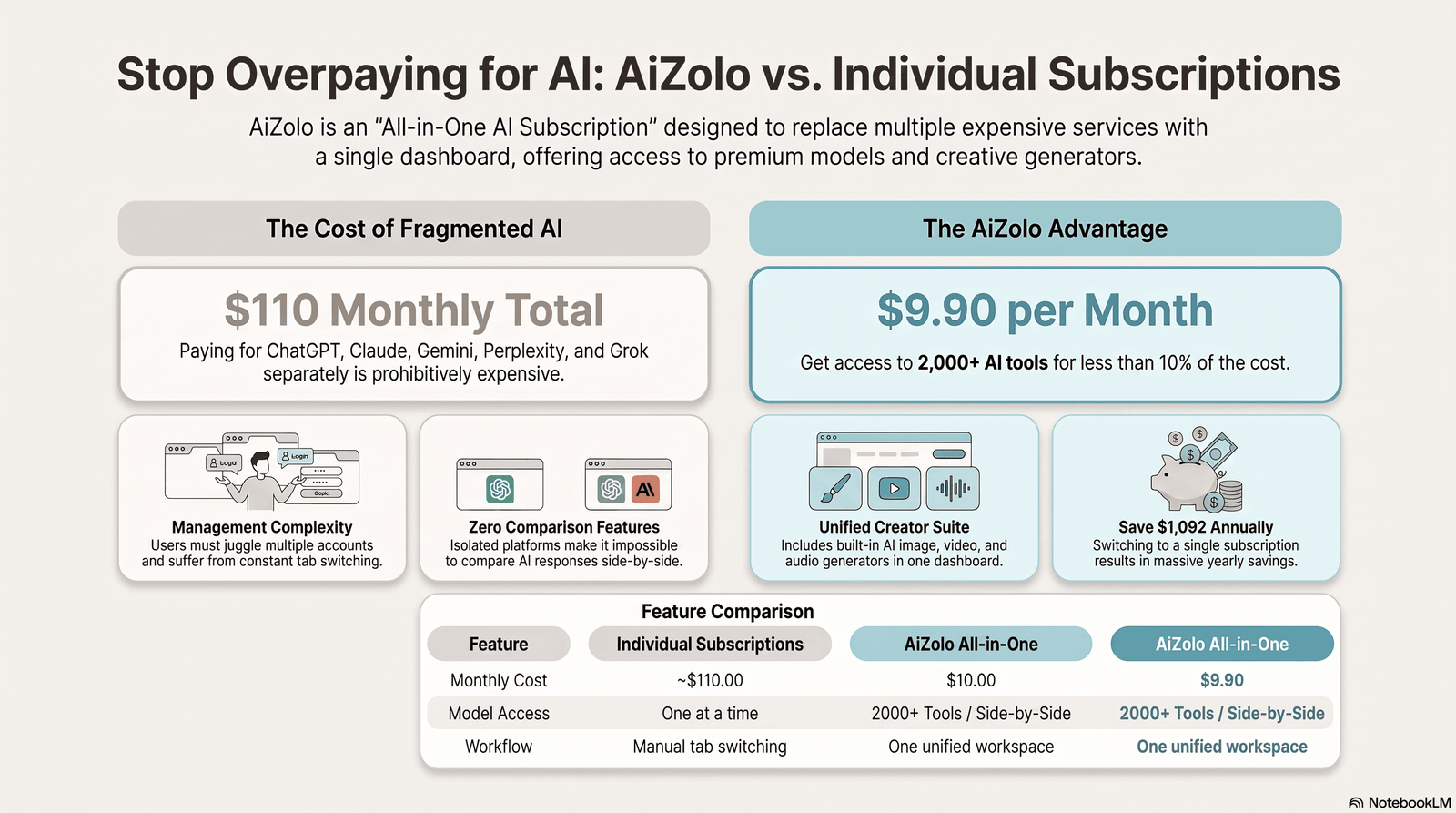
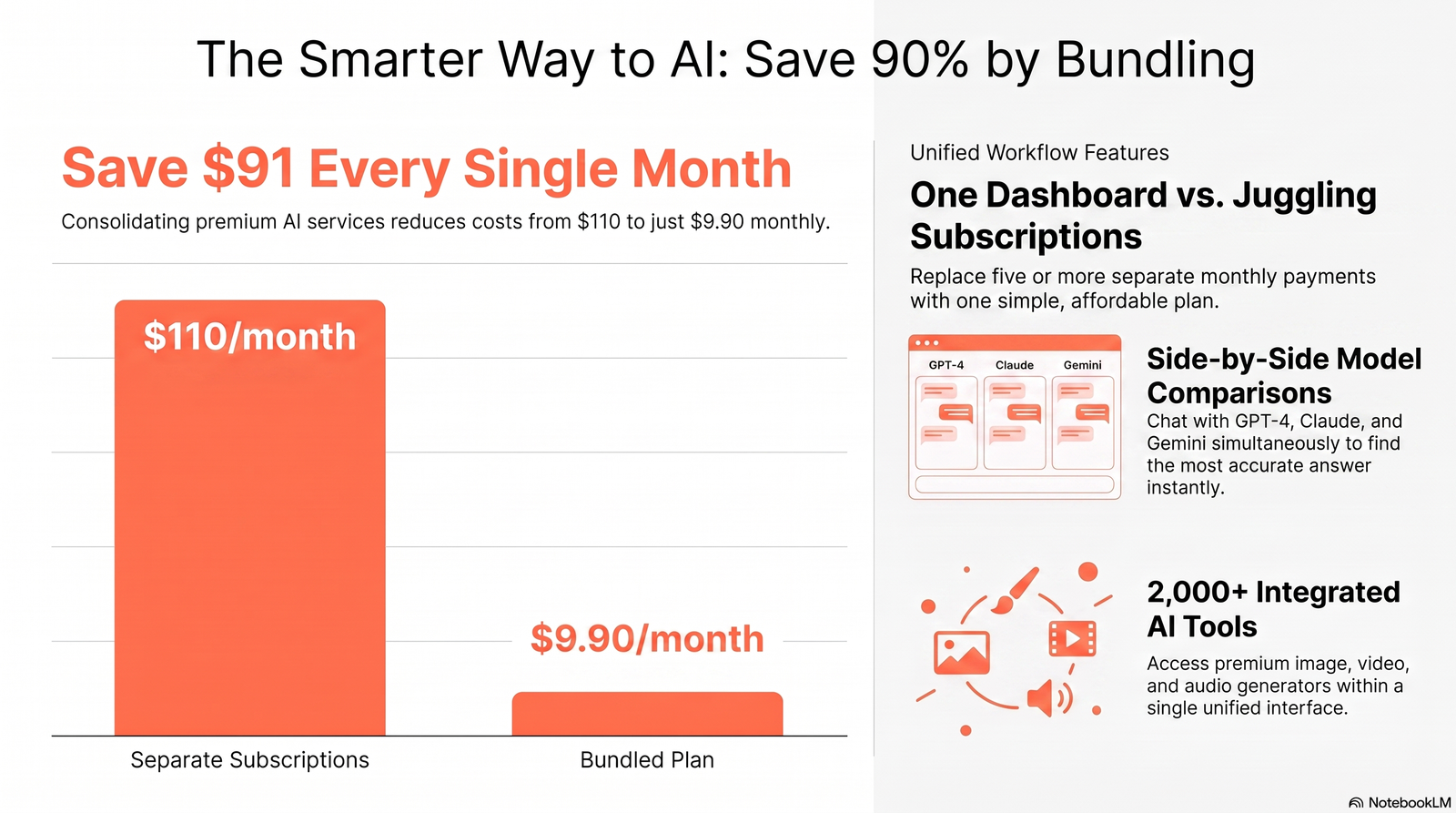
Pricing philosophy: AiZolo positions its $9.90/month Pro plan against the combined cost of subscribing to ChatGPT, Gemini, Perplexity, Claude, and Grok individually — which it estimates at around $110/month.
Standout feature: AiZolo’s flagship feature is a comparison engine — you send one prompt and get simultaneous, side-by-side responses from ChatGPT, Claude, and Gemini rather than pasting the same prompt into separate tabs. It also includes persistent AI Memory across sessions, so context carries over between conversations rather than resetting each time.
Other tools bundled in: Beyond the core chat models, AiZolo bundles over 2,000 additional AI tools, with new ones added weekly. It also supports connecting your own encrypted API keys for premium model access if you prefer.
AiZolo Pros
- Single flat subscription covering multiple major models instead of separate per-model bills.
- Side-by-side model comparison in one screen, useful for testing which model gives the better answer to the same prompt.
- Built-in image, video, and audio generation included in the standard plan, not gated behind a separate tool.
- Runs entirely in-browser with no installation, and works across Chrome, Edge, Firefox, and Safari.
- Free tier available for basic access.
AiZolo Cons
- As a newer, smaller platform, it currently shows limited third-party review coverage (no comments or reviews on some listing sites at time of writing).
- Bundled multi-model access generally means less depth per model than that provider’s own native app — a comparison tool is not the same as the full native feature set (e.g., ChatGPT’s own Custom GPTs or Claude’s own Projects).
- Individual native subscriptions still provide deeper native features — like custom GPTs, Projects, and deep research quotas — than what’s accessible through an aggregator; the cost-per-feature comparison reflects broad model access, not identical feature parity.
⚠ Important Note: Most of the specifics on AiZolo’s pricing, feature list, and comparisons to competitors come from AiZolo’s own site and blog. Treat vendor-published comparisons (including this section) as a starting point, not a substitute for checking the current pricing page yourself.
TypingMind vs AiZolo: Comparison Table
| Category | TypingMind | AiZolo |
|---|---|---|
| Pricing model | One-time license + your own API usage | Flat monthly subscription ($9.90/mo Pro, per vendor) |
| Free tier | Not advertised on public pricing page as of mid-2026 | Yes, free tier for basic access |
| Supported models | GPT, Claude, Gemini, Ollama, OpenRouter/DeepInfra-routed models, and others via API keys | GPT-4, Claude, Gemini Pro, Perplexity Sonar Pro, Grok, plus 2,000+ bundled AI tools |
| Model comparison (side-by-side) | Not a core advertised feature | Core flagship feature |
| Image/video/audio generation | Depends on connected provider/API | Included in standard plan |
| Team features | Custom-domain chat UI + Admin Panel for teams/businesses | Project management and collaboration features |
| Mobile app | Web/desktop only, PWA for mobile | Browser-based, works across devices |
| API key support | Required (bring your own) | Optional (can use your own encrypted keys) |
| Best for | Power users who already pay for API usage and want a control layer | People who want one flat bill instead of managing several subscriptions |
📌 Quick Summary: TypingMind charges once for the interface and lets you pay providers directly. AiZolo charges monthly and bundles provider access into the price. Your existing usage pattern — heavy API user vs. casual multi-model chatter — decides which model is actually cheaper for you.
User Interface Comparison
TypingMind’s interface centers on chat history search, folders, integrations, and a prompt library, aimed at people who want a highly organized, power-user chat environment. Its Teams product goes further, letting businesses run a fully custom-domain chat UI with an Admin Panel for control and customization.
AiZolo’s interface runs entirely in the browser with no installation, built around a unified dashboard rather than a highly configurable chat tool. Its distinguishing UI element is the side-by-side response view, where multiple models answer the same prompt in parallel panes rather than in separate threads.
If your priority is deep customization and organization for a single power user, TypingMind’s UI is built for that. If your priority is glancing at three model outputs at once without switching tabs, AiZolo’s layout is built for that instead.
AI Models Comparison
Both platforms lean on the same handful of frontier model families rather than training their own:
- GPT (OpenAI): Available through both platforms. TypingMind’s model catalog updates track OpenAI’s API changes closely, including recent GPT-5-class models.
- Claude (Anthropic): Listed on TypingMind as strong on long-context reasoning, agentic coding, and long-form writing. Also included in AiZolo’s bundle.
- Gemini (Google): Included in AiZolo as Gemini Pro; available on TypingMind via API key.
- Grok and Perplexity Sonar Pro: Both included in AiZolo’s model bundle.
- Open and routed models: TypingMind’s changelog shows it regularly adds models via OpenRouter and DeepInfra, plus local runtimes like Ollama.
The practical difference isn’t which model families are technically “supported” — it’s access mechanics. TypingMind requires you to hold accounts and API keys with each provider; AiZolo bundles access under its own subscription, while also letting you plug in your own encrypted API keys if you’d rather pay providers directly.
Pricing Comparison
TypingMind: A shared license for up to 10 users across 50 devices, with Premium-equivalent features, is listed at $395 (down from $790). On top of the license, you pay each AI provider directly for usage — so a new user effectively manages two bills: the license and API usage. One independent review calculated the lifetime license pays off well for users whose API spend stays under roughly $12/month in year one, and becomes a stronger deal in later years since the license cost is already sunk.
AiZolo: Pro plan is listed at $9.90/month, positioned against a combined ~$110/month for separately subscribing to ChatGPT, Gemini, Perplexity, Claude, and Grok. A free tier is available for basic access.Overall subscription range is reported between $9 and $110 per month depending on tier.
Hidden costs to watch for:
- On TypingMind, your real monthly cost is license amortization plus whatever you spend on OpenAI/Anthropic/Google API calls — this can swing widely with usage.
- On AiZolo, the aggregator’s model access doesn’t include the deeper native features (like custom GPTs or deep research quotas) that a direct subscription to a given provider offers, so heavy power users of one specific model may still want that model’s native app alongside AiZolo.
💡 Expert Tip: Calculate this like a subscription audit, not a sticker-price comparison. Add up what you currently spend across every AI tool you use monthly (including secondary AI features in other software), then compare that total to each platform’s real cost — license + API for TypingMind, or subscription tier for AiZolo.
Performance Comparison
Neither platform trains its own foundation models, so raw output quality on writing, coding, reasoning, or research tasks depends on which underlying model you select (GPT, Claude, Gemini, etc.), not on TypingMind or AiZolo themselves. Published, independently verified benchmark comparisons between the two platforms don’t currently exist, so treat any specific performance ranking with caution — including on either vendor’s own marketing pages.
Where the platforms do differ meaningfully is workflow speed:
- AiZolo’s side-by-side comparison view lets you see multiple models answer the same prompt in parallel, without the back-and-forth of copying a prompt between tabs.
- TypingMind’s strength is depth of configuration — folders, search, and a prompt library — for people running many sequential conversations with a chosen model rather than comparing models against each other.
Feature Comparison
| Feature | TypingMind | AiZolo |
|---|---|---|
| Prompt library | Yes | Yes (Smart Prompt Manager per vendor) |
| Folders / chat organization | Yes | Project management features |
| Chat history search | Yes | Not a headline feature |
| Voice | Via ElevenLabs integration | Not confirmed as a core feature |
| Memory across sessions | Depends on connected model’s native memory | Persistent AI Memory built into the platform |
| Model comparison view | Not a core feature | Flagship feature |
| Team collaboration | Custom-domain UI + Admin Panel | Project management, per vendor |
| Custom domain / white-label | Yes, for Teams | Not confirmed |
Pros & Cons
TypingMind
| Pros | Cons |
|---|---|
| One-time license, no forced monthly fee for the app itself | Two separate bills to track (license + API usage) |
| Direct, at-cost provider pricing via your own API keys | More setup effort (separate API keys per provider) |
| Strong organization tools (folders, search, prompt library) | No native mobile app |
| Frequent model catalog updates | New consumer-facing features often lag behind ChatGPT itself |
AiZolo
| Pros | Cons |
|---|---|
| Flat monthly price covering multiple models | Newer platform with limited independent review coverage |
| Built-in side-by-side model comparison | Aggregated access typically means less native depth per model |
| Image, video, and audio generation included | Most published claims currently trace back to AiZolo itself |
| Free tier to start | Optional own-API-key setup adds complexity if you choose that route |
Who Should Use TypingMind?
TypingMind fits best if you:
- Already have (or don’t mind creating) API keys with OpenAI, Anthropic, and Google.
- Want a highly organized, single-user power tool — strong search, folders, and prompt management.
- Run a business or team that wants a white-labeled, custom-domain chat interface.
- Have relatively low, predictable API usage where a one-time license beats a recurring bill.
Who Should Use AiZolo?
AiZolo fits best if you:
- Don’t want to manage separate API keys or provider billing.
- Regularly want to compare how different models answer the same prompt.
- Want image, video, and audio generation bundled in without buying separate tools.
- Prefer a predictable flat monthly cost over variable API spend.
TypingMind Alternatives
TypingMind isn’t the only front-end for multi-model AI access. Other players in the space include ChatHub, Magai, and NanoGPT, each offering different flavors of multi-model access, alongside newer entrants like AiZolo. The right pick generally comes down to whether you want a bring-your-own-key control layer (closer to TypingMind) or a bundled flat-fee subscription (closer to AiZolo).
Why Some Users Look for a TypingMind Alternative
The most commonly cited friction points with TypingMind are the ones already noted above: the two-bill structure that surprises new users expecting one flat price, the setup work of collecting API keys from multiple providers, and the lack of a native mobile app. Users who want to avoid all three of those tend to look toward bundled-subscription platforms instead.
Is AiZolo Worth It?
That depends entirely on how you currently use AI. If you’re already paying for two or more separate AI subscriptions and frequently want to compare outputs, AiZolo’s pitch — comparing subscriptions side-by-side from one dashboard at a fraction of the combined cost — directly addresses that.
If you’re a heavy, single-model power user (say, exclusively deep in Claude Projects or ChatGPT’s Custom GPTs), an aggregator’s broader-but-shallower access may not replace the native app’s deeper features, and going direct to that one provider may still make more sense.
Final Verdict
There’s no universal winner here — the two platforms are built for different buying patterns:
- Choose TypingMind if you’re comfortable managing your own API keys and want a deeply configurable, one-time-purchase interface, especially for team or white-labeled use cases.
- Choose AiZolo if you’d rather pay one flat monthly fee, want built-in side-by-side model comparison, and want image/video/audio generation bundled without extra tools.
- Consider using both if your workflow genuinely spans “deep configuration for one model” and “quick comparison across models” — they’re not mutually exclusive.
Whichever you pick, re-check current pricing and model lists before committing — both categories (AI aggregators and chat front-ends) update pricing and features frequently.
FAQ
1. Is TypingMind cheaper than AiZolo? It depends on your usage. TypingMind’s lifetime license favors users with API spend under roughly $12/month, AiZolo’s $9.90/month flat fee may cost more or less depending on how much you’d otherwise spend on API calls.
2. Does TypingMind have a free plan? TypingMind did not advertise a free tier on its public pricing page as of May 2026, though a trial may be available by contacting sales.
3. Does AiZolo have a free plan? Yes, AiZolo offers a free tier for basic access.
4. What AI models does TypingMind support? TypingMind supports OpenAI’s GPT models, Anthropic’s Claude, Google’s models, Ollama for local runtimes, and additional models routed through OpenRouter and DeepInfra, with its catalog updated regularly.
5. What AI models does AiZolo support? AiZolo includes GPT-4, Claude, Google Gemini Pro, Perplexity Sonar Pro, and Grok, plus over 2,000 additional bundled AI tools.
6. Does TypingMind require API keys? Yes — it’s a bring-your-own-key interface, so you connect and pay each AI provider directly.
7. Does AiZolo require API keys? No. AiZolo offers standard access without your own keys, but also supports connecting your own encrypted API keys if you prefer.
8. Which platform has a mobile app? TypingMind is web and desktop only, with mobile access via a PWA. AiZolo runs in-browser and works across modern browsers, including on mobile.
9. Can I compare multiple AI models side-by-side on either platform? AiZolo’s flagship feature is a side-by-side comparison engine that shows multiple models answering the same prompt at once. This isn’t a core advertised feature on TypingMind.
10. Does either platform generate images, video, or audio? AiZolo includes image, video, and audio generation in its standard plan. On TypingMind, this depends on which connected model/provider supports it.
11. Is TypingMind good for teams? Yes — TypingMind offers a custom-built version for teams and businesses with a chat UI under your own domain and an Admin Panel for control.
12. What’s the biggest complaint about TypingMind? New users are often surprised by the two-bill structure (license plus API usage) and the setup work of collecting separate API keys from each provider.
13. Is AiZolo a legitimate, established platform? AiZolo is a newer SaaS product with limited independent review coverage so far; most detailed feature and pricing claims currently come from AiZolo’s own site, so it’s worth cross-checking directly before committing.
14. Which platform is better for developers? TypingMind’s API-key-first, highly configurable model may suit developers already managing provider accounts. AiZolo’s bundled approach suits people who’d rather not manage that infrastructure at all.
15. Can I switch between TypingMind and AiZolo later? Yes — neither locks you into proprietary data formats for your prompts or conversations in a way that would prevent switching; the practical friction is just re-doing account/API setup on the new platform.
Author Bio
Jeevesh Tripathi AI Researcher & SEO Content Specialist 📧 jeevesh@aizolo.com
Jeevesh Tripathi researches and writes comparisons across the AI subscription and multi-model platform space, focusing on pricing structures, feature sets, and practical fit for different types of users. This comparison was compiled from publicly available vendor documentation and third-party listings current as of July 2026; readers should verify pricing and feature details directly with each vendor before making a purchase decision, as both categories update frequently.
