
Most teams building with AI don’t have one model problem. They have five.
One project runs on OpenAI. Another needs Claude for long-context reasoning. A third calls Gemini for multimodal input. With Aizolo, you can simplify this complexity instead of managing separate AI providers. Each provider means a new key, a new billing dashboard, and a new place for a secret to leak.
A single secure custom API key support AI platform solves this by letting you plug in your own provider keys once, store them securely, and route requests to any model from one place. No re-authentication per project. No scattered .env files. No vendor lock-in.
This guide breaks down what these platforms actually are, how BYOK (Bring Your Own Key) architecture works under the hood, the real security trade-offs, and how to implement one without introducing new risk into your stack.
Table of Contents
What Is a Single Secure Custom API Key Support AI Platform?
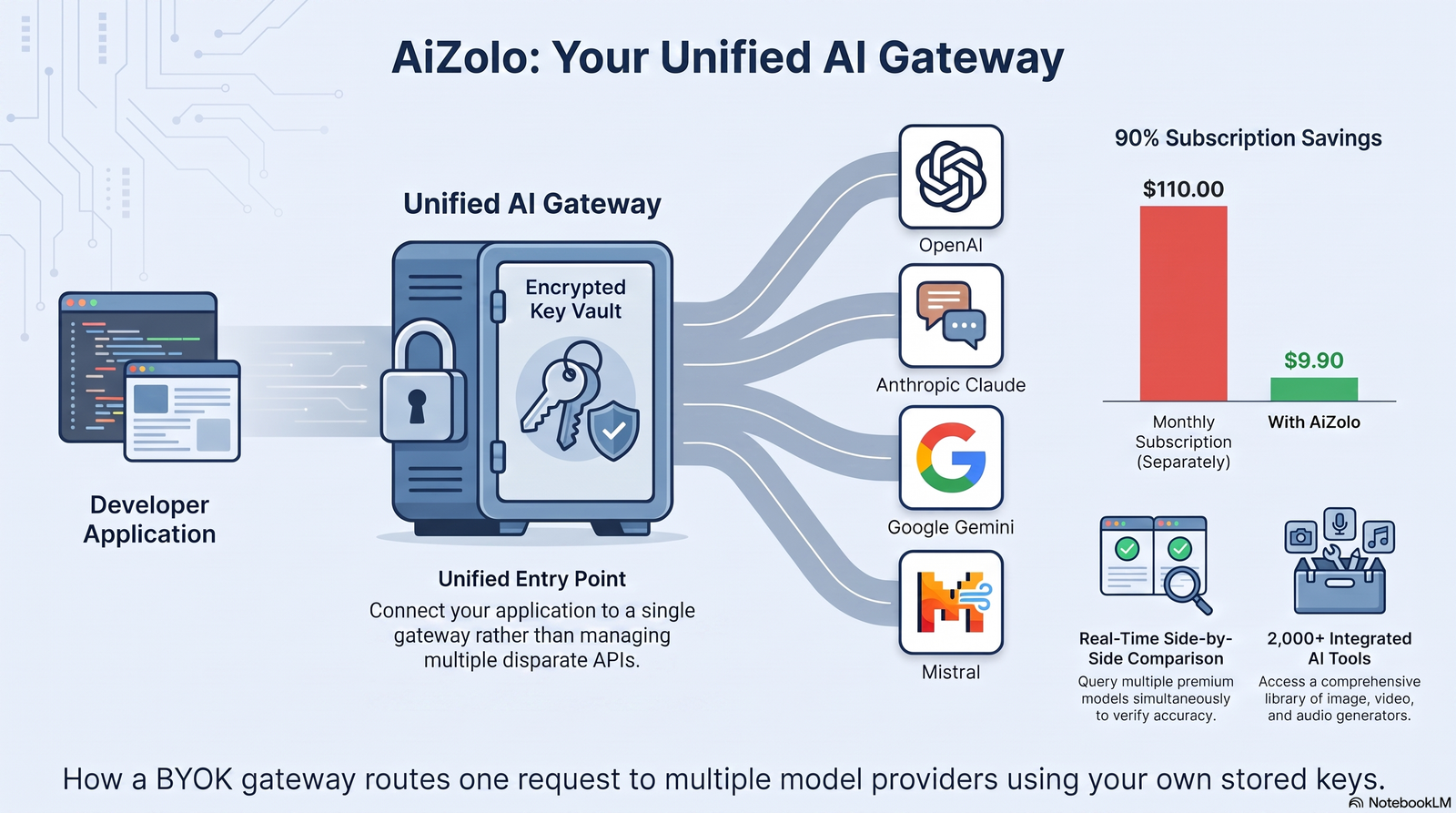
A single secure custom API key support AI platform is a developer tool that lets you connect your own API credentials from multiple AI providers — OpenAI, Anthropic, Google, Mistral, and others — into one authenticated workspace.
Instead of hardcoding separate keys into every script or microservice, you store each credential once, encrypted, inside the platform’s vault. The platform then acts as a gateway: your application authenticates against it with a single token, and it routes each request to the correct underlying model API using your stored key.
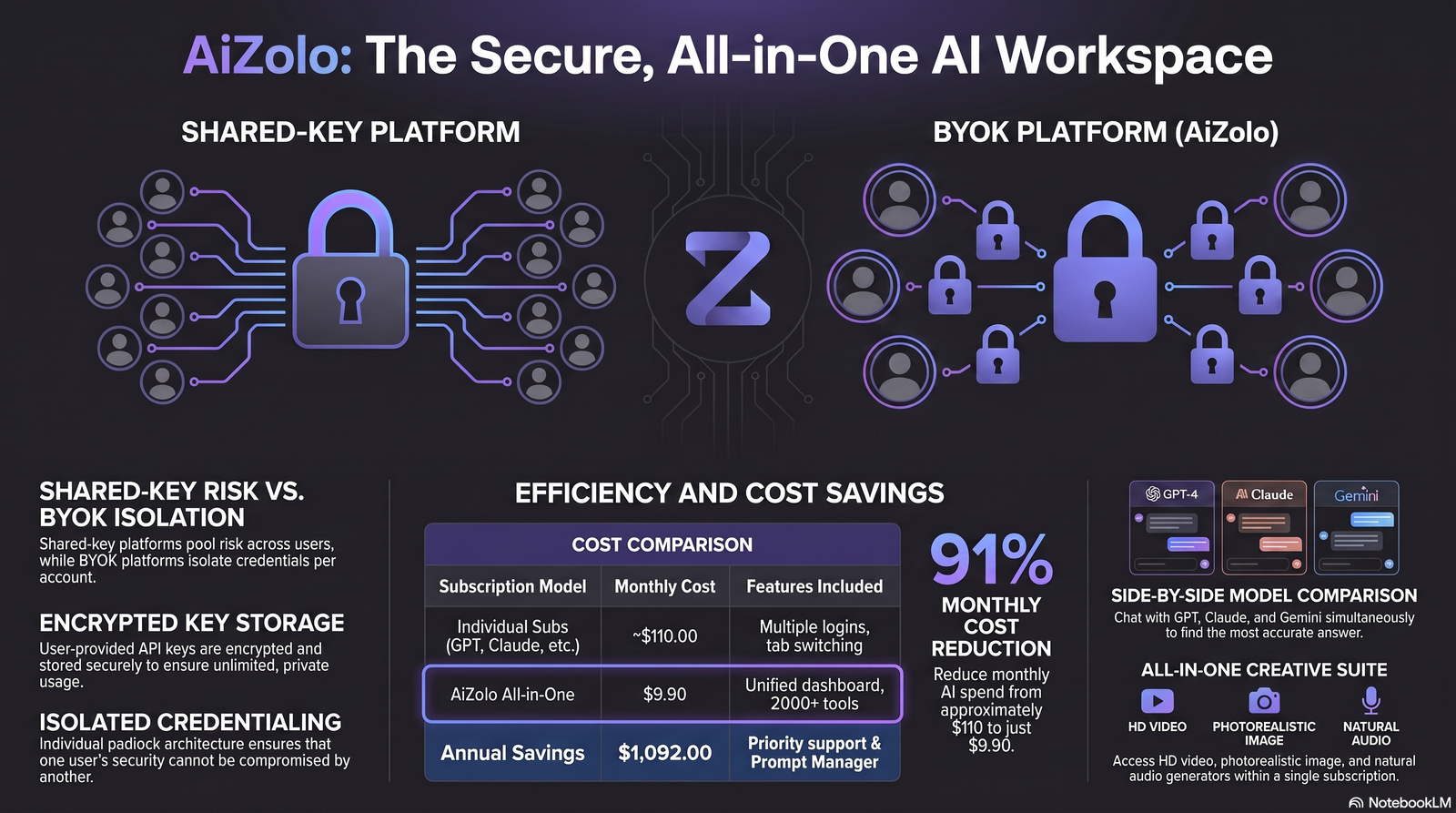
This is different from a platform that resells API access under its own account. With BYOK, you own the provider relationship, you see the usage on the provider’s dashboard, and you control rate limits and billing directly with OpenAI, Anthropic, or Google.
Expert Tip: If a platform can’t show you which provider account a request billed against, it isn’t true BYOK — it’s a reseller with extra steps.
The “single key” part refers to the developer-facing side: your app talks to one API surface, using one platform-issued credential, regardless of how many underlying models you call.
Why Developers Are Moving to BYOK
Three years ago, most teams were happy to let an AI platform manage keys on their behalf. That’s changed for a few concrete reasons.
Cost transparency. When a platform manages your keys, you often pay a markup on top of the provider’s raw token pricing. With BYOK, you pay OpenAI, Anthropic, or Google directly at list price.
Rate limit ownership. Shared-key platforms pool traffic across all their customers against provider rate limits. Your app’s throughput can degrade because of someone else’s usage spike.
Vendor independence. If a shared-key platform shuts down, changes pricing, or gets acquired, your production traffic stops. With your own keys, switching platforms is a configuration change, not a migration project.
Compliance requirements. Regulated industries — finance, healthcare, legal — frequently require that API traffic and billing stay traceable to the organization’s own contractual relationship with the model provider, not a third party’s shared account.
Audit trails. Security teams want to see exactly which key made which call, from which IP, at which time — something that’s much harder to guarantee on a shared-key system.
How BYOK Architecture Actually Works
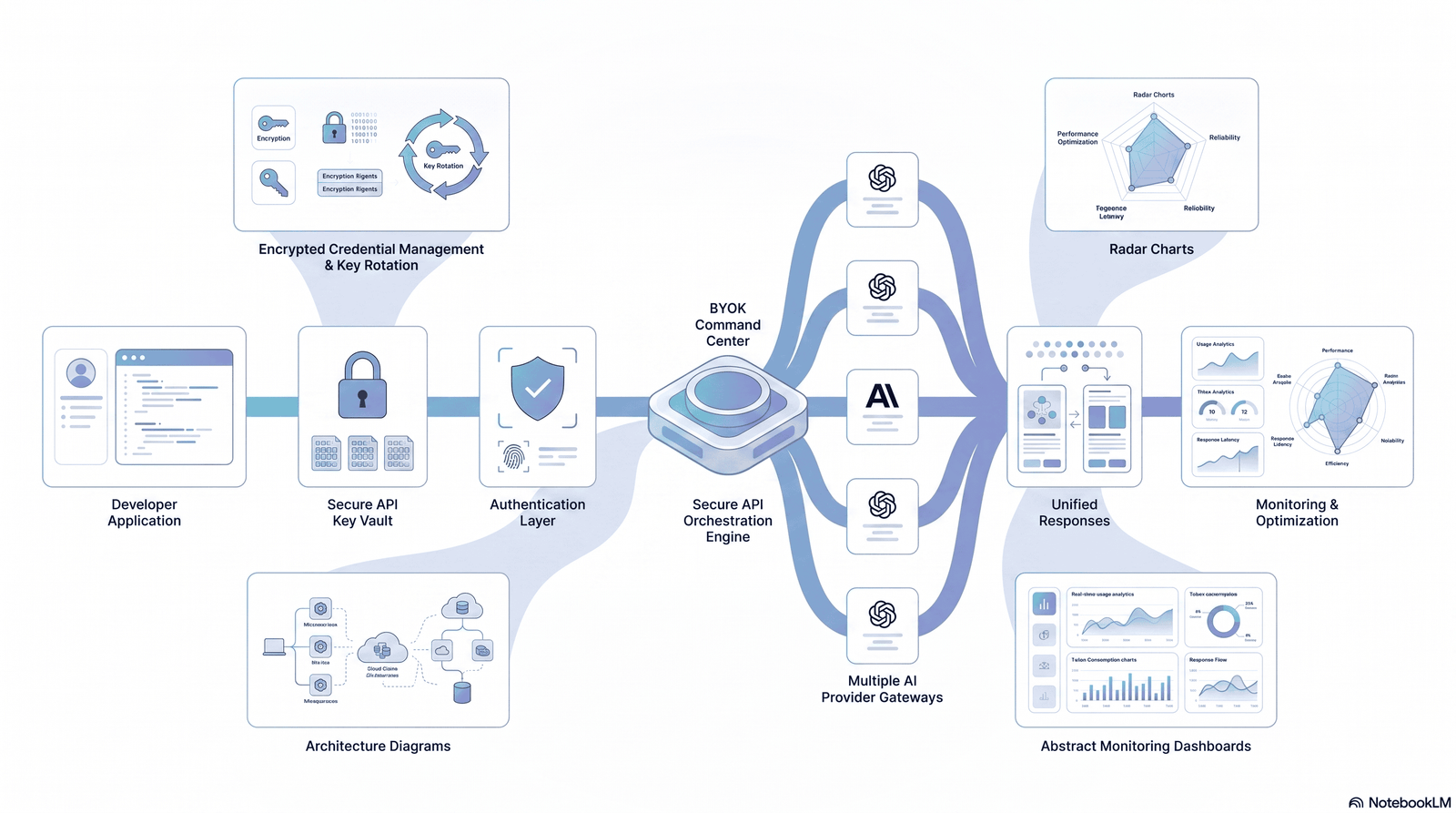
Understanding the mechanics matters before you trust any platform with credentials. A typical single secure custom API key support AI platform follows this flow:
- Key ingestion — You paste your provider API key into an encrypted input field over TLS.
- Encryption at rest — The key is encrypted using envelope encryption (commonly AES-256), with the encryption key itself managed by a hardware security module (HSM) or cloud KMS.
- Credential storage — The encrypted blob is stored in an isolated secrets store, separate from application data.
- Request routing — When your app calls the platform’s unified endpoint, the platform decrypts your key in memory just long enough to sign the outbound request to the provider.
- Response passthrough — The provider’s response streams back through the platform to your app, typically without being logged in plaintext.
- Key rotation and revocation — You can replace or delete a key at any time; the platform should invalidate the old credential immediately.
Security Warning: Never trust a platform that logs full API keys in plaintext request logs, even temporarily. Ask their support team directly how key material is handled in transit and in logs before connecting production credentials.
Supported AI Models and Providers
A mature unified AI platform typically supports credentials for:
- OpenAI API — GPT-series models for text, function calling, and embeddings
- Claude API (Anthropic) — long-context reasoning and coding tasks
- Gemini API (Google) — multimodal input including images and video
- Mistral API — open-weight and hosted models for cost-sensitive workloads
- Cohere API — retrieval-augmented generation and enterprise search
- Local or self-hosted endpoints — via custom base URLs for open-source models
| Provider | Typical Strength | Common Use Case | Auth Method |
|---|---|---|---|
| OpenAI | General-purpose reasoning, tool use | Chatbots, agents | Bearer token |
| Anthropic Claude | Long-context, safer defaults | Document analysis, coding | x-api-key header |
| Google Gemini | Multimodal, video/image input | Media analysis | API key or OAuth |
| Mistral | Cost-efficient inference | High-volume batch tasks | Bearer token |
| Cohere | Enterprise RAG | Internal search tools | Bearer token |
Core Benefits
Single integration point. Your team writes one client library integration instead of five.
Consistent request format. The platform normalizes differing provider schemas into one predictable API shape.
Centralized observability. Logs, latency, and error rates for every model live in one dashboard.
Faster experimentation. Swapping GPT-4 for Claude in a workflow becomes a config change, not a rewrite.
Reduced onboarding time. New engineers learn one API surface instead of memorizing provider-specific quirks.
Security Advantages
Centralizing keys sounds risky at first — “isn’t that a bigger target?” — but a well-built platform actually reduces your attack surface compared to keys scattered across repos, CI pipelines, and developer laptops.
- No keys in source code. Credentials never touch your git history.
- Scoped access tokens. The platform issues short-lived tokens to your app instead of exposing raw provider keys.
- Centralized rotation. Rotate one credential in one place instead of hunting through microservices.
- Granular permissions. Restrict which team members or services can use which provider key.
- Audit logging. Every request is traceable to a user, service, and timestamp.
Best Practice: Treat the platform’s own access token like a production database password — store it in a secrets manager (AWS Secrets Manager, HashiCorp Vault, or Doppler), never in plaintext config files.
DIY Key Storage: How the Underlying Secrets Stores Actually Work
Every BYOK platform — including the credential vault under Aizolo’s own key management — is built on the same primitive: a secrets store. If you’re evaluating whether to trust a unified platform with your provider keys or manage that vault yourself, it helps to know what you’d actually be signing up to build.
Types of Secrets Stores
| Type | Best For | Key Limitation |
|---|---|---|
| Environment variables | Local development, simple apps | No rotation, no audit trail, visible in process listings |
| Cloud secrets managers (AWS/Azure/GCP) | Cloud-native production apps | Vendor lock-in, per-call cost |
| HashiCorp Vault | Multi-cloud, on-prem, complex policy needs | Requires operational overhead to run |
| Kubernetes Secrets | Workloads already on K8s | Base64-encoded by default, not encrypted unless paired with a KMS provider |
| Docker Secrets | Docker Swarm deployments | Limited outside Swarm; less common in modern stacks |
Environment variables are fine for prototyping, but none of them give you rotation, per-secret access policies, or an audit trail on their own — which is exactly the gap a BYOK platform’s vault is designed to close for you.
Setting Up Your Own Vault, Provider by Provider
If you’re storing your OpenAI, Anthropic, or Gemini keys outside a unified platform, here’s the minimum viable setup on each major cloud:
AWS Secrets Manager
aws secretsmanager create-secret \
  --name prod/api/openai-key \
  --secret-string '{"api_key":"sk-xxxx"}'
Scope the IAM policy to the specific secret ARN — never secretsmanager:* — and automate rotation with a scheduled Lambda function, typically every 30–90 days. Full reference: AWS Secrets Manager documentation.
Azure Key Vault
az keyvault create --name my-app-vault --resource-group my-rg --location eastus
az keyvault secret set --vault-name my-app-vault --name openai-key --value "sk-xxxx"
Managed identities let an App Service or VM authenticate to Key Vault without any credential stored in the app itself. Reference: Azure Key Vault documentation.
Google Secret Manager
gcloud secrets create openai-key --replication-policy="automatic"
gcloud secrets versions add openai-key --data-file="key.txt"
Grant roles/secretmanager.secretAccessor per service account, not project-wide, and use secret versions to roll back a bad rotation without downtime.
For a cloud-agnostic option across multi-cloud or on-prem environments, HashiCorp Vault is the standard choice, though it carries more operational overhead than a managed service.
CI/CD: Where Most Key Leaks Actually Happen
| Platform | How Secrets Are Stored |
|---|---|
| GitHub Actions | Repository or org “Secrets” settings, injected as env vars in workflow runs |
| GitLab CI | CI/CD variables, with “masked” and “protected” flags |
| Azure DevOps | Variable groups linked to Azure Key Vault |
| Jenkins | Credentials plugin, backed by a credential store |
| Netlify | Environment variables in site settings |
| Vercel | Environment variables scoped per environment (production/preview/development) |
None of these should ever print a secret to build logs. Most platforms auto-mask known values, but custom scripts that transform a secret before use can accidentally bypass that masking — test this explicitly before shipping a pipeline change.
Security Warning: If a key has ever appeared in your Git history, treat it as permanently compromised — deleting it from the latest commit doesn’t erase it from prior commits, forks, or cached mirrors. Revoke and rotate immediately rather than trying to scrub history.
The Production Workflow
Regardless of provider, a self-managed vault follows the same path: Developer → CI/CD → Secrets Manager → Application → API Provider. The developer references a secret by name, never by value; CI/CD authenticates to the vault with a scoped service identity; the application pulls the current version into memory at runtime; and the key never touches source control, logs, or a terminal history.
This is precisely the workflow a single secure custom API key support AI platform collapses into one step — you get the encryption, rotation, and audit trail without operating AWS Secrets Manager, Key Vault, or Vault yourself. If you’re weighing that trade-off, see how the setup effort compares directly in the BYOK vs Traditional AI Platforms table above, or check how Aizolo’s approach stacks up against OpenRouter and other multi-model tools if you’re also comparing platforms, not just key storage.
Potential Risks and Limitations
BYOK is not risk-free, and any credible article on this topic has to say so plainly.
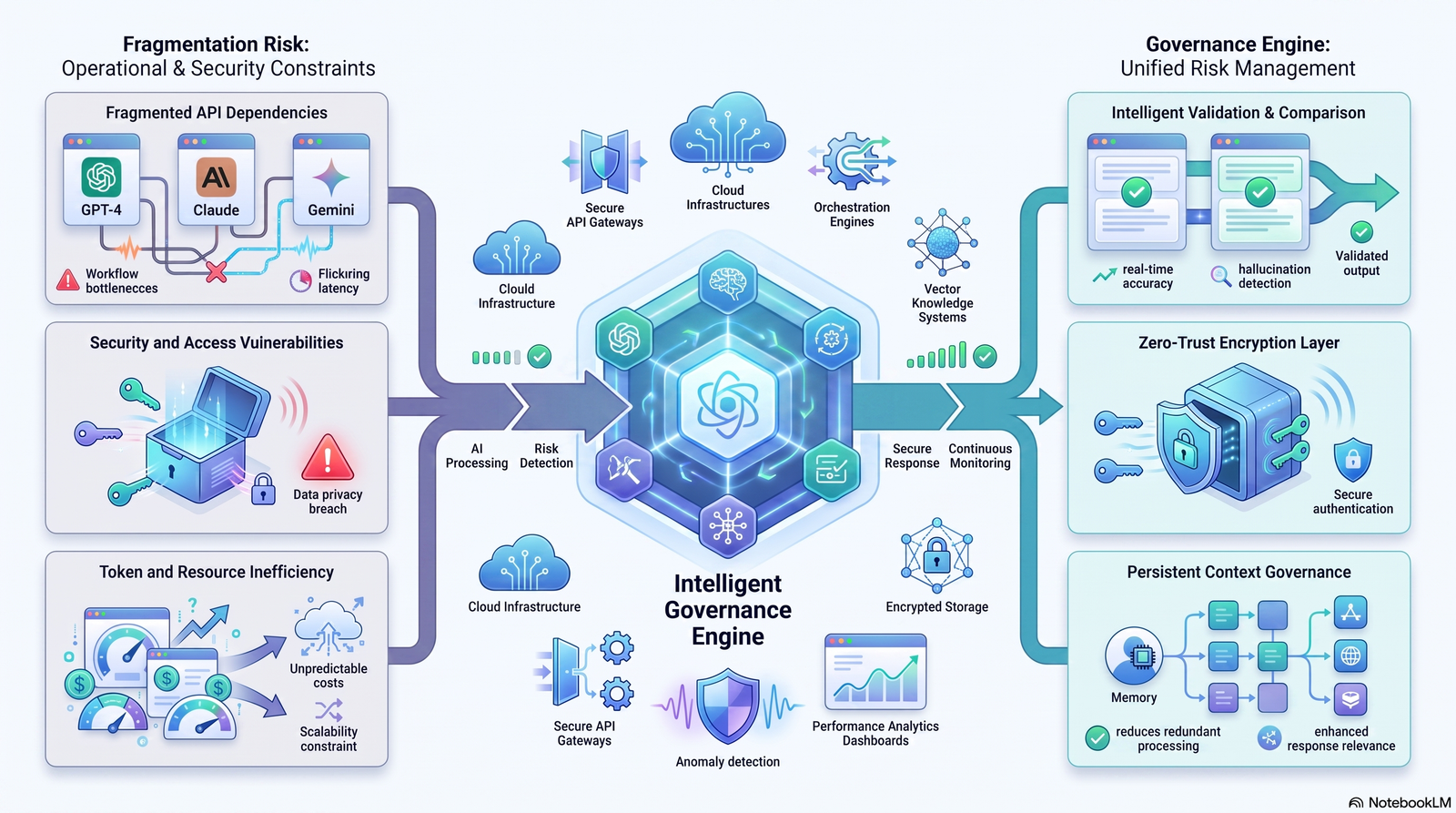
- Single point of failure. If the platform has an outage, every provider integration behind it goes down too.
- Trust concentration. You are trusting one company’s security practices with credentials for all your AI providers at once.
- Latency overhead. Routing through an extra hop adds a small amount of latency versus calling providers directly.
- Feature lag. Brand-new provider features (like a newly released model or parameter) may take time to appear in the unified API.
- Pricing model confusion. Some platforms charge a platform fee on top of pass-through provider costs — read pricing pages carefully.
When NOT to use a unified BYOK platform: if you only ever call a single provider, have no plans to multi-model, and want the absolute lowest latency path, calling that provider’s SDK directly is simpler and has one less dependency.
API Cost Optimization
BYOK platforms don’t just centralize keys — used well, they cut spend.
- Model routing by task. Send simple classification tasks to a cheaper model and reserve expensive reasoning models for complex prompts.
- Usage dashboards per key. See exactly which project is burning tokens before the invoice arrives.
- Rate limit alerts. Get notified before you hit a provider’s throttling threshold instead of discovering it in production.
- Caching layers. Some platforms cache repeated prompts, reducing redundant API calls.
Developer Insight: Track cost per feature, not just cost per provider. A support chatbot and an internal analytics tool calling the same model can have wildly different cost efficiency once you break it down by outcome.
Comparison: BYOK vs Traditional AI Platforms
| Factor | BYOK Platform | Traditional Managed Platform |
|---|---|---|
| Key ownership | You own provider keys | Platform owns provider keys |
| Billing | Direct with provider, list price | Platform sets markup pricing |
| Rate limits | Dedicated to your account | Often shared/pooled |
| Vendor lock-in | Low — switch platforms freely | Higher — tied to platform’s terms |
| Compliance traceability | Strong, direct audit trail | Depends on platform’s reporting |
| Setup effort | Slightly higher (key management) | Lower (plug and play) |
| Best for | Startups, SaaS, enterprises scaling AI | Prototyping, hobby projects |
Enterprise Use Cases
- Multi-team governance. A platform team issues scoped tokens to individual product teams while retaining central control of raw provider keys.
- Cost center attribution. Usage tied to internal departments for accurate chargeback.
- Data residency requirements. Some platforms let you pin routing to specific regions to satisfy data sovereignty rules.
- Vendor risk management. Security teams can swap or revoke a single provider’s key without affecting integrations with other providers.
Developer Workflow
A typical day-to-day workflow looks like this:
- Add provider keys once in the platform dashboard.
- Install the platform’s SDK in your project.
- Call one unified endpoint, specifying the target model as a parameter.
- Monitor usage and errors from a single dashboard.
- Rotate or revoke keys centrally when team members leave or credentials are suspected compromised.
Implementation Guide: Step-by-Step Setup
Step 1: Store Your Keys as Environment Variables
Never hardcode credentials directly in source files.
# .env file (never commit this to git)
PLATFORM_API_KEY=your_platform_issued_key
OPENAI_API_KEY=sk-xxxxxxxx
ANTHROPIC_API_KEY=sk-ant-xxxxxxxx
GEMINI_API_KEY=AIzaxxxxxxxx
Step 2: Add Keys to the Platform (curl example)
curl -X POST https://api.yourplatform.com/v1/keys \
  -H "Authorization: Bearer $PLATFORM_API_KEY" \
  -H "Content-Type: application/json" \
  -d '{
    "provider": "anthropic",
    "api_key": "sk-ant-xxxxxxxx",
    "label": "production-claude-key"
  }'
Step 3: Call the Unified Endpoint (Python)
import os
import requests

response = requests.post(
    "https://api.yourplatform.com/v1/chat/completions",
    headers={
        "Authorization": f"Bearer {os.environ['PLATFORM_API_KEY']}",
        "Content-Type": "application/json"
    },
    json={
        "model": "claude-sonnet-5",
        "messages": [{"role": "user", "content": "Summarize this contract."}]
    }
)

print(response.json())
Step 4: Call the Unified Endpoint (JavaScript)
const response = await fetch("https://api.yourplatform.com/v1/chat/completions", {
  method: "POST",
  headers: {
    "Authorization": `Bearer ${process.env.PLATFORM_API_KEY}`,
    "Content-Type": "application/json"
  },
  body: JSON.stringify({
    model: "gpt-5",
    messages: [{ role: "user", content: "Draft a release note." }]
  })
});

const data = await response.json();
console.log(data);
Step 5: Verify Encryption in Transit and at Rest
Confirm the platform uses TLS 1.2+ for all traffic and publishes its encryption standard (AES-256 is the current baseline for keys at rest).
SCREENSHOT What to capture: The platform’s “Add API Key” modal showing the masked input field and provider dropdown. Why: Shows readers exactly what a secure key-entry flow should look like, reinforcing that keys are masked, not displayed in plaintext. Ideal crop: Modal window only, cropped tight, no browser chrome. Caption: A secure key-entry modal masks credentials immediately after input. Alt text: Screenshot of a masked API key input field in a BYOK AI platform dashboard.
Best Practices
- Use separate keys for staging and production environments.
- Rotate provider keys on a fixed schedule (quarterly at minimum) even without a known breach.
- Apply the principle of least privilege — restrict tokens to only the models a service needs.
- Set spend caps at the provider level as a backstop against runaway usage.
- Review the platform’s SOC 2 report or equivalent before connecting production credentials.
Best Practice: Store your platform-issued token in your CI/CD secrets manager, not as a repository secret visible to every workflow file.
Common Mistakes
Common Mistake: Reusing the same provider key across development, staging, and production. If a development key leaks, you lose visibility into which environment was compromised.
Common Mistake: Skipping key rotation because “nothing has gone wrong yet.” Rotation should be scheduled, not reactive.
Common Mistake: Assuming BYOK removes all liability. You are still responsible for how the platform stores and transmits your keys — vet vendors before signing up.
Common Mistake: Granting a platform token full account access when only chat completion access is needed.
Troubleshooting
“Invalid API key” errors after adding a key. Confirm there’s no trailing whitespace copied along with the key, and check the key hasn’t been revoked on the provider’s own dashboard.
Requests succeed on one provider but fail on another. Check for provider-specific required fields (for example, Anthropic requires a max_tokens value that OpenAI does not).
Unexpectedly high costs. Audit which model each request is routing to — a fallback rule may be silently defaulting to a more expensive model.
Rate limit errors despite low traffic. Verify the platform isn’t pooling your key’s limits with a shared tier; confirm you’re on a dedicated BYOK plan.
Real-World Examples
Scenario 1: A SaaS support tool. A 12-person startup routes simple ticket triage to a lower-cost model and escalates complex tickets to Claude for nuanced reasoning, cutting monthly AI spend by roughly a third compared to running everything on one premium model.
Scenario 2: An enterprise document pipeline. A legal-tech company uses BYOK to keep every API call traceable to their own Anthropic enterprise agreement, satisfying a client’s vendor security questionnaire that a shared-key platform couldn’t answer.
Scenario 3: An indie developer prototyping fast. A solo developer tests the same prompt across three models in one afternoon by swapping a single parameter, instead of writing three separate SDK integrations.
The Future of Unified AI Platforms
Expect three shifts over the next few years:
- Standardized authentication. Emerging protocols like the Model Context Protocol point toward more consistent, tool-friendly authentication patterns across providers.
- Granular, revocable scopes. Expect finer-grained permissions — per-model, per-project, per-token-limit — rather than all-or-nothing provider keys.
- Built-in cost governance. Budget enforcement and anomaly detection will likely become standard features rather than add-ons.
FAQs
1. What does “BYOK” mean in AI platforms? BYOK stands for Bring Your Own Key — you supply your own provider API credentials instead of using the platform’s shared account.
2. Is a single secure custom API key support AI platform safe to use? It can be, provided the platform uses encryption at rest, TLS in transit, and doesn’t log raw keys in plaintext. Always review their security documentation first.
3. Do I still get billed directly by OpenAI or Anthropic with BYOK? Yes. Your usage is billed to your own provider account, not marked up by the platform.
4. Can I use multiple provider keys on one platform? Yes, that’s the core purpose — one platform account managing several provider credentials at once.
5. What happens if the platform gets breached? A reputable platform encrypts keys individually, so a breach shouldn’t expose plaintext credentials — but you should have a key-rotation plan ready regardless.
6. Is BYOK more expensive than a managed AI platform? Usually cheaper long-term, since you avoid markup pricing, though you may pay a smaller platform subscription fee.
7. Can I revoke a key without affecting other providers? Yes, keys are stored and revoked independently per provider.
8. Does BYOK add latency to API calls? A small amount, since requests pass through the platform’s gateway, but it’s typically negligible for most applications.
9. Can enterprises enforce compliance with BYOK platforms? Yes — direct billing and audit trails make compliance reporting easier than with shared-key platforms.
10. What’s the difference between an API gateway and a BYOK platform? An API gateway routes and manages traffic; a BYOK platform specifically adds secure storage and routing of user-owned provider credentials, often as one feature of a broader gateway.
11. Should startups use BYOK from day one? If you plan to use more than one AI provider or expect to scale usage, yes — it saves a migration later.
12. Can I switch AI models without rewriting my app? Yes, that’s a primary benefit — changing the model parameter in your request is usually enough.
13. What encryption standard should I look for? AES-256 for data at rest and TLS 1.2 or higher for data in transit are the current baseline expectations.
14. Do BYOK platforms support local or open-source models? Many do, via custom base URL configuration, in addition to major hosted providers.
15. How often should I rotate API keys? At minimum quarterly, and immediately after any suspected exposure or team member offboarding. <h2 id=”conclusion”>Conclusion</h2>
A single secure custom API key support AI platform isn’t just a convenience layer — it’s a shift in who controls your AI infrastructure’s cost, security, and portability.
The core trade-off is simple: a small amount of setup effort in exchange for direct billing, stronger audit trails, and freedom from vendor lock-in.
Next steps:
- Audit which AI providers your team currently uses and where those keys currently live.
- Choose a BYOK platform only after confirming its encryption standard and log-handling policy in writing.
- Migrate one non-critical service first, verify billing shows up correctly on your own provider account, then expand.
- Set a recurring calendar reminder for key rotation — don’t leave it to memory.
Multi-model AI development is becoming the default, not the exception. Owning your own keys is what keeps that flexibility in your hands instead of a vendor’s.
Author Bio
Jeevesh Tripathi Email: jeevesh@aizolo.com
Jeevesh Tripathi is a technical writer and API architect with over a decade of experience designing developer tools, AI infrastructure, and SaaS platforms. His work focuses on API security, multi-model AI integration, and helping engineering teams build scalable, vendor-independent AI systems. He has advised startups and enterprise teams on secure credential management and AI platform architecture.

Pingback: All in One AI Free: What You Actually Get in 2026
Pingback: Compare Gemini vs Claude vs ChatGPT in One App | AiZolo — 7 Powerful Pros & Hidden Cons
Pingback: All in One AI Software: Stop Paying for 5 Tools | AiZolo
Pingback: Chat GPT Claude Gemini All in One: 7 Powerful Benefits
Pingback: The Best All in One AI Platform in 2026 | AiZolo
Pingback: What Are the Best Free AI Chatbots in 2026? Full Guide
Pingback: How to Chat with Multiple AI Models: Proven Guide 2026
Pingback: Top AI Trends in 2026 — 7 Shifts Smart Teams Can’t Ignore