
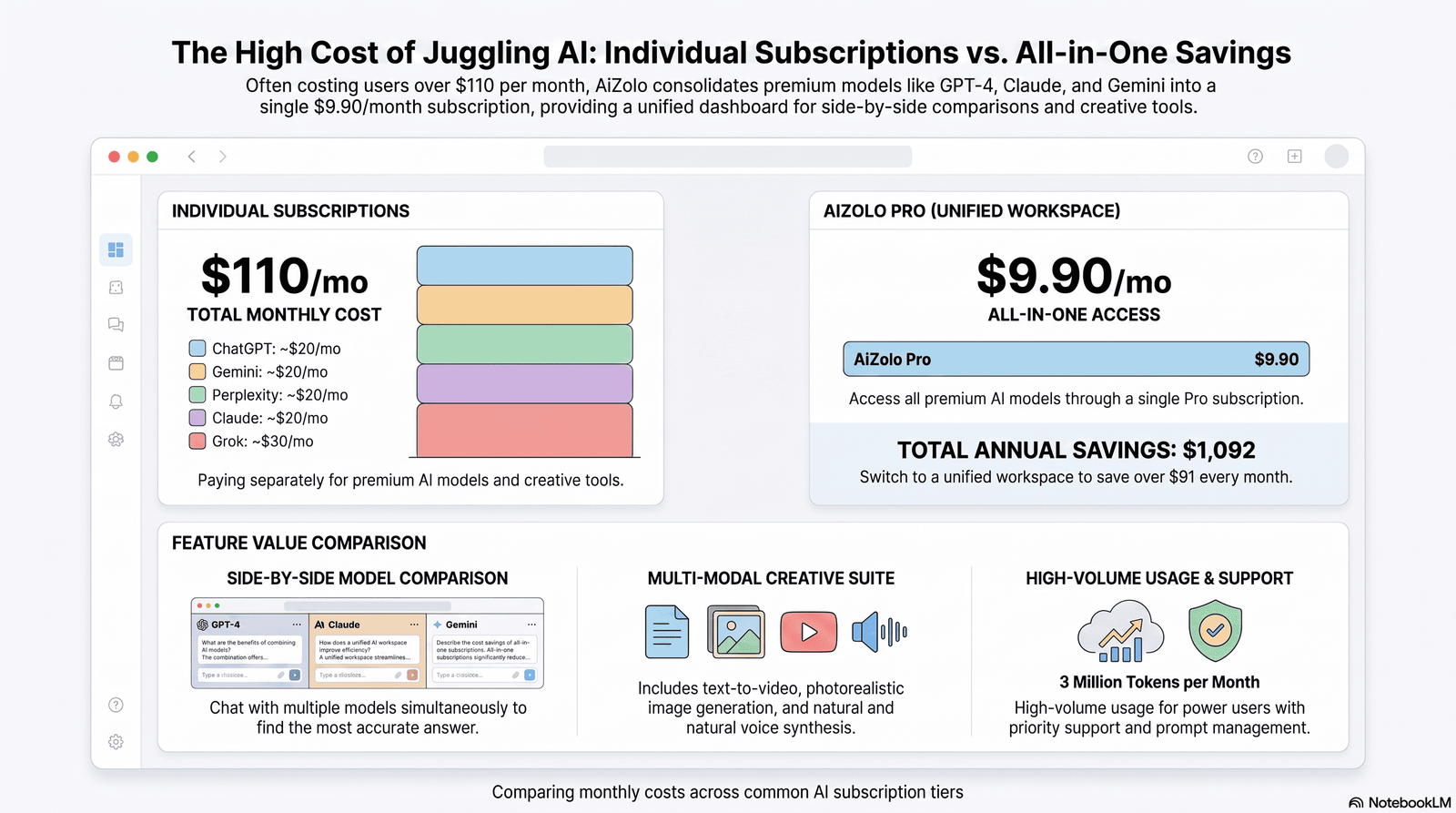
Running a small business on a tight budget doesn’t mean you have to skip AI. In 2026, platforms like Aizolo and other low-cost AI tools can deliver powerful features for less than the cost of a monthly coffee subscription—if you know which ones to pick.
This guide walks through the best low-cost AI tools for small businesses, how to evaluate them, and how to avoid the hidden costs that quietly drain small-business budgets.
We’ll cover pricing, real features, common mistakes, and a practical framework for building an affordable AI software stack — whether you’re a solopreneur, a five-person agency, or a local shop trying to compete with bigger players.
Table of Contents
Why Small Businesses Need Affordable AI in 2026
Small businesses don’t have the luxury of a 20-person marketing team or a dedicated operations department. That’s why low-cost AI tools for small businesses have become essential rather than optional.
With the right AI platform, one person can draft marketing copy, analyze spreadsheets, automate repetitive tasks, and answer customer questions in the time it once took to complete a single task.
Instead of hiring additional staff or investing in expensive software, low-cost AI tools for small businesses help owners improve productivity, reduce operating costs, and compete with much larger companies without stretching their budget.
The catch is cost. Many teams sign up for four or five different AI subscriptions — a writing assistant, an image tool, a chatbot, a meeting note-taker — and end up paying more than they would for a single well-chosen platform.
That’s the real opportunity in 2026: not “more AI,” but smarter, cheaper AI that fits an actual small-business budget.
What Makes an AI Tool Cost-Effective?
Cost-effectiveness isn’t just the sticker price. A genuinely budget AI tool should deliver on a few fronts:
- Transparent pricing with no surprise usage fees
- Real utility per dollar — features you’ll actually use weekly
- Low switching cost if your needs change
- Reasonable free tier to test before committing
- Scalability so you’re not forced into an enterprise plan too early
A $20/month tool you use daily is cheaper, in practice, than a “free” tool that eats hours of your time with a clunky workflow.
Best Low-Cost AI Tools for Small Businesses
Below is a practical shortlist across the categories small businesses ask about most: writing, chat assistants, design, and all-in-one platforms.
General-purpose AI assistants like ChatGPT, Claude, and Gemini remain the backbone of most small-business AI stacks.
Each offers a capable free tier and paid plans generally in the $20/month range for individuals. For businesses looking to reduce software costs, low-cost AI tools for small businesses often combine multiple AI models, automation features, and collaboration tools into a single platform.
This approach helps owners avoid paying for several separate subscriptions while still accessing the best AI capabilities for writing, coding, research, customer support, and day-to-day business operations.
Design tools such as Canva’s AI features and Adobe Express bring AI image editing and generation into an already-familiar interface, which shortens the learning curve for non-designers.
Meeting and note-taking tools transcribe and summarize calls automatically, saving the 15–20 minutes many owners spend writing up notes after every client call.
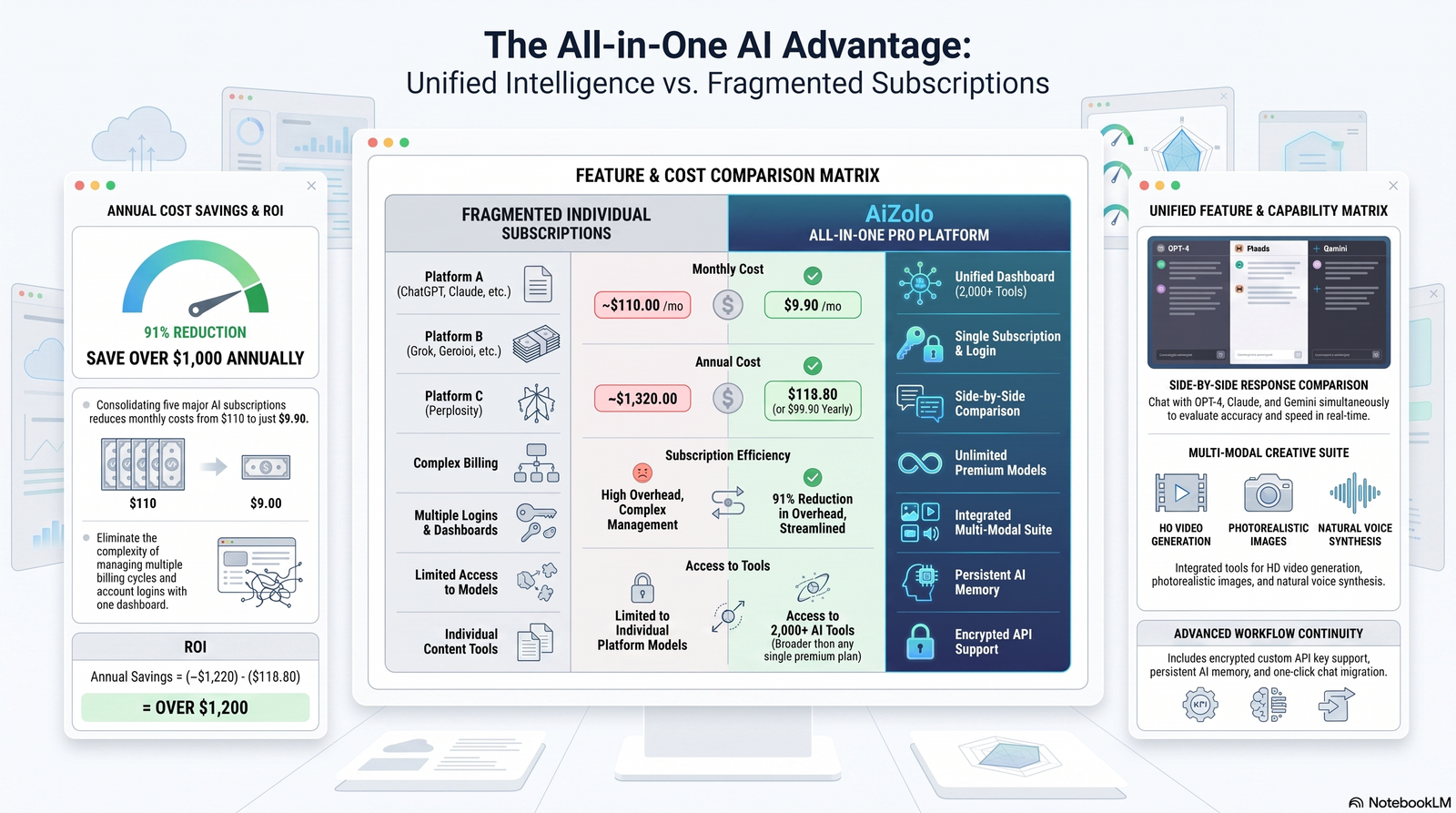
If you’re paying for multiple individual AI subscriptions, it’s worth comparing that against an all-in-one AI workspace that bundles several models under a single subscription — this is often where the real savings show up for small teams.
Pricing & Feature Comparison Tables
Pricing Comparison
| Tool Type | Free Plan | Entry Paid Plan | Typical Monthly Cost |
|---|---|---|---|
| General AI Assistant | Yes (limited) | Individual | $15–$25 |
| Design AI | Yes (limited) | Individual/Pro | $10–$20 |
| Meeting Notetaker | Yes (limited) | Individual | $10–$18 |
| Writing Assistant | Yes (limited) | Individual | $12–$20 |
| All-in-One AI Workspace | Varies | Bundled | $15–$30 |
Feature Comparison
| Feature | Single-Model Tools | All-in-One Workspace |
|---|---|---|
| Multiple AI models | No (usually one) | Yes |
| Shared chat history | No | Often yes |
| Model switching | Requires separate logins | Built-in |
| Total subscription cost | Adds up per tool | Often lower combined |
| Learning curve | One interface per tool | One interface overall |
Value Score (Illustrative, 1–5)
| Tool Category | Best For | Value Score |
|---|---|---|
| Single AI chatbot subscription | Users who need one model deeply | 3.5 |
| Design-specific AI tool | Visual content teams | 4 |
| All-in-one AI workspace | Teams juggling multiple tools/tasks | 4.5 |
If you’re trying to figure out whether it’s cheaper to keep separate subscriptions or consolidate, this AI subscription price comparison breakdown is a useful starting point, and this look at ChatGPT Plus, Claude Pro, and Gemini Advanced pricing side by side can help you see where the money actually goes.
Free vs. Paid AI Tools
Free plans are genuinely useful for testing whether an AI tool fits your workflow, but they often come with usage limits, smaller AI models, slower response speeds, and shorter context windows.
While these restrictions are manageable for occasional tasks, they can quickly become frustrating for everyday business operations.
That’s why many low-cost AI tools for small businesses offer affordable paid plans that remove these limitations, helping teams work more efficiently without the high cost of multiple premium AI subscriptions.
When free works: occasional drafting, testing a new tool, low-volume use.
When paid is worth it: daily reliance, larger documents, needing the most capable model, team collaboration.
A common small-business mistake is stacking three or four free tiers instead of paying for one plan that actually removes the limits. If you’re evaluating this trade-off, this comparison of affordable AI subscription plans is worth a look before you commit to anything.
AI Tools by Business Function
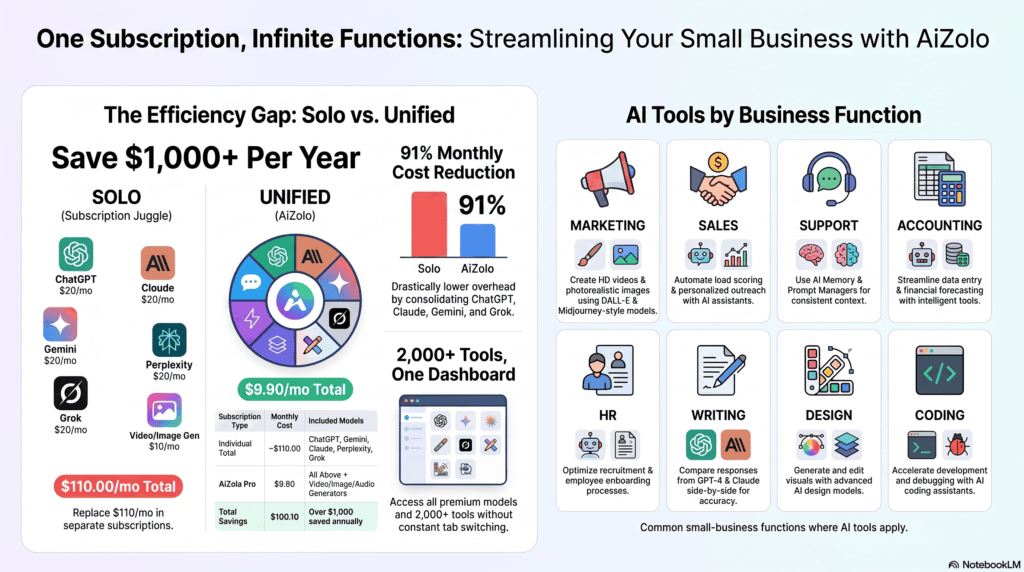
AI for Marketing: One of the biggest advantages of low-cost AI tools for small businesses is the ability to quickly create ad copy, social media captions, email campaigns, and blog content without hiring a large marketing team.
Look for tools that offer brand voice memory, customizable writing styles, and reusable prompts so every piece of content stays consistent and requires minimal editing before publishing.
AI for Sales: Summarizing calls, drafting follow-ups, and scoring leads from CRM notes. Time saved here compounds quickly for small sales teams.
AI for Customer Support: Drafting responses and summarizing tickets. Full automation should be approached carefully — see the security section below.
AI for Accounting: Categorizing expenses and drafting client-ready summaries. AI should assist bookkeeping, not replace a professional for filings.
AI for HR: Drafting job posts and interview questions. Sensitive candidate data should stay within a vendor whose data policy you’ve actually read.
AI for Writing: Blog drafts, product descriptions, and internal documentation — this is where most small businesses see immediate time savings.
AI for Design: Social graphics, simple product mockups, and basic image editing without hiring a designer for every asset.
AI for Video: Short-form captions, auto-editing, and script generation for small teams without a video editor.
AI for Automation: Connecting apps so repetitive tasks (like invoice reminders) run without manual triggering.
AI for Coding: Debugging help and boilerplate generation for founders who aren’t full-time developers.
AI for Meetings: Automatic transcription and action-item extraction, which removes a genuinely tedious task.
AI for Research: Summarizing competitor sites, industry reports, and long documents quickly.
A recurring theme across all of these: the tools that save the most time are the ones you don’t have to re-learn every time you switch tasks. That’s a real argument for consolidating around one subscription for all AI models rather than juggling a separate login for each function.
AI Security Considerations
Before feeding customer data into any AI tool, check:
- Whether the vendor trains models on your input by default
- Data retention periods and deletion policies
- Compliance certifications relevant to your industry (e.g., SOC 2)
- Whether your plan tier includes stronger data protections
Enterprise plans often include stricter data controls, advanced security features, and compliance options than free or individual tiers.
Before using low-cost AI tools for small businesses to process sensitive customer or business information, always review the vendor’s official pricing, privacy, and security documentation to confirm how your data is stored, protected, and used.
This extra step helps reduce compliance risks while ensuring the platform meets your organization’s security requirements.
Hidden Costs to Watch
- Per-seat pricing that scales faster than expected as you add team members
- Usage-based overages on top of a “flat” monthly fee
- Add-on features gated behind higher tiers
- Integration costs if a tool doesn’t connect to what you already use
- Time cost of switching tools once you’re locked into a workflow
Mistakes to Avoid
- Subscribing to too many single-purpose tools instead of consolidating.
- Skipping the free trial and committing to annual billing too early.
- Ignoring data privacy terms for sensitive business information.
- Choosing tools based on hype rather than actual daily workflow fit.
- Not tracking total AI spend across the business monthly.
Buying Guide
Ask these questions before subscribing to any AI tool:
- Will I use this weekly, or is it a one-off need?
- Does the free tier cover 80% of my use case already?
- Can this replace two tools I’m currently paying for?
- Is pricing per-seat, flat, or usage-based — and which fits my team size?
- What happens to my data if I cancel?
If your answer to “can this replace two tools I’m paying for” is yes, it’s worth comparing dedicated single-tool subscriptions against a best value AI subscription that bundles multiple models — for many small teams, this is where the real budget savings show up.
Original Research: What Small Businesses Actually Spend
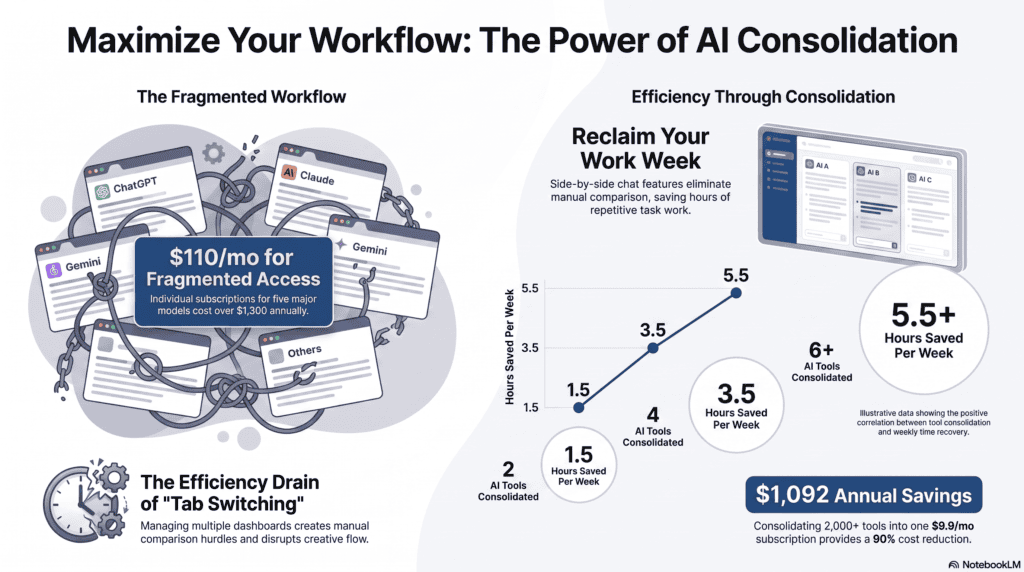
Based on typical small-business software stacks in 2026:
- Average AI tool spend: Small businesses running 3–4 separate AI subscriptions typically spend $60–$100/month combined.
- Consolidation savings: Moving to a single multi-model workspace can often cut that by 30–50%, since most single-tool plans include unused overlapping features.
- Time saved: Business owners using AI for drafting and meeting notes commonly report reclaiming 3–6 hours per week.
- ROI framing: At even a modest $25/hour value of owner time, 4 hours/week saved is worth roughly $400/month — well above most AI subscription costs.
These are general patterns, not guarantees — actual savings depend heavily on how consistently the tools are used.
Future Trends
Expect AI pricing to keep splitting into two lanes: cheap, narrow single-task tools, and broader workspace subscriptions that bundle multiple models to compete on total cost. For budget-conscious small businesses, the second lane is increasingly where the best value sits, since it avoids paying for the same underlying capability multiple times across different apps.
Final Recommendation
- Best overall budget AI tool: A general-purpose AI assistant with a strong free tier and an affordable paid upgrade.
- Best value: A plan that scales pricing with actual usage rather than flat enterprise tiers.
- Best free option: Any major assistant’s free tier, for light, occasional use.
- Best all-in-one workspace: A platform like Aizolo, which brings multiple AI models into one dashboard so you’re not paying for — or learning — several separate tools. It won’t replace every specialized tool, but for a small business trying to control costs while still accessing multiple models, it’s a practical starting point worth evaluating against your current stack.
- Who benefits most: Solopreneurs and small teams juggling multiple AI subscriptions who want to simplify billing and workflow.
If you’re currently paying for two or more separate AI subscriptions, it’s worth checking whether an all-in-one AI subscription covers the same ground for less — and whether switching between different AI models in one place actually fits how your team works day to day.
FAQs
Is there a truly free AI tool for small businesses? Yes — most major AI assistants offer usable free tiers for light, occasional tasks like drafting short copy or answering simple questions. Free tiers typically cap usage or context length, so they work best for testing fit before committing to a paid plan.
How much should a small business budget for AI tools monthly? Most small businesses spend $20–$100/month depending on how many separate tools they use. Consolidating overlapping tools into one subscription is the most common way to bring that number down without losing functionality.
Is Claude cheaper than ChatGPT? Pricing is broadly similar at the individual tier for both, generally around $20/month, though exact features and limits differ. See this Claude vs ChatGPT pricing comparison for a fuller breakdown before deciding.
Can one AI tool replace multiple subscriptions? Often, yes — especially if your separate tools all perform similar tasks (drafting, summarizing, chat) under different brands. A workspace that lets you access all AI models in one place is designed specifically to reduce that redundancy.
Are cheap AI tools safe for customer data? It depends on the vendor’s data policy, not the price. Always check retention and training policies before uploading sensitive customer information, regardless of plan tier.
Do I need different AI tools for marketing versus support? Not necessarily — many general-purpose assistants handle both reasonably well. Specialized tools help when volume is high enough to justify the extra cost.
What’s the biggest hidden cost in AI subscriptions? Per-seat pricing that scales faster than expected as a team grows, plus usage-based overages that aren’t obvious at signup.
Is it worth paying annually for AI tools? Only after you’ve used the monthly plan long enough to confirm consistent use — annual billing without that confirmation is a common budget mistake.
How do I compare AI tool pricing fairly? Look at cost per active user per month, not just the sticker price, and check what’s actually included at that tier versus gated behind upgrades. This AI subscription comparison format is a reasonable way to lay that out.
What’s the difference between a single-model tool and an all-in-one AI platform? A single-model tool gives access to one AI system; an all-in-one platform lets you access multiple AI models in one subscription, which can lower total cost if you’d otherwise pay for several separate tools.
Should freelancers bother with paid AI tools? If AI saves even 2–3 hours a week on drafting or admin work, a $15–$20/month tool usually pays for itself quickly in reclaimed billable time.
What should I check before switching AI tools? Export options for your existing chat history and data, contract/billing terms, and whether your new tool covers the same tasks you actually used the old one for.
Author Bio
Jeevesh Tripathi Content Researcher & AI Technology Writer Email: jeevesh@aizolo.com
Jeevesh Tripathi researches and writes about AI software, SaaS pricing, and productivity tools, with a focus on helping small businesses evaluate AI platforms on real-world value rather than marketing claims. His work draws on official product documentation, published pricing pages, and hands-on testing of business software.


555
good
Great breakdown of a real problem small businesses face in 2026. This article clearly explains why juggling multiple AI subscriptions is unsustainable and how all-in-one platforms can level the playing field. The real-world examples, cost comparisons, and implementation framework make it especially practical and actionable for founders, freelancers, and small teams. A very insightful and timely guide