
Introduction
Every AI assistant you talk to today faces the same design problem: how do you make a conversation feel continuous without turning a private chat into a permanent, exploitable record of someone’s life? That tension is exactly what Aizolo and secure AI memory for personalized AI chats are designed to resolve, helping deliver personalized experiences while keeping user data protected.
AI memory is the system that lets a chatbot recall your preferences, projects, and context across sessions instead of starting from zero every time. Done well, it feels like working with a colleague who remembers what you told them last week. Done poorly, it becomes a standing liability — a database of your habits, health details, and business plans sitting one misconfigured permission away from exposure.
This guide breaks down how memory actually works under the hood, how ChatGPT, Claude, Gemini, and Perplexity have each implemented it, where the real privacy risks live, and what a genuinely secure, user-controlled memory system looks like in practice — for individuals and for enterprises rolling out AI at scale.
Table of Contents
What Is AI Memory, Really?
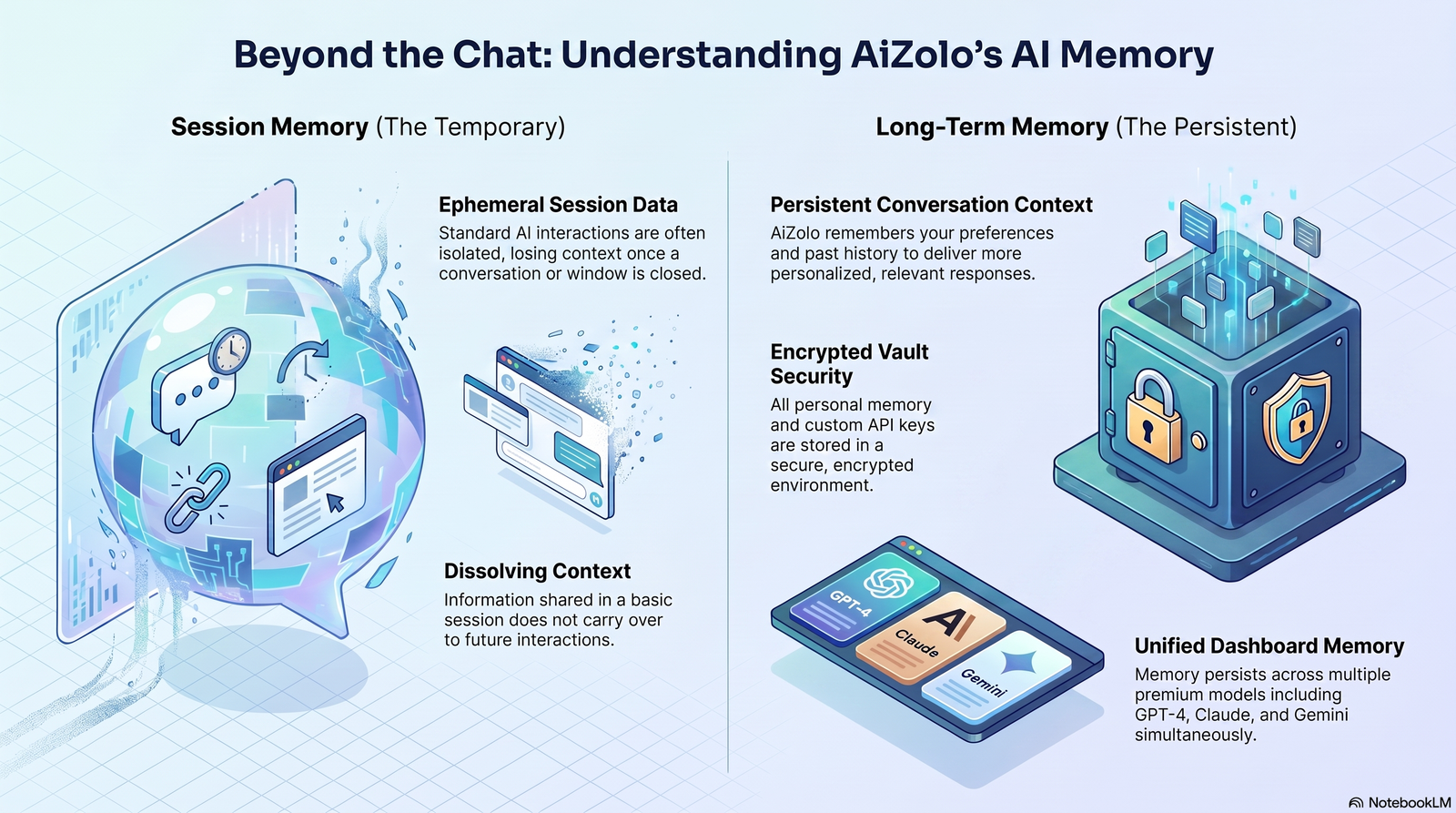
AI memory is not the same thing as a Large Language Model’s context window. The context window is short-term working memory — everything visible to the model during a single conversation. AI memory is a separate, persistent layer that survives after the chat ends.
In short: AI memory is a storage and retrieval system that captures facts, preferences, and context from past conversations, then feeds relevant pieces back into future conversations so the assistant doesn’t have to relearn who you are every time.
There are generally three layers involved:
- Session memory — everything inside the current context window, gone when the chat closes.
- Explicit memory — facts you directly tell the assistant to remember (“I’m vegetarian,” “I use Python, not JavaScript”).
- Inferred long-term memory — patterns the system learns automatically from your conversation history, without you stating them outright.
Modern assistants increasingly combine all three, which is exactly where the personalization and the privacy stakes both rise together.
Session Memory vs. Long-Term AI Memory
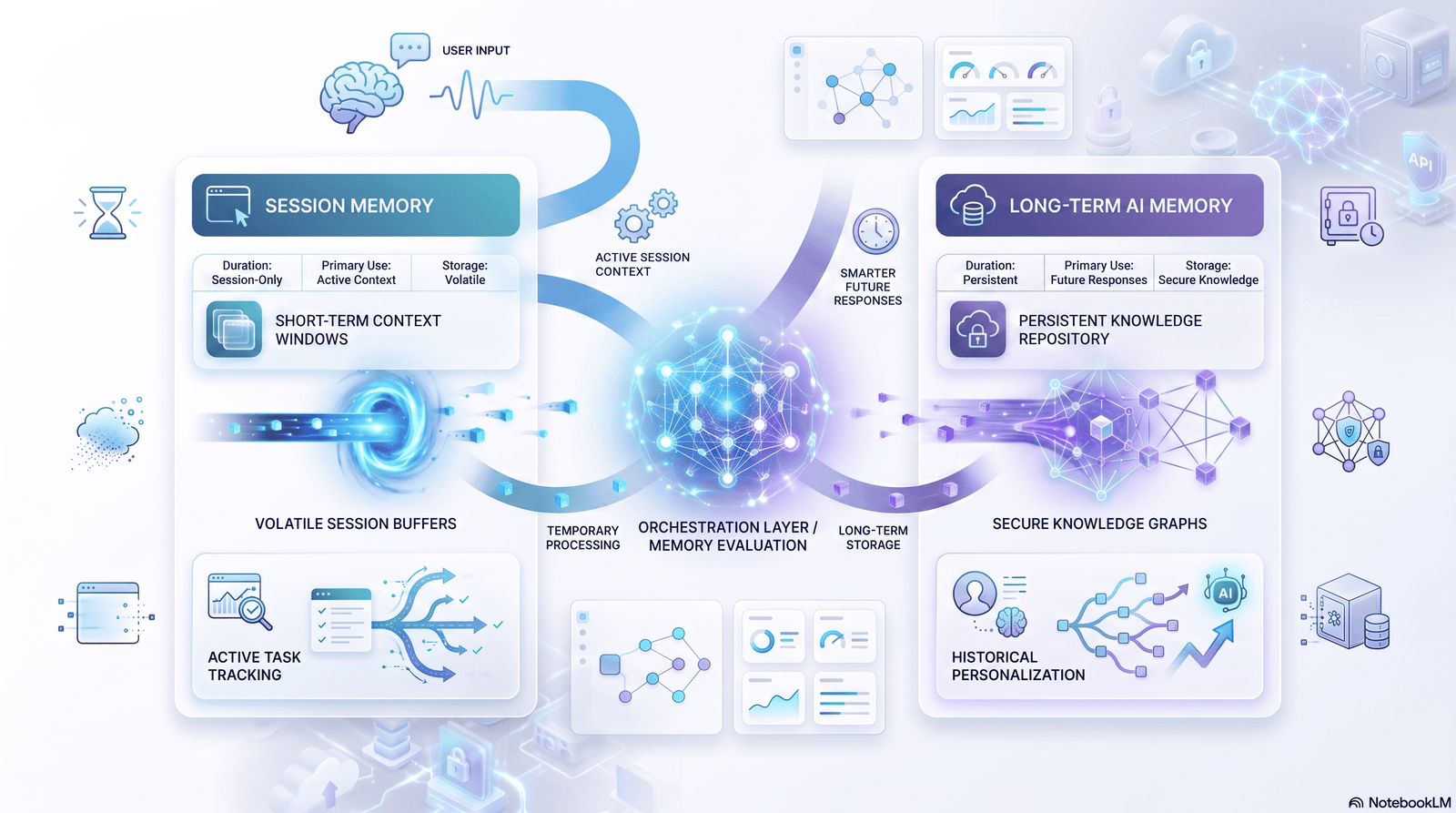
| Attribute | Session Memory | Long-Term AI Memory |
|---|---|---|
| Persistence | Ends when the chat closes | Persists across sessions, days, or years |
| Storage location | In-context (RAM/token window) | Database, vector store, or encrypted profile |
| Retrieval method | Native to the running conversation | Search, embeddings, or RAG lookup |
| Privacy exposure | Low — nothing is retained | Higher — requires access controls and encryption |
| User control | N/A (nothing saved) | Should include view, edit, delete, and export |
| Typical use case | One-off tasks, quick Q&A | Ongoing projects, recurring preferences, coaching |
Long-term memory is where the real engineering — and the real risk — lives. It’s also where “secure AI memory for personalized AI chats” becomes a design requirement rather than a nice-to-have.
How Personalized AI Chats Actually Work
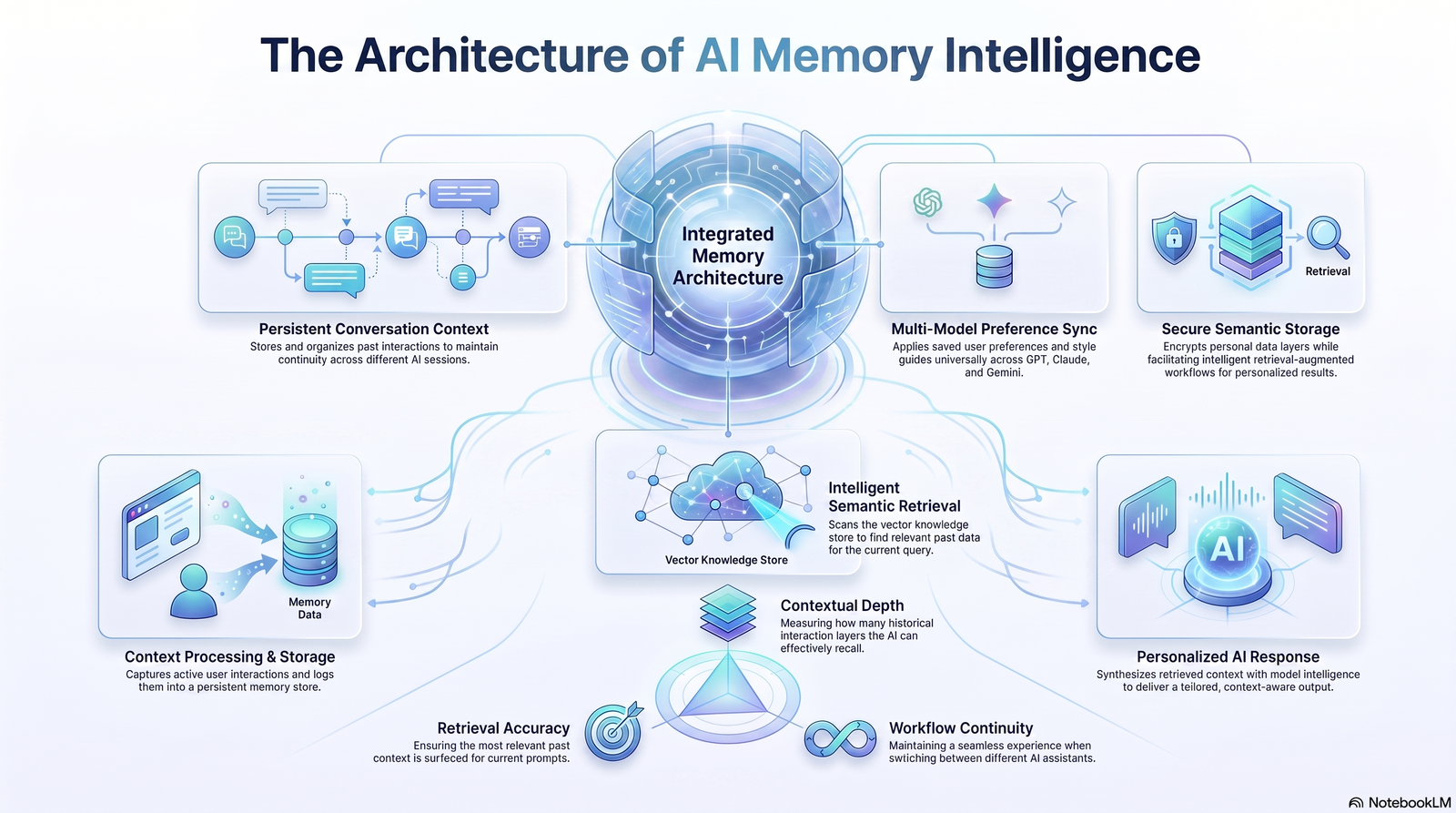
Personalization isn’t magic — it’s a retrieval pipeline. Here’s the typical sequence behind a memory-enabled response:
- Capture — the system identifies something worth remembering during a conversation (a preference, a fact, a correction).
- Encode — that information is converted into a structured entry or a vector embedding, a numerical representation of meaning that can be compared for similarity.
- Store — the entry is written to a database, often a vector database, sometimes alongside a plain-text summary.
- Retrieve — on a new conversation, the system searches stored memories for what’s relevant to the current prompt. This is the core idea behind Retrieval-Augmented Generation (RAG): pulling relevant external data into the model’s context instead of relying purely on what it was trained on.
- Inject — the retrieved memory is quietly added to the prompt sent to the model, so the reply reflects what it “remembers” without you having to repeat yourself.
This is why memory-enabled assistants sometimes show a visible “searching memory” or “referencing past chats” step — that’s the retrieval stage happening in real time, not the model recalling something from its own weights.
A Practical Example
A product manager tells an assistant early in the week that their team ships on a two-week sprint cadence and prefers metric units. Two days later, in an unrelated chat about a launch checklist, the assistant automatically adjusts timelines to sprint boundaries and uses kilometers instead of miles — without being reminded. That’s the retrieval-and-injection loop working as intended.
AI Memory Architecture: The Building Blocks
Understanding the architecture matters because every architectural choice is also a security decision.
Embeddings
Text, images, or structured facts are converted into vectors — long lists of numbers that capture semantic meaning. Similar concepts end up numerically close together, which is what makes similarity search possible.
Vector Databases
Purpose-built databases store embeddings and allow fast “nearest neighbor” search, so the system can find the most relevant memories for a given prompt in milliseconds, even across millions of entries.
Memory Store / Structured Profile
Alongside embeddings, many systems keep a human-readable memory record — categorized facts, editable summaries, or a profile object — so users (and admins) can actually see and correct what’s stored, not just trust a black box.
Retrieval Layer
The logic that decides what to fetch, how much, and how recent or relevant it needs to be. Poorly tuned retrieval is a common source of both bad personalization (irrelevant memories injected) and privacy leakage (memories surfaced in the wrong context).
Lifecycle Management
Rules governing when memories are created, updated, decayed, or deleted — including handling contradictions, like a memory saying “moving to Singapore in July” that needs to update once July has passed.
Vector Database Comparison
| Vector Database | Deployment Model | Common Use Case | Notable Security Feature |
|---|---|---|---|
| Pinecone | Managed cloud | Production RAG at scale | SOC 2 compliance, encryption at rest |
| Weaviate | Open-source / managed | Hybrid search + memory | Role-based access control (RBAC) |
| Milvus | Open-source / managed | High-throughput enterprise search | Multi-tenant isolation |
| Qdrant | Open-source / managed | Lightweight, self-hostable memory | Self-hosting for full data control |
| Chroma | Open-source | Prototyping, local-first apps | Local storage, no forced cloud dependency |
This table is illustrative of category trade-offs rather than a live pricing or feature comparison — always verify current certifications and terms directly with each vendor before an enterprise deployment.
Why Secure AI Memory Matters

Every piece of information a memory system retains is a piece of information that can be:
- Retrieved by the wrong person if access controls fail
- Exposed in a data breach if storage isn’t encrypted
- Used in ways the user never anticipated if consent wasn’t explicit
- Subpoenaed, exported, or reviewed by staff for safety and quality purposes, depending on the provider’s policies
This is precisely why secure AI memory for personalized AI chats has become a distinct engineering discipline rather than a footnote in a product’s privacy policy. The more useful memory becomes, the more sensitive the data it inevitably accumulates — health notes, financial context, relationship details, unreleased business plans.
Privacy Risks in AI Memory Systems
- Cross-context leakage — a memory formed in one context (a joke, a hypothetical) surfacing inappropriately in another.
- Over-retention — data kept long after it’s useful, expanding the breach surface.
- Third-party training exposure — memories or chat content used to train future models without clear, informed consent.
- Inference creep — the system inferring sensitive attributes (health conditions, political views, sexual orientation) that the user never explicitly disclosed.
- Weak access boundaries in shared or enterprise accounts — memory bleeding across projects, teams, or workspaces that should stay isolated.
- Prompt injection targeting memory — malicious content in a document or webpage attempting to plant false or manipulative “memories” during a session.
Secure vs. Non-Secure AI Memory
| Dimension | Secure AI Memory | Non-Secure AI Memory |
|---|---|---|
| Encryption | Encrypted at rest and in transit | Stored in plaintext or weakly protected |
| Access control | Role-based, least-privilege, audited | Broad or undefined access |
| User visibility | Full view/edit/delete controls | Opaque, hard to inspect |
| Consent | Explicit opt-in, granular | Bundled into general terms of service |
| Data retention | Defined lifecycle, deletion on request | Indefinite or unclear retention |
| Compliance posture | Aligned with GDPR/CCPA principles | Ambiguous or unaddressed |
| Incident response | Documented breach notification process | Unclear or absent |
If a vendor can’t clearly answer where memory is stored, how it’s encrypted, and how deletion works, that’s a signal to slow down before enabling the feature for sensitive workflows.
Encryption and Secure Storage for AI Memory
A well-designed memory system layers several protections rather than relying on one:
- Encryption at rest — memory data stored on disk or in a database is encrypted, so a storage-level breach doesn’t expose readable content.
- Encryption in transit — data moving between the client, the retrieval layer, and the model is protected with TLS.
- Tenant and project isolation — in enterprise deployments, one team or organization’s memory should never be retrievable by another, even accidentally.
- Customer-managed encryption keys (CMEK) — some enterprise plans let organizations hold their own encryption keys, which can restrict certain features (like cross-session search) precisely because the provider can no longer read the underlying content.
- Audit logging — recording when memory settings are changed at an administrative level, so security teams can trace who altered retention or access policies and when.
- Zero Trust principles — treating every request to read or write memory as untrusted until verified, rather than assuming anything inside the network perimeter is safe by default.
None of this is theoretical. Enterprise-tier AI products increasingly document exactly these controls — encryption at rest for memory synthesis, admin-level toggles that immediately purge data on deactivation, and audit logs scoped to organizational changes — precisely because enterprise buyers now ask for them before deployment.
User-Controlled Memory: What Good Looks Like
A trustworthy memory system gives users meaningful control, not just a checkbox buried three settings menus deep. At minimum, that means:
- Visibility — a plain-language view of everything the system has stored, grouped in a way a non-technical user can understand.
- Editability — the ability to correct or refine an entry directly, not just delete and hope it relearns correctly.
- Deletion — both individual entry deletion and a full reset option, with a clear statement of how long deletion actually takes to propagate.
- Pause without loss — the ability to stop new memories from forming without destroying what’s already stored.
- Context-specific exclusion — a private or “incognito” mode for conversations that should never be captured at all.
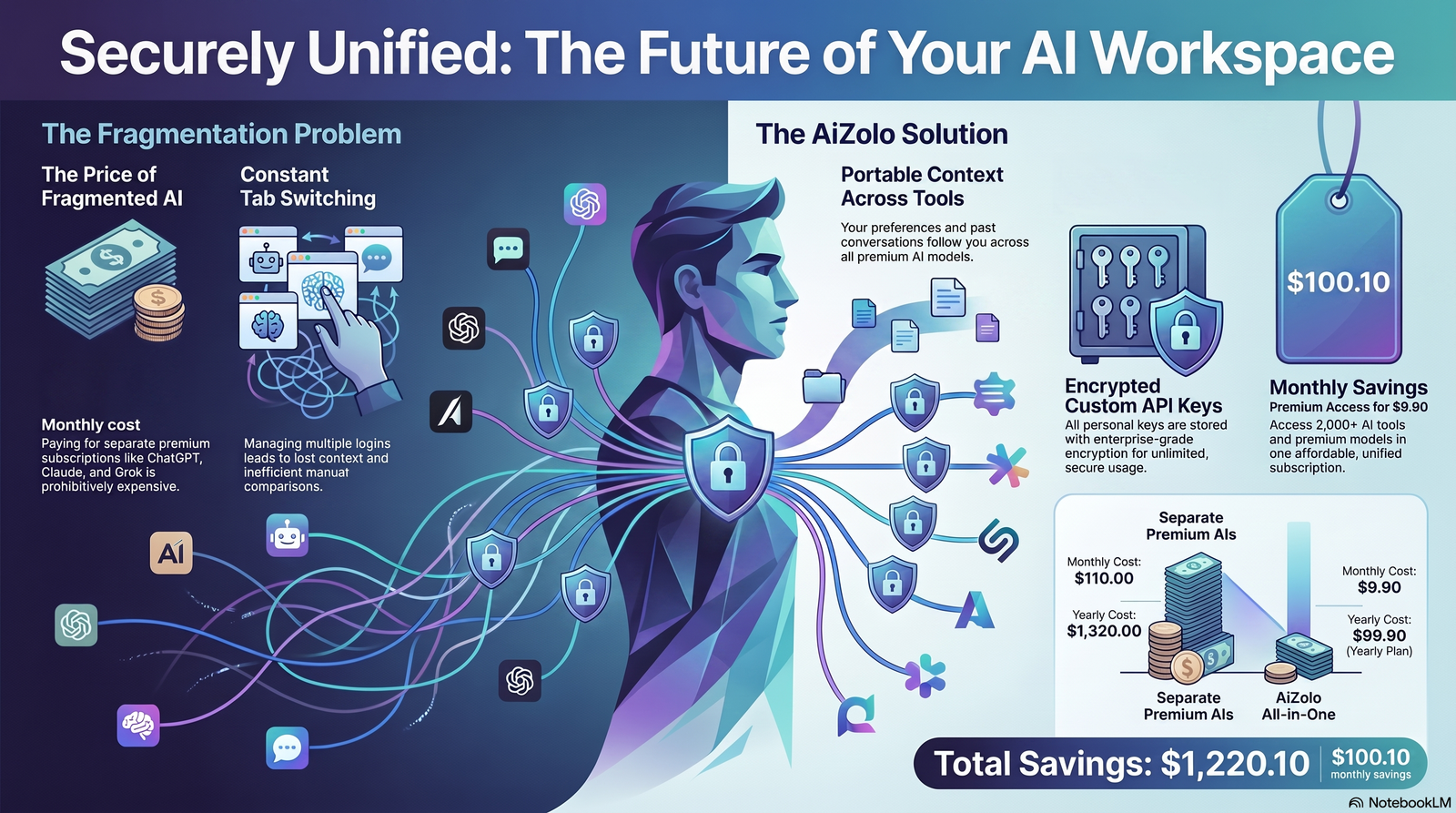
- Export and portability — the ability to take your own data with you, including, increasingly, importing memory from one assistant into another.
This is where the market has moved fastest in 2026: several major assistants now let users export their memory profile and import it into a competing product, treating personal AI memory more like portable data than proprietary lock-in.
Leading AI Assistants: Memory Feature Comparison
| Assistant | Memory Approach | Automatic Learning | User Deletion Controls | Enterprise Admin Controls |
|---|---|---|---|---|
| ChatGPT (OpenAI) | Saved memories + chat-history reference, evolving toward an automated “dreaming” synthesis system | Yes | Per-memory deletion, full reset, Temporary Chat mode | Workspace-level data exclusion from training |
| Claude (Anthropic) | Structured memory entries by category, plus opt-in search of past chats | Yes, when enabled | Per-entry edit/delete, pause, full reset, incognito chats | Org-level enable/disable, encryption at rest for memory synthesis, audit logging |
| Gemini (Google) | “Personal Intelligence” memory plus explicit saved facts, optional connection to Google apps | Yes, opt-in | Manage and delete saved memories, temporary chat mode | Admin console controls for Workspace/Enterprise accounts |
| Perplexity | Memory features tied to personalized search and assistant context | Varies by rollout | Settings-based memory management | Enterprise-tier controls, varies by plan |
Feature availability changes quickly and often rolls out by plan tier or region, so always confirm current behavior in each product’s own documentation before making a policy decision based on this table.
Enterprise AI Memory: A Different Risk Calculus
For businesses, AI memory isn’t just a convenience feature — it’s an extension of the data governance perimeter. A few considerations that don’t apply to individual users:
- Data residency — where memory data physically lives can matter for regulatory reasons, especially for regulated industries.
- Cross-tenant isolation — memory generated in one client’s workspace must never surface in another’s, even in a multi-tenant SaaS deployment.
- Employee offboarding — when someone leaves, their contribution to organizational memory needs a defined retention and deletion policy, not an assumption it “just goes away.”
- Regulatory obligations — professionals bound by confidentiality rules (legal, medical, financial) need explicit guidance on what should never enter a memory-enabled chat in the first place, regardless of how secure the underlying storage is.
- Shadow AI risk — employees using personal AI accounts with memory enabled for work tasks, unintentionally creating unmanaged copies of company data outside IT’s visibility.
Practical Example: A Support Team
A customer support organization deploys a memory-enabled assistant so it can recall a customer’s product tier and past tickets without an agent re-explaining context every time.
Done securely, this cuts resolution time significantly. Done carelessly — with memory shared across unrelated customer accounts or retained indefinitely without a deletion policy — it becomes a compliance liability and a potential data breach in waiting.
Best Practices for Secure, Personalized AI Memory
For Individuals
- Review what an assistant has stored about you at least monthly.
- Avoid typing passwords, government ID numbers, or full financial account details into any chat, memory-enabled or not.
- Use temporary or incognito modes for sensitive one-off conversations.
- Periodically delete stale memories rather than letting them accumulate indefinitely.
- Check whether your data is used for model training, and opt out where that option exists.
For Businesses
- Require explicit, documented consent before enabling memory features organization-wide.
- Apply least-privilege access to any admin console governing memory settings.
- Set a defined data retention and deletion policy for organizational memory, not an open-ended default.
- Include AI memory review in vendor security assessments — ask specifically about encryption at rest, tenant isolation, and audit logging.
- Train employees on what should never be shared with a memory-enabled assistant, regardless of the vendor’s security posture.
Decision Framework: Should You Enable AI Memory?
- Does the benefit outweigh the sensitivity of what you’d be sharing? Low-stakes personalization (writing tone, formatting preferences) is a much easier yes than anything touching health, legal, or financial detail.
- Can you see and control what’s stored? If there’s no visibility or deletion path, treat that as a hard no for sensitive use.
- Is training-data usage disclosed and optional? If memory content trains future models by default with no opt-out, weigh that carefully.
- Does your organization (if applicable) have a policy at all? If not, that’s the first thing to fix before enabling anything at scale.
Common Mistakes With AI Memory
- Treating memory like a password manager. It isn’t designed or audited for that purpose, no matter how convenient it feels.
- Assuming “private chat” means “no memory.” Many products save context by default unless a specific temporary or incognito mode is used.
- Never auditing what’s been stored. Memory accumulates silently over months of casual conversation.
- Ignoring enterprise admin defaults. Organization-wide memory toggles are often enabled by default and quietly governed by whoever set up the workspace.
- Assuming deletion is instant. Many providers state that deleted memories are purged within a defined window (commonly up to 30 days), not immediately.
Industry Trends and the Future of AI Memory
A few directions are already visible heading into the rest of 2026:
- Portability over lock-in. Import/export tools between major assistants suggest memory is trending toward being treated as user-owned data rather than a walled garden.
- Automated memory synthesis. Systems are moving from purely explicit, user-stated facts toward automatic synthesis of long-term profiles from ordinary conversation — which increases usefulness and privacy stakes simultaneously.
- Tighter enterprise governance. Expect more granular admin controls, more explicit audit logging, and more vendors publishing SOC 2 or ISO 27001 attestations specifically covering memory infrastructure.
- Regulatory attention. Data protection authorities have already shown willingness to act on AI data-handling practices, and persistent memory — because it’s a standing record rather than a transient interaction — is a natural next focus area.
- On-device and local-first memory. For privacy-sensitive use cases, expect continued interest in memory architectures that keep data on-device rather than in the cloud by default.
Frequently Asked Questions
What is secure AI memory for personalized AI chats? It’s a memory system that lets an AI assistant retain and reuse your preferences and context across conversations while protecting that data with encryption, access controls, and clear user consent — rather than storing it indefinitely with no oversight.
Is AI memory the same as the context window? No. The context window is temporary, in-conversation working memory. AI memory is a persistent layer, often backed by a database, that survives after the conversation ends and gets retrieved in future sessions.
Can I delete what an AI assistant remembers about me? Most major assistants now offer per-entry deletion and a full memory reset in settings. Deletion isn’t always instant — some providers state it can take up to 30 days to fully purge from backend systems.
Does AI memory use my conversations to train the model? It depends on the provider and plan. Many offer training opt-outs, and enterprise or business plans commonly exclude workspace data from training by default — always check the specific product’s current policy.
What’s the difference between explicit and inferred memory? Explicit memory is information you directly tell the assistant to remember. Inferred memory is learned automatically from patterns across your conversations, without you stating it outright — and it’s the harder category to audit.
Is it safe to share sensitive information with a memory-enabled AI assistant? Treat any memory-enabled chat the way you’d treat any other cloud service: avoid passwords, ID numbers, and highly sensitive health, legal, or financial specifics unless the provider has clearly documented encryption, access controls, and retention limits you’re comfortable with.
How does Retrieval-Augmented Generation relate to AI memory? RAG is the retrieval technique many memory systems use — it searches stored data for relevant information and injects it into the model’s prompt, rather than relying solely on what the model learned during training.
Do enterprise AI memory features work differently from consumer ones? Yes. Enterprise deployments typically add organization-level admin controls, tenant isolation, audit logging, and sometimes customer-managed encryption keys — protections aimed at governance and compliance rather than individual convenience.
What should I look for before enabling memory in an AI tool? Look for clear visibility into what’s stored, editable and deletable entries, disclosed training-data usage, and a documented retention policy. If any of those are missing or vague, treat that as a reason to hold off for sensitive use.
Will AI memory become portable between different assistants? It’s already heading that way. Several major providers have introduced import/export tools that let users move their memory profile between assistants, treating personal AI context more like owned, portable data.
Conclusion
Personalization is the feature that makes AI assistants feel genuinely useful over time — but it only works if the underlying memory is trustworthy.
Secure AI memory for personalized AI chats means encryption at rest and in transit, real user control over what’s stored and deleted, clear consent around training-data usage, and — for organizations — governance that treats memory as part of the data security perimeter, not an afterthought.
The technology is moving fast: automated memory synthesis, cross-platform portability, and tighter enterprise controls are all active fronts right now.
Whether you’re an individual deciding whether to turn memory on, or a security team evaluating a vendor, the same questions apply — what’s stored, who can see it, how is it protected, and how do you get rid of it when you’re done. Get those answers first, and personalization becomes a genuine advantage instead of a hidden liability.
Author Bio
Author: Jeevesh Tripathi Email: jeevesh@aizolo.com
Jeevesh Tripathi is an AI researcher and technical content strategist specializing in the intersection of artificial intelligence, cybersecurity, and enterprise technology adoption. With a background in analyzing emerging AI architectures — from retrieval-augmented generation to memory-enabled assistants — Jeevesh translates complex technical systems into practical, actionable guidance for both individual users and enterprise decision-makers. His work focuses on helping organizations evaluate AI tools through a security-first lens, with particular attention to data governance, encryption practices, and privacy-by-design principles. Jeevesh stays closely engaged with official documentation from major AI providers and standards bodies to ensure his analysis reflects current, verifiable product behavior rather than speculation, aligning with Google’s EEAT principles for trustworthy technical content.
External Linking Recommendations
| # | Anchor Text | Destination URL | Why It Adds Authority | Suggested Placement |
|---|---|---|---|---|
| 1 | Google’s Helpful Content guidance | https://developers.google.com/search/docs/fundamentals/creating-helpful-content | Establishes alignment with Google’s own quality standards | Near introduction or methodology note |
| 2 | Retrieval-Augmented Generation research | https://research.google/pubs/ | Backs the technical RAG explanation with primary research | “How Personalized AI Chats Actually Work” section |
| 3 | OpenAI’s memory documentation | https://openai.com/index/memory-and-new-controls-for-chatgpt/ | Primary source for ChatGPT memory claims | Assistant comparison table |
| 4 | Anthropic’s Claude memory support article | https://support.claude.com/en/articles/11817273-use-claude-s-chat-search-and-memory-to-build-on-previous-context | Primary source for Claude memory claims | Assistant comparison table |
| 5 | Google Gemini personalization help | https://support.google.com/gemini/answer/16598469 | Primary source for Gemini memory claims | Assistant comparison table |
| 6 | NIST AI Risk Management Framework | https://www.nist.gov/itl/ai-risk-management-framework | Authoritative government framework for AI risk practices | “Encryption and Secure Storage” section |
| 7 | OWASP Top 10 for Large Language Model Applications | https://owasp.org/www-project-top-10-for-large-language-model-applications/ | Recognized security standard covering prompt injection and data risks | “Privacy Risks in AI Memory Systems” section |
| 8 | GDPR official text | https://gdpr-info.eu/ | Authoritative regulatory reference | “Enterprise AI Memory” section |
| 9 | California Consumer Privacy Act overview | https://oag.ca.gov/privacy/ccpa | Authoritative regulatory reference for US readers | “Enterprise AI Memory” section |
| 10 | Google Search Central documentation | https://developers.google.com/search/docs | General SEO/content-quality authority signal | Methodology note or footer |
| 11 | Microsoft Learn: Responsible AI practices | https://learn.microsoft.com/en-us/azure/architecture/guide/responsible-innovation/ | Cross-industry authority on responsible AI data handling | “Best Practices” section |
| 12 | Anthropic Trust Center | https://trust.anthropic.com/ | Direct source for Anthropic’s compliance and security posture | “Secure vs. Non-Secure AI Memory” table |
