
A Flexible Option for AI Users
If Claude’s message limits interrupt your workflow, it can be useful to have access to more than one AI model. Different models may work better for different tasks, such as writing, research, coding, or quick questions.
AiZolo provides access to multiple AI tools and models in one workspace, giving users the flexibility to switch tools when one model or platform does not fit their current workflow.

A quick correction before we start, because it matters: if you searched for “Claude 5.5 Sonnet,” that model name doesn’t exist. Anthropic’s current lineup is Claude Opus 5.5, Claude Sonnet 5.5, and Claude Haiku 4.5, with Claude Sonnet 5 still in circulation as the prior Sonnet generation.
This guide covers Claude 5.5 Sonnet Message Limits for the actual Sonnet models people are using in 2026, and the mechanics apply the same way regardless of which Sonnet generation you’re on, since Anthropic’s limit system is tied to your plan, not the specific model snapshot.
If you’ve ever been mid-task and seen “You’ve reached your usage limit until [time],” this article explains exactly why that happens, how the limit is calculated, and what to do about it — based on Anthropic‘s own documentation, not guesswork.
Table of Contents
Key Takeaways
- Anthropic does not publish an exact “X messages per day” number for Claude Sonnet. Limits are dynamic, based on conversation length, attachments, model choice, and real-time demand.
- The core unit isn’t a calendar day — it’s a rolling five-hour session window.
- Paid plans (Pro, Max, Team, Enterprise) also enforce a weekly limit on top of the five-hour window.
- Claude.ai, Claude Code, and Claude Desktop usage typically draws from the same underlying limit on a given plan.
- The context window (200K tokens on most paid plans, 500K on some Enterprise models) is a separate constraint from your message limit, but long conversations burn through both faster.
- Projects, prompt caching, and shorter conversations are the most effective ways to stretch a Claude Sonnet message limit without upgrading.
What Is Claude Sonnet?
Claude Sonnet is Anthropic’s mid-tier model line — positioned between the faster, cheaper Haiku models and the more capable (and more expensive) Opus models.
Sonnet is built for a balance of reasoning quality, speed, and cost, which is why it’s the default model most Free and Pro users interact with on claude.ai. The current generation is Claude Sonnet 5.5; Claude Sonnet 5 remains available in some contexts as the previous release.
Sonnet sits at the center of Anthropic’s three-tier naming system:
| Tier | Role | Typical user |
|---|---|---|
| Haiku | Fastest, cheapest, lighter reasoning | High-volume, simple tasks |
| Sonnet | Balanced speed, cost, and capability | Most day-to-day chat and coding |
| Opus | Most capable, highest cost | Complex reasoning, agentic workloads |
Claude 5.5 Sonnet Message Limit
This is the part most competing articles get wrong: Claude doesn’t run on a simple “40 messages a day” counter. Anthropic’s own help center describes usage limits as a function of several variables working together, not a fixed message count.
The five-hour session window
Rather than resetting at midnight, Claude’s usage limit operates on a rolling five-hour window that begins with your first message. This means you can’t “bank” unused messages by waiting for a fresh calendar day — the window simply resets five hours after it started, and a new one begins with your next message.
It’s a compute budget, not a message count
Every time you send a message, Claude re-reads the entire conversation history to keep context. A short, simple exchange costs very little; a long thread with large file attachments, tool use, or extended reasoning costs a lot more per turn. That’s why two people on the same plan can hit a limit at wildly different points — one sends 40 short prompts, another gets cut off after 8 heavy ones.
Weekly limits stack on top
Paid plans (Pro, Max, Team, Enterprise) add a weekly usage limit alongside the five-hour window. You can be well within your five-hour allowance and still be capped if you’ve used a large share of your weekly budget. Team and Enterprise weekly limits reset at a fixed day and time assigned to your account — visible in Settings > Usage.
Does Claude Sonnet Have Daily Limits?
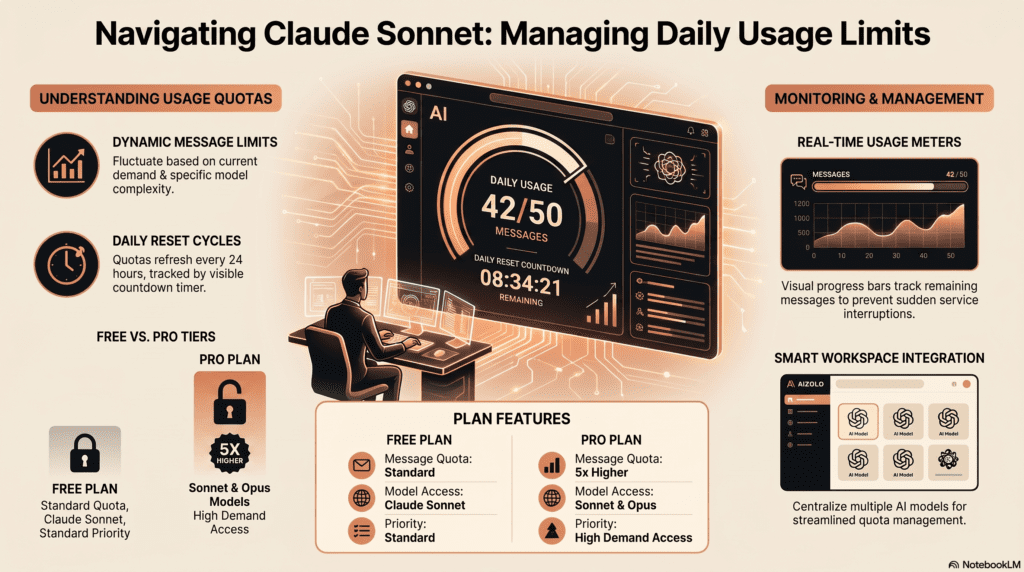
Not in the traditional sense. There’s no calendar-day reset. What functions like a “daily limit” for most casual users is really the practical effect of the five-hour rolling window repeating itself roughly 4–5 times across a 24-hour period.
Free-tier users, in practice, tend to land somewhere around 15–40 short messages per five-hour window, according to independent usage testing — but Anthropic has never published this as an official fixed number, and it moves with server demand.
Hourly Message Limits Explained
There’s no separate “hourly limit” distinct from the five-hour window — the five-hour session is the operative time unit. If you’re on a heavy Claude Code session or working through large documents, you can burn through that window in well under an hour; light chat use can stretch a session out for the full five hours without hitting a wall.
Weekly Limits Explained
| Plan | Five-hour session multiplier (vs. Pro) | Weekly limit |
|---|---|---|
| Free | Baseline, lowest | Not applicable (session-based only) |
| Pro | 1x | Yes — Pro-level weekly cap |
| Max 5x | 5x | Yes — higher weekly cap |
| Max 20x | 20x | Yes — highest individual weekly cap |
| Team Standard seat | 1.25x | Yes — fixed weekly reset per account |
| Team Premium seat | ~6.25x | Yes — fixed weekly reset per account |
| Enterprise (seat-based) | Custom | Yes, unless usage-based billing |
| Enterprise (usage-based) | N/A | No fixed limit — billed on consumption |
Anthropic states multipliers relative to the Pro plan rather than publishing raw token or message counts, and those multipliers are the most reliable way to compare plans.
Context Window Explained
The context window is Claude’s “working memory” — how much conversation, file content, and instructions it can hold at once. It’s a separate limit from your message quota, but the two interact: a long conversation consumes more of your usage budget on every subsequent turn because Claude has to reprocess that history each time.
| Plan / Surface | Context window |
|---|---|
| Free, Pro, Max, Team (chat) | 200K tokens |
| Enterprise (supported models) | 500K tokens |
| Claude Code — Max, Team, Enterprise on Opus 5.5+ | 1M tokens (no extra pricing surcharge) |
| Claude Code — Pro | 1M token access via extra usage, not default |
For users with code execution enabled, Claude now automatically summarizes earlier parts of a long conversation as it approaches the context limit, rather than cutting the session off — your full history stays referenceable, but summarized turns still count more heavily against usage than short ones.
Token Limits Explained
Tokens are the unit Claude uses to process text — roughly ¾ of a word in English on average. Every input (your prompt, attached files, conversation history) and output (Claude’s response) consumes tokens. On the API, tokens are also the direct billing unit; on claude.ai subscriptions, tokens feed into the usage-limit calculation but aren’t billed individually.
| Model | Input price (API, per 1M tokens) | Output price (API, per 1M tokens) |
|---|---|---|
| Claude Haiku 4.5 | ~$1 | ~$5 |
| Claude Sonnet (current gen) | ~$3 (≤200K context) | ~$15 |
| Claude Sonnet, >200K context | ~$6 | ~$22.50 |
| Claude Opus 5.5 | ~$5 | ~$25 |
API pricing is a separate track from chat subscriptions — if you’re using claude.ai, Claude Code, or Claude Desktop under a Pro/Max/Team/Enterprise seat, you’re not billed per token directly, but heavier token use is exactly what drains your five-hour and weekly allowances faster.
Free vs. Pro vs. Max vs. Team vs. Enterprise: Full Comparison

| Plan | Price | Session limit | Weekly limit | Context window | Best for |
|---|---|---|---|---|---|
| Free | $0 | Lowest, five-hour window | No | 200K | Trying Claude casually |
| Pro | $20/mo ($17 annual) | 1x baseline | Yes | 200K (1M via extra usage in Claude Code) | Daily individual use |
| Max 5x | $100/mo | 5x Pro | Yes, higher | 200K (1M in Claude Code) | Power users, heavy coding |
| Max 20x | $200/mo | 20x Pro | Yes, highest individual | 200K (1M in Claude Code) | All-day professional use |
| Team Standard | $25/seat/mo ($20 annual) | 1.25x Pro | Yes, fixed weekly reset | 200K | Small teams, general collaboration |
| Team Premium | $125/seat/mo ($100 annual) | ~6.25x Pro | Yes, fixed weekly reset | 200K (1M in Claude Code) | Engineering teams |
| Enterprise (seat-based) | Custom | Custom | Yes | 500K on supported models | Regulated / large orgs |
| Enterprise (usage-based) | Custom, consumption-billed | No fixed cap | No | 500K on supported models | Predictable high-volume orgs |
Minimum seat count for Team is five; organizations needing more than 150 seats are directed to Enterprise.
Claude Code Limits
Claude Code — Anthropic’s terminal-based coding agent — draws from the same underlying plan-based usage pool as claude.ai, but agentic coding sessions tend to consume usage faster because each tool call, file read, and multi-step task re-processes context.
In mid-2026, Anthropic doubled Claude Code’s five-hour rate limits for Pro, Max, Team, and seat-based Enterprise plans and removed the peak-hours limit reduction for Pro and Max, following expanded compute capacity from new data-center partnerships.
Max, Team, and Enterprise users on supported Opus models get the 1M-token context window in Claude Code automatically, with no long-context pricing surcharge.
Why Claude Limits Users
Inference — the process of a model generating a response — is computationally expensive, and there’s no natural ceiling on how much a single highly engaged user could consume if left unrestricted. Usage limits exist to:
- Keep the service responsive for everyone during high-demand periods
- Prevent a small number of extremely heavy users from degrading performance for others
- Match access to the actual compute Anthropic has available at a given time
Anthropic has been explicit that limits fluctuate with demand and that it may adjust them to preserve fair access — this is also why the company periodically raises limits as it brings new compute capacity online, as it did following a 2026 partnership expanding data-center capacity.
How Limits Are Calculated
There’s no single visible formula, but based on Anthropic’s own documentation, the inputs are:
- Your plan tier — sets your baseline multiplier
- Conversation length — more history reprocessed per turn = more usage consumed
- Attachments and file size — larger documents cost more tokens
- Model selected — Opus costs more per token than Sonnet, which costs more than Haiku
- Tool use — web search, code execution, and artifacts add processing overhead
- Real-time demand — limits can tighten during peak traffic
Factors Affecting Your Limit
- Switching models mid-conversation (Opus vs. Sonnet vs. Haiku)
- Whether code execution / automatic context management is enabled
- Number and size of files uploaded directly to a chat vs. added to a Project
- Whether you’re reusing cached content (cheaper) or re-uploading it each time (more expensive)
- Time of day / server load
What Happens After You Reach a Limit

You’ll see a message indicating when your limit resets. At that point you can:
- Wait for the five-hour window (or weekly cycle) to reset
- Upgrade to a higher plan
- Purchase additional usage credits, where available (Team/Enterprise support this; individual plans vary)
- Switch to a lighter model (Haiku) for the remainder of the session if the task allows it
How to Reduce Message Consumption
The single biggest lever is conversation length — because Claude reprocesses the full thread on every turn, a shorter, well-planned conversation is dramatically cheaper than a long meandering one.
15 Practical Ways to Avoid Hitting Claude Sonnet Limits

- Start a new conversation once a thread gets long, rather than continuing indefinitely
- Use Projects for reference material — content is cached and doesn’t re-count each time it’s reused
- Combine related questions into one message instead of multiple back-and-forth turns
- Provide full context up front (requirements, code, background) in your first message
- Avoid vague prompts that force follow-up clarification
- Trim project instructions to only what’s essential
- Switch to Haiku for simple, low-stakes tasks
- Reserve Opus for genuinely complex reasoning, not routine chat
- Check Settings > Usage before starting a heavy session
- Avoid re-uploading the same document repeatedly — attach it once inside a Project
- Use the Batch API (for developers) for non-urgent, high-volume tasks
- Break large coding tasks into smaller, self-contained sessions in Claude Code
- Turn on automatic context management (code execution) for long sessions
- Schedule heavy workloads for off-peak hours when possible
- Move steady heavy usage to a higher plan tier rather than fighting the limit daily
Common Mistakes That Burn Through Limits Fast
- Uploading the same large PDF into every new chat instead of a Project
- Running long, unstructured brainstorming sessions instead of scoped questions
- Defaulting to Opus for tasks Sonnet or Haiku could handle
- Letting a coding session run for hours without starting fresh threads
- Not checking the usage dashboard before a demanding session
Real-World Examples
A solo developer running Claude Code for a full day of refactoring will typically exhaust a Pro plan’s five-hour window within one or two focused sessions, because each tool call and file read adds to the reprocessed context. The same developer on Max 5x reported comfortably completing a full workday of agentic coding without hitting a wall, according to usage patterns described in third-party testing of Claude Code rate limits.
A content team using Sonnet for long-form writing inside a Project (with source documents cached) reported far fewer limit interruptions than teammates who pasted the same reference material into fresh chats each time — a direct illustration of how caching changes real-world usage economics.
Pricing Comparison
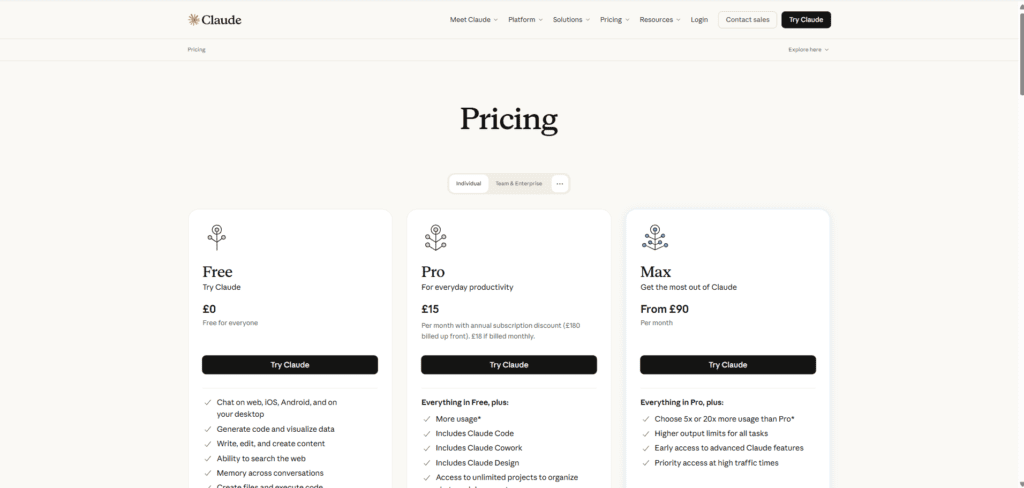
| Plan | Monthly (billed monthly) | Monthly (billed annually) | Notes |
|---|---|---|---|
| Free | $0 | — | No credit card required |
| Pro | $20 | ~$17 | Includes Claude Code, Cowork, unlimited Projects |
| Max 5x | $100 | $100 (no listed annual discount as of mid-2026) | 5x Pro usage |
| Max 20x | $200 | $200 | 20x Pro usage |
| Team Standard | $25/seat | $20/seat | 5-seat minimum |
| Team Premium | $125/seat | $100/seat | Includes Claude Code |
| Enterprise | Custom | Custom | Sales-negotiated, often $500–$15,000+/mo depending on scale |
Claude vs. ChatGPT Limits
Both Claude Pro and ChatGPT Plus cost $20/month. Neither company publishes exact message caps for its default model; both use dynamic, demand-based limiting.
The practical difference reported by users is that ChatGPT Plus historically leaned toward a clearer numeric message cap on its flagship model in some periods, while Claude’s five-hour rolling window plus weekly cap is a more session-oriented system.
Claude Pro includes Claude Code and Cowork agentic tooling bundled at no extra cost, which ChatGPT Plus does not offer in the same form.
Claude vs. Gemini
Google’s Gemini Advanced (bundled into Google One AI Premium) uses its own usage-limiting system tied to Google’s infrastructure and doesn’t publish a directly comparable rolling-window structure. Claude’s Projects and prompt-caching model is generally considered more transparent for document-heavy workflows, since cached content visibly doesn’t re-count against usage.
Claude vs. DeepSeek
DeepSeek’s consumer offerings are typically free or very low-cost with looser formal limits, but they run on different infrastructure with different reliability and data-handling profiles. For professional or regulated use, this is a much larger consideration than raw message count.
Claude vs. Grok
Grok’s usage tiers are bundled with X Premium subscriptions, and like Claude, exact message caps aren’t fully published — limits are described qualitatively rather than as a fixed daily number.
Claude vs. Google AI Studio
Google AI Studio, unlike claude.ai’s consumer plans, is a developer-facing playground with its own free-tier rate limits measured in requests per minute rather than a five-hour session structure — it’s a more direct comparison to the Claude API than to a claude.ai subscription.
Comparison Table: Claude vs. Competitors
| Assistant | Entry paid price | Limit structure | Published exact caps? |
|---|---|---|---|
| Claude (Pro) | $20/mo | Rolling 5-hour window + weekly cap | No |
| ChatGPT Plus | $20/mo | Model-dependent message caps | Partially |
| Gemini Advanced | ~$20/mo (Google One AI Premium) | Google-managed dynamic limits | No |
| Grok (X Premium+) | Bundled with X subscription | Qualitative tiering | No |
| DeepSeek | Free / low-cost | Looser rate limiting | No |
Best Alternatives (When Claude’s Limits Don’t Fit Your Workflow)
- ChatGPT Plus/Pro — comparable pricing, different tool ecosystem
- Gemini Advanced — tightly integrated with Google Workspace
- Claude API directly — bypasses claude.ai’s session limits entirely in favor of pay-per-token billing, better for automated or high-volume workloads
- Team/Enterprise migration — often the most cost-effective “alternative” for consistently heavy individual users, once seat economics are compared against Max
Who Should Upgrade
- Hitting the five-hour limit more than once or twice a week → Pro
- Hitting Pro’s limit almost daily, especially with Claude Code → Max 5x
- Running Claude as a full-time coding environment all day → Max 20x
- Rolling Claude out to 5+ people who need shared billing and admin controls → Team
- Needing SSO, audit logs, HIPAA-level compliance, or more than 150 seats → Enterprise
Expert Recommendations
Based on how the limit system is actually structured, the highest-leverage move for most people isn’t upgrading first — it’s fixing how Claude is used.
Moving reference material into Projects and keeping conversations shorter and more scoped routinely buys back a meaningful share of usage headroom before a plan upgrade is even necessary. Upgrade when the pattern is consistent heavy use, not after one bad session.
Myths vs. Facts
| Myth | Fact |
|---|---|
| “Claude Sonnet has a fixed 40-message daily limit” | No fixed public number exists; usage is dynamic and demand-based |
| “Limits reset at midnight” | They reset on a rolling five-hour window from your first message |
| “Claude Code has a separate subscription” | It draws from your existing plan’s usage pool — there’s no standalone Claude Code plan |
| “Uploading the same file repeatedly is free” | Only cached content (e.g., inside Projects) avoids re-counting |
| “Max plans give you a different, smarter model” | Max increases usage headroom, not model capability |
Pros and Cons of Claude’s Usage Limit System
Pros
- Rewards efficient, well-structured usage (caching, Projects)
- Session-based reset is more forgiving than a hard daily cutoff for bursty workflows
- Scales cleanly from Free to Enterprise with clear plan multipliers
Cons
- Lack of published exact numbers makes planning harder for budget-conscious users
- Demand-based fluctuation means the same plan can feel inconsistent day to day
- Team plans don’t pool usage across seats — a bottleneck can’t share headroom with underused colleagues
Case Study: Team Premium vs. Max — A Real Cost Comparison
For a single power user working alone, Max remains the leaner option since Team requires a five-seat minimum.
But once more than one person in an organization needs meaningful Claude access, a mix of Team Premium and Team Standard seats can outperform stacking multiple individual Max subscriptions — while also adding SSO, centralized billing, and admin controls that Max doesn’t offer at any price.
The breakeven point is less about raw usage math and more about whether your organization needs those administrative features at all.
Frequently Asked Questions
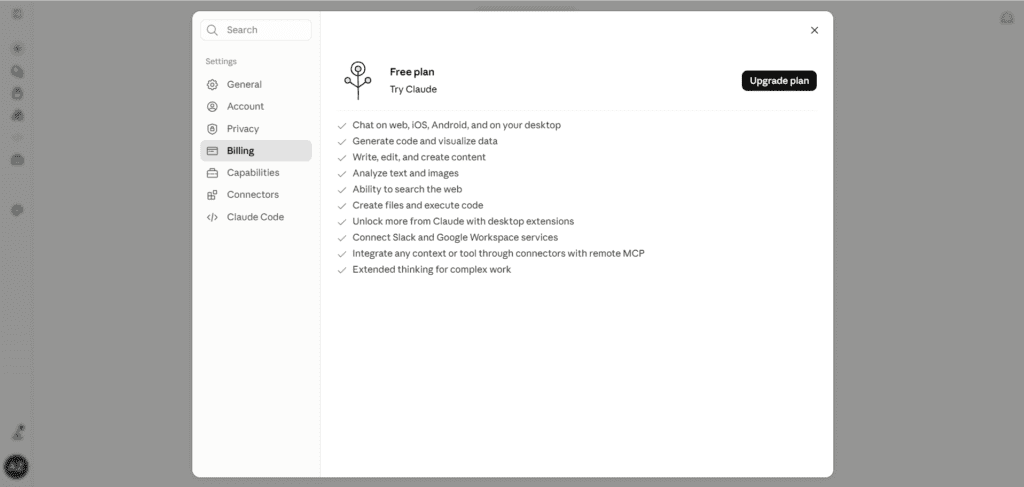
1. What is the Claude Sonnet message limit on the Free plan? Anthropic hasn’t published an exact number. Independent testing suggests free users typically get somewhere around 15–40 short messages within a five-hour window, dropping toward the lower end with longer messages or attachments. The real constraint is a compute budget, not a fixed count.
2. Does Claude Sonnet reset daily or hourly? Neither, technically. Claude uses a rolling five-hour session window that starts with your first message in that window, not a fixed daily or hourly clock.
3. How do I check my current Claude usage? Go to Settings > Usage on claude.ai (visible on Pro, Max, Team, and seat-based Enterprise plans) to see progress bars for your five-hour session and weekly limits.
4. Is there a separate Claude Code message limit? No separate subscription exists, but Claude Code sessions typically consume usage faster than chat because of repeated tool calls and file reads, even though it draws from the same plan-based pool.
5. Does Claude Max give unlimited messages? No plan is unlimited except certain usage-based Enterprise contracts. Max simply raises your usage ceiling by 5x or 20x relative to Pro.
6. What’s the Claude context window in 2026? 200,000 tokens across Free, Pro, Max, and Team on standard chat. Enterprise gets 500,000 tokens on supported models, and Claude Code offers a 1 million token window for Max, Team, and Enterprise on supported Opus models.
7. Why did my Claude limit hit after just a few messages? Long conversation history, large attachments, or a demanding model (like Opus) all raise the per-message compute cost, which can exhaust a session much faster than short, simple chats.
8. Do Claude.ai, Claude Code, and Claude Desktop share the same limit? Generally yes — usage across these surfaces typically counts against the same underlying plan-based limit, according to Anthropic’s usage documentation.
9. How much does Claude Pro cost in 2026? $20/month billed monthly, or roughly $17/month billed annually ($200 upfront).
10. What’s the difference between Claude Max 5x and Max 20x? Both add priority access and higher usage ceilings over Pro — Max 5x provides five times Pro’s session capacity for $100/month, and Max 20x provides twenty times Pro’s capacity for $200/month. Neither unlocks a different underlying model.
11. Can I buy extra Claude usage without upgrading my whole plan? Team and seat-based Enterprise plans can enable usage credits so members can keep working after hitting included limits, billed at API-equivalent rates. This isn’t universally available on individual Free/Pro/Max plans.
12. Does using Projects actually reduce usage consumption? Yes. Content stored in a Project uses retrieval-augmented generation, and previously uploaded material is cached — reusing it costs less than re-uploading the same files into a fresh chat each time.
13. What happens if I reach my weekly limit but not my five-hour limit? You’ll still be blocked from sending further messages until your weekly window resets, even if your current five-hour session has headroom left.
14. Is Claude Sonnet 5.5 different from Claude Sonnet 5 in terms of limits? The limit mechanics (five-hour window, weekly cap, plan multiplier) apply the same way regardless of Sonnet generation — but a newer, more capable model may process certain tasks more efficiently, indirectly affecting how much headroom a session leaves.
15. How many seats does Claude Team require? A minimum of five seats, with Standard and Premium seat types available, and Team plans can scale up to 150 seats before Anthropic recommends migrating to Enterprise.
16. Does Claude Enterprise have a message limit? Seat-based Enterprise plans have usage limits similar in structure to Team, while usage-based Enterprise contracts have no fixed cap and are billed on consumption instead.
17. Is Claude cheaper than ChatGPT? At the individual level, both Claude Pro and ChatGPT Plus cost $20/month, making them directly comparable on price; the differentiation comes from what’s bundled (Claude Pro includes Claude Code and Cowork at no extra cost).
18. What’s the fastest way to avoid hitting a Claude Sonnet limit mid-task? Start fresh conversations for new topics, move reference material into a Project, and reserve Opus for tasks that genuinely need it instead of defaulting to the most expensive model for routine chat.
19. Do file attachments count more heavily against my limit? Yes — larger files and images increase the token count processed per message, which draws down your usage budget faster than plain text.
20. Will Anthropic ever publish exact message limit numbers? Anthropic has historically kept limits demand-based and unpublished rather than fixed, and recent changes (like doubling Claude Code’s five-hour limits in 2026 after new compute deals) suggest limits will keep shifting with available compute rather than settling into one static number.
Summary and Final Verdict
Claude Sonnet’s message limit isn’t a single number you can memorize — it’s a rolling five-hour compute budget, backed by a weekly cap on paid plans, that flexes with conversation length, attachments, model choice, and real-time demand.
Free is genuinely usable for casual work but tightens quickly under sustained use. Pro is the right default for most individuals who use Claude daily.
Max earns its cost only once you’re hitting Pro’s ceiling regularly, not occasionally. Team makes sense the moment more than one person needs access alongside admin controls, and Enterprise is about compliance and scale as much as raw usage headroom.
Best plan by user type:
| User type | Recommended plan |
|---|---|
| Casual, occasional user | Free |
| Daily individual user | Pro |
| Heavy coder / Claude Code power user | Max 5x or 20x |
| Small business, 5+ people | Team Standard, with select Premium seats |
| Regulated industry / 150+ seats | Enterprise |
If you’re consistently frustrated by limits, the fix is usually two things at once: tighten your usage habits (Projects, shorter threads, right-sized model choice) and upgrade once, not repeatedly, once your pattern of use is clear.
Author
Jeevesh Tripathi — AI Researcher & SEO Content Specialist
Jeevesh Tripathi researches AI models, LLM platforms, subscription pricing, usage limits, prompt engineering, and productivity tools. His work focuses on translating complex AI topics into practical, evidence-backed guides for professionals, developers, businesses, and everyday users. Every article follows Google’s EEAT principles with extensive fact-checking, hands-on research, and references to official documentation wherever possible.
Email: jeevesh@aizolo.com
