Recruiting a new employee is only the first step to creating a successful working relationship.
After an employee has accepted your offer you will need to set up their documentation, give them access to your systems and get them acquainted with the team.
Without a written process in place this can lead to inconsistencies. For example one employee may receive their laptop ahead of their start date whilst another may have to wait until their first day for access to IT.
Training and check-ins may also be forgotten.
Creating an onboarding SOP ensures that everyone gets treated the same when onboarding a new employee.
It creates clarity around what should happen, who is responsible and when. This ensures that HR, managers and other departments are all working together.
This guide will show you how to create an employee onboarding SOP. It includes 8 actionable steps, an example flow chart, some role specific tips and a checklist.
When creating an employee onboarding SOP, AI can help organize scattered information, draft instructions, and turn existing workflows into structured documentation.
If you’re building SOPs for other business functions as well, read our guide on how to use AI to create standard operating procedures (SOPs).
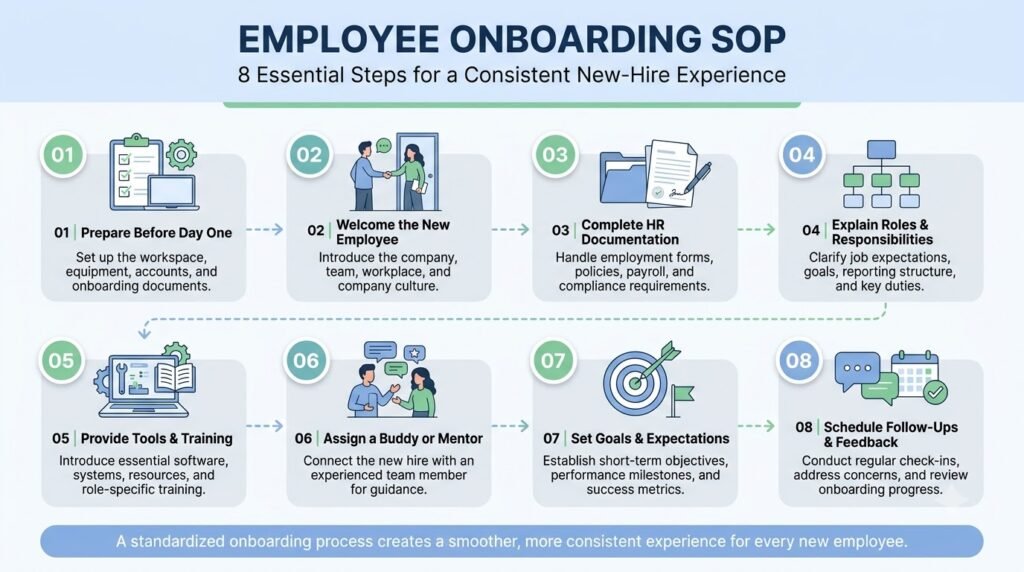
Table of Contents
What Is an Employee Onboarding SOP?
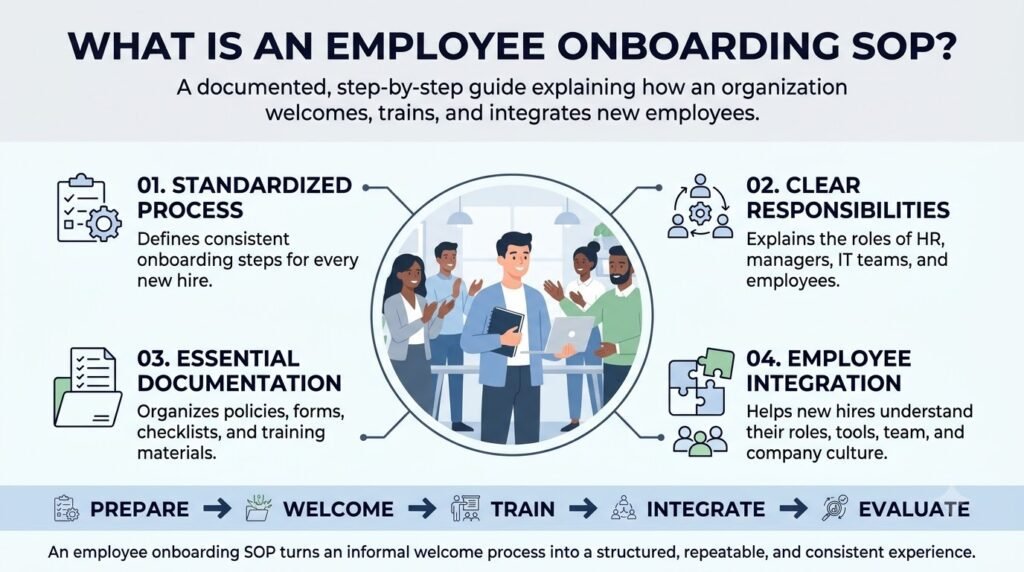
An employee onboarding SOP (Standard Operating Procedure) provides a clearly defined set of actions that outline the process for introducing new employees to your organisation.
This will include any actions that need to take place prior to the employee joining, on their first day and throughout their induction and follow up.
A complete onboarding SOP typically includes:
- Purpose: Why the onboarding procedure exists.
- Scope: Which employees and departments it covers.
- Responsibilities: Who manages each onboarding activity.
- Procedure: The sequence of activities to complete.
- Documentation: Which records must be collected and maintained.
- Quality checks: How the company verifies that onboarding tasks are complete.
- Revision history: When the procedure was reviewed or updated.
For example, when a new marketing executive joins the company, HR may handle any paperwork, IT will set up their accounts and the Marketing Manager will create the training schedule.
These can all be brought together within an onboarding SOP.
Employee Onboarding SOP vs. Onboarding Checklist vs. Onboarding Plan
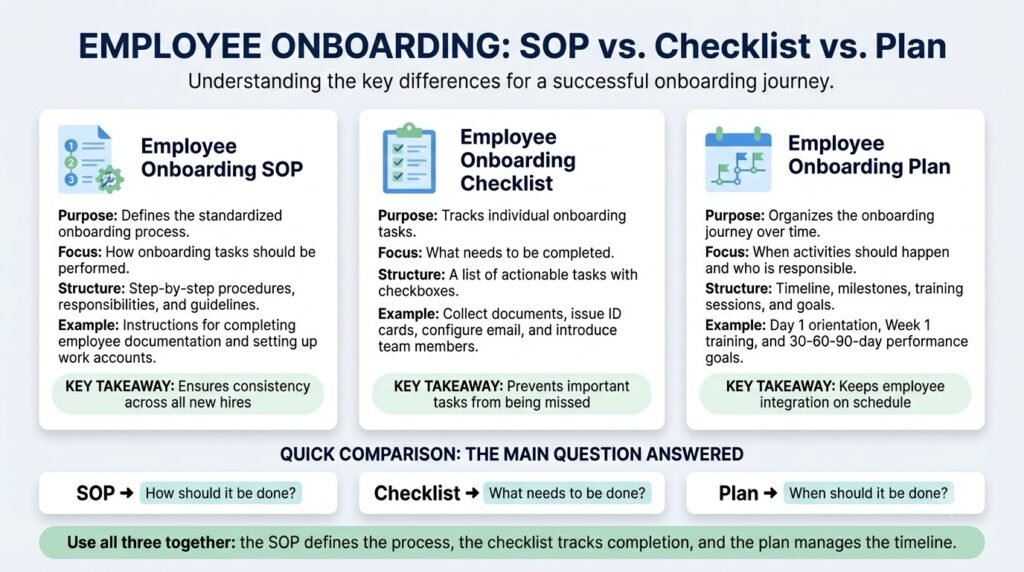
These three documents are related, but they serve different purposes.
| Document | Main purpose | Example |
|---|---|---|
| Employee onboarding SOP | Explains how the complete process should work | HR collects documents and verifies joining records |
| Onboarding checklist | Tracks individual tasks | Employee ID created, email configured |
| 30-60-90-day onboarding plan | Defines learning and performance milestones | Understand products in 30 days |
An onboarding checklist helps employees track activities, while an onboarding plan establishes learning goals.
The SOP connects both by explaining who performs each activity, when it happens, and what completion means.
For a small business, all three can be maintained as separate sections within one onboarding documentation system.
Why Does Your Business Need an Employee Onboarding SOP?
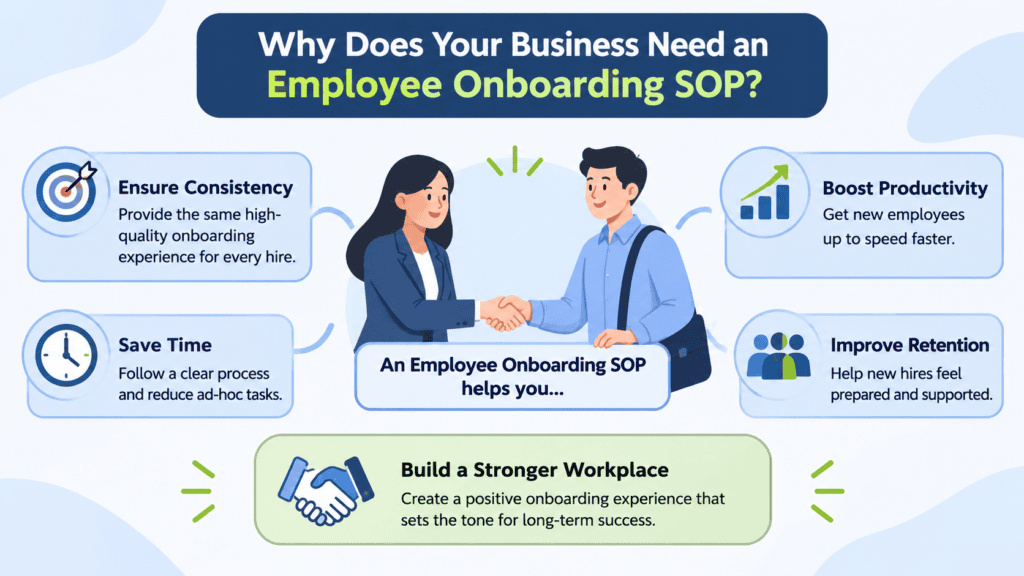
Documented processes allow businesses to ensure new employees are supported.
Here are five practical reasons to establish one.
1. Maintain a Consistent New-Hire Experience
All new employees need to be provided with the key information, resources and support.
Without set processes, quality of onboarding can be inconsistent depending on who is managing it.
An SOP ensures that all new employees receive a baseline level of support, but can be tailored for specific roles.
2. Reduce Missed Tasks and Delays
Onboarding an employee can involve several departments. If tasks are missed it can cause delays.
For example, if the IT department are not informed of your employee joining in advance they may not have the necessary tools available for your employee to start with.
Documenting the process will help to show what tasks need to be completed by when. This helps teams know when they need to complete their part of the process.
3. Clarify Departmental Responsibilities
Onboarding is not exclusively an HR responsibility.
HR, managers, IT, training teams, and coworkers may all contribute to the process. The Society for Human Resource Management also identifies these different responsibilities in its employee onboarding roles and responsibilities guide.
An SOP makes these responsibilities explicit instead of assuming that everyone knows what to do.
4. Improve Training and Knowledge Transfer
New employees need more than company information. They must understand the actual procedures they will follow in their roles.
An onboarding SOP will help you determine what training resources, internal documentation, demonstrations and supervisors you have in place to train your employees.
5. Make the Process Easier to Repeat
If you are recruiting more than one employee, your HR department won’t have to re-create your onboarding process.
Having an onboarding SOP to use multiple times means you have a consistent starting point. Your teams can tailor your process to suit different roles, departments and working styles but will still have all the key elements covered.
Eight Essential Steps in an Employee Onboarding SOP
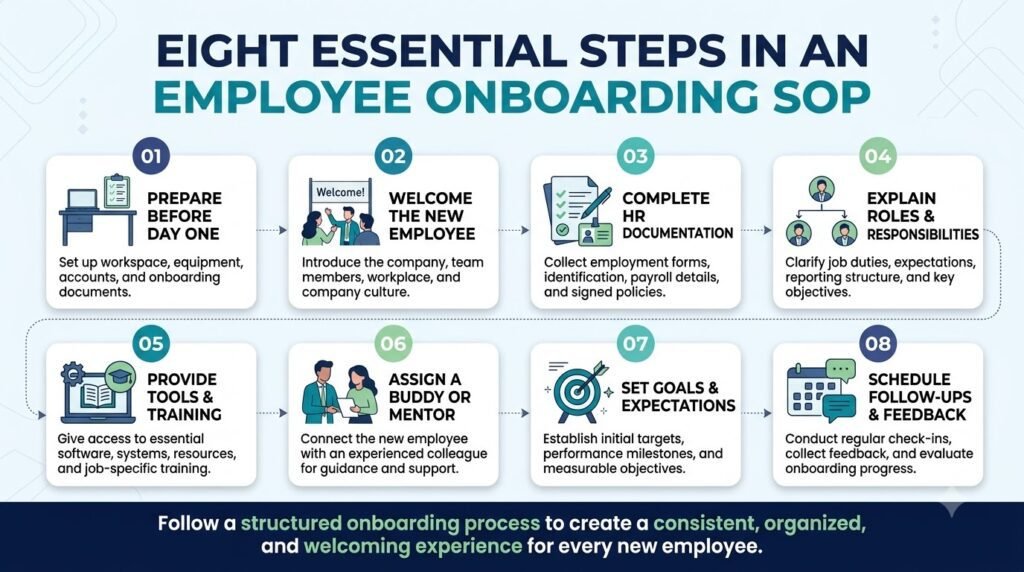
A good onboarding process will ensure that your employees will have a smooth transition from accepting the offer to settling into their new role.
Step 1: Confirm the Hiring Details and Assign Ownership
The process should start once they have accepted the offer and have agreed upon the details of their joining.
HR should create an onboarding record containing:
- Employee’s full name and job title.
- Department and reporting manager.
- Confirmed joining date.
- Employment type and work location.
- Required joining documents.
- Assigned onboarding coordinator.
HR should also notify the relevant departments about the upcoming joining date.
Responsible: HR or the designated onboarding coordinator.
Completion condition: The employee’s joining details are recorded, and all relevant departments have received the required information.
Step 2: Complete Pre-Boarding Activities
Pre-boarding covers activities that take place between offer acceptance and the employee’s first working day.
This stage helps prevent unnecessary delays after the employee joins.
HR should:
- Send a welcome message with joining instructions.
- Share the list of required employment documents.
- Provide relevant company policies and employee handbook information.
- Confirm joining time and workplace location or virtual meeting details.
- Inform the manager about the employee’s joining schedule.
- Coordinate equipment and workspace requirements.
Ensure the accounts, devices and access are correct for the role of the employee.
Ensure the equipment, communication tools and access is in place for remote employees.
Responsible: HR, IT, and the hiring manager.
Completion condition: Joining instructions are shared, required preparations are confirmed, and unresolved dependencies have an assigned owner.
Step 3: Complete Joining Formalities and Documentation
Next step is gathering, verifying and keeping the necessary employee records.
Depending on the location, type of employment and relevant legislation, documents may include:
- Signed employment agreement.
- Identity and address information.
- Educational or professional qualifications, where required.
- Bank and payroll information.
- Emergency contact details.
- Tax and statutory declarations.
- Confidentiality or information security agreements.
- Employee handbook acknowledgment.
These documents should be kept by HR following the companies approved documentation procedures.
Only authorised personnel should have access to sensitive employee information.
Responsible: HR or the designated employee records administrator.
Completion condition: Required documents are received, verified, and stored in the appropriate employee record system.
Important: Documentation requirements vary by country and jurisdiction. For example, organizations in India subject to applicable EPF requirements should account for relevant EPFO joining declarations, including Form 11 where applicable. Refer to the official EPFO Form 11 rather than relying on a generic international checklist.
Step 4: Prepare Workplace Access and Equipment
An employee should have the resources required to begin working on their first day.
This stage involves coordinating the setup of physical and digital workplace resources.
The IT team should:
- Create the employee’s official email account.
- Configure approved communication tools.
- Provide access to relevant internal platforms.
- Assign role-specific software permissions.
- Prepare the required laptop or workstation.
- Configure authentication and security controls.
- Share basic technical support instructions.
The manager should confirm that the employee receives access only to the systems and information necessary for their responsibilities.
Responsible: IT department, with confirmation from the hiring manager.
Completion condition: Required equipment and authorized access are tested and ready before the employee starts.
Some onboarding processes require employees to understand internal tools, software, and technical procedures. AI can help turn existing technical information into clearer, structured documentation. Learn how to use AI for generating technical product documentation to explore this approach.
Step 5: Conduct First-Day Orientation
The first day should introduce the employee to the organization and help them understand how their new workplace operates.
HR and the hiring manager should coordinate an orientation schedule.
A practical first-day agenda might include:
| Activity | Responsible person |
|---|---|
| Welcome and introductions | HR |
| Company overview | HR or leadership |
| Policies and workplace guidelines | HR |
| Team introduction | Manager |
| Role and responsibilities discussion | Manager |
| Systems and tools demonstration | IT or assigned trainer |
| Initial questions and support | Manager or buddy |
For remote employees, the same activities can be conducted through scheduled video meetings and digital onboarding materials.
Avoid overwhelming new employees with too much information on their first day. Important policies, procedures, and training resources should remain available for later reference.
Responsible: HR and hiring manager.
Completion condition: The employee understands the basic workplace expectations, knows whom to contact, and has completed the essential orientation activities.
A standardized onboarding process should also explain how employees can access shared resources and follow team-specific practices. For smaller organizations, a shared AI workspace for small teams can help new members find essential prompts, workflows, and guidance.
Step 6: Assign Role-Specific Training
General orientation explains the company. Role-specific training explains how the employee should perform their actual work.
The hiring manager should create a training schedule based on the employee’s position and experience.
For example:
| Job role | Initial training requirements |
|---|---|
| Marketing executive | Brand guidelines, content workflows, campaign tools |
| Sales representative | Product knowledge, CRM usage, sales procedures |
| Customer support executive | Ticket management, escalation rules, response standards |
| Software developer | Development environment, code repository, review process |
| Accountant | Accounting software, reporting procedures, approval workflows |
Each training activity should have a responsible trainer, expected completion date, and method of verifying understanding.
A manager should not mark training complete simply because the employee attended a session. Practical demonstrations or supervised tasks may be needed to establish whether the employee can perform the work correctly.
Responsible: Hiring manager and assigned trainer.
Completion condition: Required training activities are completed and the employee demonstrates the expected level of understanding.
Step 7: Conduct Scheduled Check-Ins and Progress Reviews
Onboarding should continue beyond the first day.
Managers should schedule regular conversations to understand how the employee is adjusting, identify knowledge gaps, and resolve difficulties.
A simple review schedule could include:
| Timeline | Review focus |
|---|---|
| End of first week | Initial experience, access issues, and training questions |
| 30 days | Understanding of responsibilities and early progress |
| 60 days | Skill development, work quality, and support needs |
| 90 days | Progress against agreed expectations and development goals |
These reviews should be appropriate to the position and company policies.
Managers should document important feedback and assign follow-up actions where necessary.
Responsible: Hiring manager, with HR support.
Completion condition: Scheduled reviews are conducted, feedback is recorded, and outstanding development actions have owners.
Step 8: Complete Onboarding and Transfer to Regular Operations
The final stage establishes whether the employee has completed the formal onboarding requirements.
HR and the manager should review the onboarding record to confirm that:
- Required joining documents are complete.
- Equipment and system access have been provided.
- Mandatory orientation is complete.
- Role-specific training requirements have been addressed.
- Relevant policies have been acknowledged.
- Initial progress reviews have been conducted.
- Outstanding actions have assigned owners.
The manager should also clarify the employee’s ongoing responsibilities, performance expectations, and regular reporting structure.
If some activities remain incomplete, the onboarding record should remain open until the outstanding requirements are resolved or formally transferred to an appropriate owner.
Responsible: HR and hiring manager.
Completion condition: All mandatory onboarding requirements are verified, and the employee has transitioned into the regular team workflow.
Sample Employee Onboarding SOP Template
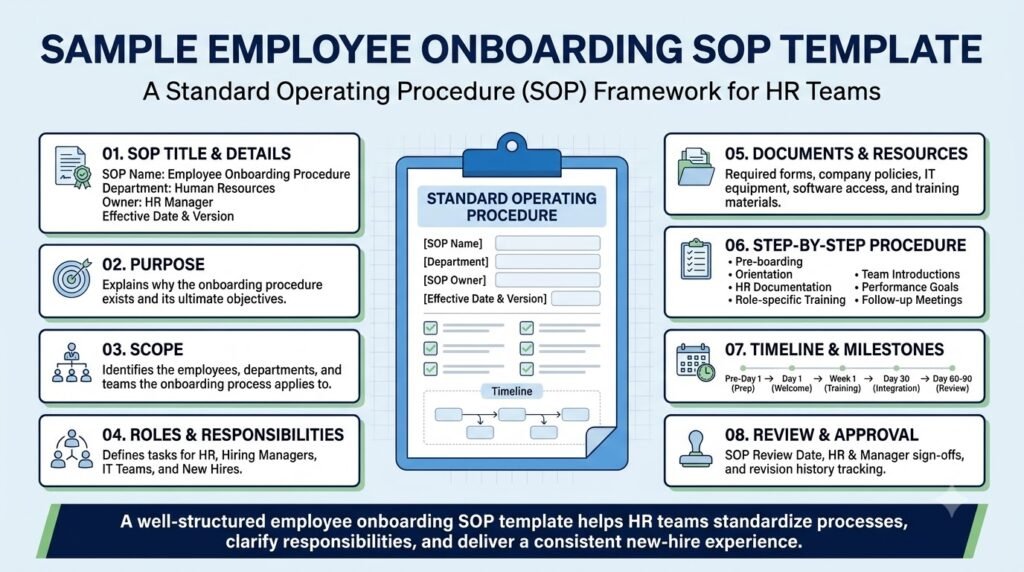
The following example shows how a company can translate the eight stages into a practical operating document.
It is an illustrative template, not a universal employment policy. Replace the example responsibilities and timelines with your actual company procedures.
Employee Onboarding SOP
| Document field | Example |
|---|---|
| SOP ID | HR-ONB-001 |
| Department | Human Resources |
| Process owner | HR Manager |
| Applies to | New employees |
| Version | 1.0 |
| Review frequency | Annual or after major process changes |
| Approval | HR Head / Management |
Operational Workflow
| Stage | Activity | Owner | Expected completion |
|---|---|---|---|
| Pre-boarding | Confirm joining details | HR | Before joining |
| Preparation | Configure accounts and equipment | IT | Before joining |
| Documentation | Verify employee records | HR | As per policy |
| First day | Conduct orientation | HR/Manager | Day 1 |
| Training | Complete role-specific training | Manager | First weeks |
| Review | Conduct progress check-ins | Manager | 7, 30, 60, 90 days |
| Closure | Verify onboarding requirements | HR | At agreed milestone |
Exception Handling
- Missing documents: HR contacts the employee and records the outstanding requirement.
- Delayed equipment: IT provides an approved alternative or escalates the issue.
- Incomplete training: The manager assigns additional training.
- Missed review: The manager reschedules and records the reason.
Approval and Maintenance
The HR process owner reviews the document, obtains the required approval, and maintains the current version in the designated company repository.
This format helps teams understand not just what needs to happen, but also who owns each activity and how completion is verified.
How Should Onboarding Responsibilities Be Divided?
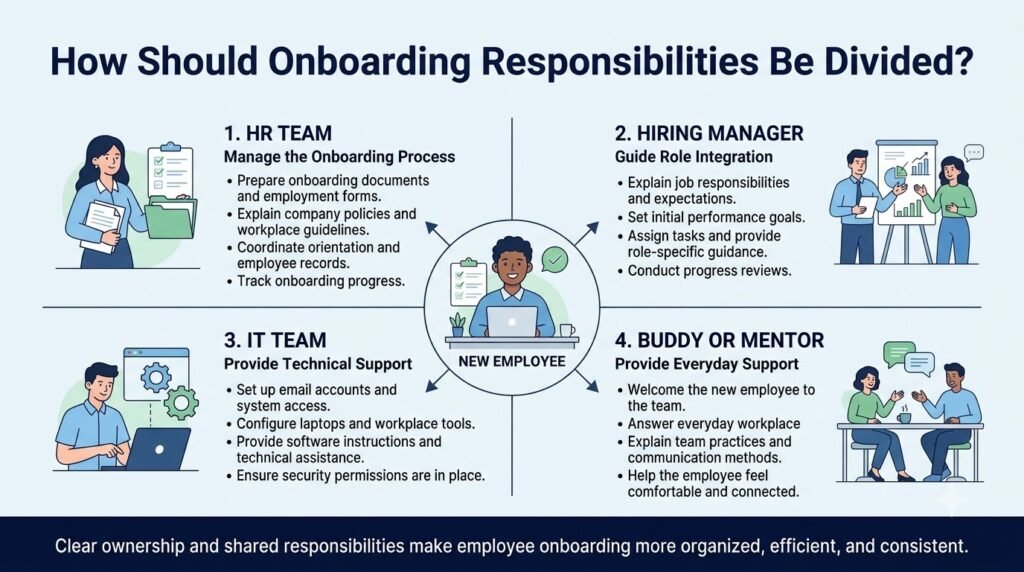
A common issue with onboarding processes is that it is not clear who has responsibility.
Saying that HR and the manager have responsibility does not clarify who is responsible for doing something.
Instead, give responsibility for each activity to a single person.
| Department or role | Primary responsibility |
|---|---|
| HR | Joining records, employee documentation, orientation |
| IT | Equipment, accounts, system access, security |
| Hiring manager | Job expectations, training, progress reviews |
| Assigned buddy | Informal guidance and team integration |
| Employee | Completing assigned tasks and required learning |
| Leadership | Communicating organizational goals and culture |
These should be tailored according to how big your company is. In a small business, one person may carry out multiple roles, however, these should be identified within the SOP.
For instance, the founder of the business may also be the hiring manager and HR coordinator. This should be identified within the procedure.
How to Adapt an Employee Onboarding SOP for Different Roles
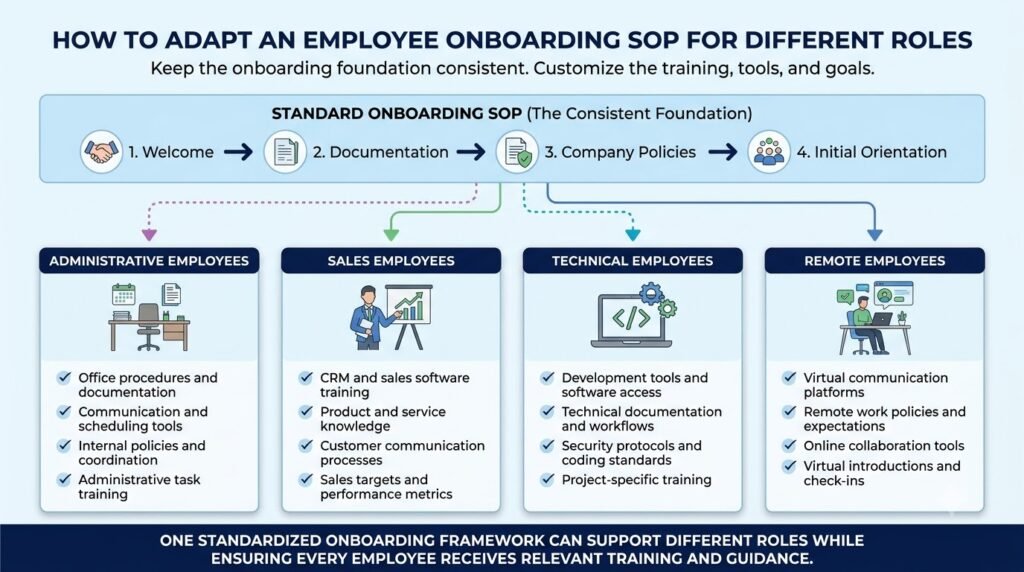
Whilst a single onboarding process can be used across multiple departments, there should be different training and access requirements.
There are three key areas to consider.
Department-Specific Training
A sales representative needs product knowledge and customer communication training. A developer needs development environment access and code review guidance.
The SOP should outline the general onboarding activities and include separate training processes for specialist activities.
Remote and Hybrid Employees
Remote employees may need additional instructions covering:
- Equipment delivery and confirmation.
- Virtual orientation meetings.
- Digital document submission.
- Remote communication expectations.
- Access to shared files and systems.
- Technical support arrangements.
Hybrid employees may require both physical workplace and remote access instructions.
Senior and Specialized Employees
Senior level employees may require more targeted onboarding relating to making decisions, organisational structure, leading teams and strategic focus.
The onboarding process should be tailored to the role of the employee.
How to Create and Maintain an Employee Onboarding SOP Using AI
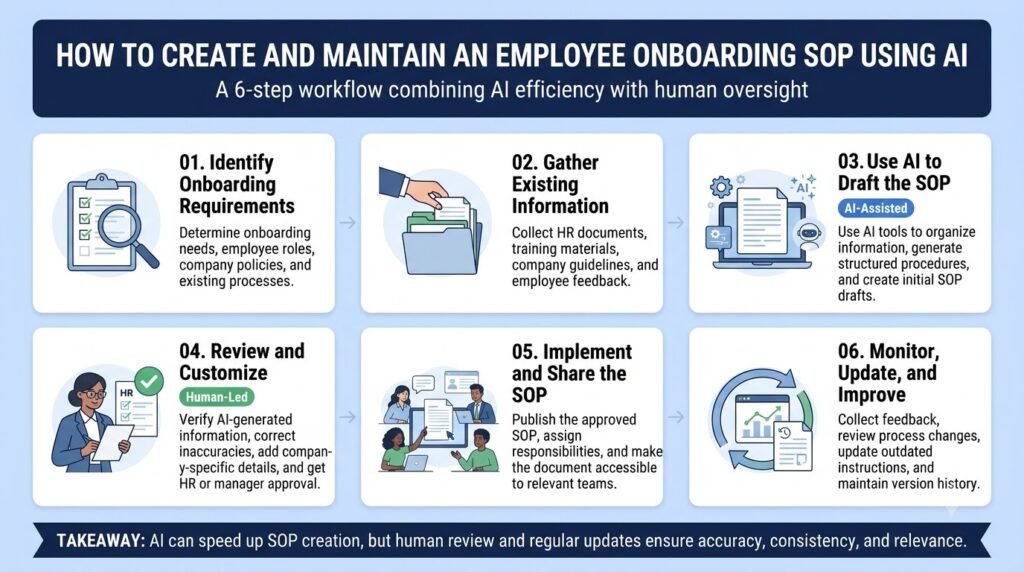
AI can help businesses structure onboarding information, create processes and identify gaps.
It is important however to use accurate processes within the company to avoid creating any new requirements or responsibilities.
A practical approach is to follow these steps.
1. Collect Existing Onboarding Information
Gather the materials already used by the company:
- Joining checklists.
- Welcome emails.
- Employee handbooks.
- Training documents.
- IT setup instructions.
- Manager onboarding notes.
- Existing HR procedures.
This gives AI a factual foundation for organizing the document.
2. Use AI to Organize the Procedure
Provide the collected information to an AI assistant and request a structured onboarding SOP.
Sample AI Prompt: Create an Employee Onboarding SOP
Create a detailed employee onboarding SOP using the company information provided below.
Organize the procedure into these stages:
- Hiring confirmation
- Pre-boarding
- Joining documentation
- IT and workplace preparation
- First-day orientation
- Role-specific training
- Progress reviews
- Onboarding completion
For every activity, specify:
- Responsible department or role.
- Required action.
- Expected timeline.
- Required documents or resources.
- Completion criteria.
- Possible exceptions and escalation procedures.
Do not invent company policies, legal requirements, or processes that are not included in the source material.
Mark missing information as [REQUIRES COMPANY INPUT].
Use clear language suitable for HR employees and hiring managers.
Company information:
[Insert verified onboarding notes, documents, and existing procedures.]
3. Review the Generated Procedure
An AI-generated document should be treated as a draft.
HR and department managers should verify:
- Whether each activity reflects the actual process.
- Whether the assigned responsibilities are correct.
- Whether the timelines are realistic.
- Whether required documentation is accurate.
- Whether any regulatory or security requirements are missing.
For additional quality checks, you can use more than one AI model to review the same draft.
AiZolo can support this review process by allowing users to run the same prompt across multiple AI models and compare their responses side by side. Its Smart Prompt Manager can also help organize and reuse prompts for recurring documentation tasks.
The final SOP should still be reviewed and approved by the appropriate company personnel.
4. Organize and Maintain the Documentation
Once you’ve approved your onboarding SOP, save it in an accessible place for authorised staff.
This is where a broader business process documentation system becomes useful. It will help you organize your individual processes and ensure that your important processes aren’t lost in a sea of emails, spreadsheets and shared files.
Assign an owner who is responsible for reviewing the document whenever:
- The hiring process changes.
- New software or HR systems are introduced.
- Company policies are updated.
- Responsibilities move between departments.
- Feedback identifies recurring onboarding problems.
AI can help revise the wording and structure, but process owners must confirm that the updated document matches actual company practices.
Common Employee Onboarding SOP Mistakes to Avoid
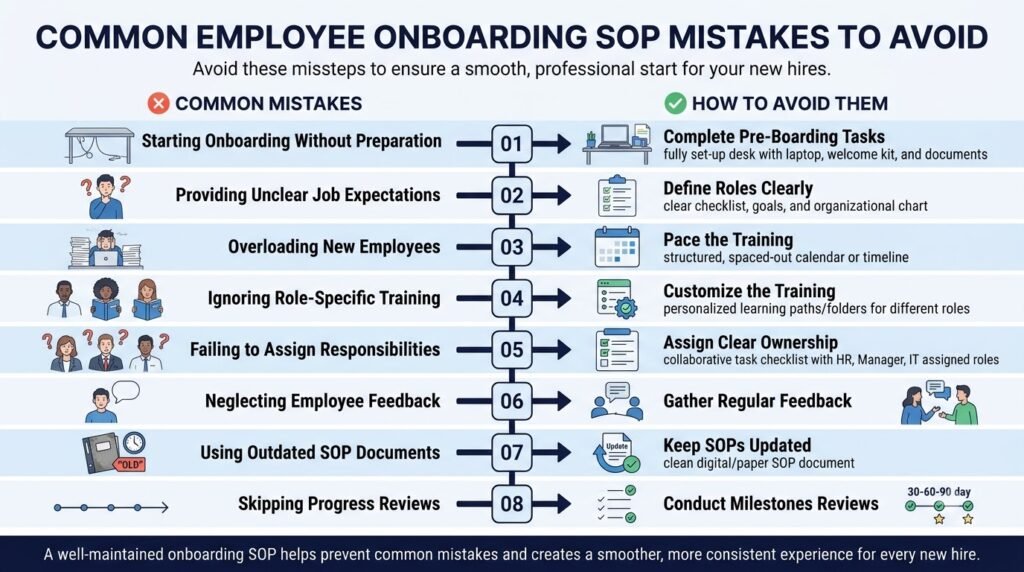
Even a well-written SOP can become ineffective if it does not reflect how the business actually operates.
Watch out for these common problems.
| Mistake | How to avoid it |
|---|---|
| Unclear responsibilities | Assign a specific owner to each activity |
| Generic training instructions | Add department-specific training requirements |
| No preparation before joining | Introduce a pre-boarding stage |
| Missing system access checks | Verify access before the employee’s start date |
| No follow-up schedule | Define review milestones |
| Outdated documentation | Assign an owner and review schedule |
| Treating AI drafts as approved policies | Require human verification and authorization |
The most important principle is to make the procedure usable by the people responsible for carrying it out.
If your SOP is not matching the actual workflow of your company and is just describing how it should work then this can cause more confusion.
How to Measure Employee Onboarding Effectiveness
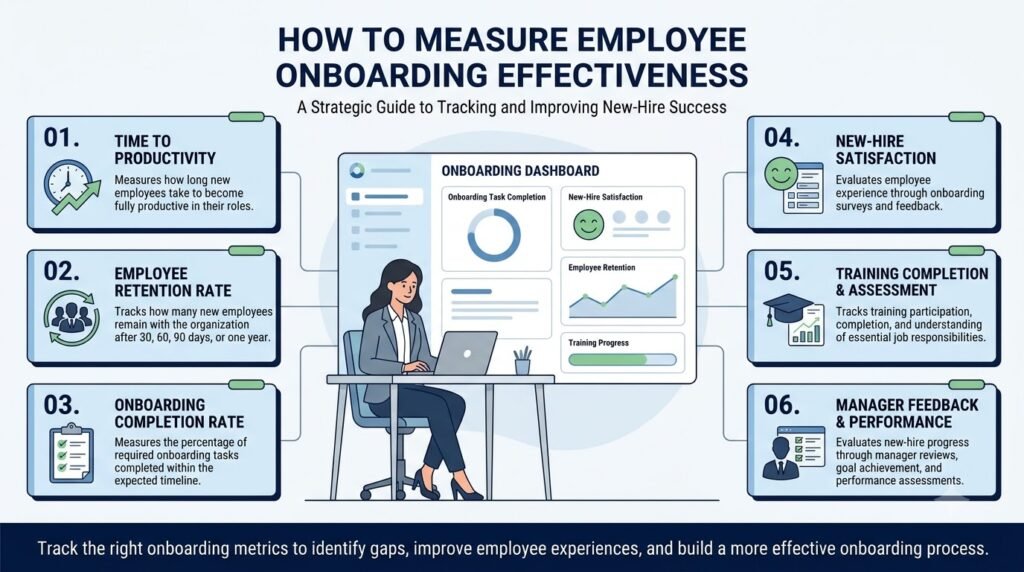
Creating the SOP is only one part of the work. Businesses should also evaluate whether the process is delivering the intended results.
Consider tracking the following indicators:
| Metric | What it measures |
|---|---|
| Onboarding task completion | Whether required activities are completed |
| Time to system readiness | How quickly employees receive necessary access |
| Training completion | Whether assigned learning activities are finished |
| Time to role readiness | How long employees take to meet agreed role expectations |
| New-hire feedback | How employees evaluate their onboarding experience |
| Outstanding onboarding tasks | Whether unresolved activities remain |
These should be seen in context.
For example, you may have a developer who will take longer to become fully productive. You will need to define time to readiness targets based on their role.
The objective is to identify bottlenecks, improve coordination, and make the onboarding experience more consistent.
Frequently Asked Questions
1. What Should an Employee Onboarding SOP Include?
The onboarding process should be broken down into the following sections: Purpose, Scope, Responsibilities, Joining Documents, Pre-Boarding, Day 1 Orientation, Training, Post-Training Activities, Completion Criteria, Revision History and also include how you will manage any missing documents, late equipment and incomplete training.
2. Who Is Responsible for Employee Onboarding?
Whilst HR usually oversee the onboarding process there are specific departments that are responsible for certain elements. IT will set up the equipment and give access to the systems. Managers will offer training relevant to their role. The new employee will also be given an assigned coworker/buddy to help them understand the daily practices of the workplace.
3. How Long Should an Employee Onboarding Process Take?
This will depend on the company, the role and how complex the tasks are. Usually an initial period of preparation will start before joining the company with onboarding taking place for up to 30, 60 or 90 days. Some roles will require more time to train.
4. What Is the Difference Between an Onboarding SOP and an Onboarding Checklist?
An onboarding SOP provides detailed information on the process including who is responsible, how long it will take, what should be done and to what standard. An onboarding checklist is a document that tracks tasks. These can be used in conjunction with each other using an onboarding system.
5. Can AI Create an Employee Onboarding SOP?
Yes. AI can help to structure current HR documentation, create clear guidance from process notes, create checklists and identify gaps. However, it is important that the HR professional and relevant managers confirm that the responsibilities, employment policies, documentation and legal requirements are correct before approving the procedure.
6. How Often Should an Employee Onboarding SOP Be Updated?
Review SOPs at least annually and when major changes have occurred that will affect the recruitment process. If there are any major policy changes, software changes, role changes or employment requirements then the SOP should be reviewed sooner.
7. Should Every Department Have a Separate Onboarding SOP?
Not necessarily. It would be possible to have a main SOP for onboarding covering general processes and then individual SOPs for the training, tools and duties of each role.
Conclusion
An onboarding SOP ensures that new staff are welcomed in a consistent way and sets clear roles for each department.
The best process will define who is responsible for what, realistic timeframes, what training is required, what needs to be completed and how to handle any exceptions.
Document your current onboarding process. Identify where there are any unclear roles and use this to create a process that will work in line with how you currently operate.
Using AI can help to structure your information and give you an initial draft however it should always be checked by those responsible for the process.
About the Author
Anshika Verma is a content researcher and writer at AiZolo, focused on researching AI tools, models, and creator technologies. She creates practical guides that help readers understand AI applications and use technology more effectively in their workflows.