Standard operating procedures are used by businesses to ensure that everyday processes are repeated consistently, staff can be trained effectively and customers can be served efficiently.
Often putting these processes into written form can be difficult.
The best SOP templates provide you with a framework to begin your documentation.
You won’t have to spend time thinking about how you want to structure your documents as you’ll be able to personalise the sections to fit your business needs.
AI tools can make this process easier by helping you draft instructions, organize workflows, and adapt generic templates to your specific needs.
For example, AiZolo lets you compare responses from multiple AI models in one workspace, making it useful when developing SOP drafts, refining instructions, and checking whether important process details have been overlooked.
In this guide we will look at 10 SOP templates you can use across your business operations. We’ll also explain what should go within each of them and how you can use AI to tailor them to your processes.
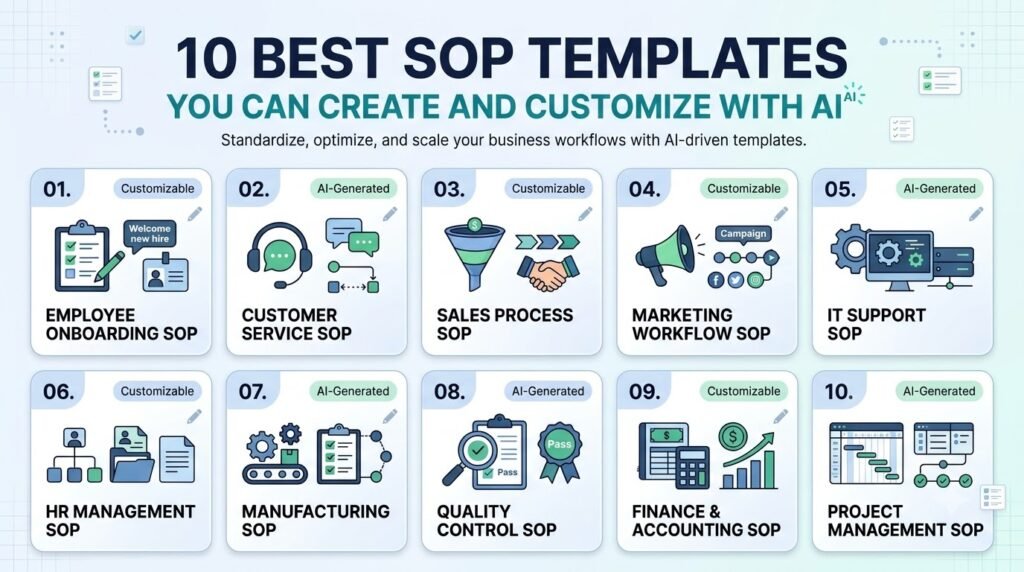
Table of Contents
What Makes a Good SOP Template?
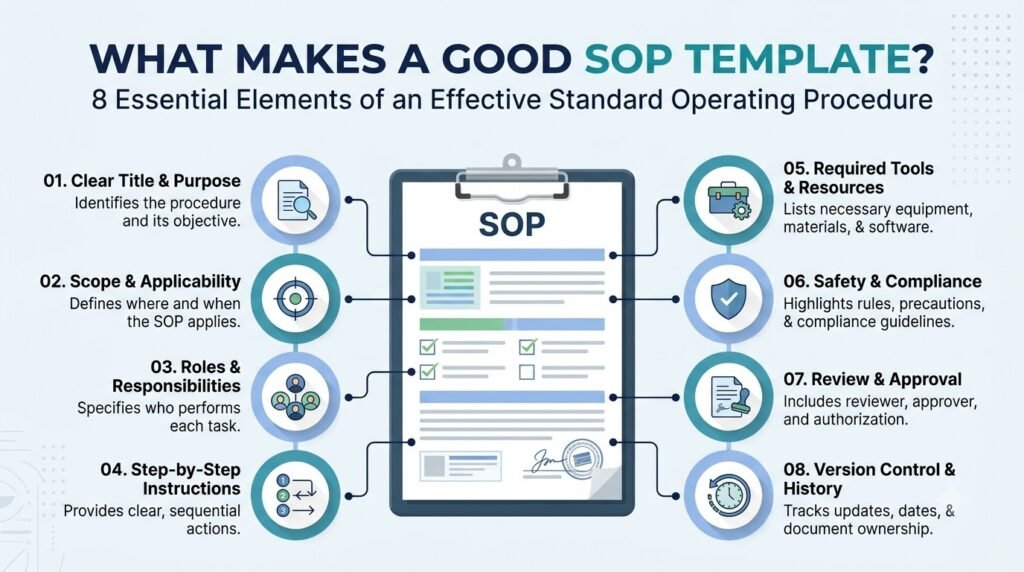
A good standard operating procedure template will make it easier to understand and follow instructions whilst being flexible enough to handle various tasks, departments and roles.
Although the structure will vary depending on the procedure, most useful SOP templates will contain the following:
| SOP component | What to include |
| SOP title | Name of the documented process |
| Document ID | Unique reference number |
| Purpose | Why the procedure exists |
| Scope | Activities and departments covered |
| Responsibilities | People responsible for each activity |
| Requirements | Tools, equipment, and resources |
| Procedure | Numbered instructions or workflow |
| Exceptions | Actions to take when something goes wrong |
| Quality checks | How to verify successful completion |
| Approval | Person authorized to approve the document |
| Revision history | Record of updates and changes |
Depending on the type of procedure, you may have fewer fields for an administration task, but more controls, recording and approvals for manufacturing or health care.
For reference, Smartsheet’s SOP template collection provides examples of different formats, including simple, HR, IT, marketing, manufacturing, and customer service templates.
10 Best SOP Templates for Different Business Needs
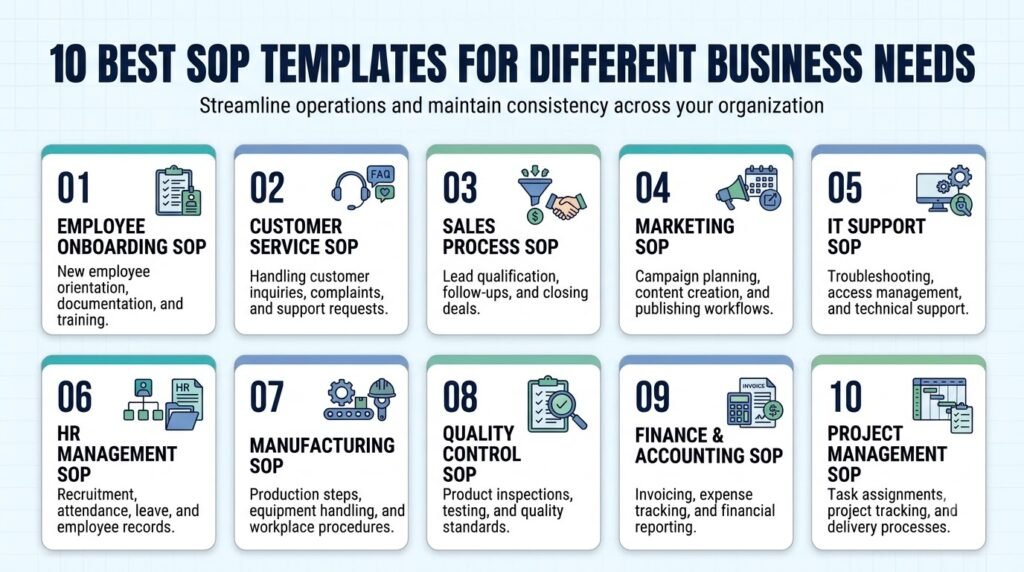
The following templates are commonly used in business. They include information about their purpose, what sections to include and an example of how they can be adapted.
1. Basic Step-by-Step SOP Template
Best for: Small businesses, administrative tasks, and everyday operations.
A simple SOP format is useful for processes that are simple to follow. This gives your staff straightforward guidance.
A small business may use this format to guide them through their invoicing process, opening up the office each day or carrying out regular stock checks.
Recommended template structure:
| Section | Information |
| Procedure name | Invoice Processing |
| Purpose | Ensure invoices are processed consistently |
| Responsible person | Accounts Assistant |
| Required resources | Invoice records and accounting software |
| Step 1 | Receive the supplier invoice |
| Step 2 | Check invoice details |
| Step 3 | Verify the purchase order |
| Step 4 | Obtain the required approval |
| Step 5 | Record the invoice |
| Step 6 | Schedule payment |
| Completion check | Confirm that the invoice is recorded correctly |
Define your processes. This will be unique to your organisation so replace with your own process. Define roles and who should perform what task. Define what systems are to be used.
Keep it brief. The more approvals or processes you add the more complex simple processes become.
2. Employee Onboarding SOP Template
Best for: HR teams, recruitment managers, and growing businesses.
An employee onboarding SOP documents what should happen after a candidate accepts a job offer. Helps with HR, management and IT coordination.
A good onboarding template will include pre-employment tasks, a new employee induction process and tasks throughout the early stages of employment.
Recommended template structure:
| Section | Information |
| Procedure name | New Employee Onboarding |
| Process owner | HR Manager |
| Trigger | Candidate accepts the offer |
| Pre-joining activities | Documentation and account setup |
| First-day activities | Introduction and orientation |
| Manager responsibilities | Role explanation and initial training |
| IT responsibilities | Device and system access |
| Follow-up | Scheduled check-ins |
| Completion check | Required onboarding activities completed |
How to customize it: Create separate onboarding processes for remote staff, in-office staff, interns and senior hires if they have different requirements.
For a more detailed example covering responsibilities, onboarding stages, and an employee checklist, explore our guide on creating an employee onboarding SOP.
3. HR and Recruitment SOP Template
Best for: HR departments and recruitment agencies.
There are a number of activities involved in the recruitment process.
An HR SOP template can be used to provide standardised roles and documentation within the recruitment process.
Recommended template structure:
| Section | Information |
| Procedure name | Recruitment and Candidate Selection |
| Process owner | HR Manager |
| Vacancy approval | Department head approval |
| Job description | Approved role requirements |
| Candidate sourcing | Recruitment channels |
| Initial screening | Resume and eligibility review |
| Interviews | Interview stages and assigned reviewers |
| Final selection | Evaluation and approval |
| Offer management | Offer preparation and communication |
| Record keeping | Candidate documentation |
How to customize it: Outline your recruitment process, how you will assess interviews, who has approval and the quality of communication with candidates.
For example, a recruitment agency may have extra steps to gain client approvals whilst an internal HR department may need to work with department managers and finance.
4. Customer Service SOP Template
Best for: Customer support teams, e-commerce businesses, and service providers.
This is a guide for employees to follow when dealing with customer queries, complaints, refunds and escalations.
If there is no documentation on how to deal with these situations, different representatives could deal with them differently.
Recommended format:
| Section | Information |
| Procedure name | Customer Complaint Handling |
| Responsible team | Customer Support |
| Entry point | Customer submits a complaint |
| Initial response | Acknowledge the complaint |
| Information collection | Record issue details |
| Investigation | Check relevant records |
| Resolution | Provide an approved solution |
| Escalation | Refer unresolved issues |
| Closure | Confirm customer response |
| Records | Update the support system |
How to customize it: Add your response channels, complaint types, escalation contacts, refund policy and internal service standards.
For example an online retailer may wish to have specific processes for damaged items, late deliveries and payment issues.
5. Sales Process SOP Template
Best for: Sales teams, business development representatives, and agencies.
A sales SOP template outlines how leads are passed through your sales process. This can help sales reps stay on track with their qualifying, meeting, proposal and closing tasks.
Recommended template structure:
| Section | Information |
| Procedure name | Lead-to-Customer Sales Process |
| Process owner | Sales Manager |
| Lead source | Website, referrals, campaigns |
| Lead assignment | Assigned sales representative |
| Qualification | Evaluate prospect requirements |
| Discovery | Understand customer needs |
| Proposal | Prepare and share quotation |
| Follow-up | Track prospect responses |
| Closing | Record final decision |
| Handover | Transfer customer information |
How to customize it: Define qualification criteria, CRM fields, follow-up duties, proposal approval guidelines and handover requirements.
Extra steps may be needed to manage product demonstrations and trials for a business that sells subscription based software. A consulting agency may also need discovery documentation and proposal reviews.
6. Marketing Workflow SOP Template
Best for: Marketing departments, content teams, and digital marketing agencies.
Marketing often involves multiple people working on projects, including researching, creating content, editing, approving, publishing and monitoring performance.
A marketing SOP is useful to ensure you have a process in place to ensure all important aspects are covered.
Recommended template structure:
| Section | Information |
| Procedure name | Content Publishing Workflow |
| Process owner | Content Manager |
| Content brief | Topic, audience, and objective |
| Research | Sources and supporting information |
| Drafting | Writer responsibilities |
| Editing | Editorial review |
| SEO review | Keywords and metadata |
| Approval | Authorized reviewer |
| Publishing | CMS and publication date |
| Performance review | Relevant content metrics |
How to customize it: Set out your content types, editing responsibilities, approval processes, publishing channels and branding guidelines.
You might need to have different approval processes if you are managing multiple accounts for an agency. For example, you will need to have an internal editing process and an external client process.
You can also have different versions ready for publishing on your blog, social media, email marketing and video.
7. IT Support SOP Template
Best for: IT departments, technical support teams, and managed service providers.
IT processes can often be technical focussed. Managing access, troubleshooting and escalating incidents.
Having an IT SOP template means that staff will have a consistent set of guidelines to follow and actions taken can be recorded.
Recommended template structure:
| Section | Information |
| Procedure name | IT Support Ticket Resolution |
| Responsible team | IT Support |
| Issue identification | Record reported problem |
| Initial assessment | Classify the incident |
| Priority | Assign approved severity |
| Troubleshooting | Follow verified diagnostic steps |
| Escalation | Transfer unresolved issues |
| Resolution | Apply approved corrective action |
| Verification | Confirm system functionality |
| Documentation | Record actions and outcome |
How to customize it: Provide details of your real systems, approved troubleshooting steps, people to escalate to, access rights and any incident logging requirements.
Do not include AI generated technical commands in your processes. Commands, access rights and recovery steps should be checked by a competent IT professional prior to being used by staff.
8. Manufacturing SOP Template
Best for: Manufacturing companies, production supervisors, and quality control teams.
They can be much more detailed than many administration SOPs as they may include equipment, materials, tests, safety measures and quality standards.
A manufacturing SOP template will show the requirements to the staff.
Recommended template structure:
| Section | Information |
| Procedure name | Production Equipment Operation |
| Process owner | Production Supervisor |
| Equipment | Approved machine and model |
| Materials | Required production materials |
| Pre-operation checks | Equipment and safety inspection |
| Operating procedure | Approved operating sequence |
| Quality checks | Inspection requirements |
| Abnormal conditions | Stop and escalation instructions |
| Shutdown | Approved shutdown procedure |
| Records | Production and inspection logs |
How to customize it: Include instructions for the specific machine, safe running parameters, personal protective equipment and inspection requirements. Include emergency procedures.
Do not use the AI generated template as the source of information for setting up the machine parameters and safety requirements. This should be obtained from approved technical documents and competent people.
If you are documenting factory workflows, our guide to manufacturing SOP documentation using AI explores production processes, equipment requirements, and validation considerations in greater detail.
9. Healthcare Administration SOP Template
Best for: Medical offices, clinics, and healthcare administration teams.
Healthcare administration involves processes where accurate records, privacy, and clearly assigned responsibilities are important.
An administrative SOP template can help document routine activities such as patient registration, appointment scheduling, record handling, and administrative follow-ups.
Recommended template structure:
| Section | Information |
| Procedure name | Patient Registration |
| Process owner | Office Administrator |
| Scope | Patient registration activities |
| Required information | Approved registration fields |
| Identity verification | Organization-approved procedure |
| Record creation | Enter information into the approved system |
| Privacy requirements | Applicable information-handling rules |
| Exceptions | Missing or inconsistent information |
| Escalation | Designated supervisor |
| Records | Registration completion record |
How to customize it: Incorporate organisationally approved documentation, role-based access controls, processes for communicating with patients and any privacy requirements.
Clinical documentation will not be standardised documentation. Clinical instructions should be reviewed by suitably qualified health professionals and relevant health regulations considered.
For a more specialized discussion, see our article on medical office SOP documentation and AI tools.
10. Document Control and Approval SOP Template
Best for: Operations managers, compliance teams, and organizations maintaining multiple SOP documents.
Businesses need to have a standard process for identifying, reviewing, approving, distributing and updating their documents.
A document control SOP template will help you do this.
Recommended template structure:
| Section | Information |
| Procedure name | SOP Document Control |
| Document owner | Operations Manager |
| Document identification | Unique document number |
| Creation | Draft preparation |
| Review | Assigned reviewer |
| Approval | Authorized approver |
| Version control | Version number and date |
| Distribution | Approved storage location |
| Updates | Change request process |
| Archiving | Handling of obsolete versions |
How to customize it: Define how documents are to be named, who can approve them, where they should be stored, who has access rights and when they need to be reviewed.
For example, if your company has several departments, you may want to add the department code and a number to each document ID. This will make it easier to find individual procedures.
If you are developing a larger documentation framework, explore how to create a centralized business process documentation system.
What Should You Customize in an SOP Template?
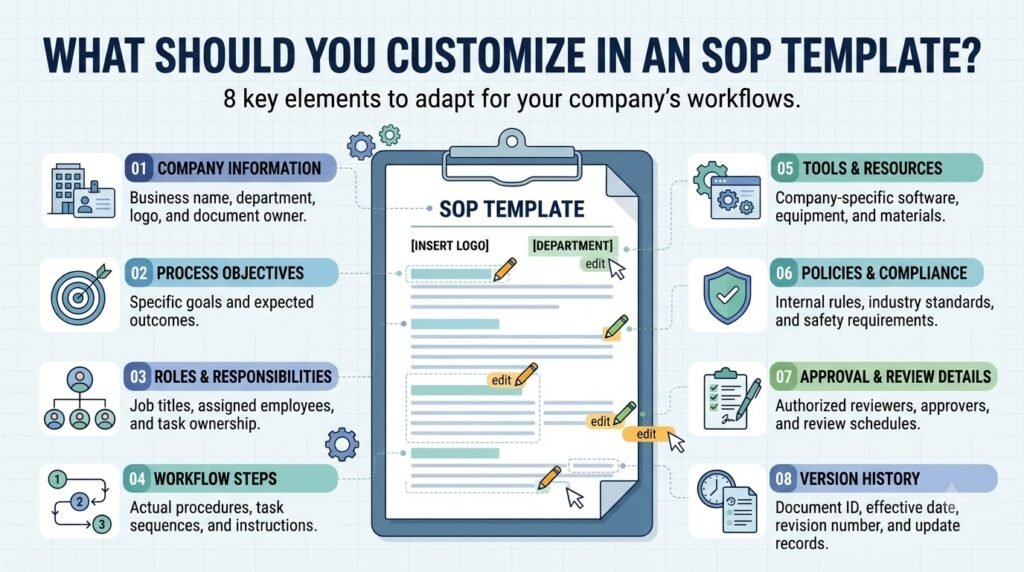
Downloading or copying a template is only the starting point. Before using it, adapt the document to the actual process followed by your organization.
Focus on these areas:
1. Process-specific information
Replace generic examples with the real activities performed by employees. Define where the process starts, what it includes, and when it is considered complete.
2. Roles and responsibilities
Identify who performs each action, who reviews the work, and who has approval authority. Avoid assigning responsibilities to vague labels such as “the team.”
3. Tools and resources
Specify the software, equipment, forms, and records employees need. Include the relevant versions or approved systems where necessary.
4. Exceptions and escalation
Explain what employees should do when a task cannot be completed normally. Include appropriate escalation contacts and decision-making responsibilities.
5. Review and approval requirements
Add document ownership, revision history, approval information, and the process for updating the SOP.
6. Formatting and accessibility
Use numbered instructions, short paragraphs, tables, and visual references where they improve understanding. A template should be easy to follow during actual work, not simply attractive to look at.
How to Choose the Right SOP Template for Your Business
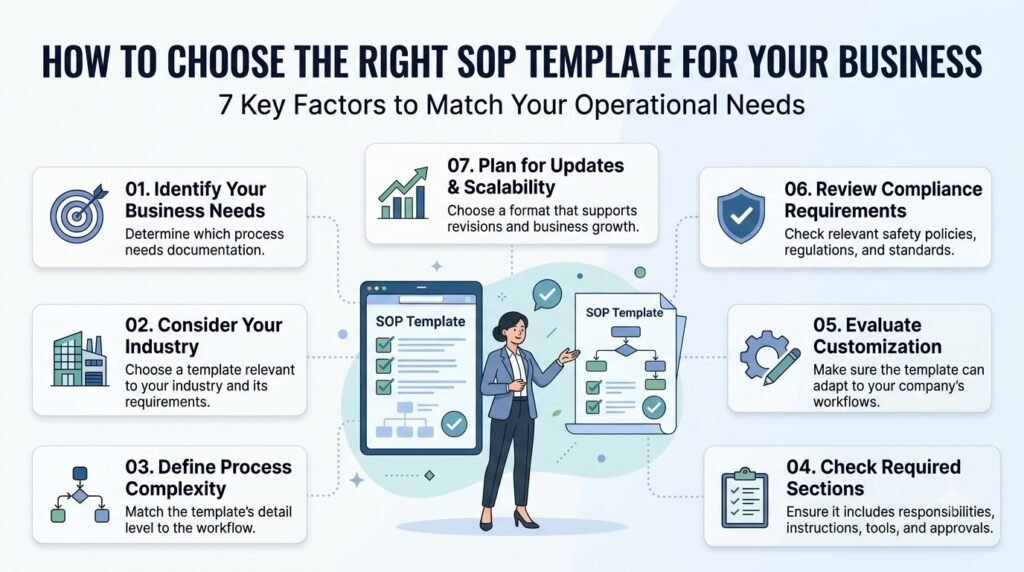
Not every department needs the same documentation format. Choose a template according to the complexity of the process and the people who will use it.
| Business requirement | Recommended template |
| Simple recurring tasks | Basic step-by-step SOP |
| New employee induction | Employee onboarding SOP |
| Recruitment operations | HR and recruitment SOP |
| Customer complaints | Customer service SOP |
| Lead management | Sales process SOP |
| Content publishing | Marketing workflow SOP |
| Technical troubleshooting | IT support SOP |
| Production and inspections | Manufacturing SOP |
| Patient administration | Healthcare administration SOP |
| Managing document versions | Document control SOP |
Consider three questions before selecting a format:
- How complicated is the process?
- How many people or departments are involved?
- Does the procedure require formal approvals, safety controls, or compliance reviews?
A simple checklist may be sufficient for a small administrative task. A process involving several departments may need a more detailed document with role assignments, decision points, and approval records.
You can also review Creately’s SOP template examples and Notion’s SOP template collection to explore different documentation layouts.
How to Use AI to Adapt an SOP Template
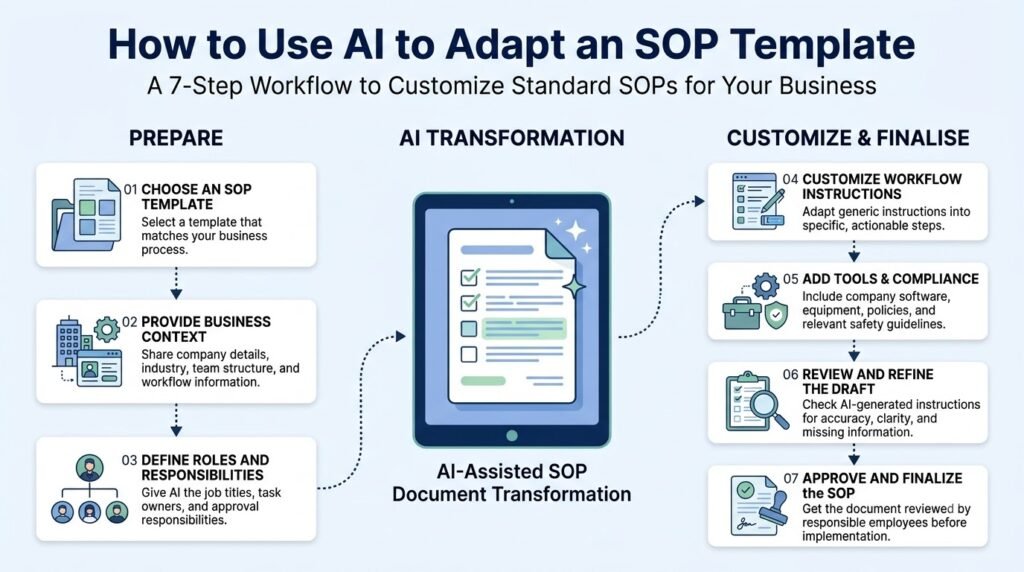
AI can help customize an existing template by organizing process information, suggesting missing sections, and improving the clarity of instructions.
The important distinction is that AI should help structure your information rather than invent the operational rules your business must follow.
Here is a practical approach:
Step 1: Select a suitable template
Choose one of the ten formats according to the process you want to document.
Step 2: Collect actual process information
Gather existing checklists, employee instructions, approved policies, workflow notes, and relevant records.
Step 3: Give AI the template and process details
Explain the intended audience, process owner, required tools, responsibilities, and expected outcome.
Step 4: Ask AI to adapt the structure
Request that it populate the existing template without changing approved policies or introducing unverified instructions.
Step 5: Review the output
Ask AI to identify missing information, unclear responsibilities, duplicated steps, and possible exceptions.
Step 6: Obtain human approval
Have the actual process owner and relevant subject-matter experts validate the document before implementation.
Sample AI Prompt for Customizing an SOP Template
You can reuse the following prompt with an AI assistant:
Act as an experienced business process documentation specialist.
I want to customize the following SOP template for my organization.
Process name: [Enter process name]
Department: [Enter department]
Process owner: [Enter responsible person or role]
Purpose: [Explain the intended outcome]
Existing process information: [Paste verified process details]
Tools and resources: [List required systems, equipment, and documents]
Responsibilities: [Identify the people involved]
Requirements: [Add applicable internal policies and approved requirements]
Customize the supplied SOP template using this information.
Requirements:
- Preserve the existing template structure where appropriate.
- Use clear, numbered instructions.
- Assign responsibilities to specific roles.
- Identify missing information instead of inventing it.
- Include exception-handling and escalation sections where relevant.
- Add review, approval, and revision fields.
- Separate confirmed information from assumptions.
- Present the result in a professional, easy-to-follow format.
Do not invent company policies, technical settings, safety instructions, or regulatory requirements. Flag anything that requires subject-matter expert review.
When you need to evaluate alternative template structures or review AI-generated drafts, AiZolo can be useful as a multi-model AI workspace.
Its side-by-side model comparison helps you examine different responses, while its Smart Prompt Manager lets you save and reuse effective documentation prompts.
Common SOP Template Mistakes to Avoid
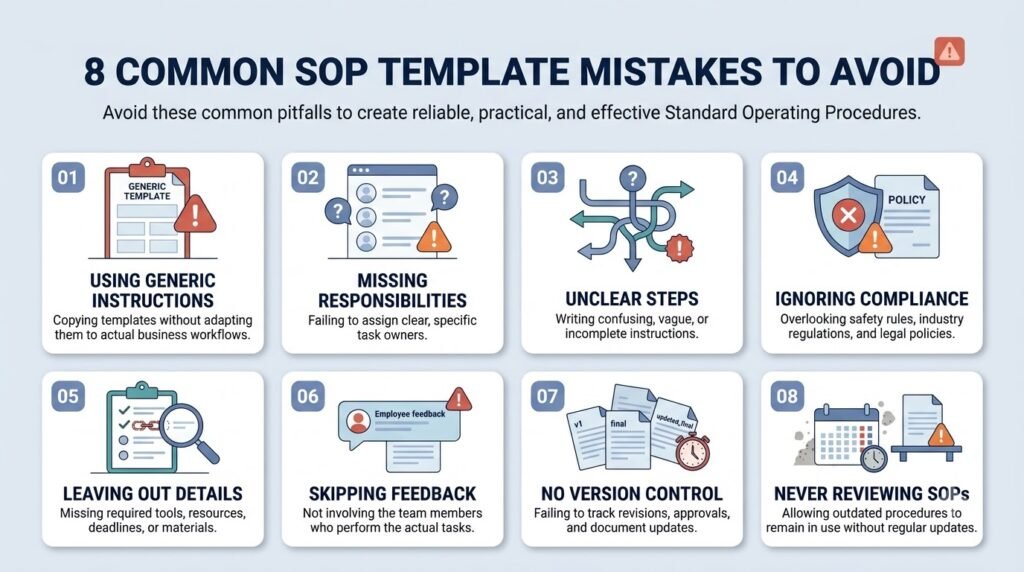
Even a well-designed template can produce confusing documentation when it is used incorrectly.
Watch out for these common mistakes:
1. Using the same template for every process
Different activities require different levels of detail. A simple administrative checklist may not work for equipment operation or incident management.
2. Leaving responsibilities unclear
Instructions such as “get approval from management” can create confusion. Identify the appropriate role or authorized approver.
3. Adding unnecessary information
Long explanations and irrelevant background details can make procedures harder to follow. Keep each instruction focused on the action employees need to perform.
4. Ignoring exceptions
A procedure should explain what happens when the normal process cannot be completed. Include appropriate escalation instructions.
5. Using unverified AI-generated instructions
AI may suggest steps that sound reasonable but do not match actual company practices. Validate every operational instruction before approval.
6. Forgetting revision history
Procedures can become outdated when responsibilities, software, equipment, or policies change. Assign document owners and establish an appropriate review process.
7. Treating the template as proof of compliance
A structured document does not automatically satisfy regulatory or industry requirements. Have relevant experts review procedures against the rules applicable to your organization.
Frequently Asked Questions
1. What are the best SOP templates?
The best SOP templates depend on the process being documented. Common options include basic step-by-step, employee onboarding, HR, customer service, sales, marketing, IT, manufacturing, healthcare administration, and document control templates.
2. What should a standard operating procedure template include?
A standard template generally includes a title, purpose, scope, responsibilities, required resources, procedure steps, exception handling, quality checks, approval details, and revision history. Additional sections may be necessary for technical or regulated processes.
3. Are there free SOP templates for small businesses?
Yes. Resources such as Smartsheet and Notion provide SOP template collections, including options for different business functions. Small businesses can start with a simple checklist or step-by-step format and customize it according to their actual workflows.
4. What are the different types of SOP formats?
Common SOP formats include simple checklists, sequential step-by-step instructions, hierarchical procedures, and flowchart-based formats. The appropriate structure depends on process complexity, decision points, user requirements, and the amount of detail employees need.
5. How do I customize an SOP template?
Start by selecting a template that matches the process. Replace generic examples with actual business information, define responsibilities, add required tools, document exceptions, and establish approval procedures. Have the process owner review the completed document before sharing it with employees.
6. Can AI help create and customize SOP templates?
Yes. AI can help organize process information, populate template sections, simplify instructions, identify missing details, and suggest improvements. However, employees and subject-matter experts must verify the actual procedures, technical requirements, and applicable policies.
7. How often should an SOP template be updated?
There is no single review schedule that applies to every SOP. Review a document whenever its underlying process, responsibilities, equipment, software, or relevant requirements change. Organizations should also establish periodic reviews appropriate to the procedure’s risk and importance.
Conclusion
The best SOP templates are not necessarily the most detailed ones. They are the formats that make your organization’s actual processes clear, repeatable, and easy for employees to follow.
Start with a template that matches your business requirement, customize its sections using verified information, and assign clear responsibilities for reviewing and maintaining the document.
AI can make this work easier by helping organize information and refine instructions, but the final procedure should always reflect how your organization actually operates.
Choose one recurring process, adapt a suitable template, and have the people responsible for that process review it before implementation.
About the Author
Anshika Verma is a content researcher and writer at AiZolo, focused on researching AI tools, models, and creator technologies. She creates practical guides that help readers understand emerging AI applications and use them effectively in everyday workflows.