

Sarah stared at her laptop screen at 2 AM, her marketing proposal only half-finished. The dreaded message appeared: “You’ve reached your usage limit. Your limit will reset in 4 hours.”
She had been on a creative roll, crafting the perfect campaign strategy with Claude 4.5 Sonnet Message Limit help. The AI was generating brilliant insights, refining her copy, and helping her think through complex positioning challenges. And just when she was about to finalize everything—click—the limit hit.
Sound familiar?
If you’re a content creator, developer, marketer, student, or startup founder using Claude 4.5 Sonnet, you’ve probably experienced this frustration. Claude 4.5 Sonnet message limit workaround has become one of the most searched phrases among AI users in 2025—and for good reason.
The good news? You don’t have to accept these limitations as inevitable roadblocks to your productivity. In this comprehensive guide, we’ll explore seven proven strategies to work around Claude 4.5 Sonnet Message Limit, including game-changing solutions that most users don’t know about.
Table of Contents
Understanding Claude 4.5 Sonnet Message Limit: What You’re Actually Dealing With
Before diving into workarounds, let’s understand exactly what we’re up against.
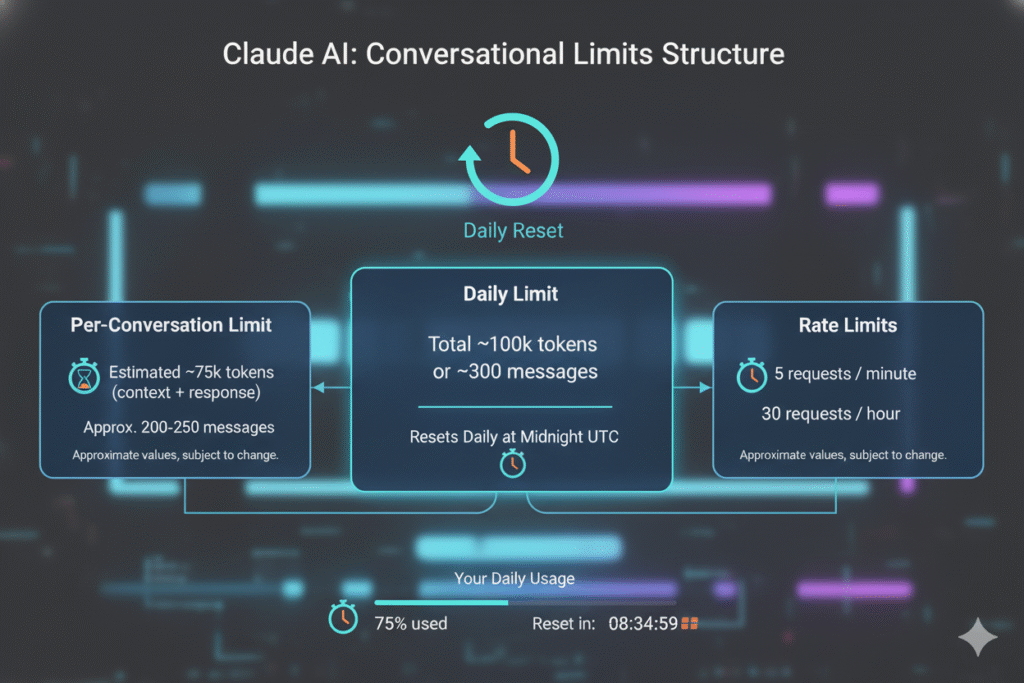
The Current Limit Structure
Claude 4.5 Sonnet operates on a rolling 5-hour reset cycle, meaning your usage limit refreshes every five hours from when you started using it. According to Anthropic’s official documentation, the actual number of messages varies based on several factors:
- Free Plan Users: Approximately 40 short messages per day, potentially dropping to 20-30 for longer conversations or when uploading attachments
- Claude Pro Subscribers ($20/month): Around 45 messages every 5 hours (roughly 216 short messages daily)
- Claude Max Users: Significantly higher limits with approximately 225 messages every 5 hours
But here’s the catch: These aren’t just “message” limits—they’re actually token consumption limits disguised as message counts.
Why Message Limits Feel So Restrictive
Claude 4.5 Sonnet has a massive 200,000-token context window (500,000 for Enterprise users). Every time you send a message, Claude processes your entire conversation history as context. This means:
- Long conversations consume tokens exponentially faster
- Uploaded files count heavily against your limit
- Using Projects or Knowledge Base features reduces available messages
- Each new message requires reprocessing everything that came before
Think of it like this: Imagine if every time you continued a phone conversation, you had to repeat everything you’d already discussed. That’s essentially what Claude does with tokens—and it’s why you hit limits so quickly when doing serious work.
Why the Standard “Just Wait” Advice Doesn’t Work for Professionals
The most common advice for hitting Claude’s limits? “Just wait for the reset.”
That’s fine if you’re casually chatting with AI on a Sunday afternoon. But what if you’re:
- A freelance writer with client deadlines tomorrow morning
- A developer debugging code at 11 PM before a deployment
- A student finishing a research paper due in six hours
- A startup founder preparing for an investor pitch presentation
Waiting simply isn’t an option.
And buying multiple subscriptions to the same platform? That’s expensive, inefficient, and frankly, doesn’t solve the underlying problem: you need continuous, reliable AI access when inspiration strikes or deadlines loom.
That’s where smart workarounds come in.
Claude 4.5 Sonnet Message Limit Workaround #1: Master Context Window Management

One of the most effective free strategies involves understanding how Claude’s context window works—and gaming it intelligently.
The Memory Log Technique
At the end of substantial Claude conversations, use this prompt to create a “memory log”:
“Please create a comprehensive conversation memory log that captures everything we’ve discussed in this chat session. Include: the original problem and how it evolved, key insights and solutions we developed, my working style and preferences you observed, effective collaboration approaches, any clarifications that changed direction, specific project context we discussed, templates or frameworks we established, and next steps identified. Structure this as a reference document I could share in a future conversation to quickly re-establish context.”
Start a fresh conversation and paste this memory log. You instantly get all your context back without consuming tokens on old messages.
Bundle Your Questions Strategically
Instead of sending five separate messages, combine related questions:
❌ Bad approach:
- “What’s the best headline for this blog?”
- “Now give me three alternatives”
- “Which one tests better for SEO?”
- “Can you make it more emotional?”
- “Add power words”
✅ Better approach:
- “Create 5 headline options for this blog post about [topic], optimized for SEO with emotional power words. Rank them by likely click-through rate and explain your reasoning.”
You get better results while consuming fewer message credits.
Claude 4.5 Sonnet Message Limit Workaround #2: Use Claude’s API Access
For developers and power users, Claude’s API offers significantly higher limits than the web interface.
Understanding API Rate Limits
Tier 1 API users get approximately 50 requests per minute for Claude 4.5 Sonnet—dramatically higher than web interface limits. Here’s the breakdown:
- Requests per Minute (RPM): 50 for Tier 1 users
- Input Tokens per Minute: 40,000
- Output Tokens per Minute: 8,000
The catch? You need technical knowledge to integrate the API, and you pay per token rather than a flat subscription.
Cost Comparison
Claude 4.5 Sonnet API pricing:
- $3 per million input tokens
- $15 per million output tokens
For moderate professional use (roughly 500,000 tokens monthly), you’re looking at $30-50/month—comparable to subscription costs but without message caps.
Third-party tools like TypingMind and 16x Prompt provide user-friendly interfaces that connect to Claude’s API, eliminating the need for coding while giving you API-level access.
Claude 4.5 Sonnet Message Limit Workaround #3: Rotate Between Multiple AI Models
Here’s where things get really interesting.

Why limit yourself to one AI model when different tasks benefit from different strengths?
The Multi-Model Strategy
- ChatGPT GPT-4: Excellent for creative writing and casual conversations
- Claude 4.5 Sonnet: Superior for long-context reasoning, coding, and analytical tasks
- Google Gemini: Strong for research tasks and multimodal queries
- Perplexity AI: Best for real-time web research with citations
But here’s the problem: Managing subscriptions across multiple platforms costs $60-100+ monthly, and constantly switching between tabs kills productivity.
This is exactly where platforms like AiZolo change the game entirely.
Claude 4.5 Sonnet Message Limit Workaround #4: The All-in-One Platform Solution (The Game-Changer)
What if you could access Claude 4.5 Sonnet, ChatGPT, Gemini, and other premium AI models in a single workspace—without hitting any platform’s individual message limits?
Enter AiZolo: Your Ultimate AI Workspace
AiZolo solves the Claude message limit problem by giving you access to multiple AI models simultaneously through one unified interface. Here’s how it works:
Simultaneous Multi-Model Access
Instead of being locked into Claude’s limits, you can:
- Chat with Claude 4.5 Sonnet, ChatGPT GPT-4, and Gemini at the same time
- Compare responses side-by-side in real-time
- Switch seamlessly when one model hits its limit
- Continue your workflow without interruption
Custom API Key Integration
Already have Claude API access? AiZolo lets you plug in your own API keys (with military-grade encryption) while providing the convenience of a professional chat interface. You get:
- Full control over your API usage
- Direct billing from Anthropic at API rates
- No additional platform fees for using your own keys
- Complete data privacy
Drag-and-Drop Workspace Design
Create custom layouts that match your workflow:
- Writer’s Setup: Claude for drafting + ChatGPT for editing
- Developer’s Config: Multiple models for code generation and review
- Research Layout: All models visible for comprehensive analysis
Real-World Success Story: How Emma Solved Her Limit Problem
Emma, a YouTube content creator with 500K subscribers, was spending $60/month on ChatGPT Plus and Claude Pro—and still hitting limits during her busiest production days.
After switching to AiZolo:
- Monthly cost dropped to $9.90 for the Pro plan
- Zero interruptions from message limits by rotating between models
- 10+ hours saved weekly by comparing AI outputs side-by-side
- Better content quality from synthesizing multiple AI perspectives
“I didn’t realize how much time I was wasting until I stopped wasting it,” Emma says. “Now I can see ChatGPT and Claude responses side-by-side. It’s like having two expert consultants in the room instead of running between their offices.”

Try AiZolo Today
Ready to break free from message limit frustration? Explore AiZolo’s plans and experience true AI freedom. Start with the free plan to test the platform—no credit card required.
Claude 4.5 Sonnet Message Limit Workaround #5: Optimize Your Prompt Engineering
Smarter prompts = fewer messages needed to get quality results.
The “One-Shot” Prompting Method
Instead of iterative back-and-forth conversations, craft comprehensive prompts that get you 80% of the way in a single message:
Template Structure:
[Context]: Provide complete background information
[Task]: Clearly state what you need
[Format]: Specify exact output format desired
[Constraints]: Define any limitations or requirements
[Examples]: Show what good looks like
Example:
Context: I'm writing a landing page for a B2B SaaS productivity tool targeting remote teams.

Task: Create three headline variations that emphasize time savings and ROI.

Format: For each headline, provide:
- The headline (8-12 words)
- A subheadline (15-20 words)
- Brief explanation of the psychological trigger used

Constraints:
- Must include a specific metric (percentage or time)
- Avoid jargon like "synergy" or "ecosystem"
- Speak to decision-makers, not end users

Example of what I like: "Cut Meeting Time by 40% Without Losing Alignment"
This single, well-structured prompt replaces what might have been a 10-message conversation.
Claude 4.5 Sonnet Message Limit Workaround #6: Strategic Timing and Reset Tracking
Understanding and tracking Claude’s reset cycles can help you work more efficiently.
Monitor Your Usage Patterns
- Use the
/usagecommand in Claude Code to check remaining allocation - Check Settings → Usage in Claude web apps
- Set reminders for when your limits reset (every 5 hours)
Plan Intensive Tasks Around Resets
Schedule your heaviest AI usage for right after a reset:
- Code debugging sessions
- Long-form content creation
- Complex data analysis
- Document summarization projects
Use lighter models or other AI tools for routine tasks during high-usage periods.
Claude 4.5 Sonnet Message Limit Workaround #7: Upgrade Strategically (When It Makes Sense)
Sometimes, the best workaround is strategic investment in higher tiers.
When Claude Pro Makes Sense
Upgrade to Claude Pro ($20/month) if you:
- Use Claude daily for professional work
- Frequently hit free tier limits
- Need priority access during high-traffic periods
- Want early access to new features
When Claude Max Is Worth It
Consider Claude Max (~$100/month) if you:
- Are a heavy coding user
- Run multiple Claude Code instances
- Need 5x Pro usage capacity
- Can justify the ROI for unlimited-style access
When Multi-Platform Access Is Smarter
For most users, platforms like AiZolo ($9.90/month) offer better value:
- Access to multiple premium AI models
- No single-platform limit bottleneck
- Flexibility to use the best model for each task
- Significant cost savings vs. multiple subscriptions
The Hidden Cost of Message Limits (That Nobody Talks About)

Message limits don’t just interrupt your work—they have deeper costs:
Disrupted Creative Flow
Research shows it takes an average of 23 minutes to regain full focus after an interruption. Every time Claude’s limit hits mid-project, you’re not just losing 5 hours—you’re losing creative momentum that’s hard to recover.
Decision Fatigue
Constantly worrying about hitting limits creates cognitive overhead:
- “Should I send this message or wait?”
- “Do I have enough messages left to finish this project?”
- “Should I split this into a new conversation?”
This mental taxation drains energy that should go toward your actual work.
Opportunity Cost
How many brilliant ideas have you shelved because you hit a limit at the wrong moment? How many projects took twice as long because you couldn’t work continuously?
These hidden costs add up to far more than any subscription fee.
Frequently Asked Questions: Claude 4.5 Sonnet Message Limit Workaround
Can I use multiple Claude accounts to bypass limits?
While technically possible, this violates Anthropic’s Terms of Service and isn’t a sustainable solution. Your accounts could be suspended. Better alternatives include API access or multi-model platforms.
Does clearing conversation history reset my limit?
No. Clearing history reduces context window usage but doesn’t restore message limits. Only time (5-hour reset cycles) or upgrading your plan increases your allocation.
Will Claude ever offer unlimited usage?
Currently, Anthropic has stated there’s no unlimited usage plan available. This is unlikely to change given the computational costs of running advanced AI models. Multi-model strategies offer the closest thing to “unlimited” access.
Is using API keys difficult for non-technical users?
Not anymore. Platforms like AiZolo and TypingMind provide user-friendly interfaces that handle API key management for you. You simply paste your key once (encrypted and secure), and the platform does the rest.
How do I know which workaround is right for me?
- Casual users: Memory logs + context optimization (free)
- Budget-conscious professionals: Claude API via third-party interface ($30-50/month)
- Power users needing flexibility: Multi-model platform like AiZolo ($9.90/month)
- Heavy enterprise use: Claude Max plan (~$100/month)
Take Action: Your Next Steps to Unlimited AI Access
[Image Prompt: Roadmap graphic showing different solution paths leading to “AI Freedom”]
You now have seven proven strategies to work around Claude 4.5 Sonnet’s message limits. Here’s your action plan:
Step 1: Implement Free Optimizations (Today)
Start using memory logs and better prompt engineering immediately. These cost nothing and can extend your free/pro limits by 30-40%.
Step 2: Evaluate Your Usage Patterns (This Week)
Track how often you hit limits and what you’re using Claude for. This data helps you choose the right paid solution.
Step 3: Try a Multi-Model Platform (This Month)
Sign up for AiZolo’s free plan—no credit card required. Experience what it’s like to never worry about hitting a single platform’s limits again. Compare responses from Claude, ChatGPT, and Gemini side-by-side. See which workflow setup boosts your productivity most.
The platform’s drag-and-drop workspace lets you create custom layouts for different projects:
- Content creation workspace with Claude + ChatGPT
- Research setup with all models visible
- Coding environment with specialized configurations
Step 4: Scale What Works (Ongoing)
If AiZolo’s free plan meets your needs, stay there. If you need more capacity, upgrade to Pro for $9.90/month—still dramatically cheaper than multiple individual subscriptions.
The Future of AI Isn’t About Choosing One Model—It’s About Using Them All
Five years ago, we thought AI assistants would be like smartphones—you’d pick one and stick with it.
We were wrong.
The professionals winning in 2025 aren’t the ones who picked the “right” AI model. They’re the ones who built workflows that leverage the strengths of multiple models without the friction of platform-hopping.
Claude 4.5 Sonnet message limit workarounds aren’t hacks or temporary fixes—they’re smart strategies for the multi-model AI era we’re living in.
Sarah, the marketer from our opening story? She now uses AiZolo’s multi-model workspace. When Claude hits its limit, she seamlessly continues with ChatGPT without losing context or momentum. Her 2 AM panic sessions are gone. She finishes projects faster, with better quality, and never hits a wall mid-creative-flow.
You can have the same experience.
Try AiZolo for free today and discover what it feels like to work with AI on your terms—not theirs.
Suggested Internal Links
- How to Use ChatGPT and Claude at the Same Time
- Multi AI Chatbot: The Complete Guide
- Top 5 All-In-One AI Platforms
- Compare AI Models Side by Side
- ChatGPT vs Claude: The Ultimate Comparison
Suggested External Links
- Anthropic’s Official Documentation on Rate Limits
- Understanding AI Context Windows
- OpenAI API Pricing and Limits
- Best Practices for Prompt Engineering
- The State of AI 2025 Report
Stop letting message limits control your productivity. Start using AI the way it was meant to be used—freely, flexibly, and on your own terms. Explore AiZolo today and join thousands of creators, developers, and professionals who’ve already made the switch.

