
Table of Contents
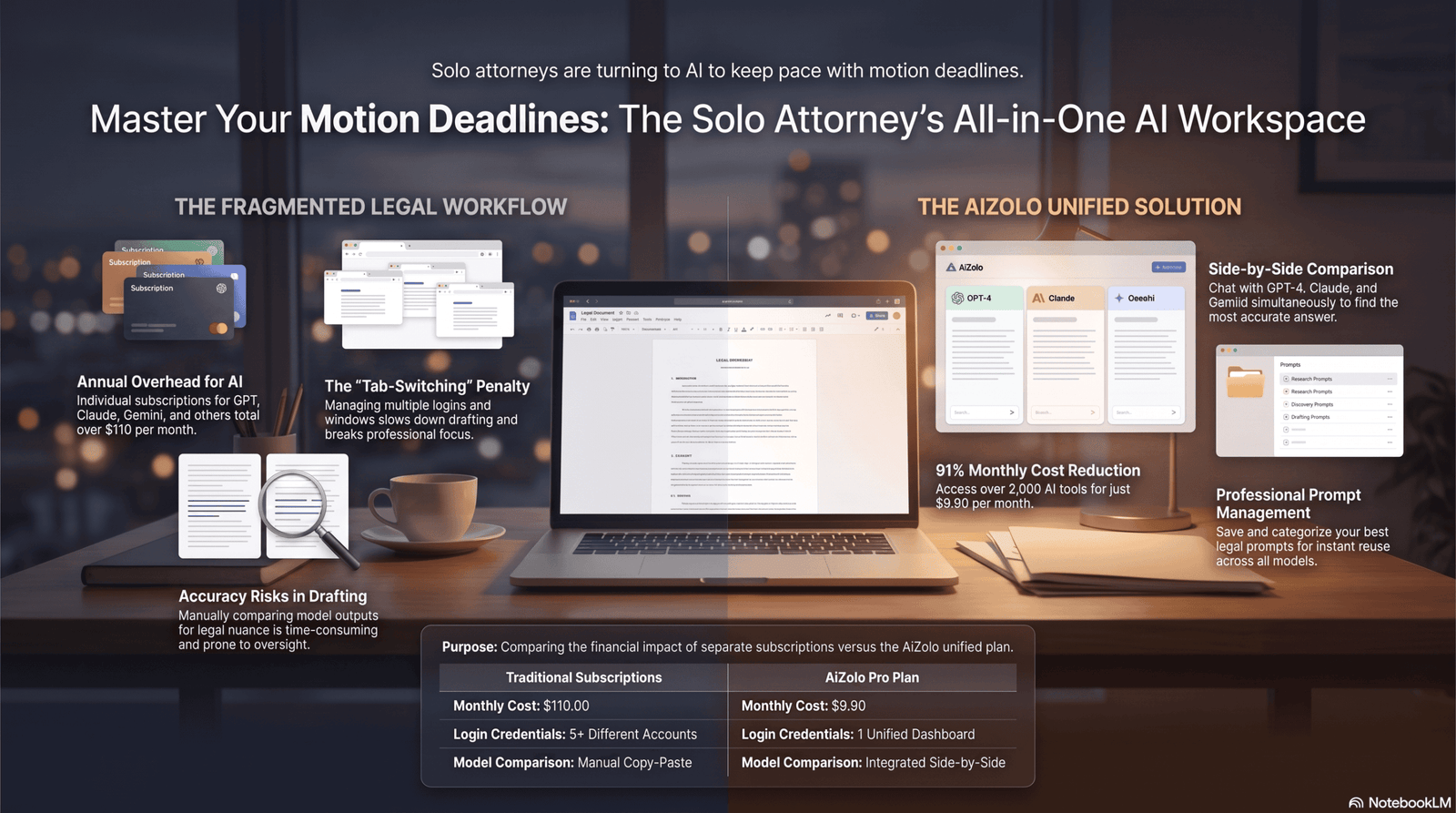
Running a solo practice means you’re the partner, the associate, the paralegal, and the billing department. A motion for summary judgment doesn’t care that you also have three client calls and a filing deadline tomorrow. That’s the pressure driving so many solo attorneys toward AI for legal motion drafting for solo firms, with platforms like Aizolo helping streamline the drafting process this year.
Traditional drafting eats hours that solo lawyers don’t have. Pulling case law, formatting citations, and writing a clean argument from scratch can take an entire evening for a single motion.
AI changes that math. It won’t replace your legal judgment, and it can’t sign a filing. But it can turn a blank page into a workable first draft in minutes, freeing your time for strategy and client work.
That said, every AI-drafted motion still needs a licensed attorney’s full review before it reaches a court. Citation-checking, jurisdictional accuracy, and professional responsibility rules don’t bend for convenience — they’re the whole reason this guide exists.
What Is AI for Legal Motion Drafting Solo Firms?
AI for legal motion drafting solo firms refers to software that uses large language models to help independent attorneys draft, structure, and refine litigation documents like motions, briefs, and memoranda.
These tools range from general-purpose AI assistants to purpose-built legal platforms trained on case law databases. Some handle drafting only; others combine drafting with legal research and citation verification.
For a solo practitioner, the appeal isn’t replacing legal thinking — it’s compressing the mechanical parts of drafting: formatting, first-draft structure, boilerplate language, and initial research summaries.
Expert Tip: Think of AI as a very fast, occasionally overconfident junior associate. It drafts quickly. It still needs a supervising attorney to check every citation and legal conclusion before anything gets filed.
Why Solo Law Firms Need AI Motion Drafting

Workload Without a Team
A mid-size firm splits drafting, research, and client management across several people. A solo attorney does all three, often for multiple active matters at once.
Deadlines Don’t Move
Court deadlines are fixed regardless of firm size. AI drafting tools help solo lawyers produce a workable first draft fast enough to leave real time for review and revision before a filing deadline.
Legal Research Takes Too Long Manually
Searching case law by hand for every motion is slow, even for experienced litigators. AI-assisted research tools can surface relevant authority in minutes, though the attorney must still verify every citation independently.
Document Preparation Is Repetitive
Motions to extend, motions to compel, and standard discovery requests share a lot of boilerplate. AI handles that repetition well, letting the attorney focus on the case-specific argument.
Client Expectations Have Shifted
Clients increasingly expect faster turnaround and transparent pricing. Solo firms that use AI responsibly can often quote flat fees on routine motions instead of open-ended hourly billing.
How AI Motion Drafting Works
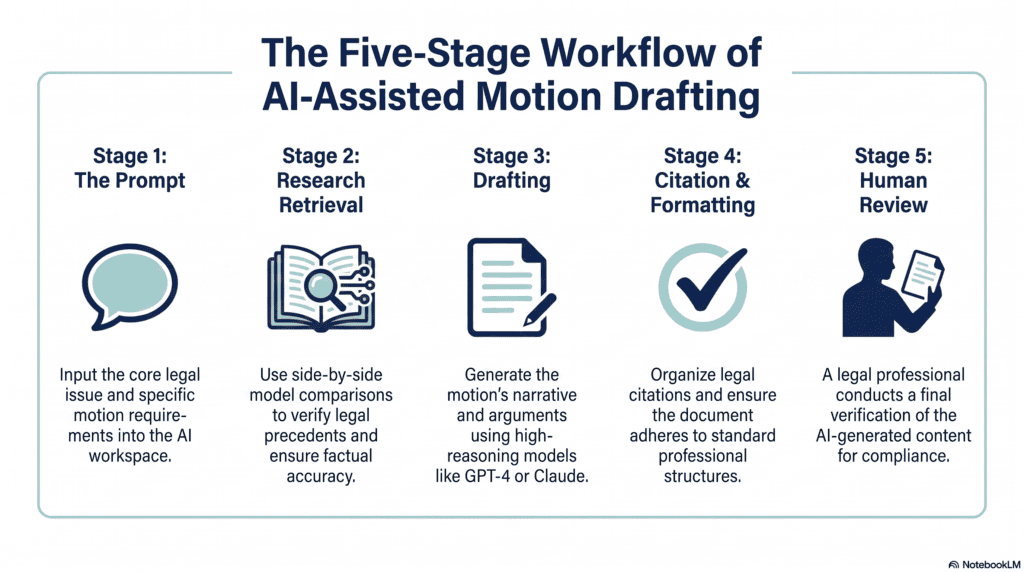
1. The prompt. The attorney describes the motion type, jurisdiction, key facts, and desired legal argument in plain language.
2. Research retrieval. Purpose-built legal AI tools pull from licensed case law databases (Westlaw, Lexis, or their own indexed sources). General AI assistants without legal-specific grounding may rely on training data alone, which is riskier for citations.
3. Drafting. The model generates a structured first draft — caption, statement of facts, argument sections, and conclusion — based on the prompt and retrieved authority.
4. Citation formatting. Some tools auto-format citations in Bluebook or local court style; others leave this step to the attorney.
5. Human review. This is the non-negotiable step. The attorney checks every cited case, confirms jurisdictional relevance, verifies the case is still good law, and edits the argument for strategy and voice.
Important Note: No AI tool available in 2026 is authorized to file a document or replace an attorney’s professional judgment. Every state bar that has issued guidance treats AI output as a draft requiring independent verification.
Benefits of AI for Legal Motion Drafting Solo Firms
- Saves time on first drafts, often cutting initial drafting time from hours to minutes for routine motions.
- Reduces repetitive work like reformatting boilerplate motions (extensions, continuances, standard discovery requests).
- Improves consistency across documents by applying the same structure and tone every time.
- Speeds up legal research with AI-assisted case law search, though verification remains manual.
- Provides reusable templates for recurring motion types specific to your practice area.
- Increases productivity by shifting attorney time toward strategy, client counseling, and case development.
- Supports profitability by making flat-fee pricing viable on routine filings.
Pro Insight: The biggest ROI isn’t in complex, novel motions — it’s in the routine, repetitive filings that eat time without requiring much original legal thinking.
Limitations
AI motion drafting has real limits solo attorneys should plan around before relying on it for client work.
| Limitation | What It Means in Practice |
|---|---|
| Hallucinations | AI models can generate case citations that don’t exist or misstate a real case’s holding. Every citation needs independent verification. |
| Jurisdiction differences | Local rules, formatting requirements, and page limits vary by court. General-purpose AI often misses these unless specifically prompted. |
| Outdated information | Models trained on older data may not reflect recent case law or statutory changes. |
| Ethics and professional responsibility | Bar associations require attorneys to supervise and verify AI-assisted work product, similar to supervising a junior associate. |
| Confidentiality and privilege | Uploading client facts to a general-purpose AI tool without a data protection agreement can raise confidentiality concerns. |
| Compliance with court rules | Some courts now require disclosure of AI use in filings; requirements vary by jurisdiction. |
Legal Reminder: Multiple courts have sanctioned attorneys for filing AI-generated briefs containing fabricated citations. Independent verification of every case citation isn’t optional — it’s a professional responsibility requirement.
Best AI Tools for Legal Motion Drafting
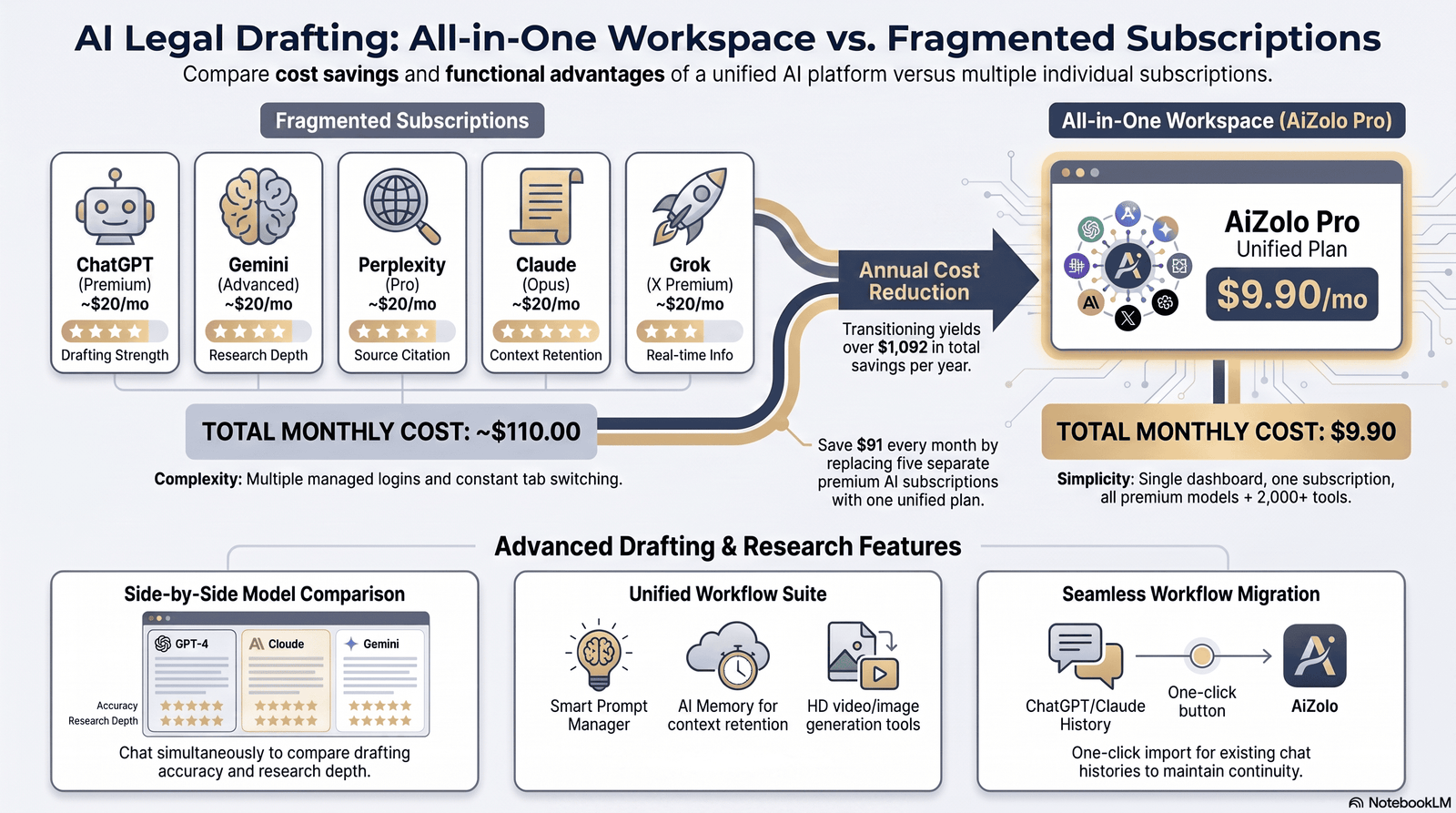
Pricing for legal AI software changes often and is frequently quote-based, so treat every figure below as a mid-2026 estimate and confirm current pricing directly with the vendor before budgeting.
1. ChatGPT (OpenAI)
Overview: A general-purpose AI assistant, not built specifically for law, but widely used by solo attorneys for drafting, brainstorming arguments, and summarizing research.
Best use case: First-draft structuring, brainstorming counterarguments, and rewriting for clarity.
Pros: Low cost, fast, flexible across many document types, strong plain-language drafting.
Cons: Not grounded in a licensed legal database, higher hallucination risk on citations, no built-in confidentiality agreement for legal data by default.
Pricing: Roughly $20/month for the Plus tier at consumer pricing; business tiers cost more.
Ideal users: Solo attorneys comfortable independently verifying every citation and using it as a drafting accelerator rather than a research source.
2. Claude (Anthropic)
Overview: A general-purpose AI assistant known for careful, well-structured long-form writing, often used by boutique and solo firms for drafting and document analysis.
Best use case: Drafting motions, memos, and correspondence with a more measured, less “AI-sounding” tone; analyzing uploaded case documents.
Pros: Strong writing quality, good at following detailed drafting instructions, handles long documents well.
Cons: Like other general-purpose models, it isn’t grounded in a licensed case law database, so citation accuracy still requires manual verification.
Pricing: Consumer plans start around $20/month; team and enterprise pricing is higher.
Ideal users: Solo attorneys who want a strong drafting and document-review assistant and already have a research-verification workflow.
3. Google Gemini
Overview: Google’s general-purpose AI assistant, integrated with Google Workspace, useful for drafting inside Docs and Gmail.
Best use case: Drafting correspondence, summarizing documents, and quick research briefs for attorneys already living in Google Workspace.
Pros: Deep Workspace integration, competitive pricing, decent summarization.
Cons: Not legal-specific; citation reliability for case law is inconsistent.
Pricing: Bundled into Google Workspace business plans, or available as a standalone subscription.
Ideal users: Solo firms already using Google Workspace for email and documents.
4. CoCounsel (Thomson Reuters)
Overview: CoCounsel is Thomson Reuters’ legal AI assistant, grounded in Westlaw and Practical Law content, and was rebuilt in 2026 as an agentic platform that plans research, drafting, and analysis tasks end to end.
Best use case: Litigation research, deposition prep, document review, and drafting for firms that already use or can justify Westlaw.
Pros: Grounded in a licensed legal database, source-linked citations, strong document analysis features.
Cons: Cannot be purchased fully standalone from Westlaw in most configurations, and pricing climbs quickly once Westlaw research is bundled in.
Pricing: Estimates vary widely by source, roughly $75–$650+ per user per month depending on whether Westlaw research is bundled, contract length, and jurisdiction coverage — confirm directly with a Thomson Reuters rep.
Ideal users: Solo litigators who already subscribe to Westlaw and want AI layered on top of it.
5. Lexis+ AI with Protégé
Overview: LexisNexis’s agentic AI assistant, grounded in Lexis primary law and Shepard’s citation validation, aimed at reducing hallucination risk through citation checking.
Best use case: Legal research and drafting for firms already on a LexisNexis subscription.
Pros: Shepard’s-validated citations, agentic workflows for research and drafting, strong for firms standardizing on Lexis.
Cons: Quote-based pricing that sits outside a base Lexis plan, so total cost can be hard to predict.
Pricing: Third-party estimates put the add-on around $125–$275 per user per month on top of an existing Lexis subscription, with full bundles reported anywhere from roughly $128 to $494 per user per month — get a direct quote before committing.
Ideal users: Solo attorneys already invested in the LexisNexis ecosystem.
6. Westlaw Precision AI
Overview: Westlaw’s AI-assisted research layer, offering natural-language queries with citations grounded in Westlaw’s primary law database.
Best use case: Legal research that feeds directly into a motion’s argument section.
Pros: Strong primary-source grounding, integrates with the broader Westlaw research platform.
Cons: Requires an underlying Westlaw subscription; pricing is jurisdiction- and term-dependent.
Pricing: A single-attorney subscription with full state and federal coverage has been reported around $400–$650 per month depending on contract length — verify current rates directly.
Ideal users: Research-heavy solo litigators who need citation-grounded answers, not just drafting help.
7. Harvey AI
Overview: An enterprise legal AI platform built for large law firms and in-house teams, with strong contract analysis and cross-border research features.
Best use case: Large-firm due diligence, complex contract analysis, and firm-wide knowledge management — not typically solo-firm work.
Pros: Deep enterprise integrations, strong document analysis at scale, credible AmLaw adoption.
Cons: <cite index=”27-1,29-1″>Harvey’s enterprise pricing model, commonly reported in the range of roughly $500 to $1,500 or more per user per month with seat minimums often around 20-plus seats, effectively puts it out of reach for solo and small firms.</cite>
Pricing: Quote-based only; not designed for solo-firm budgets.
Ideal users: Large firms and corporate legal departments — solo attorneys should look elsewhere.
8. Spellbook
Overview: An AI contract drafting and review tool that works inside Microsoft Word, focused on transactional rather than litigation work.
Best use case: Contract review and redlining for solo attorneys with a transactional practice.
Pros: Native Word integration, strong clause benchmarking, no new platform to learn.
Cons: Contract-only scope — it doesn’t help with litigation motions, and pricing requires a sales conversation for most tiers.
Pricing: Entry pricing has been reported starting around $99 per user per month, with enterprise tiers reportedly reaching $200–$350+ per seat.
Ideal users: Solo transactional attorneys, not litigators focused on motion practice.
9. Paxton AI
Overview: An all-in-one AI assistant covering legal research, drafting, and document analysis, marketed specifically toward solo and small-firm attorneys with published pricing.
Best use case: Solo litigators who want research and drafting in a single subscription without an enterprise sales process.
Pros: Transparent published pricing, drafting and research combined, positioned specifically for smaller firms.
Cons: Reported pricing has varied significantly across sources in 2026 (some list roughly $159–$299/month, others list an Individual plan around $499–$500/month) — confirm the current number directly on Paxton’s pricing page before budgeting.
Pricing: Individual plans have been reported anywhere from roughly $159 to $500 per user per month depending on tier and when the quote was pulled; a free trial is generally available.
Ideal users: Solo attorneys who want one tool for research and drafting and prefer published, self-serve pricing.
10. MyCase AI
Overview: MyCase is a cloud-based law practice management platform for solo and small to midsize firms, offering client intake, e-signature, case tracking, billing, and AI-powered document summarization.
Best use case: Solo firms that want AI-assisted document summarization built into their existing practice management software, not a standalone drafting tool.
Pros: Combines practice management with AI features, useful for firms that want fewer separate subscriptions.
Cons: Less specialized for complex motion drafting than dedicated legal AI research tools.
Pricing: MyCase’s core practice management plans have been reported in the roughly $49–$79 per user per month range, with AI features layered into existing tiers — confirm current pricing on MyCase’s site.
Ideal users: Solo firms that want practice management and light AI drafting support in one platform.
Comparison Table
| Tool | Best For | Legal Research | Drafting | Citation Support | Pricing (est., verify directly) | Free Plan | Best for Solo Firms? |
|---|---|---|---|---|---|---|---|
| ChatGPT | General drafting & brainstorming | Limited | Strong | Manual verification needed | ~$20/mo | Limited free tier | Yes, as a supplement |
| Claude | Long-form drafting & document analysis | Limited | Strong | Manual verification needed | ~$20/mo+ | Limited free tier | Yes, as a supplement |
| Gemini | Workspace-integrated drafting | Limited | Good | Manual verification needed | Bundled/Workspace pricing | Limited free tier | Yes, if on Workspace |
| CoCounsel | Litigation research + drafting | Strong (Westlaw-grounded) | Strong | Source-linked | ~$75–$650+/mo (bundle-dependent) | No | If already on Westlaw |
| Lexis+ AI (Protégé) | Research-heavy drafting | Strong (Shepard’s-validated) | Strong | Source-linked | ~$125–$494/mo (bundle-dependent) | No | If already on Lexis |
| Westlaw Precision AI | Case law research | Strong | Limited | Source-linked | ~$400–$650/mo | No | If research-heavy |
| Harvey AI | Enterprise contract/due diligence | Strong | Strong | Source-linked | ~$500–$1,500+/mo, seat minimums | No | No |
| Spellbook | Contract drafting in Word | Limited | Strong (contracts only) | N/A | ~$99–$350+/mo | 7-day trial | Only for transactional work |
| Paxton AI | All-in-one solo/small firm assistant | Good | Strong | Source-linked | ~$159–$500/mo | Free trial | Yes |
| MyCase AI | Practice management + AI | Limited | Basic | N/A | ~$49–$79/mo | Free trial | Yes, as a management layer |
Step-by-Step Guide
How to responsibly draft a legal motion using AI:
- Confirm the motion type and jurisdiction. Note the specific court, local rules, and any page or formatting limits before you prompt anything.
- Gather the facts. Write a clean fact summary — the AI’s output is only as good as the facts and instructions you provide.
- Choose the right tool for the task. Use a citation-grounded legal research tool for case law, and a general drafting assistant (or the same tool) for structuring the argument.
- Prompt with specificity. Include the legal standard, jurisdiction, key facts, and desired outcome in your prompt.
- Generate the first draft. Treat this as a working draft, not a filing-ready document.
- Verify every citation independently. Pull each cited case in Westlaw, Lexis, or a free source like Google Scholar and confirm it says what the draft claims.
- Check local rules compliance. Confirm formatting, page limits, and any AI-disclosure requirements for that specific court.
- Revise for strategy and voice. Adjust the argument for case-specific strategy — this is where your legal judgment does the real work.
- Have a second review pass. Even solo attorneys benefit from stepping away and re-reading with fresh eyes, or having a contract attorney review high-stakes filings.
- File under your own professional judgment. The final filing decision, and the responsibility for its accuracy, is yours alone.
Prompt Examples
Motion to Dismiss: “Draft a motion to dismiss for failure to state a claim under [jurisdiction] procedural rules. The claim alleges [brief fact summary]. Structure it with a statement of facts, legal standard, argument, and conclusion. Flag any case law claims for me to verify independently.”
Summary Judgment: “Draft a motion for summary judgment based on these undisputed facts: [list facts]. Identify the applicable legal standard for [jurisdiction] and structure the argument around the absence of a genuine dispute of material fact.”
Discovery Motion: “Draft a motion to compel discovery responses. The opposing party has failed to respond to [specific requests] within the required timeframe under [jurisdiction] rules.”
Extension Motion: “Draft a short motion for extension of time to respond to [document type], citing [reason], and requesting a [number]-day extension consistent with local court practice.”
Demand Letter: “Draft a demand letter regarding [dispute summary], outlining the legal basis for the claim, the requested remedy, and a response deadline of [date].”
Legal Memo: “Draft an internal legal memo analyzing whether [legal issue] applies to these facts: [fact summary]. Include counterarguments and a recommended position.”
Ethical Considerations

- Attorney responsibility. The supervising attorney remains fully responsible for anything filed, regardless of how it was drafted.
- Verification. Every AI-generated citation must be independently checked before it reaches a filing.
- Client confidentiality. Confirm any AI tool’s data handling policy before uploading client facts, and avoid general-purpose tools without a data protection agreement for sensitive matters.
- Data privacy. Understand whether your inputs are used to train the underlying model, and prefer tools that explicitly state they don’t.
- Court rules. Some courts now require disclosure of AI assistance in filings; check the specific court’s standing orders.
- Professional judgment. AI can suggest language, but the legal strategy and final judgment calls belong to the attorney.
Expert Tip: Keep a simple internal policy — even one page — describing which AI tools you use, what data you will and won’t upload, and your citation-verification step. It’s useful for client conversations and consistent practice.
Best Practices
- Use citation-grounded, legal-specific tools for anything involving case law research.
- Treat every AI draft as a first draft, never a final filing.
- Independently verify every citation in a primary source before filing.
- Check local court rules for AI-disclosure requirements before every filing.
- Avoid uploading identifying client details to general-purpose tools without confirming data handling terms.
- Keep a documented review process so your verification steps are consistent across matters.
- Reserve AI for routine, repetitive drafting first, then expand its use as you build confidence in the workflow.
Common Mistakes
- Filing without independent citation verification. This is the mistake behind nearly every publicized AI-in-court sanction.
- Treating general-purpose AI as a legal research database. Tools without a licensed legal database grounding are more prone to fabricated citations.
- Ignoring jurisdiction-specific formatting. A well-argued motion can still get rejected for missing local formatting rules.
- Skipping the confidentiality check. Uploading sensitive client facts to a tool without understanding its data policy.
- Over-relying on AI for strategy. AI can structure an argument; it can’t replace judgment about which argument will actually work with a specific judge.
Future of AI in Legal Drafting (2026–2030)
Legal AI is moving from single-prompt drafting tools toward agentic platforms that plan and execute multi-step research and drafting workflows with less manual prompting, a shift already visible in how major vendors rebuilt their platforms in 2026.
Expect deeper citation-verification features to become standard rather than a premium add-on, as courts continue to scrutinize AI-assisted filings. Solo-firm-specific pricing tiers are also likely to expand as vendors compete for the large population of independent attorneys currently priced out of enterprise platforms.
Bar associations and courts will likely continue issuing more specific guidance on AI disclosure requirements, data handling, and supervision standards over the next several years, so staying current on your jurisdiction’s rules will remain part of the job.
Frequently Asked Questions
1. Can AI legally draft a motion for a solo attorney? Yes, AI can draft a first version of a motion, but a licensed attorney must review, verify, and take responsibility for the final filing.
2. Is AI-drafted content risky for court filings? It carries risk if not verified — AI can generate fabricated citations. Independent verification of every citation eliminates most of that risk.
3. Which AI tool is best for solo litigators? It depends on budget: general-purpose tools like Claude or ChatGPT work well as drafting accelerators, while citation-grounded tools like Paxton AI, CoCounsel, or Lexis+ AI add stronger research grounding at a higher price.
4. Do I need to disclose AI use in a filing? Some courts require disclosure; requirements vary by jurisdiction, so check the specific court’s local rules or standing orders.
5. Can AI replace a paralegal for a solo firm? It can absorb some repetitive drafting and research tasks, but it doesn’t replace the judgment, client interaction, or case management a paralegal provides.
6. Is client data safe with AI legal tools? It depends on the tool’s data policy. Purpose-built legal AI platforms typically state they don’t use customer data to train models; confirm this before uploading sensitive facts to any tool.
7. How much does AI legal drafting software cost for a solo attorney? Costs vary widely, from roughly $20/month for general-purpose assistants to several hundred dollars per month for citation-grounded legal research platforms.
8. What’s the biggest risk of using AI for legal drafting? Fabricated or misstated case citations that go unverified before filing — this has already led to court sanctions in multiple reported cases.
9. Can AI keep up with recent case law changes? Not reliably on its own. Tools grounded in a live legal database (Westlaw, Lexis) stay more current than general-purpose models relying solely on training data.
10. Should a solo attorney disclose AI use to clients? Many solo attorneys proactively mention AI-assisted drafting in engagement letters for transparency, even where not legally required.
11. What happens if an AI-drafted motion contains a fake citation? Courts have sanctioned attorneys in these situations. Responsibility falls on the filing attorney, not the AI tool.
12. Is free AI (like ChatGPT’s free tier) good enough for legal drafting? It can help with brainstorming and basic drafting, but it lacks the citation grounding of paid, legal-specific platforms — verification remains essential either way.
People Also Ask
- What is the best AI for writing legal motions?
- Can lawyers get in trouble for using AI to write briefs?
- What AI tools do solo attorneys use?
- Is ChatGPT good for legal drafting?
- How do I verify AI-generated legal citations?
- What’s the difference between CoCounsel and Lexis+ AI?
- Do courts allow AI-written legal documents?
- How much does legal AI software cost?
- What is the cheapest AI tool for solo lawyers?
- Can AI replace a legal research assistant?
- What is Harvey AI and can small firms use it?
- Is Claude or ChatGPT better for legal writing?
- What are the ethics rules for AI in law practice?
- How do solo firms afford AI legal tools?
- What is agentic AI in legal tech?
Final Verdict
AI for legal motion drafting solo firms isn’t a single tool — it’s a workflow decision. General-purpose assistants like Claude or ChatGPT are a low-cost way to speed up first drafts and brainstorming. Citation-grounded platforms like Paxton AI, CoCounsel, or Lexis+ AI add stronger research grounding for litigation-heavy practices, at a real cost premium.
Enterprise platforms like Harvey AI simply aren’t built for solo-firm budgets, and contract-only tools like Spellbook won’t help with motion practice at all.
Whichever tool you choose, the constant is this: AI drafts, the attorney verifies, and the attorney alone is responsible for what gets filed. Build that verification step into your workflow from day one, and AI becomes a genuine productivity gain rather than a malpractice risk.
Featured Snippet Optimization
What is AI for legal motion drafting solo firms? AI for legal motion drafting solo firms means software that helps independent attorneys draft litigation documents like motions and briefs using AI, either general-purpose assistants or legal-specific platforms grounded in case law databases. It speeds up first drafts, but every citation and legal conclusion still requires independent attorney verification before filing.
Is it ethical for solo lawyers to use AI to draft motions? Yes, as long as the attorney independently verifies all citations, protects client confidentiality, follows court disclosure rules, and treats the AI output as a first draft rather than a final filing. Bar guidance consistently requires attorney supervision equivalent to overseeing a junior associate’s work.
Author Bio
Jeevesh Tripathi AI Researcher | SEO Strategist | Legal Technology Writer Email: jeevesh@aizolo.com
Jeevesh Tripathi researches and writes about AI tools, legal technology, and evidence-based SEO strategy for professional audiences. His work focuses on translating fast-moving developments in legal AI into practical, verifiable guidance for solo attorneys and small firms. He prioritizes primary-source verification over marketing claims, cross-checking vendor pricing and feature claims against independent reviews before publishing. Jeevesh’s approach follows EEAT principles: grounding every recommendation in documented experience, current evidence, and a clear distinction between what AI tools can do and where human legal judgment remains essential. He writes for legal professionals who want practical technology guidance without hype.
