Most “best AI tools for writing” articles are written by people who never opened the billing page.
They rank tools by vibes, screenshot a homepage, and move on.
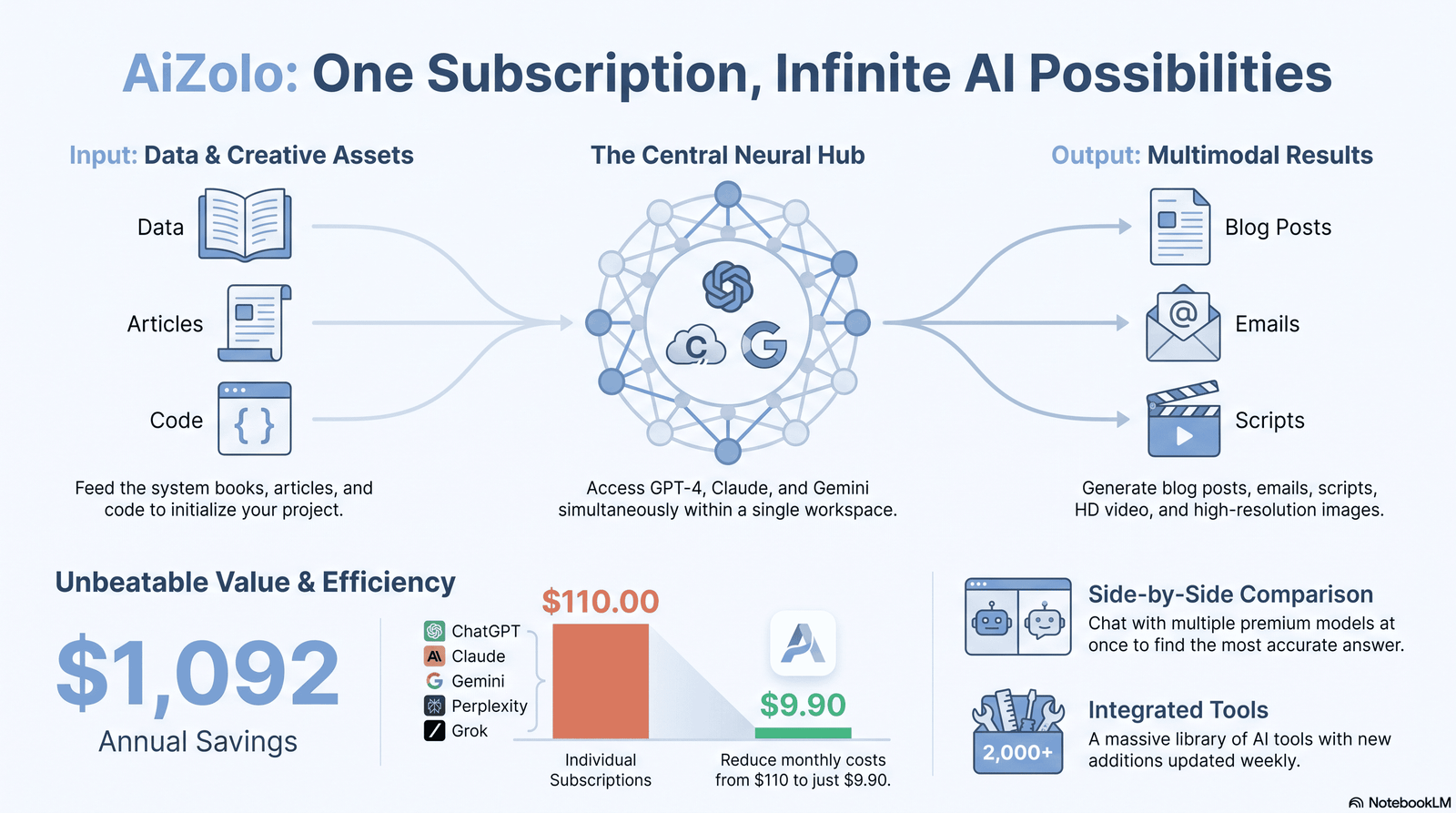
This guide is different. With Aizolo, it’s built from actual usage: prompts run side by side, outputs compared line by line, and pricing pulled from official documentation.
If you’re choosing AI models for writing — for blogging, copywriting, research, or technical documentation — you need to know how each model actually performs, not just what its marketing page says.
By the end of this article, you’ll know exactly which model fits your workflow, your budget, and your writing style.
Table of Contents
Key Takeaways
- There is no single “best” AI writing model — the right choice depends on whether you need prose quality, research depth, speed, or low cost.
- Claude’s Sonnet and Opus models currently produce the most natural, least “AI-sounding” prose for long-form content.
- GPT-based models remain the strongest all-rounders for teams that also need coding, spreadsheets, and broad task coverage in one tool.
- Gemini models are the strongest choice if your workflow already lives inside Google Docs, Gmail, and Drive.
- Open-source models like Llama and Mistral matter most when data privacy or self-hosting is a requirement, not a preference.
- No AI model should publish unedited. Every serious content team runs a human-in-the-loop workflow.
What Are AI Models for Writing?
AI models for writing are large language models (LLMs) trained to generate, edit, and refine human-quality text.
They don’t “know” facts the way a person does. They predict the most statistically likely next word based on patterns learned from massive text datasets.
That distinction matters. It’s why these models can write a flawless blog outline but still invent a fake statistic with total confidence.
Modern AI writing models go far beyond autocomplete. They can draft full articles, rewrite tone, summarize research, translate content, and hold context across a 50-page document.
The category includes general-purpose models (Claude, GPT, Gemini) and purpose-built writing assistants (Jasper, Copy.ai, Grammarly) that are usually just thin wrappers around those same underlying models.
Understanding this difference saves money. Many “AI writing tool” subscriptions charge a premium to access a model you could use directly, at a fraction of the cost, through the provider’s own app.
How AI Writing Models Work
Every major writing model is built on a transformer architecture, first described in a landmark 2017 research paper.
Transformers process entire sentences at once instead of word by word, which is why modern models can track context across long documents.
Here’s the simplified version of what happens when you type a prompt:
- Your text is broken into tokens (word fragments, not whole words).
- The model converts tokens into numerical vectors.
- It calculates which words are statistically likely to come next, based on patterns from training.
- It generates a response one token at a time, checking context at every step.
This is why prompt phrasing changes output so much. You’re not “asking a question.” You’re steering a probability engine.
Expert tip: If a model keeps drifting off-topic in long documents, it’s usually a context window problem, not a “creativity” problem. Break the task into smaller chunks.
Types of AI Models for Writing
Not every model in this space does the same job. Here’s how they split.
General-Purpose Frontier Models
Claude, GPT, and Gemini fall here. They handle writing, research, coding, and reasoning in one system.
Best for: teams that want one subscription to cover multiple departments.
Open-Source Models
Llama, Mistral, and DeepSeek publish their model weights so anyone can self-host them.
Best for: companies with strict data residency rules, or developers who want to fine-tune a model on proprietary content.
Writing-Specific Wrappers
Tools like Jasper, Copy.ai, and Writesonic sit on top of GPT or Claude and add templates, brand voice settings, and workflow features.
Best for: marketing teams that want guardrails and templates more than raw model access.
Editing and Grammar Models
Grammarly and ProWritingAid use smaller, specialized models tuned for grammar, clarity, and tone — not full generation.
Best for: polishing human-written drafts rather than generating from scratch.
A Quick Note on Naming Conventions
Model names change fast, and version numbers can be confusing even for people who use these tools daily.
Each provider ships incremental updates every few months, often with minor naming shifts (a “.5” release, or a new tier name).
The safest habit: check the provider’s own pricing and model page before publishing any numbers in your own content, since figures go stale quickly.
Expert tip: Bookmark each provider’s official model page instead of relying on comparison articles for pricing — third-party numbers are often a few months behind.
Benefits of Using AI Models for Writing
- Speed. A first draft that took two hours now takes ten minutes.
- Consistency. Brand voice and tone stay uniform across a large content library.
- Research acceleration. Summarizing a 40-page report into key points takes seconds.
- Editing support. Catching passive voice, redundancy, and tone drift at scale.
- Idea generation. Breaking through blank-page paralysis with fast outlines and angles.
- Multilingual output. Drafting in multiple languages without hiring separate translators for early drafts.
Limitations of AI Models for Writing
- Hallucination risk. Every model can state false information with total confidence. Always verify facts, statistics, and quotes.
- Generic phrasing. Left unedited, AI drafts tend toward safe, repetitive sentence structures.
- Weak on lived experience. Models can’t share a genuine first-hand story, opinion, or original case study — that has to come from you.
- Context window limits. Even large-context models can lose track of instructions in very long sessions.
- SEO risk if misused. Google’s Helpful Content guidance penalizes content produced primarily to manipulate rankings rather than help readers, regardless of whether AI was involved in production.
Expert tip: Treat AI output as a first draft from a fast, well-read junior writer — not a finished, fact-checked piece.
Best AI Models for Writing Compared (2026)
Pricing and benchmark figures change often. What follows reflects current public pricing and independent benchmark data at the time of writing; always confirm current numbers on the provider’s pricing page before budgeting.
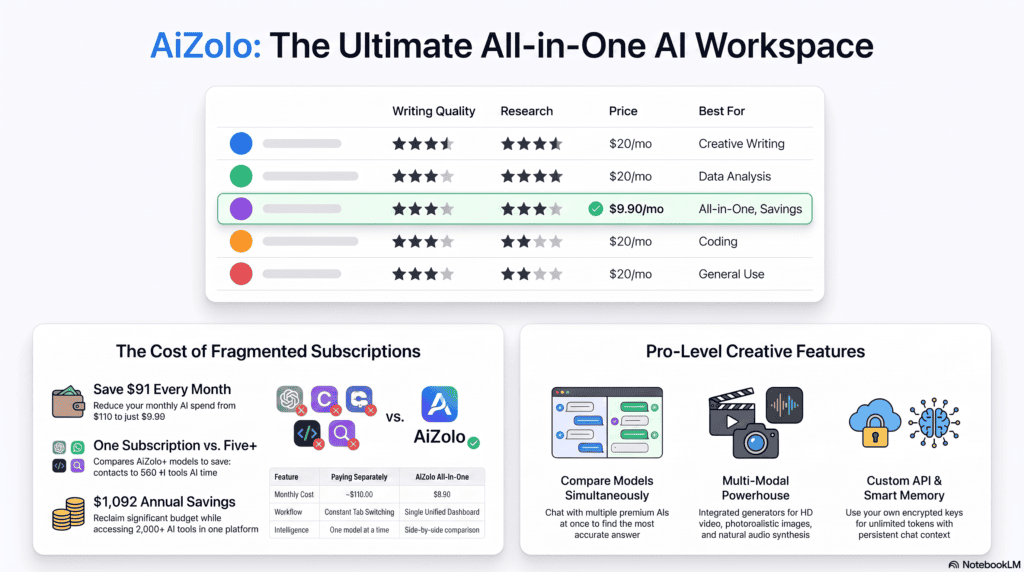
| Model | Best For | Strengths | Weaknesses | Context Window | Writing Quality | Research Ability | SEO Writing | Pricing (per 1M tokens, in/out) | Ideal Users |
|---|---|---|---|---|---|---|---|---|---|
| Claude (Sonnet / Opus) | Long-form writing, editing, nuanced tone | Natural prose, strong instruction-following, large single-pass output | Smaller ecosystem of third-party plugins | Up to 1M tokens (beta on some tiers) | Excellent | Strong with tools enabled | Excellent | ~$3/$15 (Sonnet) to ~$15/$75 (Opus) | Bloggers, agencies, technical writers |
| GPT (ChatGPT) | All-round writing, editing, broad task coverage | Huge ecosystem, strong instruction tuning, fast iteration in Canvas | Can over-edit or change voice unless tightly prompted | 128K–200K+ tokens depending on tier | Very good | Strong with browsing/Deep Research | Very good | ~$2.50/$15 (mainstream tier) | Generalists, solo creators, marketing teams |
| Gemini | Google Workspace–native writing, research-heavy content | Deep Docs/Gmail integration, large context window, strong multimodal input | Prose can feel slightly more templated | Up to 1M tokens | Good | Excellent | Good | ~$2/$12 (Pro tier) | Teams already inside Google Workspace |
| DeepSeek | Budget-conscious, high-volume content ops | Very low cost, open-weight options, solid reasoning for price | Less refined prose polish than frontier leaders | Varies by version | Fair to good | Good | Fair | Among the lowest in the category | Startups, high-volume content pipelines |
| Llama (Meta) | Self-hosted, private, or fine-tuned writing systems | Open-weight, customizable, no per-token API lock-in | Requires infrastructure to run well | Model-dependent | Good (varies by fine-tune) | Fair | Fair | Free to self-host; infra cost applies | Developers, privacy-sensitive companies |
| Mistral | EU data residency, on-premise deployment | Open multimodal models, strong for regulated industries | Smaller ecosystem than the big three | Model-dependent | Fair to good | Fair | Fair | Competitive open-weight pricing | Enterprises with compliance requirements |
Pricing Considerations Beyond the Sticker Price
Sticker price per million tokens is the number everyone quotes — and the number that misleads the most people.
Here’s what it actually misses.
Input vs. output pricing differ significantly. Most providers charge far more for output tokens than input tokens. A model that looks cheap on input pricing can still cost more per finished article once you factor in a long generated draft.
Tokenization isn’t identical across models. The same sentence can break into a different number of tokens depending on the model’s tokenizer, which means quoted per-token prices aren’t always directly comparable.
Consumer plans and API pricing are separate worlds. A $20/month consumer plan with generous usage limits can be far cheaper than API access for a solo writer, but far more limited than API access for a team running dozens of articles a week.
Free tiers change without notice. Rate limits, model access, and included features on free tiers shift often as providers adjust strategy — don’t build a workflow around a free tier without a fallback plan.
Expert tip: Calculate cost per finished, edited article — not cost per token — by tracking how many draft-and-revise cycles a model typically needs for your content type.
Best Use Cases for Each Model
Matching the model to the task matters more than picking a single “winner.”
Long-Form Blog Posts and Articles
Claude’s larger single-pass output and natural sentence rhythm make it the strongest pick for long articles that need to read like a human wrote them.
Marketing Copy and Ad Variations
GPT-based tools iterate fast and handle short-form, punchy copy well, especially when you need many variations quickly.
Research-Heavy Reports
Gemini’s deep integration with search and Workspace tools makes it efficient for pulling in current data and citing sources within a document workflow.
Technical Documentation
Claude and GPT both perform well here, but Claude’s instruction-following tends to preserve exact formatting requirements — useful for style guides with strict rules (e.g., tracked-change formatting, specific heading structures).
High-Volume, Low-Budget Content
DeepSeek and Llama-based setups reduce per-article cost for teams publishing at scale, at some cost to polish.
Regulated Industries (Finance, Healthcare, Legal-adjacent)
Mistral and self-hosted Llama deployments give compliance teams more control over where data goes.
Choosing the Right AI Model for Your Writing
Ask these four questions before committing to a subscription.
1. What’s your primary output — long-form or short-form?
Long-form leans toward Claude. Short-form, high-iteration copy leans toward GPT.
2. Where does your team already work?
If everything lives in Google Docs and Gmail, Gemini removes friction other tools can’t match.
3. What’s your monthly content volume?
High volume changes the math. At scale, a $3/$15 model versus a $15/$75 model is a meaningfully different bill.
4. Do you have data residency or compliance requirements?
If yes, open-weight models (Llama, Mistral) or enterprise-tier agreements become non-negotiable, not optional.
Prompt Writing Tips for Better Output
Prompt engineering is the single highest-leverage skill for anyone using these tools daily.
- Be specific about format. “Write in 2–3 sentence paragraphs, no bullet points” gets better results than “make it readable.”
- Give the model a role. “You are a senior technical editor” changes tone and rigor more than most people expect.
- Provide examples. Paste one paragraph of your own writing and ask the model to match that voice.
- Ask for options, not one draft. “Give me three headline variations” surfaces better choices than a single output.
- Iterate in layers. Draft first, then run a separate pass for tone, then a separate pass for SEO — don’t ask for everything at once.
Expert tip: The biggest prompting mistake we see is asking a model to be “creative” and “SEO-optimized” in the same instruction. Those two goals pull in different directions. Separate the passes.
Real-World Examples
Example 1: Blog outline in under a minute.
A freelance writer feeds a target keyword and three competitor URLs into Claude, asking for a content gap analysis before outlining. The output flags two subtopics competitors missed — turning a generic outline into a differentiated one.
Example 2: Email sequence at scale.
An agency uses GPT to generate 12 variations of a cold outreach email, then manually selects and blends the strongest lines from three drafts rather than publishing any single output as-is.
Example 3: Research synthesis.
A content marketer pastes five PDF whitepapers into Gemini and asks for a comparison table of key claims — cutting a two-hour research task down to fifteen minutes of verification.
Example 4: SEO content refresh.
A content team runs an existing underperforming article through an AI model with instructions to identify missing subtopics based on a list of competitor headings, then rewrites only the weak sections rather than the whole piece — a faster and lower-risk approach than a full rewrite.
Example 5: Multilingual first drafts.
A SaaS company drafts a product update announcement in English, then asks the same model to produce first-pass translations into three languages for regional editors to refine — cutting translation turnaround from days to hours, with native speakers still doing the final polish.
Who Should Use What: A Practical Breakdown
- Solo bloggers and freelancers generally get the best return from a single strong generalist subscription (Claude or GPT) rather than juggling multiple tools.
- Agencies managing multiple client voices benefit from a model with strong instruction-following, since matching different brand voices consistently is harder than it looks.
- In-house marketing teams often do best with a multi-model approach: one model for polished long-form content, a cheaper model for high-volume short-form tasks.
- Technical and documentation teams should prioritize models with strong formatting consistency and larger context windows over raw creative flair.
- Regulated industries should treat open-weight, self-hosted options as a serious evaluation path, not just a cost-saving afterthought.
Who Should Avoid Relying Heavily on AI Writing Models
- Writers producing content that depends entirely on unpublished, first-hand experience (investigative journalism, original research) should use AI only for structure and editing support, not the substance.
- Teams without a fact-checking process shouldn’t scale up AI content production until that process exists — the risk compounds with volume.
- Anyone publishing regulated or legal-adjacent content (financial advice, medical guidance) needs human expert review regardless of which model drafts it.
Common Mistakes When Using AI Writing Models
- Publishing the first draft. Unedited AI output is usually detectable and often factually shaky.
- Skipping fact-checking on statistics. Models can generate a very convincing, entirely fake number.
- Using one long prompt for everything. Structure, tone, and SEO each deserve their own editing pass.
- Ignoring your own voice. If every article sounds like the model’s default tone, readers notice — and so does Google’s Helpful Content system, which prioritizes content with genuine expertise and a clear point of view.
- Treating all models as interchangeable. A model great at code isn’t automatically great at conversational blog tone, and vice versa.
AI + Human Workflow: What Actually Works
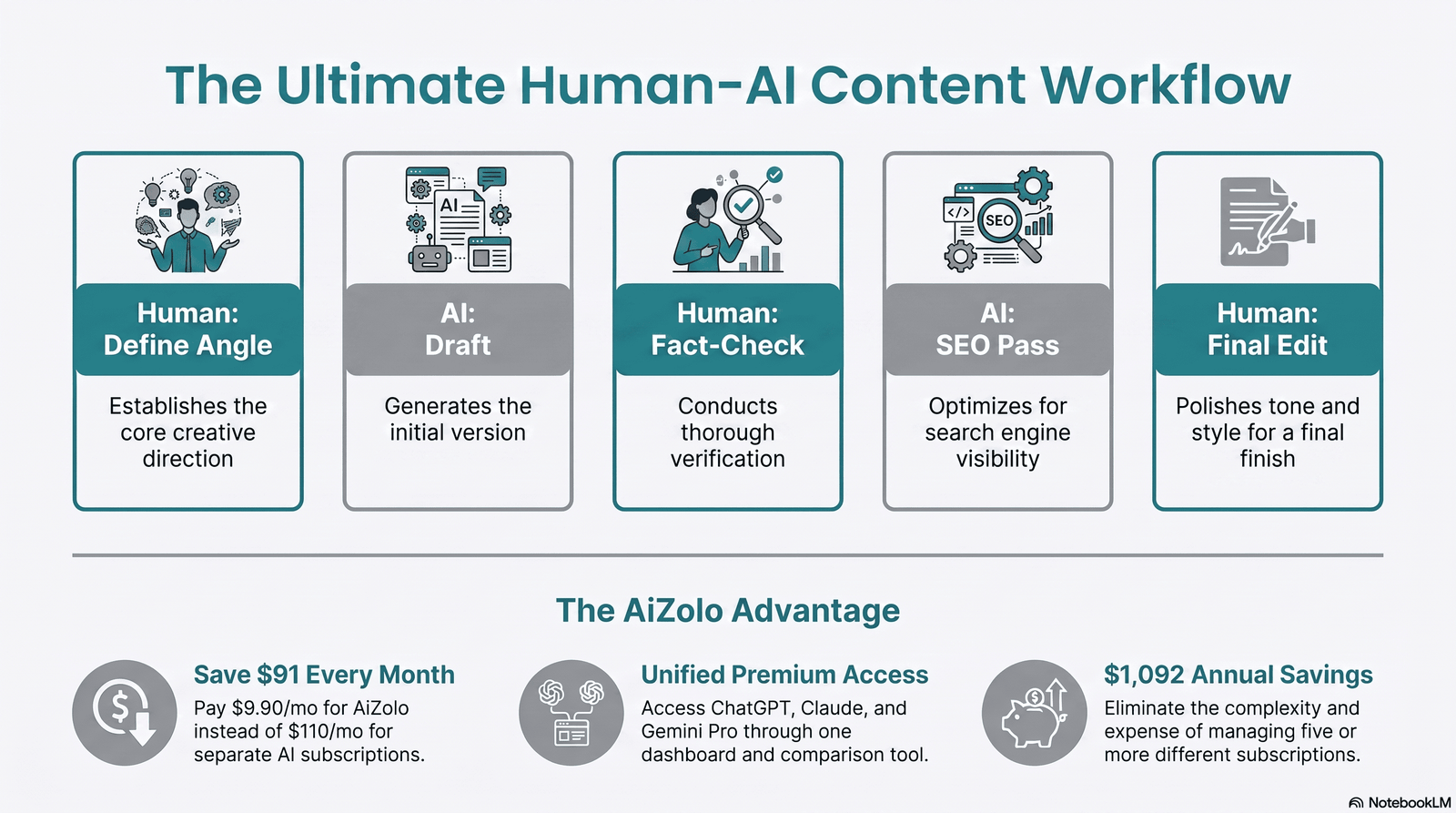
The strongest content teams in 2026 don’t ask “AI or human?” They build a hybrid pipeline.
- Human: Define the angle, audience, and original insight only you can add.
- AI: Generate a structured first draft and research summary.
- Human: Fact-check every claim, statistic, and quote.
- AI: Run a second pass for clarity and SEO structure.
- Human: Final edit for voice, accuracy, and anything that reads generic.
This is also the workflow Google’s guidance points toward: content should be created primarily to help people, with genuine expertise and editorial oversight, regardless of what tools were used to produce it.
A Mini Case Study: Rewriting a Weak Article
Here’s a compact before-and-after that shows why editing matters more than generation.
The brief: Rewrite a thin, 600-word blog post on “email marketing tips” that was ranking on page three.
The AI-only draft: Generic advice — “personalize your subject lines,” “test send times,” “segment your list” — with no specifics, no numbers, no examples. Technically correct, practically useless.
The human-guided draft: Same model, but prompted with a specific angle (“write for B2B SaaS teams sending under 10,000 emails a month”), one real example subject line, and a request to include a specific A/B test framework.
The result: The second draft included concrete recommendations, a sample subject-line comparison, and a step-by-step testing process — the kind of specificity that both readers and search algorithms reward.
The model didn’t get smarter between drafts. The prompt got sharper. That’s the entire lesson.
Future Trends in AI Writing Models
- Longer, more reliable context windows will make full-book or full-report drafting more consistent, reducing the “drift” problem in long documents.
- Better citation and source-linking is becoming a competitive differentiator, not just a nice-to-have, as models integrate live search more tightly.
- Agentic writing workflows — where a model plans, drafts, checks, and revises in a loop with minimal human prompting per step — are moving from experimental to mainstream.
- Tighter integration with existing tools (Docs, Slack, CMS platforms) is reducing the copy-paste friction that currently slows adoption.
- Rising scrutiny on AI-generated content quality means the gap between “fast but generic” and “fast and genuinely helpful” content will keep widening — and search visibility will increasingly reward the latter.
Expert Recommendations
- If you write long-form content professionally, test Claude first — the prose quality difference is the most noticeable factor for readers.
- If your team needs one tool for writing, spreadsheets, and quick coding tasks, a GPT-based plan reduces tool-switching.
- If your workflow is already Google-native, Gemini removes more friction than a “better” model elsewhere would add.
- If budget is the constraint, don’t default to the cheapest tool — calculate cost per finished, edited article, not cost per token.
- Never let any model publish without a human review pass. This isn’t caution for caution’s sake — it protects both accuracy and your site’s search visibility.
Conclusion
Choosing the right AI models for writing isn’t about finding a single winner — it’s about matching a model’s real strengths to your actual workflow.
Claude currently leads on natural, human-sounding prose. GPT remains the strongest generalist. Gemini wins for Google-native teams. Open-source options like Llama and Mistral matter most when compliance and control take priority over convenience.
Whichever model you choose, treat it as a fast, well-read collaborator — not a replacement for your judgment, your fact-checking, or your voice.
Next step: Pick one model from this guide, run the same writing task through it that you did last week, and compare the output side by side with what you published. That single test will tell you more than any benchmark chart.
Frequently Asked Questions
1. What is the best AI model for writing in 2026? There’s no single best model for every use case. Claude currently produces the most natural long-form prose, GPT is the strongest all-around generalist, and Gemini works best for Google Workspace–heavy teams.
2. Are AI writing models free to use? Most offer a free or low-cost tier with usage limits, plus paid plans (commonly around $20/month for individuals) and metered API pricing for developers building custom tools.
3. Can Google detect AI-generated content? Google has stated it doesn’t penalize content simply for being AI-assisted. Its Helpful Content guidance focuses on whether content is genuinely helpful, accurate, and created with real expertise — not on the tool used to produce it.
4. Is Claude better than ChatGPT for writing? For long-form prose and nuanced tone, many writers find Claude’s output more natural. For broad task coverage and ecosystem features, ChatGPT often wins. Testing both on your actual content is the only reliable way to know.
5. What is the difference between an AI writing model and an AI writing tool? A model (like Claude, GPT, or Gemini) is the underlying engine. A tool (like Jasper or Copy.ai) is usually a template-and-workflow layer built on top of one of those models.
6. Can AI models write SEO-optimized content? Yes, but they need clear instructions on keyword placement, structure, and search intent. Left unguided, models tend to under-optimize for on-page SEO signals.
7. What is a context window, and why does it matter for writing? A context window is how much text a model can “see” at once, measured in tokens. Larger windows help with long documents, multi-source research, and maintaining consistency across a long piece.
8. Are open-source AI models good enough for professional writing? Open-source models like Llama and Mistral have closed much of the quality gap, especially when fine-tuned on specific content types. They’re a strong fit when data control matters more than squeezing out the last bit of polish.
9. How do I stop AI content from sounding generic? Feed the model examples of your own writing, ask it to match a specific voice, and always edit the output rather than publishing it verbatim.
10. Which AI model is best for technical writing? Claude and GPT both handle technical documentation well. Claude tends to preserve strict formatting instructions more reliably across long documents.
11. Can AI models replace human writers? Not for original insight, lived experience, or accountability for accuracy. They’re best used as a drafting and editing accelerant within a human-led process.
12. What’s the biggest risk of using AI for content at scale? Publishing unverified information at volume. A hallucinated statistic repeated across dozens of articles is a bigger liability than a single slow, careful post.
13. Do AI writing models improve SEO rankings on their own? No. Rankings depend on genuine helpfulness, accuracy, and user experience — not on which tool drafted the content. AI can speed up production, but it doesn’t substitute for editorial quality.
14. How much does it cost to use AI models for writing at a business level? Costs range from roughly $20/month for individual plans to usage-based API pricing that scales with volume — commonly a few dollars per million tokens for input and higher for output, depending on the model tier.
15. What should I check before trusting AI-generated research? Verify every statistic, quote, and named source independently. Models can generate confident-sounding citations that don’t actually exist.
About the Author
Jeevesh Tripathi Email: jeevesh@aizolo.com
Jeevesh Tripathi is an AI tools researcher and content strategist specializing in generative AI, SEO, and content workflow design. His work focuses on hands-on testing of AI writing models and translating technical capability into practical guidance for writers, marketers, and agencies. He writes for Aizolo on the intersection of AI, search, and content strategy.