
Accessing multiple AI models from one place can save time, reduce subscription costs, and make it easier to choose the right model for each task. Instead of switching between ChatGPT, Claude, Gemini, and other AI tools, multi-model platforms provide a unified workspace for comparing responses and managing workflows. AiZolo is a convenient option, offering access to multiple leading AI models alongside image, video, and audio generation tools. If you want a simpler way to explore and compare AI models, AiZolo is worth trying.
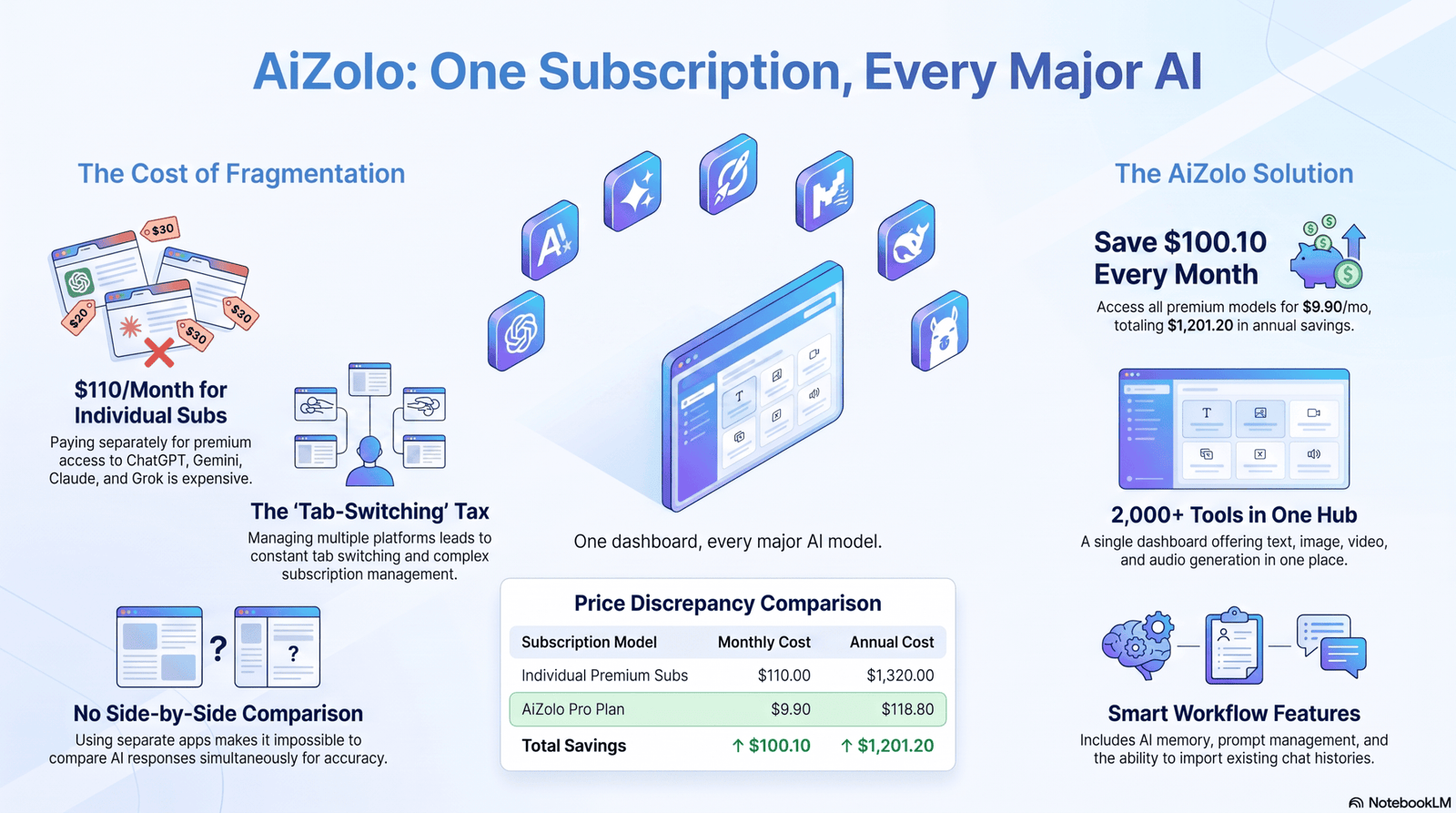
Table of Contents
Introduction
If you’ve tried to keep up with modern AI, you’ve probably ended up with more logins than you can remember. A ChatGPT tab here, a Claude tab there, maybe Gemini open for research and Grok for something else entirely.
Each one is genuinely useful. Each one also charges its own monthly fee, remembers nothing about the other, and forces you to copy-paste context every time you switch.
That’s the exact problem behind the growing search for a way to access all AI models in one place — a single workspace where ChatGPT, Claude, Gemini, Grok, Mistral, DeepSeek, and Llama all live under one login and, ideally, one bill.
For the core case for a unified AI workspace — why no single model wins at everything, and what a hosted subscription like Aizolo gets you — see our full breakdown: The Best AI Chat Platform That Supports ChatGPT, Claude, and Gemini Together. This guide focuses specifically on bring-your-own-key and self-hosted alternatives for developers and privacy-focused teams.
Problems With Paying for Separate AI Subscriptions
Individually, premium AI subscriptions add up fast. ChatGPT Plus, Claude Pro, and Gemini Advanced each typically run in the $20/month range on their own, and pricing and limits change often enough that any fixed number quoted today is worth double-checking on the provider’s own pricing page before you budget around it.
Beyond cost, there are practical friction points:
- Context loss — switching apps means re-explaining your project every time.
- Fragmented history — your best conversations live in five different places.
- Redundant limits — you might hit a usage cap on one app while barely touching another you’re also paying for.
- Decision fatigue — constantly guessing which model to open for which task.
Important Note: Subscription pricing for ChatGPT, Claude, and Gemini changes frequently. Always confirm current rates on OpenAI’s, Anthropic’s, and Google’s official pricing pages before comparing costs.
Benefits of Accessing All AI Models in One Place
A genuinely unified AI workspace solves most of the friction above, and adds a few advantages you don’t get from single-model apps:
- Side-by-side comparison — send one prompt to multiple models and compare answers before picking one.
- Lower total cost — one subscription (or one set of API keys) instead of several.
- Shared context — a single history and, on some platforms, persistent memory across models.
- Task-based routing — use the strongest model for each job instead of settling for whichever one you happen to have open.
- Simplified billing — one invoice instead of a stack of recurring charges to track.
Pro Tip: If you regularly use two or more premium AI models, run the actual math — subscription cost plus the time you lose switching tools — before assuming a single-model plan is cheaper. It usually isn’t once your time is counted.
Some platforms extend past chat into full productivity tooling — see our all-in-one AI productivity suite review for that angle.
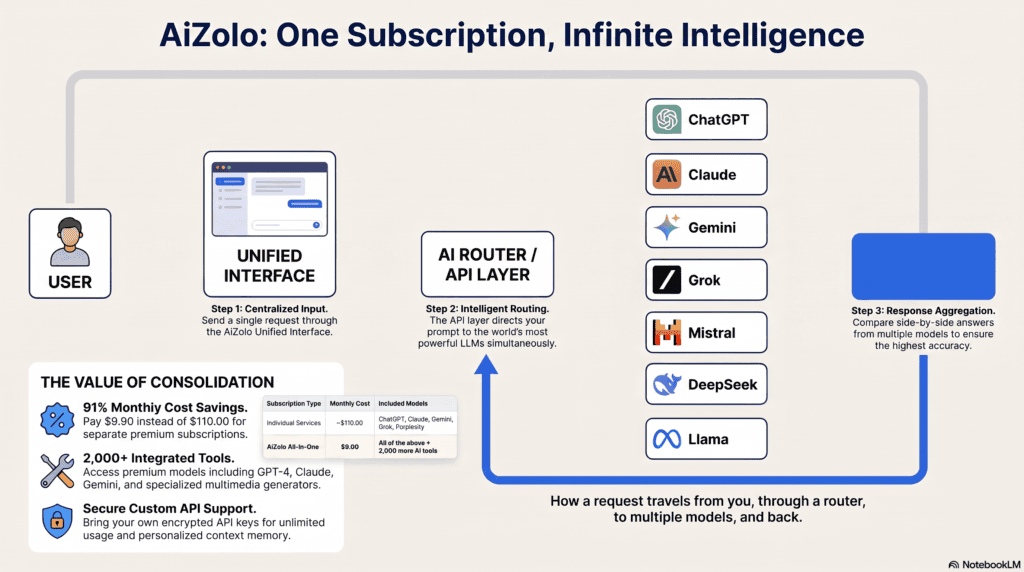
For a walkthrough of how these platforms route prompts across providers under the hood, see the How Multi-Model AI Platforms Work section of our main guide.
Best Platforms to Access All AI Models in One Place
Below are the platforms most commonly used for multi-model access in 2026, based on their own documentation and independent reviews. Pricing and limits change frequently — always verify current figures on the platform’s own site before subscribing.
If you prefer a shorter, decision-ready list instead of an extended comparison, see our curated top-5 shortlist of all-in-one AI platforms.
Aizolo
Overview: Aizolo is a subscription-based, all-in-one AI workspace that bundles chat access to several leading models with image, video, and audio generation tools, a prompt manager, and project-based organization.
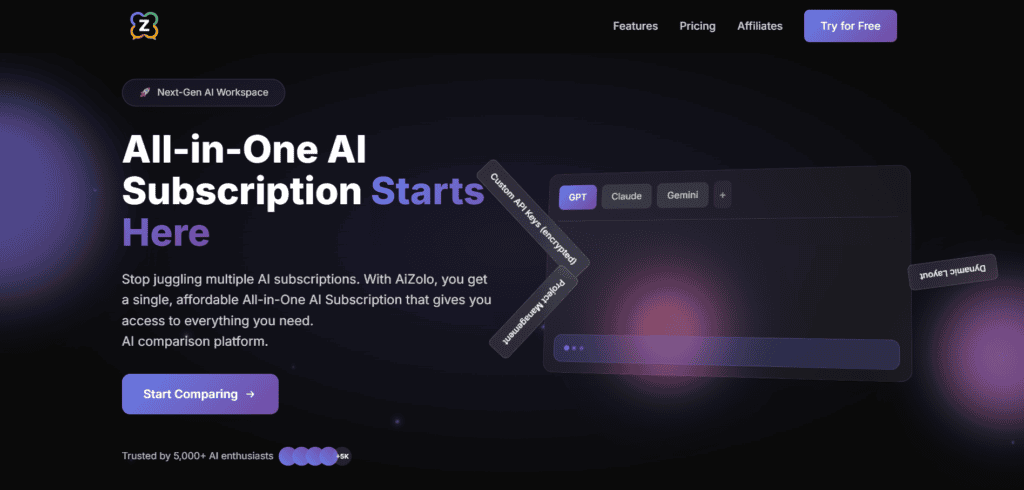
Pros: Side-by-side model comparison; creative generation tools included in the base plan rather than sold separately; supports bringing your own API keys for unlimited usage; chat import from ChatGPT and Claude.
No card required to start — see our no-credit-card free trial aggregator list for confirmation across platforms.
Cons: Newer entrant than OpenRouter or Poe, so third-party tutorials and community troubleshooting resources are still limited.
Pricing: Free tier available; Pro plan listed at approximately $9.90/month at the time of writing — confirm current pricing on Aizolo’s own pricing page.
Best for: Individuals and small teams who want chat, image, video, and audio generation bundled under one subscription rather than assembled from several tools.
Supported models: Access to major chat models (GPT-class, Claude, Gemini, and others) plus image, video, and audio generators, with custom API key support for additional models.
OpenRouter
Overview: OpenRouter is a developer-focused API gateway rather than a consumer chat app. It offers a single API to access hundreds of AI models with pay-as-you-go, free-tier, and enterprise pricing.
Pros: Access to 290+ models through one API, provider pricing passthrough with no markup on inference, and bring-your-own-key support.
Cons: No native chat interface of its own — it’s built for developers integrating models into their own apps; a flat percentage fee applies when purchasing credits, and unused credits can expire after a period of account inactivity.
Pricing: Pay-as-you-go with no minimum spend, plus a free tier for select models. A roughly 5.5% fee applies to credit purchases rather than a per-token markup.
Best for: Developers building their own tools who want one API key covering many providers rather than a consumer-facing chat app.
Supported models: 300+ models spanning Claude, GPT, Gemini, DeepSeek, Llama, and more.
Poe
Overview: Built by Quora, Poe is one of the longest-running consumer multi-model chat platforms, giving subscribers a single interface to talk to models from most major providers.
Pros: Library spans text, image, video, and audio models from OpenAI, Anthropic, Google, xAI, Meta, Mistral, DeepSeek, and more. Custom bot creation lets you build task-specific assistants on top of existing models.
Cons: Uses a points-based consumption system rather than flat unlimited access, which some users find confusing to track; plans span a wide range from an entry tier up to a considerably pricier team tier.
New to this entirely? Start with our simpler walkthrough: how to find all AI tools in one website.
Pricing: Subscriptions start at $4.99/month, with higher tiers offering more monthly compute points; team plans available at higher price points.
Best for: Casual-to-power users who want the widest possible model selection without managing their own API keys.
Supported models: GPT-5.5, Claude-Opus-class models, Gemini, and thousands of other bots built on top of major providers.
ChatHub
Overview: ChatHub is a lightweight browser extension and web app that opens several chatbot interfaces side by side, primarily for quick comparison rather than deep workflow management.
Pros: Very low friction to start; genuinely useful for fast side-by-side answer comparison; works well as a browser add-on.
Cons: Thinner feature set than full workspace platforms — limited memory, project organization, or document tools; typically requires either its own subscription or your own API keys per model.
Pricing: Free tier with limited usage; paid tier for higher limits — check ChatHub’s site for current rates.
Best for: Quick, casual comparisons between a couple of chatbots without committing to a full platform.
Supported models: Major chat models including GPT-class, Claude, and Gemini, depending on connected keys.
LibreChat
Overview: LibreChat is a free, open-source, self-hostable chat interface that connects to multiple AI providers via your own API keys. It’s aimed at technically comfortable users who want full control over data and hosting.
Pros: Free and open source; self-hosted, so conversation data stays on infrastructure you control; supports plugins, custom endpoints, and multiple simultaneous model conversations.
Cons: Requires you to supply your own API keys (and pay providers directly per token); setup requires basic technical comfort with deployment.
Pricing: The software is free; you pay only for the API usage from whichever providers you connect.
Best for: Developers, privacy-conscious teams, and organizations that want a self-hosted multi-model interface rather than a hosted subscription.
Supported models: Any provider you connect via API key, including OpenAI, Anthropic, Google, and open-weight models through routers like OpenRouter.
TypingMind
Overview: TypingMind is a polished, paid front-end that connects to your own API keys for multiple providers, aimed at users who want a nicer interface than the default provider apps without self-hosting.
Pros: Clean, fast interface; supports plugins and custom instructions; works across most major model providers.
Cons: Requires bringing your own API keys, so total cost still depends on your usage with each provider; one-time or subscription license fee on top of API costs.
Pricing: Paid license (one-time or subscription, depending on current offer) plus your own per-token API costs — check TypingMind’s site for current pricing.
Best for: Users who already have API keys and want a better interface than ChatGPT’s or Claude’s native apps.
Supported models: Any model reachable via API key, including GPT, Claude, and Gemini.
AnythingLLM
Overview: AnythingLLM is an open-source, self-hostable platform focused on combining multi-model chat with document/knowledge-base retrieval (RAG), popular with teams building internal AI tools.
Pros: Strong document analysis and knowledge-base features; free and open source; can run fully local or connect to cloud model APIs.
Cons: More setup overhead than a hosted consumer app; best features require some technical comfort.
Pricing: Free open-source version; a hosted/cloud tier is also available — confirm current pricing on their site.
Best for: Teams that want multi-model chat combined with searchable internal documents.
Supported models: Connects to OpenAI, Anthropic, Google, and local open-weight models via Ollama or similar runners.
Open WebUI
Overview: Open WebUI is a free, open-source web interface most commonly paired with locally-run models (via Ollama) but also capable of connecting to cloud APIs.
Pros: Fully free and self-hosted; strong for privacy-sensitive or offline use cases; active open-source community.
Cons: Best local-model experience requires reasonably capable hardware; less “plug and play” than hosted platforms.
Pricing: Free (self-hosted); costs are limited to your own infrastructure and any API keys you connect.
Best for: Developers and privacy-focused users who want to run models locally or self-host their multi-model interface.
Supported models: Local open-weight models via Ollama, plus optional connections to cloud APIs.
BoltAI (Mac)
Overview: BoltAI is a native macOS app that gives quick, system-wide access to multiple AI providers through your own API keys, including a menu-bar assistant.
Pros: Native Mac performance and integration; works from any app via keyboard shortcut; supports several providers.
Cons: Mac-only; requires your own API keys, so ongoing cost depends on usage.
Pricing: One-time license fee (check current pricing on BoltAI’s site) plus your own API costs.
Best for: Mac users who want fast, system-wide AI access without a browser tab open at all times.
Supported models: OpenAI, Anthropic, Google, and other providers via API key.
MindMac
Overview: MindMac is another native macOS client for chatting with multiple AI providers through your own API keys, with a focus on customization and local data storage.
Pros: Local-first data storage; supports multiple providers and custom system prompts; native Mac experience.
Cons: Mac-only; API keys and their costs are managed separately by the user.
Pricing: One-time license fee plus your own API usage costs — verify current pricing on MindMac’s site.
Best for: Mac users prioritizing local data storage and interface customization.
Supported models: OpenAI, Anthropic, Google, and other providers via API key. <!– IMAGE 4 Placement: Platform comparison section Type: Screenshot recommended Source: Official website of each platform Purpose: Capture the actual dashboard/model-selection screen from each platform’s official site to show readers the real interface rather than a generic mockup. –>
Feature Comparison Table
| Platform | Models Supported | Bring Your Own API | Built-in Subscription | Image Generation | Document Analysis | Team Features | Pricing | Best For |
|---|---|---|---|---|---|---|---|---|
| Aizolo | Multiple major chat models + generators | Yes | Yes | Yes | Yes | Limited | Free tier; ~$9.90/mo Pro | All-in-one chat + creative tools |
| OpenRouter | 300+ | Yes (it’s API-first) | No (pay-as-you-go) | Some via connected models | No native UI | Enterprise tier | Pay-as-you-go, ~5.5% credit fee | Developers building apps |
| Poe | 200+ | No (points-based) | Yes | Yes | Limited | Yes (Teams tier) | From ~$5/mo | Widest model variety, casual to power users |
| ChatHub | Several major models | Depends on plan | Yes (basic) | Limited | No | No | Free tier + paid | Quick side-by-side comparisons |
| LibreChat | Any connected via API | Yes | No | Via connected models | Yes (plugins) | Self-hosted teams | Free software + API costs | Self-hosted, privacy-focused |
| TypingMind | Any connected via API | Yes | No | Via connected models | Yes | Limited | License fee + API costs | Better UI over your own API keys |
| AnythingLLM | Cloud + local models | Yes | Optional hosted tier | No native | Yes (strong RAG) | Yes | Free (OSS) + hosted tier | Teams needing document search |
| Open WebUI | Local + connected cloud | Yes | No | No native | Limited | Self-hosted teams | Free (self-hosted) | Local/offline model access |
| BoltAI (Mac) | Any connected via API | Yes | No | Via connected models | Limited | No | One-time license + API costs | Mac system-wide AI access |
| MindMac | Any connected via API | Yes | No | Via connected models | Limited | No | One-time license + API costs | Mac users wanting local data storage |
Figures above reflect publicly available information at the time of writing. Confirm current pricing and feature availability directly on each platform’s website before subscribing.
Which AI Models Should You Use for Different Tasks?
No single model wins every category. Here’s a practical breakdown:
- Coding: Claude and GPT-class models both perform strongly on structured reasoning and debugging; comparing both on the same prompt is often worth the extra step.
- Research: Models with live web access or retrieval features (including Perplexity-style tools) tend to outperform static-knowledge models for current events.
- Writing: Claude is frequently favored for long-form, nuanced prose; GPT-class models are strong for punchy, varied styles.
- Math: Reasoning-focused model variants (o-series/GPT reasoning modes, Claude’s extended thinking) generally outperform standard chat modes on multi-step problems.
- Marketing copy: Fast, creative models like GPT-class or Grok variants often produce more usable first drafts for ad copy.
- Customer support: Consistency and instruction-following matter more than raw creativity here — Claude and GPT-class models both do well with clear system prompts.
- SEO content: A capable general-purpose model plus a human editor beats any single model working unsupervised — see Google’s own guidance on helpful, people-first content.
- Brainstorming: Cheaper, faster models (Llama, DeepSeek, Grok) are often “good enough” for volume ideation, saving premium model usage for refinement.
- Reasoning-heavy tasks: Claude Opus-class and GPT reasoning modes tend to lead on multi-step logic problems.
- Image generation: Purpose-built image models (DALL·E-class, Midjourney-style, Nano Banana-class tools) outperform general chat models asked to describe images.
- Summarization: Most modern large-context models handle summarization well; the deciding factor is usually context window size for long documents. For very large inputs, see the best AI aggregator for 10 million token context.
- Translation: GPT-class and Gemini models are commonly cited as strong all-around translators, though quality varies notably by language pair.
Expert Insight: Treat model choice like tool choice in a toolbox — the “best” AI model is the one best suited to the specific task in front of you, not a universal winner.
Not sure whether a hosted subscription or a BYOK setup fits you better? Start with the general decision framework in our main comparison guide, then use the BYOK-specific checklist below.
Why Aizolo Is Worth Considering
Aizolo fits a specific niche well: people who want chat access to multiple premium models plus image, video, and audio generation, bundled into one subscription rather than assembled from several separate tools.
Its side-by-side comparison view is genuinely useful for evaluating model outputs without tab-switching, and bundling creative generation tools into the base plan is a real point of difference from pure text-chat aggregators like Poe or ChatHub.
Aizolo’s free tier is also worth testing first — see our full comparison in 7 all-in-one free AI platforms before deciding whether the paid Pro plan is necessary for your usage.
That said, it’s a newer platform than OpenRouter or Poe, so it has a smaller track record and less third-party documentation. It’s a reasonable pick if bundled creative tools and a simple subscription model matter more to you than the sheer model count of OpenRouter or Poe — but it isn’t the only reasonable choice, and it’s worth comparing directly against alternatives like OpenRouter for developers or one-subscription-for-all-ai-models options for straightforward chat-only use cases before deciding.
See the Common Mistakes section in our main guide for general pitfalls — below are mistakes specific to bring-your-own-key setups.
The Future of Multi-Model AI Platforms
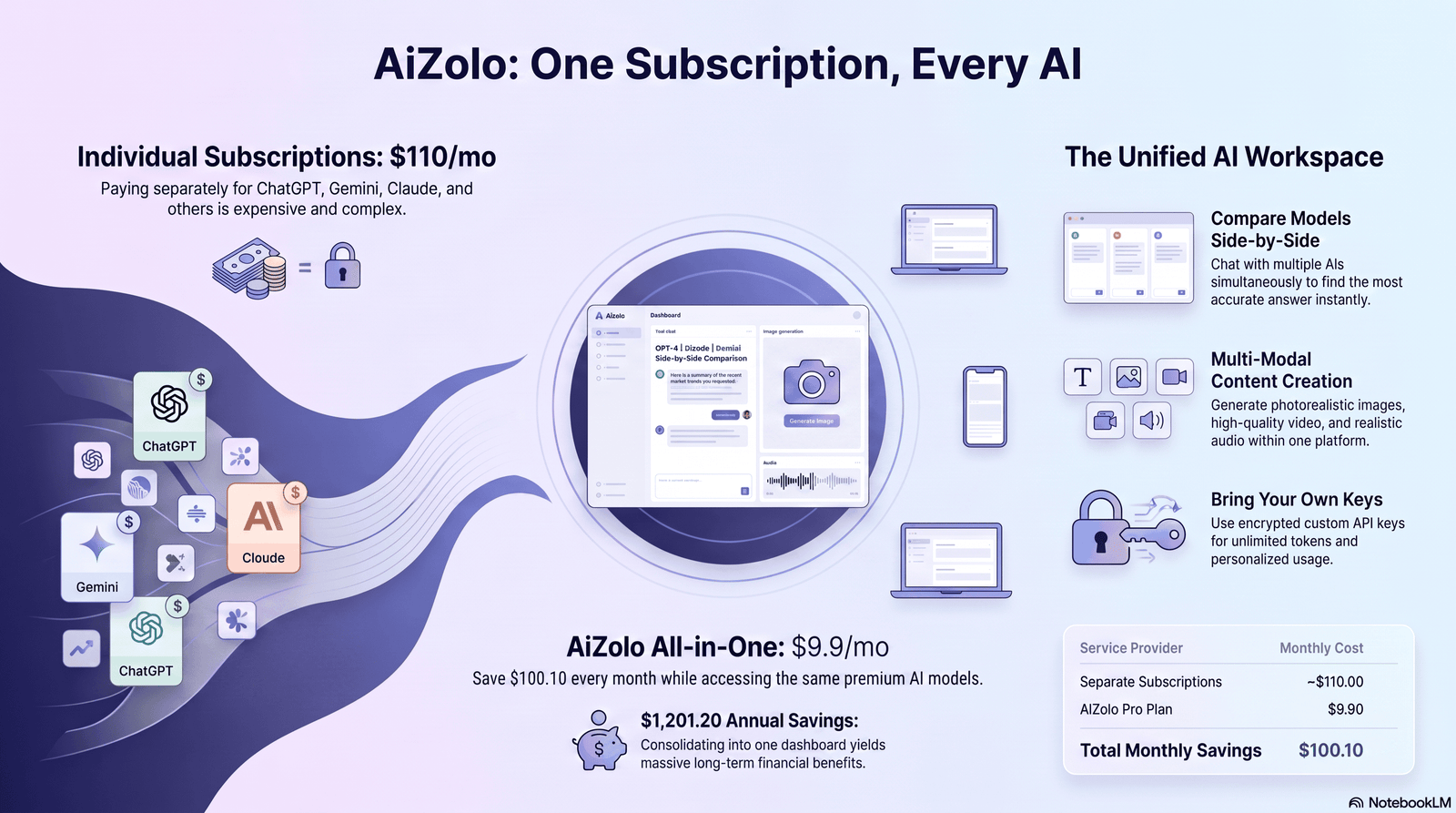
Expect three trends to keep accelerating: smarter automatic routing (platforms picking the best model per task without you choosing manually), deeper memory and personalization across models rather than per-app, and tighter integration of image, video, and audio generation alongside text chat in the same subscription. <!– Video suggestion: An embedded YouTube walkthrough comparing 2-3 multi-model platforms side by side would help readers here, since seeing the actual interfaces in motion communicates usability far better than screenshots alone. Best placed right after this section, before the
FAQs
1. What does it mean to access all AI models in one place? It means using a single platform or interface to reach multiple AI models — like ChatGPT, Claude, and Gemini — instead of maintaining separate accounts for each.
2. Is it cheaper to use one platform instead of separate AI subscriptions? Usually yes, if you regularly use two or more premium models, since a single bundled subscription or pay-as-you-go API tends to cost less than several full-price individual subscriptions.
3. Can I really compare ChatGPT, Claude, and Gemini side by side? Yes — several platforms, including Aizolo and Poe, support sending the same prompt to multiple models and viewing responses next to each other.
4. Do multi-model platforms store my conversations? It depends on the platform and plan. Check each provider’s privacy policy directly, especially if you’re handling sensitive or client data.
5. What’s the difference between a hosted platform and a BYOK tool? Hosted platforms (like Aizolo or Poe) bundle model access into one subscription. BYOK (“bring your own key”) tools like OpenRouter or LibreChat let you connect your own API keys and pay providers directly per token.
6. Which platform supports the most AI models? OpenRouter and Poe both offer very large model catalogs — OpenRouter for developers via API, Poe for consumer chat.
7. Can I use a multi-model platform for free? Most offer a free tier with limited usage; free tiers are useful for testing but usually too limited for daily professional use.
8. Are self-hosted options like LibreChat and Open WebUI hard to set up? They require more technical comfort than a hosted app, but both have active documentation and communities to help with deployment.
9. Do these platforms support image and video generation too? Some do (Aizolo, Poe), while others (OpenRouter, LibreChat) depend on which models or plugins you connect.
10. How do I know which AI model is best for my specific task? Test the same prompt across two or three models using a comparison feature — the differences are often more obvious in practice than in any general ranking.
11. Is a multi-model platform the same as an AI aggregator? Largely yes — “multi-model platform” and “AI aggregator” describe the same category of tool, just with different marketing language.
Final Verdict
There’s no single “best” way to access all AI models in one place — the right choice depends on whether you want a simple hosted subscription, a developer-grade API gateway, or a self-hosted tool you fully control.
If you want a bundled, beginner-friendly subscription with creative tools included, platforms like Aizolo or Poe are worth trying. If you’re building your own application or want maximum model choice at API-level pricing, OpenRouter is the stronger fit. If data control is non-negotiable, self-hosted tools like LibreChat or Open WebUI deserve a serious look.
Whichever direction you choose, test it against your actual daily workload before committing to an annual plan — that’s the detail that matters more than any single feature list.
For a shorter, curated paid-tier shortlist rather than this full ten-platform list, see top 5 all-in-one AI platforms.
Author Bio
Jeevesh Tripathi — AI Researcher & Technical Content Writer
Jeevesh Tripathi specializes in AI platforms, generative AI, prompt engineering, productivity software, and emerging machine learning technologies. His research focuses on helping professionals and businesses choose the right AI tools through in-depth comparisons, hands-on testing, and evidence-based analysis. He follows Google’s EEAT principles by prioritizing accuracy, transparency, and practical value in every article.
Email: jeevesh@aizolo.com
