
Introduction
You know your site has problems. Traffic is flat, rankings are stuck, and you don’t have three days to spend digging through spreadsheets.
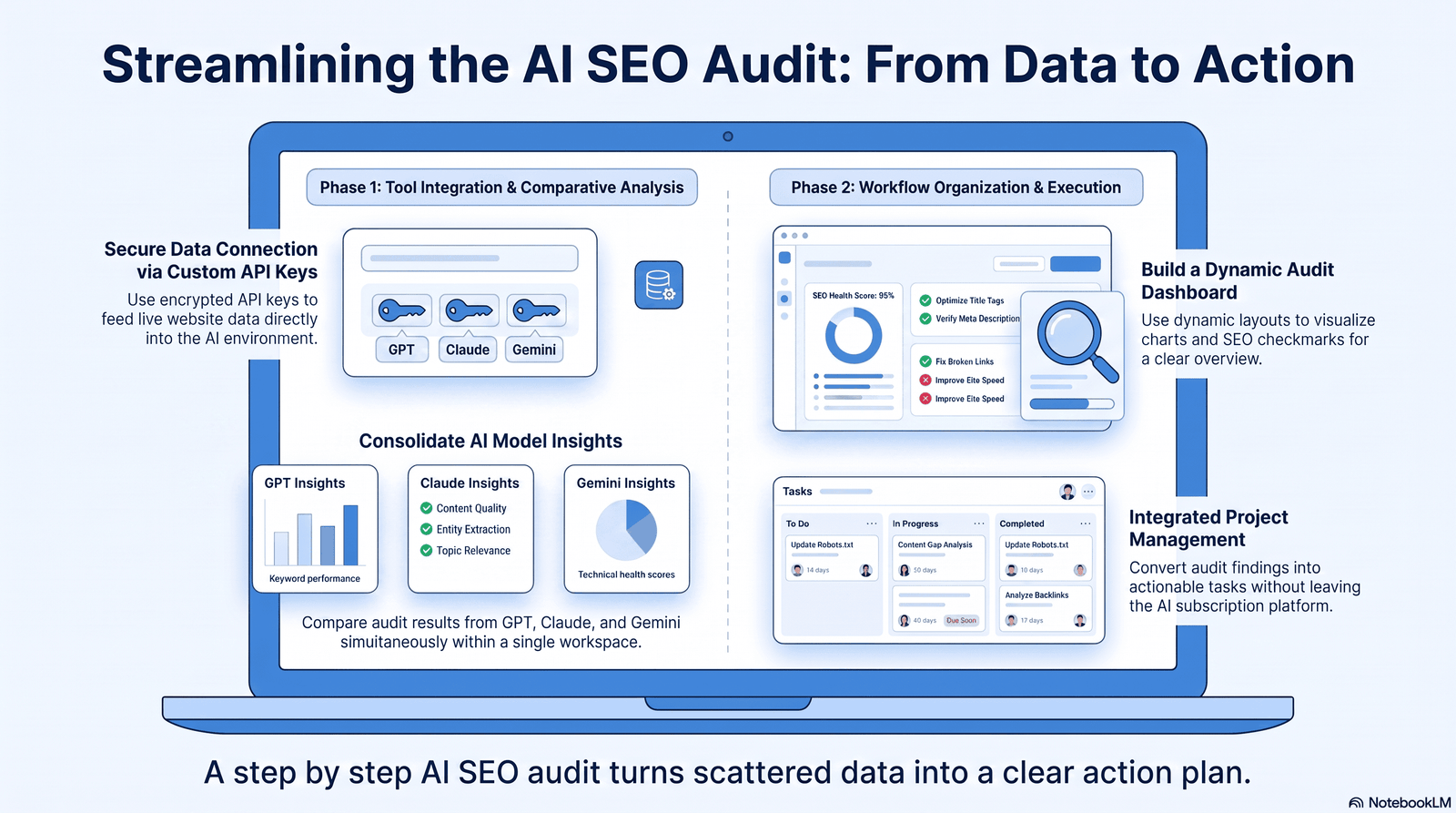
Traditional SEO audits were built for a slower internet. They rely on manual crawls, endless tab-switching, and gut instinct to prioritize fixes. Aizolo helps streamline this process, making SEO audits faster and more efficient for today’s rapidly evolving search landscape.
AI changes the math. It can crawl, cluster, and summarize thousands of data points in minutes, leaving you more time for the judgment calls that actually move rankings. That’s exactly why a step by step ai seo audit for beginners approach has become the fastest way to find and fix what’s holding a site back.
This guide walks through the entire process — technical SEO, content quality, EEAT, and AI search visibility — using a repeatable workflow that combines AI tools with human review. By the end, you’ll know exactly how to run your own audit from scratch, validate what the AI tells you, and turn findings into a prioritized action plan.
Table of Contents
What Is an AI SEO Audit?
An AI SEO audit uses machine learning tools to analyze crawl data, content, and performance metrics at scale, then surface patterns a human might miss.
It doesn’t replace strategy. It replaces the manual grind of scanning thousands of URLs one by one.
Think of it as a first-pass filter. The AI flags what’s broken, thin, or underperforming — then a human decides what actually matters for the business.
Expert Tip: Treat every AI output as a hypothesis, not a verdict. Confirm it against real data before you act.
Why AI Is Changing SEO Audits
Search itself has changed. Google’s AI Overviews, along with ChatGPT, Gemini, Claude, and Perplexity, now answer queries directly — sometimes without a click to your site at all.
That shift means audits can’t just check rankings anymore. They need to check whether your content is structured well enough to be understood, summarized, and cited by AI systems.
AI tools help here because they can simulate how a language model reads your page — checking clarity, entity structure, and answer completeness — far faster than a manual review.
According to Google’s own Search Central documentation, sites that prioritize helpful, people-first content consistently perform better across both traditional and AI-driven search surfaces.
Traditional SEO Audit vs AI SEO Audit
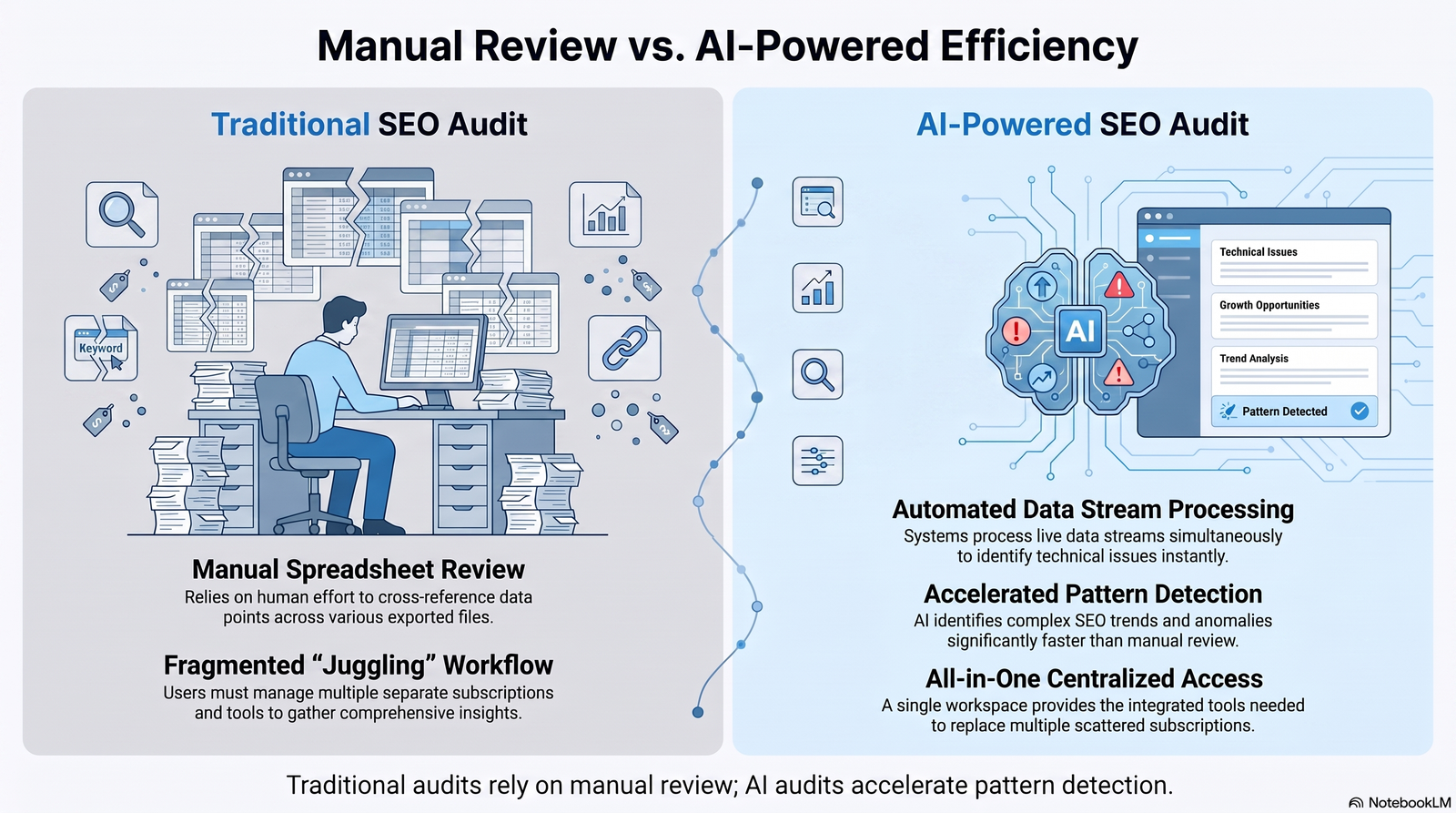
| Factor | Traditional Audit | AI SEO Audit |
|---|---|---|
| Time to complete | Days to weeks | Hours |
| Data processing | Manual, spreadsheet-based | Automated pattern detection |
| Content analysis | Page-by-page review | Bulk clustering and gap analysis |
| Technical checks | Manual crawl review | Automated crawl + prioritization |
| Risk of human error | Higher on large sites | Lower, but hallucination risk exists |
| Strategic judgment | Fully human | Human validates AI output |
| Best for | Small sites, deep manual review | Large sites, recurring audits |
Neither approach is complete on its own. The strongest workflow blends both — AI for speed, humans for judgment.
Benefits for Beginners
Beginners often stall out on SEO audits because the scope feels overwhelming. AI narrows that scope immediately.
- Faster orientation — AI summarizes hundreds of issues into a short priority list.
- Lower learning curve — plain-language explanations replace dense technical jargon.
- Fewer blind spots — pattern detection catches issues manual reviews often skip.
- Repeatable process — once you learn the workflow, every future audit gets faster.
Quick Win: Run your first AI audit on just your top 20 landing pages. A smaller, high-value sample builds confidence before you tackle the whole site.
Tools You Need
You don’t need an expensive stack to start. A focused toolkit covers almost everything.
| Tool | Purpose | Cost |
|---|---|---|
| Google Search Console | Indexing, crawl errors, query data | Free |
| Google Analytics 4 (GA4) | Traffic, behavior, conversions | Free |
| Google PageSpeed Insights | Core Web Vitals, page speed | Free |
| Screaming Frog | Full-site crawling | Free (limited) / Paid |
| Semrush or Ahrefs | Keyword and backlink analysis | Paid |
| An AI assistant (Claude, ChatGPT, Gemini) | Summarizing data, spotting patterns | Free / Paid tiers |
| Google Rich Results Test | Schema validation | Free |
SEO Consultant Insight: The tool matters less than the workflow. Beginners often buy tools before they know what questions to ask them.
Preparing Before Your Audit
Before opening any tool, get your baseline data in order. This step is skipped constantly, and it’s why audits go off the rails.
- Export your last 3–6 months of Search Console data.
- Pull GA4 traffic and conversion trends for the same period.
- List your top 20–50 landing pages by traffic or revenue.
- Note any recent site changes — migrations, redesigns, CMS switches.
- Set a clear goal: technical health, content gaps, or full-site review.
Skipping this step is the single biggest reason AI audits produce noisy, low-value output — the AI has nothing to anchor its analysis against.
Complete Step-by-Step AI SEO Audit for Beginners
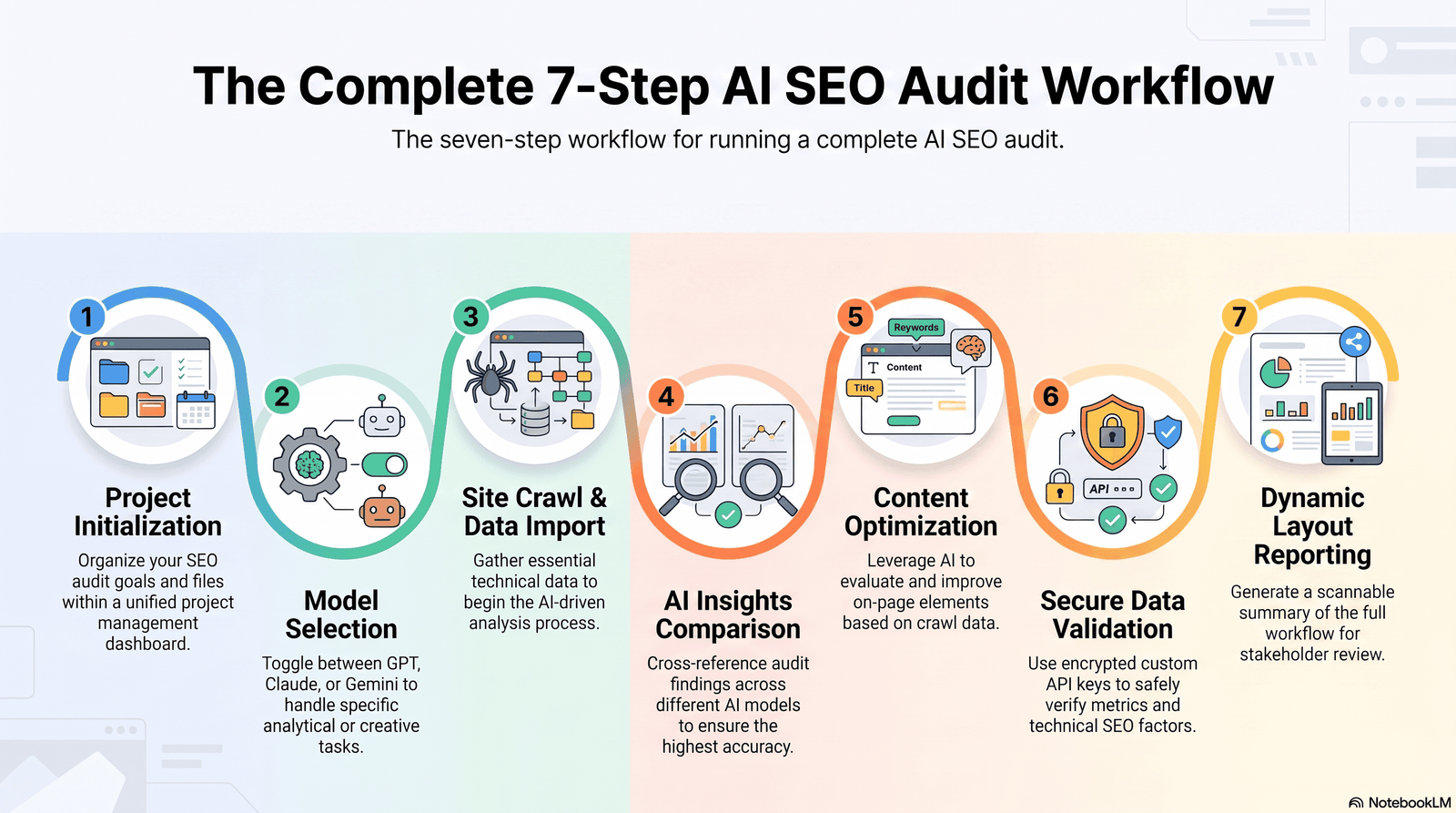
This is the core workflow. Each phase builds on the last, so follow the order.
Step 1: Crawl the Site
Run a full crawl with Screaming Frog or a similar tool to capture URLs, status codes, titles, and metadata.
Step 2: Feed Data Into Your AI Assistant
Export the crawl as CSV, then ask your AI tool to cluster issues by type — indexing, duplication, thin content, broken links.
Step 3: Cross-Reference With Search Console
Layer in impressions, clicks, and coverage data so the AI can prioritize by actual traffic impact, not just technical severity.
Step 4: Review Content Quality
Ask the AI to flag pages with low word count, outdated information, or overlapping topics with other URLs on the site.
Step 5: Check EEAT Signals
Review author bios, citations, and trust indicators across key pages — AI can flag gaps, but this step needs human judgment.
Step 6: Validate AI Findings
Manually spot-check a sample of flagged pages. AI sometimes misreads context, especially on JavaScript-heavy or paginated content.
Step 7: Build a Prioritized Action Plan
Rank fixes by traffic impact and effort required, starting with quick technical wins before tackling larger content rewrites.
Mistake to Avoid: Don’t let the AI’s output become your final report. Its job is to accelerate discovery — yours is to make the call.
Crawlability and Indexability
If Google can’t crawl or index a page, nothing else in this audit matters. Start here.
Check robots.txt for accidental disallows, review your XML sitemap for accuracy, and confirm canonical tags point where intended.
In Search Console, the Coverage report shows exactly which pages are excluded and why — a critical first data source for your AI analysis.
Crawlability Checklist
- ✅ Robots.txt doesn’t block important sections
- ✅ XML sitemap is current and submitted
- ✅ No orphaned high-value pages
- ✅ Canonical tags are accurate
- ✅ No accidental noindex tags on live pages
Technical SEO and Core Web Vitals
Site speed and stability directly affect both rankings and user experience. Run every priority URL through PageSpeed Insights.
Focus on the three Core Web Vitals: Largest Contentful Paint (loading), Interaction to Next Paint (responsiveness), and Cumulative Layout Shift (visual stability).
AI tools are strong here — they can batch-analyze dozens of PageSpeed reports and summarize the most common bottlenecks across your site.
Technical SEO Checklist
| Check | Tool | Priority |
|---|---|---|
| HTTPS enabled sitewide | Browser / SSL checker | High |
| Mobile-friendly rendering | Google Mobile-Friendly Test | High |
| Core Web Vitals passing | PageSpeed Insights | High |
| No render-blocking resources | Lighthouse | Medium |
| Structured data valid | Rich Results Test | Medium |
Internal Linking and Broken Links
Internal links distribute authority and help both users and crawlers navigate your site. Weak internal linking is one of the most common — and most fixable — issues.
Ask your AI assistant to identify orphaned pages (no internal links pointing to them) and pages with excessive outbound links diluting authority.
Broken links, meanwhile, waste crawl budget and hurt user trust. A full crawl will surface every 404 and redirect chain on the site.
Internal Linking Checklist
- ✅ No orphaned high-priority pages
- ✅ Anchor text is descriptive, not generic
- ✅ No broken internal links (404s)
- ✅ Redirect chains resolved to single hops
- ✅ Cornerstone content receives the most internal links
Thin and Duplicate Content

Thin content — pages with little unique value — drags down site-wide quality signals, even if only a fraction of pages are affected.
AI tools can quickly flag pages below a word count threshold or with high similarity scores to other URLs, which speeds up what used to be tedious manual comparison.
Duplicate content often comes from faceted navigation, tag pages, or CMS defaults — not intentional copying. Identify the source, not just the symptom.
Example — Poor Title:
Best Shoes
Improved Title:
Best Running Shoes for Flat Feet (2026 Buyer's Guide)
The improved version targets a specific audience, adds a timeframe, and signals depth — all things that help both users and AI search systems understand relevance.
Content Quality and Keyword Cannibalization
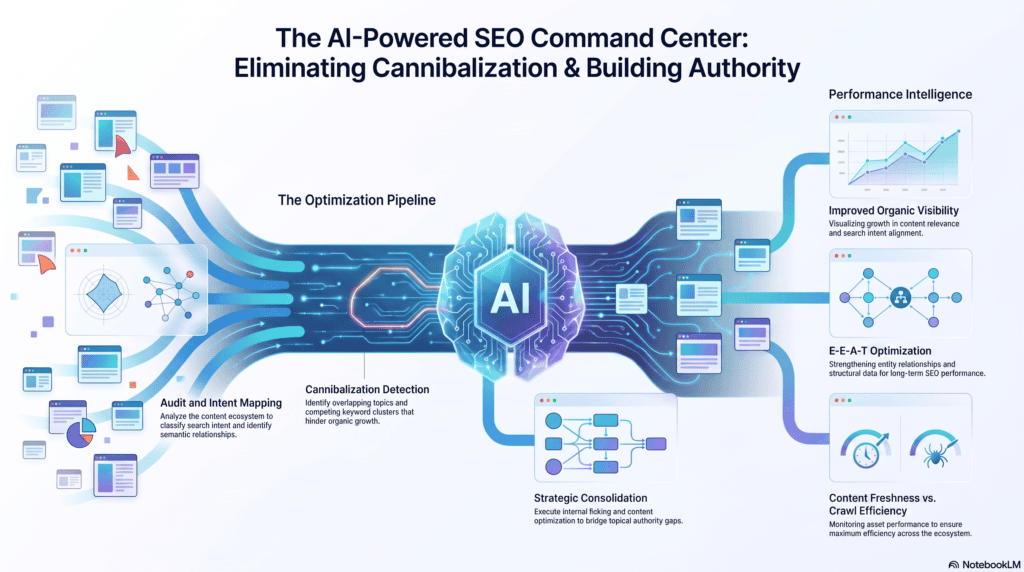
Keyword cannibalization happens when multiple pages compete for the same query, splitting ranking signals instead of consolidating them.
Ask your AI assistant to group your top pages by target keyword overlap. Where you find true duplicates, consolidate; where intent genuinely differs, differentiate the content further.
Content Audit Checklist
- ✅ Every page has a clear, unique primary keyword
- ✅ No two pages compete for the same query
- ✅ Content matches current search intent
- ✅ Statistics and examples are up to date
- ✅ Pages are updated on a recurring schedule
AI Content Detection Myths
A persistent myth: Google penalizes content because an AI wrote it. That’s not accurate.
Google’s Helpful Content guidance focuses on whether content is helpful and people-first — regardless of whether AI assisted in drafting it. What gets penalized is low-effort, unoriginal content, not the tool used to produce it.
SEO Consultant Insight: The real risk isn’t AI authorship — it’s publishing unedited AI output without fact-checking, original insight, or a human review pass.
Schema, Mobile, and Image SEO
Structured data helps search engines and AI systems understand your content’s purpose. Validate every schema type with Google’s Rich Results Test.
Schema Checklist
| Schema Type | Where It Applies |
|---|---|
| Article | Blog posts, guides |
| FAQ | Question-and-answer sections |
| HowTo | Step-by-step tutorials |
| Breadcrumb | Site navigation hierarchy |
| Organization | Homepage, about page |
| Person | Author bio pages |
Mobile SEO matters just as much — run every priority page through Google’s Mobile-Friendly Test and check tap targets, font sizing, and viewport configuration.
Image SEO Checklist
- ✅ Descriptive, keyword-relevant file names
- ✅ Alt text describes the image accurately
- ✅ Images compressed for fast loading
- ✅ Modern formats used (WebP where possible)
- ✅ No missing alt attributes on key visuals
On-Page and Off-Page Signals
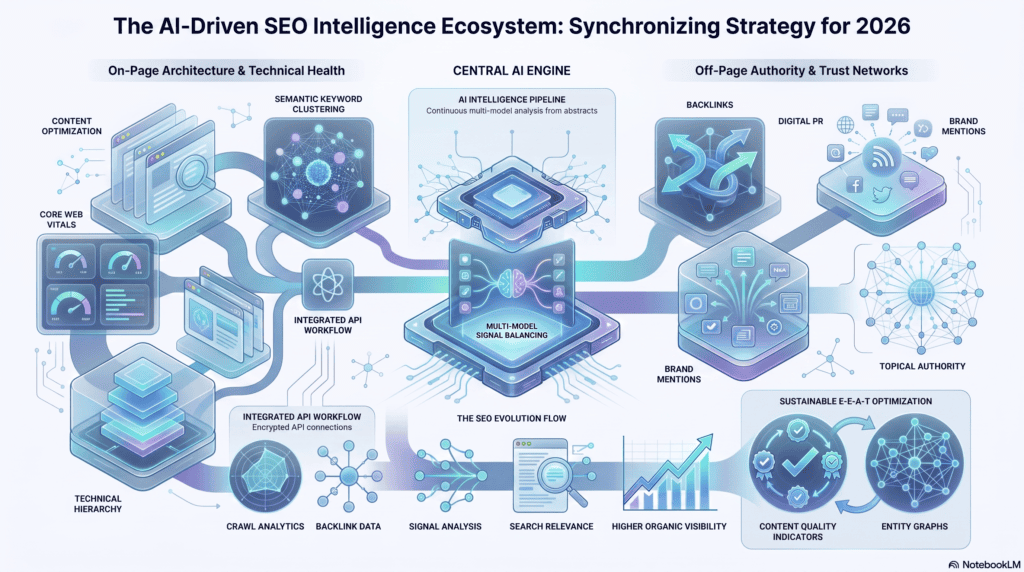
On-page SEO covers everything within your control: titles, headers, meta descriptions, and internal structure. Off-page covers external trust signals like backlinks and brand mentions.
AI can help draft title and meta variations quickly, but final selection should weigh click-through potential and brand voice — something AI still handles imperfectly.
For off-page, use Semrush or Ahrefs to review your backlink profile for toxic links, lost links, and competitor gap opportunities.
EEAT Review
EEAT — Experience, Expertise, Authoritativeness, Trustworthiness — is central to how Google evaluates content quality, especially on YMYL (Your Money or Your Life) topics.
Experience: Does the content reflect firsthand use, testing, or direct involvement? Real workflow examples, screenshots, and case-specific detail signal genuine experience.
Expertise: Is the author qualified to speak on the topic? Bios, credentials, and demonstrated depth matter here.
Authoritativeness: Does the site get referenced or linked to by other credible sources in its niche?
Trustworthiness: Is content accurate, transparent about limitations, and easy to verify? This is where AI-assisted content needs the most human oversight — always disclose limitations and encourage manual verification of AI-generated claims.
AI Search Optimization
Optimizing for Google AI Overviews, ChatGPT, Gemini, Claude, and Perplexity requires a slightly different lens than traditional rankings.
These systems favor content that’s easy to extract and summarize: clear definitions near the top, scannable bullet points, well-labeled tables, and direct answers to specific questions.
Entity-rich content — mentioning related concepts, tools, and terminology clearly — also helps AI systems understand context and cite your page accurately.
Featured Snippet Example (40–60 words): An AI SEO audit uses automated tools to analyze crawl data, content quality, and technical performance, then flags issues for human review. It speeds up the discovery phase of an SEO audit but still requires manual validation to confirm findings and set priorities accurately.
Common Mistakes
- Trusting AI output without verification — always cross-check flagged issues against real data.
- Auditing everything at once — start with high-traffic pages, then expand.
- Ignoring search intent shifts — content that ranked well a year ago may no longer match intent.
- Skipping the baseline data step — audits without context produce noisy, low-value findings.
- Treating schema as optional — missing structured data limits AI and rich-result visibility.
AI SEO Audit Checklist
✅ Technical SEO reviewed (crawlability, indexability, speed) ✅ On-page SEO reviewed (titles, metas, headers) ✅ Content quality assessed (thin, duplicate, outdated) ✅ UX and mobile experience checked ✅ Images optimized and alt text complete ✅ Internal and external links audited ✅ EEAT signals reviewed and strengthened ✅ AI search readiness confirmed
Frequently Asked Questions
What is a step by step AI SEO audit for beginners? It’s a structured process that uses AI tools to analyze crawl, content, and performance data, then guides a beginner through prioritizing and fixing the issues found.
Do I need coding skills to run an AI SEO audit? No. Most tools involved — Search Console, PageSpeed Insights, AI assistants — require no coding knowledge at all.
Can AI replace a human SEO auditor? No. AI accelerates data analysis, but strategic decisions and validation still require human judgment.
How often should I run an SEO audit? Quarterly for most sites; monthly for large ecommerce or fast-changing content sites.
Is AI-generated content bad for SEO? Not inherently. Google evaluates helpfulness and quality, not authorship method.
What’s the biggest risk of relying on AI for audits? Hallucinated or misread data — always validate flagged issues manually before acting.
Which free tools are essential for an AI SEO audit? Google Search Console, GA4, and PageSpeed Insights cover most core needs at no cost.
How do I prioritize audit findings? Rank by estimated traffic impact first, then by implementation effort.
What is keyword cannibalization? When multiple pages on the same site compete for the same search query, diluting ranking potential.
How does EEAT affect AI-assisted content? AI-assisted content still needs demonstrated experience, expert review, and transparent sourcing to meet EEAT standards.
Can AI tools check Core Web Vitals? Yes — AI can summarize PageSpeed Insights data across many URLs, but the underlying test still comes from Google’s tools.
Should beginners audit their entire site at once? No — start with top-traffic and top-revenue pages, then expand outward.
What’s the difference between technical SEO and content SEO audits? Technical SEO covers crawlability, speed, and structure; content SEO covers relevance, depth, and search intent match.
How do I optimize for AI Overviews specifically? Use clear definitions, scannable formatting, and direct answers near the top of each section.
What should I do after finishing an audit? Build a prioritized action plan, assign owners, and set a timeline for fixes and re-testing.
People Also Ask
Is an SEO audit necessary before a redesign? Yes — auditing first prevents carrying forward existing technical and content issues into the new site.
How long does an AI SEO audit take? For a mid-sized site, a few hours with AI assistance versus several days manually.
What’s the first thing to check in an SEO audit? Indexability — confirm Google can actually crawl and index your pages.
Does site speed really affect rankings? Yes, Core Web Vitals are a confirmed ranking factor, particularly for mobile search.
Can small businesses do their own SEO audit? Yes — with free tools and a structured workflow, no agency is required to start.
What is thin content? Pages with minimal unique value, often under-optimized or duplicative of other content.
How do I find broken links on my site? A full site crawl with a tool like Screaming Frog will list every 404 and redirect issue.
What is schema markup used for? It helps search engines understand page content and enables rich results in search listings.
Why does EEAT matter for SEO? It’s central to how Google assesses content quality, especially for health, finance, and safety topics.
What tools show Core Web Vitals data? Google PageSpeed Insights and Search Console’s Core Web Vitals report.
Final Thoughts
A step by step ai seo audit for beginners doesn’t need to feel overwhelming. Start with crawlability, move through technical health, then content quality and EEAT — validating AI findings with real data at every stage.
The sites that win in 2026 aren’t the ones with the fanciest tools. They’re the ones that combine AI speed with human judgment consistently, audit after audit.
Take what you’ve learned here and run your first audit this week. Start small, validate everything, and build from there — and if you want a faster path to a full audit, Aizolo can help you put this workflow into action.
Author Bio
Jeevesh Tripathi SEO Researcher & AI Search Optimization Specialist 📧 jeevesh@aizolo.com
Jeevesh Tripathi has spent years working hands-on with technical SEO audits, AI-powered search optimization, and content strategy for businesses ranging from solo bloggers to ecommerce brands. His work focuses on turning complex audit data into practical, prioritized action plans — combining AI-driven analysis with manual verification to keep recommendations accurate and trustworthy.

Thanks for another informative site. Where else may just I am
getting that kind of information written in such a perfect
manner? I have a venture that I’m simply now working on, and I have been at the look out for such info.
Thanks for the auspicious writeup. It in truth was once a enjoyment account
it. Glance complicated to more added agreeable from you!
By the way, how can we keep in touch?
Pingback: Unlock the Ultimate Multi LLM AI Workspace for Teams — Stop Wasting Time and Boost Productivity | AiZolo Guide 2026