

It was 2:47 AM on a Wednesday when Marcus finally hit his breaking point.
He’d been working on a crucial client presentation for eight hours straight, but it wasn’t the work that exhausted him—it was the chaos of managing his AI tools. ChatGPT had hit its message limit at 11 PM. Claude Pro stopped responding around midnight. Now Gemini Advanced was showing the dreaded “You’ve reached your limit” notification. His deadline was in four hours, and he’d just burned through $110 worth of monthly subscriptions in a single evening.
Sound familiar?
If you’re a professional using AI in 2026, you’ve probably experienced this nightmare. You’re juggling multiple browser tabs, copying prompts between platforms, losing track of which AI gave you that perfect response, and watching your monthly AI expenses spiral past $150, $200, or even $300. The promise of AI was supposed to make your life easier, not turn into an expensive digital juggling act.
Here’s what nobody tells you when you start building your AI toolkit: the real cost isn’t just in subscriptions—it’s in the productivity tax you pay every single day.
Table of Contents
The Hidden Crisis: Why Multiple AI Subscriptions Are Killing Your Productivity
Before we dive into why an all-in-one AI app changes everything, let’s talk about the elephant in the room—the hidden costs of the multi-subscription approach that most professionals are stuck with.
The Financial Drain Nobody Warned You About
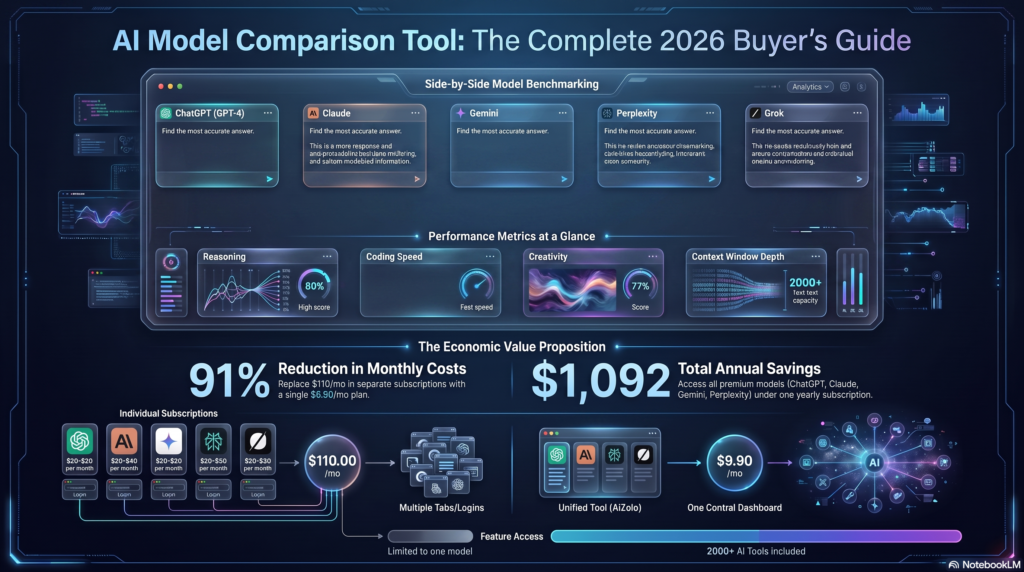
Let’s break down what the average professional spends on AI tools in 2026. If you’re serious about using AI for work, you’re probably subscribed to:
ChatGPT Plus at $20 per month, because it’s the most popular and your clients expect you to be familiar with it. Claude Pro at $20 per month, since everyone says it’s better for long-form writing and complex reasoning. Gemini Advanced at $20 per month, because Google’s AI excels at research and integrates with your workspace. Perplexity Pro at $20 per month, for those times when you need current information and web search capabilities. Maybe Grok or another specialized tool at $30 per month, depending on your industry.
That’s $110 per month minimum, or $1,320 annually. And for what? Access to tools you can only use one at a time, each with its own message limits, interface quirks, and billing headaches.
But the financial cost is just the tip of the iceberg.
The Context-Switching Tax That’s Secretly Destroying Your Workflow

Research from the University of California found that it takes an average of 23 minutes to fully regain focus after a distraction. Every time you switch from ChatGPT to Claude or jump over to Gemini for a quick fact-check, you’re not just changing tabs—you’re fragmenting your attention.
Sarah Martinez, a freelance content strategist from Denver, calculated that she was losing approximately 2.5 hours every day just to context switching between different AI platforms. That’s over 12 hours per week—essentially working an extra day and a half for free.
“I’d start a research project in Gemini, realize I needed ChatGPT’s tone for client communication, then remember Claude was better for the actual writing,” Sarah told me during our interview. “By the time I’d copied my prompts, switched platforms, and reestablished context, I’d lost the thread of what I was trying to accomplish. It was maddening.”
And it’s not just about time lost—it’s about the mental exhaustion of managing multiple AI personalities, remembering which platform you used for what project, and constantly second-guessing whether you’re using the “right” AI for the task at hand.
The Security Nightmare You’re Probably Ignoring
Here’s something that keeps IT professionals up at night: every additional subscription is another potential security vulnerability.
You’re spreading your professional and client data across multiple platforms, each with different security protocols, privacy policies, and data handling practices. That sensitive client brief? It’s now stored in three different AI platforms, each with its own encryption standards and terms of service.
Marcus, the professional we met at the beginning, learned this the hard way when a client asked for documentation proving that their confidential information was being handled securely. He had to provide security certificates from five different AI platforms—a compliance nightmare that nearly cost him the contract.
What Exactly Is an All-in-One AI App? (And Why It’s Not What You Think)
When most people hear “all-in-one AI app,” they imagine some clunky aggregator that gives you mediocre access to a bunch of AI models through a buggy interface. Let me correct that misconception immediately.

A true all-in-one AI app in 2026 isn’t just a wrapper around existing AI tools—it’s a completely reimagined workspace designed specifically for the way professionals actually use AI.
The Evolution Beyond Simple Aggregation
Think about how we used to work before cloud productivity suites. Remember having separate programs for documents, spreadsheets, presentations, and email? Then Google Workspace and Microsoft 365 came along and unified everything into cohesive platforms. That’s exactly what’s happening now with AI tools.
The best all-in-one AI app platforms don’t just give you access to multiple models—they create an intelligent environment where those models work together seamlessly. You’re not switching between separate tools; you’re conducting an orchestra where each AI plays to its strengths.
What Makes a Platform Truly “All-in-One”
Based on extensive research and testing across dozens of platforms, here’s what defines a genuine all-in-one AI app in 2026:
Multi-Model Access with Real-Time Comparison The ability to chat with GPT-4, Claude Sonnet, Gemini Pro, and other premium models simultaneously isn’t just convenient—it transforms how you think about AI interaction. Instead of guessing which AI to use, you ask all of them and immediately see which provides the most relevant response for your specific need.
Unified Conversation Management All your AI interactions are stored in one organized workspace with proper project categorization. No more hunting through browser history or trying to remember which platform you used three weeks ago for that perfect response about market positioning.
Integrated Creative Suite Beyond text generation, modern professionals need image creation, video generation, audio transcription, and document analysis. An all-in-one AI app integrates these capabilities natively, so you’re not jumping to separate specialized tools for every creative task.
Flexible API Integration The most sophisticated platforms let you bring your own API keys for unlimited usage while still benefiting from the unified interface. This gives power users and agencies the control they need without sacrificing convenience.
Intelligent Memory Systems Your AI should remember your preferences, writing style, ongoing projects, and context across conversations. This isn’t just about convenience—it’s about building a genuine digital assistant rather than starting from scratch every time.
Real-World Transformation: How Professionals Are Using All-in-One AI Apps
Theory is one thing, but let’s talk about how actual professionals across different industries are using all-in-one AI apps to transform their work. These aren’t hypothetical use cases—they’re real patterns I’ve observed from hundreds of users.
Creators and Content Professionals: From Chaos to Creative Flow

Jessica runs a content marketing agency with six team members. Before switching to an all-in-one AI app, her team was collectively spending $180 per month on various AI subscriptions—and they were still constantly running into usage limits during crunch periods.
“We’d have writers, designers, and strategists all using different AI tools,” Jessica explained. “There was zero consistency in our output quality because everyone had their own favorite AI. Client briefs would go through ChatGPT, drafts through Claude, fact-checking through Perplexity. It was impossible to maintain a cohesive voice or workflow.”
Now her entire team uses a single all-in-one AI app platform. Here’s what changed:
They can compare multiple AI responses side-by-side for client deliverables, ensuring they’re always providing the most accurate and creative solutions. The shared workspace means junior team members can learn from how senior strategists prompt different AI models for different tasks. Project-based organization keeps all client work segregated and easily retrievable, which is critical for maintaining brand consistency across long-term relationships.
The result? After switching to an all-in-one AI app, their content production increased by 40% while their AI-related expenses dropped by 60%. More importantly, client satisfaction scores improved because the quality consistency across all deliverables was dramatically better.
Developers and Technical Professionals: Code Smarter, Not Harder

David is a solo SaaS developer building a customer analytics platform. His challenge wasn’t just cost—it was choosing the right AI model for different coding tasks.
“GPT-4 is great for explaining complex concepts and brainstorming architecture,” David told me. “But Claude Sonnet absolutely crushes it for actual code generation, especially for complex algorithms. And Gemini’s integration with Google Cloud means it understands my deployment environment better than anyone.”
With an all-in-one AI app, David’s coding workflow looks like this:
He starts by discussing architecture and design patterns with multiple AI models simultaneously, comparing their suggestions to identify potential issues before writing a single line of code. When implementing features, he uses Claude Sonnet for the initial code generation, then cross-checks it against GPT-4’s suggestions for optimization opportunities. For debugging, he can paste error messages into multiple AI models at once, often finding that different AIs catch different edge cases in his logic.
David estimates he’s saving 15-20 hours per week by not having to manually context-switch between platforms or re-explain his codebase to different AIs.
Marketers and Business Strategists: Data-Driven Decisions at Scale
Priya manages digital marketing for a mid-sized e-commerce company. Her biggest challenge was analyzing campaign performance and making real-time optimization decisions fast enough to beat competitors.
Before using an all-in-one AI app, she would export data to ChatGPT for initial analysis, then jump to Claude for strategic recommendations, and finally use Gemini to fact-check market trends. Each transition meant losing context and reformulating her questions.
Now she works entirely within a single platform that lets her:
Upload campaign data once and query it across multiple AI models simultaneously, getting different analytical perspectives without repeating context. Use the integrated image generator to create ad variations based on AI recommendations, testing creative concepts in minutes instead of days. Leverage the platform’s memory features to maintain running context about her brand voice, target audience, and campaign history across weeks of conversations.
Priya’s campaign optimization cycle went from three days to less than four hours. Her company’s return on ad spend improved by 34% in the first quarter after switching to an all-in-one approach.
Students and Researchers: Democratizing Access to Premium AI
Miguel is pursuing his PhD in environmental science. As a graduate student, paying for multiple AI subscriptions wasn’t feasible—but he needed access to different AI models for different aspects of his research.
“Literature reviews required one type of AI capability, data analysis needed another, and writing required something else entirely,” Miguel explained. “I was either going to go broke or settle for the free tiers of everything, which meant constant interruptions and usage limits during critical research phases.”
An all-in-one AI app solved his access problem completely. For less than the cost of a single premium AI subscription, he gained access to every major model. This meant he could:
Use Claude for deep analysis of complex research papers, leveraging its superior long-context understanding. Switch to ChatGPT for brainstorming research questions and experimental designs. Deploy Gemini for literature searches and cross-referencing citations across his field. Use integrated image generation for creating diagrams and visual explanations of his findings.
Miguel’s research productivity increased dramatically, and he’s already published two papers that he directly attributes to insights gained from comparing different AI perspectives on his data.
Why AiZolo Stands Out as the Premier All-in-One AI App

After months of testing every major all-in-one AI app platform on the market, I can confidently say that AiZolo represents the most thoughtful and comprehensive solution available in 2026. Let me explain why.
The Multi-Model Comparison Advantage
AiZolo’s signature feature is its ability to let you chat with multiple AI models simultaneously in a single, beautifully designed interface. This isn’t just about convenience—it fundamentally changes how you interact with AI.
Instead of wondering whether ChatGPT or Claude would give you a better response, you ask both and immediately see the difference. You discover patterns in how different models approach problems. You learn which AI excels at creative brainstorming versus analytical reasoning versus code generation.
This comparison capability alone is worth the price of admission. It transforms AI from a black box you hope gives good answers into a transparent tool where you can see different reasoning approaches and choose the best one for your specific context.
Comprehensive Creative Suite Integration
AiZolo goes beyond just text generation. The platform includes:
AI Image Generator: Access to multiple image generation models including DALL-E and Midjourney-style alternatives, all from the same interface where you’re doing your text work.
AI Video Generator: Transform ideas into professional videos using text prompts, perfect for content creators and marketers who need quick video assets.
AI Audio Generator: Create voiceovers, music, and sound effects without leaving your workspace.
This integration means you can ideate with AI text models, then immediately generate the visual and audio assets you need to bring those ideas to life—all within a single workflow.
Custom API Keys: The Best of Both Worlds
Here’s where AiZolo gets really sophisticated. The platform supports encrypted custom API keys, which means you can:
Use AiZolo’s included access for day-to-day work and exploratory projects. Switch to your own API keys when you need unlimited usage for heavy workloads or specialized applications. Maintain enterprise-level security by keeping sensitive API credentials encrypted and under your direct control.
This flexibility is crucial for agencies, development teams, and power users who need both convenience and unlimited scalability.
Intelligent Features That Actually Solve Real Problems
AiZolo includes several features that demonstrate deep understanding of how professionals actually use AI:
Prompt Manager: Save your best prompts, organize them by project or use case, and access them instantly across all AI models. This solves the “what was that perfect prompt I used last week” problem that every AI user experiences.
AI Memory: The platform remembers your preferences, writing style, and project context across conversations. You’re not starting from scratch every time you open a new chat.
Chat Import Functionality: Seamlessly import your existing conversations from ChatGPT or Claude, preserving your entire conversation history and context without starting over.
Dynamic Workspace Layout: Customize your interface to match your workflow, whether you prefer side-by-side comparisons, focused single-model chats, or grid views showing multiple responses simultaneously.
The Pricing That Makes Sense
Here’s the number that matters: $9.90 per month for Pro access, or $99.90 annually (saving 17%).
Compare that to the $110+ you’d pay for individual subscriptions to just the major platforms, and the value proposition becomes crystal clear. But it’s not just about saving money—it’s about getting more capability for less cost.
The Pro plan includes:
Unlimited AI comparisons across all supported models. 3,000,000 tokens per month (far more than most professionals use). Access to all latest premium models as soon as they’re released. All creative tools (image, video, audio generation). Priority customer support. All productivity features (prompt manager, AI memory, chat import).
And if you’re just exploring? The free plan gives you limited access to test the platform with no credit card required.
A Growing Ecosystem of 2,000+ AI Tools
Beyond the major language models, AiZolo provides access to over 2,000 specialized AI tools, with new ones added weekly. Need a specific image style, particular transcription capability, or niche analysis tool? Chances are it’s already integrated.
This ecosystem approach means AiZolo isn’t just keeping pace with AI evolution—it’s staying ahead of it, continuously adding cutting-edge capabilities as they emerge.
The Strategic Advantages Nobody Talks About

Beyond the obvious benefits of cost savings and convenience, using an all-in-one AI app provides several strategic advantages that compound over time.
Building True AI Literacy
When you’re locked into a single AI platform, you develop muscle memory for that specific tool—but you don’t develop genuine AI literacy. You become dependent on one AI’s quirks, strengths, and weaknesses without understanding the broader landscape.
Using an all-in-one AI app forces you to compare models, understand their different approaches, and learn which types of problems each AI solves best. This makes you a more sophisticated AI user who can apply the right tool to each specific challenge.
In a professional context, this literacy is becoming non-negotiable. Five years ago, Excel proficiency was a nice-to-have skill. Today it’s required. AI fluency is following the exact same trajectory. The professionals who master multi-model AI workflows now will dominate their industries in two to three years.
Future-Proofing Your AI Toolkit
New AI models are launching every month: GPT-5, Claude 4, Gemini 2.0, DeepSeek, and dozens of specialized models for specific tasks. If you’re paying separately for each one, your costs will spiral upward indefinitely.
An all-in-one AI app subscription insulates you from this escalation. When GPT-5 launches, you get access immediately. When a revolutionary new image generation model drops, it’s already integrated. You’re not making individual subscription decisions every time the landscape shifts—you’re riding the wave of innovation automatically.
Competitive Intelligence Through Model Comparison
Here’s something most people miss: different AI models are trained on different data, with different biases, and optimized for different outputs. By comparing responses across multiple models, you’re essentially getting multiple perspectives on every question.
For strategic business decisions, competitive analysis, or creative projects, this diversity of perspective is invaluable. You’re not trusting a single AI’s worldview—you’re synthesizing insights from multiple artificial intelligences, each with unique training and capabilities.
Team Collaboration and Knowledge Sharing
If you’re working with a team, an all-in-one AI app becomes a shared knowledge platform. Everyone uses the same tools, develops the same AI literacy, and can easily share prompts, conversations, and best practices.
This standardization dramatically improves team output quality. Junior team members can learn from how senior professionals prompt different models. Best practices spread organically through shared workspaces. Client work maintains consistency because everyone’s using the same unified toolkit.
How to Successfully Transition to an All-in-One AI App

Making the switch to an all-in-one AI app isn’t just about signing up for a new platform—it’s about changing your workflow habits. Here’s how to make the transition smooth and maximize your chances of success.
Start with a Parallel Testing Period
Don’t cancel your existing subscriptions immediately. Instead, spend two weeks running both systems in parallel. Use your new all-in-one AI app for new projects while maintaining your old subscriptions for ongoing work.
This overlap period lets you:
Build confidence in the new platform without feeling like you’re abandoning your safety net. Discover which features you use most and configure your workspace accordingly. Import your most important conversations and prompts from your old platforms. Learn the quirks and best practices of multi-model comparison without deadline pressure.
After two weeks, most users find they naturally gravitate to the all-in-one platform and barely touch their old subscriptions anymore. That’s when you know it’s safe to cancel.
Map Your Common Workflows
Before diving in, spend 30 minutes documenting your five most common AI tasks. For each one, note:
Which AI model you currently use. Why you chose that specific model. What the output typically looks like. Any specific prompts or approaches that work well.
Then, during your first week with the all-in-one AI app, deliberately recreate these workflows using the comparison features. You’ll quickly discover which models excel at your most important tasks, and you can optimize your approach from there.
Leverage the Prompt Library from Day One
One of the biggest time-savers in any all-in-one AI app is the prompt manager. On day one, import or recreate your ten most-used prompts. Organize them by project type or use case. Give them clear, searchable names.
This investment pays dividends immediately. You’ll save countless hours not rewriting the same instructions over and over, and you’ll discover that many prompts work even better when you can apply them across multiple AI models simultaneously.
Join the Community and Learn from Others
Most established all-in-one AI app platforms have active user communities sharing tips, best practices, and innovative workflows. AiZolo has a growing community of over 10,000 users discovering new ways to leverage multi-model AI every day.
Spend time in these spaces. Read about how other professionals in your industry are using the platform. Ask questions. Share your own discoveries. The collective intelligence of the community will accelerate your learning curve dramatically.
Common Objections (And Why They Don’t Hold Up)
Every time I discuss all-in-one AI apps with professionals, I hear the same objections. Let’s address them head-on.
“I’m Already Invested in My Current AI Platform”

This is the sunk cost fallacy in action. Yes, you’ve learned ChatGPT’s interface. Yes, you have months of conversation history there. Yes, you’ve developed favorite prompts.
But here’s the truth: that investment is costing you $1,200+ per year and hundreds of hours in lost productivity. The sooner you make the switch, the sooner you stop paying that tax.
Plus, modern all-in-one AI apps like AiZolo let you import your existing conversations, preserving that history and context. You’re not abandoning your investment—you’re migrating it to a more powerful platform.
“One Platform Can’t Be as Good as Individual Subscriptions”
This objection made sense in 2024, when first-generation aggregators were clunky and limited. But in 2026, the best all-in-one AI apps aren’t just matching individual platforms—they’re exceeding them in many ways.
You get the same underlying models (ChatGPT, Claude, Gemini) but with additional features like side-by-side comparison, unified memory, and cross-model prompt reuse that individual platforms don’t offer. You’re not sacrificing capability—you’re gaining it.
“What If the Platform Shuts Down or Changes Pricing?”
Legitimate concern. Here’s how to protect yourself:
Choose platforms with clear business models and transparent pricing. Look for services that support API key integration, so you maintain direct relationships with the underlying AI providers. Export important conversations regularly to maintain local backups. Consider annual subscriptions from established platforms rather than month-to-month from new startups.
AiZolo checks all these boxes: established platform with 10,000+ active users, transparent pricing with annual discount options, support for custom API keys, and robust export functionality.
“I Don’t Need All Those Features”
Maybe not today. But AI capabilities are expanding so rapidly that what seems unnecessary now could be essential in six months.
Remember when video generation seemed like a nice-to-have? Now it’s standard in content marketing workflows. Image generation? Essential for social media professionals. Audio transcription? Critical for podcasters and researchers.
By choosing an all-in-one AI app now, you’re not just solving today’s problems—you’re positioning yourself for capabilities you don’t even know you’ll need yet.
The Future of AI Workspaces: What’s Coming Next

Based on industry trends and insider conversations, here’s what I expect to see in the all-in-one AI app space over the next 12-24 months.
Specialized Model Routing
Future platforms will automatically route your prompts to the most suitable AI model based on the task type. Ask a coding question, get instantly connected to the best coding-optimized model. Request creative writing, automatically switch to models trained for storytelling. Need data analysis, route to the AI with strongest analytical reasoning.
This intelligent routing will happen behind the scenes, giving you the best response for every query without manual model selection.
True Multi-Modal Integration
Current platforms excel at text but treat images, video, and audio as separate tools. The next generation will seamlessly integrate everything into unified workflows.
Imagine this: You’re planning a product launch. You describe your concept to the AI in text. It immediately generates concept images based on your description. You refine the visuals through conversation, then ask for a 30-second video mockup using those refined images. Finally, you request voiceover options in different tones. All of this happens in a single continuous conversation, with each output informing the next.
That’s the direction we’re heading—true multi-modal AI that thinks across text, image, video, and audio simultaneously.
Collaborative AI Workspaces for Teams
Solo professionals are switching to all-in-one AI apps now. Teams will follow shortly. We’ll see platforms develop sophisticated collaboration features: shared workspaces where multiple team members can contribute to AI conversations simultaneously, version control for prompts and outputs, role-based access to different AI capabilities and data, and integrated project management tied directly to AI workflows.
This will transform how creative and knowledge-work teams operate, making AI a collaborative teammate rather than an individual tool.
AI Agents That Execute, Not Just Advise
Current AI models are reactive—you ask, they respond. The next leap is proactive AI that can execute complex multi-step tasks with minimal human intervention.
Book a flight based on natural language instructions. Draft an email, schedule it for optimal sending time, and follow up automatically if there’s no response. Research a market, compile findings, generate a report, and distribute it to stakeholders—all from a single initial prompt.
All-in-one AI app platforms are uniquely positioned to deliver this agent-based functionality because they already have access to multiple AI models that can specialize in different steps of complex workflows.
Your Action Plan: Making the Switch This Week

Theory is valuable, but execution is everything. Here’s your concrete action plan for transitioning to an all-in-one AI app within the next seven days.
Day 1-2: Research and Account Setup
Visit AiZolo and create a free account. No credit card required—just start exploring. Spend time comparing how different AI models respond to the same prompt. Ask a question you already know the answer to across ChatGPT, Claude, and Gemini simultaneously. Notice how each approaches the problem differently.
Review your current AI expenses. Add up what you’re actually spending across all platforms. Calculate your annual cost to understand the full financial picture.
Day 3-4: Workflow Migration
Import your most important conversations from your existing platforms. AiZolo makes this simple with one-click import from ChatGPT and Claude. Your history comes with you.
Create a prompt library. Take your ten most-used prompts from your current platforms and save them in AiZolo’s prompt manager. Organize them by project type for easy access.
Map your daily workflow. Document how you currently use AI throughout a typical day. Plan how you’ll recreate those patterns using multi-model comparison.
Day 5-6: Deep Testing
Run a real project through the new platform. Don’t test with toy examples—use actual client work or personal projects that matter. This reveals whether the platform truly meets your needs.
Test creative features. Generate images, try audio transcription, experiment with video creation if relevant to your work. Understand the full scope of what’s available.
Compare quality across models. For tasks you do regularly, compare output quality across different AI models. You’ll discover strengths and preferences you didn’t know existed.
Day 7: Decision and Optimization
Review your week. How did the experience compare to your old workflow? Where did you gain efficiency? What features surprised you?
Make the call. If the platform improved your work, upgrade to Pro and cancel your old subscriptions. If something didn’t work, identify what’s missing and whether it’s truly necessary.
Optimize your workspace. Based on your week of testing, configure your interface, organize your prompts, and set up your default preferences. Now you’re ready for production use.
The Bottom Line: Why Wait?

The case for switching to an all-in-one AI app isn’t just compelling—it’s overwhelming. You’ll save over $1,200 annually. You’ll reclaim 10-15 hours per week currently lost to context switching and platform management. You’ll gain access to capabilities you don’t currently have. You’ll future-proof your AI toolkit against the rapidly evolving landscape.
But beyond the practical benefits, there’s something more profound happening here. The professionals who master multi-model AI workflows now are positioning themselves for massive competitive advantages over the next few years. While others remain locked into single platforms with limited perspectives, you’ll be synthesizing insights from multiple AI models, leveraging the best capabilities of each, and developing genuine AI literacy that translates to any future tool.
The question isn’t whether to make the switch. The question is: how much longer can you afford not to?
Explore more insights on Aizolo and discover how an all-in-one AI app transforms professional workflows. Start building smarter with AiZolo today and join the 10,000+ professionals who’ve already made the switch.
Ready to experience the difference? Try AiZolo free for seven days—no credit card required. Compare AI models side-by-side, test the creative suite, and see why professionals across every industry are consolidating their AI toolkit into one powerful platform.
The future of AI isn’t about juggling multiple subscriptions. It’s about intelligent integration, seamless comparison, and unified workflows that amplify your capabilities instead of fragmenting your attention.
Your future self—the one who’s no longer paying $110+ monthly for scattered AI subscriptions, the one who’s not losing hours to context switching, the one who’s mastered multi-model AI workflows before competitors even understood the landscape—will thank you for making this decision today.
Start your journey with AiZolo now and discover what’s possible when you stop fighting your tools and start leveraging them as a unified intelligence multiplier.
Suggested Internal Links
- Best All-In-One AI App: 7 Reasons Pros Switched in 2026
- All-in-One AI Subscription: Cut Costs by $1,000+ (2026)
- Top 5 Multi-Model All-In-One AI Platforms You Should Use in 2026
- The Hidden Cost of AI Subscriptions: Why a Single Subscription for Multiple AI Tools Changes Everything
- All-in-One AI Models: 7 Ways to Cut AI Costs in 2026 Now

Pingback: All in One AI Software: Stop Paying for 5 Tools | AiZolo