

Table of Contents
Why You’re Reading This (And What You’ll Learn)
You were mid-flow — drafting code, writing a report, researching a topic — and then Claude stopped responding with a message you didn’t expect: “You’ve reached your usage limit.”
It’s one of the most frustrating moments in AI-assisted work, especially when the project isn’t finished.
If you searched for “how to bypass Claude 4.8 Sonnet message limit,” you’re in good company. Thousands of developers, students, writers, and researchers hit this wall every day and go looking for a workaround.
Here’s the honest truth: there is no magic bypass, and any trick that claims to circumvent Anthropic’s usage system either doesn’t work or risks getting your account suspended. But there are twelve legitimate, officially supported strategies that can meaningfully extend your access — ranging from free techniques you can apply right now to paid upgrades that remove limits almost entirely.
This guide covers everything:
- What actually causes the Claude usage limit
- How Anthropic calculates your message quota
- The myths that circulate online (and why they fail)
- Every approved method for continuing your work
- How the Claude API differs from subscription plans
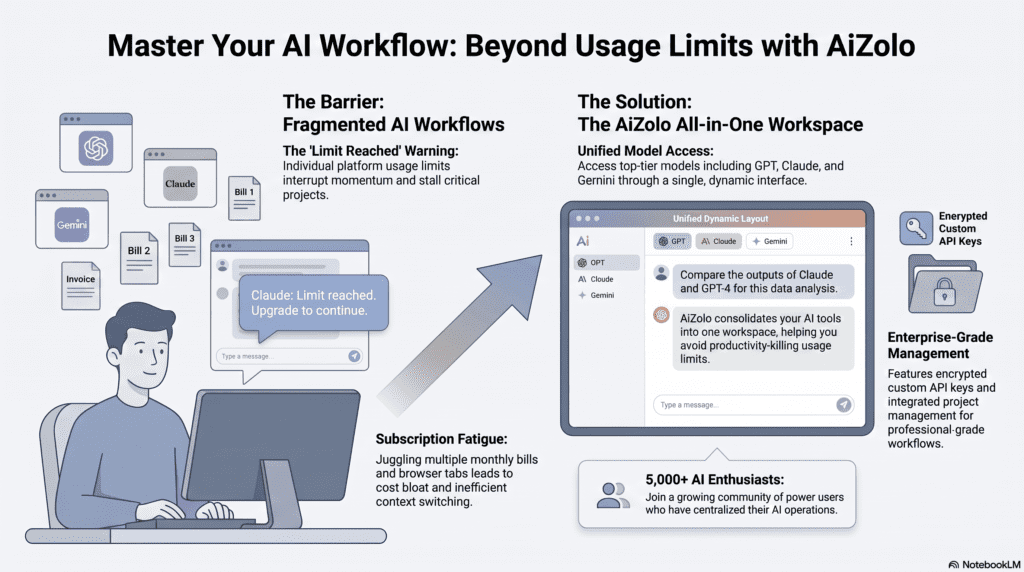
- When multi-model platforms like Aizolo make sense
Let’s start with what’s actually happening when Claude stops responding..
What Is the Claude Message Limit?
Claude’s message limit is a usage cap Anthropic places on how much you can interact with Claude over a defined time window. It isn’t a single hard number — it’s a dynamic system shaped by your subscription plan, the model you’re using, the length and complexity of your messages, and current server demand.
There are two distinct layers of limits:
Usage Limits (Quantity Over Time)
Usage limits control how many messages you can send within a rolling time period. Think of it as a “conversation budget.” According to Anthropic’s official support documentation, usage limits control how much you can interact with Claude over a specific time period — your “conversation budget” that determines how many messages you can send before needing to wait for your limit to reset.
This budget is affected by:
- The length and complexity of your conversations
- The features you use (e.g., extended thinking, file uploads, tools)
- The Claude model you’re using (Opus consumes more than Sonnet or Haiku)
- Your chosen effort level setting
- Whether you’re using Claude Code, Claude.ai, or Claude Desktop — all of which draw from the same pool
Length Limits (Depth Per Conversation)
Length limits relate to Claude’s context window — the amount of information Claude can work with in a single chat. Claude’s context window size is 200K tokens across all models and paid plans, except for Enterprise plans, which have a 500K context window on some models.
The good news: for users with code execution enabled, Claude now automatically manages long conversations. When your conversation approaches the context window limit, Claude summarizes earlier messages to continue the conversation seamlessly.
Why Does Claude Limit Messages at All?
This is a fair question, and Anthropic has been transparent about it.
Claude is computationally expensive to run. Large language models like Claude 4.8 Sonnet require significant GPU infrastructure for every inference — and that cost scales directly with the number of tokens processed.
A small share of power users were running 24-hour sessions, sharing credentials across teams, and burning thousands of dollars of compute on $20 subscriptions — degrading service for everyone else. The 5-hour window and weekly cap are Anthropic’s guardrails against that: fair-use enforcement, anti-abuse, and a way to keep plan pricing sustainable without quietly restricting features.
In other words, limits exist to keep the service affordable and reliable for the majority of users. They’re not arbitrary friction — they’re the mechanism that allows a $20/month subscription to remain economically viable while Claude processes hundreds of millions of requests globally.
How Claude Calculates Usage
Understanding the calculation model helps you manage your quota strategically.
Claude does not simply count discrete messages. It measures token consumption — roughly, the number of words or pieces of words processed in both your input and Claude’s output.
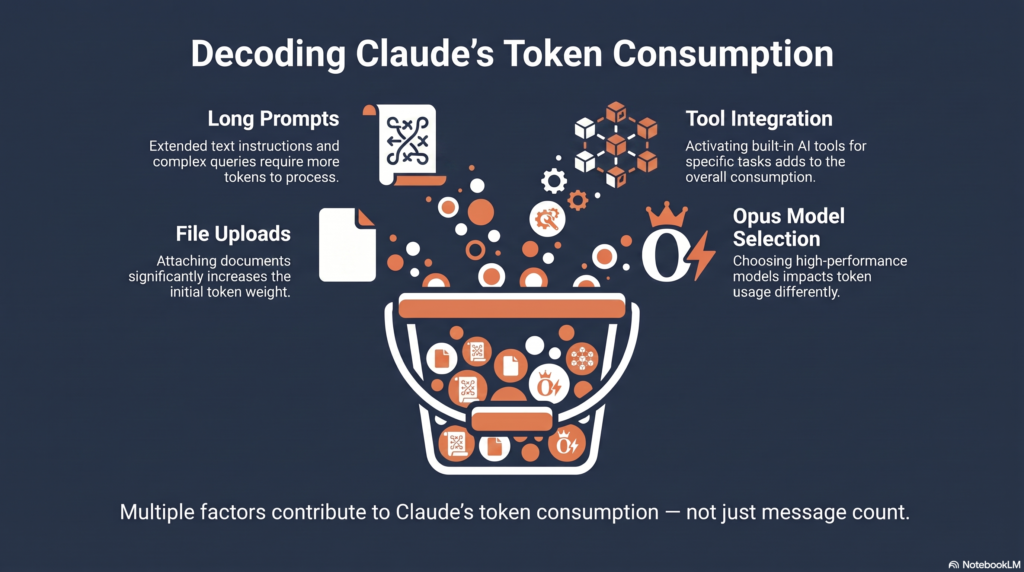
Several factors drive token consumption up faster than you might expect:
| Factor | Impact on Usage |
|---|---|
| Long system prompts or project instructions | High — loaded on every turn |
| Large file uploads (PDFs, code files) | High — content added to context |
| Extended thinking / deep reasoning mode | Very high |
| Tools and connectors (web search, calendar, etc.) | High — each tool call costs tokens |
| Opus model vs. Sonnet | Opus costs more per equivalent task |
| Long conversation history | Accumulates over the session |
| Repeated similar questions | No discount — each pays full cost |
When you upload documents to a project, they’re cached for future use. Every time you reference that content, only new/uncached portions count against your limits. This caching behavior is one of the most underused efficiency tools available to paid plan users.
Does Claude 4.8 Sonnet Have Daily or Weekly Limits?
Yes — and the structure is more nuanced than most people realize. Claude uses two overlapping limit layers:
The 5-Hour Rolling Window
The primary limit operates on a rolling 5-hour basis, not a calendar day. Claude Pro uses a 5-hour rolling window system, not a daily reset at midnight. Messages expire from your quota exactly 5 hours after you send them. This means if you send a message at 2:00 PM, that message “frees up” space in your quota at 7:00 PM, not at midnight.
This is a meaningful distinction from competitors: ChatGPT Plus resets every 3 hours on a fixed schedule; Gemini Advanced resets at midnight daily.
Approximate message capacity per 5-hour window (subject to demand fluctuations):
| Plan | Approx. Messages per 5-Hour Window |
|---|---|
| Free | 15–40 |
| Pro ($20/mo) | ~90 (doubled after May 2026 Colossus deal) |
| Max 5× ($100/mo) | ~225 |
| Max 20× ($200/mo) | ~900 |
Note: These are approximate figures from independent testing. Actual capacity varies based on message length, model selection, and server demand. Shorter messages with no file attachments allow more interactions.
The Weekly Cap
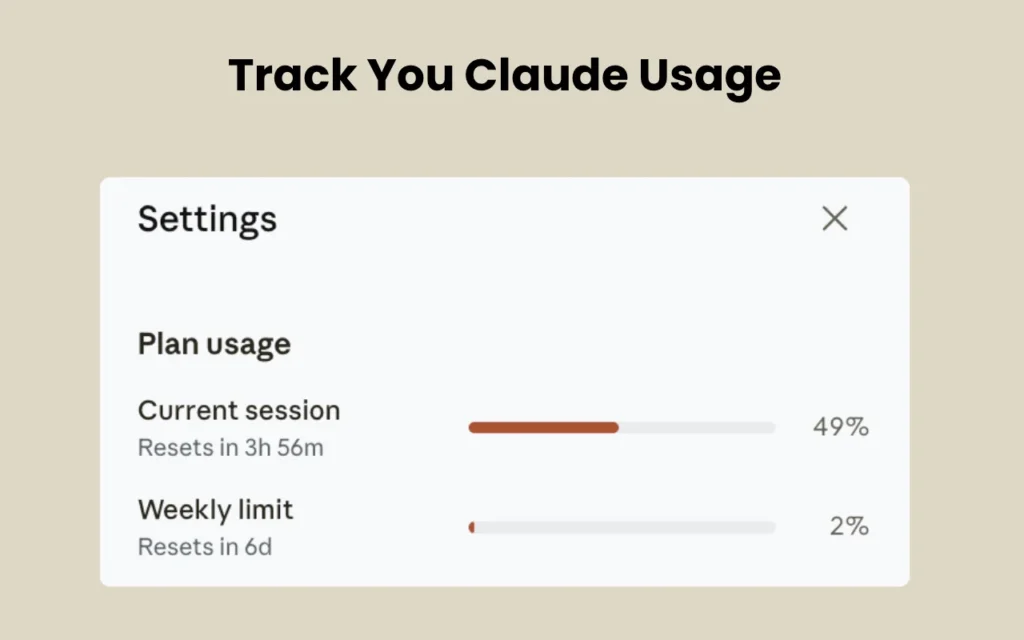
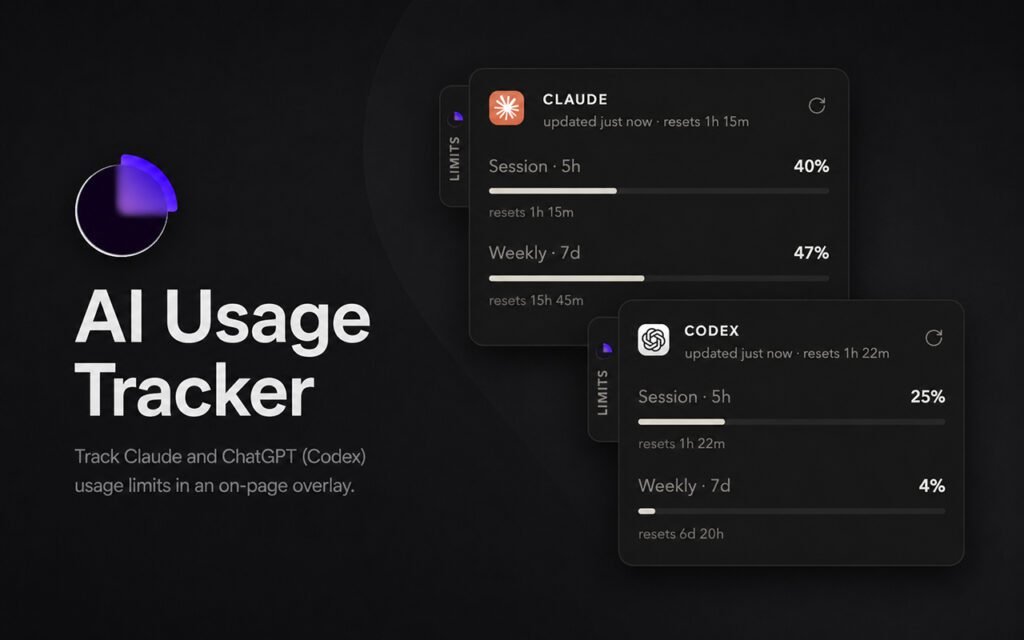
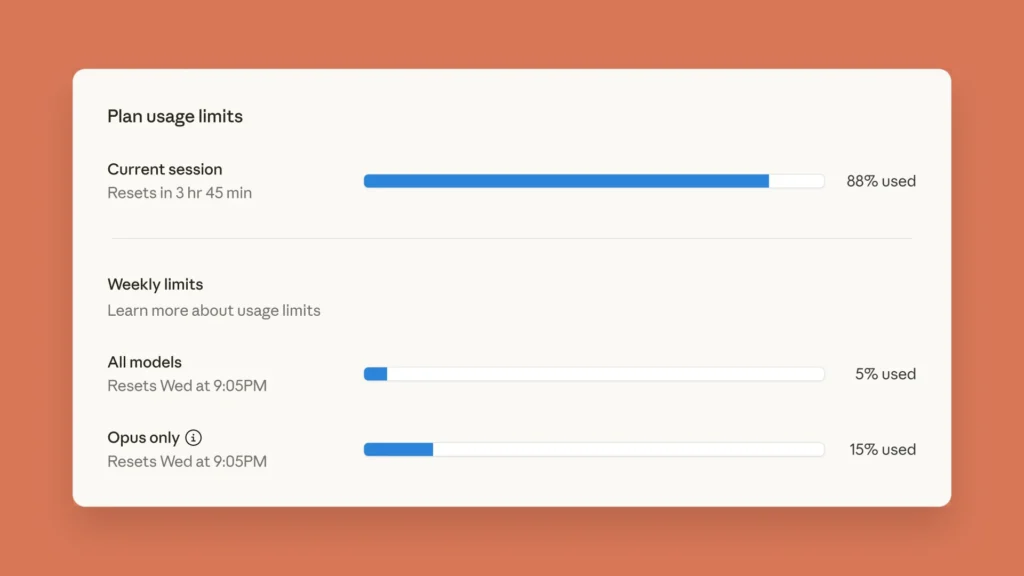
The Settings → Usage page shows two progress bars: your 5-hour rolling window usage (resets continuously) and your weekly usage cap (resets every 7 days). The Plan usage limits section at the top shows your progress towards both your session limit and weekly limits.
The weekly cap was added in 2025 to prevent extreme usage patterns. According to independent research, the weekly limit is set high enough that typical users never hit it. If you’re consistently hitting weekly limits, you’re in the top 5% of heavy users and should consider Claude Max ($100/month) or rotate between multiple AI services.
Recent Limit Increases (May 2026)
In May 2026, Anthropic doubled the 5-hour rate limits for Claude Code following a major infrastructure expansion. Claude Code’s 5-hour rate limit just doubled. API Tier 1 input tokens per minute jumped from 30,000 to 500,000. This change applies to Pro, Max, Team, and seat-based Enterprise plans.
Can You “Bypass” Claude’s Message Limit?
Let’s be direct: no, you cannot bypass Claude’s message limits through technical tricks — and attempting to do so risks account suspension.
When people search for “how to bypass Claude 4.8 Sonnet message limit,” they’re almost always asking one of three real questions:
- “How do I get more messages without paying more?” — Answered by optimization techniques in Section 8.
- “What plan should I upgrade to?” — Answered by the plan comparison in Section 9.
- “Are there legitimate alternatives when I’ve hit my limit?” — Answered by the alternatives section.
The word “bypass” is understandable shorthand for “I need to keep working.” This guide reframes that intent toward methods that are sustainable, safe, and actually effective.
Why Most “Bypass” Tricks Don’t Work — Myth vs. Fact
The internet is full of advice that ranges from outdated to actively harmful to your account. Here’s a clear breakdown:
| Claimed “Bypass” Method | Reality |
|---|---|
| Opening multiple browser tabs | Doesn’t work — limits are server-side, not browser-side |
| Using incognito / private browsing | Doesn’t work — tied to your account, not your browser session |
| VPN to appear in a different region | Violates ToS; doesn’t extend your quota |
| Creating a second free account | Violates Anthropic’s Terms of Service; risks both accounts being banned |
| Browser fingerprint manipulation | Technically ineffective and ToS violation |
| Clearing cookies mid-conversation | Doesn’t affect server-side usage tracking |
| Using “jailbreak” prompts | Unrelated to usage limits entirely |
| API key rotation (multiple keys, same account) | Violates API ToS; rate limits apply per organization |
| Account sharing or credential sharing | Anthropic explicitly identified credential sharing across teams as a major contributor to the problem that prompted the limits in the first place |
Why these approaches reliably fail: Claude’s usage tracking is entirely server-side. Anthropic tracks consumption at the account/organization level, not the browser or device level. No client-side manipulation changes what Anthropic’s servers record.
12 Legitimate Ways to Keep Working When You Hit the Limit
These twelve strategies are all Anthropic-approved, ToS-compliant, and practical. Some are free; some require a subscription change. Read through them all before deciding — the best option depends on your workflow.
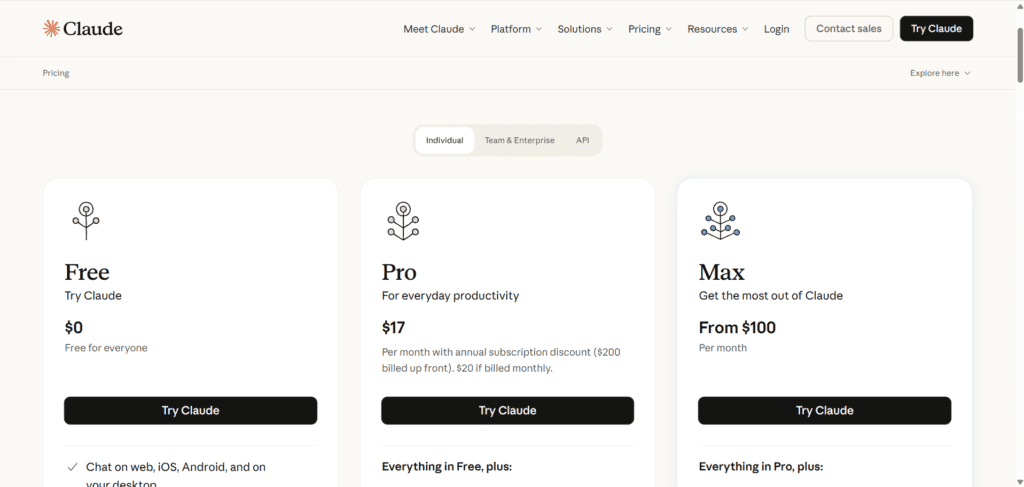
Fix 1: Upgrade to Claude Pro ($20/month)
The first and most direct solution for free-tier users is upgrading to Claude Pro. The difference is substantial: roughly 5× more messages per 5-hour window compared to the free tier.
Who this is for: Anyone using Claude daily for work, study, or creative projects who regularly hits the free tier wall.
What you get:
- Higher 5-hour rolling window capacity
- Priority access during peak demand
- Access to Claude Projects (with file uploads and persistent context)
- Access to all Claude models including Sonnet and Haiku
Fix 2: Upgrade to Claude Max ($100/month or $200/month)
For power users who regularly hit Pro limits, Claude Max is Anthropic’s purpose-built solution. It comes in two tiers:
- Max 5× ($100/month): Approximately 5× the capacity of Claude Pro (~225 messages per 5-hour window)
- Max 20× ($100/month): Approximately 20× the capacity of Claude Pro (~900 messages per 5-hour window)
If you’re on the Max 5× plan, consider upgrading to the Max 20× plan if you consistently hit limits. Enable usage credits to continue using Claude with your Max plan after hitting the included usage limit.
Who this is for: AI engineers, heavy developers, researchers running long sessions, agencies managing multiple client projects simultaneously, and anyone whose productivity loss from hitting limits costs more than $100/month.
| Plan | Price | Approx. 5-hr Capacity | Best For |
|---|---|---|---|
| Free | $0 | 15–40 messages | Casual use |
| Pro | $20/mo | ~90 messages | Daily users |
| Max 5× | $100/mo | ~225 messages | Power users |
| Max 20× | $200/mo | ~900 messages | Heavy professionals |
Fix 3: Switch to the Claude API
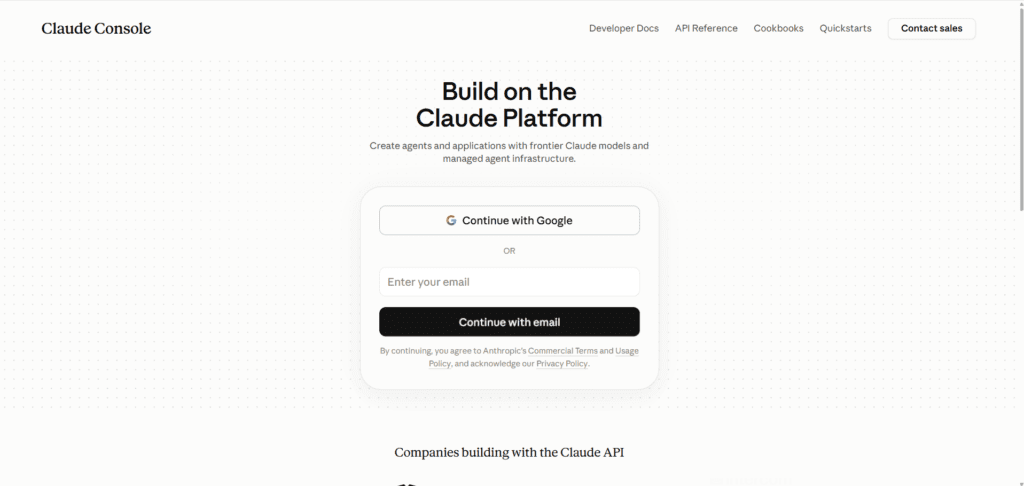
The Claude API is a completely separate product from the subscription plans. The Claude API is a completely separate product with its own pricing and rate limits. API usage does not count against your Pro subscription limits, and Pro subscription does not include API credits. They are independent services.
For technical users, the API offers:
- Pay-per-token pricing (no hard message cap)
- Higher throughput for automated workflows
- Integration into your own applications and pipelines
- Full programmatic control over context, model selection, and parameters
API rate limits are governed by your usage tier. Rate limits for the Messages API are measured in requests per minute (RPM), input tokens per minute (ITPM), and output tokens per minute (OTPM) for each model class.
Who this is for: Developers, researchers running batch processing, teams building Claude-powered applications.
Trade-off: The API requires technical setup — API keys, code integration, usage monitoring, and billing management. It’s not suitable for non-technical users who want a chat interface.
Fix 4: Optimize Your Prompts
This is the highest-leverage free option available to every Claude user. Poorly structured prompts waste tokens; well-structured prompts accomplish more with fewer interactions.
Practical prompt optimization techniques:
Batch multiple questions into one message. If you have multiple related tasks or questions, group them in a single message. For example, instead of sending separate messages for each math problem, send them all in one message. Take a moment to review your message for clarity and completeness to reduce the need for follow-up messages.
Be specific in your first message. Vague prompts lead to vague answers, which lead to follow-up clarifications, which consume more messages. A clear, detailed initial prompt often resolves the task in a single turn.
Avoid redundant context. Don’t paste the same background information into every message in a conversation. Set it once in a project’s system prompt and Claude will reference it throughout.
Example — inefficient vs. efficient:
| Inefficient (5 messages) | Efficient (1 message) |
|---|---|
| “Can you help with my essay?” → “It’s about climate change” → “Make it more formal” → “Add a conclusion” → “Fix the grammar” | “Write a formal 500-word essay about climate change policy, with an introduction, three body paragraphs, and a conclusion. Fix grammar throughout.” |
This single-message approach uses roughly one-fifth the quota of the scattered approach.
Fix 5: Start a New Chat
This is the simplest technique for avoiding context-window pressure specifically.
Long conversations accumulate context. By the time a conversation reaches 50+ exchanges, Claude is processing the entire history every time you send a new message — even if most of that history is no longer relevant.
Starting a fresh chat with a focused prompt resets your context to zero. You can always paste a brief summary of what was established in the previous chat if you need continuity.
Best practice: Start a new chat whenever you’re shifting to a meaningfully different task, rather than continuing an ever-growing conversation thread.
Fix 6: Reduce Context Size
When you need to continue an existing conversation rather than start fresh, trimming context is the next best option.
Tactics:
- Remove unnecessary file attachments from the current project
- Turn off extended thinking when you don’t need deep reasoning
- Disable tools and connectors you aren’t actively using — tools and connectors are token-intensive, so managing them helps both maximize your available context window and optimize your usage limits
- Keep project instructions concise — keep your project instructions concise and focused on essential information. Claude performs best when you use project instructions for general context around your project, key guidelines, and Claude’s role. Reserve task-specific instructions for the chat itself.
- Remove unused project files regularly
Fix 7: Use Claude Projects Efficiently
Claude Projects are one of the most powerful but underused features for managing usage efficiently.
Projects use retrieval-augmented generation (RAG), which allows Claude to work with larger amounts of information more efficiently by only loading relevant content into the context window. This means a 100-page document in a project doesn’t consume 100 pages of tokens every message — Claude retrieves only the relevant sections.
How to structure projects for efficiency:
- One project per distinct workflow. Don’t mix your coding project with your writing project. Separate contexts keep each project’s instructions lean.
- Use project memory. Users with paid plans can use Claude’s memory and project summaries to build context across conversations. Users with paid plans can prompt Claude to search through previous conversations and reference relevant information in new chats.
- Cache your reference documents. Upload stable reference documents (style guides, codebases, research papers) to the project once. When you upload documents to a project, they’re cached for future use. Every time you reference that content, only new/uncached portions count against your limits.
Fix 8: Use Claude Code Wisely
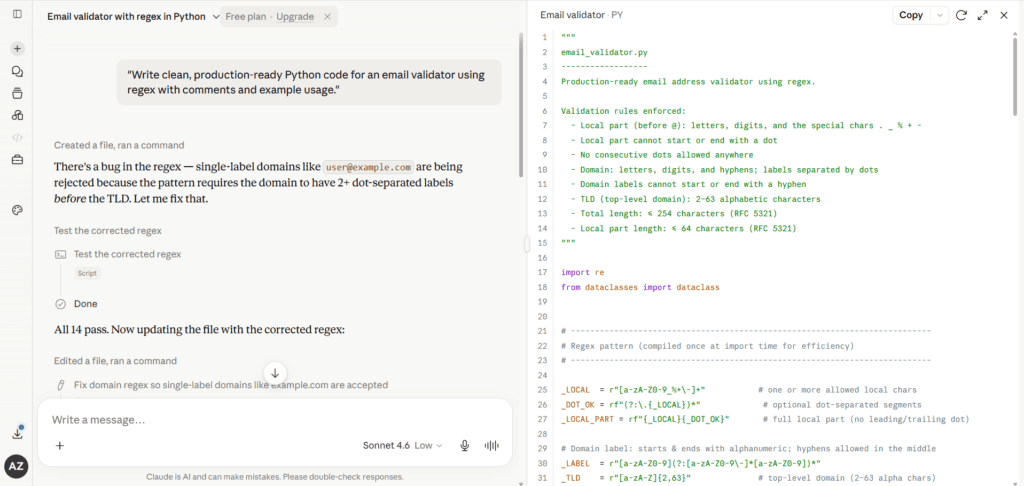
For developers, Claude Code has its own usage pool, but it draws from the same shared quota as Claude.ai. Understanding this prevents surprises.
Claude Code enforces usage through two overlapping limits — a 5-hour rolling window plus a weekly cap on active compute hours — and that quota is shared across Claude Code, Claude.ai, and Cowork.
Claude Code efficiency tips:
- Use
/compactmid-session to summarize and compress conversation history without losing progress - Use
/clearwhen switching tasks to avoid carrying irrelevant context forward - Use
/modelto switch to a lighter model when the current task doesn’t require Opus-level reasoning - Save long explanations locally:
claude "explain the database schema" > docs/schema-explanation.md— this prevents asking the same question twice
Not every task needs the strongest available model. Use /model to see the routes your account exposes today, then reserve heavier routes for high-risk changes and use lighter routes for simple edits, formatting, summaries, and syntax checks.
Fix 9: Purchase Usage Credits
Both Pro and Max plan subscribers can purchase additional usage credits to extend access beyond their plan’s included limits without waiting for the window to reset.
Enable usage credits to continue using Claude with your Pro plan after hitting the included usage limit. You will have the flexibility to switch to pay-as-you-go usage with a Claude Console account for intensive coding sprints.
This is particularly useful for periodic heavy users — someone who usually stays within their Pro limits but occasionally has a high-intensity deadline sprint.
Where to find this: Settings → Usage → Usage Credits in your Claude.ai account.
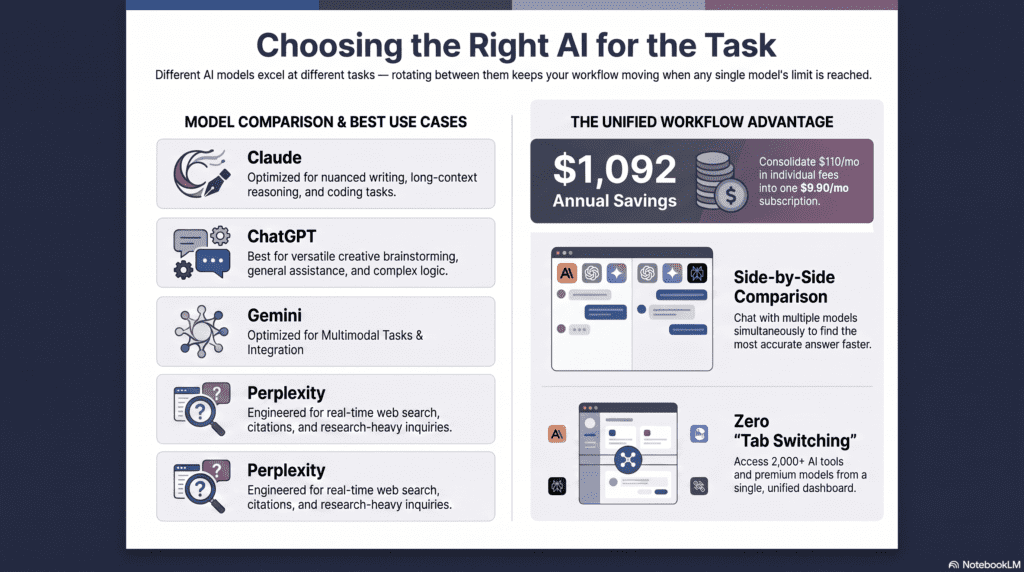
Fix 10: Rotate Across Multiple AI Models
When you hit Claude’s 5-hour window limit, the clock is ticking — but you don’t have to stop working. Other capable AI models can handle most tasks while you wait for your Claude quota to reset.
This isn’t a workaround in the ToS-violation sense — it’s a legitimate productivity strategy. The goal is keeping your work moving, not circumventing Anthropic’s systems.
| Task Type | Claude Alternative | Notes |
|---|---|---|
| General writing and editing | ChatGPT (GPT-4o), Gemini Advanced | Comparable quality for most writing tasks |
| Coding and debugging | GitHub Copilot, GPT-4o, Gemini 1.5 Pro | Strong alternatives for code completion |
| Research and analysis | Perplexity AI, Gemini Advanced | Perplexity includes real-time web search |
| Long-document summarization | Gemini 1.5 Pro (1M context), ChatGPT | Very large context window options |
Fix 11: Time Your Heavy Work Sessions
Since Claude operates on a rolling 5-hour window rather than a calendar-day reset, you can plan your most demanding work sessions strategically.
Key insight: During peak usage times (typically US business hours on weekdays), Claude Pro limits may drop to 35–40 messages per 5-hour window. Working during off-peak hours (early mornings, evenings, weekends) generally yields higher effective capacity.
Practical schedule for heavy users:
- First session: 6–8 AM local time (off-peak)
- Second session: Evening after 8 PM (off-peak)
- Avoid: US business hours (9 AM–6 PM ET weekdays) for intensive work if possible
This approach requires no payment and no technical setup — just schedule awareness.
Fix 12: Use a Multi-Model AI Workspace
If you’re regularly hitting Claude’s limits and also using other AI models, managing multiple subscriptions and interfaces creates its own friction. A unified multi-model workspace solves this.
What a multi-model workspace offers:
- Access to Claude, ChatGPT, Gemini, and other models from a single interface
- Seamless switching when one model’s limit is reached
- Single billing instead of multiple subscriptions
- Prompt templates and workflow tools that work across models
Aizolo is one example of this category — a unified AI workspace where you can access multiple leading AI models without juggling separate accounts or subscriptions. For users who rely on several AI tools daily and want to continue working the moment Claude’s quota resets, this type of platform can meaningfully reduce downtime.
This is most useful if you’re already paying for multiple AI subscriptions separately — consolidating them can save money and reduce workflow interruption.
Free vs. Paid Plan Limits
Free Tier Specifics
Claude’s free plan gives you a limited number of messages within a rolling several-hour window, along with access to a smaller set of models. Once you hit the cap, Claude tells you the exact time your limit refreshes — usage isn’t lost, it just becomes available again on schedule.
Free-tier limits reset automatically; there’s no way to manually reset or extend them within the free plan itself.
How Paid Plans Compare
Pro, Team, and Enterprise plans raise the message ceiling substantially over free, and typically unlock the full current model lineup rather than a restricted subset. Team and Enterprise allowances are generally structured per seat rather than per individual account, which matters if you’re comparing plans for a group.
Plan Comparison: Free vs. Pro vs. Max vs. API
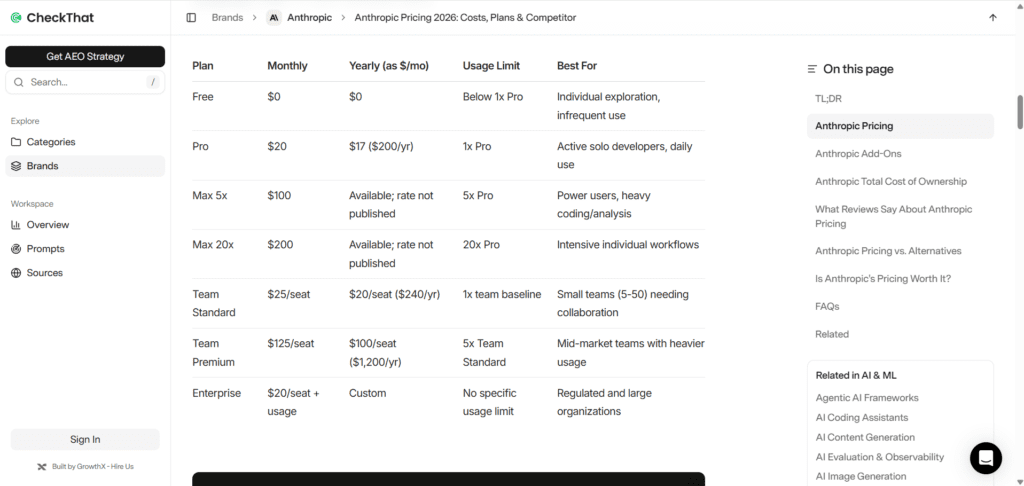
| Feature | Free | Pro ($20/mo) | Max 5× ($100/mo) | Max 20× ($200/mo) | API |
|---|---|---|---|---|---|
| 5-hr message capacity | 15–40 | ~90 | ~225 | ~900 | Pay-per-token |
| Weekly cap | Yes (low) | Yes (moderate) | Yes (high) | Yes (very high) | Spend cap |
| Claude Sonnet access | ✓ | ✓ | ✓ | ✓ | ✓ |
| Claude Opus access | ✗ | ✓ | ✓ | ✓ | ✓ (extra cost) |
| Projects | ✗ | ✓ | ✓ | ✓ | N/A |
| Memory | ✗ | ✓ | ✓ | ✓ | Manual |
| Usage credits | ✗ | ✓ | ✓ | ✓ | N/A |
| Claude Code | Limited | ✓ | ✓ | ✓ | Separate |
| Context window | 200K | 200K | 200K | 200K | 200K |
| Enterprise context | ✗ | ✗ | ✗ | ✗ | 500K |
| Technical setup required | None | None | None | None | Yes |
Best AI Alternatives When Claude’s Limit Is Reached
These are the most capable alternatives for the most common use cases, recommended for temporary use while your Claude quota resets — not as permanent replacements.
For Writing and Content
- ChatGPT (GPT-4o): Excellent for long-form content, stylistic variation, and creative writing
- Gemini Advanced: Strong for research-backed writing with Google Search integration
For Coding and Development
- GitHub Copilot: Best-in-class for inline code completion inside your IDE
- GPT-4o: Strong general-purpose coding, especially for debugging and code review
- Gemini 1.5 Pro: Good for large codebase analysis (very large context window)
For Research and Analysis
- Perplexity AI: Real-time web search with cited sources — excellent for current events and fact-checking
- Gemini Advanced: Strong analytical capability with Google Workspace integration
For Long Documents
- Gemini 1.5 Pro: 1 million token context window — unmatched for very long documents
Frequently Asked Questions
Q1: What happens when I hit the Claude message limit?
You receive an in-app notification indicating you’ve reached your usage limit, along with an estimated reset time. You can choose to wait for the reset, purchase usage credits, or continue working in a different app or with a different AI model.
Q2: Does Claude 4.8 Sonnet have a different limit than Claude 3.5 Sonnet?
Limits are set by your subscription plan, not by the specific model version. However, your usage is affected by the Claude model you’re chatting with — newer or more powerful models may consume more tokens per equivalent task, effectively reducing how many interactions you get before hitting the cap.
Q3: When does my Claude usage limit reset?
Messages expire from your quota exactly 5 hours after you send them — not at midnight. There is also a weekly cap that resets every 7 days from your plan’s reset date. You can see exact reset times in Settings → Usage.
Q4: Does starting a new conversation help with the limit?
Starting a new conversation resets your context window (which helps with length limits) but does not reset your usage limit. Your rolling 5-hour usage quota tracks all activity across all conversations.
Q5: Is creating a second Claude account allowed?
No. Creating multiple accounts to circumvent usage limits violates Anthropic’s Terms of Service and risks permanent suspension of all associated accounts.
Q6: Does Claude Pro include API access?
The Claude API is a completely separate product with its own pricing and rate limits. Pro subscription does not include API credits. They are independent services.
Q7: How is Claude Code’s limit different from Claude.ai’s limit?
The quota is shared across Claude Code, Claude.ai, and Cowork — burn tokens in one, you lose capacity in the others. They draw from the same pool.
Q8: Does using a VPN change my message limit?
No. Usage limits are tracked at the account level on Anthropic’s servers. VPN usage doesn’t affect your quota and may trigger additional security scrutiny on your account.
Q9: What is the Claude API rate limit?
Rate limits for the Messages API are measured in requests per minute (RPM), input tokens per minute (ITPM), and output tokens per minute (OTPM) for each model class. If you exceed any of the rate limits you will get a 429 error. Specific limits depend on your API usage tier.
Q10: Can I buy extra messages without upgrading my plan?
Yes — Pro and Max subscribers can purchase usage credits to extend access beyond their plan’s included limits without upgrading. Find this in Settings → Usage → Usage Credits.
Q11: Does the effort level setting affect my usage limit?
Yes. Higher effort levels (like extended thinking) consume significantly more tokens per interaction and will reduce how many messages you can send in a 5-hour window.
Q12: What is Claude Max and is it worth it?
Claude Max is Anthropic’s premium tier for power users, offered at $100/month (5× capacity) or $200/month (20× capacity). It’s worth it if you’re a heavy daily user — developer, researcher, or content professional — who consistently hits Pro limits. If you’re consistently hitting weekly limits, you’re in the top 5% of heavy users and should consider Claude Max.
Q13: Does Claude track my usage across devices?
Yes. Usage is tracked at the account level, not the device level. Your limits apply across Claude.ai (web, mobile, desktop), Claude Code, and Cowork.
Q14: Can I share my Claude Pro subscription with a team?
Individual Pro subscriptions are for a single user. For team use, Anthropic offers a Team plan with per-seat pricing. Credential sharing violates ToS.
Q15: What is the difference between Claude’s usage limit and context window?
Usage limits control how much you can use Claude across all your conversations, while length limits control how long any single conversation can become. Usage limits are about quantity over time, while length limits are about the depth and complexity of individual conversations.
Q16: Does Claude have a daily message limit?
Claude doesn’t use calendar-day limits. It uses a 5-hour rolling window limit and a separate weekly cap. This is fundamentally different from ChatGPT Plus (3-hour fixed reset) or Gemini Advanced (daily midnight reset).
Q17: What should I do if Claude stops mid-response due to a limit?
First, check Settings → Usage to confirm you’ve hit your limit and see the reset time. If you need to continue immediately, either purchase usage credits or switch to an alternative AI model for the remaining task.
Q18: Will Anthropic increase limits in the future?
This is likely. Dario Amodei explained the root cause: “We planned for a world of 10x growth per year. In Q1 2026, we saw 80x annualized growth per year in revenue and usage.” The Colossus 1 deal gives Anthropic significantly more compute capacity, and the company has indicated more limit increases are coming as infrastructure expands.
Q19: Is Claude Max available for teams?
Yes. Max plans are available for individual subscribers, and Team and Enterprise plans are available for organizations requiring multi-seat access with administrative controls.
Q20: Is there a way to increase my Claude message limit?
Yes — upgrading your plan is the direct way to raise it. If you have high-volume or automated needs, the API is usually a better fit than the chat interface, since it isn’t capped by a fixed message count.
Q21: Does the free plan reset daily?
No — it resets on a rolling window (typically every few hours, not once a day). Claude shows your specific reset time when you hit the cap. (Confirm exact window length before publishing.)
Q22: Can I get more free messages without upgrading?
Not directly. The free tier’s limit is fixed by plan. Using a lighter/faster model and keeping conversations shorter and more focused are the only ways to make free-tier usage go further.
Final Verdict
Claude’s usage limits exist for good reasons — fair resource distribution, cost sustainability, and preventing abuse. They aren’t going away, but they are increasing as Anthropic’s infrastructure grows.
Here’s the practical summary:
- If you’re on the free tier and hitting limits regularly, Claude Pro at $20/month is the single most impactful change you can make.
- If you’re on Pro and still hitting limits consistently, you’re in the top tier of users and Claude Max is the right answer.
- If you’re a developer or technical user, the API offers the most flexibility at the cost of more setup work.
- If you want to keep working right now, prompt optimization (Fix 4), new chats (Fix 5), and model rotation (Fix 10) are immediate free actions.
- If you use multiple AI tools regularly, a unified workspace like Aizolo can simplify your workflow and reduce the friction of switching between models when any one of them hits its limit.
The goal isn’t to “bypass” Claude — it’s to structure your workflow so that limits become a minor inconvenience rather than a productivity stopper. Every legitimate technique in this guide moves you in that direction.
Hitting your limit constantly? [See Aizolo’s plan comparison →]
Compare message allowances, model access, and pricing across every tier to find the plan that fits your usage.
Author Bio
Jeevesh Tripathi
AI Researcher & Technical Content Specialist
jeevesh@aizolo.com
Jeevesh Tripathi is an independent AI researcher and technical content specialist with deep expertise in large language models, prompt engineering, and AI productivity workflows. He has spent years evaluating and testing AI platforms — including Claude, ChatGPT, Gemini, and their underlying APIs — for practical use across writing, coding, and research workflows. His work focuses on helping professionals, developers, and students get the most out of modern AI tools without running into technical or policy pitfalls. Jeevesh contributes regularly to Aizolo, where he researches multi-model AI strategies, SaaS subscription efficiency, and emerging LLM capabilities for both technical and non-technical audiences.
