
Quick Summary
Most people trying to compare multiple AI models in one dashboard are stuck flipping between browser tabs for ChatGPT, Claude, and Gemini. This guide breaks down what a genuine unified AI dashboard needs, how the workflow actually works day to day, and how to judge whether an AI comparison platform is worth switching to. You’ll find a features checklist, four real workflow scenarios, a multi-model AI vs. single-model AI comparison, an evaluation framework, a fast setup guide, and answers to the questions people ask most before they commit to one tool.
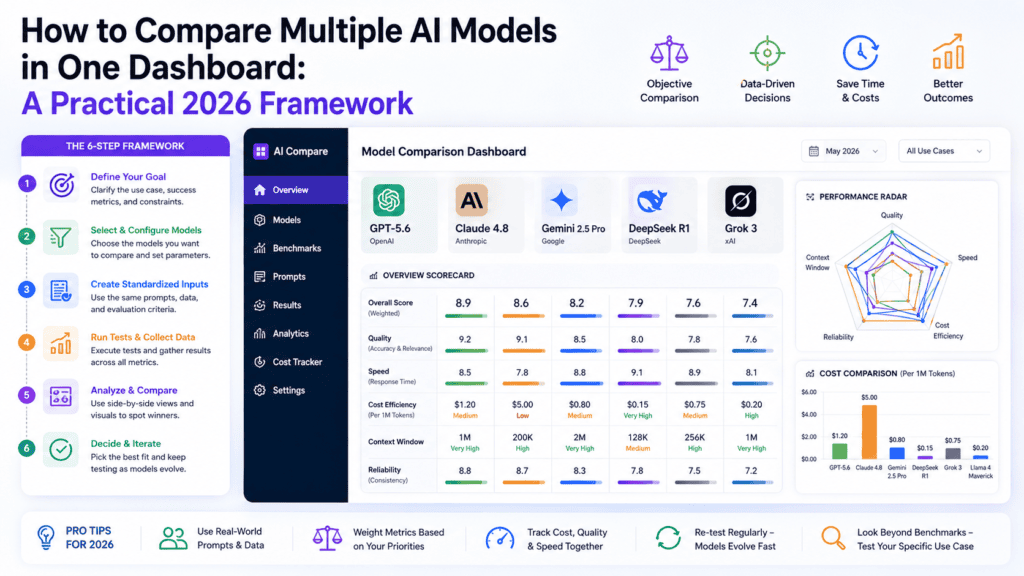
Table of Contents
Introduction: One Question, Three Different Answers
Ask ChatGPT, Claude, and Gemini the same question and you’ll often get three genuinely different answers. Not wrong answers — just different ones, shaped by how each model was trained and tuned.
That’s the entire reason people want to compare multiple AI models in one dashboard instead of picking a single “favorite” and hoping it’s right every time.
The problem isn’t that any one model is bad. It’s that no model is best at everything, and checking three separate apps to find out which one nailed your specific task is exhausting.
This guide isn’t a repeat of the usual “AI subscriptions are expensive” story. It’s a practical look at what a dashboard actually needs to do, how the comparison workflow plays out for different jobs, and how to tell a genuinely useful AI comparison platform from a gimmick.
What Does “Compare Multiple AI Models in One Dashboard” Actually Mean?
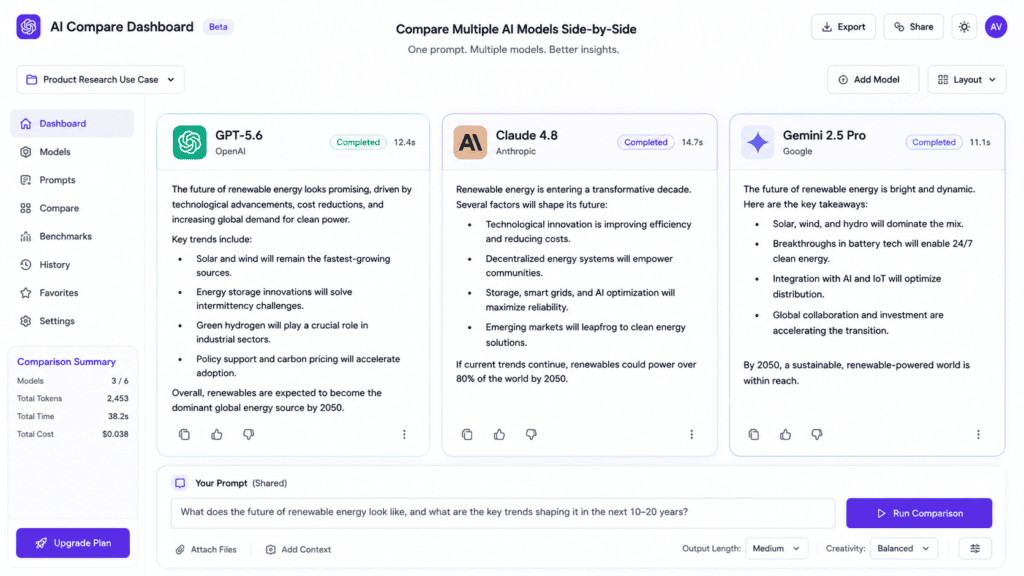
At its simplest, it means sending one prompt and getting responses from several AI models — say GPT-5, Claude, and Gemini — inside a single screen, without re-typing anything or opening new tabs.
A true unified AI dashboard goes further than that, though. It should keep your conversation history, your prompts, and your project context in one place, so switching models doesn’t mean starting over.
Think of it less like a chat window and more like a control room. You’re not choosing one AI and living with its limits — you’re pulling in whichever model fits the task at hand, on demand.
This is different from simply “having accounts” with multiple AI providers. Multi-model AI access only becomes useful when the interface lets you compare, not just switch.
Why Tab-Switching Quietly Wrecks Your Workflow
It’s not just the extra clicks. Every time you copy a prompt from one AI tool into another, you lose the conversation thread that gave the first answer its context.
That means re-explaining background information, re-pasting source material, and re-stating constraints — three separate times, for one task.
Multiply that by every project you touch in a week, and the fragmented approach costs far more time than the few minutes it looks like on the surface.
There’s also a quieter cost: decision fatigue. Deciding “should I use ChatGPT or Claude for this” before you’ve even started the actual work adds friction to tasks that shouldn’t need it.
A unified AI dashboard removes that decision entirely — you don’t choose one model, you query several and let the results speak for themselves.
The Core Features a Real Unified AI Dashboard Needs
Not every tool that claims to offer “multi-model AI” actually delivers a usable comparison experience. Here’s what to look for.
1. True parallel prompting The same prompt should go to multiple models at once, not one at a time through a dropdown menu.
2. Persistent context across models Your project notes, uploaded files, and conversation history shouldn’t reset every time you switch which model you’re looking at.
3. Side-by-side response view You should be able to visually scan two or three answers without scrolling between separate windows.
4. Access to current, top-tier models An AI comparison platform is only as good as the models behind it — GPT-5-class, Claude Sonnet-class, and Gemini-class models, kept current as providers release updates.
5. Flexible billing, including BYOK The ability to bring your own API keys matters for anyone who already has usage-based accounts with providers like OpenAI or Anthropic.
6. Organized projects, not just chat history Folders or workspaces that group conversations by client, topic, or task make a dashboard usable long-term, not just for a single session.
If a platform is missing more than one or two of these, it’s probably a wrapper with extra branding, not a real unified AI dashboard.
How AiZolo’s Dashboard Puts This Into Practice
AiZolo was built specifically around this idea: instead of an AI chat app with one model, it’s a workspace where you compare multiple AI models in one dashboard by design, not as an afterthought.
Here’s what that looks like step by step.
Step 1 — Type one prompt. You write your question or instruction once, in a single prompt bar.
Step 2 — Select your models. Choose which models should respond — for example, GPT-5, Claude Sonnet, and Gemini together — using AiZolo’s Parallel Chat feature.
Step 3 — Compare responses live. All three answers load into resizable panels you can view side by side, rather than switching browser tabs.
Step 4 — Keep going with the best one. Continue the conversation with whichever model gave the strongest answer, without losing the context built up so far.
Step 5 — Save it to a project. File the conversation under a project folder so it’s easy to find again later, alongside related work.
For teams comparing this kind of setup against a single-vendor subscription, the AiZolo vs ChatGPT Plus breakdown and the AiZolo vs Perplexity Pro comparison walk through feature-by-feature differences in more depth.
Real Workflows: How Different People Compare Multiple AI Models in a Dashboard
Generic advice is easy to ignore. Here’s what the comparison workflow actually looks like across four different jobs.
A Marketing Manager Planning a Product Launch
She drafts three versions of a launch email tagline — one from GPT-5, one from Claude, one from Gemini — and reads all three back to back instead of guessing which model “usually” writes better copy.
She picks the strongest opening line from one model and the closing call-to-action from another, then merges them into the final version.
For a deeper look at content-focused workflows, the guide on an all-in-one AI subscription for content creators covers this in more detail.
A Developer Debugging a Production Error
He pastes the same stack trace into Claude and GPT-5 simultaneously. Claude spots the logic error in a recursive function; GPT-5 flags a missing null check three lines away.
Neither model alone caught both issues — comparing them side by side did.
A Researcher Cross-Checking a Data Claim
She asks Gemini and GPT-5 to summarize a dataset described in a scientific paper, then checks both summaries against the source PDF for accuracy before citing anything.
Readers working with complex source material may also find the guide on the best AI for analyzing scientific figures and charts useful for this exact kind of task.
An Agency Reviewing Client Deliverables
The team runs client briefs through multiple models before a deadline, comparing tone and structure so the final draft doesn’t read like it came from a single AI’s default style.
Agencies managing several clients on tighter budgets often pair this workflow with the tips in the AI tools bundle for agencies guide.
Multi-Model AI vs. Single-Model AI: A Side-by-Side Look
| Factor | Single AI Model | Multi-Model AI Dashboard |
|---|---|---|
| Perspective | One viewpoint per prompt | Multiple viewpoints, compared instantly |
| Error-catching | Relies on one model’s blind spots | One model often catches what another misses |
| Context switching | None, but limited to one tool’s strengths | Minimal, if the dashboard preserves context |
| Learning curve | Familiar with one interface | Slightly more setup, faster long-term |
| Best for | Simple, low-stakes tasks | Client work, research, code review, high-stakes writing |
Neither approach is “wrong” — a single model is fine for a quick, low-stakes question. But for anything that ends up in front of a client, a grade, or a codebase in production, comparing outputs is the safer habit.
For a broader look at this exact decision, Compare AI Models Side by Side in 2026 covers evaluation criteria in more depth, and the AI Model Comparison Tool buyer’s guide looks at how to shop for this category of software.
How to Evaluate an AI Comparison Platform Before You Commit
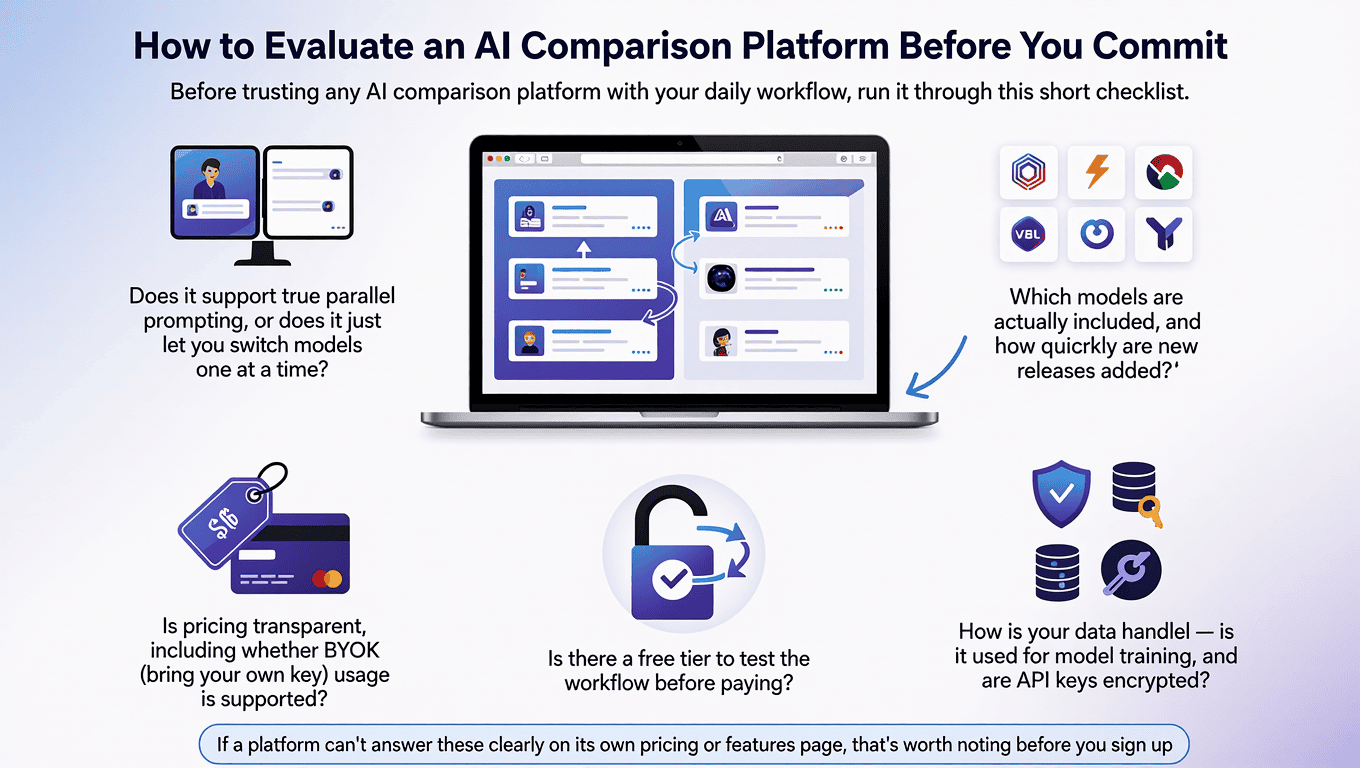
Before trusting any AI comparison platform with your daily workflow, run it through this short checklist.
- Does it support true parallel prompting, or does it just let you switch models one at a time?
- Does context carry over when you move from one model’s answer to another’s?
- Which models are actually included, and how quickly are new releases added?
- Is pricing transparent, including whether BYOK (bring your own key) usage is supported?
- Is there a free tier to test the workflow before paying?
- How is your data handled — is it used for model training, and are API keys encrypted?
If a platform can’t answer these clearly on its own pricing or features page, that’s worth noting before you sign up.
Getting Started: A Fast, Low-Risk Setup
You don’t need a two-week migration plan to try this. Here’s a shorter path.
1. Create a free account. Sign up at AiZolo — no credit card required to start exploring.
2. Run one real task through it. Pick something you’re already working on and send it to two or three models at once.
3. Compare, don’t overthink. Notice which model handled the task best, and why — tone, accuracy, structure, or speed.
4. Set up a project folder. Group related conversations together so future work builds on what you’ve already done.
5. Decide what to keep running in parallel. Some people keep one existing subscription for a specific need while using a unified dashboard for everything else — there’s no rule that says it has to be all-or-nothing right away.
Common Mistakes People Make When Comparing AI Models
Testing with a throwaway prompt. “Write me a poem” won’t reveal much. Test with a real task that has a right or wrong answer, or a clear quality bar.
Ignoring the second and third response. People often glance at the first answer and stop reading, missing the fact that another model handled it better.
Assuming one model is “always best.” Model strengths shift by task type, and even by prompt phrasing. Comparing regularly, not just once, builds better judgment over time.
Skipping the context check. A dashboard that resets your conversation every time you switch models isn’t really saving you the tab-switching problem — it’s just moving it inside one app.
Frequently Asked Questions
Is comparing multiple AI models actually worth the extra time? For quick, low-stakes questions, no — one model is fine. For anything that goes to a client, a grade, or production code, the extra 30 seconds of comparison regularly catches errors a single model would have missed.
Do I need separate subscriptions to compare models like ChatGPT, Claude, and Gemini? Not with a unified AI dashboard. Platforms like AiZolo provide access to multiple models under one plan, or let you connect existing API keys through a BYOK setup.
Which AI model is “the best” overall? There isn’t one. GPT-5-class models tend to lead on conversational brainstorming, Claude-class models are frequently strongest on code and nuanced writing, and Gemini-class models often lead on real-time information and large context windows. Independent benchmark trackers like Artificial Analysis track this as it shifts month to month.
Can I use my own OpenAI or Anthropic API key in a comparison dashboard? Yes, on platforms that support BYOK. This is often the cheapest way to run a multi-model AI setup if you already have API access with usage-based billing.
How is a multi-model dashboard different from a chatbot aggregator? An aggregator often just switches which model answers your prompt. A true unified AI dashboard runs models in parallel and keeps shared context, which is the difference that actually saves time.
Is my data safe when I compare AI models through a third-party dashboard? Check the platform’s privacy policy directly. Reputable comparison platforms encrypt API keys and state clearly whether conversation data is used for model training.
The Bigger Picture: Why This Workflow Matters Going Forward
New AI models are released every few months, and each one shifts which tool is “best” for a given task. Betting everything on a single AI model means re-learning that bet every time a new release changes the landscape.
A dashboard built to compare multiple AI models keeps you flexible by design. When a new model launches, you’re not switching platforms — you’re just adding another panel to compare.
That’s really the point of a unified AI dashboard: not replacing your judgment with an AI’s, but giving you enough perspective to use your own judgment well.
If you’re weighing this approach against a broader AI stack, the pillar guides on an AI chat platform that supports ChatGPT, Claude, and Gemini together and how to replace multiple paid AI tools with one AiZolo plan are good next reads.
For a deeper technical comparison of two current frontier models, see Kimi K3 vs. Claude Opus 5, or the AiZolo vs. OpenRouter comparison if you’re weighing a dashboard against a raw API router.
Ready to see it for yourself? Try AiZolo free and compare multiple AI models in one dashboard on your own next task, before you decide anything.
About the Author
Jeevesh Tripathi is a researcher and writer covering AI tools, model comparison methodology, and productivity workflows for professionals and teams evaluating multi-model AI platforms. His work focuses on hands-on testing rather than marketing claims, following an evidence-first approach in line with Google’s guidance on people-first, experience-backed content.
📧 jeevesh@aizolo.com
