Operating a business requires you to manage many different activities. This could include providing excellent service for your customers, processing invoices, managing staff and tracking performance and generating reports.
If these processes are very manual, it can cause delays in your business, making it challenging for your teams to focus on the most important decisions.
AI can be used to automate repetitive processes within your business, helping to keep your information organised, analyse data and manage your processes between departments.
With the use of AI, your teams will be able to process information and receive recommendations to help with the repetitive tasks.
However, to ensure your business is automated successfully you need to understand how the processes currently work. Identify where AI can add value and create processes that deliver results.
In this guide, you will learn how to use AI to automate business operations, which processes can benefit from automation, how to implement AI workflows, and what businesses should consider before adopting these technologies.
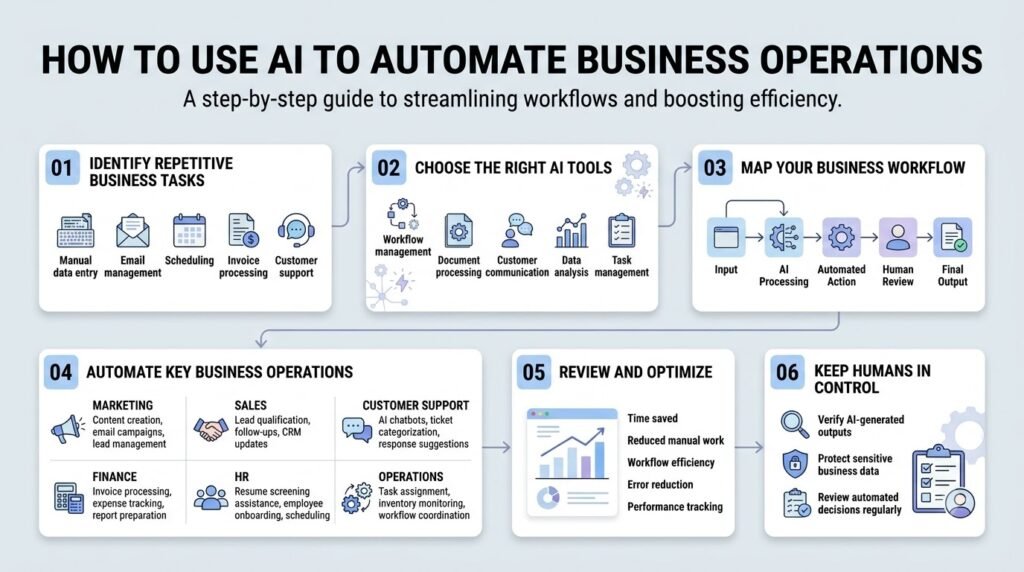
Table of Contents
What Does It Mean to Use AI to Automate Business Operations?
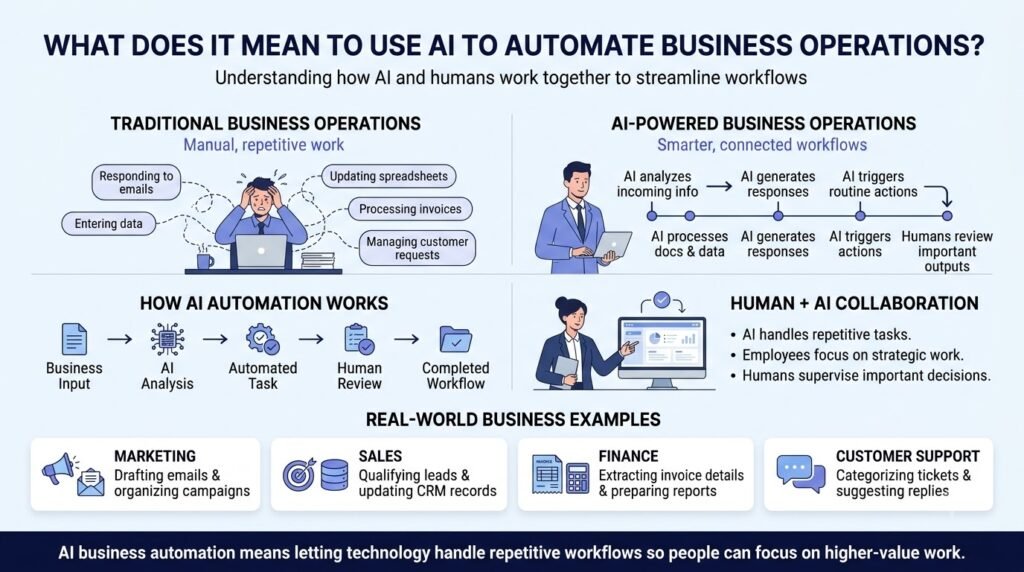
Using AI will automate your business processes by using artificial intelligence.
An AI system can help you understand information, sort it into different categories, summarise conversations, spot trends, create new content and give recommendations. If integrated with workflow automation software, this can help automate your business by moving the information around your tasks.
For example, if your business gets lots of customer questions (hundreds), you could use AI to sort them into categories, understand what they’re about, pick out any urgent requests and create some draft replies for your customer service staff.
Your finance team could also use AI to extract information from invoices, sort through transactions and create some draft summaries.
Most AI powered workflows would look like this:
Business Input > Data Collection > AI > Decision/Classification > Automation > Human Check > Output
Depending on the process, some parts will be fully automated and others will need to be approved by an employee.
The aim of this is to remove any repetitive tasks, improve consistency and allow your employees to focus on tasks that require some experience.
How Is AI Automation Different From Traditional Business Automation?
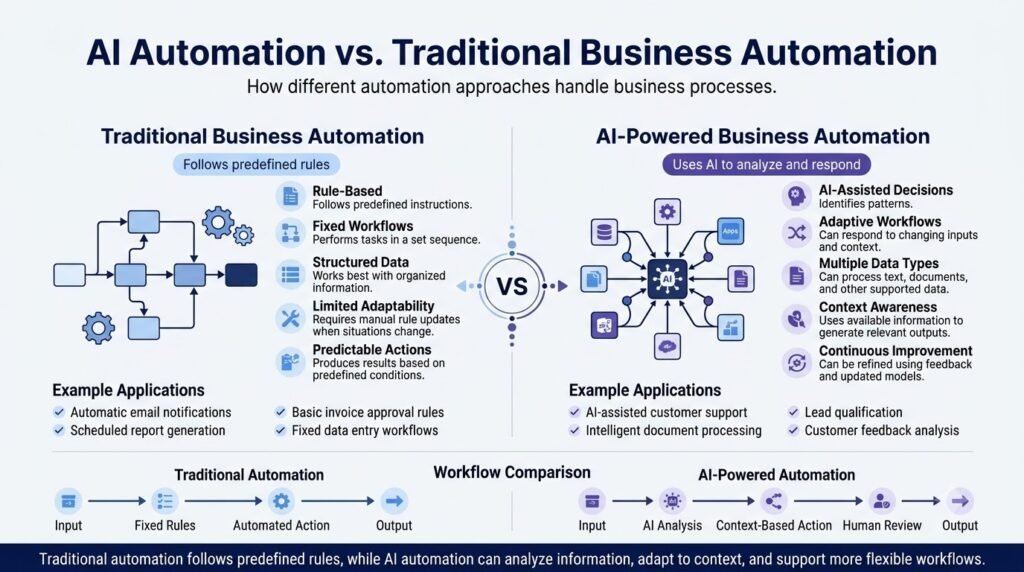
Traditional automation will reduce manual tasks but will only be able to do so on specific tasks.
Traditional automation uses set commands. This might be to automatically send an email when a customer has filled out their registration form.
AI is able to interpret unstructured data. It might be able to read the customer’s message, understand the request, categorise the issue and create an appropriate response.
The two approaches can also work together within one workflow.
| Feature | Traditional Automation | AI Automation |
| Processing | Predefined rules | AI-assisted interpretation and analysis |
| Inputs | Usually structured | Structured and unstructured |
| Decision-making | Fixed conditions | Context-dependent recommendations |
| Adaptability | Limited to configured rules | Can handle some variations in input |
| Examples | Scheduled emails and reminders | Message classification and document extraction |
| Human involvement | Depends on workflow | Often needed for validation and exceptions |
Where Does RPA Fit Into Business Automation?
Robotic Process Automation (RPA) can be used to automate repetitive tasks within applications using software robots. Examples of these include copying text, updating records and transferring data.
AI and RPA can work well together.
An example of this would be using AI to pick out key information from a document and then having an RPA robot enter the validated information into an existing application.
This can be useful in situations where businesses will receive information in varying formats.
What Is the Difference Between an AI Workflow and an AI Agent?
An AI workflow is a pre-defined set of tasks that an AI will complete.
Generally, an AI agent has more freedom. They can plan sub-tasks, choose tools and decide what actions to perform based on how they have been configured and what access they have.
| Aspect | AI Workflow | AI Agent |
| Structure | Predefined sequence | More flexible task execution |
| Control | Defined stages and rules | Greater autonomy |
| Best suited for | Repeatable processes | Tasks requiring multiple decisions |
| Predictability | Generally easier to control | Requires additional safeguards |
| Example | Classifying and routing support tickets | Investigating a request and coordinating several permitted actions |
Businesses do not need AI agents for every automation project. A simple workflow or rule-based system may be more appropriate when the task is predictable and repetitive.
Why Should Businesses Automate Operations With AI?
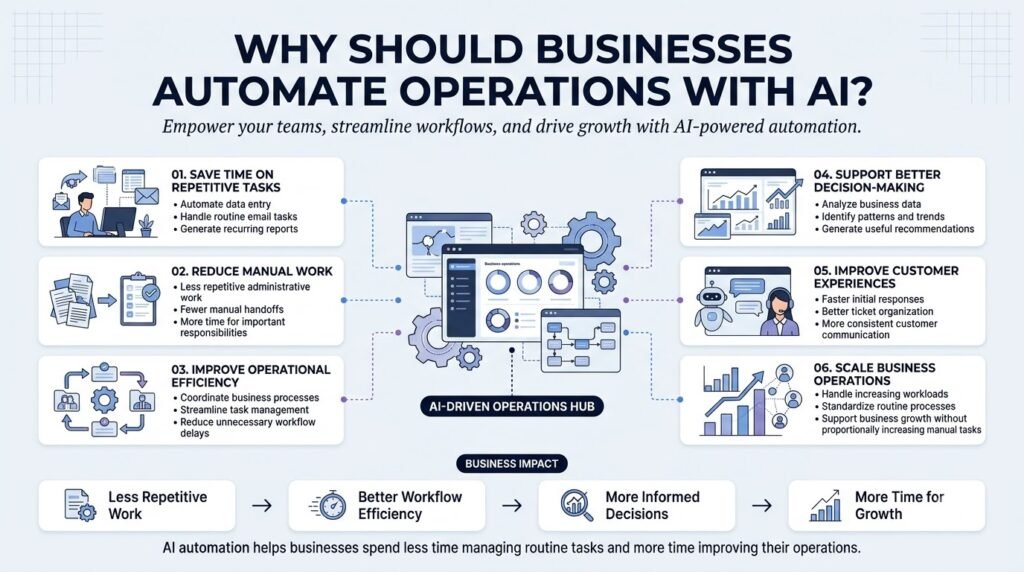
When applied to daily tasks within a team, AI can increase efficiency. The degree to which it does depends on the processes involved, quality of data and design of the workflow.
1. Reduce Repetitive Administrative Work
People often waste large amounts of time organising information, creating documents, answering standard queries and updating data.
AI can be used to write emails, summarise meetings, sort requests, extract information and create initial reports.
This cuts down on repetitive tasks that employees have to do manually.
2. Improve Information Processing
Businesses often receive information from various sources such as emails, forms, spreadsheets, messages, documents and more.
AI can assist in categorising and summarising this information.
An example of this is if you have an operations team, they can use AI to analyse any requests coming in and sort these based on department/priority or issue type.
3. Support Better Business Decisions
In business there often is a need to pull information from multiple sources.
Using AI to summarise sales data, identify common customer issues, compare KPIs and pick up anomalies can help managers to investigate issues within the business in an efficient manner. However, it is important to reference back to the original data when making important decisions based on recommendations made by AI.
4. Improve Workflow Consistency
Well designed automation workflows will ensure processes are consistent by applying rules to repetitive tasks.
An example of this would be having a standard process for classifying all incoming support requests and assigning them to the correct employee.
This will improve consistency and help you identify areas for improvement.
5. Support Business Growth
As your business grows, you’re likely to see increased administration plus customer interaction.
By using AI-powered workflows, your team will be able to manage more data, and reduce the time spent on menial tasks.
However, you will still need the right people in place to own the right processes and ensure quality.
Which Business Operations Can Be Automated Using AI?
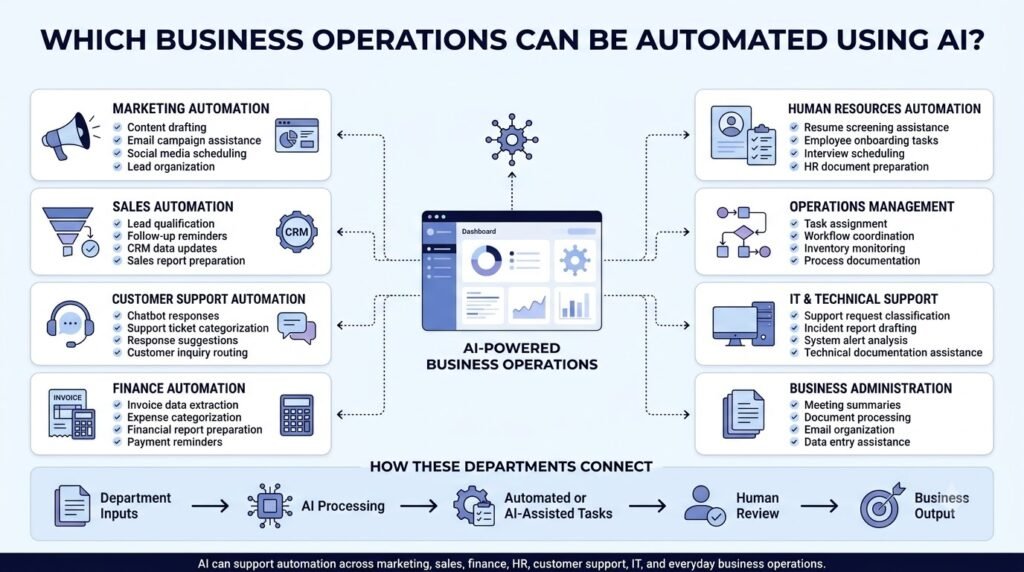
The most useful opportunities tend to involve repetitive tasks, high volumes of data or tasks which require interpretation of unstructured data.
1. Customer Support Operations
This could be questions, complaints, product queries and service requests handled by customer service teams.
AI can assist with:
- Categorizing incoming customer messages.
- Identifying common customer issues.
- Detecting potentially urgent requests.
- Preparing suggested email responses.
- Summarizing previous customer interactions.
- Identifying recurring complaint patterns.
An e-commerce business could use an intelligent workflow to automatically sort customer messages into four categories: delivery questions, refunds, product queries and technical issues.
Standard requests can be automatically routed to the right team, whilst any unusual or sensitive requests can be sent to an employee.
2. Finance and Accounting Operations
Finance departments manage invoices, expenses, transaction records, payment information, and financial reports.
AI can help with:
- Extracting information from invoices.
- Categorizing financial documents.
- Identifying missing information.
- Preparing expense summaries.
- Organizing transaction descriptions.
- Drafting preliminary financial reports.
AI can extract the relevant data from documents, such as invoice numbers, vendor information, date and amounts.
This can be validated against particular rules within your business before being inputted into your accounting software. The AI shouldn’t have automatic authorisation to pay or make any key financial decisions.
3. Human Resources Operations
They are responsible for the recruitment, onboarding, training, communication and documentation of employees.
AI can assist with:
- Organizing job applications.
- Drafting interview questions.
- Preparing onboarding checklists.
- Summarizing employee training materials.
- Answering routine policy questions using approved documents.
- Preparing internal HR communications.
When new employees join, workflows can be used to produce checklists using AI technology based upon their department and role. The Human Resources professional must then make important decisions regarding their employment and ensure their information is handled correctly.
4. Sales Operations
Sales teams handle lead, contact, follow up, proposals and sales activity information.
AI can help with:
- Summarizing sales conversations.
- Categorizing incoming leads.
- Drafting follow-up emails.
- Preparing meeting summaries.
- Organizing customer requirements.
- Identifying recurring objections.
If a sales team were to use AI they could take a meeting transcript and create a summary of requirements, questions and suggested follow ups from the customer.
The sales person can then look over the summary and update their CRM or send a proposal.
5. Marketing Operations
Marketing teams manage research, planning, creation, publishing and analysis.
AI can assist with:
- Organizing customer research.
- Generating campaign ideas.
- Preparing content briefs.
- Drafting marketing materials.
- Analyzing customer feedback.
- Summarizing campaign performance.
An example of this is having a repeatable AI process that helps you to create briefs from your research, review your content drafts and create a summary of your performance.
For a deeper look at marketing automation, see our guide on AI agents for marketing automation.
6. Business Reporting and Performance Monitoring
Gather data from various departments and present it in an insightful format.
AI can help:
- Organize business data.
- Summarize performance changes.
- Identify unusual patterns.
- Draft management reports.
- Explain important metrics.
- Prepare questions for further investigation.
An owner can use AI to analyse monthly sales data, compare with previous times and create an initial summary of how they are performing.
This data must be verified and validated before presenting to stakeholders.
7. Business Documentation and Process Management
Organizing information about business processes, roles, workflows, and requirements is vital for businesses.
AI can help organize current documents, find gaps in the information, provide summaries of processes and draft process descriptions.
For more detailed guidance, read our article on creating a business process documentation system using AI.
How to Use AI to Automate Business Operations: 7 Steps
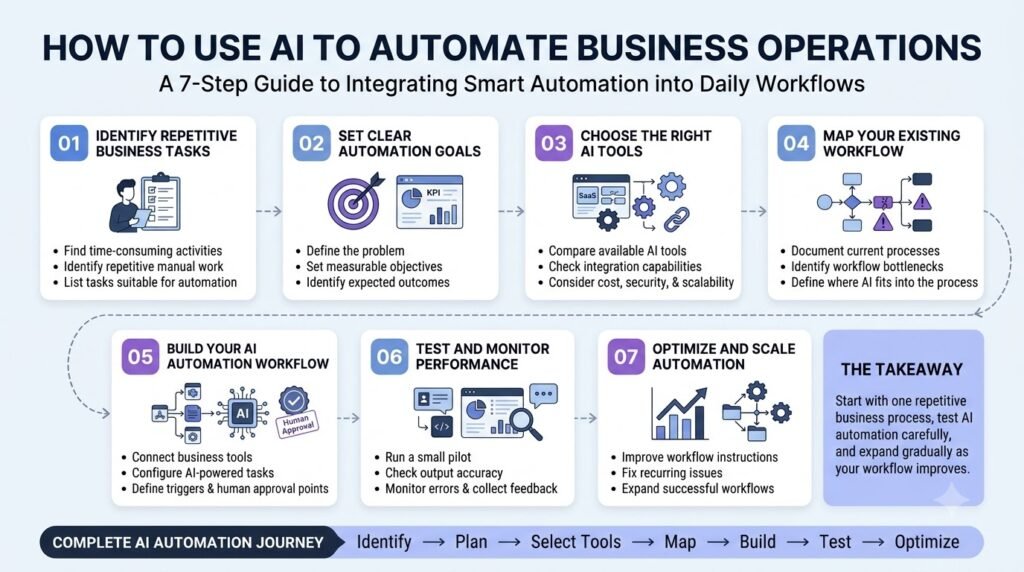
Implementing AI automation can be more complicated than simply choosing your model and buying some software. You must first understand your process, find the correct automation opportunities and have the right controls in place.
There are 7 steps to creating an AI powered business process.
Step 1: Identify Repetitive Business Processes
Identify activities that are taking up a lot of time but are relatively predictable.
Review the tasks being carried out within each department.
Examples include:
- Processing incoming customer requests.
- Preparing recurring business reports.
- Organizing invoice information.
- Sending routine follow-up messages.
- Updating customer records.
- Preparing employee onboarding documents.
- Summarizing meetings and internal discussions.
Do not begin by trying to automate every department.
Instead, list the processes that are causing the most repetitive work and identify areas where employees are wasting time.
Create a simple process inventory:
| Business Process | Current Challenge | Potential AI Application |
| Customer support | Manually categorizing inquiries | AI-based classification |
| Invoice processing | Extracting information from documents | AI data extraction |
| Reporting | Preparing recurring summaries | AI-assisted report generation |
| HR onboarding | Preparing repetitive checklists | AI-assisted document preparation |
| Sales follow-ups | Writing similar emails | AI-generated drafts |
The purpose is to identify opportunities, not to assume that every listed activity should be automated.
Step 2: Map the Existing Workflow
Before AI is introduced, it is important to understand how your chosen process operates currently.
Outline the entire process from start to finish.
Identify:
- What triggers the process?
- What information is required?
- Who performs each task?
- Which applications are involved?
- Where do delays occur?
- Which decisions require human judgment?
- What happens when something goes wrong?
- What should the final output look like?
Consider a customer support workflow.
A basic process might look like this:
Customer Message → Request Identification → Issue Classification → Ticket Assignment → Employee Response → Resolution → Record Update
AI can help with understanding what the message is about and categorising the issue. The workflow software can assign and notify whilst staff will deal with more complex issues and approve key responses.
Understanding how the process currently operates will allow businesses to identify where they can use AI.
This will also ensure that organisations are not wasting time on unnecessary steps or replicating an inefficient process.
Step 3: Choose the Right AI Models and Automation Tools
If your small business only wants to sort incoming emails then you might need just a basic AI classification process.
When comparing different AI models for your business, consider how well they obey commands, make sense of the data provided, deliver structured output and provide explanations.
If it is an important process you can compare the outputs from different models to pick the most reliable method.
Step 4: Prepare Business Data and Define Automation Rules
AI automation depends heavily on the quality and relevance of the information supplied to the system.
Before implementation, identify the data sources required for the workflow.
These may include:
- Customer records.
- Internal spreadsheets.
- Business documents.
- Email conversations.
- Sales information.
- Inventory records.
- Support tickets.
- Approved company policies.
Organize the information and remove unnecessary or outdated records.
Next, define the rules that control the workflow.
For example, a customer support classification system may use these categories:
| Category | Workflow Rule |
| General inquiry | Prepare a response draft |
| Delivery issue | Route to the order support team |
| Refund request | Send for policy-based review |
| Technical problem | Assign to technical support |
| Urgent complaint | Escalate to an employee |
Whilst AI can be used to make suggestions, business rules should be implemented.
You should not give any sensitive customer, staff or financial information to an AI service without first understanding how they will manage, secure and comply with privacy requirements around your data.
Step 5: Build the AI-Powered Workflow
Now connect the selected AI capability with the process and tools your business already uses.
A typical workflow contains the following elements:
- Trigger: An event starts the process.
- Input: The system collects the required information.
- AI processing: The model classifies, extracts, summarizes, or generates information.
- Validation: The output is checked against predefined rules.
- Action: The workflow performs a permitted next step.
- Human review: An employee handles approvals or exceptions.
- Recordkeeping: The result is stored for future reference.
For example, consider an automated invoice preparation workflow.
Invoice Received → Document Extraction → Field Validation → Missing Information Check → Employee Approval → Accounting System Update
AI is used to extract invoice details and highlight any missing information.
A workflow system can be used to ensure that all mandatory fields have been included. This will then allow an employee to check the invoice.
Using AI in this way helps but does not allow the AI to have full control over the financial transactions.
Step 6: Test the Workflow and Introduce Human Review
Never assume an AI process will work just because it can produce a successful demo.
Use real-world data to test your process.
Ensure the system does what you want it to do.
Include:
- Normal requests.
- Incomplete information.
- Unusual formats.
- Duplicate records.
- Conflicting information.
- Incorrect inputs.
- Cases that require human judgment.
If you are building a classifier for customer support purposes, test your model on different types of messages such as complaints, refund requests, urgent cases and messages that aren’t in any existing categories.
Establish a human review process for:
- Uncertain classifications.
- Sensitive information.
- Financial approvals.
- Legal or compliance-related decisions.
- Customer complaints requiring judgment.
- Actions that are difficult to reverse.
Keep a record of errors and corrections. These observations can help improve the workflow over time.
Step 7: Monitor Performance and Improve the Workflow
After testing, introduce the workflow gradually and monitor its performance.
Compare its results against the original manual process.
Useful measurements include:
| KPI | What It Measures |
| Processing time | Time required to complete a task |
| Error rate | Frequency of incorrect outputs |
| Manual intervention rate | How often employees need to correct or handle outputs |
| Workflow completion rate | Percentage of successfully completed processes |
| Response time | Time taken to respond to a request |
| Cost per task | Estimated operating cost of completing the process |
| Exception rate | Frequency of cases requiring special handling |
If you are using AI to classify support tickets, measure how accurate the classifications are, and how many tickets need to be manually reassigned.
If there is an increase in errors, or the process is not reliable, determine why this is happening before scaling.
Once the process is reliable consider using the same method for other suitable business processes.
Practical Example: Automating Customer Support Operations With AI
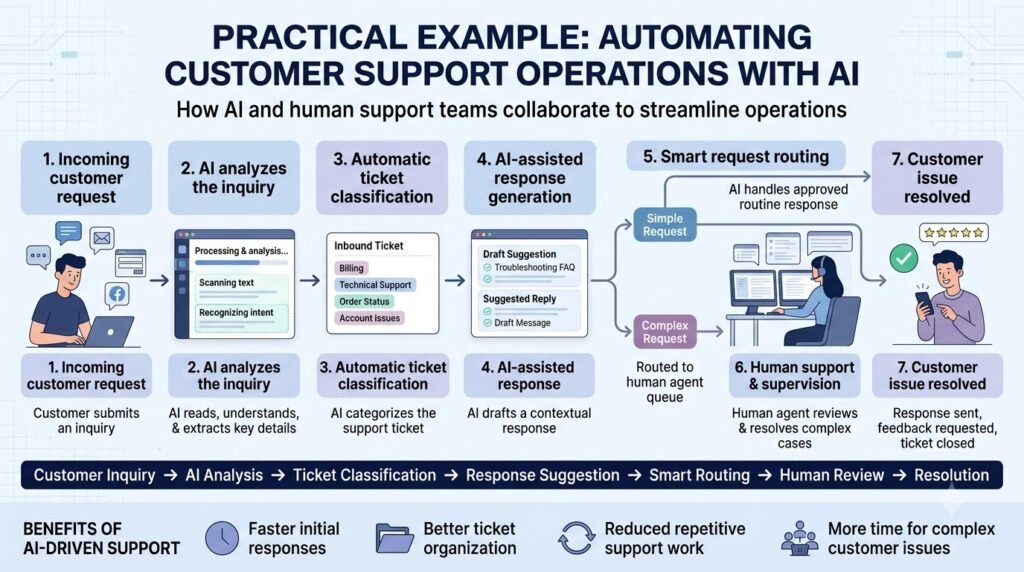
An online business is growing so they start receiving emails and contacts via their website.
These are then all read by the support team. They identify what the issue is, assign the request and create a response.
However as the volume increases this becomes difficult to manage.
The business decides to introduce an AI-assisted support workflow.
The Original Process
| Stage | Manual Activity |
| 1 | Employee opens each customer message |
| 2 | Employee identifies the issue |
| 3 | Employee selects the appropriate department |
| 4 | Employee prepares a response |
| 5 | Employee updates the support record |
The AI-Assisted Process
| Stage | AI or Automation Activity |
| 1 | New customer message triggers the workflow |
| 2 | AI summarizes the message |
| 3 | AI suggests an issue category |
| 4 | Rules determine the appropriate routing |
| 5 | AI prepares a response draft |
| 6 | Employee reviews sensitive or uncertain cases |
| 7 | The approved response and outcome are recorded |
What Improves?
They don’t need to categorise each day to day question.
They can put more focus on complex complaints, unusual requests and those that require human judgement.
You should monitor if categorisation is accurate, the quality of response, the speed of handling and customer satisfaction to ensure this is actually providing value.
This example shows how we should use AI to assist our process and not allow it to run wild.
Best AI Tools and Technologies for Business Automation
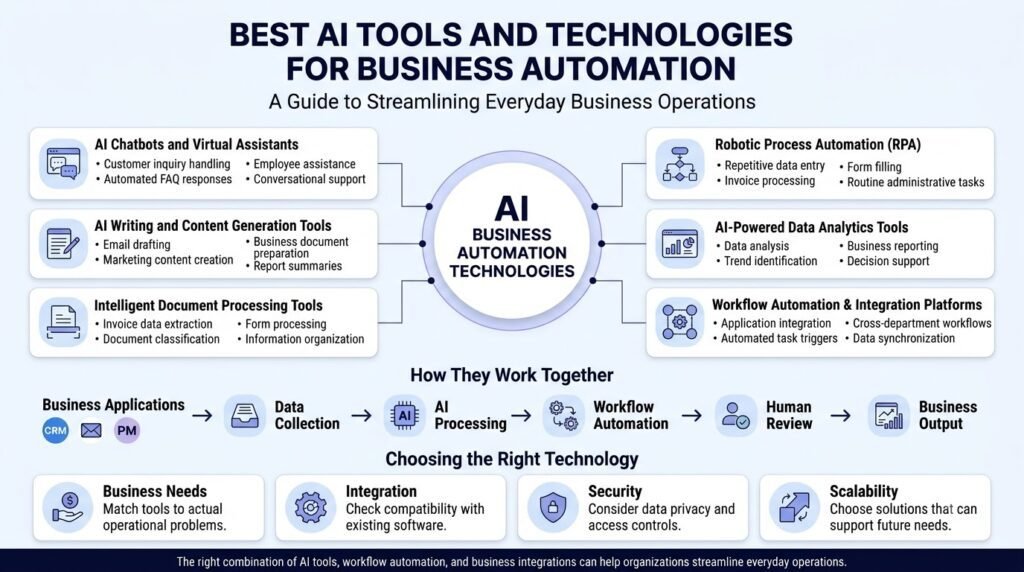
This depends on the problem you are trying to solve, what data you have, what software you already have and how much automation you need.
Understand what each category of technology can do rather than what is popular.
1. General-Purpose AI Models
Large language models can understand written instructions, summarize documents, generate content, classify information, and assist with analysis.
They are useful for tasks involving:
- Email and document processing.
- Customer communication drafts.
- Internal knowledge summaries.
- Business research.
- Report preparation.
- Workflow planning.
Examples include ChatGPT, Claude, and Google Gemini.
2. Workflow Automation Platforms
Workflow automation platforms connect applications and execute predefined actions.
This means you can transfer data between systems, notify people, create new records and kick off approval processes.
They’re great if you want to link up systems you already have in place.
3. Robotic Process Automation Tools
RPA platforms allow repetitive tasks to be automated across various software applications.
This can be useful for old systems or processes which involve copying, data entry and transfer.
4. Document Processing Tools
Document processing technologies can help extract information from documents like invoices, forms, contracts, and receipts.
AI can help with interpretation of the document’s content and validation rules will ensure information is correctly extracted.
5. Business Intelligence and Analytics Tools
Business intelligence systems can help you collate your data, create dashboards, and monitor performance.
AI can be used to give summaries of results, detect anomalies and aid investigation into performance changes.
6. Multi-Model AI Workspaces
In some areas of business it is useful to compare different AI outputs.
For example, a team may develop a model to analyse a business problem but then have another model developed to challenge the assumptions and review the process.
AiZolo allows you to develop a multi-model AI environment so you can easily compare the outputs, manage your prompts and keep the project context. This helps with researching, planning processes and reviewing AI generated recommendations for business.
It is important to understand that this isn’t a process orchestration tool. The multi-model environment can help with working with AI models but isn’t a direct replacement for CRM, ERP or automation integration tools.
How to Choose the Right AI Automation Tools for Your Business
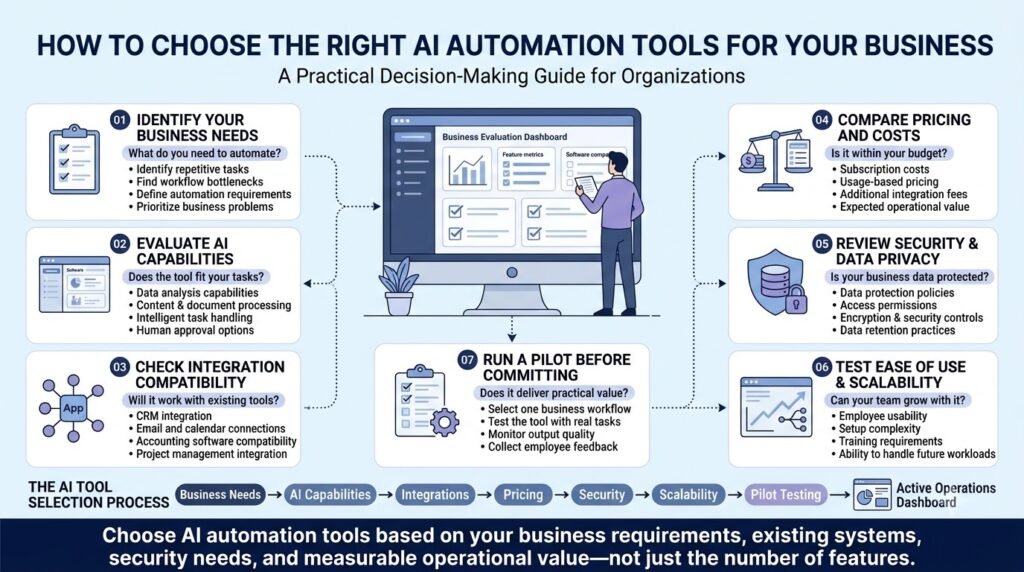
Selecting automation technology requires more than comparing features.
Consider these factors before making a decision.
1. Define the Business Problem
Identify what you want to improve.
Reduce manual data entry? To help organise customer requests, generate reports, or just help you manage your internal information? Having a clear problem to solve will help you find the right solution.
2. Check Integration Capabilities
Check that the tool is compatible with your current applications
Check the APIs, integration support, data export and authentication required.
A strong AI model won’t be very useful if it can’t access the information it needs.
3. Evaluate Data Security
Understand how the provider handles business information.
Data storage, data access, encryption, training policies and contractual terms.
All sensitive business data should only be processed using services approved for handling the data type.
4. Compare Output Quality
Test candidate tools using representative business inputs.
The results are accurate, reliable, relevant and can be verified.
If important tasks are being undertaken then different models can be used to see how the recommendations differ.
5. Consider Total Operating Costs
Account for more than the subscription price.
Consider:
- API usage.
- Automation platform fees.
- Integration development.
- Maintenance.
- Employee training.
- Human review.
- Monitoring and support.
A workflow that is inexpensive to configure may still require substantial ongoing maintenance.
6. Start With a Small Implementation
Avoid introducing automation across every department simultaneously.
Choose one process, establish a baseline, test the solution, and evaluate the results.
Expand only after the workflow demonstrates reliable performance.
How to Measure the ROI of AI Business Automation
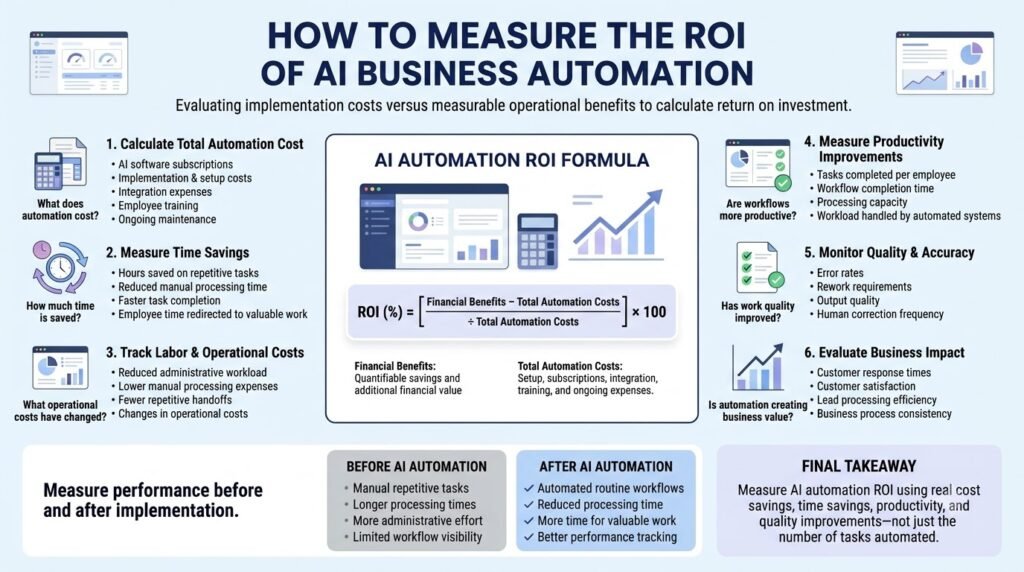
Automation should provide a measurable improvement.
Without having any reference point, it can be challenging to know if a new AI process is actually saving time or money for your business.
Begin by measuring the efficiency of the current process.
For example, how many hours does an employee take to prepare weekly reports, how many errors are made and average time to complete a report.
After introducing AI assistance, compare the same measurements.
A simple cost-benefit framework is:
Net Benefit = Measurable Operating Savings + Additional Quantifiable Benefits − Total Automation Costs
For a more detailed estimate, consider the following:
ROI (%) = (Net Financial Benefit ÷ Total Automation Investment) × 100
If you have invested in AI subscriptions, integrations and implementation, then you need to balance this with the tangible benefits.
This includes reduced processing costs, reduced time spent by employees on repetitive tasks and reduced rework costs.
Do not include any time saving that is just an estimate, unless it has directly led to cost saving or increased productivity.
Useful evaluation questions include:
- Has the workflow reduced processing time?
- Are fewer errors occurring?
- Do employees spend less time on repetitive tasks?
- Has the number of unresolved requests decreased?
- Is the workflow reliable enough to operate consistently?
- Are maintenance and review costs reasonable?
These measurements help businesses decide whether to improve, expand, or discontinue an automation project.
Common Mistakes to Avoid When Automating Business Operations With AI
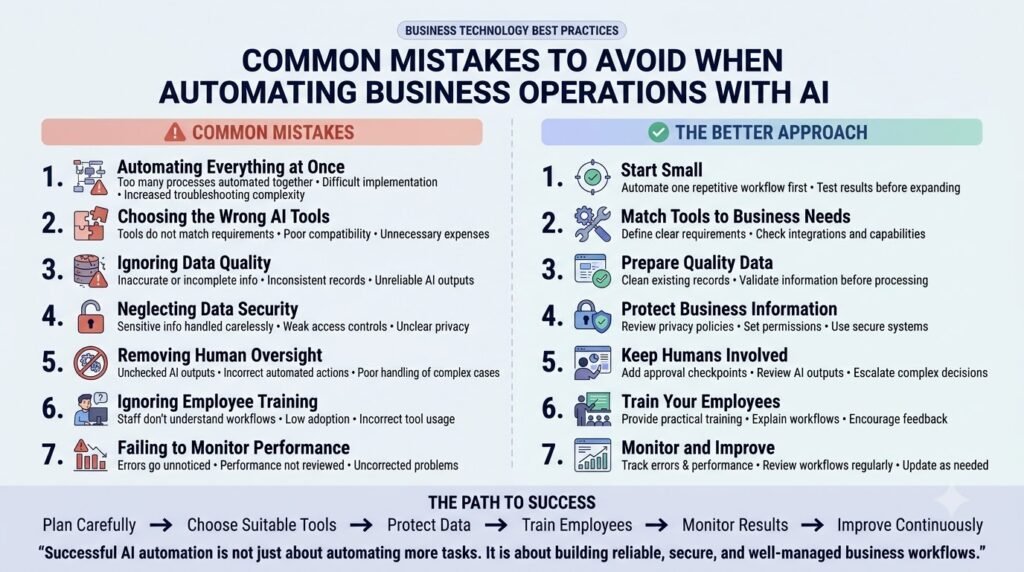
If you don’t understand your processes, you could get into new issues when implementing AI automation.
1. Automating an Inefficient Process
Automating a poorly designed workflow can make existing problems happen faster.
Understand your current process, remove any redundant steps and make sure roles are clear.
2. Choosing AI Before Defining the Problem
Sometimes you can end up buying more than one tool for a vague task.
Start with the operational challenge and select the simplest technology that can address it.
3. Giving AI Too Much Authority
AI generated content can make errors and miss key context.
Do not allow AI to approve payments, make sensitive employment decisions or irreversible actions without the proper authorisation.
4. Ignoring Data Quality
Inconsistent or incomplete data can result in unreliable outputs.
Ensure data is of an appropriate structure and validation rules have been defined.
5. Skipping Human Review
Human review is particularly important when an incorrect output could affect customers, employees, finances, or compliance.
Define clear approval and escalation processes.
6. Failing to Measure Results
The workflow should be assessed according to how effectively it achieves its goal.
Without measuring accuracy, completion rates, processing time and costs you will not be able to accurately determine if automation is successful.
7. Introducing Too Many Automations at Once
It becomes complicated to troubleshoot and see what’s working when you have several workflows running.
Start small, test thoroughly, and scale up.
Risks and Limitations of Using AI in Business Operations
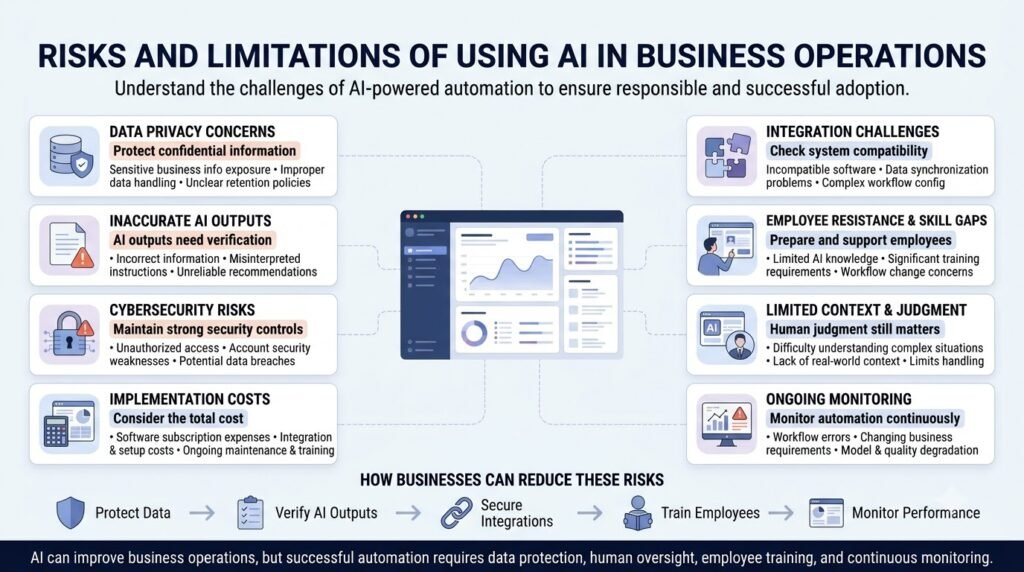
AI can help drive efficiency however it’s important to understand the limitations of AI automation.
Incorrect or Fabricated Outputs
Generative AI can create incorrect information and not always understand what the business wants.
Important outputs should be verified against reliable source information.
Data Privacy and Confidentiality
Business processes often have different types of data including customer data, employee data, financial data and internal documents.
The organisation should specify what data can be used, by whom and what AI services are approved for each type of data.
Integration Problems
Different applications might use different data formats, access control and interfaces.
Planning and testing must be done to ensure that data is transferred without omissions or errors.
Security Risks
AI systems that connect to business applications can create additional risks if access is too open.
Ensure you use least privilege access control, keep logs of activities and ensure that sensitive actions are limited.
Employee Adoption
Employees may not know how AI works and be worried about changes to their role.
Offer training, provide information on how it works and get them involved in the implementation process.
Ongoing Maintenance
Business rules, applications, customer needs and AI model capabilities can change.
Ownership of monitoring and updating key processes should be assigned.
The NIST AI Risk Management Framework is a useful reference for businesses looking to identify, assess and manage risks in their AI systems.
Best Practices for Successful AI Business Automation
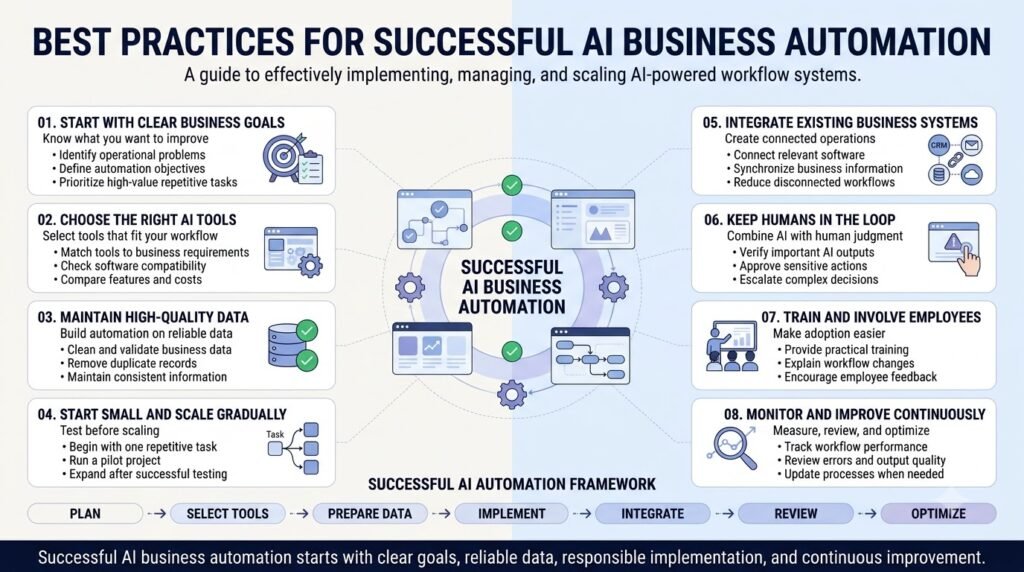
There are a few things you can do to increase the reliability of AI powered operations.
- Start with clearly defined processes: Understand the current workflow before automating it.
- Choose suitable tasks: Focus on repetitive processes that have clear inputs and outputs.
- Use the simplest effective technology: Do not introduce AI agents when ordinary automation can complete the task.
- Prepare reliable data: Check the quality, relevance, and permissions associated with business information.
- Define human approval points: Keep employees responsible for important decisions and exceptions.
- Test with realistic examples: Include incomplete, unusual, and incorrect inputs.
- Measure performance: Track processing time, error rates, costs, and workflow completion.
- Maintain clear ownership: Assign people responsible for monitoring and improving each workflow.
- Review access permissions: Give automated systems only the access they need.
- Expand gradually: Scale workflows only after they demonstrate consistent results.
Frequently Asked Questions
1. How can I use AI to automate business operations?
To automate processes using AI, first identify processes that can be automated and then identify the current workflow. Choose the right AI tools for your business then prepare your business data. Then integrate AI with automated processes. Start small with one process, test it and include human approvals where necessary for any key decision making or handling of sensitive data.
2. Which business operations can be automated using AI?
AI can help with customer support, invoice management, document management, sales chasing, onboarding new employees, business reporting, marketing research and data analysis. The best areas are usually repetitive tasks that involve processing, sorting, summarising and making decisions.
3. Is AI automation suitable for small businesses?
Yes. Small businesses can use AI to eliminate repetitive tasks. They can be used to help organise customer queries, create documents and analyse business data. This can be done with one workflow and will help save costs by using an AI that fits your budget, data and business needs.
4. What is the difference between AI automation and traditional automation?
Automated processes are based on specific rules and conditions being applied. AI automated processes can interpret language, analyse documents, categorise and recommend. Businesses can use both types of automation to create processes that can deal with predictable processes but with varying inputs.
5. Do businesses need AI agents to automate their operations?
No. Many business processes can be automated using simple workflow tools, APIs and AI assisted automation. AI agents are useful for processes involving many decisions or flexible processes. The amount of autonomy given should match the complexity and risk of the process.
6. How much does AI business automation cost?
This will depend on the AI models you’re using, software subscriptions, API usage, integrations, implementation and ongoing maintenance. Simple workflows will not cost too much, but complex systems with many applications and approvals can be quite expensive. You should look at the overall running costs of your system.
7. Can AI automate business operations without human involvement?
Certain low risk, predictable tasks can be left to run with little oversight. However, you should have appropriate human oversight for any important financial, legal, employment, customer and compliance decisions. You should also have processes in place to deal with errors, unexpected inputs and workflow issues.
8. How do I measure the success of AI business automation?
Compare your results to what the manual process achieved. Look at metrics such as processing time, error rate, completion rate, manual effort, cost to run and response times. You can also look at employee productivity and customer experience to see if it provides real business value.
9. Is AI business automation secure?
AI business automation can be implemented with security measures. Ensure that the tools, data, integration and permissions are safe by checking the policies of your providers, limiting access to sensitive data, using the correct authentication and setting up monitoring and approvals.
10. What should I automate first in my business?
Choose a task that has common and repeatable steps that can be measured. This could be anything from categorising customer queries, extracting information from invoices, meeting notes or regular reporting. Select a task that has clear error points which you can correct.
Conclusion
Implementing AI to automate business processes is less about replacing every manual process, and more about using AI to improve repetitive processes, data handling and help employees get the most out of their business processes.
Understand your processes, find the right opportunities to automate and ensure you have quality data. Create processes with clear ownership and approval steps.
Measure the impact of your automation. It is better to start with a small, well tested process to get real value from your automation rather than a complex process that hasn’t been fully assessed.
Once businesses start to become more familiar with AI powered processes they can begin to implement more advanced processes for reporting, customer analysis, document handling and decision support.
The best way to do this is to focus on real business needs, use AI to add value and ensure decisions are owned by people.
About the Author
Anshika Verma is a content researcher and writer at AiZolo, focusing on researching AI tools, models, and creator technologies. She writes practical guides to help readers understand emerging AI capabilities and apply them to everyday workflows.