
If you compare GPT 6 Luna vs GPT 6.1 Sol, the main difference is not that one model is much better than the other, but rather that the two are made to handle different kinds of tasks.
OpenAI made the GPT-6 Luna its most efficient model for focused and high-volume tasks, and the GPT-6.1 Sol is made to provide near-Astra performance on demanding coding, computer use and professional work at a lower price.
The biggest difference between the two lies in their capabilities, efficiency, workload and cost-effectiveness. The Luna is more efficient for recurring tasks, while Sol has a higher level of performance needed for specialized workloads.
Both the GPT-6 Luna and the GPT-6.1 Sol have a context window of 1.05-million tokens and a maximum output of 128,000 tokens, but the two models’ API prices differ significantly: while the GPT-6 Luna costs $0.10 per million input tokens and $0.5 per-million output tokens, the GPT-6.1 Sol costs $2 and $10.
Since both GPT-6 Luna and GPT-6.1 Sol are available on AiZolo, you can also compare their responses in the same workspace instead of switching between separate AI platforms. This makes it easier to test the same prompt across both models and judge which one delivers the better result for your specific task.
So, which model provides you with the best quality for your money? It all depends on the tasks you plan to give to the AI.
For this article, I have prepared a list of seven differences to highlight when the Luna model is more beneficial, when the GPT-6.1 Sol is worth the money and which is better suited for different workloads.
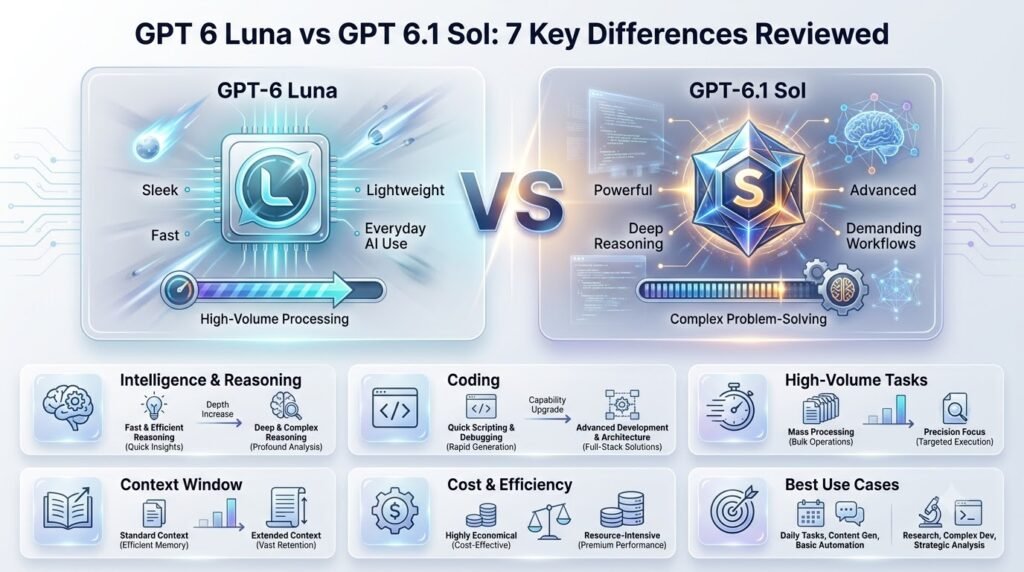
Table of Contents
GPT 6 Luna vs GPT 6.1 Sol: What’s the Difference?
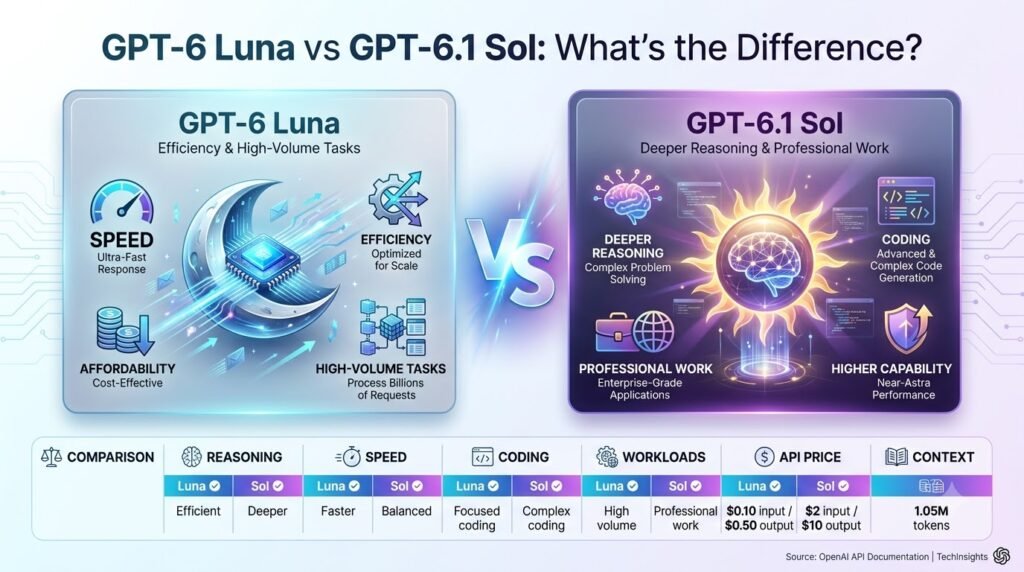
Both models come from the same GPT-6 family, but they’re built for different jobs. Luna is the efficient workhorse. Sol is the more capable model for demanding work. The gap in token price is wide, so the right choice depends on what you’re actually running.
GPT-6 Luna at a Glance
Luna is designed for efficiency and scale. It’s aimed at high-volume work and costs $0.10 per million input tokens and $0.50 per million output tokens. Its strengths:
- Efficiency and speed for fast turnaround
- High-volume processing across large workloads
- Lower token cost per request
- Reasoning options to match effort to the task
- Structured outputs and tool support for pipelines
GPT-6.1 Sol at a Glance
Sol is positioned below the flagship GPT-6 Astra and is priced at $2 per million input tokens and $10 per million output tokens. That makes it a near-Astra option at a much lower price. It’s built for:
- Complex coding
- Computer use
- Professional work
- Deeper reasoning
- Agentic workflows where many steps must hold together
The Simple Difference
Luna = more work for less money
Sol = more intelligence for harder work
This framework has a catch. The best model depends on cost per accepted result, not token price alone. Sol’s tokens cost about 20x more. But if Luna’s output needs retries, escalations, or human cleanup, the cheaper model can cost more per usable result.
If Luna passes most of your tasks on the first try, Sol’s premium buys you very little.
Test both on your real tasks and compare cost per accepted output.
GPT-6 Luna Review: Features, Strengths and Weaknesses
What Is GPT-6 Luna?
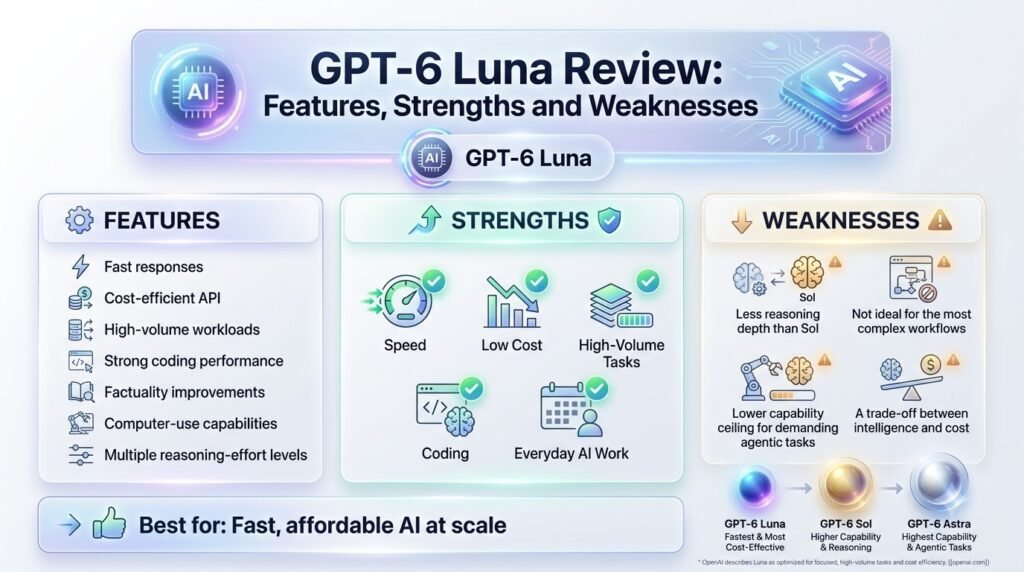
GPT-6 Luna is OpenAI’s efficiency-focused model for high-volume, focused workloads. It was not intended to replace the company’s highest performant models, but to target applications and use cases which involve a lot of repeated work and where reducing the per-request cost and latency is paramount.
It is well-suited to operate in domains where the same sets of operations (classification, extraction, summarization, support, content generation, etc.) are performed repeatedly.
Luna can process 1.05-million token context windows and generate responses up to 128,000 tokens long, making it sufficiently expressive for processing and producing output applicable to lengthy documents and involved application workflows.
Key Features
Despite the limitations related to its lower positioning in the hierarchy of capabilities, GPT-6 Luna can perform a wide range of tasks, including:
- 1.05M-token context window for processing large inputs
- 128K maximum output for long-form responses and generated content
- Text and image input for multimodal tasks
- Structured outputs for predictable, machine-readable responses
- Function calling for connecting models to external tools and applications
- Web search for tasks requiring current information
- File search for retrieving information from connected files
- Computer use for interacting with supported computer environments
- Configurable reasoning, with settings ranging from none and low through medium, high, xhigh, and max
Compared to a baseline text generation model, this provides support for diverse use cases.
Where Luna Shines
Luna’s main domain is applications and processes where throughput is more valuable than the depth of processing.
For instance, using it as a classifier or extractor of information or as a tool to perform document or content summarization, code generation, customer support, or repetitive research tasks would benefit tremendously from the ability to process thousands or even millions of similar requests in a highly optimized manner.
It is important to note that in many practical use cases, throughput is more valuable than the depth of processing. If your application involves processing thousands or millions of similar requests, the ability to reduce the per-request cost and latency is more valuable than being able to handle a few complex ones at the expense of the majority.
Where Luna Falls Short
It is not accurate to say that Luna is bad at reasoning; it is better to say that it is not the best at certain operations.
For instance, for tasks which involve extended investigative work, intensive processing of multiple files, advanced agent-based operations, or processing of very involved decision trees, it is better to use a higher-tier model (GPT-6.1 Sol).
This is not a limitation of the model itself, but rather a consequence of the design decisions made by OpenAI when introducing the GPT-6 architecture.
GPT-6.1 Sol Review: Features, Strengths and Weaknesses
What Is GPT-6.1 Sol?
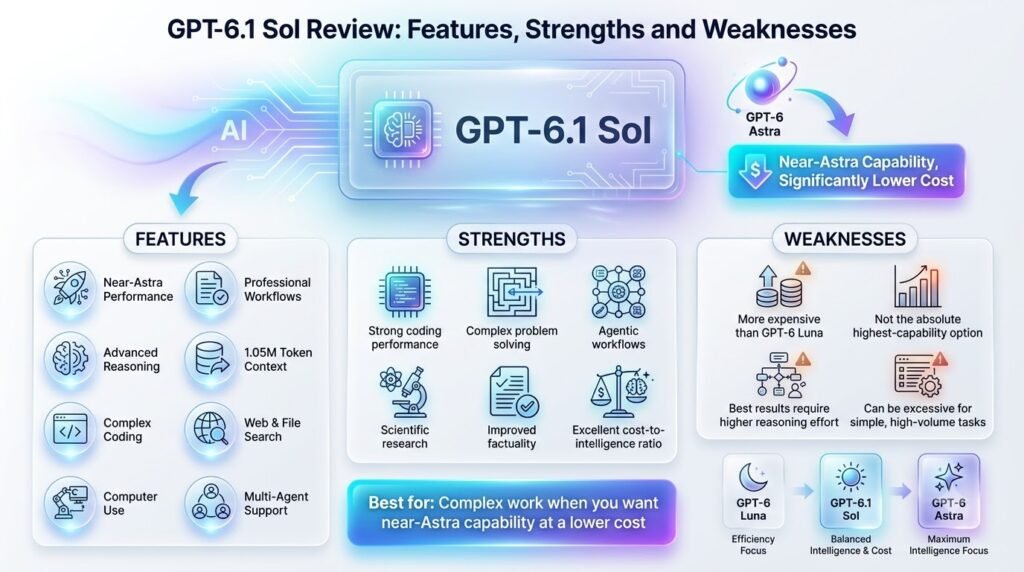
GPT-6.1 Sol is an upgrade to GPT-6 Sol, positioned below the flagship GPT-6 Astra. OpenAI describes it as near-Astra performance for complex work at lower cost. It’s priced at $2 per million input tokens and $10 per million output tokens.
Key Features
- 1.05M context window: room for large codebases, long documents, and extended agent sessions
- 128K maximum output: long reports, large code changes, and detailed analysis in one response
- Text and image input: analyze screenshots, charts, and documents alongside prompts
- Reasoning: deeper step-by-step problem solving
- Computer use: operate software interfaces for agentic tasks
- Web search and file search: pull in fresh information and your own documents
- Professional workflows: built for business and knowledge work
Where Sol Is Strong
Sol suits tasks where mistakes are expensive and steps depend on each other:
- Complex coding and debugging
- Research and professional analysis
- Multi-step workflows
- Computer use
- AI agents
Where Sol Is Overkill
Sol’s weakness isn’t quality. It’s price. Using a near-flagship model for simple jobs pays for intelligence you don’t need.
Take simple classification, basic extraction, routine summaries, and high-volume repetitive requests. A lighter model would handle these well, and Sol’s reasoning is not that deep anyway.
Each call isn’t expensive, but it adds up if you have thousands or millions of them. Luna costs just $0.10 per million input tokens, against $2 for Sol. That’s a 20x gap on input.
Reserve Sol for the hard cases. Route regular requests to Luna, and only use Sol for failed requests or those that require deeper reasoning.
GPT-6 Luna vs GPT-6.1 Sol Specifications Compared
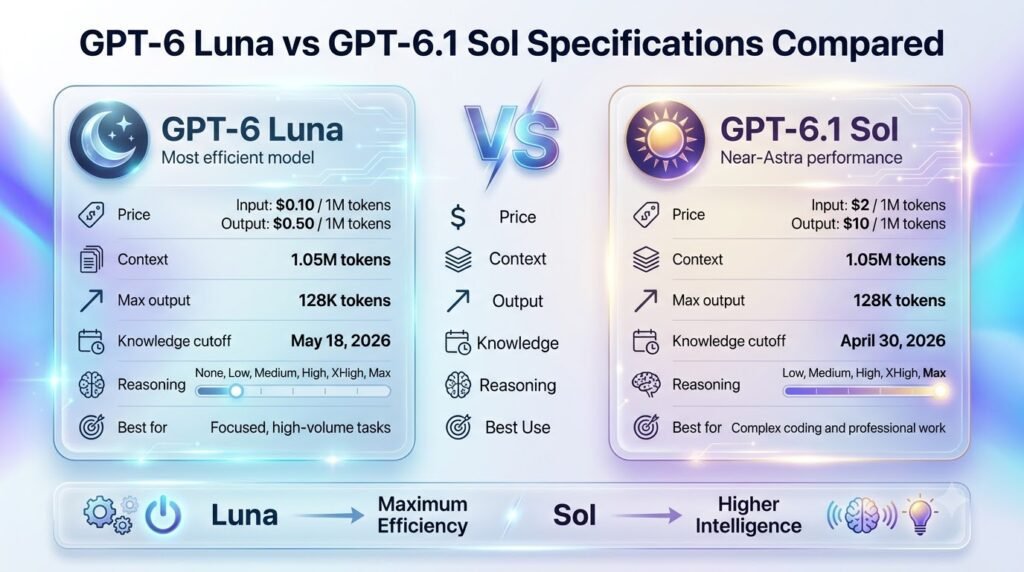
At the specification level, GPT-6 Luna and GPT-6.1 Sol look surprisingly similar. Both have a 1.05-million-token context window, 128K maximum output, multimodal input, and the same core tool set. The major differences appear in reasoning configuration, pricing, and knowledge cutoff.
| Specification | GPT-6 Luna | GPT-6.1 Sol |
| Model ID | gpt-6-luna | gpt-6.1-sol |
| Positioning | Efficient model for focused, high-volume tasks | Near-Astra performance for complex work |
| Context window | 1.05M tokens | 1.05M tokens |
| Maximum output | 128K tokens | 128K tokens |
| Input | Text + images | Text + images |
| Output | Text | Text |
| Reasoning levels | None, Low, Medium, High, xHigh, Max | Low, Medium, High, xHigh, Max |
| Input price | $0.10 / 1M tokens | $2 / 1M tokens |
| Cached input | $0.01 / 1M tokens | $0.10 / 1M tokens |
| Cache write | $0.125 / 1M tokens | $2.50 / 1M tokens |
| Output price | $0.50 / 1M tokens | $10 / 1M tokens |
| Knowledge cutoff | May 18, 2026 | April 30, 2026 |
| Function calling | Yes | Yes |
| Web search | Yes | Yes |
| File search | Yes | Yes |
| Computer use | Yes | Yes |
OpenAI’s present documentation positions GPT-6 Luna as its most efficient model for concentrated, high-volume workloads, and GPT-6.1 Sol is meant to balance higher intelligence and cost for complex work.
Both models support the same 1.05M context window and 128K maximum output.
The Biggest Specification Difference: Price
The most dramatic difference is cost. Luna’s standard input price is $0.10 per million tokens, compared with $2 per million for Sol. Output is $0.50 per million tokens for Luna versus $10 per million for Sol.
That means Sol costs 20× more per million input tokens and 20× more per million output tokens at standard rates. For high-volume applications, this can quickly outweigh relatively small gains in capabilities.
Luna Has the Later Knowledge Cutoff
One detail that many model comparisons overlook is the knowledge cutoff. GPT-6 Luna’s stated cutoff is May 18, 2026, while GPT-6.1 Sol’s is April 30, 2026. Luna therefore has a stated knowledge base that extends about 18 days further.
However, this should not be interpreted as Luna automatically being better for current-information questions. Both models support web search, so applications can retrieve newer information instead of relying solely on their built-in knowledge.
The cutoff matters most when a task depends on information that falls within that gap and no external retrieval is being used.
The specification table therefore reveals an important trade-off: Luna offers nearly the same context capacity and tool access at a fraction of Sol’s price, while Sol’s premium is primarily justified by its higher capability tier for complex work.
If you want to test GPT 6 Luna and GPT 6.1 Sol yourself, AiZolo lets you compare both models in one workspace. You can run the same prompt through each model and review their responses side by side, making it easier to judge which one fits your workflow.
Reasoning Performance: Sol vs Luna at Different Effort Levels
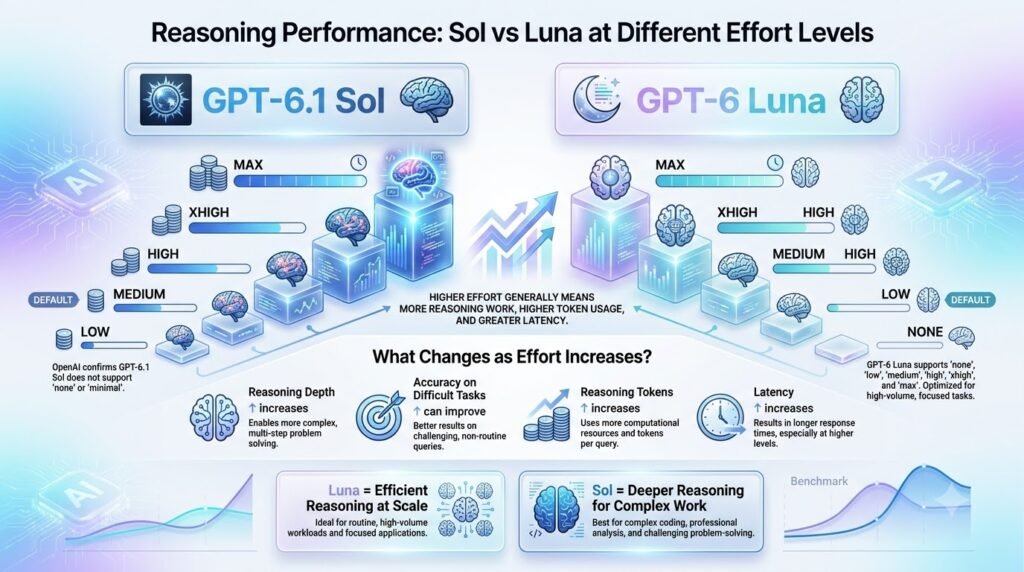
Comparing “Sol vs Luna” hides most of the story. Each model has several reasoning settings. Luna runs at None, Low, Medium, High, XHigh, and Max. Sol runs at Low, Medium, High, XHigh, and Max. Artificial Analysis’s Intelligence Index scores them separately.
Why Reasoning Effort Changes the Comparison
You’re not really comparing two models. You’re comparing two model families across different reasoning budgets.
Sol’s Intelligence Index score rises from 42 at Low to 52 at Max, a 10-point spread. Luna runs from 18 with no reasoning to 38 at Max, a 20-point spread. Reasoning effort matters about twice as much for Luna, so a Luna deployment on the wrong setting can look far weaker than it is.
The two families also overlap. Luna Max (38) sits 4 points below Sol Low (42), and 14 points below Sol Max (52). Higher effort also costs more tokens and time, and more isn’t always better.
One independent test found Sol at max scoring below Sol at xhigh on AutomationBench, and Luna at xhigh scoring below Luna at high. Test the middle settings before defaulting to Max.
When to Use Luna None
Luna with no reasoning is the cheapest and fastest setting. It fits:
- Simple transformation
- Classification
- Straightforward extraction
- Very latency-sensitive requests
Its score of 18 is low, so it only suits tasks that need little thinking.
When to Increase Luna Reasoning
Step up through Low, Medium, and High when inputs are messier or quality matters more:
- Ambiguous inputs
- More complex analysis
- Quality-sensitive routine work
This is where Luna’s 20-point range pays off. You can buy a lot of quality without leaving the cheaper family.
When Sol Makes More Sense
Move to Sol when errors compound or the task needs real depth:
- Dependent decisions
- Difficult debugging
- Multi-step reasoning
- Agentic tasks
Intelligence Benchmarks: Which Model Actually Wins?
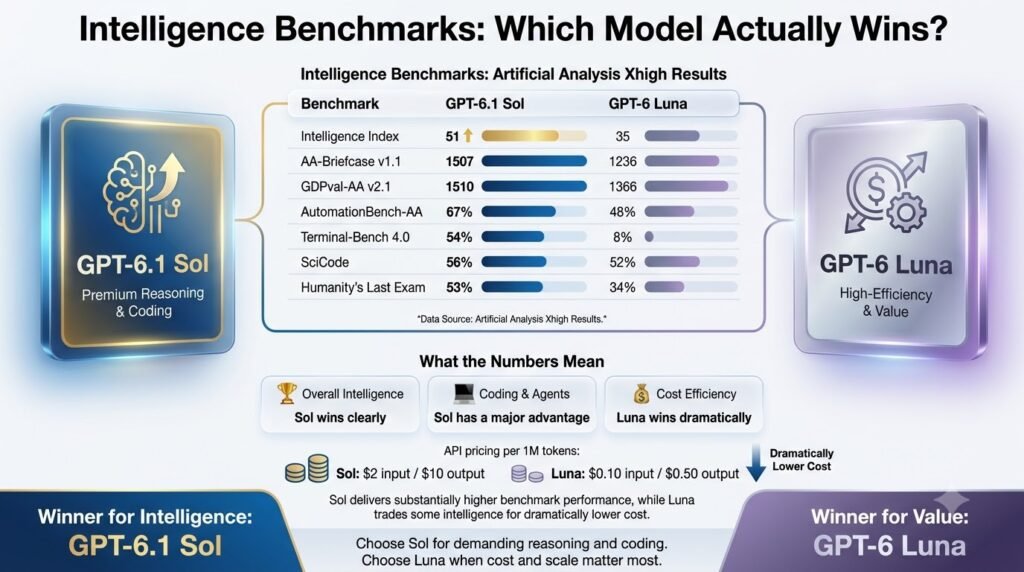
The benchmark results make the comparison between GPT 6 Luna vs GPT 6.1 Sol more intriguing than the simplistic “the higher the price, the better the result” conclusion.
Artificial Analysis currently gives GPT-6.1 Sol (Max) an Intelligence Index of 52, compared with 38 for GPT-6 Luna (Max). Sol leads across many of the evaluations that contribute to the index, but the results are not uniformly one-sided.
Overall Intelligence
At maximum reasoning, Sol has the broader advantage across Artificial Analysis’ current evaluation set. It scores higher on agentic knowledge work, professional document reasoning, general reasoning and several agentic workflows.
However, the score distribution varies significantly depending on the task.
That matters because a single aggregate intelligence score cannot tell you whether the model is worth its much higher API cost for your particular workload.
Coding — Terminal-Bench
The biggest difference appears in Terminal-Bench 4.0, which evaluates agentic coding and terminal use. At Max, the current comparison reports around 56.1% for GPT-6.1 Sol and 12.6% for GPT-6 Luna. Artificial Analysis’ current rounded display shows the same result as 56% vs 13%.
That’s a substantial gap. For autonomous coding workflows involving terminal commands, debugging and multi-step tool use, Sol has a much stronger benchmark position.
Scientific Coding — SciCode
SciCode tells a very different story. At Max, the reported results are 54.2% for Sol versus 54.6% for Luna. In other words, Luna is slightly ahead on this particular evaluation.
That’s an important editorial point: Sol doesn’t win every benchmark.
It also shows why saying “Sol is more intelligent at everything” would be misleading. The performance of the benchmark depends heavily on what is being measured.
Professional Work
The advantage shifts back toward Sol on professional-work evaluations. Artificial Analysis includes task-specific evaluations covering areas such as finance, strategy and operations, legal work, healthcare, quantitative analysis and business operations.
Sol generally records stronger capability results across these professional-work categories.
For businesses using AI to perform complex knowledge-work tasks rather than simply process large volumes of text, these evaluations are arguably more useful than a generic leaderboard position.
What Benchmarks Don’t Tell You
Benchmarks are evidence, not a purchasing decision.
Your actual workload may differ from the test. Reasoning settings can materially change performance, and comparing Sol Max against Luna Max is different from comparing other reasoning levels. Artificial Analysis’ comparisons show that the relative scores and costs change as reasoning levels change.
You also need to consider cost, latency, tool reliability, and reviewer time. Artificial Analysis currently shows Luna as substantially cheaper and faster, while Sol delivers higher aggregate intelligence.
For example, its Max comparison lists Luna at roughly $0.077 per 1M tokens versus $1.47 weighted cost per 1M tokens for Sol, with Luna also generating output faster.
So the practical question isn’t simply “Which model scores higher?” It is “Does Sol’s additional capability save enough human review, retries, and failed-task cost to justify its premium?”
Coding Performance: Simple Edits vs Complex Engineering
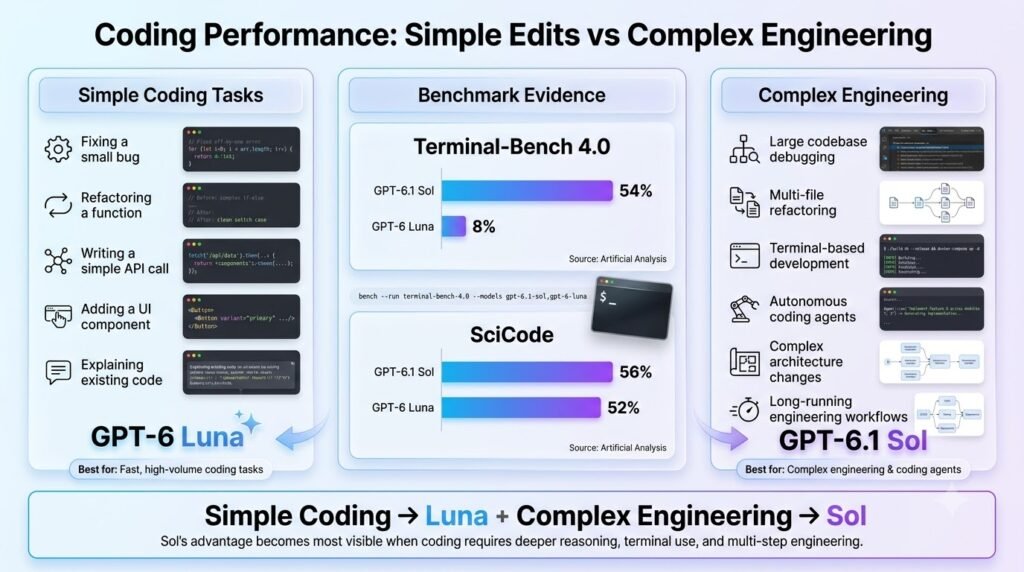
“Sol is better for coding” is too blunt to be useful. Coding is a ladder of difficulty, and the right model depends on which rung you’re on.
Level 1: Simple Code Generation
Functions, regex, small scripts and CSS fixes are well-defined, short-horizon tasks. Both models handle them comfortably, so test Luna first. If it gets the job done, you’ve saved real money at no cost to quality.
Level 2: Debugging
Finding bugs, fixing failing tests and tracing errors take more judgment, because the model has to form and test hypotheses. Compare both on your own code. Luna often succeeds on isolated bugs, but Sol may pull ahead when the cause is subtle or buried in a long stack trace.
Level 3: Multi-File Engineering
Architecture decisions, dependency tracing, database changes and API integrations require holding a lot of context and keeping changes consistent across files. Mistakes here are expensive, because a plausible but wrong migration can cost hours. Sol becomes much more attractive.
Level 4: Autonomous Coding Agents
This is where Sol’s advantage matters most. Agents run commands, edit files, recover from errors and work through many steps without supervision, so small reasoning weaknesses compound over a long run. Artificial Analysis currently reports much stronger Terminal-Bench results for Sol across reasoning levels.
The Practical Takeaway
Don’t pick one model for everything. Start with Luna at Levels 1 and 2, and move to Sol as tasks span more files, carry more risk or run with less supervision.
GPT 6 Luna for High-Volume Tasks
GPT 6 Luna is the better fit when you need to process large volumes of relatively predictable tasks without paying Sol-level pricing for every request. Its lower token cost makes it particularly attractive for workflows where thousands or millions of API calls are more important than maximum reasoning depth.
Common high-volume use cases include:
- Customer support: Classify requests, draft replies, route conversations, and summarize interactions.
- Invoice extraction: Pull vendor names, dates, totals, tax amounts, and line items from documents.
- Ticket classification: Categorize support tickets by issue, priority, sentiment, or department.
- Data extraction: Convert unstructured text into consistent JSON or database-ready fields.
- Summarization: Process large batches of emails, reports, meeting notes, or documents.
- Content generation: Produce product descriptions, metadata, social posts, and other templated content at scale.
- Translation: Translate repetitive business or customer-facing content across languages.
- Bulk research: Extract and summarize information from large sets of sources where every individual task does not require maximum reasoning.
- API automation: Power background workflows that make frequent model calls, such as enrichment, classification, routing, and transformation pipelines.
The economics are compelling: for equal token consumption, Luna’s standard input and output rates are 20× lower than Sol’s. That can make a substantial difference when an application processes millions of tokens every day.
However, 20× cheaper per token does not necessarily mean 20× cheaper per successful task. If Luna requires more retries, additional tool calls, human review, or corrective passes, those costs can narrow the real-world savings. Reasoning tokens can also contribute to billing.
So the right metric for production systems is not simply cost per million tokens. It is cost per successful completed task. For predictable, high-volume workloads, Luna can be dramatically more economical; for complex tasks where failure is expensive, Sol’s higher first-pass reliability may justify its premium
GPT 6.1 Sol for Professional Work
GPT 6.1 Sol is better suited to professional work where the cost of an incorrect answer, missed requirement, or incomplete analysis outweighs the savings to be had by using a cheaper model.
Its enhanced reasoning capability, and ability to perform complex, multi-step tasks, makes it a better choice for work that calls for judgment, over simple transformation.
In terms of software engineering, Sol can handle architecture decisions, debugging, codebase analysis, implementation planning, and challenging coding tasks. In financial analysis, it can help interpreting financial statements, comparing scenarios, identifying assumptions, and structuring investment or business analyses.
It is similarly useful to strategy and business analysis, where recommendations often have to connect the dots between a set of constraints.
Professional applications also include legal research, technical research, complex reports, and domain-heavy knowledge work, where the model must have to synthesize multiple sources, follow detailed instructions, distinguish between competing arguments, and generate a defendable conclusion, rather than simply generating text.
This becomes easier to distinguish in Artificial Analysis’s domain-specific evaluations, where indexes are made separately for areas such as Finance & Accounting, Strategy & Operations, Legal, Healthcare & Medical, Engineering, and Economics, offering a more meaningful way to evaluate professional models than an overall intelligence score.
Sol is also the preferred choice for computer-use workflows, where the model may need to reason through a sequence of actions, operate software, inspect results, and recover from errors.
The trade-off, of course, is cost: For simple, repetitive workloads, Luna can be significantly more economical.
But when correctness, reasoning, and successful completion outweighs token price considerations, the value of GPT 6.1 Sol’s higher cost can be easily justified by the ability to get difficult professional tasks right.
Speed and Latency: Which Model Is Faster?
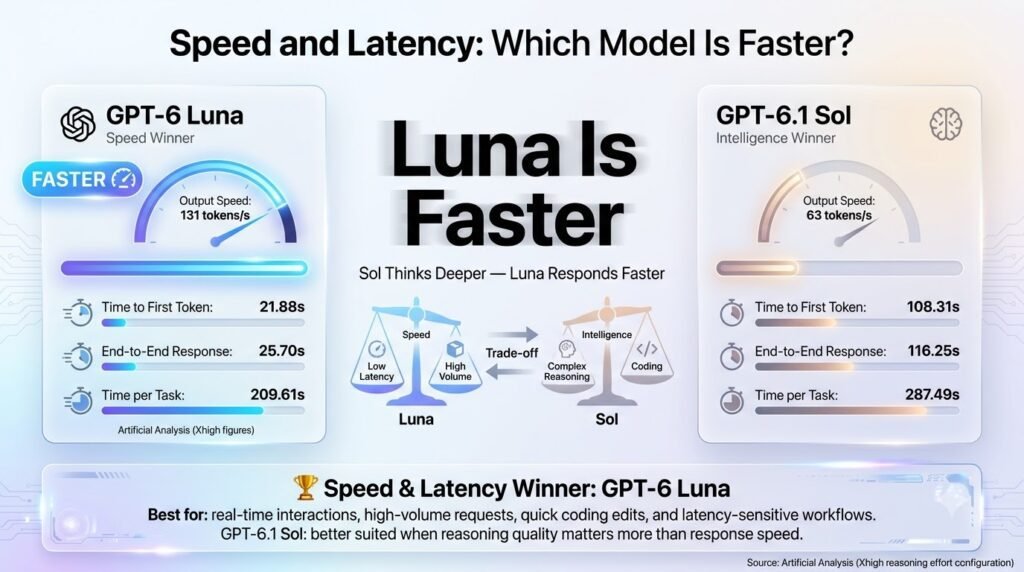
The raw speed of output gives the GPT 6 Luna the advantage over the GPT 6.1 Sol, but an interesting question arises as to if that speed leads to the ability to complete the task faster.
According to Artificial Analysis, GPT 6 Luna Max generates around 141 tokens per second, while GPT 6.1 Sol Max produces about 64 tokens per second.
Luna also has a lower time to first token in the current comparison: about 103 seconds versus 291 seconds for Sol Max on the benchmark’s long-running intelligence workload.
Output Tokens per Second
Luna’s higher generation rate makes it attractive for interactive applications, high-volume processing, and workflows where users need large amounts of text quickly.
Time to First Token
This measures how long you wait before the model begins responding. This has implications on responsiveness, especially with the chat and the interactive applications.
End-to-End Response Time
This includes the time required to produce the complete response. Artificial Analysis currently records roughly 107 seconds for Luna Max versus 299 seconds for GPT 6.1 Sol Max in its comparison workload.
Time per Task
This is the metric that matters most for real production workflows. A model that generates tokens rapidly is not necessarily faster if there is the need for retries, additional passes of a reasoner, tool calls, or even human review.
That creates an important distinction: generation speed is not the same as completion speed. Luna is the better choice when fast, economical output is the priority. Sol could still be faster at completing a challenging task if its greater reasoning power allows it to find the correct result in one pass.
Pricing, Prompt Caching and the 272K Threshold
Raw price-per-token comparisons miss two things that often decide the real bill: caching and prompt length.
Standard Pricing
Per million tokens:
Luna
- Input: $0.10
- Cached input: $0.01
- Output: $0.50
Sol
- Input: $2
- Cached input: $0.20
- Output: $10
Prompt Caching
Caching bills repeated prompt prefixes at a steep discount. A cache write is the first time a prefix is stored, and cached input and cache writes are separate billing categories. Sol cache writes cost $2.50 per million tokens and Luna’s cost $0.125, so writing is not free. Cache reads are the cheap part, and they only pay off when the same prefix is reused.
That makes caching a good fit for stable system instructions, tool definitions, reference documents and agent loops that replay a large prefix. Keep the stable content at the start of the prompt and put anything that changes at the end.
What Happens Above 272K Input Tokens?
This is the pricing trap. Above 272K input tokens, the whole request uses 2× input and cache rates and 1.5× output rates. It applies to the entire call, so one oversized prompt bills double on input and 1.5× on output for every token in that call.
Sol’s output rises from $10 to $15. Luna’s input rises from $0.10 to $0.20. Both models offer a 1,050,000-token window, so it’s easy to cross the line by accident.
Batch and Flex
Both models have cheaper processing options, and Fast mode costs more. One source lists Fast/priority at 2× pricing and Flex at 0.5×.
API and Tool Compatibility: What Developers Need to Know
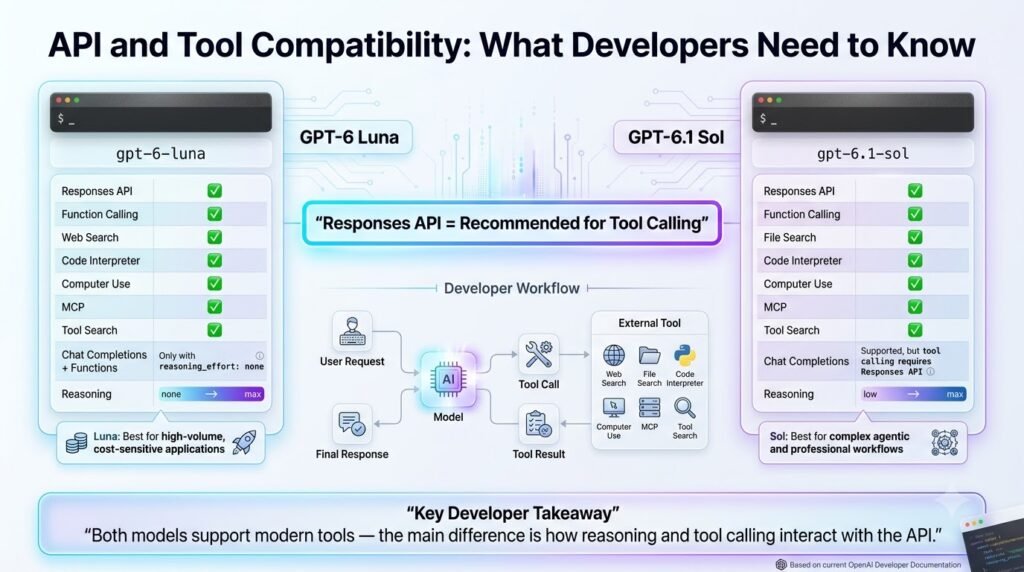
For developers, GPT 6 Luna vs GPT 6.1 Sol is not simply a choice between two model IDs. The API and tool configuration can change how your application should be built, particularly when reasoning and agentic workflows are involved.
Responses API
The Responses API is the preferred option for tool-heavy applications. It provides the foundation for workflows involving built-in tools, multi-step reasoning, and agentic interactions.
OpenAI’s current documentation also recommends Responses for new integrations and positions it as the replacement for the retired Assistants API.
Chat Completions
Luna can use Chat Completions for function calling when reasoning is set to none. In case of reasoning-based tool workflows it’s better to use the Responses API for the purposes of development and flexibility.
This is because Luna is able to provide a more powerful path for simple structured automation without compromising the more involved option for complex workflows.
Function Calling
Function calling is useful when the model needs to interact with your application’s APIs, databases, or business logic. There’s an important difference between simple function execution and requiring the model to reason over multiple tool calls.
Web Search
For applications requiring current information, web search can be integrated as a model tool. Tool usage also incurs additional costs (on top of the model’s input and output tokens). OpenAI’s current pricing for web search is $10 per 1000 calls, and applicable search-content tokens for the given operation.
File Search
File search is particularly useful for retrieval-augmented applications that need to search internal documents. Its tool-call and storage costs should be included when calculating the actual cost of a production workflow.
Computer Use
Computer-use workflows are better suited to the Responses-based agentic architecture, where the model can reason through actions rather than simply return text.
Migration Considerations
Do not assume you can simply replace:
gpt-6-luna
with:
gpt-6.1-sol
and leave everything else unchanged. Before migrating your application to use reason-based API, review your reasoning settings, API endpoint, tool definitions, function-calling flow and response handling.
A Luna application designed around non-reasoning Chat Completions may require re-architecture in the case of migration towards Sol to power reasoning-heavy or tool-based workflows.
For developers, therefore, the best model is not determined by benchmark scores alone. API compatibility, tool requirements, reasoning behavior, and the cost of each successful workflow should all be part of the decision.
Long Context: Is 1.05M Tokens Actually an Advantage?
Both models advertise the same specs: a 1,050,000-token context window and 128,000 tokens of output. Luna takes up to 922,000 input tokens and returns up to 128,000, which is the practical input limit once output space is reserved.
But the same context window does not mean the same long-context performance. Capacity tells you how much a model can accept, not how well it uses it. Vercel makes this distinction too: equal context capacity doesn’t establish equal accuracy on long documents.
Test both models on:
- Document retrieval: finding one fact buried deep in the prompt
- Cross-section reasoning: combining evidence from distant parts of a document
- Conflicting evidence: noticing when two sources disagree
- Citation accuracy: pointing to the right passage
- Long-codebase navigation: tracing a function across many files
Remember cost too. Above 272K input tokens, the whole request uses 2× input and cache rates and 1.5× output rates. A huge prompt is often better replaced by retrieval.
Real-World Cost: Cost Per Accepted Result
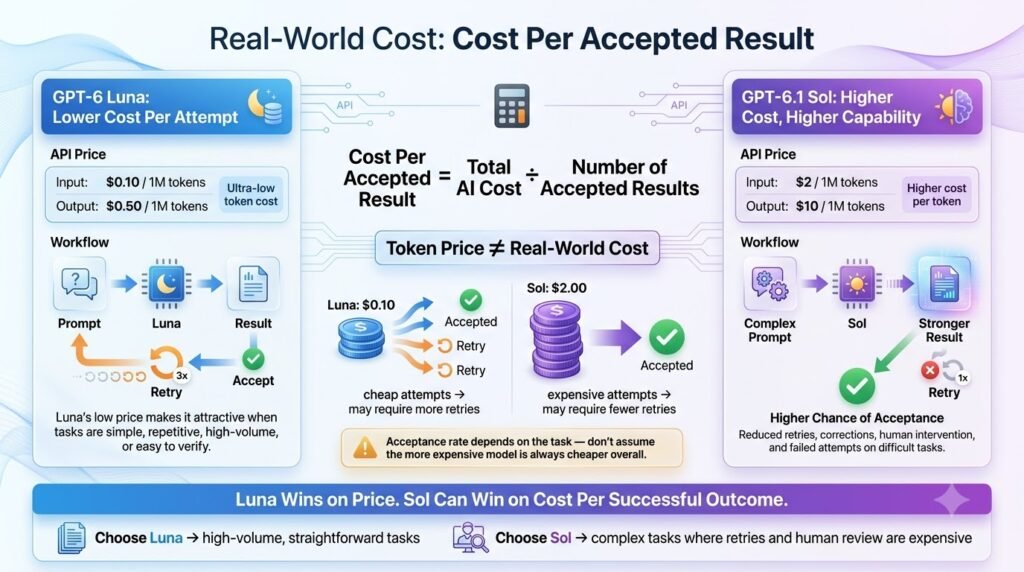
While the cheapest model per token may not always be the cheapest model for your business
a more meaningful comparison between GPT 6 Luna versus GPT 6.1 Sol would be to evaluate cost per accepted result, or the amount you spend to train an output that passes your quality requirements:
Cost per accepted result = (model cost + tool cost + retry cost + review cost) ÷ accepted outputs
This, of course, shifts the value proposition of the two models
Luna Wins When:
GPT 6 Luna is typically the preferred model when both solutions hit your quality target, the work is high-volume, and the task is predictable.
Classification, extraction, summarization, translation, and structured content creation all fall under this category. If Luna hits 99% of your required tasks and does so at a fraction of the token cost of Sol, the math becomes obvious.
Sol Wins When:
GPT 6.1 is more economical when repeated attempts or human intervention are required to achieve acceptable results with Luna
If an employee needs to edit 25% of the results produced with Luna, then Sol’s cheaper token price would need to offset 25% of the completed outputs to be competitive.
The same math applies when Luna’s mistake has a higher opportunity cost than the extra model spend. A defunct financial analysis, faulty technical recommendation, or failed software-engineering task will consume significantly more time than simply paying a little more to get it right the first time.
Similarly, Sol has clearer value if completing a task with one successful attempt is much more economical than paying for multiple faster, cheaper attempts with Luna, followed by extensive tool calling and editing.
The main takeaway here should be that you want to optimize for cheapest per successful result, not cheapest per token.
Can You Use Both Models Together?
It’s not that you have to choose, but for many production systems it may actually make sense to use both models. How about model routing? Using Luna for the predictable, high-volume workloads and routing exceptional cases (or higher-risk ones) to Sol?
A simple architecture would be:
Luna → routine processing → quality check/classifier → Sol for difficult/exception cases → human for high-risk failures
Imagine the customer-support scenario I mentioned earlier, let’s say it’s handling 100 tickets. Luna could be used for the bulk of the easy tickets, password resets, order status checks, basic FAQs or whatever the most common tickets are.
The quality check determines what edge cases get sent to Sol for extra processing (difficult accounts, ambiguous queries, responses below a certain confidence threshold). This could lead to dramatically lower costs while still handling the “hard” cases.
A similar architecture could be applied to many other domains. Luna would do batch data extraction, document categorization, summarization or other work, but more challenging problems (investigations, coding, financial modeling, etc.) could get priority access to Sol.
And of course there’s always a role for humans in the loop, especially for the low-volume, high-consequence cases in any workflow. Instead of asking “which model is best,” you can be asking “which model should handle which types of tasks?”
In the end this may be the most pragmatic architecture of all: default to Luna but use Sol for exceptional cases and humans for anything too risky or challenging to be handled by machines.
How to Test GPT-6 Luna vs GPT-6.1 Sol Yourself
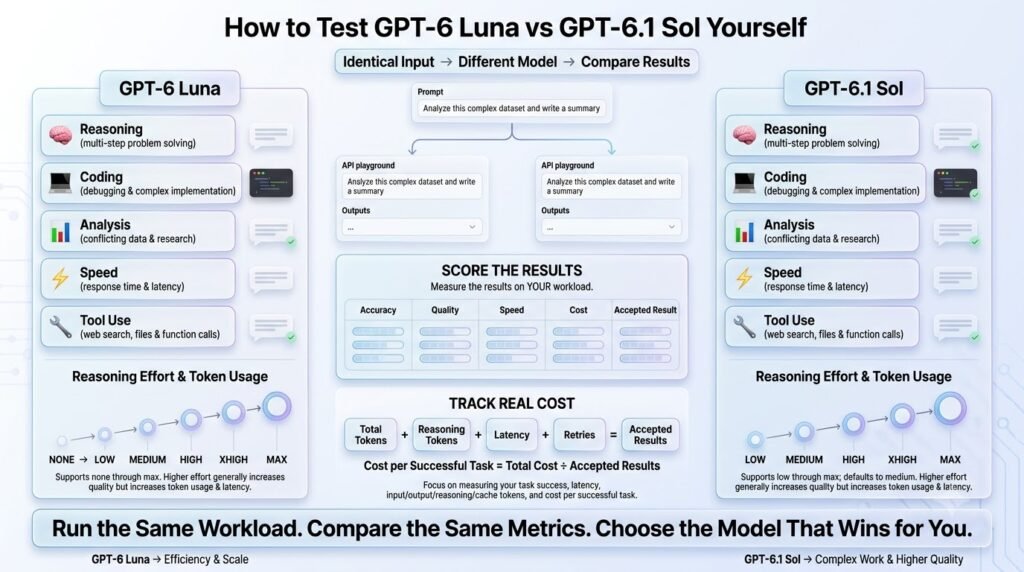
Benchmark scores are useful, but your own workload is the best way to determine which GPT-6 Luna vs GPT-6.1 Sol is the better choice. Build a controlled test which measures successful outcomes, not just intelligence.
Step 1: Build 20–50 Sample Tasks
Build a representative set of tasks from your production. Include typical requests, as well as edge cases.
Step 2: Use Same Prompts
Give both models same instructions, inputs, output formatting, and evaluation criteria. Don’t give either model prompting help that makes it easier for that particular model to produce the desired result.
Step 3: Use Same Tools
Use same files, APIs, permissions, retrieval sources, and tool configuration (where supported by both models). Otherwise you’re benchmarking tools, not core language models. If a cloud provider provides a different API for Luna and Sol, use that API for that model only.
Step 4: Same Reasoning Effort
Where the APIs allow, start with the same reasoning effort. You can always run a second round of testing with the most recommended configuration for each model.
Step 5: Measure More Than Accuracy
Measure accuracy, but also completion rate, latency, token count, retries, tool failures, manual review, and total cost.
Most importantly, calculate cost per accepted result = total cost of workflow ÷ accepted results
Step 6: Test Edge Cases
Don’t test easy prompts. Test ambiguous instructions, long documents, conflicting information, tool failures, unexpected user input, and tasks where an incorrect answer is far more costly than a correct one.
Run the same representative tasks again with same inputs and conditions.
This will give you much more useful insight about which model earns its keep in your production environment.
How to Compare GPT-6 Luna & GPT-6.1 Sol Side by Side
Benchmarks may indicate how GPT-6 Luna and GPT-6.1 Sol differ, but your actual use cases will always be the best indicator of which is right for you. A good way to begin evaluating these models is by providing them with the same prompt and comparing the responses based on your own criteria.
That’s easier than it sounds when you’re able to test multiple models in a single workspace instead of switching back and forth between different AI tools.
With AiZolo, you can ask the same question to multiple models and see the answers side by side so you can easily weigh each response based on criteria like reasoning, accuracy, writing quality, and overall value.
You could, for instance, provide both GPT-6 Luna and GPT-6.1 Sol with the same coding or research prompt and see which provides stronger solutions for your particular needs. You could also compare against other models if you’d like a broader perspective.
Bear in mind that you shouldn’t necessarily be looking to select the model with the highest overall mark. Instead, think about which AI is able to help you produce the best results in your particular use cases while also fitting within your quality and budget constraints.
GPT-6 Luna vs GPT-6.1 Sol: Pros and Cons
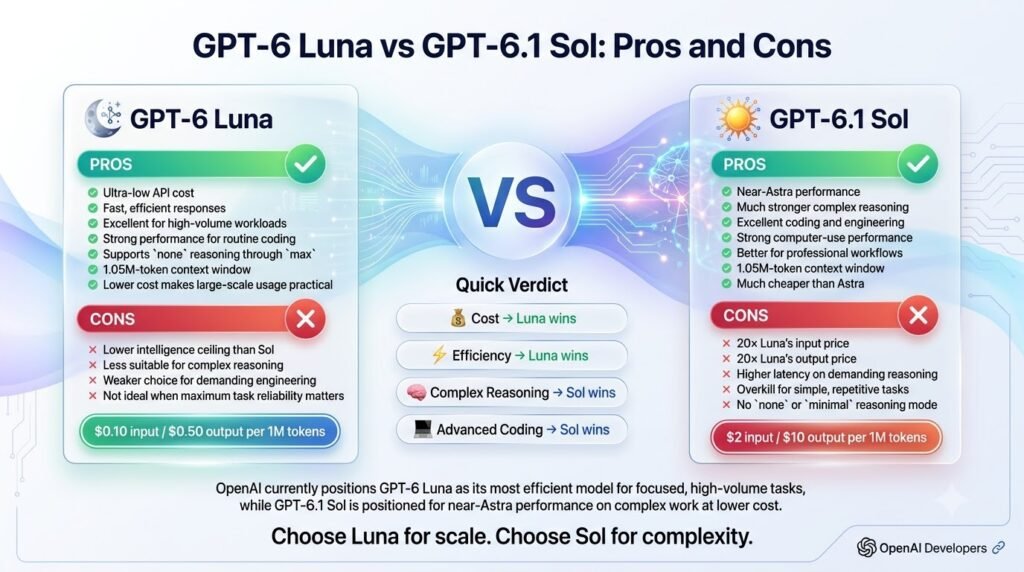
GPT-6 Luna
Pros
- Extremely cheap
- Fast
- Excellent for scale
- Flexible reasoning
- Strong routine performance
Cons
- Lower intelligence scores at comparable high reasoning levels
- Less suitable for difficult autonomous work
GPT-6.1 Sol
Pros
- Much stronger complex reasoning
- Strong coding
- Better professional workflows
- Stronger agentic performance
Cons
- About 20× the token price: $2 input and $10 output versus Luna’s $0.10 and $0.50
- Higher latency
- Requires more careful API configuration
Verdict: Use Luna for volume and routine tasks, and Sol where mistakes are costly.
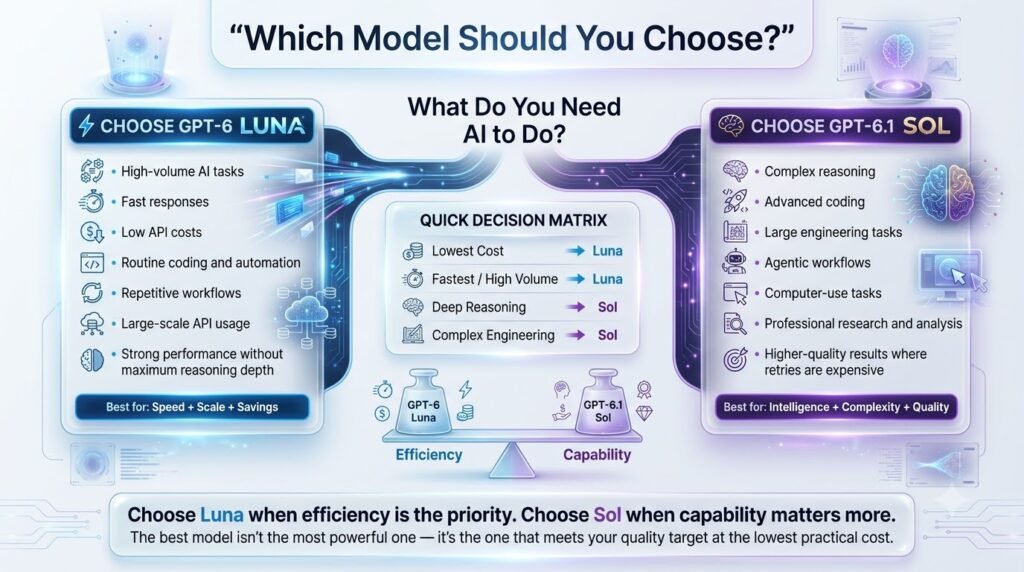
Which Model Should You Choose?
The best choice between GPT-6 Luna and GPT-6.1 Sol depends less on which model has the highest benchmark score and more on the type of work you need to complete.
Choose Luna If:
Is the task repetitive?
→ Yes
Is the output easy to validate?
→ Yes
Is the workload high-volume?
→ Yes
Choose GPT-6 Luna.
Luna is the stronger economic choice for predictable tasks such as classification, extraction, summarization, translation, routine content generation, and other workflows where mistakes are inexpensive and outputs can be automatically validated.
Choose Sol If:
Does the task require multiple dependent decisions?
→ Yes
Would failure require expensive human review or rework?
→ Yes
Does it involve complex coding, agents, computer use, or professional analysis?
→ Yes
Choose GPT-6.1 Sol.
Sol makes more sense when reasoning depth and successful first-pass completion matter more than raw token cost.
Choose Both If:
Does your workload contain both routine and difficult tasks?
→ Yes
Route routine work to Luna and difficult exceptions to Sol.
For many production systems, this is the best overall recommendation. Use Luna as the high-volume default, introduce quality checks to identify difficult cases, and route those cases to Sol. This model-routing approach can deliver lower overall costs without sacrificing the reasoning capability needed for your most demanding tasks.
Ultimately, the question is not “Which model is better?” It is “Which model is better for this task?”
Frequently Asked Questions
Is GPT-6 Luna better or worse than GPT-6.1 Sol?
Both are good in their own ways. You probably want to choose GPT-6 Luna for most high-volume, highly-automated, predictable-generation use cases. The GPT-6.1 Sol would be ideal for coding, professional fields of expertise, higher reasoning, and wherever first-pass accuracy is critically important.
Is GPT-6 Luna cheaper than GPT-6.1 Sol?
The base cost per token is much lower for GPT-6 Luna. But you should always evaluate total cost by accepted result, not per-token. Retries, tool-calls, rejected output, and/or human review can dramatically change the economics of a workflow.
Is GPT-6 Luna good for high-volume?
Yes, especially for high-volume, high-velocity, low-complexity, repeatable workloads. Classifications, extractions, summarizations, translations, customer support, and other content-focused automated tasks are all excellent fits.
Is GPT-6.1 Sol better for coding than GPT-6 Luna?
For most coding, development, and programming uses, GPT-6.1 Sol is much stronger and more accurate. It has been optimized for software engineering, architecture, complex problem-solving, and agentic/automated coding. That said, GPT-6 Luna can still be a much lower-cost option for simpler, more predictable code transformations.
Do GPT-6 Luna and GPT-6.1 Sol offer the same context window size?
It depends on the model, but you should always design your application around the current model capabilities. Context-window sizes and other performance characteristics can vary between different model families and API endpoints, so you should always design your application around the latest documentation for whatever specific model you are using.
Can I use GPT-6 Luna and GPT-6.1 Sol in the same application?
Definitely. In fact, this is often the best approach. If you have an application that has a mix of both high-volume, low-complexity tasks, and low-volume, high-complexity “edge” cases, you can use model routing to send the simple requests to GPT-6 Luna and the harder ones to GPT-6.1 Sol. This can provide significant cost savings while still maintaining accuracy.
Final Verdict
GPT-6 Luna and GPT-6.1 Sol are fine-tuned for different specialized tasks, so one cannot claim a universal victory.
GPT-6 Luna is a better economic choice for predictable, large-volume workloads while GPT-6.1 Sol is a better capability choice for more sophisticated coding tasks, agentic work flows, and professional judgments.
Luna makes the most sense for high-volume, easily auditable and repeatable processes where the cost per token is meaningful, and errors are commonplace and easy to remediate.
When you have thousands of queries, tens of thousands of documents to ingest, or millions of tokens to process, the savings add up.
Meanwhile, Sol is valuable for getting the answer right the first time and being able to justify that the response is correct.
Harder software engineering problems, financial and technical analysis, and certain kinds of advanced investigative work may be worth the extra cost if human review or iteration would be more expensive than getting it right initially.
For many production systems, the most economically viable answer is actually Luna for the “default” answer and Sol for the edge cases. This hybrid approach could be more cost-effective and achieve higher accuracy than either model used alone.
Author Bio
Anshika Verma is a content writer and researcher at AiZolo, covering AI models, tools, and emerging technology trends.
