CSV files are used everywhere. Businesses export customer records, marketers download campaign reports, and analysts collect information from databases in CSV format.
The problem usually starts after downloading the file. You may have thousands of rows but no clear idea where to begin. Finding unusual values, comparing categories, or understanding trends can take longer than expected.
AI tools to analyze CSV files can make this work easier. Some let you upload a dataset and ask questions in plain English, while others provide SQL, Python, automated exploration, or interactive dashboards.
However, not every tool is designed for the same type of analysis. Some are better for quick insights, while others are more suitable for large datasets and ongoing analytical work.
In this guide, we’ll look at six different tools, what they offer, where they fit, and what to consider before choosing one.
Table of Contents
What Makes CSV Analysis Different from Spreadsheet Analysis?
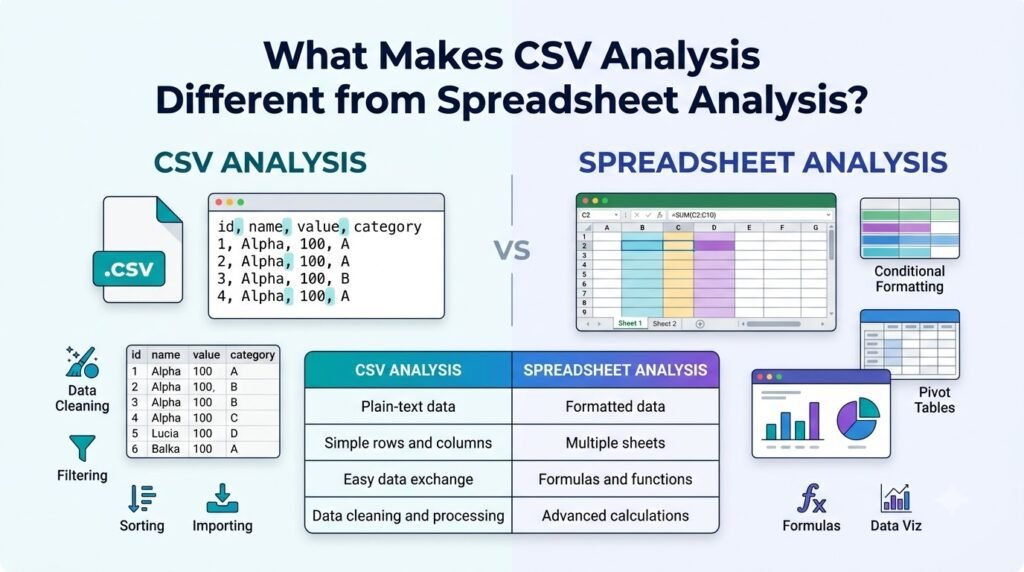
A CSV file stores tabular information as plain text, with values separated by delimiters such as commas. Unlike an Excel workbook, it does not preserve formatting, formulas, multiple worksheets, or built-in charts.
This makes CSV useful for transferring information between applications, databases, and reporting systems.
But working with CSV data can become challenging when the file contains thousands of records or information from multiple sources.
For example, imagine downloading three CSV files:
- customers.csv containing customer details.
- orders.csv containing transaction records.
- products.csv containing product information.
You may want to connect these files to understand which customers purchased particular products and how much revenue each product generated.
Doing this manually can involve several steps. An AI-powered CSV analysis tool can help explore the files, identify matching columns, and perform calculations or queries.
The important difference is that CSV analysis often involves working with exported datasets rather than editing a formatted spreadsheet.
If you want to understand the complete process of working with both formats, our guide on how to analyze Excel and CSV data using AI covers data preparation, analysis, and result verification.
What Can AI Tools Do With CSV Files?
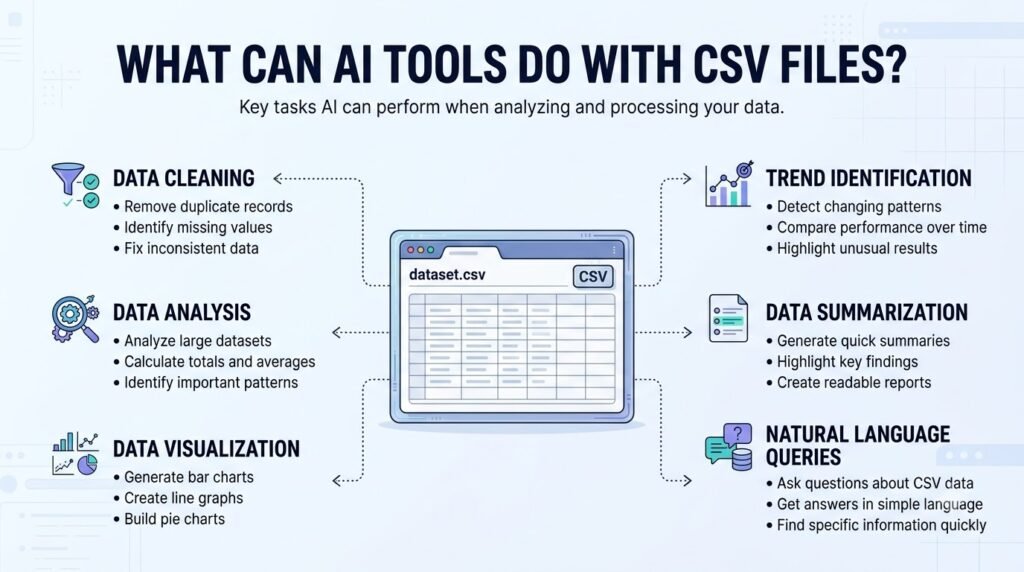
AI-powered CSV analyzers can help with several stages of data exploration. Their capabilities depend on the platform, but common tasks include:
| Task | How AI Can Help |
| Data exploration | Summarize columns, identify data types, and understand dataset structure |
| Statistical analysis | Calculate averages, totals, percentages, and correlations |
| Data cleaning | Identify missing values, inconsistent formats, and potential duplicates |
| Pattern identification | Find trends, unusual values, and relationships between variables |
| Data comparison | Compare multiple datasets and identify differences |
| Visualization | Generate charts, tables, and visual summaries |
| Natural-language queries | Answer questions about data without manually writing SQL |
| Reporting | Convert analysis into readable summaries and reports |
For example, suppose you have a CSV file containing website traffic information.
Instead of manually calculating every metric, you could ask an AI tool:
“Analyze this website traffic CSV. Identify the top five traffic sources by visitors, compare their conversion rates, and highlight any unusual changes. Present the results in a table.”
The tool can help perform the analysis and explain the findings.
However, the result should still be checked against the original dataset, especially when it involves financial figures or important business decisions.
6 Best AI Tools to Analyze CSV Files
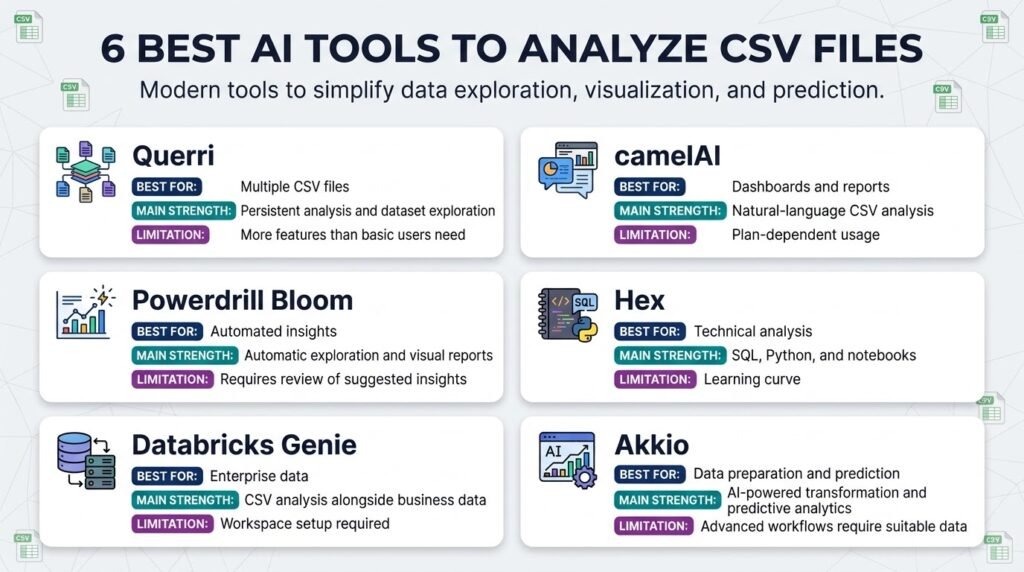
The following tools offer different approaches to CSV analysis. Rather than focusing only on general-purpose spreadsheet assistants, this selection includes dedicated CSV analyzers, data workspaces, and platforms that support SQL or Python workflows.
1. Querri – Best for Working With Multiple CSV Files
Querri is an AI-powered data analytics platform designed to help users explore datasets through natural-language questions.
It is particularly interesting for people who regularly work with multiple CSV files and want to keep their data available for further analysis.
You can upload datasets, ask questions, explore patterns, and create visualizations without manually writing every query.
What it offers:
- Upload and analyze CSV datasets.
- Ask questions about data using natural language.
- Work with multiple CSV files and combine information from different sources.
- Identify data types and potential inconsistencies.
- Generate tables, charts, and explanations.
- Store datasets in a persistent library for future analysis.
Example use case:
Suppose your company exports separate CSV files for sales, customers, and products.
You could use Querri to explore how sales vary across product categories and customer groups. Combining these datasets can help you investigate relationships that would be harder to identify by looking at each file separately.
Advantages:
- Useful for multi-file analysis.
- Supports conversational data exploration.
- Persistent data storage supports repeated analysis.
- Can create visual summaries and reports.
Limitations:
- Its broader analytics features may be unnecessary for someone who only needs a few calculations.
- Users should review how files are combined and which columns are used.
- Check the current plan for file-size and usage restrictions.
Best for: Teams and analysts who regularly work with multiple CSV datasets and need ongoing analysis rather than one-time answers.
2. camelAI – Best for Turning CSV Files Into Shareable Dashboards

camelAI offers a dedicated CSV analysis experience.
Its workflow is straightforward: upload a dataset, ask questions in everyday language, and explore the resulting analysis through charts and reports.
You do not need to set up a spreadsheet or write SQL queries to begin exploring a supported file.
What it offers:
- Upload CSV, TSV, Excel, and other supported data files.
- Automatically identify column structures and data types.
- Ask questions in plain English.
- Explore trends and relationships within datasets.
- Generate charts and visual reports.
- Publish shareable dashboards and reports.
Example use case:
Imagine you have a CSV export from your marketing platform containing campaign names, visitors, clicks, conversions, and spending.
You could ask:
“Compare the conversion rates of all campaigns. Identify the three campaigns with the highest conversion rates and compare their spending.”
camelAI can help turn the dataset into a visual analysis that is easier to review and share.
Advantages:
- Simple upload-and-analyze workflow.
- No coding required for basic exploration.
- Supports multiple tabular file formats.
- Shareable dashboard functionality.
Limitations:
- It may be more than you need for a small, one-time calculation.
- The accuracy of findings depends on the quality of the uploaded data and instructions.
- Review the current plan for usage and sharing restrictions.
Best for: Marketers, business owners, and teams that want to turn exported CSV reports into interactive dashboards.
3. Powerdrill Bloom – Best for Automated CSV Insights
Powerdrill Bloom is designed to explore datasets and generate insights without requiring users to build every analysis manually.
Its CSV AI Assistant can automatically examine uploaded data, identify patterns, and generate visual reports.
This can be useful when you receive a dataset but are not entirely sure which questions to investigate first.
What it offers:
- Upload CSV files for automated analysis.
- Identify important metrics and patterns.
- Explore trends and correlations.
- Generate AI-supported visual insights.
- Suggest directions for further exploration.
- Export selected insights into presentation and reporting formats.
Example use case:
Suppose you have a CSV containing monthly expenses from different business departments.
You could upload the file and explore which departments account for the largest share of spending.
You can then investigate changes over time and look for unusual expense patterns.
Advantages:
- Helps users get started without writing code.
- Automated exploration can reveal areas worth investigating.
- Supports visual summaries.
- Offers reporting and export options.
Limitations:
- Automated suggestions may not always match your business objectives.
- You may need follow-up questions to investigate specific findings.
- Advanced features and usage limits should be checked against the current subscription.
Best for: Users who want an initial overview of a dataset and AI-generated suggestions for further analysis.
4. Hex – Best for Analysts Using SQL and Python
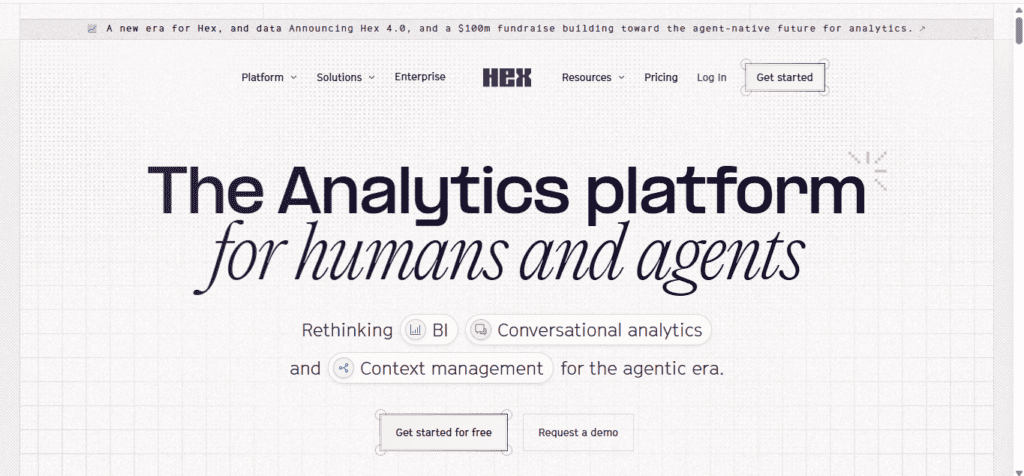
Hex takes a more technical approach to data analysis.
It provides a collaborative workspace where analysts can combine uploaded files, SQL queries, Python code, and visualizations.
You can upload a CSV file directly into a project and use it in a notebook. Hex also supports querying uploaded CSV files through SQL cells.
This makes it useful when natural-language answers alone are not enough and you want greater control over the analysis.
What it offers:
- Upload CSV and JSON files.
- Analyze datasets using Python.
- Query uploaded CSV files through SQL.
- Connect to external databases and data sources.
- Combine different datasets within a project.
- Build analytical notebooks and interactive applications.
Example use case:
Suppose you have two CSV files containing customer information and purchase history.
You want to identify customers who made more than three purchases during a particular period.
Using Hex, you can upload both files, join the datasets using an appropriate customer identifier, and write a SQL query to calculate the results.
You can then use Python to explore the output further.
Advantages:
- Provides flexibility through SQL and Python.
- Supports multiple data sources.
- Suitable for more detailed analytical workflows.
- Useful for collaborative data projects.
Limitations:
- Has a learning curve for people unfamiliar with SQL or Python.
- Uploading files and developing notebooks require the appropriate workspace permissions.
- It may be unnecessarily complex for users who only want simple answers from a CSV file.
Best for: Data analysts and technical teams who need more control over their analysis.
5. Databricks Genie – Best for CSV Analysis Alongside Business Data
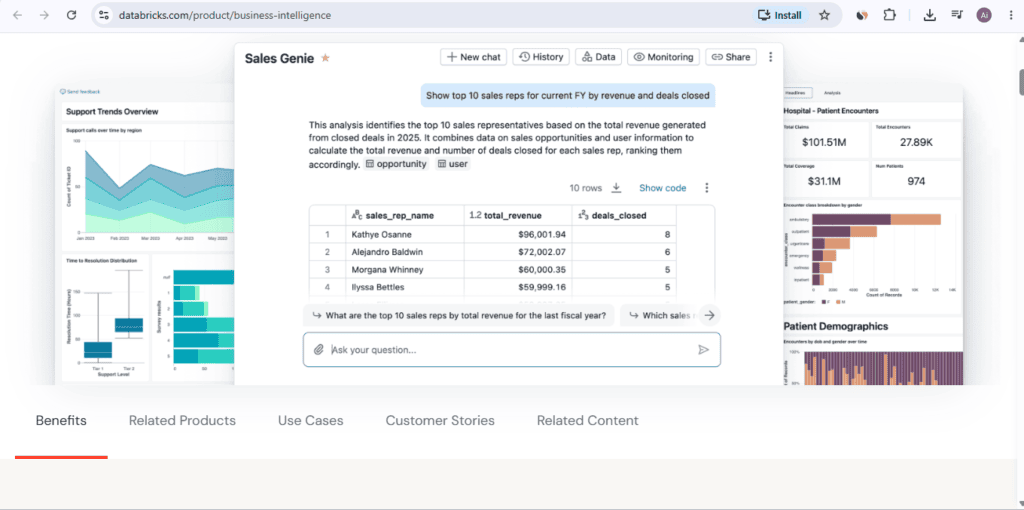
Databricks Genie provides a conversational way to explore business data.
One useful capability is its support for uploading CSV and Excel files directly into a Genie Agent conversation.
This allows users to explore uploaded datasets alongside existing Unity Catalog tables, where the relevant workspace configuration is available.
It is particularly useful for organizations that already work within the Databricks environment.
What it offers:
- Upload CSV files directly into a Genie Agent conversation.
- Ask questions about uploaded datasets in natural language.
- Explore local files alongside supported business data.
- Perform data validation and lightweight analysis.
- Work with structured data through the Databricks environment.
Example use case:
Suppose your company stores sales information in Databricks but receives a separate CSV file from an external supplier.
You could upload the CSV to a configured Genie Agent and explore it alongside the existing business data.
This can help investigate differences between supplier records and internal product information.
Advantages:
- Combines uploaded files with existing data sources.
- Useful for organizations already using Databricks.
- Supports conversational data exploration.
- Suitable for business data validation.
Limitations:
- Requires an appropriately configured Databricks workspace.
- Genie Agent access and file-upload settings must be enabled.
- It is not the simplest option for an individual who only wants to analyze a small CSV file.
Best for: Businesses and data teams already using Databricks who want to explore external CSV files alongside their existing data.
6. Akkio – Best for AI-Powered Data Preparation and Analysis
Akkio is an AI-powered data analytics platform that helps users prepare, explore, and analyze structured datasets. It supports CSV and Excel files, making it useful for businesses that regularly work with exported data.
One of its useful capabilities is conversational data exploration. Instead of manually writing every query, users can ask questions about their datasets and investigate patterns through natural-language instructions.
What it offers:
- Upload CSV and other supported tabular datasets.
- Explore data using natural-language questions.
- Clean and transform columns through AI-assisted workflows.
- Combine datasets using matching columns.
- Build predictive machine learning models.
- Create dashboards and reports.
Example use case:
Suppose you have a CSV file containing customer purchase records, including customer IDs, order dates, product categories, and transaction amounts.
You want to identify which customers are more likely to make another purchase.
Akkio can help prepare the dataset, explore relationships between variables, and build a predictive model when you have suitable historical data and a clearly defined prediction target.
Advantages:
- Supports conversational data exploration.
- Offers AI-assisted data preparation and transformation.
- Provides predictive analytics capabilities.
- Includes reporting and dashboard functionality.
Limitations:
- Predictive modeling requires suitable historical data.
- Advanced analytical workflows may require some understanding of data preparation.
- Available features and usage limits depend on the selected subscription.
Best for: Businesses and analysts who want to prepare CSV datasets, explore patterns, and build predictive models.
Quick Comparison of AI Tools to Analyze CSV Files
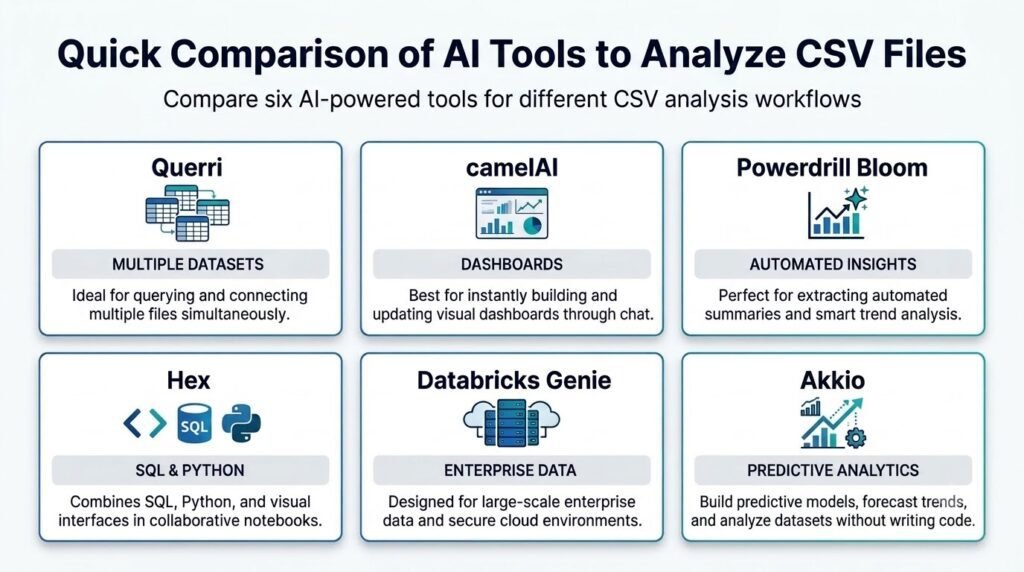
Choosing between these platforms becomes easier when you compare their main strengths.
| Tool | Best For | Main Strength | Possible Limitation |
| Querri | Multiple CSV files | Persistent analysis and dataset exploration | More features than basic users need |
| camelAI | Dashboards and reports | Natural-language CSV analysis | Plan-dependent usage |
| Powerdrill Bloom | Automated insights | Automatic exploration and visual reports | Requires review of suggested insights |
| Hex | Technical analysis | SQL, Python, and notebooks | Learning curve |
| Databricks Genie | Enterprise data | CSV analysis alongside business data | Workspace setup required |
| Akkio | Data preparation and prediction | AI-powered transformation and predictive analytics | Advanced workflows require suitable data |
These tools are not direct replacements for one another. A person analyzing a single marketing export may prefer a simple upload-and-ask interface, while a data analyst working with several datasets may need SQL and Python support.
The right choice depends on the type of data, the complexity of your questions, and how you plan to use the results.
How to Choose the Right CSV Analysis Tool
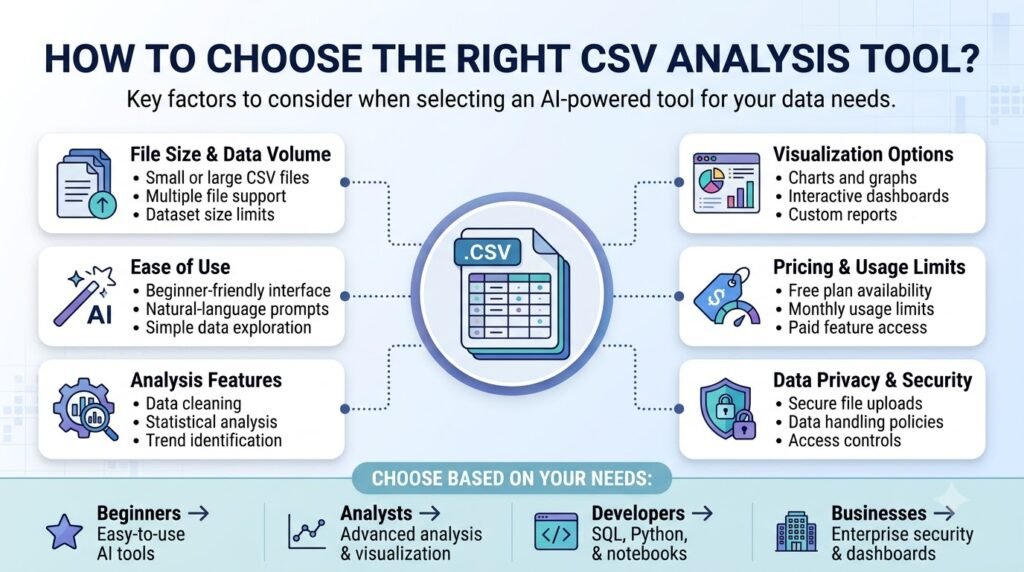
Before subscribing to a tool, consider what you actually need to do with your data.
A long feature list does not necessarily mean a better experience. Start with your regular tasks and compare the tools against them.
1. Check Supported File Formats and Size Limits
First, confirm that the tool accepts your CSV files.
Also check its maximum file size, row limits, column limits, and support for multiple files.
This matters when working with large exports from analytics platforms, customer databases, or business applications.
For example, a tool that handles a small survey file comfortably may not be suitable for a much larger transaction dataset.
2. Look at How You Want to Ask Questions
Some tools focus on natural-language analysis, while others provide SQL queries, Python notebooks, or a combination of these approaches.
If you are not comfortable writing code, camelAI or Powerdrill Bloom may be easier starting points.
If you already work with SQL and Python, Hex or Akkio may provide more flexibility.
3. Consider Multiple CSV File Support
Sometimes the information you need is spread across different exports.
For example, customer information may be stored separately from transaction records.
In that situation, check whether the platform supports multiple uploads, matching columns, joins, and combining datasets.
4. Check Visualization and Export Options
Analysis is more useful when you can communicate the results.
Look for tools that provide suitable charts, tables, reports, or downloadable outputs.
If your goal is to share findings with colleagues, consider whether the platform supports dashboard publishing or report exports.
You can also explore our guide on generating charts from Excel data using AI for ideas on choosing visualizations that make numerical information easier to understand.
5. Review Privacy and Data Handling
CSV exports may contain customer names, email addresses, financial information, or internal business records.
Before uploading them, check the platform’s privacy policy, file retention settings, access permissions, and data-use practices.
For confidential business data, use only an organization-approved service and account.
6. Test the Tool With Your Own Dataset
A demonstration using sample data does not tell you how a tool will perform with your actual files.
Try a representative CSV before purchasing a subscription.
Ask the tool to calculate a few known values and compare its answers with independently calculated results.
This gives you a better understanding of its accuracy, limitations, and usability.
How to Analyze a CSV File Using AI
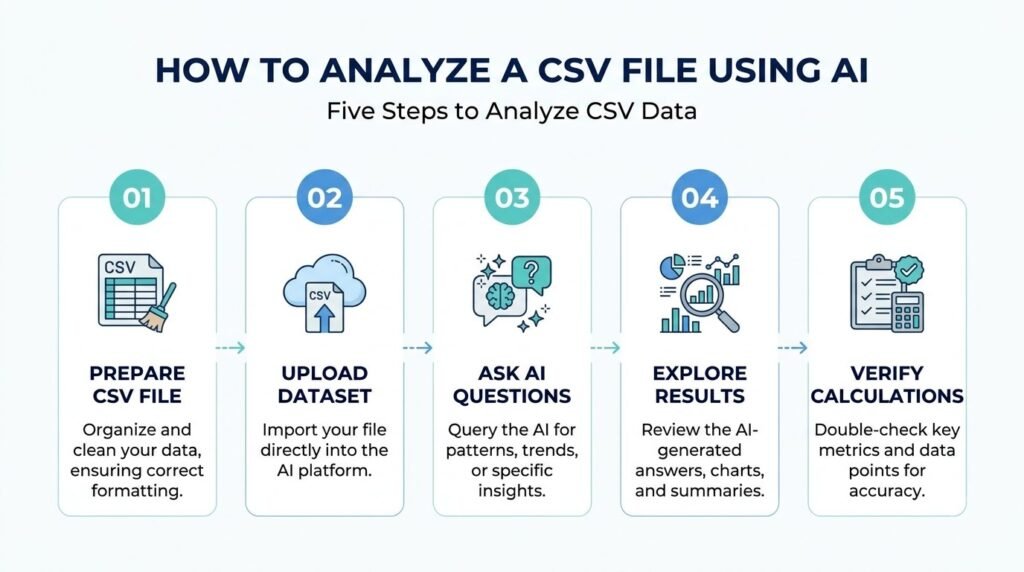
Once you have selected a suitable tool, the actual process is relatively straightforward.
Here is a practical workflow you can follow.
Step 1: Prepare Your CSV File
Start by checking the structure of your dataset.
For example, a simple online store sales CSV might contain:
| Order ID | Date | Product | Region | Units Sold | Revenue |
| ORD101 | 01-10-2026 | Wireless Mouse | North | 12 | 6000 |
| ORD102 | 02-10-2026 | Office Chair | West | 3 | 15000 |
| ORD103 | 03-10-2026 | USB Hub | South | 8 | 4000 |
| ORD104 | 04-10-2026 | Desk Lamp | East | 10 | 5000 |
| ORD105 | 05-10-2026 | Keyboard | North | 6 | 9000 |
Make sure the column headings are understandable and the values are organized consistently.
Step 2: Upload the Dataset
Open your chosen CSV analysis tool and upload the file.
Wait until the platform has processed the dataset.
If the tool displays a data preview, check whether it has recognized the correct columns and values.
Step 3: Ask a Specific Question
Avoid vague instructions such as “Analyze this file.”
Instead, explain what you want to find.
For example:
Prompt:
“Analyze the uploaded sales CSV file. Calculate total revenue, total units sold, and average revenue per order. Then identify the highest-performing region by revenue. Present the results in a table and explain the calculation method. Use only the actual values in the file.”
Specific instructions make it easier to understand what the analysis should include.
Step 4: Explore the Results Further
Once the initial analysis is complete, ask follow-up questions.
For example:
- Which product generated the highest revenue?
- Which region recorded the lowest sales?
- What is the average revenue by product category?
- Are there any unusually high or low transactions?
- How does revenue change across the available dates?
You can investigate different parts of the same dataset without starting the process again.
Step 5: Verify the Calculations
Do not assume every AI-generated result is correct.
Check the total revenue against the original Revenue column. Review the number of records and confirm that the tool has not accidentally excluded rows.
If the analysis involves multiple datasets, also verify the matching columns and join conditions.
This is particularly important before using the results in business reports.
Common Problems to Watch for When Using AI CSV Analyzers
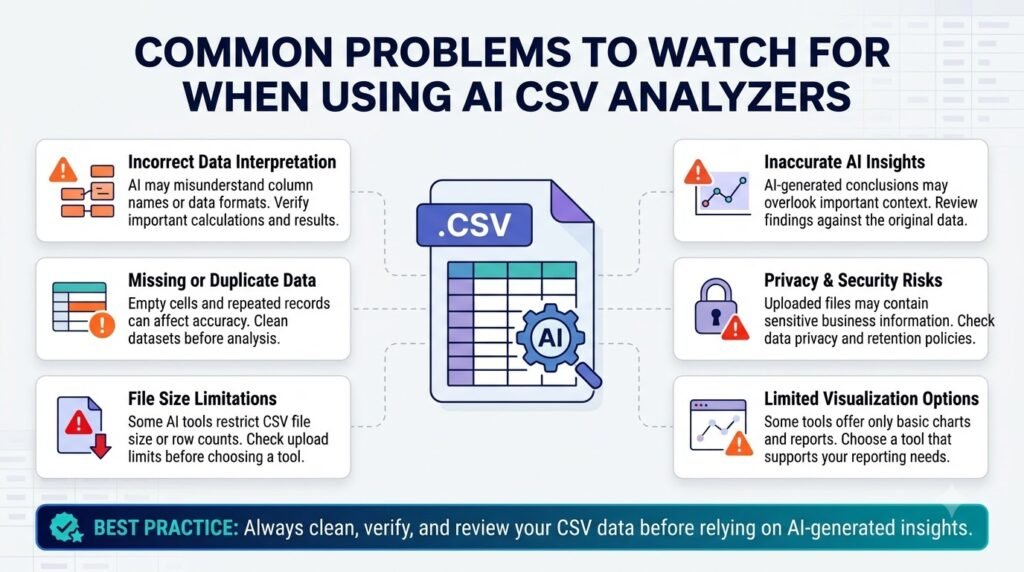
AI can make data analysis easier, but the quality of the results still depends on the input and the instructions.
Here are a few problems worth watching for.
1. Incorrect Column Recognition
Sometimes a tool may misunderstand a column because its heading is unclear.
For example, a column called “Value” could represent revenue, quantity, or customer ratings.
Use descriptive headings and explain unfamiliar columns in your prompt.
2. Inconsistent Date and Number Formats
A CSV may contain dates in different formats or numbers stored as text.
This can affect calculations and time-based comparisons.
Check the data types before asking the tool to calculate monthly or yearly trends.
3. Missing or Duplicate Records
Duplicate transactions or missing values can change the final results.
Ask the AI tool to report these issues separately rather than automatically removing or replacing records.
If cleaning is your main requirement, our guide on how to clean Excel data using AI explains how to identify common data-quality issues and review suggested corrections.
4. Incorrect Assumptions About Relationships
When combining multiple CSV files, an AI tool may select the wrong matching columns.
For example, matching customer names instead of unique customer IDs could create incorrect relationships.
Always review the join conditions before accepting combined results.
5. Trusting Visualizations Without Checking the Data
A chart can look convincing even when the underlying calculations are incorrect.
Check the values, filters, categories, and date ranges used to generate it.
If you are comparing different AI-generated explanations, a multi-model workspace such as AiZolo can help you submit the same analytical question to different models and review their responses side by side.
The actual file processing should still be performed in a tool that supports your dataset.
Frequently Asked Questions
1. What are the best AI tools to analyze CSV files?
Some options include Querri, camelAI, Powerdrill Bloom, Hex, Databricks Genie, and Akkio. Each serves a different purpose. Some focus on automated insights and dashboards, while others provide SQL, Python, and more advanced analytical workflows.
2. Can AI analyze a CSV file without Excel?
Yes. Several AI-powered platforms allow you to upload a CSV file directly without opening it in Microsoft Excel. You can ask questions about the data, calculate metrics, explore patterns, and generate visualizations using the features supported by the selected platform.
3. Can AI analyze large CSV files?
Yes, some platforms support larger datasets, but their limits differ. Check the maximum file size, row and column restrictions, processing capabilities, and subscription requirements. For particularly large datasets, a database-connected analytical platform may be more suitable than a basic file-upload tool.
4. Can AI find errors in CSV files?
AI tools can help identify potential problems such as missing values, duplicate records, inconsistent formats, and unusual entries. However, not every unusual value is necessarily an error. Review the original records and business rules before making corrections.
5. Can I analyze multiple CSV files together?
Yes. Some platforms support multiple file uploads and allow you to compare or combine datasets. For example, you might connect customer information with transaction records using a common customer ID. Check whether the tool supports joins and whether you can review the matching conditions.
6. Do I need SQL or Python to analyze CSV files with AI?
No. Tools with natural-language interfaces allow you to ask questions without writing code. However, SQL and Python can provide more control over complex calculations, data transformations, and repeatable analytical workflows.
7. Are AI-generated CSV analysis results always accurate?
No. AI tools can misunderstand column names, overlook missing records, or use incorrect assumptions. Verify important totals, filters, calculations, and dataset relationships before using the findings in reports or business decisions.
Conclusion
Choosing the right AI tool to analyze CSV files depends on how you work with data.
If you regularly handle multiple datasets, Querri is worth exploring. For visual reports and conversational analysis, camelAI and Powerdrill Bloom offer different approaches.
Hex and Akkio provide more flexibility for technical users, while Databricks Genie is relevant for organizations already working within its data environment.
You do not need the most complicated platform to get useful results. Start with your actual dataset, identify the questions you need answered, and test whether the tool can produce accurate and understandable results.
Most importantly, treat AI as an assistant for exploring data, not a replacement for checking it. A useful analysis is one you can understand, verify, and confidently act on.
About the Author
Anshika Verma is a content researcher and writer at AiZolo, focusing on AI tools, AI models, and creator technologies. She creates practical guides that help readers understand new AI technologies and use them in their everyday work.