
Website testing used to mean writing brittle scripts that broke every time a developer renamed a CSS class. Today, that model is collapsing.
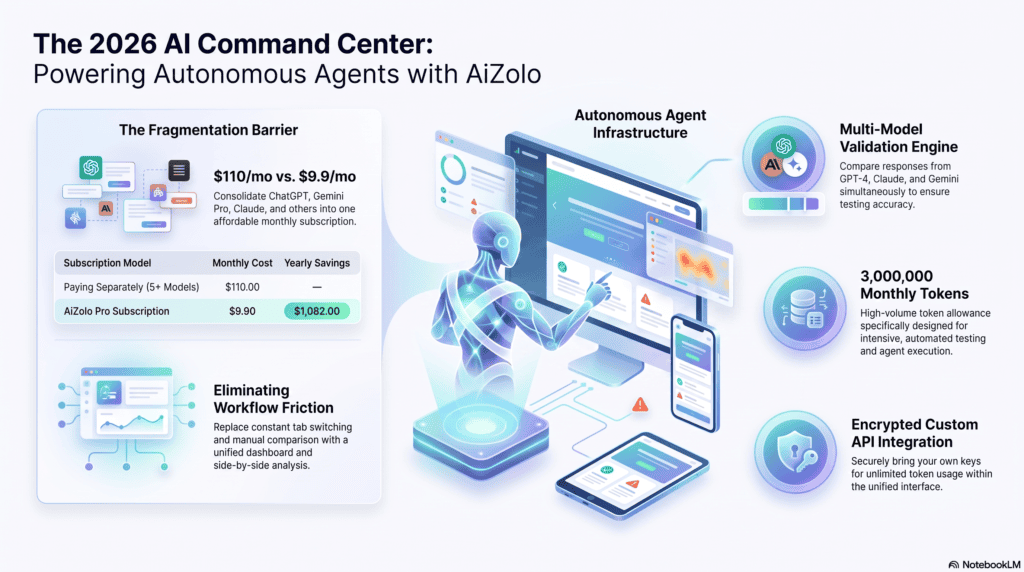
Teams are replacing rigid Selenium scripts with reasoning-driven agents, and Aizolo helps accelerate this shift by enabling AI-powered testing workflows that can look at a page, understand its intent, and decide what to test. Much like a human QA engineer, these intelligent agents adapt to changing interfaces instead of relying on brittle automation scripts.
That shift is why so many engineering teams are now researching how to use AI for autonomous website testing agent development, not just AI-assisted testing.
In this guide, you’ll learn what these agents are, how they reason and act, which frameworks and models perform best, and how to design, prompt, and deploy one in production. We’ll also cover security, limitations, and where this space is heading next.
By the end, you’ll have a working mental model — and starter code — for building your own autonomous testing agent.
Table of Contents
What Is an Autonomous Website Testing Agent?
An autonomous website testing agent is a software system that uses a large language model (LLM) to plan, execute, and evaluate tests against a live website with minimal human scripting.
Unlike a traditional test script, it doesn’t need exact selectors or hardcoded steps. It perceives the page, reasons about what “correct” behavior looks like, and adapts when the UI changes.
Core capabilities typically include:
- Understanding page structure and intent, not just DOM selectors
- Planning multi-step user journeys from a goal description
- Executing actions through a real or headless browser
- Detecting failures based on expected outcomes, not just exceptions
- Repairing broken selectors automatically (“self-healing”)
Did You Know? The term “agent” in AI testing specifically refers to a system with a planning loop — it observes, decides, acts, and re-observes, rather than executing a fixed script top to bottom.
How AI Has Changed Website Testing
Traditional automation frameworks assumed a stable UI: fixed selectors, predictable flows, deterministic assertions. Modern web apps break that assumption constantly.
Large language models changed the equation by adding reasoning. An agent can now read a page’s accessibility tree, infer what a “checkout” button does, and act on that inference.
Multimodal models added a second capability: vision. Agents can now compare screenshots, spot visual regressions, and validate layouts the way a human tester scans a page.
Together, reasoning and vision let agents handle novel UI states — pages they’ve never seen before — which scripted automation simply cannot do.
Expert Tip: Reasoning models reduce long-term maintenance cost because they infer intent from context instead of memorizing brittle selectors that expire with every UI refactor.
Traditional Automation vs AI Agents
| Dimension | Traditional Automation (Selenium/Scripted) | AI Testing Agent |
|---|---|---|
| Test creation | Manual scripting, line by line | Generated from natural-language goals |
| Selector stability | Breaks on DOM changes | Self-healing via reasoning/vision |
| Maintenance cost | High, grows with app size | Lower, scales with better prompts |
| Visual regression | Limited, pixel-diff only | Context-aware visual understanding |
| New page handling | Requires new scripts | Can generalize from prior patterns |
| Setup speed | Slow | Fast, goal-driven |
| Determinism | Fully deterministic | Probabilistic, needs guardrails |
| Best for | Stable, high-volume regression suites | Exploratory, dynamic, evolving UIs |
Best Practice: Many mature QA teams run both — deterministic scripts for critical, stable regression paths, and an AI agent for exploratory and dynamic-UI coverage.
How to Use AI for Autonomous Website Testing Agent: Step-by-Step Workflow
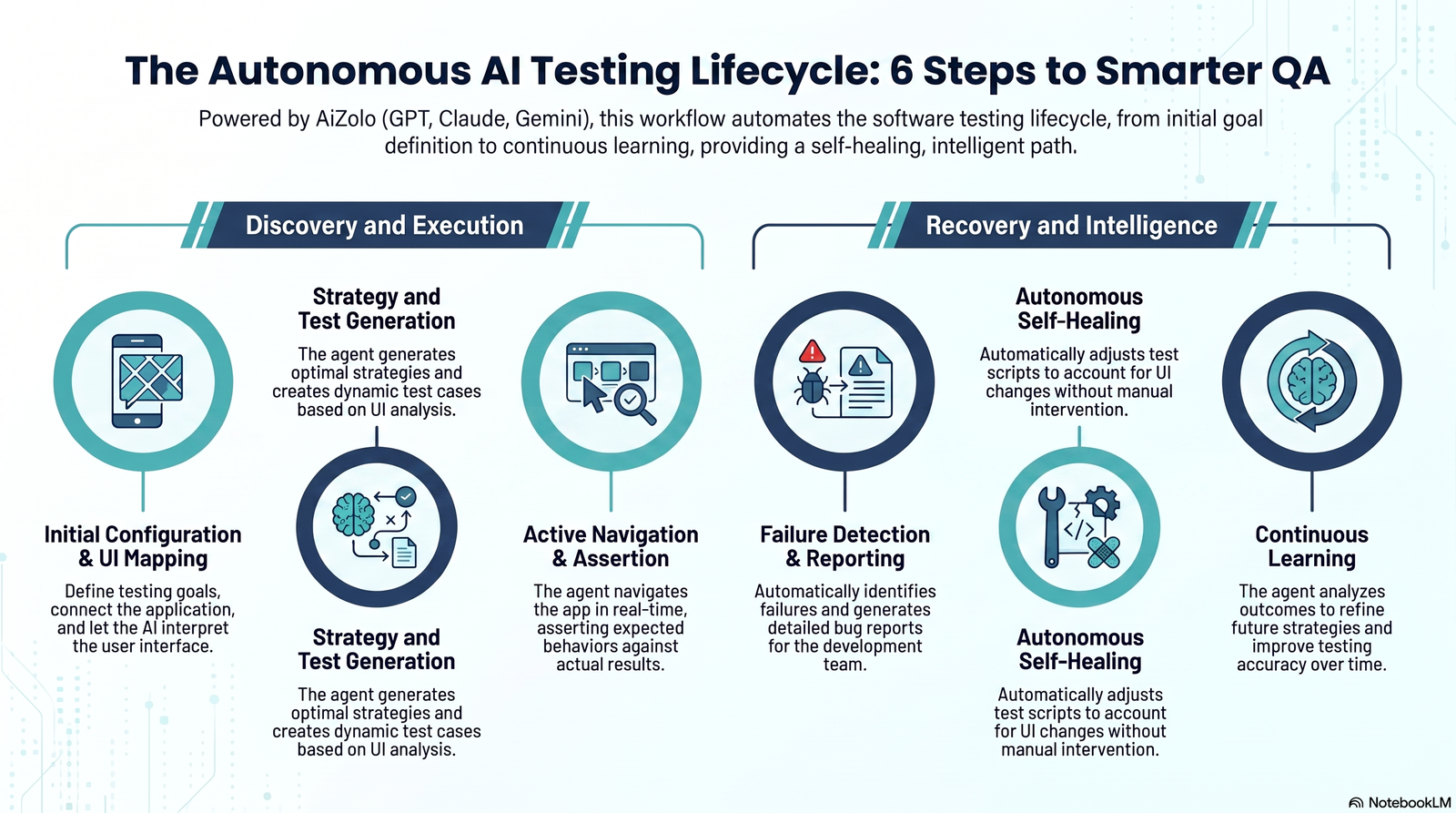
This is the core workflow for how to use AI for autonomous website testing agent development, from a blank goal to a running test suite.
Define Testing Goals
Start with a plain-language objective, not a script. Example: “Verify a new user can sign up, verify their email, and reach the dashboard.”
Clear goals matter more than clever prompts. Vague goals produce vague, unreliable test coverage from any agent.
Connect Application
The agent needs a way to observe and control the target site — typically a browser automation layer like Playwright or a browser-use library.
At this stage, you also decide on environment: staging, sandbox, or a dedicated test account, never production data.
Understand UI
The agent reads the DOM, accessibility tree, and optionally a screenshot to build a structural understanding of the current page.
This step is what lets the agent locate a “Submit” button even if its class name or ID changes between builds.
Generate Testing Strategy
Using the goal and the observed UI, the planner LLM proposes a strategy: which flows to test, in what order, and what “success” looks like for each.
Good strategies branch — they include edge cases like empty fields, invalid emails, and slow network conditions, not just the happy path.
Create Test Cases
The agent converts the strategy into discrete, executable test cases, each with expected preconditions and expected outcomes.
These can be stored as structured JSON or YAML so they’re versioned, reviewed, and reused across runs.
Navigate Dynamically
During execution, the agent clicks, types, and scrolls — but re-evaluates the page after every action instead of assuming a fixed sequence will always work.
This dynamic loop is what allows recovery from unexpected modals, pop-ups, or A/B test variants.
Perform Assertions
Instead of only checking exact text matches, the agent evaluates whether the outcome matches the intent — e.g., “user reached an authenticated dashboard state.”
Semantic assertions catch more real bugs, because copy changes don’t automatically fail a test that’s otherwise correct.
Detect Failures
Failures are classified: functional (broken flow), visual (unexpected layout shift), or performance (unacceptable load time).
Classifying failures early makes triage faster for the humans who eventually review the report.
Self-Heal Selectors
When a selector fails, the agent re-locates the element using surrounding text, role, and layout — instead of immediately failing the test.
Warning: Self-healing can mask real bugs if a button’s function silently changed. Always log what was healed and why, for human review.
Generate Bug Reports
On failure, the agent compiles reproduction steps, screenshots, console logs, and a plain-language summary of what went wrong.
Well-structured reports save engineers significant triage time compared to a raw stack trace.
Continuous Learning
Agents that store past runs in memory can recognize recurring flaky patterns and adjust future test strategies accordingly.
This is where autonomous QA becomes genuinely different from one-off scripted automation: it compounds over time.
Architecture of an Autonomous Testing Agent
A production-grade agent is built from several cooperating components, not a single model call.
Planner — Breaks a high-level goal into an ordered set of sub-tasks and revises the plan when execution results differ from expectations.
Reasoner — The LLM layer that interprets page state, decides next actions, and explains its reasoning for logs and audits.
Memory — Stores prior runs, known-good selectors, flaky test history, and app-specific quirks across sessions.
Browser — The execution layer (Playwright, Selenium, or a browser-use library) that performs real clicks, typing, and navigation.
LLM — The underlying model providing language and reasoning capability; can be swapped depending on cost and accuracy needs.
Vision — A multimodal component that reads screenshots for layout, visual regressions, and elements without accessible text.
Validation Engine — Compares actual outcomes against expected outcomes using both DOM state and semantic assertions.
Reporting — Aggregates results into human-readable bug reports, dashboards, and CI/CD-consumable outputs.
Expert Tip: Keep the planner and executor as separate components. A single monolithic prompt that both plans and clicks tends to produce inconsistent, hard-to-debug behavior.
Best AI Models for Testing
| Model Family | Strengths for Testing | Considerations |
|---|---|---|
| GPT (OpenAI) | Strong tool-use, wide ecosystem support | Cost scales with long browsing sessions |
| Claude (Anthropic) | Strong structured reasoning, careful multi-step planning | Best paired with explicit tool schemas |
| Gemini (Google) | Native multimodal strength for visual checks | Newer agent tooling ecosystem |
| Open-source (Llama, Qwen, Mistral variants) | Full data control, lower long-run cost | Requires more engineering to match closed-model reasoning |
Best Practice: Use a stronger reasoning model for planning and a cheaper/faster model for repetitive step execution to control cost.
Best Frameworks for Building AI Testing Agents
| Framework | Type | Good For |
|---|---|---|
| Playwright | Browser automation engine | Reliable cross-browser execution layer |
| Selenium | Browser automation engine | Legacy compatibility, wide language support |
| Browser Use | AI-native browser control library | Quick agent-to-browser wiring |
| LangGraph | Agent orchestration | Complex, stateful multi-step agent logic |
| CrewAI | Multi-agent orchestration | Coordinating specialized sub-agents (planner, tester, reporter) |
| AutoGen | Multi-agent orchestration | Conversation-driven agent collaboration |
| OpenAI Agents SDK | Agent framework | Native tool-calling and handoffs |
| Model Context Protocol (MCP) | Standardized tool/context interface | Connecting agents to external tools and data safely |
Common Mistake: Choosing a heavy multi-agent framework before validating a simple single-agent loop works. Start simple, then add orchestration complexity only when needed.
Sample Prompt Examples
System prompt for a planner agent:
You are a QA planning agent. Given a testing goal and the current
page's accessible elements, produce an ordered list of test steps.
Each step must include: action, target description, and expected
outcome. Do not invent elements that are not present in the page context.
Prompt for generating test cases from a goal:
Goal: "Verify a returning user can log in and view their order history."
Generate 5 test cases covering: valid login, invalid password,
locked account, empty fields, and session persistence after refresh.
Return as JSON with fields: id, steps, expected_result.
Prompt for self-healing a broken selector:
The selector "#submit-btn-v2" was not found. Here is the current
DOM's interactive elements: {elements}. Identify the element that most
likely serves the same function as the original submit button and
justify your choice in one sentence.
Real Workflow Example
Consider an e-commerce team testing a new promo-code field at checkout.
The agent receives the goal: “Confirm a valid promo code reduces the order total correctly.” It navigates to checkout, locates the promo field via the accessibility tree, and applies a known valid code.
It then asserts the new total matches the expected discount calculation, captures a screenshot for visual confirmation, and logs the result — all without a single hardcoded selector.
# Simplified Playwright + LLM agent step
async def apply_promo_code(page, agent):
    element = await agent.locate("promo code input field")
    await page.fill(element["selector"], "SAVE10")
    await page.click(await agent.locate("apply promo button")["selector"])
    total = await agent.read_value("order total")
    assert agent.validate(total, expected_discount_pct=10)
Testing Login Pages
Login flows are high-value because they’re the entry point to nearly every other test path.
An agent should cover: valid credentials, invalid password, non-existent user, locked account, expired session, and multi-factor prompts if present.
Checklist: Login Testing
- [ ] Valid credential login succeeds
- [ ] Invalid password shows correct error, not a generic 500
- [ ] Account lockout triggers after defined failed attempts
- [ ] Session persists correctly after page refresh
- [ ] Logout fully invalidates the session
Checkout Testing
Checkout flows combine forms, payment logic, and third-party integrations — a natural fit for adaptive agents.
Key scenarios include valid payment, declined card, expired card, invalid address, and promo code edge cases like expired or single-use codes.
Warning: Never run checkout tests against live payment processors in production mode. Use sandbox payment credentials exclusively.
Regression Testing
Autonomous agents excel at regression by comparing current behavior against a memory of prior “known good” runs.
Instead of re-running identical scripts, the agent can flag meaningful deviations and ignore cosmetic noise like minor spacing shifts.
Best Practice: Pair AI-driven regression checks with a small set of deterministic smoke tests for your most business-critical flows.
Visual Testing
Multimodal vision lets agents catch layout breaks that DOM-only checks miss entirely — overlapping text, cut-off buttons, broken responsive layouts.
The agent compares a current screenshot against a baseline, using semantic understanding rather than strict pixel-diffing, which reduces false positives from anti-aliasing noise.
API Testing
Not every check needs a browser. Agents can call backend APIs directly to validate contracts, response schemas, and error codes faster than a full UI pass.
Combining API-level checks with UI-level checks gives faster feedback loops and clearer failure isolation — a bug is either in the API or the frontend, not ambiguous.
{
  "endpoint": "/api/v1/orders",
  "method": "POST",
  "expected_status": 201,
  "expected_schema": ["order_id", "total", "status"]
}
Performance Testing
Agents can monitor page load timing, time-to-interactive, and network waterfall data during functional test runs, flagging regressions automatically.
This isn’t a replacement for dedicated load-testing tools, but it catches obvious performance regressions early, before a full performance test cycle even runs.
Accessibility Testing
Because agents already read the accessibility tree to locate elements, checking for missing labels, poor contrast, or broken ARIA roles is a natural extension.
External Link Anchor: W3C Accessibility Guidelines Destination: W3C Web Accessibility Initiative documentation Reason: Authoritative reference for accessibility testing criteria.
Security Considerations
Autonomous agents that can browse and submit forms carry real risk if misconfigured — they must never run against production systems with real customer data.
Key precautions:
- Run agents in isolated staging environments with synthetic data only
- Restrict credentials the agent can access to least-privilege test accounts
- Log every action the agent takes for auditability
- Sandbox any code the agent generates before execution
- Review self-healing decisions periodically for silent behavior drift
External Link Anchor: OWASP Testing Guide Destination: OWASP official documentation Reason: Reference for secure testing practices relevant to agent-driven automation.
Checklist: Security
- [ ] Agent has no access to production credentials
- [ ] All test data is synthetic
- [ ] Action logs are retained for audit
- [ ] Agent’s browser environment is sandboxed
- [ ] Third-party model calls exclude sensitive PII
Common Mistakes
- Letting the agent run against production instead of staging
- Treating self-healing as infallible instead of logging and reviewing it
- Skipping deterministic smoke tests for critical business flows
- Over-broad prompts that produce vague, low-value test cases
- Ignoring cost controls on long autonomous browsing sessions
Limitations
Autonomous agents are probabilistic, meaning identical runs can occasionally produce slightly different paths or flag false positives.
They also struggle with highly custom, non-standard UI components that lack accessible markup, and with tasks requiring precise timing-sensitive interactions.
Did You Know? Even the best current agents perform better on read-heavy verification tasks than on complex, multi-branch transactional flows with many valid outcomes.
Future of Autonomous QA
Expect tighter integration between agents and CI/CD pipelines, where agents autonomously triage failures and open draft bug tickets.
Standardized protocols like the Model Context Protocol are making it easier to connect agents to test data, ticketing systems, and browsers with consistent, secure interfaces.
External Link Anchor: Model Context Protocol Documentation Destination: Official MCP specification site Reason: Reference for the emerging standard connecting AI agents to external tools.
Longer term, expect agents that learn app-specific behavior over months of runs, reducing false positives and catching subtler regressions than today’s tools can.
Deployment Checklist
- [ ] Staging environment isolated from production data
- [ ] Least-privilege test accounts configured
- [ ] Model and browser costs monitored per run
- [ ] Self-healing actions logged for human review
- [ ] CI/CD integration tested with a rollback plan
- [ ] Bug report format validated with the engineering team
- [ ] Flaky test threshold defined before enabling auto-triage
Frequently Asked Questions
1. What is an autonomous website testing agent? It’s an AI-driven system that plans, executes, and evaluates website tests using reasoning and browser automation, rather than following a fixed script. It observes the page, decides on actions, and adapts when the UI changes, reducing the manual maintenance traditional automation requires.
2. How is this different from AI-assisted test automation? AI-assisted automation typically helps a human write scripts faster. An autonomous agent independently plans and executes the testing loop itself, using reasoning to decide what to test and how to respond to failures, with much less human scripting involved.
3. Do I need to know how to use AI for autonomous website testing agent setup from scratch? Not entirely from scratch — most teams start with an existing framework like Playwright combined with an agent orchestration library, then customize prompts and validation logic for their specific application.
4. Which AI model is best for testing agents? It depends on your priorities. Models with strong structured reasoning suit complex planning, while multimodal models help with visual regression checks. Many teams mix models: a stronger one for planning, a cheaper one for repetitive execution steps.
5. Can AI agents replace Selenium or Playwright entirely? No — they typically sit on top of these tools. Playwright and Selenium remain the execution layer that performs clicks and navigation; the AI agent adds the reasoning layer that decides what to do and evaluates results.
6. Is self-healing selector technology reliable? It significantly reduces maintenance overhead, but it isn’t infallible. Best practice is to log every self-healing decision so a human can periodically review whether the “healed” behavior still matches original intent.
7. Are autonomous testing agents safe to run in production? Generally, no. They should run against staging or sandbox environments with synthetic data and least-privilege credentials, since an autonomous agent submitting real forms in production carries real risk.
8. How much does it cost to run an AI testing agent? Cost depends on model choice, run frequency, and session length. Using a cheaper model for repetitive execution steps and a stronger model only for planning helps control per-run costs significantly.
9. Can these agents handle visual regression testing? Yes. Multimodal models can compare screenshots semantically, catching layout breaks like overlapping text or cut-off elements that pure DOM-based checks would miss entirely.
10. What frameworks work best for building an agent from scratch? Playwright or Selenium for browser control, combined with an orchestration layer like LangGraph, CrewAI, or the OpenAI Agents SDK, is a common and effective starting stack.
11. How do autonomous agents handle flaky tests? Agents with memory can recognize recurring flaky patterns across runs and adjust strategy accordingly — for example, adding retry logic or flagging a test as environmentally flaky rather than functionally broken.
12. Do autonomous agents support API testing too? Yes. Many implementations combine API-level checks with UI-level checks, since backend validation is often faster and gives clearer failure isolation than a full browser pass.
13. What’s the biggest limitation of AI testing agents today? Probabilistic behavior. Identical runs can occasionally take slightly different paths, so critical, high-stakes flows still benefit from paired deterministic smoke tests for reliability.
14. How do I get started today? Begin with a narrow goal — one login flow, for example — using Playwright plus a single LLM call for element location and assertion, before scaling to a full multi-agent architecture.
15. Will autonomous QA agents fully replace human testers? Unlikely in the near term. They’re best viewed as force multipliers that handle repetitive and exploratory coverage, while human testers focus on judgment-heavy, exploratory, and edge-case-driven testing.
Conclusion
Autonomous AI testing agents represent a genuine shift from scripted automation to reasoning-driven QA — one that adapts as your application evolves instead of breaking with it.
The strongest approach today combines deterministic scripts for critical, stable flows with an autonomous agent layer for dynamic, exploratory, and visual coverage.
As frameworks like LangGraph, CrewAI, and standards like the Model Context Protocol mature, building and deploying your own agent will keep getting simpler and more reliable.
Start small: one goal, one flow, one agent loop — then expand responsibly, with proper sandboxing, logging, and human review built in from day one.
Author Bio
Jeevesh Tripathi AI Researcher & Technical Writer, Aizolo Email: jeevesh@aizolo.com
Jeevesh is an AI researcher and technical writer at Aizolo, specializing in applied AI systems, automation architecture, and SaaS product education. His work focuses on translating complex agentic AI concepts — from multi-step reasoning to browser-based automation — into practical, implementation-ready guidance for engineering and QA teams. Drawing on hands-on experience evaluating AI models, testing frameworks, and agent orchestration tools, Jeevesh writes with a focus on technical accuracy, real-world applicability, and responsible deployment practices, aligning with Google’s EEAT principles of demonstrated expertise and trustworthiness.
