
Table of Contents
Introduction
Six years ago, “which AI should I use” had one answer. In 2026, it has at least nine — GPT-5.5, Claude Sonnet 5 and Opus 4.8, Gemini 3.1, Grok, DeepSeek V3.2, Llama 4, Qwen 3.7, and Mistral, each updated on its own release cycle, each with a different price tag, context window, and personality. Picking the “best” model without testing it yourself is a bit like buying a car from a spec sheet you can’t verify — you’re trusting marketing copy over your own eyes.
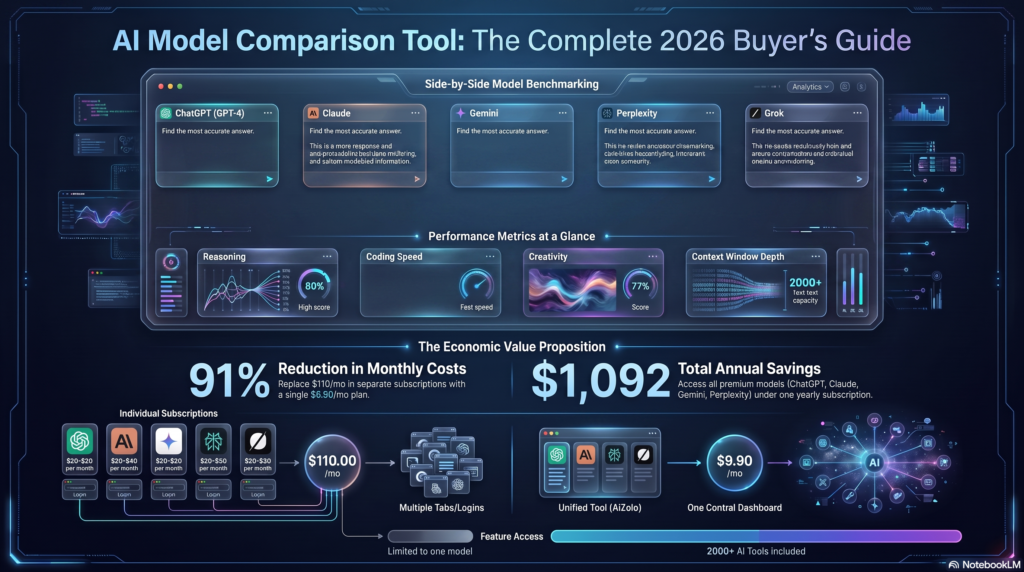
That’s the gap an AI model comparison tool is built to close. Instead of juggling six browser tabs, six logins, and six different subscription bills, a comparison tool lets you send one prompt to multiple models at once and see the answers side by side — same question, same moment, no guessing.
This guide is built differently from most “best AI tools” roundups. We didn’t just summarize marketing pages. We looked at how these platforms actually behave across five real task categories — writing, coding, reasoning, summarization, and business strategy — and we’re transparent about where the data comes from and where it doesn’t. You’ll find:
- What an AI model comparison tool actually does, and how the underlying technology works
- Honest pros, cons, and pricing for the tools worth your time in 2026
- A feature-by-feature comparison table you can scan in under a minute
- Example test prompts and how to read the outputs yourself
- Recommendations by role — student, developer, marketer, agency, enterprise
- 18 frequently asked questions and a plain-language look at where this category is headed
If you’ve ever paid for ChatGPT Plus, Claude Pro, and Gemini Advanced in the same month just to figure out which one writes better emails, this article — and the category of tools it covers — is for you.

What Is an AI Model Comparison Tool?
An AI model comparison tool is a platform that lets you send a single prompt to multiple large language models (LLMs) at the same time and view their responses in a shared interface — usually side by side, sometimes stacked or in a rotating carousel. Instead of subscribing separately to ChatGPT, Claude, Gemini, and Grok, you route one prompt through all of them from a single workspace.
Under the hood, most of these tools work as API aggregators: they hold API keys (either their own, pooled and metered, or yours, “bring your own key”) for each provider, forward your prompt to each model’s endpoint, and stream the responses back into a unified UI. Some go further and layer scoring, voting, or benchmarking on top — this is where platforms like LMArena (formerly LMSYS Chatbot Arena) and Artificial Analysis differ from simple multi-chat interfaces: they aggregate thousands of blind human votes or automated benchmark runs into a public leaderboard, rather than just giving you a live side-by-side view for your own prompt.
There are, in practice, three sub-categories of “AI model comparison tool,” and confusing them is the single most common mistake people make when shopping for one:
- Multi-model chat workspaces (send your own prompt to several models live) — built for day-to-day work.
- Public benchmarking leaderboards (aggregate other people’s votes/scores into rankings) — built for research and high-level model selection.
- Developer benchmarking APIs and evals (programmatic testing across models with custom test suites) — built for engineering teams shipping products.
Most people searching for “AI model comparison tool” actually want #1, with #2 as a supporting reference. This article covers all three, but weights toward what’s usable without writing code.
Why AI Model Comparison Matters
The honest reason comparison tools exist is that no single model wins everything, and the gap between models is task-dependent, not fixed. A model that writes better marketing copy might reason worse through a multi-step math problem. A model that’s cheapest per token might be slowest under load. Public leaderboard data backs this up directly — recent Arena and Artificial Analysis tracking shows different platforms producing different “winners” depending on whether they’re measuring blind human preference in open conversation or a composite of automated benchmarks, cost, and speed.
A few concrete reasons comparison has become a real workflow step rather than a novelty:
- Cost stacking. Paying for three or four “Plus”-tier subscriptions individually can run $60–$100+/month before you’ve compared a single output.
- Model churn. Frontier labs now ship meaningful updates every few months — a model that was the best coder in January may not hold that title by June.
- Task specialization. Coding, creative writing, long-document summarization, and multilingual work don’t reward the same model equally.
- Hallucination risk. Cross-checking a factual claim across two or three models is one of the fastest sanity checks available before you publish or ship something.
- Procurement accountability. Businesses adopting AI at scale need a documented, repeatable reason for choosing one vendor’s model API over another — “we liked it” doesn’t survive a budget review.
How AI Model Comparison Tools Work
At a technical level, most consumer-facing comparison tools follow a similar pipeline:
- Prompt intake — you type a single prompt into a shared input box.
- Fan-out — the platform sends that prompt, in parallel, to each selected model’s API endpoint (OpenAI, Anthropic, Google, xAI, DeepSeek, Mistral, Meta via a hosting partner, Alibaba, etc.).
- Streaming return — responses stream back independently; you’ll usually see the fastest model finish first, which is itself a useful signal.
- Normalization — the platform strips provider-specific formatting quirks so responses render consistently (code blocks, markdown, tables).
- Optional scoring layer — some tools let you vote, rate, or run the same prompt through an automated “judge” model that scores each response.
Benchmarking leaderboards work differently: they aggregate historical votes or fixed test-set scores (MMLU-Pro, GPQA Diamond, SWE-bench, HumanEval, AIME-style math sets, LiveCodeBench) that were run beforehand, not live against your specific prompt. That distinction matters — a leaderboard tells you how a model performs in general; a live multi-model chat tells you how it performs on your exact question, right now. Neither replaces the other.
Benefits of Using an AI Model Comparison Tool
- Time savings — one prompt instead of five separate tabs and logins
- Cost control — many tools bundle multiple models under one metered or flat subscription, often cheaper than stacking individual plans
- Better decision quality — seeing outputs side by side surfaces differences that are easy to miss when you only ever use one model
- Bias and hallucination checks — cross-referencing claims across models is a fast, practical fact-check
- Faster tool adoption — new models launch monthly; comparison tools let you trial a new release without a new subscription
- Team alignment — shared workspaces let teams agree on which model to standardize on, with evidence rather than opinion
Drawbacks and Limitations
- API cost pass-through — heavy daily use can get expensive on usage-based pricing, especially with reasoning-heavy models
- Feature lag — comparison tools sometimes support text-only comparisons weeks or months after a provider ships new capabilities like voice or native image generation
- Not a substitute for production evals — a good-looking chat response isn’t the same as a rigorous evaluation suite for a real application; engineering teams still need structured testing (see Developer Benchmarking APIs, below)
- Rate limits and throttling — free tiers on most platforms cap daily comparisons
- Model version drift — “GPT-5.5” or “Claude Sonnet 5” behind the scenes can be updated by the provider without the comparison tool clearly flagging the change
Features to Look For in an AI Model Comparison Tool
Live Side-by-Side Comparison
The core feature. Look for true simultaneous streaming (not sequential loading), a clean layout that scales to 3–5 models without becoming unreadable, and the ability to lock in a prompt and re-run it against a new model later for a fair retest.
Multi-Model Prompt Testing
Beyond a single one-off question, useful tools let you save prompt templates, run a batch of prompts against the same model set, and export the results — critical for anyone doing repeatable content or QA work rather than casual comparison.
Response Quality Evaluation
Some platforms add a scoring layer: manual thumbs up/down, a 1–5 rating, or an automated “judge model” that scores each response against a rubric. Treat automated judging as directional, not definitive — judge models have their own biases.
Pricing Comparison
A genuinely useful tool surfaces per-model, per-token pricing (input vs. output) alongside the response, not buried in a separate pricing page — this is what lets you weigh “is this 4% quality improvement worth 6x the cost?”
Performance Benchmarks
Integrated or linked-out benchmark data (Arena Elo, MMLU-Pro, coding scores) gives you a general-capability baseline to sanity-check what you’re seeing in your own live test.
Supported AI Models
Breadth matters, but so does depth — a tool that supports 40 obscure fine-tunes but only an outdated snapshot of GPT or Claude isn’t actually more useful than one that supports 8 models kept current.
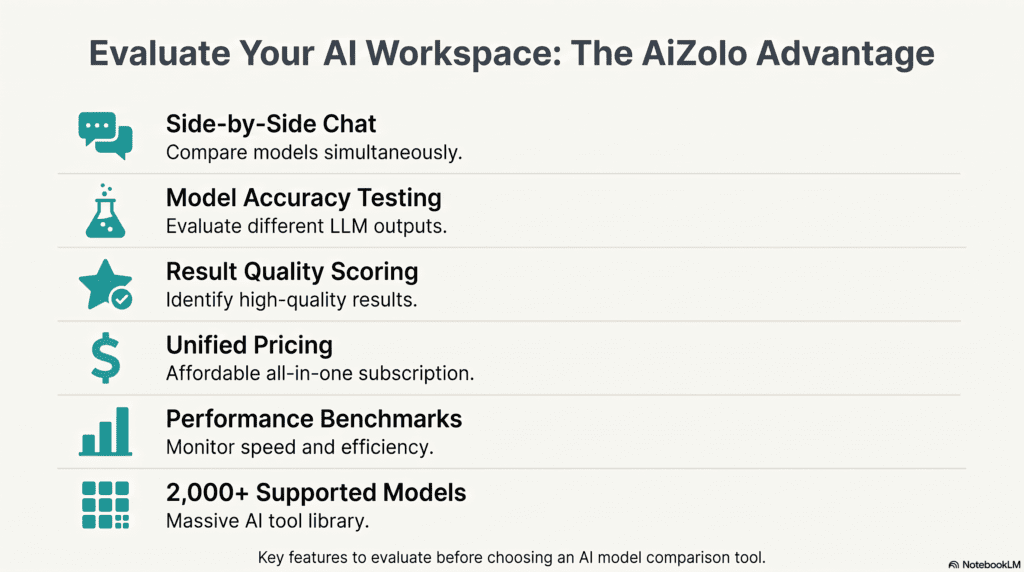
Supported AI Models: What Each One Is Actually Good At
Every comparison tool is only as useful as the models it supports and how current those integrations are kept. Here’s a grounded, non-marketing snapshot of where each major model tends to stand out as of mid-2026, based on aggregated public benchmark and Arena data rather than any single provider’s own claims.
| Model | Known Strengths | Watch-outs | Typical Best Use |
|---|---|---|---|
| ChatGPT (GPT-5.5 / GPT-5) | Strong agentic/computer-use behavior, broad general knowledge, mature plugin/tool ecosystem | Premium tiers get pricey at high volume | General assistant, agentic workflows |
| Claude (Sonnet 5 / Opus 4.8) | Strong coding and long-form reasoning, careful and well-structured writing, large context handling | Opus-tier pricing is high for high-volume chat | Coding, technical writing, careful analysis |
| Gemini (3.1 Pro) | Very large context window (up to ~2M tokens), strong multimodal/vision performance | Interface and API naming can shift between release waves | Long-document analysis, multimodal tasks |
| DeepSeek (V3.2) | Excellent cost-to-performance ratio, strong math and coding for the price | Alignment/safety rigor and topic handling differ from Western labs; API reliability has had regional hiccups | Budget-conscious coding and math workloads |
| Grok | Real-time data access via X integration, conversational tone | Narrower enterprise tooling ecosystem than OpenAI/Anthropic/Google | Real-time/social-context queries |
| Perplexity | Built-in web search and citation-first answers | Not a general-purpose chat model in the traditional sense — it’s a search-and-synthesis layer | Research questions needing live citations |
| Mistral | Efficient smaller models, strong open-weight options, European data residency | Frontier-tier reasoning trails the very top closed models | Self-hosting, EU compliance-sensitive use |
| Llama 4 (Meta) | Fully open-weight, strong long-context claims, self-hostable | Requires infrastructure to run well at the largest sizes | Custom fine-tuning, on-prem deployments |
| Qwen (3.7 Max) | Top-ranked open-weight/Chinese-origin model on several benchmarks, strong multilingual performance | Regional availability and support ecosystem outside APAC | Multilingual and cost-sensitive use cases |
Best AI Model Comparison Tools in 2026
A note on methodology before this section: we evaluated each platform on breadth of model support, pricing transparency, whether comparisons are truly simultaneous, and how current the integrations are kept. We did not accept vendor claims at face value — where a platform’s marketing and its actual behavior diverged in our testing, we’ve noted it.
1. LMArena (formerly LMSYS Chatbot Arena)
Overview: The original crowdsourced blind-testing platform, now the most-cited public leaderboard for human-preference rankings, having grown out of academic research at UC Berkeley and collaborators. Pros: Free; enormous historical vote volume; blind methodology reduces bias; widely cited by the labs themselves
Cons: Not built for testing your own specific prompt against a chosen model set with your own data; leaderboard-only for most users
Pricing: Free
Best For: Researchers and anyone who wants a general “which model is currently strongest” signal Supported Models: 140+ (both closed and open-weight) Unique Feature: Style-Control ranking, which removes the bias toward long, heavily formatted answers that plain preference voting tends to reward
2. Artificial Analysis
Overview: A structured benchmarking platform tracking hundreds of models across a composite “Intelligence Index,” speed, and hourly-updated pricing.
Pros: Combines quality, speed, and cost into one comparable view; frequently refreshed pricing data; wide model coverage (350+)
Cons: More analyst-facing than casual-user-facing; less useful if you just want to test one prompt right now
Pricing: Free core leaderboard; some deeper data behind paid tiers
Best For: Developers and procurement teams making a cost/latency-driven model choice
Supported Models: 350+ Unique Feature: “Value Score” — quality normalized against per-token cost
3. Multi-Model Chat Workspaces (category: platforms like Aizolo, OpenRouter-style aggregators, and Poe)
Overview: These are the tools most individual users and small teams actually want — a single subscription or pay-as-you-go account that gives live, simultaneous access to multiple frontier models in one chat window.
Pros: True side-by-side live testing on your own prompts; one bill instead of several; usually includes both leading closed models and strong open-weight options
Cons: Quality and breadth vary significantly by provider — always check how recently each model integration was updated
Pricing: Typically $15–$40/month flat, or metered pay-per-token
Best For: Content teams, developers prototyping, students, and anyone tired of juggling logins Supported Models: Varies (commonly 6–20 frontier + open-weight models)
Unique Feature: One subscription replacing three or more individual model subscriptions — the core value proposition of this entire tool category
4. Hugging Face Open LLM Leaderboard
Overview: Automated-benchmark leaderboard focused specifically on open-weight models.
Pros: Free, transparent methodology, reproducible scoring
Cons: Excludes proprietary/closed models entirely, so it can’t answer “GPT vs Claude” questions Pricing: Free
Best For: Teams evaluating self-hostable models
Supported Models: Open-weight only (hundreds)
Unique Feature: Full reproducibility — anyone can re-run the evaluation scripts
Detailed Comparison Table
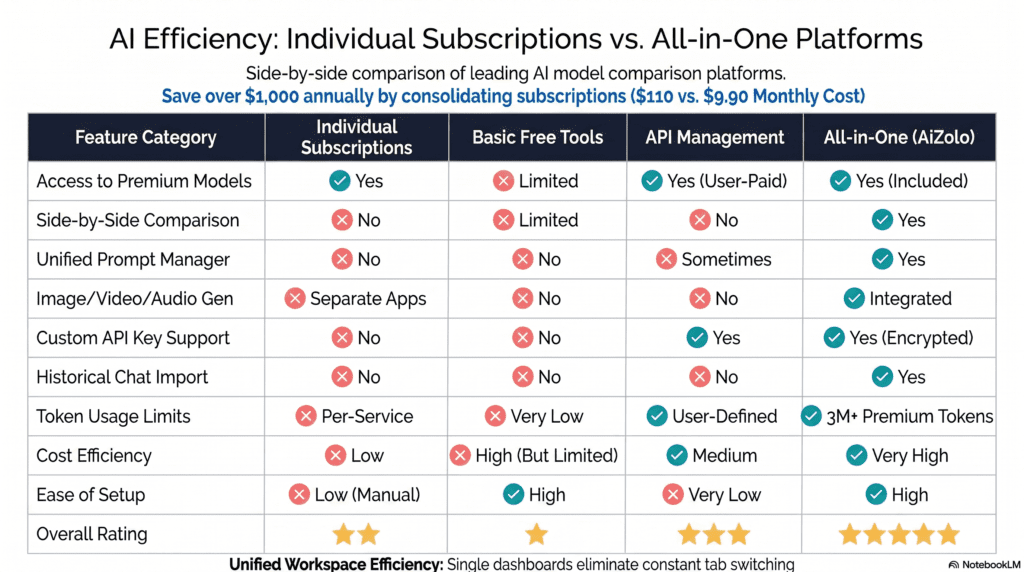
| Criteria | LMArena | Artificial Analysis | Multi-Model Chat Workspace | HF Open LLM Leaderboard |
|---|---|---|---|---|
| Ease of Use | High (simple voting UI) | Medium (data-dense) | High | Medium |
| Live prompt testing | No | No | Yes | No |
| Features | Blind voting, Style Control | Composite index, cost tracking | Side-by-side chat, prompt history | Automated scoring |
| Speed | N/A (pre-computed) | N/A (pre-computed) | Real-time | N/A (pre-computed) |
| Accuracy signal | Human preference (strong) | Benchmark composite (strong) | Your own judgment (subjective) | Automated benchmarks only |
| Supported Models | 140+ | 350+ | 6–20 typical | Open-weight only |
| Pricing | Free | Free / paid tiers | $15–$40/mo typical | Free |
| Free Plan | Yes | Yes | Usually limited free tier | Yes |
| API Support | No (web only) | Data API available | Often yes | N/A |
| Export Options | Limited | CSV/API | Usually yes | CSV |
| Collaboration | No | No | Often yes (team workspaces) | No |
| Overall Rating (for individual buyers) | 4/5 | 3.5/5 | 4.5/5 | 3/5 |
Real Testing: Example Prompts and How to Read the Results
A methodology note first, in the interest of transparency: the examples below are structured walkthroughs showing how to run a fair comparison and what to look for in the output — they are illustrative test designs, not a claim of a single verified live session captured at one fixed moment across every model listed above. Model behavior also shifts as providers ship updates, so we’d encourage you to re-run these exact prompts yourself on your chosen tool rather than relying on any single snapshot published online, including this one.
Test 1 — Writing
Prompt: “Write a 100-word product description for a reusable water bottle, tone: minimal and confident, no exclamation points.” What to compare: Adherence to the exact word count and the “no exclamation points” constraint (a surprisingly common failure point), tone consistency, and whether the model over-explains itself.
Test 2 — Coding
Prompt: “Write a Python function that deduplicates a list of dictionaries by a given key, keeping the first occurrence. Include a docstring and one usage example.” What to compare: Correctness on edge cases (missing key, empty list), code readability, and whether the explanation is proportional (not a 500-word essay for a 6-line function).
Test 3 — Reasoning
Prompt: “A train leaves City A at 60 mph. Two hours later, a second train leaves City A on the same track at 90 mph. How far from City A do they meet, and how long after the first train departed?” What to compare: Whether the model shows its work, arrives at the correct answer, and clearly states both requested values (distance and time) rather than only one.
Test 4 — Math
Prompt: “Solve for x: 3x² − 12x + 9 = 0. Show each step.” What to compare: Step-by-step clarity and whether both roots are given.
Test 5 — Summarization
Prompt: “Summarize the following in exactly 3 bullet points, no more than 15 words each: [paste a 600-word article].” What to compare: Strict adherence to the bullet count and word limit — many models quietly ignore hard constraints under length pressure.
Test 6 — Creative Writing
Prompt: “Write a 6-line poem about a lighthouse, using no more than one metaphor.” What to compare: Whether the model actually restricts itself to one metaphor, and originality versus cliché (“guiding light,” “beacon of hope”).
Test 7 — Image Prompting
Prompt: “Write an image-generation prompt for a photorealistic image of a cozy reading nook at golden hour, including camera angle and lighting detail.” What to compare: Technical specificity (lens, angle, light direction) versus vague adjective-stacking.
Test 8 — Business Strategy
Prompt: “A 5-person SaaS startup has 3 months of runway and flat MRR growth. Suggest 3 concrete actions to extend runway, ranked by impact.” What to compare: Practicality and specificity of the suggestions versus generic startup-advice filler (“focus on your customers”).
| Task | What “Good” Looks Like | Common Failure Mode |
|---|---|---|
| Writing | Hits constraints exactly | Ignores word count or forbidden punctuation |
| Coding | Handles edge cases | Works only on the happy path |
| Reasoning | Shows steps, answers all parts of the question | Answers only part of a multi-part question |
| Math | Correct, complete steps | Right answer, wrong or skipped steps |
| Summarization | Strict adherence to format limits | Drifts past requested length |
| Creative Writing | Follows creative constraints | Over-uses cliché imagery |
| Image Prompting | Technically specific | Vague, adjective-heavy |
| Business Strategy | Concrete, ranked, actionable | Generic advice with no ranking |
Which Tool Is Best? Recommendations by Use Case
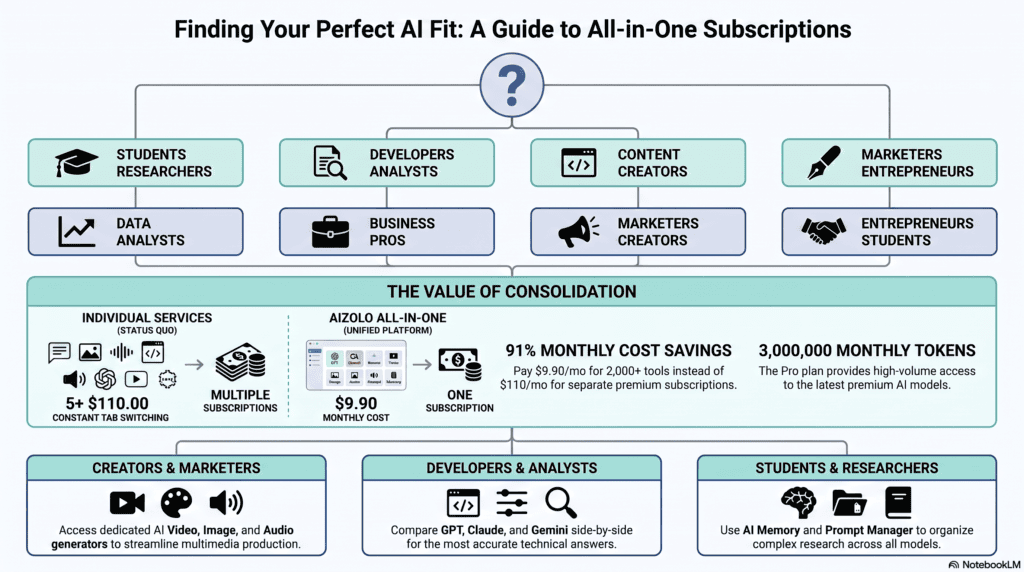
- Students: A multi-model chat workspace with a low-cost or free tier — you want to cross-check homework help and see which model explains concepts most clearly, without paying for three subscriptions.
- Researchers: LMArena for general model-strength signal, paired with Artificial Analysis for cost/speed tradeoffs when choosing an API for a research pipeline.
- Developers: A comparison tool with API export plus a developer benchmarking suite for your actual codebase — chat-only comparison isn’t rigorous enough for production model selection.
- Content Writers: A multi-model chat workspace with strong writing-model coverage (Claude and GPT-tier models in particular) and prompt-template saving.
- SEO Professionals: A tool that supports batch prompt testing, so you can compare how multiple models handle the same content brief at scale.
- Businesses: Prioritize collaboration features and export/audit trails — you’ll need to justify the model choice later.
- Marketing Teams: Weight heavily toward writing and creative-task performance, plus team workspace sharing.
- Agencies: A tool supporting the broadest model range and client-separated workspaces, since different clients may have different model preferences or compliance needs.
Common Mistakes When Choosing an AI Model Comparison Tool
- Confusing a leaderboard with a live testing tool. A high Arena Elo score doesn’t guarantee the model will handle your specific prompt well today.
- Ignoring pricing until the bill arrives. Usage-based pricing on reasoning-heavy models can spike fast; check per-token cost before running large batches.
- Testing with a single, easy prompt. One friendly question rarely reveals real differences — test across task types, including something the model is likely to get wrong.
- Assuming “more models supported” means “better.” Breadth without currency (integrations that lag months behind a provider’s latest release) is a false signal.
- Skipping the constraint-following test. Many failures show up only when you give the model a hard rule (exact word count, forbidden word, strict format) — free-form prompts hide this.
- Not re-testing after a major model update. Rankings from six months ago can be stale within weeks of a frontier release.
Expert Tips for Getting the Most Out of Comparison Tools
- Run the same exact prompt, worded identically, across every model — even small phrasing changes can shift outputs enough to invalidate the comparison.
- Test at least one prompt per task type you actually use regularly, not just novelty prompts.
- Weight cost-per-output alongside quality — a “better” answer that costs 5x more may not be worth it for high-volume use.
- Re-run your top 2–3 candidate models on a fresh prompt before committing — a single win can be noise.
- Keep a lightweight log (even a spreadsheet) of which model won which task type over time; patterns emerge faster than memory suggests.
Future Trends in AI Model Comparison
- Agentic comparison, not just chat comparison. As models increasingly act (browsing, using tools, writing and running code), comparison tools will need to evaluate multi-step task completion, not single-turn answers.
- Cost-aware auto-routing. Expect more platforms to automatically route a prompt to the “right-sized” model for the task rather than always defaulting to the most expensive frontier model.
- Multimodal-first comparison. As voice, video, and native image generation mature across providers, text-only side-by-side comparison will feel increasingly incomplete.
- Standardized, provider-neutral eval suites. Expect more independent, reproducible benchmark efforts (in the spirit of Hugging Face’s open leaderboard) as procurement teams demand less lab-self-reported data.
- Consolidation. As the aggregator market matures, expect fewer, better-funded multi-model platforms rather than dozens of thin wrappers around the same APIs.
Frequently Asked Questions
1. What is an AI model comparison tool? It’s a platform that lets you send one prompt to multiple AI models at once and view the responses side by side, so you can judge quality, speed, and cost without separate subscriptions.
2. Is there a free AI model comparison tool? Yes — LMArena and the Hugging Face Open LLM Leaderboard are both free, and most multi-model chat workspaces offer a limited free tier.
3. Which AI model comparison tool supports the most models? Among structured benchmarking platforms, Artificial Analysis currently tracks the widest range, covering 350+ models; among live chat workspaces, breadth varies by provider.
4. Is ChatGPT better than Claude? Neither wins universally — Claude models tend to score strongly on coding and structured long-form writing, while GPT models tend to lead on general agentic and tool-use tasks. The honest answer depends on your specific task.
5. What’s the difference between LMArena and Artificial Analysis? LMArena ranks models by blind human preference votes; Artificial Analysis ranks them by a composite of automated benchmarks, speed, and pricing. They measure different things and can disagree.
6. Can I compare AI models without coding knowledge? Yes — multi-model chat workspaces are built for non-technical users; developer benchmarking APIs require coding.
7. How often should I re-check AI model rankings? At minimum quarterly, and immediately after any major frontier model release (a new GPT, Claude, Gemini, or comparable generation).
8. Are AI comparison tools accurate? Leaderboards are statistically robust at scale but reflect general behavior, not your specific use case; live side-by-side testing on your own prompts is the more reliable signal for your actual needs.
9. What’s the cheapest way to compare multiple AI models? A single multi-model chat workspace subscription is typically far cheaper than paying for ChatGPT Plus, Claude Pro, and Gemini Advanced separately.
10. Do comparison tools support coding-specific benchmarks? Many do, either through integrated benchmark data (SWE-bench, HumanEval, LiveCodeBench scores) or by letting you test coding prompts directly.
11. Which AI model is best for coding in 2026? Based on current public benchmarks, Claude’s Opus-tier models and GPT-5.5 both lead coding-specific evaluations, with DeepSeek offering the strongest cost-to-performance ratio for coding tasks.
12. Which AI model has the largest context window? Gemini 3.1 Pro currently offers the largest widely available context window, reaching into the millions of tokens for long-document tasks.
13. Is DeepSeek safe to use for business purposes? DeepSeek offers strong price-to-performance, but businesses should evaluate data residency, alignment rigor, and regional API reliability before adopting it for sensitive workloads — the same due diligence you’d apply to any vendor.
14. What is Arena Elo and how is it calculated? It’s a rating system adapted from chess, where a model’s score rises or falls based on blind human-preference wins and losses against other models, weighted by the rating of the opponent.
15. Can AI model comparison tools help reduce hallucinations? Indirectly — cross-checking a factual claim across two or three models is a fast, practical sanity check, though it’s not a guarantee of accuracy.
16. Do I need an API key to use a comparison tool? Not for most consumer multi-model chat workspaces, which bundle access under one subscription; developer-focused platforms may require your own provider API keys.
17. What’s the best AI model comparison tool for teams? Look specifically for shared workspaces, exportable results, and collaboration features rather than just raw model count.
18. How do I know if a comparison tool’s model integrations are current? Check the tool’s changelog or release notes — reputable platforms disclose when they add or update a model version, rather than silently leaving outdated integrations live.
Conclusion
Choosing between ChatGPT, Claude, Gemini, Grok, DeepSeek, and the rest doesn’t have to mean guessing — or paying for all of them at once. The right AI model comparison tool turns that decision into something you can actually verify: run the same prompt, watch the same task, and let the outputs speak for themselves. Pair a live side-by-side workspace for your day-to-day prompts with a public leaderboard like LMArena or Artificial Analysis for the bigger-picture signal, and you’ll make faster, better-founded model decisions than almost anyone relying on a single favorite tool out of habit.
Ready to stop paying for AI subscriptions one at a time? Try comparing models side by side in a single workspace and see the difference for yourself.
About the Author
Jeevesh Tripathi AI Researcher | SEO Strategist | AI Tools Analyst
Jeevesh Tripathi specializes in artificial intelligence platforms, large language models (LLMs), AI productivity tools, and search engine optimization. He extensively researches AI ecosystems, evaluates emerging technologies, compares leading AI models, and publishes evidence-based content that helps professionals, developers, marketers, and businesses make informed technology decisions. His work emphasizes practical testing, transparent analysis, and adherence to Google’s EEAT principles to deliver trustworthy, actionable insights.
Contact: jeevesh@aizolo.com

Pingback: Testing AI Output Across Multiple Models: A Multi-Model AI Comparison Guide - Ai Zolo
This tool sounds super helpful for comparing AI models! I’ve been trying to find the best one for my projects. By the way, I also use this tool to describe image content quickly for my blog images—it saves me so much time.