
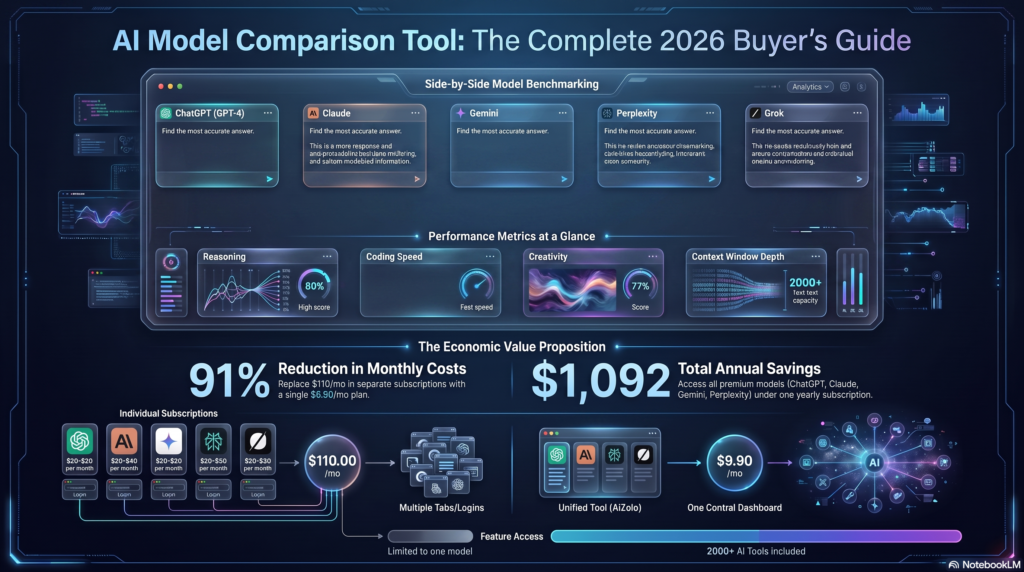
Meet Rachel, a freelance marketing consultant. Last January, she sat down to review her expenses and nearly fell off her chair. ChatGPT Plus: $20/month. Claude Pro: $20/month. Gemini Advanced: $20/month. Midjourney: $30/month. Perplexity Pro: $20/month.
That’s $110 monthly—$1,320 per year—just for AI tools.
And she wasn’t alone. When she mentioned this in her freelancer group chat, dozens of others chimed in with similar stories. One designer was paying $180/month across seven different AI subscriptions. A content creator was spending $150/month but still felt like he didn’t have the right tool for every task.
Sound familiar? If you’re nodding along, you’re experiencing what industry experts call “AI subscription sprawl“—and it’s silently draining thousands from your budget every year.
But here’s the good news: learning how to save money on AI subscriptions doesn’t mean sacrificing functionality. In fact, with the right strategies, you can access more AI power for less money while actually boosting your productivity.
In this comprehensive guide, we’ll show you exactly how to cut your AI costs by 60-80% while getting better results. Whether you’re a solo entrepreneur, a small business owner, or managing a growing team, these strategies will transform how you think about AI spending.
Table of Contents
The Hidden Cost of Multiple AI Subscriptions
Before we dive into solutions, let’s understand the real problem. The cost isn’t just the monthly subscription fees—it’s much deeper than that.
The True Financial Burden
Direct Costs:
- Individual AI subscriptions: $60-$200/month average
- Annual spending: $720-$2,400 per person
- Team of 5: $3,600-$12,000 annually
- Enterprise costs can exceed $50,000+
Hidden Costs:
- Time lost switching between platforms (2-3 hours weekly = $400-600/month for a $50/hour professional)
- Duplicate work when tools don’t sync
- Training costs for each new platform
- Mental fatigue from managing multiple logins
- Opportunity cost of limited AI access
Meet Thomas, a small business owner running a digital agency. His 8-person team was using:
- ChatGPT Plus for copywriting ($160/month)
- Claude Pro for analysis and research ($160/month)
- Midjourney for design work ($240/month)
- Jasper for content templates ($99/month)
- Copy.ai for social media ($49/month)
Total: $708/month or $8,496 annually
But the real killer? His team spent hours each week copying prompts between tools, losing context, and duplicating work. When he calculated the productivity loss, the true cost exceeded $15,000 annually.
Why Traditional “Solutions” Don’t Work
You’ve probably tried to cut AI costs before. Maybe you:
- Canceled subscriptions but then needed them again
- Shared one account across your team (violating terms of service)
- Downgraded to free tiers but hit frustrating limits
- Tried to rely on just one AI tool but missed features from others
These band-aid solutions don’t work because they ignore a fundamental truth: modern professionals need access to multiple AI models because different tools excel at different tasks.
GPT-4 might be best for creative writing, Claude for analytical thinking, Gemini for research, and Perplexity for fact-checking. Limiting yourself to just one means compromising on quality.
The real question isn’t “which AI subscription should I keep?” It’s “how do I get access to all the AI tools I need without paying for each one separately?“
7 Proven Strategies to Save Money on AI Subscriptions
Strategy #1: Consolidate with an All-in-One AI Platform
Potential Savings: 60-80%
This is the single most effective way to save money on AI subscriptions. Instead of paying separately for ChatGPT, Claude, Gemini, and other tools, use a unified platform that gives you access to all of them.
Traditional Approach:
- ChatGPT Plus: $20/month
- Claude Pro: $20/month
- Gemini Advanced: $20/month
- Perplexity Pro: $20/month
- Total: $80/month ($960/year)
All-in-One Platform Approach:
- One subscription with access to all models
- Savings: $600-800+ annually
Real Example: Jennifer, a content marketing manager, was spending $95/month on four different AI subscriptions. After switching to AiZolo, she now pays a fraction of that for access to ChatGPT, Claude, Gemini, Perplexity, and more—all in one workspace. Her annual savings: over $800.
But the savings go beyond the subscription fees. With AiZolo’s unified workspace, Jennifer saves 5+ hours weekly that she previously spent switching between tools. At her hourly rate, that’s an additional $1,200 in recovered productivity.
Why This Works: All-in-one platforms like AiZolo negotiate bulk access to AI models and pass the savings to users. You get enterprise-level AI access at individual pricing—without the enterprise-level costs.
👉 Try AiZolo’s all-in-one AI workspace and see how much you could save
Strategy #2: Use Your Own API Keys (The Power User Secret)
Potential Savings: 50-90% on heavy usage
Here’s a secret that power users know: AI companies charge premium prices for convenience. But if you’re willing to do a bit of setup, using API keys directly can slash your costs dramatically.
How It Works: Instead of paying $20/month for unlimited ChatGPT access through their subscription, you can:
- Sign up for OpenAI API access (pay-per-use)
- Use a platform that supports custom API keys
- Pay only for what you actually use
Cost Comparison:
- ChatGPT Plus subscription: $20/month (unlimited)
- OpenAI API direct: $0.01-0.03 per 1,000 tokens
- Average monthly cost for moderate users: $5-10
For most users who aren’t using AI 24/7, this represents 50-75% savings.
The AiZolo Advantage: AiZolo supports custom API key integration with full encryption, giving you the best of both worlds:
- The convenience of a unified platform
- The cost savings of direct API access
- The flexibility to use paid tiers or bring your own keys
- No artificial usage limits
Marcus, a Python developer, uses AiZolo with his own API keys. He pays about $15/month in API costs instead of $60/month for three separate subscriptions—saving $540 annually while getting unlimited access.
Pro Tip: Start with a unified platform subscription to test your usage patterns. Once you know your needs, switch to custom API keys for even more savings.
Strategy #3: Eliminate Redundant Subscriptions
Potential Savings: $20-60+ per month
Take a hard look at your current AI subscriptions. You’re probably paying for overlapping features.
Common Redundancies:
- Multiple AI writing tools (Jasper, Copy.ai, Writesonic) when one would suffice
- Separate subscriptions for similar models (ChatGPT and Claude both excel at similar tasks)
- Tools with overlapping features (many AI platforms now offer image generation, code assistance, and more)
Action Plan:
- Audit Your Subscriptions: List every AI tool you’re paying for
- Track Your Usage: For 2 weeks, note which tools you actually use
- Identify Overlaps: Find tools that do the same thing
- Consolidate: Move to a platform that covers 80%+ of your needs
Real Example: David, a content creator, was paying for:
- Jasper ($99/month) for blog writing
- ChatGPT Plus ($20/month) for brainstorming
- Grammarly Premium ($12/month) for editing
- Hemingway Editor ($20/month one-time)
After consolidating to AiZolo, he handles all these tasks in one workspace—brainstorming with Gemini, drafting with GPT-4, editing with Claude, and refining with Perplexity for fact-checking. Annual savings: $1,400+
Strategy #4: Right-Size Your Team Access
Potential Savings: 30-50% for teams
If you’re managing a team, you’re probably overpaying for AI access. Not every team member needs every AI subscription.
The Problem:
- Designer needs AI for image generation and brainstorming
- Writer needs AI for content creation and editing
- Manager needs AI for analysis and reporting
- Traditional solution: Buy all subscriptions for everyone ($240/month per person)
The Smart Solution: Use a platform with flexible team access where:
- Everyone shares one workspace
- Different roles access different features
- Prompts and workflows are shared across the team
- You pay for the workspace, not per seat
Team Cost Comparison:
Traditional Approach (5-person team):
- 5 × ChatGPT Plus: $100/month
- 5 × Claude Pro: $100/month
- 3 × Midjourney: $90/month
- 2 × Perplexity Pro: $40/month
- Total: $330/month ($3,960/year)
Smart Team Platform:
- Unified workspace with all models
- Shared prompt libraries
- Team collaboration features
- Potential cost: 50-70% less
Real Example: Sarah’s marketing agency of 6 people was spending $420/month on individual AI subscriptions. After switching to AiZolo’s team workspace, they pay a fraction of that while gaining collaboration features like shared prompts and project folders. Annual savings: $3,000+
The team also reports 40% faster project completion because they can collaborate on AI tasks in real-time instead of emailing prompts and results back and forth.
Strategy #5: Leverage Free Tiers Strategically
Potential Savings: $20-40+ per month
You don’t always need paid subscriptions. Many AI tools offer robust free tiers that handle 60-80% of most users’ needs.
Best Free AI Tools (2026):
- ChatGPT Free: Access to GPT-3.5 (excellent for most tasks)
- Claude Free: Limited but capable for research and writing
- Gemini Free: Strong for brainstorming and analysis
- Perplexity Free: Great for research with web search
The Strategy:
- Use free tiers for routine, low-stakes tasks
- Reserve paid tools or all-in-one platforms for complex, high-value work
- Combine free tools with one unified platform for best results
Example Workflow:
- Quick emails and social posts: Free ChatGPT
- Complex analysis and long-form content: Paid platform like AiZolo
- Research and fact-checking: Free Perplexity
- Brainstorming and ideation: Free Gemini
Warning: Don’t over-rely on free tiers if AI is critical to your business. The time spent managing limitations often costs more than a paid subscription saves.
Strategy #6: Annual vs. Monthly Subscriptions
Potential Savings: 15-30%
If you’re going to keep individual subscriptions, at least pay annually. Most AI services offer significant discounts for annual commitments.
Typical Savings:
- ChatGPT Plus: Monthly $20 vs. Annually ~$192 (20% savings)
- Claude Pro: Similar 15-20% discounts
- Most SaaS tools: 20-30% annual discount
However: Before committing annually, consider whether a unified platform would save even more. Paying $192 annually for one AI tool is still more expensive than accessing multiple AI models through a single affordable subscription.
Smart Approach:
- Trial a unified platform like AiZolo first
- If you still need individual subscriptions, pay annually
- Review quarterly to ensure you’re not overpaying
Strategy #7: Build and Share a Prompt Library
Potential Savings: Indirect but significant
This strategy doesn’t directly cut subscription costs, but it maximizes your AI ROI by making every interaction more effective.
How It Works: Instead of starting from scratch with every AI task:
- Save your best-performing prompts
- Organize them by use case (writing, research, analysis, etc.)
- Refine and reuse them
- Share with your team to multiply effectiveness
Benefits:
- Get better results in less time
- Reduce trial-and-error costs
- Train team members faster
- Justify higher-tier subscriptions by using them more effectively
AiZolo’s Approach: AiZolo includes advanced prompt management features that let you save, categorize, and share prompts across your team. Instead of losing your best prompts or copying them into spreadsheets, everything’s organized and searchable in one place.
Real Example: Emily’s design agency created a prompt library in AiZolo with templates for:
- Client briefings
- Design concepts
- Copywriting
- Social media content
- Email marketing
Result: New team members are productive on day one, and the team’s overall AI output quality improved by 35%.
The Ultimate Cost-Saving Strategy: All-in-One AI Platforms
After reviewing all seven strategies, one clear winner emerges: consolidating your AI subscriptions into a unified platform offers the best combination of savings and productivity.
Here’s why:
The Math is Compelling
Traditional Multi-Subscription Approach:
- ChatGPT Plus: $20/month
- Claude Pro: $20/month
- Gemini Advanced: $20/month
- Midjourney: $30/month
- Perplexity Pro: $20/month
- Jasper or Copy.ai: $40-99/month
- Total: $150-209/month
- Annual Cost: $1,800-2,508
Unified Platform Approach (like AiZolo):
- Access to all major AI models
- Team collaboration features
- Prompt management
- Custom API key support
- One affordable subscription
- Annual Savings: $1,200-2,000+
But the real value goes far beyond subscription savings.
The Productivity Multiplier
When you’re not constantly switching between platforms:
- Save 2-5 hours weekly (worth $400-1,000/month for professionals)
- Reduce errors from copying/pasting between tools
- Improve collaboration with team workspaces
- Maintain context across all AI interactions
- Learn once instead of mastering multiple interfaces
Total Value: For the average professional, the productivity gains alone equal $5,000-12,000 in annual value.
Why AiZolo is the Smart Choice
When it comes to learning how to save money on AI subscriptions, AiZolo stands out as the most comprehensive solution:
Multi-Model Access Access ChatGPT, Gemini, Claude, Perplexity, and more—all from a single platform. Compare responses side-by-side and choose the best output for each task.
Custom API Keys Connect your own API keys with enterprise-grade encryption for unlimited usage and complete control over spending.
Customizable Workspace Drag-and-drop, resizable workspace that adapts to your workflow. Create multiple panels for different AI models and organize projects visually.
Prompt Management Save, organize, and share your best prompts. Build a library of templates that make your team more productive instantly.
Team Collaboration Share workspaces, prompts, and projects with teammates. Work together in real-time without emailing prompts or results.
Founded by Users, for Users Founder Abhijeet built AiZolo after experiencing the frustration of juggling multiple AI platforms himself. He understood that the AI ecosystem was unnecessarily fragmented and expensive.
Real-World Success Stories: How People Are Saving Thousands
Case Study #1: Marketing Agency Saves $4,200 Annually
Company: Bright Digital, 8-person marketing agency
Previous Setup: ChatGPT Plus, Claude Pro, Midjourney, and Jasper for all team members
Monthly Cost: $520
Annual Cost: $6,240
After AiZolo: Monthly Cost: ~$170 (including custom API key usage)
Annual Cost: ~$2,040
Annual Savings: $4,200 (67% reduction)
Bonus Benefits:
- Team productivity up 35%
- Onboarding time reduced from 2 weeks to 3 days
- Client deliverables improved with multi-model comparison
“We were hemorrhaging money on AI subscriptions,” says founder Mike Chen. “Switching to AiZolo was the smartest business decision we made this year. The savings paid for itself in the first month, and the productivity gains have been incredible.”
Case Study #2: Freelance Writer Cuts AI Costs by 73%
User: Amanda Torres, freelance content writer
Previous Setup: ChatGPT Plus, Claude Pro, Jasper, Grammarly Premium
Monthly Cost: $151
Annual Cost: $1,812
After AiZolo: Monthly Cost: $40
Annual Cost: $480
Annual Savings: $1,332 (73% reduction)
Workflow Improvements:
- Draft with GPT-4, edit with Claude, fact-check with Perplexity—all in one workspace
- Prompt library cut writing time by 40%
- No more copying between tools
“As a freelancer, every dollar matters,” Amanda explains. “AiZolo gives me access to better AI tools for less than I was paying for ChatGPT alone. My writing is better, my workflow is smoother, and my profit margins are healthier.”
Case Study #3: Startup Team Saves $10,800 While Scaling
Company: TechVision, 15-person startup
Previous Setup: Various AI tools per department, no standardization
Monthly Cost: $1,200
Annual Cost: $14,400
After AiZolo: Monthly Cost: $300 (team workspace)
Annual Cost: $3,600
Annual Savings: $10,800 (75% reduction)
Strategic Benefits:
- Standardized AI workflows across departments
- Knowledge sharing through shared prompt library
- Reduced onboarding time for new hires
- Better collaboration between teams
“We went from AI chaos to AI strategy,” says CTO Sarah Kim. “AiZolo didn’t just save us money—it made us a more efficient, innovative company.”
Your Step-by-Step Action Plan to Save Money on AI Subscriptions
Ready to take control of your AI spending? Follow this proven roadmap:
Week 1: Audit and Assess
Day 1-3: Track Your Current AI Spending
- List every AI subscription you’re paying for
- Calculate your total monthly and annual costs
- Note which tools you actually use vs. which sit idle
- Identify overlapping features between tools
Day 4-5: Evaluate Your Usage Patterns
- Which AI tasks do you perform most often?
- Which AI models work best for which tasks?
- How much time do you spend switching between tools?
- What features do you truly need vs. nice-to-have?
Day 6-7: Calculate the True Cost
- Direct subscription costs
- Time lost to context-switching (hours × your hourly rate)
- Productivity losses from tool limitations
- Training time for team members
Action Item: Create a simple spreadsheet with:
- Tool name
- Monthly cost
- Usage frequency (daily/weekly/rarely)
- Essential features
- Could consolidate? (Yes/No)
Week 2: Test a Unified Platform
Day 8-10: Try AiZolo
- Sign up for AiZolo and explore the interface
- Test the same tasks you do with your current tools
- Compare results between different AI models (GPT-4 vs Claude vs Gemini)
- Set up your workspace layout to match your workflow
Day 11-12: Migrate Your Best Prompts
- Transfer your top 10-20 most-used prompts
- Organize them by category in AiZolo’s prompt library
- Test them across different AI models to find the best fit
Day 13-14: Measure the Difference
- Track time spent on typical tasks
- Compare quality of outputs
- Note any workflow improvements
- Calculate potential time and cost savings
Goal: By end of week 2, you should have concrete data showing whether consolidation will save you money and improve productivity.
Week 3: Make the Switch
Day 15-17: Plan Your Transition
- Decide which subscriptions to keep vs. cancel
- If you have team members, schedule training sessions
- Set up team workspaces and shared folders in AiZolo
- Export any data or prompts you want to keep
Day 18-19: Cancel Redundant Subscriptions
- Start with the tools you use least
- Keep one or two backups initially if you’re nervous
- Set calendar reminders for when subscriptions end
Day 20-21: Optimize Your New Setup
- Customize your AiZolo workspace for maximum efficiency
- Create project folders and organize prompts
- Set up any custom API keys if you’re a power user
- Establish team workflows and guidelines
Tip: Don’t cancel everything at once if you’re risk-averse. Keep 1-2 subscriptions for the first month as a safety net while you transition.
Week 4: Measure and Refine
Day 22-24: Track Your Savings
- Calculate your new monthly AI costs
- Document time saved by not switching tools
- Measure any productivity improvements
- Survey team members about the new workflow
Day 25-27: Fine-Tune Your Workflow
- Identify any gaps or missing features
- Explore advanced AiZolo features you haven’t used yet
- Build out your prompt library
- Create templates for recurring tasks
Day 28-30: Make It Permanent
- Cancel any remaining redundant subscriptions
- Document your new AI workflow for team reference
- Set up quarterly reviews to ensure ongoing savings
- Calculate your total first-month savings
Celebrate: You’ve successfully learned how to save money on AI subscriptions while improving your productivity!
Common Mistakes to Avoid When Cutting AI Costs
Learning how to save money on AI subscriptions is great—but avoid these pitfalls:
Mistake #1: Cutting Too Much, Too Fast
The Problem: Canceling all subscriptions immediately and trying to survive on free tiers alone.
The Solution: Transition gradually. Try a unified platform like AiZolo first, keep one backup subscription for a month, then cancel once you’re confident.
Mistake #2: Choosing Price Over Value
The Problem: Picking the cheapest option without considering features, model quality, or productivity impact.
The Solution: Calculate total value, not just price. A platform that saves you 5 hours weekly is worth far more than the subscription cost.
Mistake #3: Ignoring Team Needs
The Problem: Choosing a solution that works for you but doesn’t scale for your team.
The Solution: Involve team members in the decision. Test collaboration features. Ensure everyone’s needs are met.
Mistake #4: Not Tracking Actual Usage
The Problem: Assuming you need premium tiers when free or basic plans would suffice.
The Solution: Use analytics to understand your actual usage patterns before committing to expensive plans.
Mistake #5: Forgetting About API Costs
The Problem: Switching to custom API keys without understanding pay-per-use pricing, leading to surprise bills.
The Solution: Start with fixed-price subscriptions, monitor your usage, then evaluate whether API keys would save money.
Mistake #6: Neglecting Training
The Problem: Switching platforms without teaching your team how to use them effectively.
The Solution: Invest time in learning the new platform’s features. Most savings come from using tools well, not just having access.
How to Maximize Your AI ROI After You Save Money
Saving money on AI subscriptions is step one. Here’s how to get even more value:
1. Build a Comprehensive Prompt Library
Great prompts are like having an expert on your team. Invest time creating and refining prompts for:
- Common writing tasks
- Research and analysis
- Creative brainstorming
- Data interpretation
- Customer communication
AiZolo’s prompt management makes this easy with categories, tags, and search functionality.
2. Implement Systematic Testing
Don’t settle for the first output. With access to multiple AI models:
- Test the same prompt across GPT-4, Claude, and Gemini
- Compare results side-by-side
- Identify which model excels at which tasks
- Build a “model selection” decision tree for your team
3. Create Standard Workflows
Document your best AI workflows so they’re repeatable:
- Blog post creation: Research with Perplexity → Outline with Claude → Draft with GPT-4 → Edit with Gemini
- Social media: Brainstorm with Gemini → Write with GPT-4 → Refine with Claude
- Analysis: Data prep with GPT-4 → Analysis with Claude → Visualization with specific tools
4. Measure Everything
Track metrics that matter:
- Time saved per task
- Quality improvements
- Cost per project
- Team satisfaction
- Client feedback
Goal: Show concrete ROI from your AI investment beyond just subscription savings.
5. Continuous Learning
AI is evolving rapidly. Stay current by:
- Following AI news and updates
- Testing new features in your platform
- Learning advanced prompting techniques
- Sharing discoveries with your team
AiZolo regularly adds new AI models and features, so staying updated ensures you’re always using the best tools available.
Frequently Asked Questions About Saving Money on AI Subscriptions
Q: Can I really get the same quality from a unified platform as from individual subscriptions?
A: Yes! Unified platforms like AiZolo provide direct access to the same AI models (GPT-4, Claude, Gemini, etc.) that you’d get from individual subscriptions. The quality is identical—you’re just accessing multiple models through one interface instead of many.
Q: What if I’m already locked into annual subscriptions?
A: Set a reminder for when your subscriptions renew, then transition. In the meantime, start using a unified platform alongside your existing subscriptions to test the workflow. Most people find they naturally stop using their old subscriptions once they experience the convenience of an all-in-one platform.
Q: Is it safe to connect my own API keys to a third-party platform?
A: When using reputable platforms like AiZolo that employ enterprise-grade encryption, yes. Always verify that the platform encrypts API keys and follows security best practices. Read the privacy policy and check for security certifications.
Q: How much money can I realistically save?
A: Most individuals save $600-1,500 annually. Teams of 5+ can save $3,000-10,000+ annually. The exact savings depend on your current subscriptions and usage patterns. Use the audit worksheet in this guide to calculate your specific savings.
Q: What if I need specialized AI tools for my industry?
A: Many unified platforms integrate with specialized tools or offer API connections. AiZolo, for example, supports custom integrations while providing comprehensive access to general-purpose AI models that handle 80-90% of most users’ needs.
Q: Will I lose my prompts and data if I switch platforms?
A: You can export your prompts from most platforms. Create backups before canceling any subscriptions. AiZolo makes it easy to import and organize your existing prompts.
Q: How do I convince my team or boss to switch?
A: Show them the math. Calculate current annual costs, demonstrate potential savings, highlight productivity improvements, and offer a trial period. Most decision-makers approve once they see the ROI.
Q: What’s the learning curve for a unified AI platform?
A: Minimal. If you can use ChatGPT, you can use platforms like AiZolo. Most users are productive within minutes, and fully proficient within a few days.
Q: Can I start small and scale later?
A: Absolutely! Start with an individual account, test the workflow, then expand to team features as needed. Most platforms offer flexible scaling.
Q: What happens if a new AI model launches?
A: Quality unified platforms regularly add new AI models as they become available. With AiZolo, you automatically get access to new models without additional costs or setup.
The Future of AI Subscriptions: Trends to Watch
Understanding where AI pricing is heading helps you make smarter decisions:
Trend #1: Consolidation Will Accelerate
Just as we moved from buying individual TV channels to streaming bundles, AI access is consolidating. Expect more unified platforms offering comprehensive access to multiple AI models.
What This Means: Getting in early with a solid unified platform means you’re ahead of the curve and will benefit as more features and models are added.
Trend #2: Usage-Based Pricing Will Grow
More platforms are moving toward consumption-based pricing where you pay for what you use rather than flat subscriptions.
What This Means: Platforms that support custom API keys give you flexibility to choose between flat-rate and pay-per-use models based on your needs.
Trend #3: AI-Specific Features Matter More
Generic AI access isn’t enough. The winning platforms will offer:
- Advanced prompt management
- Multi-model comparison
- Team collaboration
- Workflow automation
- Analytics and usage tracking
What This Means: Choose platforms like AiZolo that are built specifically for AI workflows, not just AI access.
Trend #4: Enterprise Features for Everyone
Features once reserved for enterprise users (team workspaces, advanced security, custom integrations) are becoming standard.
What This Means: Small businesses and individuals can now access enterprise-grade AI tools at consumer prices.
Trend #5: AI Model Specialization
Different AI models are developing distinct strengths. Future platforms will help you automatically route tasks to the best model.
What This Means: Platforms that give you access to multiple specialized models will deliver better results than single-model solutions.
Take Action Today: Start Saving Money on AI Subscriptions
You’ve learned the strategies. You’ve seen the success stories. You understand the math.
Now it’s time to take action.
Every month you wait is another month of overpaying for fragmented AI access. Another month of lost productivity from switching between tools. Another month of missing out on the collaboration features that could transform your team’s output.
Your Next Steps:
1. Calculate Your Current AI Spending (5 minutes) Add up all your current AI subscriptions. Multiply by 12 to get your annual cost. That’s your baseline.
2. Try AiZolo Free (10 minutes) Sign up for AiZolo and explore the platform. Test your typical AI tasks across multiple models. See which workflows improve.
3. Test Your Key Tasks (1 hour) Run your most common AI tasks through AiZolo. Compare the experience to your current setup. Note the time and quality differences.
4. Calculate Your Potential Savings (10 minutes) Compare your current annual AI costs to AiZolo’s pricing. Add the value of time saved. Calculate your ROI.
5. Make the Decision (1 day) If the numbers work (and for 90%+ of users, they do), commit to the transition. Create your migration plan using the roadmap in this guide.
The Cost of Inaction
Consider this: If you’re currently spending $100/month on AI subscriptions, and you could cut that to $30-40 with better access:
- Month 1 of waiting: Lost savings = $60-70
- Year 1 of waiting: Lost savings = $720-840
- Plus lost productivity worth $3,000-6,000
Total cost of waiting one year: $3,720-6,840
That’s a vacation, a new computer, or reinvestment in your business—money you’re leaving on the table every month you don’t optimize your AI subscriptions.
Conclusion: Smart AI Spending = Better Results for Less
Learning how to save money on AI subscriptions isn’t about sacrificing quality or limiting your capabilities. It’s about working smarter.
By consolidating your AI tools into a unified platform like AiZolo, you:
- Cut costs by 60-80% compared to multiple individual subscriptions
- Save 5-10 hours weekly by eliminating context-switching
- Improve output quality by comparing multiple AI models instantly
- Boost team collaboration with shared workspaces and prompt libraries
- Future-proof your workflow with access to new AI models as they launch
The professionals and teams who are thriving in the AI era aren’t the ones with the most subscriptions—they’re the ones with the smartest AI strategies.
Rachel, the freelance consultant from our opening story? She made the switch to AiZolo three months ago. She’s now saving $85/month, completing projects 40% faster, and her clients have noticed the quality improvement.
Thomas’s agency? They cut their AI costs from $708/month to under $200 while improving collaboration and output quality. The savings funded a new team member.
And the hundreds of other creators, marketers, developers, and entrepreneurs who’ve consolidated their AI subscriptions? They’re reinvesting their savings into growing their businesses, not into fragmented software subscriptions.
The question isn’t whether to optimize your AI spending. It’s whether you’ll do it today or lose another month of savings and productivity.
👉 Start saving money on AI subscriptions with AiZolo – Try it risk-free and see your savings in the first week.
Additional Resources
AI Spending Calculators and Tools
- Use our AI Subscription Cost Calculator to see your potential savings
- Download the AI Tool Audit Worksheet (free template)
- Watch: “5-Minute Platform Comparison” video guide
Further Reading on AI Optimization
- Understanding AI Model Strengths: GPT-4 vs Claude vs Gemini
- The Complete Guide to AI Prompt Engineering
- Best Practices for Team AI Collaboration
- API Key Management and Security Best Practices
AiZolo Resources
- AiZolo Platform Tour – See all features in action
- Pricing and Plans – Find the right plan for your needs
- Customer Success Stories – Read how others are saving
- Migration Guide – Step-by-step transition assistance
Join the Community
- AiZolo User Community (tips, templates, and best practices)
- Weekly AI Optimization Newsletter
- LinkedIn Group: AI Efficiency Professionals
Ready to transform your AI spending from a drain to an investment?
Get started with AiZolo today →
Stop paying for AI tools individually. Start working smarter with AiZolo’s all-in-one AI workspace.

Pingback: how to use ai for generating seo briefs from keywords
Pingback: All in One AI Platform: Save $1,000+ with AiZolo in 2026
Pingback: Best All in One AI App: 7 Reasons Pros Switched in 2026
Pingback: All AI Websites in One Place: 7 Smart Picks for 2026
Pingback: Compare AI Models: 7 Smart Tests to Save Money in 2026
Pingback: Cheap Annual AI Tools Bundle 2026: Save $1,000+ Fast
Pingback: Poe Alternative for Professionals: 7 Reasons to Switch (2026)
Pingback: AI for Non Profit Budget Management: 5 Ways to Save More
Pingback: AI Tool Subscription Guide for Beginners: 7 Smart Picks 2026
Pingback: Best AI Budgeting Apps for Millennials: 5 Ways to Save Big
Pingback: All in One AI Subscription for Content Creators: Save $1,000+ Fast
Pingback: Compare Claude 4.5 Haiku and Gemini Flash 3.0 Speed: Speed Tests 2026 Fast
Pingback: Dwell Time Optimization for AI Search: 3x Engagement 2026
Pingback: Best Multi-LLM Tool for Content Creation in 2026: 6 Models 2026
Pingback: Cheap AI Subscription for Multiple Models: Switch Multiple AI Models Mid Conversation Tool
Pingback: AI Automation Tools for Small Entrepreneurs: Scale 3x 2026
Pingback: 7 Affordable All-in-One AI Subscriptions Startups Love Now
Pingback: 9 Cheaper ChatGPT Alternatives That Save $1,000+ in 2026
Pingback: world best AI in 2026? 7 Models, One Powerful Platform Now
Pingback: 7 AI Chatbot Online Platforms for Multi-Model Chat 2026
Pingback: Replace 10 Paid AI Tools with AI Zolo & Save $2,400+
Pingback: 7 best ai tools for generating high quality podfics Pro 2026
Pingback: 7 ai tools bundle for freelancers 2026 Use to Save $1,000+ (2026)
Pingback: Cheap AI Subscription for Multiple Models – Save 70% in 2026
Pingback: 7 AI Strategies to Generate SEO-Optimized Product Tags and how to use ai for generating seo optimized product tags
Pingback: Next Billion AI: Access Premium AI Tools from $9.90
Pingback: What is AI All in One in 2026? Ultimate Guide to Multi-AI Platforms & Massive Savings